1. Solutions
  2. By event type
  3. Trade shows & exhibitions

Fill Your Hall With Exhibitors and the Visitors They Came to Meet

Sell each stand package online with a deposit, and give every exhibitor one page to name their stand staff, send their insurance, order kit and book their build-up delivery. Register trade and public visitors with their company and job title, badge them at your desk or a kiosk, and let them book meetings at the stands they came to see. Exhibitors record leads at their stand, follow up with emails Fai drafts and see their results for themselves, which is the reason they book again.

  • Stands sold and paid for online
  • Every exhibitor built, insured and staffed on time
  • Exhibitors who see the leads they took home
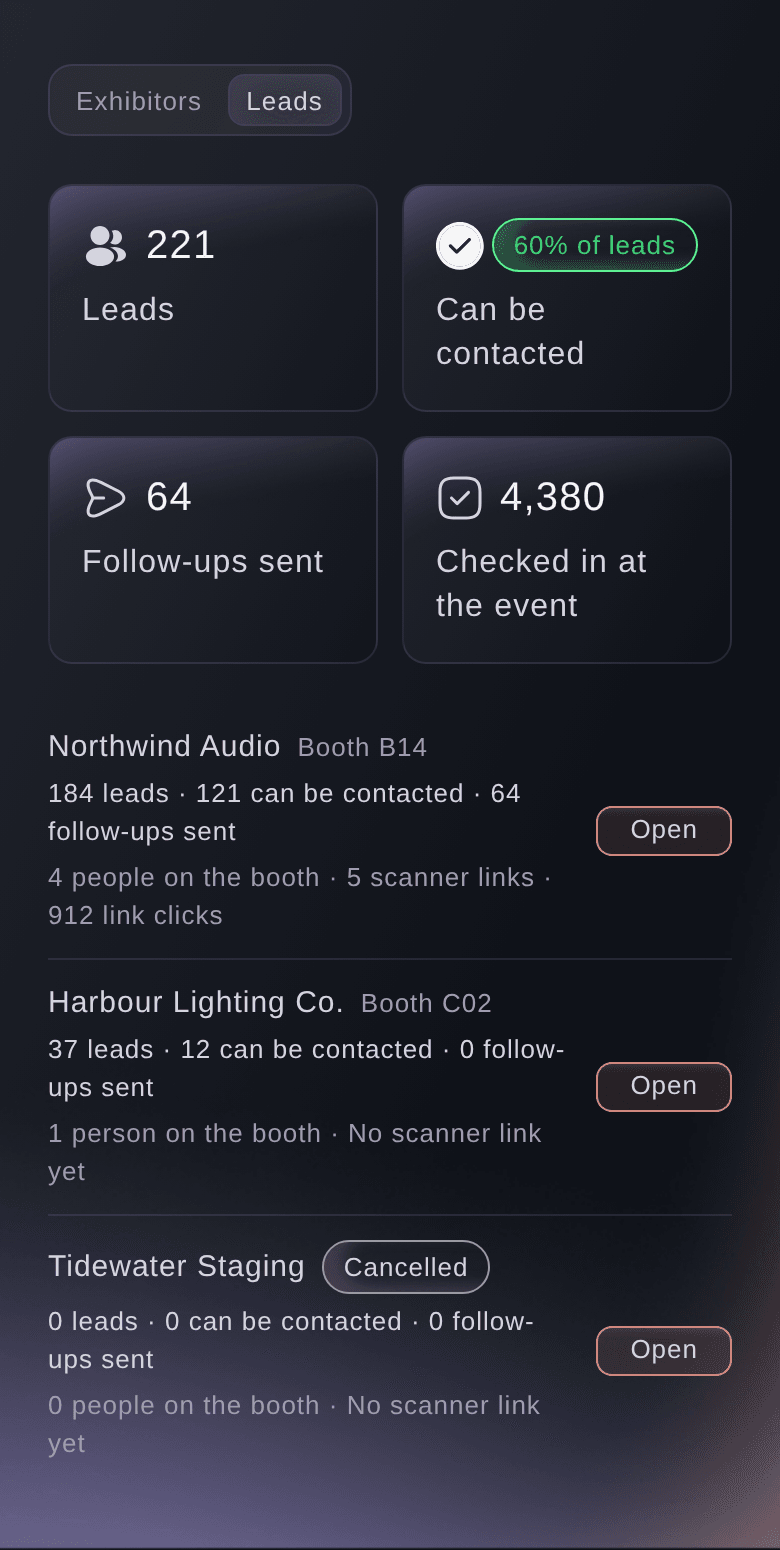
Ticket Fairy Exhibitors section on Leads, with each exhibitor's booth, leads, how many can be contacted, follow-ups sent and scanner links

Sell Every Stand Package Online and Get Paid Before Build-Up

Make each stand package its own booking, such as shell scheme, space only and corner stand, with its price, the number of stands and the size of team each one admits. Choose how much each exhibitor pays online, from a deposit to the whole price, and every booking includes an identity check before the card is charged. When you choose who exhibits, take applications on your own form with the questions you need, such as product category and stand size, and accept or decline each one.

Stand sales usually run on email threads, invoices in a separate system and a floor plan that is out of date by lunchtime. Selling packages online gives exhibitors a price, a deposit and a confirmation the moment they decide, and gives your sales team one list of who has booked what. Give each package a sale window, so an early stand rate closes on the date you publish.

For a bespoke space-only deal or a sponsorship upgrade, raise an invoice from Vault with line items and a due date, and the payment arrives in the same account as your stand and ticket sales. For a show the public visits, build your event from the Convention template and say yes to an exhibitor booth, and your visitor passes and stand bookings sit side by side.

  • Stand packages: each with its price, number of stands and team size
  • Online deposits: a deposit or the whole price, charged after an identity check
  • Exhibitor applications: your own questions, with your decision on each
  • Vault invoices: line items and a due date for bespoke deals
Ticket Fairy Create Table Type form with the name, price, stock, guest limits and online deposit for a booth

Get Every Exhibitor Built, Insured and Staffed Before the Doors Open

Give each exhibitor a page of their own, with no login, where their contact names the stand builders and staff who need a pass, uploads the insurance and certificates you ask for, and orders kit from your own price list. Exhibitors and their contractors book build-up deliveries into the arrival times you set at each gate and get a code for the gate. You see who still owes names, whose paperwork is missing and whose cover runs out before the show.

For stand staff, create a free ticket that never appears on your public event page, give it a once-a-day scan rule so one ticket covers every day of the show, and give each exhibitor an allocation that matches their package. They name their own staff through one link, and the link refuses a ticket past the number you set. Stand staff scan in at the same doors as your visitors, so you see how many are in before the doors open.

Build-up is where a show is won or lost. Fai lists who still owes a document or a name, drafts the reminders and asks before she sends them, and your gate team finds each vehicle by its code or number plate and checks it in and out. Your operations team stops chasing exhibitors by email and starts the open day knowing every stand is ready.

  • Exhibitor allocations: each exhibitor names their own stand staff from one link
  • Insurance and certificates: asked for once and tracked to their expiry
  • Delivery bookings: build-up arrivals booked into your gate times
  • Kit orders: exhibitors order from your own price list
Ticket Fairy Delegations page with a partner's allocation and the controls to manage its access

Register Trade Visitors and Know Who Walks Your Floor

Put a name on every ticket, and ask each visitor for their company, job title and the products they came to see at checkout. For a trade-only day, approve each order before the ticket is issued, and hold the payment until you approve it, so the floor is full of buyers your exhibitors want to meet. Give visitors arrival times when you want to spread the morning rush, each with its own capacity.

Run a free trade day and a paid public day from the same event: a hidden trade ticket unlocked by an access code or a personal invitation, and a public ticket on sale to everyone. Companies sending a team buy their visitor passes as a group booking with sign-off and one invoice. The visitor answers you collect at checkout print on the badge and travel with each lead an exhibitor records.

Exhibitors book a stand to meet a certain kind of visitor. When you can tell them how many buyers, specifiers and decision makers registered, and from which companies, you sell next year's stands on evidence. Export your visitor answers for your own reports, and email only the holders of the trade ticket when the seminar programme changes.

  • Checkout questions: company, job title and interests for each visitor
  • Order approval: approve trade visitors before their ticket is issued
  • Arrival times: each with its own capacity
  • Group bookings: company teams on one invoice
Ticket Fairy Ticket Settings with Require order approval and Hold payment until approved turned on

Badge Every Visitor and Help Them Meet the Right Stands

Scan a visitor's ticket at your registration desk, or find them by name, email or order number, and their badge prints with their name, company, job title, ticket type and a QR code. A tablet and a badge printer by the entrance make a self-service kiosk, and volunteers work the desk from a link on their own phone with no dashboard login. Walk-ups scan a QR code on the desk to register and join the queue.

Switch on your attendee directory, and visitors join it from their order page, choose what others see and book meetings with each other at your meeting tables and times. Exhibitors switch on meeting bookings on their own page, so a visitor books time at the stand they came to see before they arrive, and the exhibitor accepts or declines each request.

Seminar theatres fill when visitors can take part. In each seminar, the audience scans a code to ask and vote on questions and answer polls, with no app or sign-in, and your moderator chooses what the speaker sees. Print the ticket type in your colour on the badge, so stand staff tell a buyer from a fellow exhibitor at a glance.

  • Name badges: printed as each visitor checks in
  • Self-service kiosk: visitors check in and print their own badge
  • Meetings at the stand: visitors book time with the exhibitors they came to see
  • Seminar Q&A and polls: the audience asks and votes from a code
Ticket Fairy Badge and desk setup dialog with the A6 badge size, the company and job title lines from checkout questions, the ticket type and a badge preview

Send Exhibitors Home With Leads They Can Follow Up

Give each exhibitor's stand staff a lead scanner link that opens on their own phone or tablet with no account. Staff scan a visitor's badge or enter its code, rate the visitor in the exhibitor's own words and add notes, and a visitor who does not want contact has their details hidden at once. On their own page, each exhibitor downloads their leads and approves the follow-up emails Fai drafts from the stand notes.

Badge-scanning apps sold separately to each exhibitor leave you out of the results. Here the leads, ratings and follow-ups sit on your show, so you see every exhibitor's leads, how many can be contacted and the follow-ups sent side by side, and you know which stands had a strong show before they tell you.

Give each staff member their own scanner link so every lead shows who met the visitor, or one shared link for the tablet on the stand. Each exhibitor's results show leads by rating, follow-ups sent, who met the most visitors and the share of checked-in visitors they met. Sponsors see their deliverables and what their tracking link sold on a page of their own.

  • Lead scanner links: one for each member of stand staff or one for the stand
  • Follow-ups drafted by Fai: approved by the exhibitor before they go
  • Exhibitor results: leads by rating, follow-ups and visitors met
Ticket Fairy page for an exhibitor's booth, with its leads, ratings, notes, who met each visitor and the button to download the leads

Rebook Next Year's Floor While This Year's Show Is Fresh

Duplicate this year's show into next year's with the dates moved, and copy its rooms, teams, shifts and zones, seeing what each part adds before anything is copied. Open next year's stands to this year's exhibitors first with an access code or a personal invitation, and show each one the leads and visitors they met while the show is fresh in their minds. Send visitors a feedback survey the morning after the show, and see the themes Fai found in their answers.

An exhibitor who rebooks on the last afternoon is worth more than a dozen new leads. Their results page gives your sales team the conversation: the visitors they met, the leads they rated hot and the follow-ups they sent. Your visitor feedback, with its Net Promoter Score beside last year's, tells you which halls, seminars and timings to change.

Add the improvements your visitors asked for as tasks on next year's show, and give each one an owner and a due date. The show that sells its floor early is the one that can plan the layout, the seminar programme and the marketing with time to spare.

  • Copy from last event: next year's show starts from this one
  • Rebooking access codes: this year's exhibitors book first
  • Visitor feedback: the score beside last year's and the themes Fai found
Ticket Fairy preview of what copying last year's event adds, with the dates moving and a count and examples for each part

How Exhibition Organisers Use Ticket Fairy

  • A B2B Trade Show

    Shell scheme, space only and corner stands sell online with a deposit, and every trade visitor is approved before their ticket is issued. Exhibitors book their build-up deliveries into gate times and upload their insurance on their own page. On the last afternoon, the sales team rebooks stands with each exhibitor's results open.

  • A Consumer Home Show

    The public buys day tickets with arrival times to spread the Saturday morning, and kitchen and garden companies book their stands online. Each exhibitor's staff record leads on their own phones, and Fai drafts the follow-ups for each exhibitor to approve. Exhibitors download their leads before they leave the hall.

  • A Professional Expo With a Seminar Programme

    Delegates and visitors pick seminars in advance, and each seminar theatre runs live Q&A from a code on the slide. Visitors book meetings with the stands they came to see. Sponsors see their deliverables and tracking link sales on a page of their own.

  • A Trade Day and a Public Day

    Trade buyers unlock a free trade ticket with an access code on the first day, and the public buys paid tickets for the second. Producers name their stand staff from one link, and one ticket covers both days. Each producer's leads show the trade buyers they met.

  • A Motor Show in an Exhibition Centre

    Dealers and manufacturers book their vehicle deliveries into build-up slots at each gate, and the gate team checks every vehicle in by its number plate. Volunteers run badge kiosks at three entrances from desk links. Next year's floor opens first to this year's exhibitors with a rebooking code.

Get this page as a PDF Read it later or share it with your team. We email you a link to the PDF.
What to put in your PDF

We will email you this deck. We may also email you now and then about Ticket Fairy features that can help your events. You can unsubscribe at any time with one click.

Everything You Need to Run Your Trade Show

More about ticketing for Trade shows & exhibitions

Questions About Ticket Fairy for Trade shows & exhibitions

Trade shows & exhibitions

You choose the share they pay online when you set up each stand package. A deposit below the full price is held on the exhibitor's card and charged once they pass the identity check, and you collect the rest directly or with a Vault invoice. Enter 100 as the deposit percentage to take the whole stand price online.

Not through their link, which refuses a ticket past the number you set. Raise the number on their allocation when you agree to more staff.

No. Stand staff scan with a USB or Bluetooth barcode scanner connected to their phone or tablet, or enter the code printed on the badge or ticket.

No. Exhibitors name their stand staff through one link with no login to your event, and stand staff scan leads from a scanner link that works until the day after your show ends. Each exhibitor sees their leads, follow-ups and results on their own page.

Yes. Give the visitor ticket type time slots, and it offers a calendar of dates and arrival times, each with its own capacity.

Any label or card printer your computer can print to. Badges print as A6 lanyard badges (105 × 148 mm) or CR80 cards (85.6 × 54 mm); choose the printer and the paper size in your browser's print dialog.

No. The directory is off until you switch it on, and visitors join it themselves from their order page. Each visitor chooses which details others see, can change them or leave at any time, and nobody can download the directory.

With Hold payment until approved on, a payment method that supports it reserves the amount at checkout and is charged only when you approve. Other payment methods charge at checkout and refund the visitor if you decline. Approve before the hold expires, or the order is declined.

No. Fai can set up exhibitors and their lead scanners, draft exhibitor follow-ups, chase outside teams for names and documents, and take group bookings, and she shows you each change or email and waits for your approval first.

Sell more tickets. Build the crowd that comes back.

Start Selling Tickets Online

Sign up without a credit card and build a test event before you commit. Go on sale in minutes when you are ready.

No monthly subscription required for ticketing
Start selling tickets immediately
Ticketing tools included in the service fee
Get Started Talk to Fai Now

Ask Fai, our AI assistant, about Ticket Fairy’s features, pricing and how it could work for your event.

No credit card required

Book a demo call

See the referral model that drives 20% more ticket sales on average, learn which campaigns sell tickets, answer buyers faster and keep queues moving.

45-Minute Video Call
Pick a Time That Works for You