1. Solutions
  2. By event type
  3. Venues

Fill Your Room Every Night, Whoever Puts the Show On

Venue teams put on their own nights and hand others to the promoters who hire the room. Your permanent team keeps its access across every event, each hiring promoter works on the night they booked, and your venue's page tells every buyer how to get in. Hold dates, make offers and settle shows across all your rooms, and see the ticket sales each promoter brought to your venue side by side.

  • Every night on sale, yours and your hirers'
  • Every date held, offered and settled
  • Every promoter's sales at your venue compared
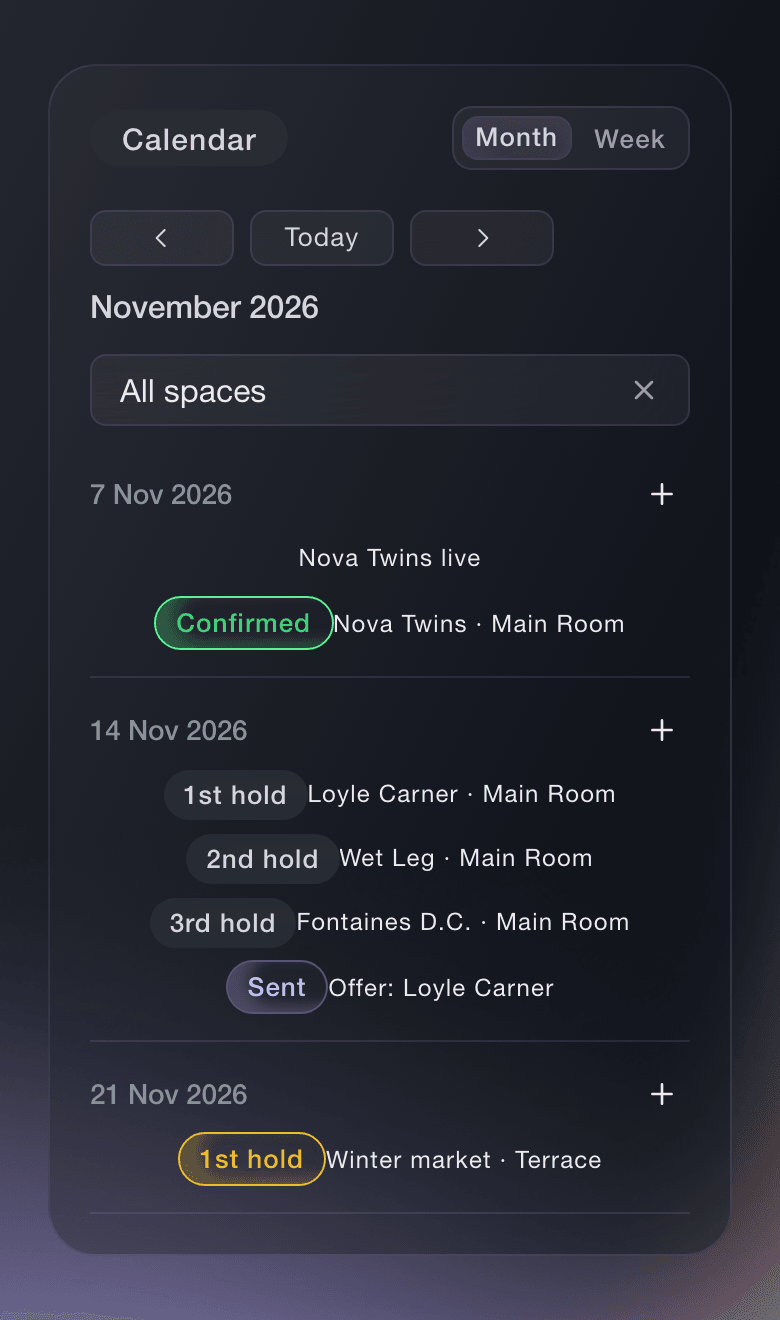
Ticket Fairy Event Operations calendar with a confirmed show and a first, second and third hold on the same Saturday

Tell Every Buyer How to Find You and Get In

Claim your venue's free page on Ticket Fairy with a code sent to your venue's email address, or add it to the brand you already run. Add sections on getting there, your rooms, accessibility and the door, and answer the questions visitors ask, such as where to park and what time you open. Every promoter's buyers read the same page, so the directions are the same whoever runs the night. Invite your booker or marketing manager to keep the page current, with no access to your events, orders or money.

  • Claim your page: free, with a code sent to your venue's email address
  • Sections and answers: getting there, your rooms, accessibility and the door
  • Venue page helpers: the page and nothing of your events
Ticket Fairy venue page with no sections yet, offering Add the first section

Put Your Own Nights on Sale and Repeat Them Every Week

Start each night from the template that matches it, such as a club show, a concert or a theatre show, and it lays out the tickets, add-ons and door times around your price and your capacity. Copy a night for its next date, and the ticket types, table types and settings come with it. Sell numbered seats from your seat map, a place in each area of the house, or tables and booths with a deposit online. Put a buy button, the full checkout or a list of your upcoming events on your own website, so buyers choose, pay and get their tickets without leaving it.

  • Event templates: tickets, add-ons and door times around your price
  • Duplicate event: next week's night from this week's
  • Seats, areas and tables: every way your room sells
  • Website embeds: a buy button, the checkout or your events list
Ticket Fairy website embed install page with checkout code ready to paste

Give Every Promoter Who Hires Your Room Their Own Night

Add a hiring promoter to the one event they booked, and their access reaches that night only and ends with it, while your permanent team stays on your brand with access to every night. A promoter who builds the night gets an Administrator seat, and one who sells a night your team builds gets a promoter link of their own. Give a partner such as a sponsor or an act's management an allocation they hand out from a link, and hold tickets back for a promoter's guest list. Share a live sales report with the promoter for the ticket types they have a stake in, with no role on your event.

  • Event teams: access to one night that ends with it
  • Promoter links: sales counted for the promoter who brought them
  • Partner allocations: tickets a partner hands out from a link
  • Sales report links: live sales for the ticket types they share
Ticket Fairy External/3rd-Party Sales Reporting section with the form to make a sales report link and a table holding one link

Hold Dates, Make Offers and Settle Every Show

See every hold and show across your rooms and stages on one calendar, in queue order for each date, and challenge, confirm or release a hold. Before you send an offer to an agent, see what you paid the act before and the fee range Fai suggests, and keep each counter-offer with the offer. When the agent accepts, the act is booked onto your event. After the show, Fai drafts the settlement from your ticket sales, your costs and the deal, and you share it with the act's team and mark it agreed.

  • Holds and challenges: every hold on a date in queue order
  • Offers: past fees and a suggested range beside each offer
  • Settlements: drafted by Fai from your sales, costs and the deal
Ticket Fairy settlement drafted by Fai, with ticket sales, sales tax, sound and lights and the performer fee, where each figure came from, and the totals

Get a Dashboard That Arranges Itself Around Each Night You Host

Each event in your diary has its own event type, and the type decides which sections it shows and what they are called. A concert, club show or comedy night shows Artists, Schedule, Stages and Public line-up, with Advancing, Travel and Accommodation for the act, and a conference you host calls the same sections Speakers, Agenda and Rooms, with Exhibitors beside Sponsors. Choose Venue manager as your role in Start with Fai, and each event opens on its Today page with the countdown to doors, your tasks and what changed. Your production manager lands on Advancing while the show is weeks away and on Run of show as it gets close.

  • Event type: each night shows the sections its type needs
  • Your role: each event opens where your work is
  • Today page: the countdown to doors, your tasks and what changed
Ticket Fairy Today page with the section list, the countdown and figures, what changed since the last visit, Fai's suggestions and a tile for each section

Run a Box Office That Balances and See Who Sold Your Nights

Invite your door team to your brand as Door Staff, and they scan tickets on their own phones at every night your venue runs, including the nights a hiring promoter builds on it. Your box office sells to walk-ups, hands over will-call and reprints tickets, and balances each till against its cash float at the end of the night. Door staff see each guest's age status as the ticket scans and mark the wristband as ID checked for your bar team. The Promoters report on your brand, narrowed to your venue, ranks every promoter by the tickets and revenue their links brought to your nights.

  • Door Staff logins: one login for every night at your venue
  • Box office: walk-ups, will-call and a till that balances
  • Age checks: age status on the scan and ID checked on the wristband
  • Promoters report: every promoter's sales at your venue
Ticket Fairy Show team results for menu open above the brand Promoters report, with the time period choices
Get this page as a PDF Read it later or share it with your team. We email you a link to the PDF.
What to put in your PDF

We will email you this deck. We may also email you now and then about Ticket Fairy features that can help your events. You can unsubscribe at any time with one click.

Everything You Need to Run Your Venue

More about ticketing for Venues

Questions About Ticket Fairy for Venues

Venues

No. Add them to the one event's team, and their access reaches that night only and ends with it. Your permanent team stays on the brand and keeps its access across every night.

No. The page is free and stays free whether or not you sell tickets with us. You claim it with a code sent to an address at your venue's own website, and if no address there reaches you, contact us and a person sets the page up with you.

Yes. Add each of them to that night's team as Door Staff. They install the same scanning app, sign in with their own login, and every admission is recorded against their name.

A ticket or table booked within 7 days of opening the promoter's link, in the same browser, counts as theirs. The Promoters report counts the sales made while they were on the team.

Every hold on a date stays in queue order. If the first hold does not answer a challenge in time, the challenger can take the date.

By card with a card reader or Tap to Pay on their phone, where your payment account allows it, or in cash from the till's float.

They are part of the Event Operating System. Open Event Operations for your brand, where one calendar covers every room and stage you run. Book a demo, and we set up your first event with your team.

Sell more tickets. Build the crowd that comes back.

Start Selling Tickets Online

Sign up without a credit card and build a test event before you commit. Go on sale in minutes when you are ready.

No monthly subscription required for ticketing
Start selling tickets immediately
Ticketing tools included in the service fee
Get Started Talk to Fai Now

Ask Fai, our AI assistant, about Ticket Fairy’s features, pricing and how it could work for your event.

No credit card required

Book a demo call

See the referral model that drives 20% more ticket sales on average, learn which campaigns sell tickets, answer buyers faster and keep queues moving.

45-Minute Video Call
Pick a Time That Works for You
