
Driv produktionen
Check your running order for clashes before show day
Festival programmers and production managers rebuild the running order many times as set times, flights and stages change. The running-order checks read the whole day every time it changes and point at the clash before an act, a stage manager or the curfew finds it on the day.
Have Fai check each day of your event's run of show for overlapping sets, short changeovers, an act booked on two stages, flights that land after soundcheck, sets outside a stage's hours or past curfew, and riders a stage cannot meet. Each problem comes with up to two fixes Fai has tried against the rest of the day, which you apply in one tap and can undo.
- För
- Catching clashes in your running order before show day
- Tar
- 6 minuter
Innan du börjar
- You are an owner, admin or producer on the event. The event's Operations page opens for those roles only.
- The day has a run of show with its sets, soundchecks and curfew.
-
Open the checks
Open the event, select Operations, select Run of show, then go to Running-order checks under the day's stages.
Obs: The button beside the day, such as 3 problems to check, takes you there. The checks run again whenever the run of show changes.
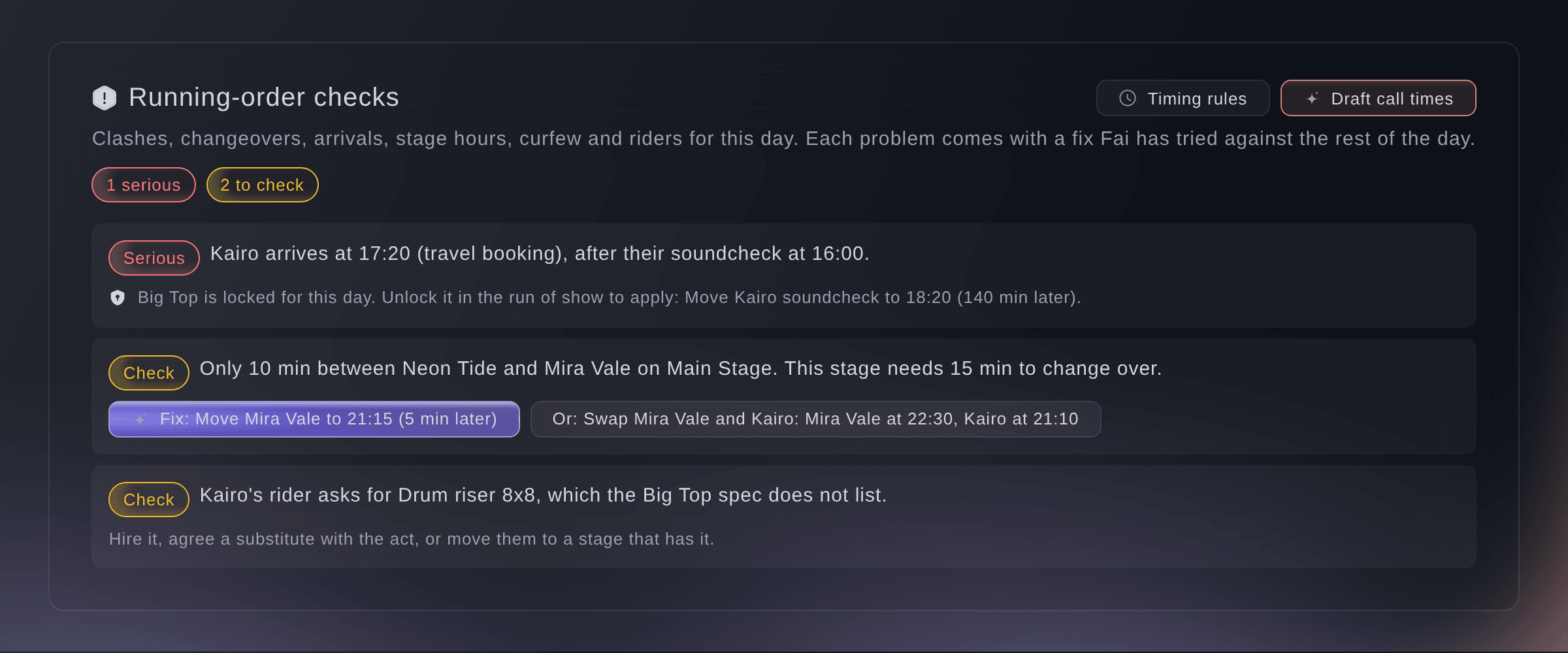
Running-order checks for one day. -
Read each problem
Read each problem, marked Serious, Check or Minor.
Obs: Arrival and departure times come from the travel bookings, or from the advance when there is no booking. A problem with no fix says what to change instead, such as the travel booking.
-
Apply a fix
Select the button that starts with Fix:, check which cues move and where to, then select Apply fix.
Obs: Fai tried each fix against the rest of the day first, so it never adds a serious problem. Select Undo in the message straight after to put the cues back.
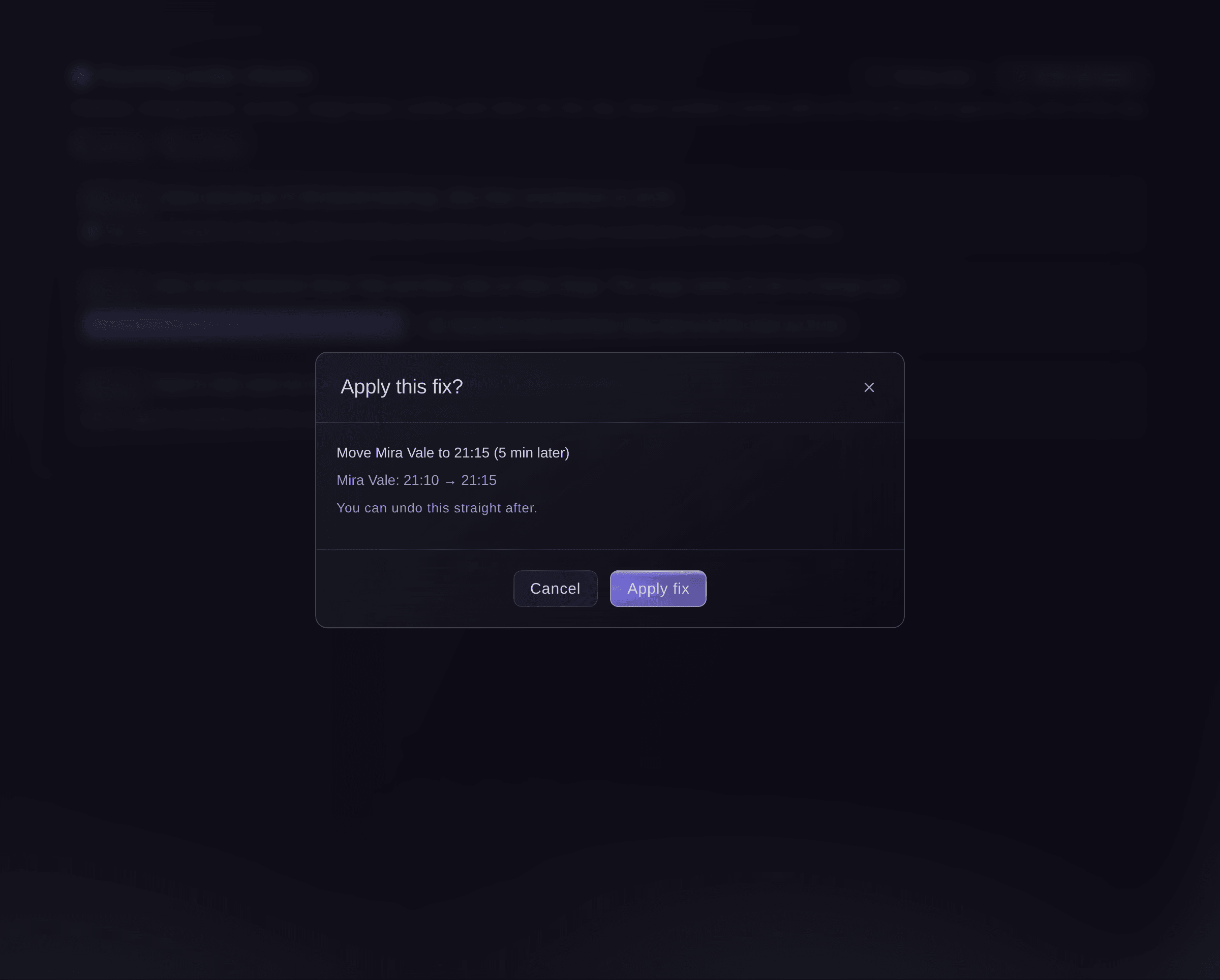
The cues a fix moves, before it changes anything. -
Set your timing rules
Select Timing rules, enter each stage's shortest changeover and its opening and closing times, then select Save.
Obs: Also set how long an act needs between two appearances and how long before a call it should be on site. A stage's changeover and hours are part of the stage, so Stages shows the same values.
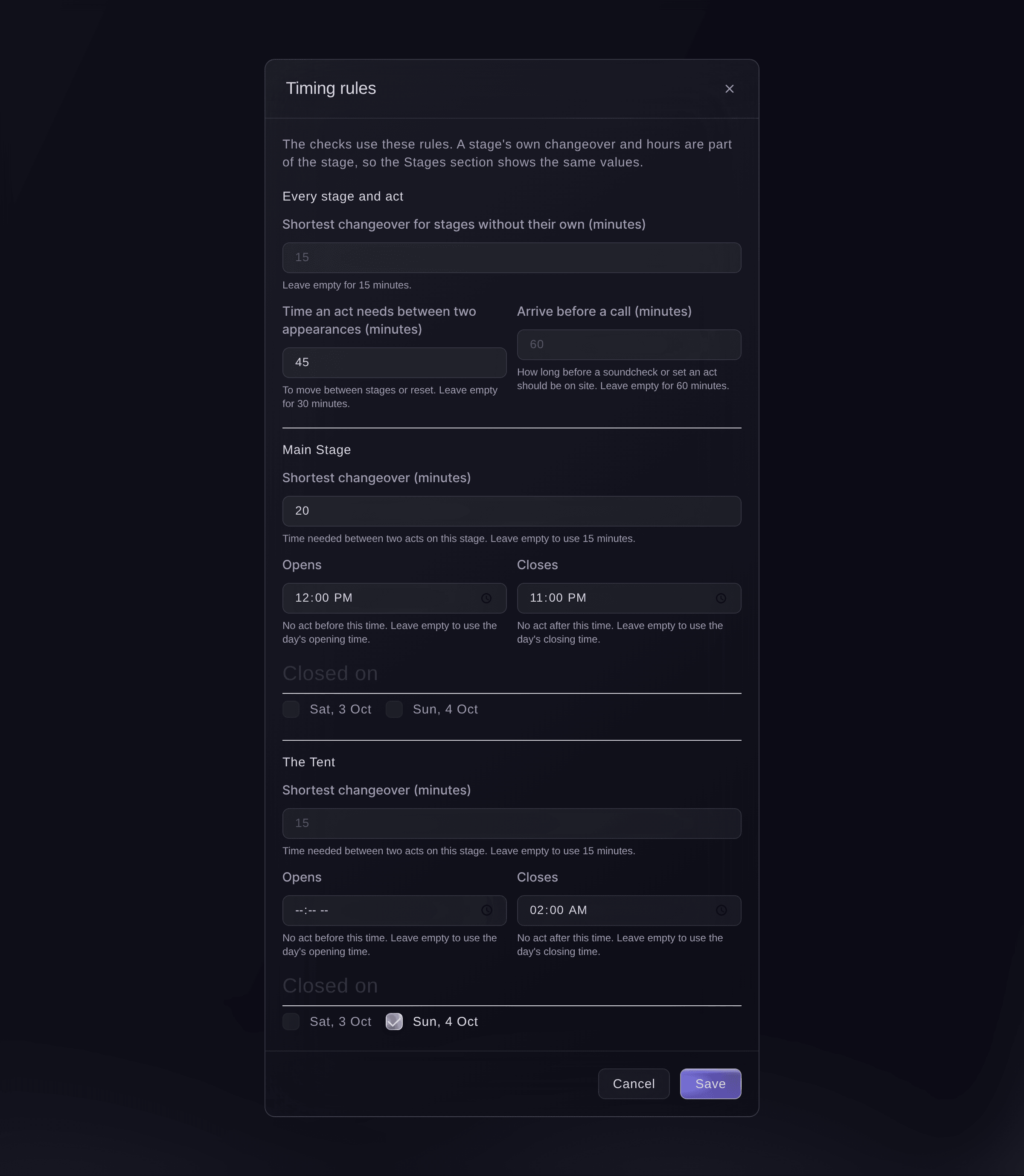
Timing rules for the checks. -
Draft the call times
Optional: select Draft call times, then open Today to approve each message.
Obs: Fai drafts each act's load-in, soundcheck, changeover, stage call and set, and each department's cues, by email and by text where there is a mobile number. Nothing is sent until you approve it, and a moved cue drafts it again.


Prova de här stegen på ditt eget evenemang
Skapa ett gratis konto, bygg ditt evenemang och följ stegen ovan i din egen instrumentpanel. Det tar några minuter och du behöver inte boka något säljsamtal.
Inga startavgifter. Ingen obligatorisk månadsavgift. Inget kreditkort krävs.
Eller låt det göras åt dig
Fai reads the problems on any day with their fixes, applies a fix after you confirm, changes the timing rules, and drafts each act's and each department's call times for you to approve on Today. She never moves a cue on a locked stage or one already called on the day.
I din instrumentpanel, med Fai
Check the running order for Saturday at <EVENT NAME> and fix the short changeover on the Main Stage
Låt Fai göra det åt dig
Fai arbetar inuti din Ticket Fairy-instrumentpanel. Skapa ditt konto, öppna Fai och klistra in instruktionen ovan.
Inga startavgifter. Ingen obligatorisk månadsavgift. Inget kreditkort krävs.
Set a stage's hours from Stages
-
Change the stage
In Stages, open the stage, open Changeover and opening hours, enter the times, then save the stage.
Obs: The closed days of a stage are set in Timing rules, which knows the event's days.
Fai changes a stage's changeover, opening and closing times and closed days when you ask, after you confirm.
I din instrumentpanel, med Fai
The Big Top at <EVENT NAME> closes at 23:00 and needs 20 minutes between acts
Frågor du kanske har
- Why can a fix not be applied?
- The stage and day are locked, a cue in it has already been called on show day, or the run of show changed since the fix was worked out. Unlock the stage in the run of show, or use the new fix the checks show.
- Does a fix move cues I did not see?
- No. The dialog lists every cue it moves and its new time before you apply it.
- Do the day sheets show the problems?
- Yes, in the dashboard: each day sheet shows the problems that touch its own cues. Day sheets you share by link never show them.
- How does Fai know a stage cannot meet a rider?
- Fai compares the act's technical rider with the stage's technical specs in Stages, including lines such as No drum riser. Hire it, agree a substitute with the act, or move them to a stage that has it.
- What if two of us change the timing rules at once?
- The second save does not overwrite the first. Your changes stay in the dialog, and saving again replaces your teammate's.
Har du fortfarande en fråga?
Boka en demo så svarar vi på den i ett samtal, utifrån din typ av evenemang. Eller skapa ditt konto och se själv.
Inga startavgifter. Ingen obligatorisk månadsavgift. Inget kreditkort krävs.
Relaterade guider
Gör det på ditt eget evenemang
Skapa ditt konto, bygg evenemanget och följ stegen i din egen kontrollpanel. Du behöver inte boka ett säljsamtal.