
Driv produktionen
Give crew meals at your event meal desk
Festival production and catering managers feed crew, volunteers and performers against meal allowances, usually with paper tickets that get lost, shared or used twice. The meal desk counts each meal against the person's pass, shows the dietary needs at the counter, and gives the kitchen a forecast for every day of the event.
Run the crew catering counter at your event from each person's pass: scan it, see the meals left today and their dietary needs, and give a meal against their allowance. An extra meal needs the reason and your name, and the kitchen sees how many meals to expect each day with the dietary needs counted.
- För
- Serving crew and volunteer meals against each person's allowance
- Tar
- 5 minuter
Innan du börjar
- You are an owner, admin or producer on the event. The event's Operations page opens for those roles only.
- Your pass types carry Meals per day, set under Zones and pass types in Accreditation, and the passes are issued.
-
Open Meals
Open the event, select Operations, then select Meals in the list of sections.
Obs: Meals opens on the Meal desk, with the cursor in the scan field. If Meals is not in the list, select More sections and open it there.
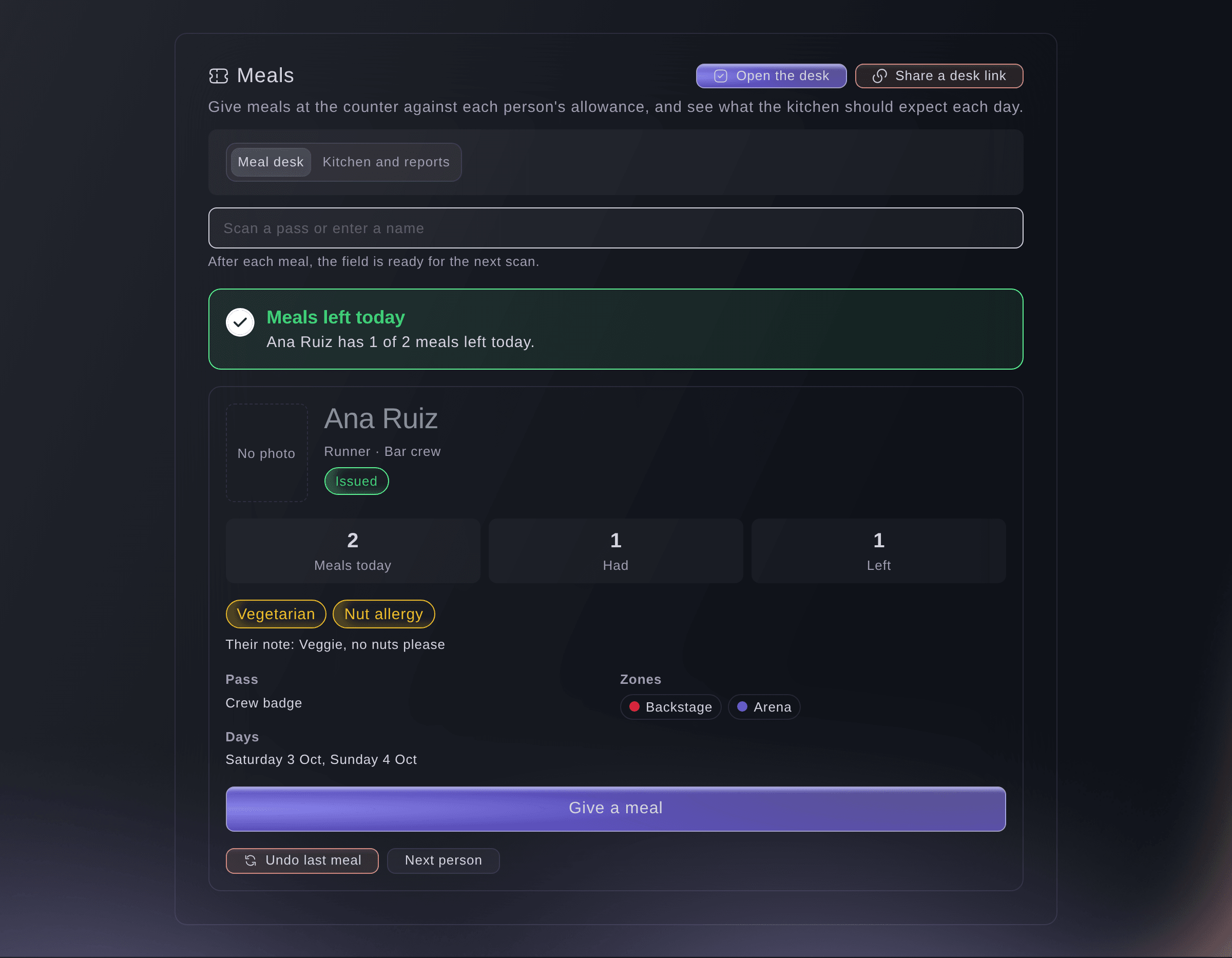
The meal desk with a pass scanned. -
Scan the pass
Scan the code on the ticket or badge, or enter part of the name in Scan a pass or enter a name.
Obs: The card shows the meals they have left today and their dietary needs, with their own note and any note from their artist advance.
-
Give the meal
Select Give a meal.
Obs: The desk says how many meals they have left today, and the field empties for the next scan. Today is the event's own day in its time zone.
Someone with no meals left
The card says No meals left today, or that the pass has no meals today. To give one anyway, enter the reason in Why are you giving an extra meal? and select Give a meal anyway. Your name and the reason are kept with the meal, and the kitchen report lists every extra meal by team member.
-
Check the kitchen forecast
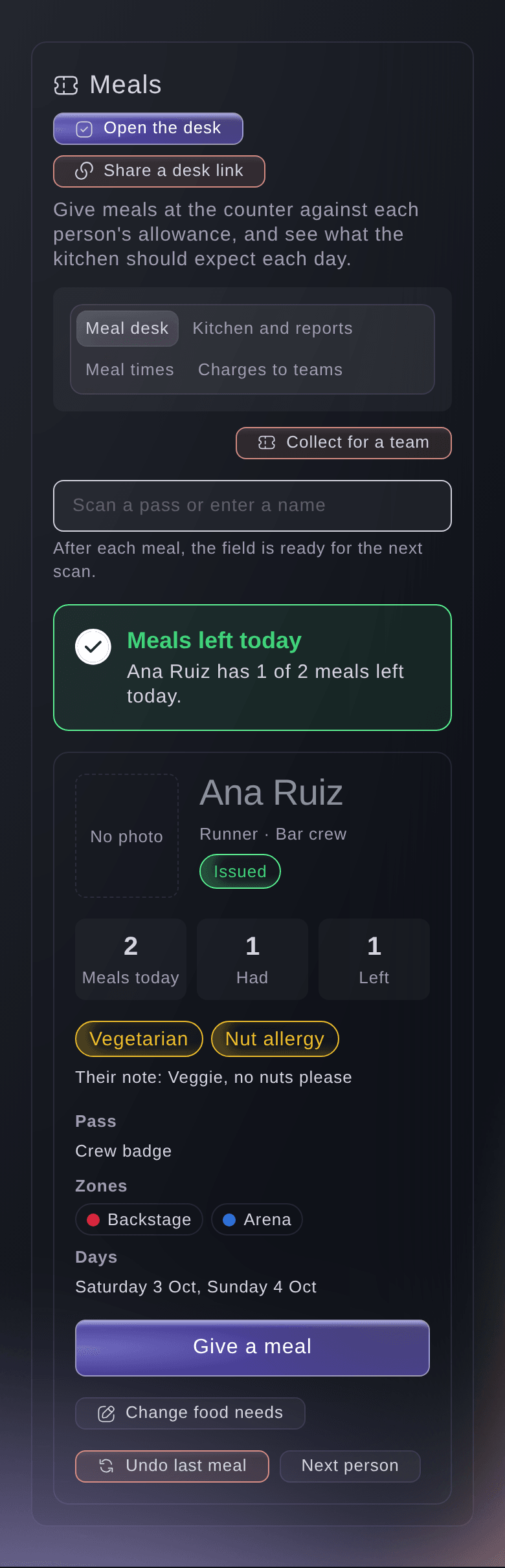
Select Kitchen and reports at the top of Meals.
Obs: Each day shows the meals expected with the dietary needs counted, the meals served, and meals on passes not issued yet. Choose a Day to see each group's allowance and what it ate.
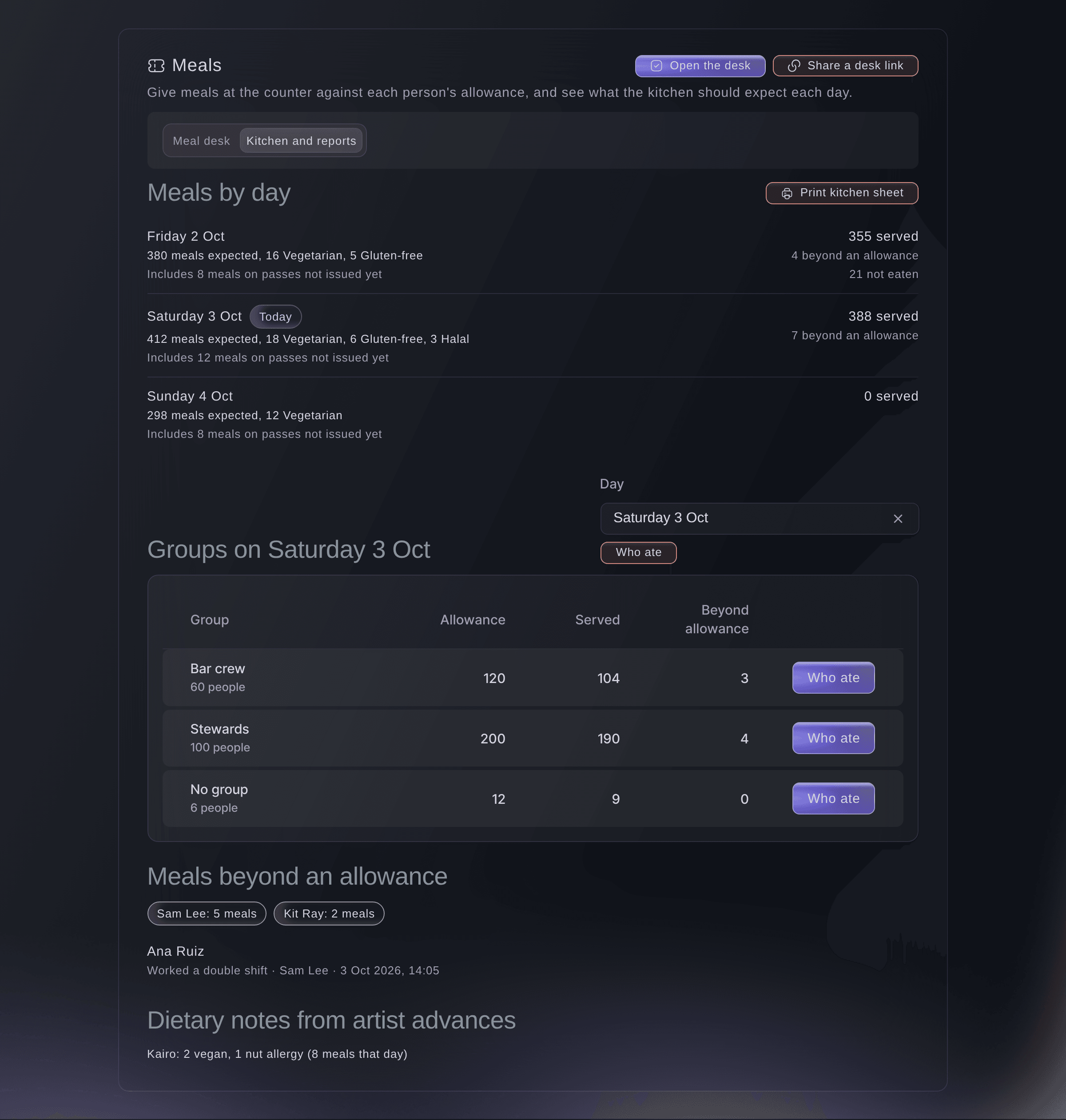
Meals expected and served, day by day. -
Print the kitchen sheet
Select Print kitchen sheet, then select Print.
Obs: The sheet carries the counts, dietary needs and performer notes, and no other personal details.
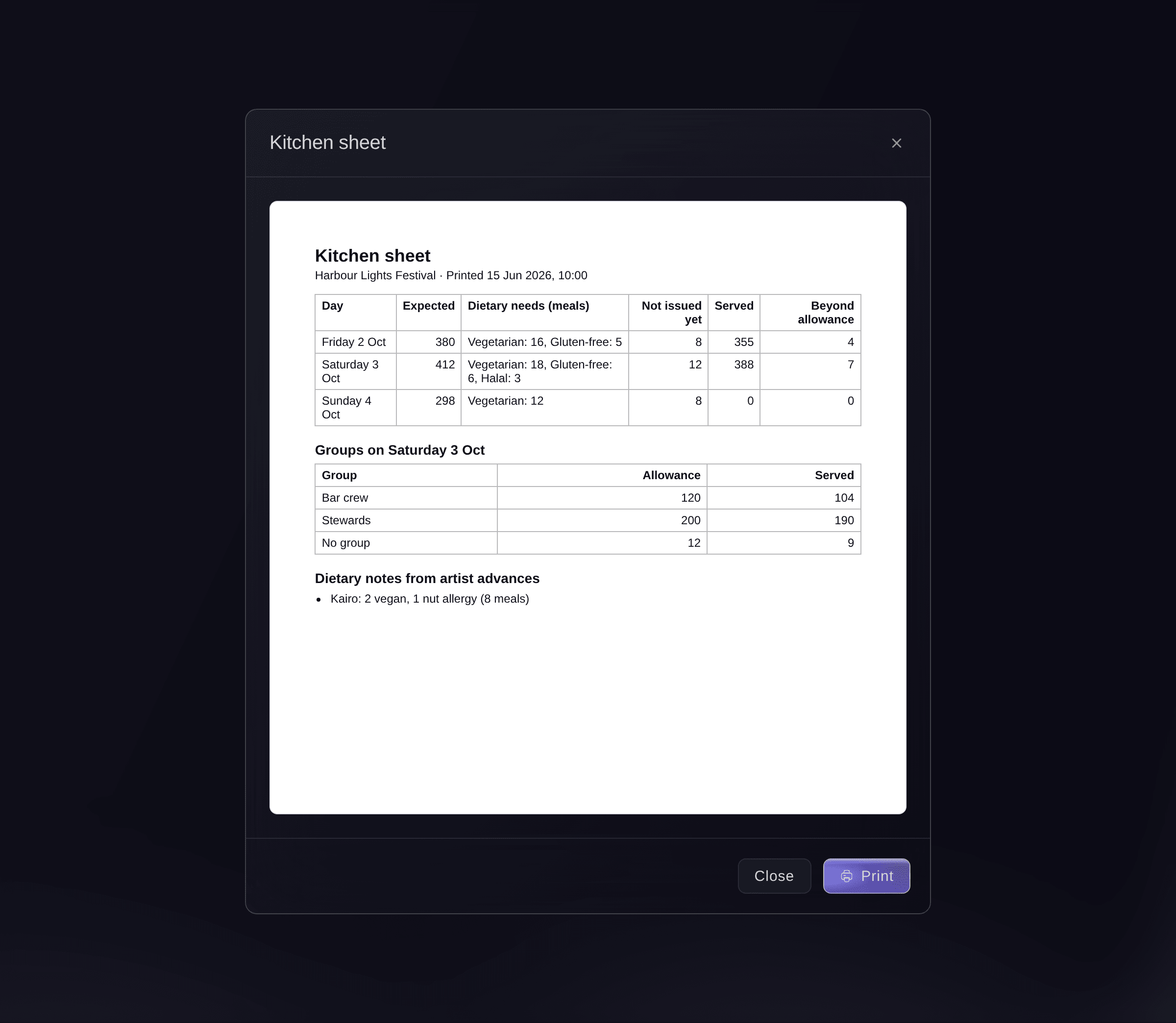
The kitchen sheet.


Prova de här stegen på ditt eget evenemang
Skapa ett gratis konto, bygg ditt evenemang och följ stegen ovan i din egen instrumentpanel. Det tar några minuter och du behöver inte boka något säljsamtal.
Inga startavgifter. Ingen obligatorisk månadsavgift. Inget kreditkort krävs.
Eller låt det göras åt dig
Fai finds a pass at the meal desk, records a meal or an extra meal with its reason, undoes the last meal, and reads you the kitchen forecast and who ate. She shows you the pass and waits for your yes before she records a meal.
I din instrumentpanel, med Fai
How many meals should the kitchen expect at <EVENT NAME> tomorrow, and how many are vegetarian or gluten-free?
Låt Fai göra det åt dig
Fai arbetar inuti din Ticket Fairy-instrumentpanel. Skapa ditt konto, öppna Fai och klistra in instruktionen ovan.
Inga startavgifter. Ingen obligatorisk månadsavgift. Inget kreditkort krävs.
Give a whole team's meals to one collector
-
Choose the team
On the meal desk, select Collect for a team, then choose the team.
Obs: Each team shows how many of its people can still eat today.

Collect meals for a team. -
Give the meals
Untick anyone who is not eating now, enter the name in Who is collecting, then select the button that counts the meals.
Obs: Each meal comes off that person's meals for today. Anyone with no meal left or no issued pass is skipped, and the desk says how many.

Fai gives a team's meals to a named collector when you ask, after you confirm, and tells you who was skipped.
I din instrumentpanel, med Fai
Jo from Northern PA Hire is collecting lunch for their crew at <EVENT NAME>
Undo a meal
-
Undo the last meal
Scan the pass, select Undo last meal, then select Undo meal.
Obs: The person gets the meal back for today. The meal stays in the history with the undo beside it.
Fai undoes a person's last meal today when you ask, after you confirm.
I din instrumentpanel, med Fai
Undo the meal we gave Ana Ruiz a minute ago at <EVENT NAME>, it was scanned twice
See who ate
-
Open who ate
In Kitchen and reports, select Who ate.
Obs: Each meal shows who gave it and the reason for any extra meal. Select Download this list for a file of the day.
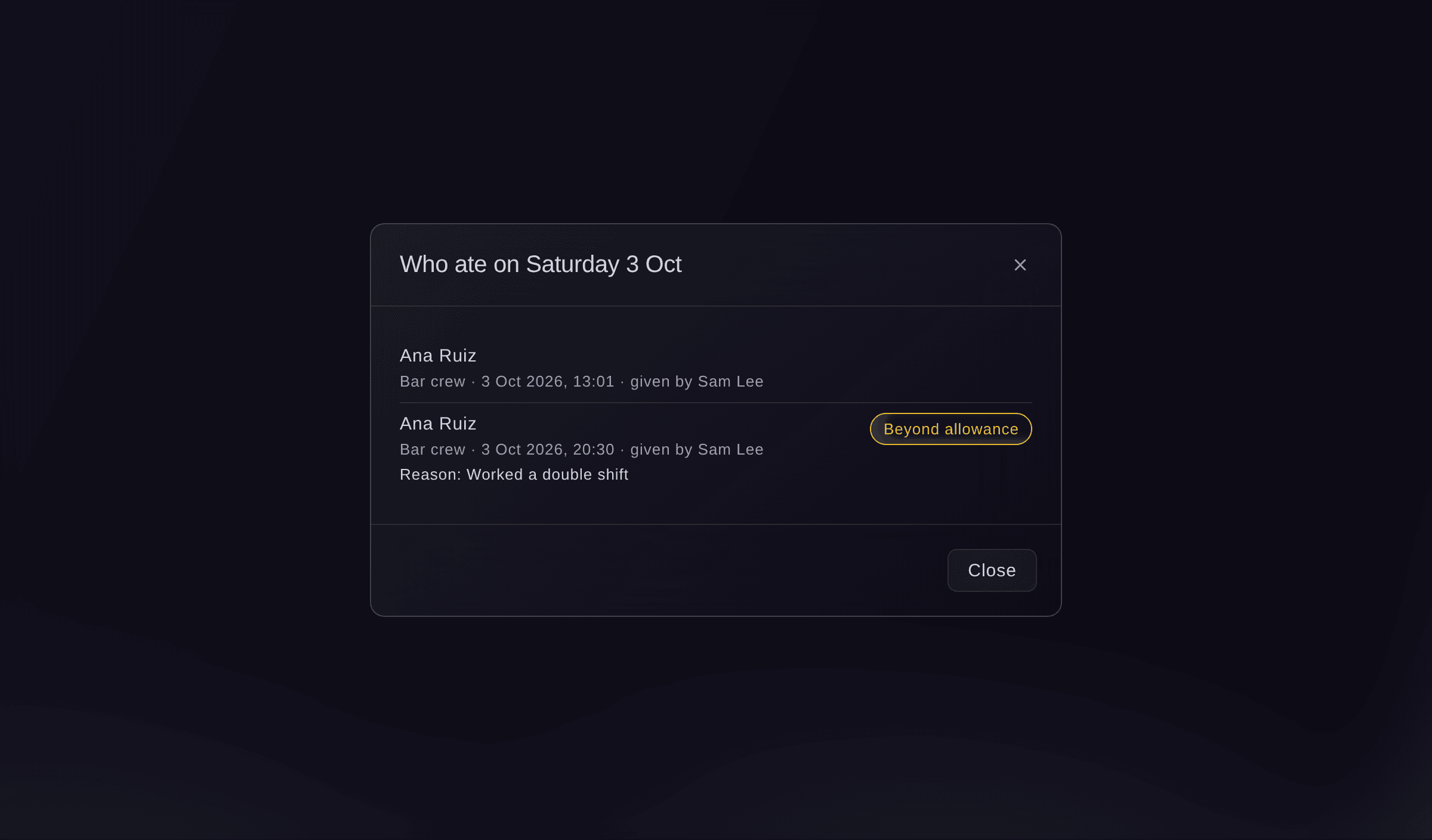
Who ate on the day.

Fai reads you the meals given on a day, the extra meals and who gave them.
I din instrumentpanel, med Fai
Who was given an extra meal at <EVENT NAME> today, and by whom?
Frågor du kanske har
- Where does each person's meal allowance come from?
- From the pass type's Meals per day. A person on the rota gets one meal for each shift that starts that day, or two for a shift of 8 hours or more, up to the pass type's meals per day.
- Where do the dietary needs come from?
- From the food needs each person gives on their My shifts page or at the desk, from a volunteer's application until they give them, and from the hospitality answers on each performer's advance. A performer's note covers their whole party, so the kitchen report lists it by performer rather than counting it per person.
- What if two counters scan the same pass at once?
- Each meal is counted against the same allowance, so the second counter sees the meals left after the first one. Once the allowance is used, a meal needs a reason.
- Does the meal desk work without a connection?
- Yes. Keep giving meals; each one is kept on the device and sent when the connection is back, and it counts on the day it was given if it is sent within 12 hours. Collecting for a team needs a connection.
- Can a caterer run the meal desk without a dashboard login?
- Yes. Select Share a desk link at the top of Meals and make a meal service point link for their phone or tablet.
- Why is the kitchen forecast empty?
- None of your pass types has meals per day yet. Select Open Passes and set Meals per day on the pass types under Zones and pass types.
Har du fortfarande en fråga?
Boka en demo så svarar vi på den i ett samtal, utifrån din typ av evenemang. Eller skapa ditt konto och se själv.
Inga startavgifter. Ingen obligatorisk månadsavgift. Inget kreditkort krävs.
Relaterade guider
Gör det på ditt eget evenemang
Skapa ditt konto, bygg evenemanget och följ stegen i din egen kontrollpanel. Du behöver inte boka ett säljsamtal.