EVENT TICKETING + STRIPE

Sell Event Tickets and Get Daily Payouts with Stripe Where Available

Get paid daily with Stripe where available, sell more tickets, see what drives sales and scan guests quickly.

YOUR
STRIPE ACCOUNT
DAILY
BANK PAYOUTS
ONE
ORDER, READY FOR ENTRY
Pre-Event Cashflow
Multiple Payment Methods
Dynamic Ticket Pricing
Door Sales with Stripe Terminal
International Currency Support

No setup fees or subscription costs. Create your free account today
Event Ticketing Platform with Stripe Integration
Direct Bank Deposits
Sell More Tickets
Your Stripe Account
Your Revenue, Your Account

Why Connect Your Own Stripe Account?

Keep your Stripe relationship and get daily payouts, while Ticket Fairy helps you sell more tickets and run the event.

Feature
Ticket Fairy + Your Stripe
Traditional Ticketing Platforms
Payout Timeline
Daily deposits to your bank account
Ticketing provider's settlement schedule
Pre-Event Cashflow
Ticket revenue paid to your bank daily
Access depends on the provider's terms
Financial Visibility
Complete details in Stripe dashboard
Limited transaction data
Payment Methods
All major cards, Apple Pay, BNPL
Payment methods depend on the provider
On-site Sales
Integrated Stripe Terminal readers
Separate systems or limited options
Financial Independence
Your direct relationship with Stripe
Reliant on platform for payouts

Grow Ticket Sales Without Giving Up Your Stripe Account

Sell more tickets, put revenue to work sooner and move the crowd through entry faster.

Daily Payouts

Get paid daily with Stripe.

Put sales income towards event costs while tickets are still on sale
Pay vendors, venues, and artists before your event
Keep the payout relationship in your own Stripe account

Flexible Payments

Give buyers familiar ways to pay without sending them away from the event checkout.

All major credit and debit cards accepted
Digital wallets (Apple Pay)
Buy-now-pay-later options (Afterpay, Clearpay)

Global Reach

Sell in several checkout currencies and show buyers the payment methods available in their country.

Multi-currency event checkout
Region-specific payment methods
Automatic currency conversion

Door Sales

Take card payments at the box office with Stripe Terminal readers or Tap to Pay where enabled.

Integrated box office solution
See online and box office orders in Ticket Fairy reports
Issue a ticket door staff can scan quickly

Stripe Payment Processing

Stripe processes the card payment while Ticket Fairy keeps it with the buyer's order and ticket.

Payment processing through Stripe
Payment activity available in your Stripe account
Buyer, payment and ticket details ready when your team needs them

Financial Insights

Follow ticket sales in Ticket Fairy and payment activity in your own Stripe account.

Real-time sales and revenue tracking
Transparent fee breakdown
Exportable financial reports

Make Every Ticket Sale Grow Your Event

Reward buyer referrals, see which campaigns sell tickets and keep entry moving while Stripe handles payments.

Mobile Ticket Scanning

Keep the queue moving with a dedicated scanning app that gives door staff the buyer and ticket details they need when a guest needs help.

Custom Registration

Collect exactly the attendee information you need with customizable registration fields for each ticket type or add-on.

Dynamic Pricing

Turn early demand into ticket sales with early-bird prices, scheduled ticket releases and promotional codes, all through the same Stripe checkout.

Group Management

Sell VIP packages and group orders while keeping each attendee and paid item with the same order for support and entry.

Marketing Suite

Bring past buyers back with event emails, reward successful buyer referrals and see which campaign links sell tickets.

Box Office System

Sell at the door through Stripe and keep box office and online orders in the same event reports, so the team can see the complete result.

Get Paid Daily With Stripe

Keep ticket revenue moving while you are still selling, then use Ticket Fairy to grow sales and run faster entry.

Daily payouts to your bank

Use your Stripe payment processing account

Put ticket revenue to work while your event is still on sale. Get paid daily.
Daily
Payouts
Direct
To your bank
Your
To your account

Keep Your Stripe Account and Add Ticket Fairy

Choose Stripe Express or Stripe Standard

Keep direct access to Stripe while Ticket Fairy keeps payment, ticket, attendee, campaign and entry details together. Standard accounts also retain full access to Stripe settings and reporting.
Express
Simpler setup
Standard
Full Stripe access
One
Sale details ready

Turn Every Stripe Payment Into a Ticket Ready for Entry

Run the sale through entry

Use ticket releases, buyer referrals, attendee questions, payment plans, box office sales and ticket scanning to sell more and give guests a smoother journey from checkout to entry.
Online
Ticket checkout
Door
Box office sales
Entry
Fast guest scans

Start Selling in 3 Simple Steps

Keep your Stripe account and add the Ticket Fairy tools that help your event sell and run better.

1

Create Your Free Account

Sign up for Ticket Fairy in minutes - no credit card required, no setup fees, no monthly charges required.

2

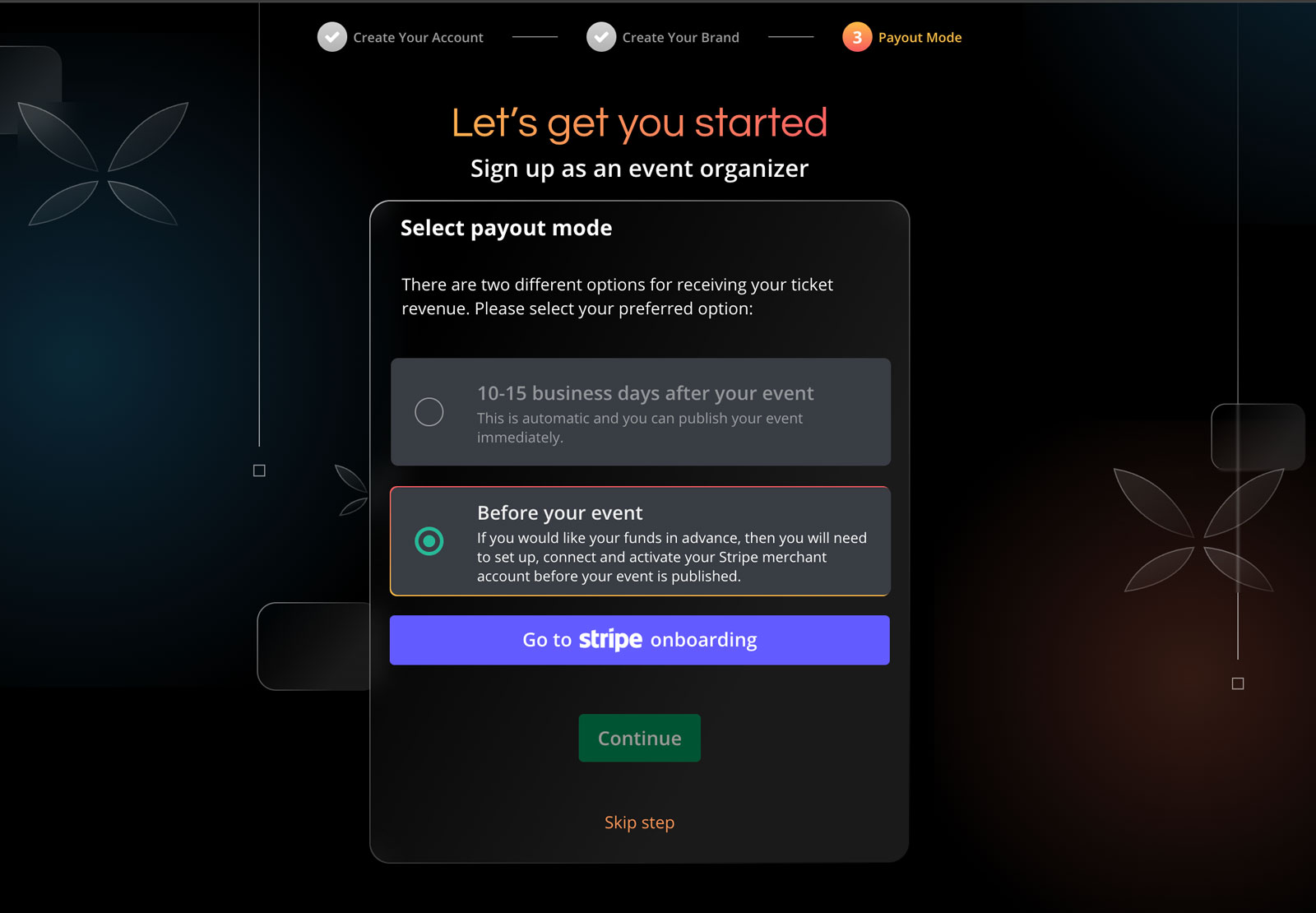
Connect Your Stripe Account

Connect your Stripe payment processing account to Ticket Fairy.

3

Create & Start Selling

Set up your event, customise your tickets and get paid daily.

Connect Stripe & Start Selling Today

Start without setup fees or a required subscription.

Frequently Asked Questions About Selling Tickets with Stripe

Stripe Integration & Setup

How quickly can I start selling tickets with Stripe?
You can start selling tickets within minutes. Simply create your Ticket Fairy account, connect your Stripe account (or create a new one), and set up your event details. Once connected, you can immediately begin accepting payments and selling tickets online.
Can I use Stripe for ticket payments in my country?
Stripe availability, payment methods and currencies vary by country. Tell us where your event business is based and we will confirm the options available to you.

Payments & Payouts

How quickly do I receive ticket sales revenue with Stripe?
Your Stripe dashboard shows the payout schedule for your event. Daily payouts appear when available.
What payment methods can my customers use?
Through Stripe, you can accept all major credit and debit cards (Visa, Mastercard, American Express), digital wallets (Apple Pay), and buy now pay later options like Afterpay/Clearpay. Available payment methods may vary by country.

Stripe Fees and Pricing

Who pays the payment processor fee for Stripe payments?
With standard buyer-pays pricing, the buyer pays the booking fee by default. You can choose to absorb it instead. We show the exact pricing before you launch.
Are there any setup fees or monthly fees for using Stripe?
Core ticketing has no required setup fee or monthly ticketing fee. Paid plans are optional. With standard buyer-pays pricing, the buyer pays the booking fee by default.

Event Payments and Revenue

How do event payments work with Stripe?
Stripe processes the payment and pays ticket revenue to your bank. Ticket Fairy handles the event page, checkout, buyer referrals, support and entry.
Can I use Stripe for door sales at my event?
Yes. Sell walk-up tickets and take card payments with Stripe Terminal card readers or Tap to Pay where enabled. See door and online sales together in Ticket Fairy.

International Payments and Currencies

Can I accept multiple currencies through Stripe?
Yes, Stripe supports multi-currency processing. You can accept payments in various currencies while receiving payouts in your preferred currency. This is especially useful for international events.

Security and Fraud Prevention

How secure are Stripe payments?
Stripe is PCI-DSS Level 1 certified, the highest level of payment security certification. All transactions are encrypted and processed through secure channels, protecting both you and your customers.
How does Stripe help prevent fraud?
Stripe includes advanced fraud prevention tools like Radar, which uses machine learning to detect and block fraudulent transactions. This helps protect your event from chargebacks and unauthorized purchases.

Account Setup & Management

Do I need to create a Stripe account first?
No, you can create a Stripe account directly through our platform's integration process. Once you start setting up your event on Ticket Fairy, you'll be guided through creating and connecting your Stripe account seamlessly.
What information do I need to connect my Stripe account?
You'll need basic business information, including your legal business name, address, website URL (if available), and banking details for payouts. You'll also need to provide identification for account verification purposes, which is a standard requirement for financial compliance.

Reporting & Analytics

How will I track sales and revenue through Stripe?
You'll have access to sales data in both your Ticket Fairy dashboard and your Stripe dashboard. Ticket Fairy dashboard provides comprehensive event-specific analytics, while your Stripe dashboard offers detailed financial reporting, reconciliation tools, and transaction histories.
Can I export transaction data for accounting purposes?
Yes, both Ticket Fairy and Stripe provide data export capabilities. You can export transaction data, sales reports, and payout information in various formats (CSV, Excel) for your accounting software or financial records.

Using Stripe for Specific Event Types

Is Stripe suitable for both small and large events?
Absolutely. Stripe's scalability makes it perfect for events of all sizes. For small events, you benefit from easy setup with no monthly fees required. For large events, you gain enterprise-grade security, high transaction capacity, and comprehensive financial reporting.
Can Stripe handle payment plans for high-value tickets?
Yes, our integration with Stripe supports installment payment plans for high-value tickets. You can offer your customers the option to pay in multiple installments while still receiving your revenue according to the payment schedule you set up.

Refunds & Customer Service

How are refunds handled with Stripe?
Refunds can be processed directly through your Ticket Fairy dashboard with a few clicks. When you issue a refund, the money is returned to the customer's original payment method through Stripe, and the ticket is automatically invalidated. You can issue full or partial refunds depending on your refund policy.
What happens to Stripe fees when I issue a refund?
When issuing a refund within Stripe's standard refund window (typically 60 days), Stripe will refund their processing fees as well. For refunds outside this window, the processing fee may not be refunded. Ticket Fairy service fee handling for refunds depends on your specific agreement and event policies.

Technical Integration

Can I customize the checkout experience for my brand?
Yes, our Stripe integration allows for extensive branding customization. You can add your logo, brand colors, and custom messaging to the checkout process while maintaining Stripe's secure payment infrastructure. This creates a seamless brand experience throughout the customer journey.
Is the Stripe integration mobile-friendly?
Absolutely. The checkout process is fully mobile responsive and optimized for all devices. Mobile users benefit from streamlined payment methods like Apple Pay, which can increase conversion rates by making it easier to complete purchases on mobile devices.

Compliance & Tax Handling

How does Stripe handle tax calculations and reporting?
Stripe can automatically calculate, collect, and report applicable taxes based on your event location and tax settings. You can configure tax rates for different regions, and Stripe will provide detailed tax reports for your accounting records. This simplifies compliance with local tax regulations.
Does Stripe meet international data protection standards?
Yes, Stripe is compliant with major data protection regulations including GDPR in Europe, CCPA in California, and other international standards. This means your customers' payment data is handled according to strict privacy and security protocols, reducing your compliance burden as an event organizer.

Getting Started

How long does it take to get my Stripe account approved?
Stripe decides account verification times after reviewing your business details. Start the connection from Ticket Fairy and Stripe will show anything else it needs from you.
Can I test the platform before going live with my event?
Yes, you can create test events and process test payments using Stripe's test mode. This allows you to familiarize yourself with the platform, customize your event settings, and test the entire checkout flow without processing real payments. Once you're ready, switching to live mode is as simple as toggling a setting.

Ticket Fees & Free Events

Who pays for your ticket fee?
The ticket buyer usually pays the service fee, or you can choose to absorb it. The fee shown for the ticket includes Stripe payment processing, so the buyer does not see a separate Stripe charge later.
Do you charge for free events?
There is no ticketing fee for a free event when every ticket is complimentary. Ticketing fees apply when you sell paid tickets.
Do you charge for issuing guest tickets?
There is no ticket fee for complimentary guest tickets. You can issue them for staff, VIPs and other invited attendees, then keep them on the same guest and entry lists as paid tickets.

Additional Payment Options

I need cashflow for my festival. Can I get regular payouts?
Yes. Get paid daily when your Stripe payment processing account and country qualify. Put ticket revenue toward deposits, production and marketing while sales are still live.
What makes the payment gateway within your event ticketing software reliable?
Stripe processes the payment while Ticket Fairy handles ticket delivery and entry. Offer cards, Apple Pay, Google Pay and payment plans where they are available in your country.

Customisation & Branding

What level of customization do you provide?
Add your event artwork, colours and header, then collect the attendee details your event needs with custom checkout questions. Stripe processes the payment while Ticket Fairy keeps the buyer, order and ticket together.
Can I sell tickets on my own website or mobile apps?
Yes. Add the Ticket Fairy checkout to your website with a buy button or inline embed, including promo codes, add-ons, custom questions and eligible payment plans. Use the React SDK for a fully unbranded buying experience, while Stripe processes the payment through your Stripe payment processing account.

Advanced Features

Do you support add-ons?
Yes. Offer merchandise, parking, meal packages, camping or VIP upgrades after the buyer chooses a ticket. You decide which tickets each add-on belongs with, and Stripe processes the payment.
Do you support virtual events?
Yes. Sell access to online or hybrid events, use the Zoom integration or bring your own stream, and give ticket holders an online event watch page. Stripe processes payments in the countries it serves.

Ticket Types & Management

What types of tickets can I sell?
Sell general admission, VIP, table or booth bookings, timed entry and reserved seats. Set capacity, sale dates, prices and entry rules, then take the Stripe payment methods available in your country.
Can I limit how many tickets one person can buy?
Yes. Set a purchase limit for each ticket type and control its total capacity. These limits help more buyers get a fair chance when demand is high.
Do you support reserved seating?
Yes. Buyers can choose available seats from an interactive map, while the same event can also include standing or general-admission areas. Your team can create a seating chart in the dashboard and take the payment through Stripe.

Ticket Distribution & Check-in

How do attendees receive their tickets?
After purchase, attendees receive digital tickets by email with unique QR codes. They can also open them in their Ticket Fairy account, print them or show the QR code on their phone at entry.
What options do you have for access control? Do you have an event check-in app?
Use Entry Fairy on most iOS or Android phones and tablets to scan tickets, give door staff their own logins and keep every entrance moving. Connect your existing RFID or cashless partner when you need wristband access or on-site spending.
Can tickets be transferred or resold?
Yes. Ticket Fairy keeps resale at face value, not a markup. Waiting-list members hear first when a ticket is listed, the new buyer gets the ticket and the old code stops working.

Promotions & Marketing

How do discount codes work? I'd like to give discounts to certain people or offer group discounts.
Create a promotion with a fixed or percentage discount, then add codes in bulk. Limit codes by use count, time, ticket type, email address or email domain, and give different ticket types different discounts within the same promotion.
Do you offer tools to help me sell more tickets?
Yes. Give every buyer a referral link and a reason to share, see which promoter and campaign links sell tickets, recover abandoned carts and send campaigns to your audience. Ticket Fairy shows which activity produced sales, while Stripe processes the payment.
Do you have a waiting list feature for sold-out events?
Yes. When an event or ticket type sells out, buyers can join the waiting list. Ticket Fairy notifies them when tickets return through resale, released holds or cancellations, so proven demand gets another chance to buy.

Data & Reporting

Can I collect custom data from my attendees?
Yes, in addition to the standard information (name, email, phone), our platform allows you to create custom data capture fields to gather specific information relevant to your event. You can collect details such as meal preferences, T-shirt sizes, workshop selections, accessibility requirements, emergency contacts, or any other information you need. These custom fields can be made required or optional, and can be associated with specific ticket types or add-ons. All customer data is accessible in your dashboard alongside the payment information from Stripe.
What sales reports are available?
Our platform provides comprehensive reporting on ticket sales, revenue, attendee demographics, conversion rates, and marketing performance. You can view data in real-time dashboards and export reports in various formats. This complements the financial reporting available in your Stripe dashboard.
Can I access real-time sales data?
Yes, you have access to real-time sales dashboards showing ticket purchases, revenue, conversion rates, and other key metrics. This allows you to make data-driven decisions about pricing, marketing, and inventory. This data is available alongside the financial information in your Stripe dashboard.

Powered by Stripe

Keep your Stripe account and add Ticket Fairy sales, marketing and entry tools

No setup fees or monthly subscriptions
Start selling tickets immediately
Full access to all features
Get Started

No credit card required

Book a demo call

See the referral model that drives 20% more ticket sales on average, learn which campaigns sell tickets, answer buyers faster and keep queues moving.

45-Minute Video Call
Pick a Time That Works for You

Ticket Fairy in full: event ticketing system, with the features, pricing and support behind this page.

// Add staggered animations to feature bubbles $('.feature-bubble').each(function(index) { $(this).css({ 'animation-delay': (index * 0.1) + 's' }); }); // Initialize floating animations for specific elements $('.hero-mockup, .comparison-grid, .primary-cta').addClass('floating-animation'); } // FAQ accordion functionality - Copied from eventbrite_alternative.php $('.faq-question').click(function() { var $entity = $(this).parent(); if ($entity.hasClass('active')) { $entity.removeClass('active'); } else { $('.faq-entity').removeClass('active'); $entity.addClass('active'); } }); // Show the first FAQ in each section by default for better UX const faqSections = document.querySelectorAll('.content-margin-top'); faqSections.forEach(function(section) { const firstQuestion = section.querySelector('.faq-entity'); if (firstQuestion) { firstQuestion.classList.add('active'); } }); // Add hover state interactions for feature cards $('.feature-card').on({ mouseenter: function() { $(this).find('.feature-icon i').addClass('fa-spin-pulse'); $(this).css('transform', 'translateY(-12px)'); $(this).css('box-shadow', '0 20px 40px rgba(103, 114, 229, 0.15)'); }, mouseleave: function() { $(this).find('.feature-icon i').removeClass('fa-spin-pulse'); $(this).css('transform', ''); $(this).css('box-shadow', ''); } }); // Add hover state interactions for step cards $('.step-card').on({ mouseenter: function() { $(this).find('.step-icon').addClass('animated-gradient'); $(this).css('transform', 'translateY(-15px)'); $(this).css('background', 'rgba(255, 255, 255, 0.1)'); $(this).css('box-shadow', '0 15px 30px rgba(0, 0, 0, 0.2)'); $(this).css('border-color', 'rgba(36, 180, 126, 0.3)'); }, mouseleave: function() { $(this).find('.step-icon').removeClass('animated-gradient'); $(this).css('transform', ''); $(this).css('background', ''); $(this).css('box-shadow', ''); $(this).css('border-color', ''); } }); });