Introduction
Entering an event should feel like a welcome, not a waiting. In 2026, attendees expect to scan in smoothly without long queues or hiccups at the gates. The technology used at entry – whether a smartphone QR code, an RFID wristband, or a biometric scan – can make or break that first impression. Event organizers face a critical choice: which access control tech will deliver the fastest, most secure, and most seamless entry experience for their audience?
Why does this choice matter so much? A clunky check-in not only frustrates ticket holders, it can ripple through the event – delaying show schedules, straining staff, and even cutting into food and merchandise sales. Savvy venues know that shorter lines mean happier guests who spend more once inside (the same logic behind using tech to cut wait times at bars and concessions). On the flip side, a smooth entry sets a positive tone and gets people in the door fast, ready to enjoy (and spend at) your event.
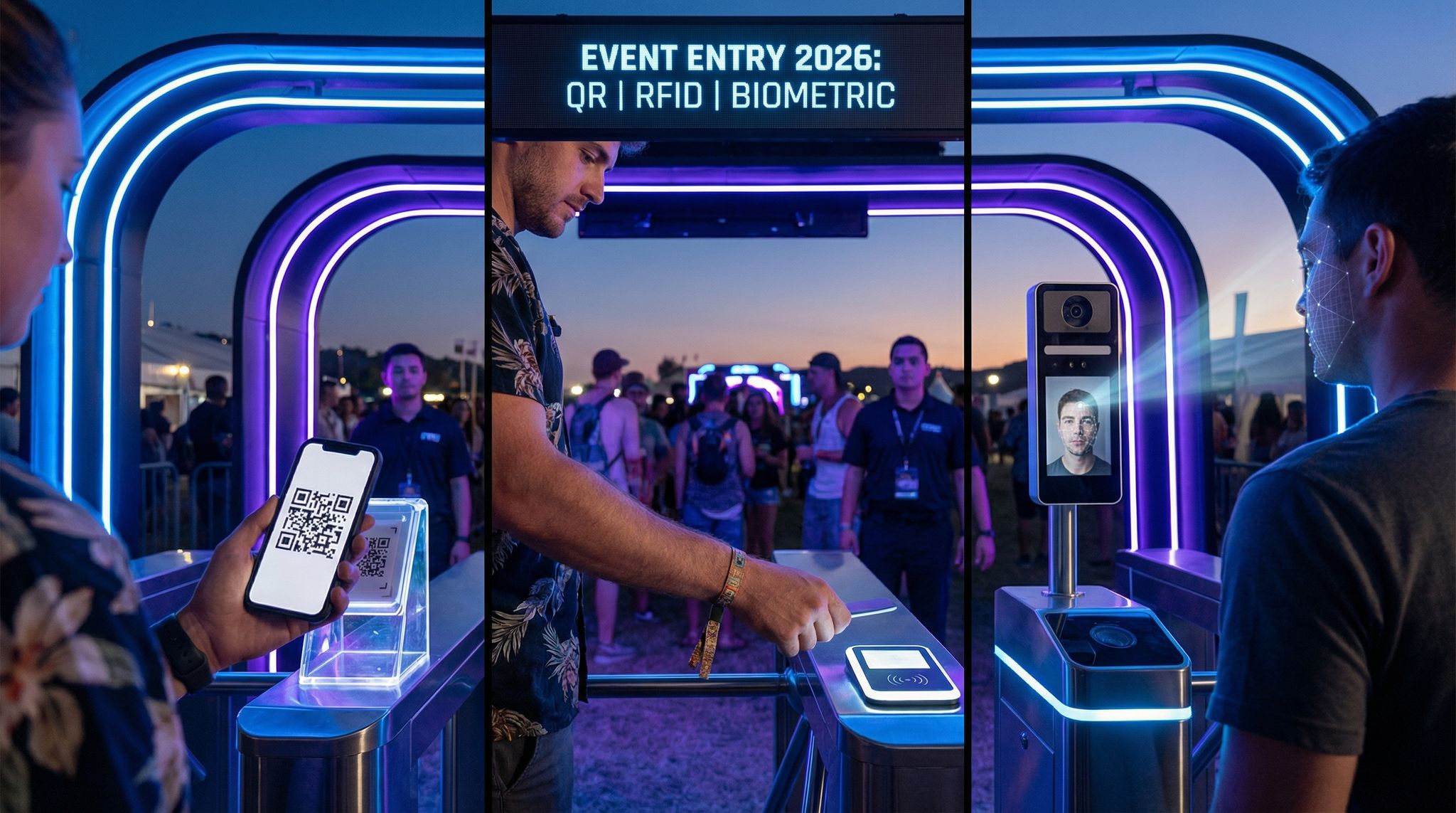
By 2026, access control technology has advanced dramatically. Driven by pandemic-era demands for contactless interactions and ongoing innovation, event entry has evolved beyond paper tickets or basic barcode scans. Today’s organizers often choose between three leading methods:
- Smartphone QR Code Ticketing – letting attendees flash a QR code on their phone (or printed ticket) to be scanned at the gate.
- RFID/NFC Systems – issuing ultra-fast radio-frequency wristbands or badges that attendees tap at entry portals.
- Biometric Entry – using attendees’ unique biological traits (face, fingerprint, etc.) to verify identity with no physical ticket at all.
Each approach promises a different mix of speed, security, cost, and complexity. The “best” choice isn’t one-size-fits-all – it depends on your event’s scale, budget, attendee profile, and even local privacy laws. In this guide, we’ll compare QR codes vs. RFID vs. biometrics in real-world terms to help you decide which tech is the right fit. We’ll break down how each works, their pros and cons, integration considerations, and lessons learned from actual implementations – from 500-person conferences to 100,000-attendee festivals. By the end, you’ll have a clear understanding of which entry system can deliver a smooth and secure welcome for your event.
Smooth Entry With Mobile Check-In
Scan tickets and manage entry with our mobile check-in app. Supports photo ID verification, real-time capacity tracking, and multi-gate coordination.
Let’s open the gates and explore the leading access control technologies of 2026 – and see which one earns VIP status for your needs.
Smartphone QR Code Ticketing
How QR Code Ticketing Works
Smartphone-based ticketing with QR codes has become ubiquitous at events of all sizes. QR codes (those square 2D barcodes) can encode a ticket ID or URL that links to the attendee’s record. Here’s how a typical QR ticketing flow works:
Ready to Sell Tickets?
Create professional event pages with built-in payment processing, marketing tools, and real-time analytics.
- The attendee buys a ticket online and receives a unique QR code – usually via email, in the event’s mobile app, or in their mobile wallet (e.g. Apple Wallet or Google Pay pass). Printed QR e-tickets are an option for those without smartphones.
- At the venue entrance, staff or devices scan the QR code using a handheld scanner or a turnstile-mounted reader. Many organizers simply use smartphones or tablets with scanning apps as the readers, making this approach very accessible.
- The scanning system checks the code against the ticketing database in real time to validate authenticity and ensure the ticket hasn’t already been used. If valid, the attendee is allowed entry; the ticket is then marked as “redeemed” to prevent reuse.
- Typically, the process takes only a couple of seconds per attendee – the scan either beeps green (entry OK) or red (problem) and the line keeps moving.
QR codes are highly flexible: an entrance attendant can scan off a phone screen or paper printout, and codes can be read even if the phone is offline (since the code itself holds the key identifier). Modern platforms often generate dynamic QR codes for added security – these refresh or only activate shortly before the event, thwarting would-be counterfeiters. (One popular festival ticket app only reveals the QR code a few hours before the show to combat scalping, a strategy highlighted by Hello Endless on their blog about how mobile-only ticketing ensures a smooth transition.) In essence, QR tech turns every smartphone into a ticket and every entry staffer into a mobile gate.
Benefits of QR Code Entry
It’s no surprise that QR codes are the default digital ticket in 2026. They offer a low-cost, low-friction solution that just about every attendee can use instantly. Key advantages include:
- Ubiquity & Ease of Use: Nearly everyone knows how to use a QR code now. Attendees don’t need special devices – just their smartphone or a printout. By 2025 over 2.2 billion people worldwide were using QR codes for payments alone, showing how mainstream scanning has become, as noted by Intellitix in a report on strategies for boosting attendee adoption of event tech. This familiarity means minimal training or explanation at the gate.
- Minimal Infrastructure Costs: For organizers, QR entry is extremely accessible. You can often use existing hardware (a staffer’s phone or off-the-shelf QR scanner) and the scanning functionality built into your ticketing platform. There’s no need to buy expensive new equipment or physical badges. Essentially, the heavy lifting is done by software and the attendee’s own device.
- Fast Deployment & Flexibility: Setting up QR ticketing can be done relatively quickly. If you’re selling tickets online, you likely already have QR codes generated for each order – you just need to equip staff with scanning devices. It’s easy to set up multiple entry lines or mobile check-in teams at the last minute if needed. And because QR codes can be sent digitally, last-second ticket sales or reissues are straightforward (no physical item distribution).
- Integration with Apps & Marketing: QR codes integrate well with broader digital engagement. For example, your event app can not only hold the ticket QR code but also push reminders (“Get your QR code ready for faster entry!”) and guide attendees through the check-in process. You can brand the e-ticket or app interface with sponsor logos or messaging. And post-scan, you can immediately trigger a welcome message or direct attendees to content in the app, since the system knows they’ve arrived.
- Environmental & Cost Savings: Going digital means eliminating thousands of paper tickets or plastic mail-outs. Many festivals see it as a greener approach – cutting down on waste from printing and shipping. It also saves on the costs (and headaches) of physical ticket stock, mailing fulfillment, or on-site will-call operations.
Overall, QR code entry shines for accessibility and affordability. Experienced event technologists often recommend QR-based ticketing as a starting point for smaller events or any organizer on a tight budget because it delivers reliable access control without big upfront costs. Even large venues and sports teams have widely adopted mobile QR tickets because they’re simple and effective – almost every concert or game attendee now expects to flash a code on their phone at the turnstile.
Drawbacks and Limitations of QR Codes
No technology is perfect, and QR ticketing does have its challenges. Organizers considering this approach should be aware of a few common pain points:
Keep Tickets in Fans' Hands
Our secure resale marketplace lets attendees exchange tickets at face value, eliminating scalping while keeping you in control of the secondary market.
- Scanning Speed & Throughput: Scanning QR codes is a manual process that typically requires aiming a reader at each code, one at a time. Throughput per lane is decent but not the fastest – usually around 8–12 people per minute max with an attentive staffer, according to insights on the 2026 toolkit for event security. Several factors can slow this down: phone screens at low brightness, glare from sunlight on screens, wrinkled printouts that won’t scan, or attendees fumbling to pull up their code. Over thousands of attendees, those extra seconds add up. In contrast, other technologies like RFID or facial recognition can achieve higher throughput (we’ll compare these later). With QR, you may need more entry lanes or staff to achieve the same entry rate as a higher-speed system.
- Potential for Ticket Sharing or Fraud: A QR code itself is basically just data. If someone copies or screenshots a code and sends it to an unauthorized person, that person might gain entry if additional controls aren’t in place. To mitigate this, most systems mark tickets as used after one scan – so a copied code could only be used once. But that first person to scan gets in; any duplicates get rejected at second scan. Dynamic QR codes (that refresh frequently or only activate just before the event) can greatly reduce illicit sharing, as can pairing code scans with ID checks for name verification at VIP or sensitive events. Nonetheless, compared to an RFID wristband (which is harder to clone) or biometric ID, a basic QR is somewhat easier to share or fake if someone finds a loophole. Vigilance and good system design (like one-scan-only validation) are important.
- Reliance on Phones & Batteries: While attendees love using their phones as tickets, there is a downside – phone issues can disrupt entry. If someone’s phone dies in line, if they can’t find the emailed ticket, or their screen is cracked and unreadable, it causes delays. You’ll need a plan for those cases (like having a manual lookup by name or an on-site help desk to re-send tickets). Connectivity can also be a concern; however, one advantage of QR codes is that connectivity isn’t required for the attendee (the code is already on their device). The scanners may need connectivity to verify tickets live unless the system supports offline mode with pre-downloaded ticket lists. It’s wise to brief attendees: “Download or screenshot your QR ticket in advance, and turn your screen brightness up at the gate.” Simple troubleshooting steps like these can preempt a lot of holdups.
- Manual Verification for Security: Unlike biometrics, scanning a QR code doesn’t inherently tell you that the person holding the code is the rightful owner – just that the code is valid. For most general admission events, that’s fine. But for high-security events, you might still need an ID check or visual identity verification in addition to scanning the QR, to prevent someone using a ticket that isn’t theirs. This can slow down the process. Some events embed the attendee’s name on the QR ticket and have staff do a quick name or photo ID match at entry, but that adds a level of manual labor. Essentially, QR codes alone verify tickets, not people. If personal identity matters (for example, non-transferable tickets or credentials), you either accept a bit of risk or incorporate an extra check.
- Less Data for In-Event Tracking: QR codes do the job for initial entry but once inside, they’re not typically used to continuously interact with the attendee. An RFID wristband, by contrast, can be used for cashless payments, session check-ins, or location-based activations throughout the venue. If you envision a fully connected on-site experience (scanning at sponsor booths, check-in at VIP lounges, etc.), basic QR codes may not support that as seamlessly. You could have attendees pull up their code again to scan at different points, but it’s not as fluid as a wristband tap. In short, QR is a point-in-time token, whereas RFID can serve as an ongoing interactive credential. However, QR codes can still be used beyond entry in creative ways (like scanning a code to join a contest or scavenger hunt in the event app), just not as continuously as RFID/NFC solutions.
Despite these limitations, QR codes remain an attractive option for many events. The issues are usually manageable with proper planning: have extra staff for busy waves, communicate clearly with attendees about how to use their e-tickets, and set up robust validation rules in your ticketing system. For a huge festival or a stadium that demands ultra-fast throughput, QR might be the limiting factor. But for countless concerts, conferences, and mid-sized events, it strikes the right balance of simplicity and performance. As one festival production manager put it, “Using mobile QR tickets was the simplest part of our entire operation – the only ‘failure’ we saw were a few drained phone batteries, which were easy to solve with a printout at the help desk.” In other words, if you execute competently, QR codes rarely become your biggest headache on event day.
Best Use Cases for QR Ticketing
Given its strengths and weaknesses, when does QR ticketing make the most sense? Experienced organizers and ticketing directors have identified a few scenarios where QR shines:
Grow Your Events
Leverage referral marketing, social sharing incentives, and audience insights to sell more tickets.
- Small to Medium Events (up to a few thousand attendees): At lower scale events – like a 500-person corporate conference or a 2,000-person indoor concert – QR codes are usually more than sufficient. The lines won’t be so massive that you need the absolute fastest tech, and the low cost is a major plus. For example, a tech conference of 800 attendees might simply use QR codes within their event app; attendees arrive, the staff scans each badge on an iPad, and everyone is inside within minutes. There’s no need to invest in RFID wristbands for an event that size when QR handles it fine.
- Events on Tight Budgets: When cost containment is critical, QR wins out. Community festivals, amateur sporting events, non-profit galas, or any event that doesn’t have the budget to deploy physical tech can rely on QR with confidence. The entry experience will still be modern and digital, just without the bells and whistles of more expensive systems. Organizers can allocate funds to other essentials while still benefiting from secure, verifiable digital tickets.
- Widespread One-Day Events: Some large events that occur in many locations or dates stick to QR codes for simplicity. For instance, imagine a nationwide series of synchronized concerts at dozens of venues – mailing RFID wristbands for each small venue would be complex, whereas a unified QR ticket system is easy to roll out everywhere. Each local venue just needs scanners and the central ticket database. Tours and multi-city events appreciate the plug-and-play nature of QR ticketing across different sites.
- Hybrid or Virtual Components: If your event has a virtual or hybrid portion (attendees joining online as well as in person), QR codes can streamline how you unify the access credentials. A person’s QR code could both get them into the venue and grant them access to an online event platform, for example. It serves as a single token tying together their event participation. This is harder to do with something like an RFID wristband, which doesn’t translate to online use. QR’s digital nature makes it versatile for linking physical and virtual attendance in 2026’s hybrid event world.
- Backup and Redundancy: Even when events invest in advanced access tech, they often keep QR codes in their back pocket as a backup method. If a primary system fails, having the ability to fall back to scanning a QR (which can be done with nothing more than a smartphone camera if needed) is a lifesaver. For instance, one major festival primarily used RFID wristbands but emailed all ticket buyers a QR code as well, instructing “have this code handy on your phone just in case.” Sure enough, when a few RFID scanners had hiccups, staff quickly switched to scanning QR codes on those lanes, preventing a big delay. QR’s simplicity makes it an excellent contingency plan.
In summary, smartphone/QR ticketing earns its place as the workhorse of event entry – dependable, accessible, and improving year by year with better scanner apps and anti-fraud features. It democratized digital ticketing, allowing events of all types to move away from paper. However, when events grow bigger or want to pack more into the wristband (like payments or richer data), they start to eye our next technology: RFID.
RFID/NFC Wristband Systems
How RFID Access Control Works
If you’ve been to a major festival or theme park in recent years, you’ve likely experienced RFID at work. RFID (Radio Frequency Identification) systems use small wireless chips embedded in credentials (like wristbands or cards) and readers that pick up the chip’s signal. In event access, the most common form is an RFID wristband that attendees wear. Here’s the entry process in an RFID-based system:
- Each attendee is issued a wristband (or sometimes a plastic card or badge) with an embedded RFID chip. These chips have a unique ID number and often use NFC (Near Field Communication) technology, a subset of RFID that works when the chip is very close to a reader (within a few centimeters). NFC is the same tech behind contactless credit cards and mobile wallet payments.
- Leading up to the event, the ticketing system links each chip’s unique ID to the attendee’s ticket record. This can happen in various ways: if tickets were mailed out, the chips are pre-assigned; or attendees might go to a wristband pickup station where staff activate the band and bind it to the person’s account (scanning the ticket barcode and the wristband’s RFID tag together). With a platform like Ticket Fairy that supports RFID, organizers can manage wristband assignments directly in the system, ensuring a smooth pairing of each band to the correct attendee.
- At entry, attendees simply tap or wave their wristband at an RFID reader (attached to a gate or handheld device). The reader energizes the chip and reads its ID instantly – no line-of-sight aiming needed as with a QR code. This makes scans very quick and easy: people can even just brush their wrist past a sensor without stopping.
- The system checks the chip’s ID against the authorized tickets database in real time, much like a QR scan, and immediately signals approval or denial. Often a light or turnstile feedback will flash green for go or red for stop. Many events use a tunnel or archway reader that can detect the chip as the person walks through, allowing a continuous flow.
- Since RFID chips are unique and encrypted, it’s extremely difficult to counterfeit a valid chip. Once a wristband is scanned and admitted, the system marks that ID as entered (preventing re-use at other gates). Some systems even enforce an anti-passback logic – meaning if someone tries to leave and re-enter inappropriately or use one wristband at two different gates simultaneously, it’s caught and flagged.
RFID entry systems often double as more than just gatekeepers. A big appeal of RFID wristbands is that they can be a multi-functional device for the attendee throughout the event: scan the same wristband to make a cashless payment for a drink, tap it at a merchandising booth to earn a giveaway, or use it to access VIP areas. All these interactions feed into the backend, giving organizers a wealth of data on movement and engagement. But even just for pure access control, RFID offers speed and reliability that older barcode systems can’t match. It essentially mechanizes the check-in – a quick tap and you’re in, no fumbling or direct line-up needed.
Advantages of RFID for Event Entry
RFID/NFC solutions have surged in popularity for large-scale events and festivals, and for good reason. They solve a lot of the pain points that come with traditional ticket scanning. Some of the biggest benefits include:
- Lightning-Fast Throughput: Speed is the killer feature. An RFID entry lane can process 15–20 people per minute per reader in real conditions, as highlighted in data on 2026 event security toolkits – nearly double the throughput of manual QR scanning. Attendees often don’t even need to come to a full stop; with an array of sensors, people can walk through steadily, tapping their wrist as they go. For massive festivals or stadiums where tens of thousands of people funnel in during a short window, this efficiency is invaluable. It means shorter lines, happier attendees, and the ability to safely get crowds inside before show time. In fact, in ideal setups, facial recognition gates and RFID tunnels can operate at similar speeds, but RFID has the advantage of being a proven technology widely in use for the past decade.
- Greatly Reduced Fraud & Scalping: Each RFID wristband is physically and digitally unique. Unlike a QR code that could be copied, an active RFID chip is very hard to duplicate or hack (especially when the data on it is encrypted). This significantly cuts down on ticket fraud. Reports from events that have switched to RFID often cite drastic drops in counterfeit tickets – one analysis noted a 90%+ reduction in fraud cases after moving from paper tickets to RFID wristbands. The system also discourages scalping and uncontrolled resale; since the wristband is tied to a person’s account and often securely fastened on their wrist, it’s not easily transfered to someone else without obvious tampering. Organizers can implement policies like “wristbands void if removed” to combat unauthorized transfers. All of this leads to more secure admissions and fewer headaches dealing with fake tickets at the door.
- Enhanced Security Features: Beyond just validating tickets, RFID can add layers of security. For example, you can program different access levels into different wristbands: general admission can’t open the VIP gate, backstage crew have wristbands that also let them into staff-only zones, etc. The readers will identify the credential’s permissions instantly. Compare that to a basic QR ticket, which usually is either valid or not, with no gradation of access unless manually checked. RFID systems can also detect if someone is trying to re-enter where they shouldn’t (anti-passback can flag that the wristband already entered, unless it’s a multi-entry pass). Some festivals even embed photo IDs or age info in the registration data, so a quick scan at a bar can confirm you’re of drinking age. Essentially, an RFID wristband can serve as a combined ticket + ID + access pass, all in one, making life easier for security staff throughout the venue.
- Offline Resilience: Well-designed RFID setups can function offline or in low-connectivity environments better than app-based scanning. At a remote festival site with patchy internet, local controllers at the gates can be pre-loaded with the list of valid chip IDs. Entry scans are then matched against the local list instantly, and if the network is down, they queue the scans to sync with the cloud later. Attendees still get in without a hitch. With smartphone tickets, if your scanning devices lose connectivity and they need to query a cloud server, you’re stuck. RFID systems often use local servers or edge computing at the venue. This robustness has proven critical in open-field festivals or places where thousands of phones might overwhelm cell networks. One festival in a rural area deployed a completely offline RFID entry system – essentially a closed local network at the gate – and not even a site-wide internet outage could stop the flow of people entering.
- All-in-One Attendee Credential: This is where RFID truly outshines other methods – the wristband can be the key to the entire event experience. Attendees love the convenience of an all-purpose wristband: it’s their ticket to get in, their wallet to buy things (tap at a point-of-sale to charge their linked card or prepaid balance), their proof of age, and even their social engagement tool (some events let you tap your wristband at photo booths or sponsor kiosks to automatically share photos or win prizes). For organizers, this means richer data and more opportunities: you can see which zones people visited, how long lines were by tracking band taps, and you eliminate cash handling by going fully cashless with RFID payments. It’s an ecosystem enabler. Many festivals report increased spending per head once they implement RFID cashless payments – for instance, attendees spend more when they just tap a wristband versus handling physical cash, as studies in the live events industry have shown. The ability to integrate access control with these other functions (entry + payment + analytics) makes RFID a compelling choice if you want to maximize both security and attendee engagement.
- Durability for Multi-Day Use: Unlike a paper ticket that’s one-and-done, an RFID wristband is designed to last. The waterproof, rugged bands can be worn for days or even weeks (in the case of a theme park season pass). Festivals spanning a whole weekend or sports tournaments spread over several days benefit from this – attendees keep the same credential on, and you don’t have to re-issue tickets each day. It also becomes a bit of a badge of honor; many festival-goers proudly wear their RFID fabric wristbands even after the event, advertising your brand in the process. That continuity helps with attendee loyalty and even marketing (free advertising on fans’ wrists and social media posts).
The bottom line is that RFID/NFC technology brings speed, security, and a premium experience to event entry. It’s not just about getting people in faster (though it does that very well); it’s about transforming the entry point into the launchpad for a connected event journey. It’s no wonder that by 2026, nearly every mega-festival (think Tomorrowland, Coachella, Glastonbury, etc.) and many large venues have adopted RFID in some form. Even events that initially balked at the cost have often come around after seeing the ROI in terms of smoother operations and increased on-site spending. As one festival director put it, “Going RFID was like upgrading to business class. Sure, it cost a bit more upfront, but once we saw how quickly 50,000 people came through the gates with almost zero fraud, we knew we weren’t going back.”
Challenges and Costs of RFID Implementations
For all its advantages, RFID is not a trivial undertaking. Event organizers must weigh the costs, logistics, and potential pitfalls that come with an RFID system. Here are some of the key challenges to be mindful of:
- Higher Upfront Costs: There’s no denying that RFID will hit your budget harder than simple QR tickets. You need to procure the hardware and the consumables. Each attendee needs a wristband or smart badge (which might cost anywhere from $0.50 to $5.00 each depending on volume, type, and features like full-color printing or special materials). You’ll also need RFID readers – these could be handheld units ($300–$800 apiece for industrial scanners), fixed gate antennas, or turnstile systems (which can run into thousands of dollars per gate for robust setups). Plus, there’s backend software which may come as part of your ticketing platform or via a dedicated RFID vendor. In many cases, events partner with RFID solution providers who offer a package – they supply the wristbands, readers, and software as a service. This can sometimes be on a per-attendee pricing model (e.g. $1 per wristband issued, etc.). In any case, expect RFID to be one of the larger line items in your tech budget. The ROI can absolutely justify it, but smaller events might find the economics tough unless they have sponsorship to offset costs.
- Complex Logistics & Planning: Implementing RFID requires significantly more planning and coordination than digital tickets. For instance, if you’re mailing out wristbands in advance, you have to collect addresses, manage bulk shipment well ahead of the event, handle returns for bad addresses, etc. If distributing on-site, you need a robust check-in process to hand thousands of people the right wristbands quickly (often done at a “box office” or will-call before the entry gates). You also have to plan for lost or damaged bands – how will you replace them and void the old ones in the system? All this means starting the project early. The timeline for RFID is typically measured in months: selecting a vendor, designing the wristbands (if custom branded), shipping, testing hardware, training staff. You can’t really slap together an RFID system a week before showtime. In contrast, QR codes could be deployed on short notice if needed. So there’s a project management overhead with RFID that shouldn’t be underestimated.
- Technical Glitches & Failures: While RFID technology is generally reliable, it’s not foolproof. Readers can sometimes misfire (e.g. a tag doesn’t read on the first tap, which can frustrate attendees unless staff are quick to direct a second try). Interference can be an issue – too much metal in the area or frequency noise could affect reads, though NFC (which is very short range) is less prone to interference issues than long-range RFID. Additionally, if your system relies on network connectivity, a dropout can halt validations (unless you have offline mode configured). We’ve seen cases where an improperly configured system caused delays – for example, at one festival the entry gates slowed to a crawl on day 1 because the RFID software was set to sync every scan with a remote server over a weak connection. After they adjusted to offline local validation, day 2 was smooth sailing. The learning: test, test, test your RFID system under real-world conditions. Simulate the peak entry rush beforehand, and have tech support on standby. You should also have backup plans (like those QR codes or a secondary handheld scanner) ready. Another scenario to prepare for: attendee errors. People occasionally put wristbands on too tight (cutting off circulation) or too loose (it falls off), or show up having forgotten their mailed wristband at home. Your customer service team will need processes for these situations (like issuing a replacement band and invalidating the old one in the system). It’s all manageable, but it’s more moving parts than digital tickets.
- Attendee Education and Compliance: Not everyone is immediately familiar with RFID wristbands, especially if your audience skews older or less tech-oriented. You might encounter attendees who don’t understand that the wristband is their ticket and must be worn at all times. Some might remove it and then can’t get back in, or trade wristbands as souvenirs prematurely. Clear communication is key: well before the event, tell attendees exactly how to use the wristband and why it’s important. For example, instruct them not to put it on until the day of the event (to avoid people tightening it too early and then wanting a new one), or demonstrate how to simply tap at the gate. In 2026, many festival-goers have used RFID bands before, but if your event is introducing it for the first time, expect a learning curve. Staff training is equally important – they should coach people in line (“tap the logo here, good, now go on through”) to minimize confusion. You don’t want someone waving their wrist wildly at the wrong area of the gate and holding up people behind them. Thankfully, after the first wave, most people catch on quickly and appreciate the convenience.
- Compatibility and Integration: RFID doesn’t operate in a vacuum – it needs to work hand-in-hand with your ticketing platform and other systems. Ideally, you have an integrated solution where your ticketing provider also supports RFID access control (for instance, Ticket Fairy’s platform offers built-in RFID event solutions, meaning the ticket purchase data, wristband assignment, and entry scans all live in one system). If not, you might be bolting on a third-party RFID system that has to sync with your ticket database. Ensuring seamless integration is vital. You want an attendee who buys a ticket last-minute to still be able to pick up a wristband at the gate and get in, which means the systems must communicate in real time. Middleware or API connections may be required. Some events choose to go with a full-service RFID provider to simplify this, at the expense of being a bit more locked-in. When negotiating those vendor contracts, pay attention to data ownership (make sure you own your attendee data and scan data) and support levels (have an SLA that includes on-site technical support for the equipment). If you’re rolling your own system, bring on experienced RFID technicians. Many events establish a “Mission Control” tech center on-site to monitor all systems – including entry scans – so any hiccup can be spotted and addressed immediately. (For insight on setting up such an oversight hub, see our guide on creating a tech command center to monitor entry, crowd flow, and more in real time.) The point is, RFID is a more elaborate dance of hardware and software – you need all parts in sync.
- Ethical and Privacy Concerns: Compared to biometrics, RFID is relatively light on personal privacy issues, because the chip typically only stores an ID, not the person’s actual data. However, as RFID wristbands enable a lot of tracking (you can know which entrance someone used, what they bought, possibly their location patterns if you have multiple tap points), organizers have a responsibility to use that data wisely and transparently. It’s good practice to inform attendees what data you collect via the wristband and how it will be used. In some jurisdictions (like parts of the EU under GDPR), the RFID data that ties to a person could be considered personal data. So you should treat it securely – encrypt transmissions, and don’t retain data longer than needed. In general, most attendees accept RFID at events because the benefits (fast lines, cashless convenience) are tangible, but ensure you have an privacy policy available for those who ask. Also, always give attendees a way to opt out of any extra tracking features – for example, if you’re doing cool interactive kiosks that track who did what, allow anonymous participation as well in case someone is uncomfortable using their wristband for that.
When weighing RFID, consider the scale and nature of your event: for a large music festival, the benefits often outweigh the costs due to volume and the expectations of tech-savvy attendees. For a small community fair, RFID might be overkill and not worth the expense. Some mid-sized events might find a middle ground, like using NFC-enabled smartphone wallet tickets (so attendees tap their phone like a wristband) – a hybrid of QR and NFC tech that’s growing in use. And remember, you don’t have to jump in 100% on day one; you could pilot RFID at a single gate or for VIP tickets to get a feel for it, then expand event-wide later. Many festivals did exactly that – tested RFID for VIPs one year, ironed out kinks, then rolled it out to all attendees the next.
Real-world outcomes show that, when done right, RFID systems can dramatically improve entry operations. One 3-day festival with ~40,000 daily attendance reported that switching to RFID wristbands cut average entry wait times from over 30 minutes to under 10 minutes on day one – they simply could process people faster and more consistently. The same system helped them catch dozens of invalid tickets (people who duplicated PDFs) that would have otherwise slipped in, potentially overcrowding the venue. On the flip side, another event’s first attempt at RFID faltered because they didn’t properly test their scanners and had poor crowd routing at gates, leading to confusion. The tech itself was fine, but the implementation plan was lacking. They regrouped, got expert advice, and the next year it went off without a hitch. The lesson is clear: RFID can be worth it, but you must commit to doing your homework – budgeting, planning, testing, and having the right partners.
Example: RFID at a Large Festival
To illustrate RFID in action, let’s look at a hypothetical (but informed by reality) case study of a large festival in 2026. This festival draws 50,000 attendees per day and decided to implement RFID for entry and cashless payments:
Preparation: The organizers partnered with an RFID event tech vendor. Six months before the festival, they placed an order for 60,000 custom wristbands (50k for attendees plus extras for staff, artists, and contingencies). Each wristband has a securely encoded chip. They integrated the vendor’s system with their ticket platform via API so that every ticket purchase would be assigned an RFID tag ID once fulfilled. Attendees had the option to get their wristband mailed weeks in advance or pick it up at an official exchange point in the city the week of the event.
On-Site Distribution: For those picking up on-site, the festival set up multiple “wristband exchange” stations the day before gates opened. Attendees showed their purchase QR code or confirmation email, staff scanned it, then scanned an unused wristband’s chip to bind it to that order, and then fastened the band on the attendee’s wrist. Each station had trained staff with handheld RFID readers and laptops connected to the system. The process took about 30 seconds per person. By opening day, over 90% of attendees had their wristbands in hand (or on wrist) and were event-ready.
Entry Experience: The festival had a dedicated main entrance with 8 lanes, each equipped with free-standing RFID pedestals that create a walk-through gate. Attendees approached in lines, and at each gate an overhead display prompted “Tap your wristband”. People tapped, a green light flashed, and they continued through. Because there were multiple pedestals, effectively four people could tap in nearly simultaneously per lane. At peak, the system handled roughly 120 people per minute across all lanes – a throughflow that would be unattainable with manual scanning. Security staff were posted to manage crowd flow but rarely needed to intervene in the scanning itself. Those with issues (like a damaged wristband that didn’t read) were pulled aside to a resolution tent, where staff had a computer to check their registration and issue a replacement band if needed. Very few backups occurred; most people moved through in seconds.
In-Event Use: Once inside, attendees found that their wristband was also their wallet. The festival had gone cashless, so all food, beverage, and merch had POS systems for tapping the wristband. Many attendees pre-loaded funds online, while others linked a credit card – all tied to that same RFID chip ID. This further reduced lines at vendors (no fumbling with cash or cards). The data from these transactions, combined with entry scans, painted a rich picture for organizers: they could see, for example, that a surge of entries at 5 PM correlated with long queues at the beer tents at 5:30, which helped them dispatch extra staff in real-time (this insight coming from their integrated dashboard; it’s an example of how connecting ticketing, entry, and payment data creates a powerful real-time ops tool for large events). The wristband also allowed them to do fun perks: a few interactive art installations let people tap to “check in” and later receive a personalized photo montage of their festival experience via email.
Outcomes: The RFID system dramatically cut unauthorized entry – the gate staff reported virtually zero instances of counterfeit tickets, whereas in past years with just QR codes they had caught dozens of fakes. Attendees gave positive feedback about entry speed; many posted on social media that they “got in faster than ever, no line at all at 4pm!” On the financial side, the festival saw a 20% increase in average attendee spending compared to the last pre-RFID edition, which they attribute partly to the ease of cashless payments (and perhaps people feeling secure to spend since everything was on the convenient wristband). The organizers also learned from a few snags: Day 1 had a brief slowdown when one gate’s reader lost power – they quickly brought in a spare battery backup and from then on had redundancies in place. They also noticed a handful of people sharing VIP wristbands after entry (e.g. one person would tap in, then slip the band off to give a friend access to VIP area). To combat that, next year they plan to use tamper-evident locking clasps and maybe add a photo verification in the VIP system. These little adjustments aside, the festival considered RFID a huge success and decided it’s the new standard for their events moving forward.
This example encapsulates why RFID has become the workhorse for large events – it scales beautifully and unlocks a level of insight and control that simpler methods can’t. However, the next evolution on the horizon goes a step further by removing the need for any ticket or device… and that’s biometric entry.
Biometric Entry Systems
The Rise of Biometrics at the Gate
Biometric entry uses an attendee’s inherent traits – like their face, fingerprint, or iris – as the “ticket.” It sounds like science fiction, but it’s increasingly real in 2026. Imagine walking up to a camera at a venue entrance, it recognizes your face in a split second, and you stroll right in without scanning a thing. That’s the promise of biometric access control: truly frictionless entry tied to identity, not a piece of paper or plastic.
There are a few biometric modalities to consider:
- Facial Recognition: By far the most discussed for events. It uses cameras and AI to identify people by their facial features. Attendees would typically enroll a photo ahead of time (often by uploading a selfie during ticket registration). At the event, cameras at the gate capture faces of people in line, match them against the database of ticket-holders, and grant entry to recognized faces. Modern facial recognition systems can process multiple faces at once, enabling a flow of people through a gate with minimal stopping.
- Fingerprint Scans: Fingerprinting has been used for access in theme parks and some venues for years (e.g. Disney World uses fingerprint readers alongside tickets to verify that the same person is using a multi-day pass). For events, an attendee might register their fingerprint at the time of ticket purchase or on-site, and then a fingerprint reader at the gate confirms their identity when they touch it. It’s a direct verification of the person, often used in controlled environments.
- Palm or Hand Scans: A newer approach, popularized by systems like Amazon’s “One” palm scanner, is to use the unique patterns in a person’s palm or hand geometry. These are contactless or minimal-contact scans – the attendee holds their hand over a sensor – that can be quick and hygienic. Some stadiums have tested palm-scanning as an entry method for season ticket holders.
- Iris or Eye Scans: Less common in entertainment contexts but used in high-security facilities, iris recognition cameras can identify individuals by the unique pattern of their irises. This could theoretically be used for VIP or staff access in sensitive areas (and some airports use it for fast-track security lanes), but at public events it’s rare so far due to the need for precise cameras and alignment.
- Voice Recognition or Others: Unlikely at entry gates due to noise and complexity, but worth noting that biometrics is a broad field. For entry, face and fingerprint are the frontrunners, with palm scans emerging as a contender.
In practice, facial recognition has gotten the most trial at events. It doesn’t require people to physically touch anything (a big consideration in a post-pandemic world) and can potentially check people through at a very high rate. A face-cam system might verify 20-30 people per minute per lane or more in optimal conditions, according to data on 2026 event security toolkits, outpacing even RFID since people don’t even need to tap – they’re recognized as they approach. Some facial recognition gates use a continuous corridor where attendees just walk normally and a screen maybe flashes their name or a checkmark once verified.
However, deploying biometrics isn’t as simple as flipping a switch. Pre-event enrollment is crucial – you need attendees to provide the biometric data (like a clear selfie or scan of their finger) in advance or at a special signup station. The success of recognition depends on the quality of this enrollment data and the tech’s accuracy. The venue also needs specialized hardware: high-resolution cameras with good lighting for face, fingerprint readers for fingers, etc., plus the computational systems (often cloud-based AI services) to match biometrics with your ticketing database in real time.
It’s cutting-edge technology, and event organizers in 2026 are cautiously experimenting with it. Some use it for VIP fast lanes or staff entrances rather than the main public entry, to test effectiveness and acceptance. Others, like certain sports venues, have begun offering biometric entry as an optional perk – attendees can opt in for a faster line using face or finger scan, while everyone else still uses their tickets normally. This dual approach respects personal choice and eases in the technology without forcing it on those uncomfortable.
Let’s delve into why an event might consider biometrics and what the concerns are.
Benefits of Biometric Entry
Using biometrics for entry can feel almost magical when it works well. Here are the major potential benefits driving interest in these systems:
- Unparalleled Speed and Convenience: The holy grail of entry tech is letting people in without even stopping. Biometrics can achieve that. Facial recognition gates, for example, allow a continuous flow of attendees walking through, with the system logging each face in milliseconds. Throughput can reach 20-30+ people per minute per gate, as noted, since multiple faces are processed at once by the AI (www.ticketfairy.com). This is because with face ID, the “scan” is passive – the person just has to face a camera briefly, not pause to align a code or tap a device. For attendees, it’s incredibly convenient: no need to dig out a phone or ticket, no worry about losing a wristband. They are the ticket. Many who try it say it feels frictionless, almost like walking into their own office or home with an automatic door. For the organizer, fewer bottlenecks and potentially less staffing at gates (one attendant can monitor a biometric lane that hundreds of people flow through, whereas with manual scanning you often need one staffer per few hundred people). This can cut down labor costs if fully realized.
- Enhanced Security – True Identity Verification: Biometrics tie entry to an individual’s identity in a way that QR or RFID cannot. If John Smith buys a ticket, only John Smith’s face (or finger) will be accepted at the gate. He can’t give that ticket to someone else without alerting the system. This eliminates ticket sharing and resale fraud beyond any doubt (assuming IDs were verified at enrollment). It’s extremely appealing for high-security events or sensitive venues. For example, a corporate shareholders meeting or a government conference might require that only vetted, badge-photo-matching individuals enter – facial recognition could enforce that without slow ID checks by humans. It can also help ensure banned individuals truly can’t enter (if you have a watchlist of faces, the system can flag them). In essence, biometrics brings airport-level or high-security verification to event entrances: you know the person coming in is who they claim to be. That’s peace of mind when security is paramount.
- No Physical Credential to Lose or Forget: With biometric entry, there’s nothing to carry. Attendees can’t forget their tickets at home or lose a wristband en route. This is great for multi-day events – attendees don’t need to worry about keeping a pass intact, and there’s no reissue hassle. It can also reduce the costs of printing or producing physical credentials (though those savings might be offset by tech costs, of course). For events targeting a very tech-forward audience, going fully biometric might even be a branding point – it signals a futuristic, efficient experience.
- Reduced Scalping & Black Market Issues: Since biometric tickets are typically non-transferable (your face is your entry, you can’t sell that on StubHub easily), organizers have more control over the secondary market. This could be seen as a benefit or a downside depending on perspective, but from the organizer standpoint, it means less worry about fake tickets circulating or unauthorized resale at inflated prices undermining your pricing strategy. Fans who got tickets legitimately are the ones who get in, full stop. (However, this is only true if you mandate biometric for everyone, which most events haven’t dared to do yet. And you’d need to offer refunds or official resale channels if people can’t go, to be fair. It’s a complicated topic, but biometrics could enforce a strictly personalized ticket approach.)
- Potential for Multifactor & Additional Services: Biometrics can also be combined with other systems for extra layers. For instance, some implementations use face + temperature checks (during pandemic times, some events did trial face recognition that also screened body temperature as a health measure). Or face plus a secondary scan for certain zones (maybe face gets you into the venue, but to get backstage you need face and an RFID staff badge, achieving two-factor security). Another potential: linking face recognition with personalization, like greeting a VIP by name on a screen as they enter (a nice touch at a high-end experience). It can also speed up services like age verification for alcohol – if an attendee’s profile is marked 21+ and you trust the face match, a bartender could accept a facial scan as proof of age (some venues are exploring this in 2026). So beyond entry, the biometric could become a unified ID for various checkpoints inside the event, similar to how RFID is used, but without requiring any wearable.
- Hygiene Benefits: One reason fingerprints fell slightly out of favor in recent years is the hygiene concern – everyone touching the same fingerprint scanner could spread germs, which was a big no-no during COVID times. Contactless biometrics like facial or iris recognition avoid that completely; people don’t touch anything. In fact, early adoption of facial recognition at venues (like some stadiums) was partly driven by the desire for contactless entry in a pandemic-conscious environment. Reports indicate that biometrics are a high priority for stadiums and that fan experience improvements drive these integrations. In 2026, people are back to high-fiving at concerts, but the preference for touch-free interactions remains in many quarters. Biometric gates satisfy that nicely – they’re as touchless as it gets.
When everything works, biometric entry can be the fastest and most secure way in. It carries an aura of state-of-the-art sophistication – being able to tell sponsors or press that your event used AI at the door to speed up entry can be a marketing point in itself. Some event industry reports have highlighted that nearly half of venues were considering biometrics as a priority by 2025, especially stadiums and large venues eager to modernize fan experiences and tighten security. Major League Baseball’s optional facial ticketing program (the Go-Ahead Entry system using face scans) is a notable example – by mid-2024, about half a dozen MLB parks had lanes where enrolled fans could enter via face scan and skip the lines, as detailed in reports on facial recognition at Great American Ballpark. Those who used it reported favorably on the convenience (and indeed those systems touted being “noticeably faster than traditional scanning” according to end-user feedback in a Stadium Tech Report study, cited in analysis of stadium biometric priorities).
However, we must temper these benefits with the substantial challenges biometrics present.
Risks and Challenges of Biometric Entry
If RFID is an incremental step up from QR codes, biometrics is a giant leap – with all the uncertainty and hurdles that leaps entail. Here are some of the key challenges and downsides:
- Privacy and Public Perception: The biggest cloud over biometric entry is the privacy issue. Scanning people’s faces or fingerprints raises immediate concerns for many attendees: How will my data be used? Is it stored securely? Could it be misused or hacked? Unlike a ticket ID, your biometric markers are deeply personal – you can’t change your fingerprint or face if it’s compromised. There’s also a broader discomfort among some fans about surveillance; it can feel “Big Brother”-ish to be facially tracked. These worries have real impact: in 2019, a wave of negative publicity and activist campaigns led several major festival promoters to back off plans for facial recognition at events, as reported when concert promoters turned away from facial technology. Artists and attendees voiced opposition, and companies like Ticketmaster publicly paused their facial recognition pilots in the concert space due to the outcry. Even in 2026, you’ll find a share of your audience is skeptical of or outright opposed to biometrics. This means if you plan to introduce it, communication and consent are paramount. You likely need to make it opt-in, clearly explain the benefits, and what safeguards are in place. Without that trust, you risk a PR fiasco or losing ticket buyers.
- Regulatory and Legal Constraints: Hand-in-hand with privacy come legal regulations. Biometric data is considered highly sensitive in many jurisdictions. For example, under Europe’s GDPR, using facial or fingerprint data typically requires explicit, informed consent and a clear necessity – misuse can bring heavy fines. Certain U.S. states like Illinois (with BIPA – the Biometric Information Privacy Act) give individuals rights to sue if their biometric data is taken without proper notice and consent. There have been cases of companies (even theme parks) facing multi-million dollar class action lawsuits for things like collecting fingerprints without a compliant consent process. As an event organizer, you must navigate this legal landscape carefully. It might mean restricting biometric programs to regions where laws are clearer or more permissive, or tailoring your method (e.g. on-device face matching that doesn’t store an image, to sidestep definitions of biometric storage). Always involve your legal team or advisors when rolling out biometrics – the last thing you want is to unknowingly violate a privacy law. Also, have a clear privacy policy and get attendees to actively agree to it if they opt in. Events in 2026 often have to provide alternatives for those who don’t want their biometrics used – say, a separate line for opt-outs who can show an ID instead – to avoid any hint of coercion.
- Accuracy and Technical Issues: Today’s facial recognition algorithms are very good, but not 100% perfect. Factors like poor lighting, hats or costumes, similar-looking individuals, or database quality can lead to false negatives (not recognizing a valid attendee) or much rarer false positives (mistaking someone for someone else). A 99% accuracy still means 1 in 100 could face an issue – with thousands of attendees, that’s dozens of people who might be told “face not recognized, step aside.” Those instances must be handled swiftly by staff to avoid backups or frustration. For fingerprints, issues can arise if someone’s finger is dirty, wet, or they don’t align it right – plus it’s one-at-a-time and slower. Biometric systems must be finely tuned and tested with the specific crowd. There have been improvements to reduce bias – early facial recognition was notoriously less accurate for certain demographics (darker skin tones, for example, due to training data imbalances). Modern systems are much better, but organizers should demand performance stats from vendors and perhaps do a small pilot to gauge accuracy in the field. Lighting and camera setup at venues is a non-trivial matter: for reliable face scans, you need consistent lighting (nighttime events need infrared or good flood lighting at gates), and camera placement that captures faces at the right angle as people approach. Any technical glitch (camera disconnects, network lag connecting to the face database) can cause delays. Redundancy and local processing can mitigate some network issues – some systems store biometric templates locally at each gate to do matching even if internet drops, similar to offline RFID mode. But that adds complexity. Essentially, you’re relying on advanced hardware and software; if it fails, you need a backup plan (likely switching to manual scanning). Always budget extra time and resources for testing biometric setups in the actual venue environment – don’t assume it works as magically as the sales demo in all conditions.
- Enrollment Hurdles: Biometric entry is only as good as the enrollment process. Getting high-quality data from attendees ahead of time can be challenging. If done online, you need users to take a proper selfie or scan that meets your requirements (clear image, good lighting, etc.). Not everyone follows instructions well, so some faces might not match on site if their upload was poor. Some events set up enrollment stations, for example at badge pickup or in advance, where attendees can quickly have their face or fingerprint captured under controlled conditions – but that is an extra step that not everyone will do, and it can create friction or lines of its own. Essentially, onboarding attendees into a biometric system is a new task events have to handle. There’s also an adoption curve: some portion will simply not bother or will miss the emails, etc. If a large percentage don’t enroll, your biometric lane might be underutilized while everyone else goes through normal lanes. Thinking of incentives or making enrollment super easy (like part of buying the ticket: “upload selfie now for faster entry”) can help. One example: at some Major League Baseball stadiums with optional face entry, they launched it via the team’s mobile app – fans could enroll their selfie in the app in minutes. Early adopters got perks (maybe a separate shorter line or a bonus item). Over time more fans joined when they saw peers breezing through gates. This is a cultural shift and might take time; in 2026, we’re still in the early adopter phase for most event biometrics, so don’t expect 100% uptake or comfort immediately.
- Costs and Vendor Dependency: Implementing biometrics tends to be expensive. You’ll need specialized camera systems or scanners, and likely a third-party software solution with robust AI – unless you have an in-house data science team building one (which is uncommon in the events space). Many event organizers will partner with a biometric tech company or use solutions offered by their ticketing provider if available. These vendors can charge setup fees, per-attendee fees, or even subscription models for the service. It might be more costly per person than RFID. Until the tech commoditizes further, it’s a premium add-on. Also, carefully vet vendors for security standards – they’ll be handling sensitive data, so they should follow strong encryption practices, not store raw data longer than needed, etc. There’s a trust element here: in a way you are outsourcing part of your security to a tech firm. Make sure they have a good track record and ideally some third-party certifications or audits of their tech. Another cost to consider: infrastructure. High-speed internet at gates, power for the cameras, maybe even servers on-site for local processing – these can add complexity. Some events had to invest in upgrading their entry gate networking significantly to support real-time video processing and data sync. Additionally, you may still need regular entry setups as a backup or for those who opt out, so you’re not entirely replacing old costs; you’re layering new ones.
- Social and Ethical Implications: Beyond privacy laws, think about attendee sentiment and inclusivity. Could biometric requirements exclude some people? For instance, not everyone has a smartphone or is comfortable uploading their face; if an event mandated it, it might deter certain attendees (like older individuals or privacy-conscious fans). Also consider errors: if the system fails to recognize someone repeatedly, how will staff handle it to avoid embarrassment or conflict? There’s also the scenario of identical twins or people who look alike – hopefully rare, but a reminder nothing is foolproof (twins can sometimes fool face recognition, though some systems claim to handle it). Ethically, you should have a clear answer if someone asks, “What are you doing with my face data after the event?” – ideally the answer is, “We delete it promptly” or “It’s stored encrypted and safe, and here’s why you can trust us.” The more transparent you are, the better. Some organizers put out data transparency reports or statements to proactively address these concerns. For example, a festival trialing facial entry might announce: “This is optional, images are converted to mathematical templates and the photos themselves are destroyed, and templates are deleted 30 days after the event,” etc., to build trust. If you can’t confidently convey the safeguards, you may not be ready to deploy it.
Given these challenges, most experts see biometric entry in 2026 as a tool to be used carefully. It’s not likely to replace QR or RFID for the majority of attendees overnight, but it’s making inroads, especially in controlled use-cases. A common strategy is the opt-in fast lane approach: you keep normal ticket scanning for everyone, but also have a “biometric express lane” for those who voluntarily pre-registered. This gives you the best of both worlds: you reduce lines by offloading some percentage of people to the faster lane, you gather experience with the tech, but you don’t forcibly impose it on anyone who might push back. For instance, a festival might advertise: “Enroll your face for a VIP entry experience – no lines, just walk through a facial recognition gate! (Regular entry also available.)” This typically yields a small percentage of adopters at first (maybe 5-10% will try it), but if those people rave about how quick it was, it can grow in future years.
The technology is evolving too. Companies are working on making biometric checks more privacy-friendly – for example, systems where the face matching happens on the user’s own device (like how FaceID on iPhones never sends your face data to the cloud; it’s stored in a secure chip on your phone). We might see ticketing apps that use your face just to unlock a local encrypted token that lets you in, without any central database of faces. Such approaches could alleviate privacy issues. But it will take time for standards to emerge and for audiences to get comfortable.
One real-world example: In 2024, a European arena introduced a facial recognition option for season ticket holders to enter through a special gate. They reported that by the end of the season, about 25% of regular attendees had enrolled and the dedicated gate was scanning people in at roughly 30 people per minute with almost no wait, even when other gates had queues. They credited careful communication (including offering a tour of the system to a local privacy watchdog group and getting their endorsement) with helping build trust. Meanwhile, a different venue in the U.S. faced backlash when word leaked that they were considering face scanners – they ended up shelving the plan and instead implemented an age verification system using an electronic ID scan (simply scanning driver’s licenses) at entry for certain shows, which was less controversial. These cases show the spectrum of outcomes. The takeaway: know your audience and stakeholders. If you decide to deploy biometrics, do it transparently, securely, and with a clear opt-out path.
Real-World Trials and Uses
It’s worth highlighting a few notable deployments of biometric entry tech up to 2026, as these shed light on how it can be done effectively (or not):
- Sports Stadiums and the CLEAR Program: In the U.S., a company called CLEAR (famous for airport security fast lanes) has partnered with sports venues to offer biometric stadium entry. Fans can enroll their fingerprints or eyes (or face, depending on the program) once through CLEAR, and then use a dedicated CLEAR lane at participating stadiums. For example, some NBA and MLB arenas let fans with CLEAR breeze through ID verification and entry in seconds. The adoption has been moderate – appealing particularly to season ticket holders and frequent attendees who value the convenience. These programs tend to emphasize that it’s opt-in and secure. They also often combine it with perks (like a free month of CLEAR at the airport, etc.). While not every fan uses it, those who do shave significant time off their entry, and it’s helped prove the concept that a segment of fans will accept biometrics for a smoother experience.
- Music Festivals Pilots: A handful of music festivals have dabbled with facial recognition in limited ways. One large EDM festival in Asia reportedly tested a facial recognition system for VIP entries and as an added security measure to spot banned individuals. It worked technically – VIPs got in super fast – but the organizers kept a low profile about it to avoid stirring controversy. Meanwhile in Europe, a certain multi-day festival partnered with a tech university on a trial where one entrance gate was equipped with face recognition and a few hundred volunteer attendees agreed to use it. Feedback was gathered to assess comfort levels and accuracy. The results were promising on speed but highlighted that many festival-goers still had reservations. The festival decided to pause expansion until they could address privacy better. On the other hand, the Olympics (while not a music festival) made headlines by using facial recognition for athlete and staff accreditation at Tokyo 2020 (held in 2021) – a controlled population with mandatory participation. That was deemed a success for security, showing the viability in a controlled, high-security event. But they did not use it for general spectators.
- Venue Staff & Contractor Access: One area biometrics have quietly taken hold is in managing staff entry at venues and festivals. Many backstage or staff entry points now use either fingerprint or facial recognition to ensure that only authorized crew get into sensitive areas. It’s easier to ask staff/crew to consent to this as part of their working agreement. It prevents credential sharing (e.g., a worker can’t just hand their badge to a friend to get them in). For example, the NFL implemented a facial authentication program for all media and staff accessing the field on game days, as noted in reports on stadium biometric priorities – each person’s face had to match their registered profile to pass security. This dramatically reduced incidents of badge swapping. Festivals too have started using fingerprint or face scans at crew check-in each day so that lost staff badges can’t be misused. These use cases have been successful and typically uncontroversial since they’re internal and for security. It’s a smaller step from there to extend the option to attendees.
- University and Expo Badges: Outside of entertainment, there have been conferences and expos experimenting with biometrics. Some high-profile tech conferences let attendees opt to link their face to their registration so they can walk up to a kiosk and print their badge without an ID, for instance. Some universities use iris scanners for student entry into exam halls or sporting events to prevent ticket fraud among students. These controlled communities often accept it because the value (and trust in the institution) is there. It shows that for certain event types – especially where security is top priority (like a government summit) or where the community is closely managed – biometrics can be more readily implemented.
All told, biometric entry is on the horizon but must be handled with care. As one event technology analyst put it, “Biometrics will complement tickets, not replace them outright, at least through the late 2020s. The key is using them in ways that enhance experience without alienating your audience.” For most organizers, the question isn’t if this tech will eventually touch their events, but when and how to introduce it responsibly. And importantly – whether the benefits outweigh the downsides for their specific scenario. For some, the equation might lean yes (e.g., a VIP lounge at a conference might benefit from face-ID entry to wow the guests). For others, sticking with tried-and-true RFID or mobile tickets might be the wiser choice for now.
Having explored each of the three technologies on their own, it’s time to put them side by side. In the next section, we’ll directly compare QR codes, RFID, and biometrics across key criteria like speed, cost, and attendee experience, so you can see clearly how they stack up.
Head-to-Head Comparison: QR vs RFID vs Biometrics
Each access control method brings unique strengths. This section compares smartphone QR codes, RFID/NFC, and biometric entry on the critical factors event organizers care about: entry speed, security, convenience, cost, and more. Below is a summary table highlighting how they stack up:
| Entry Method | Throughput (per lane) | Security & Fraud Prevention | Attendee Convenience | Key Challenges to Manage |
|---|---|---|---|---|
| QR Code (Mobile/Paper) | ~8–12 people per minute (manual scan required), based on 2026 security toolkit data |
Low–Medium: Ticket can be shared or copied if no ID check; one-time use and dynamic codes help prevent duplicates. | Medium: Phone readily available, but must present screen or paper; need sufficient brightness/QR load. | Screen glare or phone battery issues; slower if attendees fumble; requires network if not preloaded; no personal ID verification by default. |
| RFID/NFC Wristbands | ~15–20 people per minute (tap & go, minimal pause), based on 2026 security toolkit data |
Medium: Each wristband is unique & encrypted, hard to clone. Can be physically given to someone else if not secured; anti-passback limits re-use. | High: Just tap wrist – no need to pull out anything. Durable for multi-day use, waterproof, etc. | Higher cost per attendee (wristbands & hardware); planning distribution; potential reader hiccups; needs upfront integration and testing. |
| Biometric (Facial) | ~20–30+ people per minute (continuous flow possible), based on 2026 security toolkit data |
High: Essentially non-transferable – verifies the individual’s identity; stops all ticket sharing. Some risk of false match errors but very secure overall. | High (when opt-in): Nothing to carry or show – truly hands-free entry. Enrolling ahead is an extra step but then it’s frictionless on site. | Privacy concerns & legal compliance; must obtain consent and protect data; requires reliable cameras & network; need backup for unrecognized faces or opt-outs. |
| Biometric (Fingerprint) | ~10–15 people per minute (brief stop to press finger), based on 2026 security toolkit data |
High: Unique to the individual; well proven for ID verification. However, requires physical contact and one-at-a-time scanning. | Medium: Quick scan if familiar, but some find it intrusive or worry about hygiene (everyone touching the same sensor). | Hygiene issues (touchpoint); slightly slower than face due to alignment; attendees must enroll fingerprints; hardware cheaper than face but still specialized. |
Table: Comparing Entry Technologies on Speed, Security, Convenience, and Challenges. Biometric methods can offer superior security and even higher throughput than traditional tickets, but come with significant implementation caveats (enrollment, privacy, cost). RFID strikes a balance of speed and enhanced capabilities, while QR codes remain the go-to for simplicity and low cost.
A few observations from the comparison:
- Speed: If pure entry speed is your top KPI (e.g. clearing tens of thousands of people in an hour), RFID and facial recognition clearly outpace QR codes. Continuous flow face recognition, when it works perfectly, is the fastest – we’re talking sub-2-second identification per person in ideal conditions, meaning a steady stream walking through. RFID is a close second, with a quick tap taking maybe 2–3 seconds max per person. QR scanning is a bit slower (each scan might take 5–8 seconds including aligning the code and any small delays). The differences only really matter at scale – for smaller events, all three can get people in efficiently. But at festival or stadium scale, these per-person seconds translate to big differences in line lengths. For example, 10,000 people through 4 lanes: at 10 ppl/min each (QR), that’s ~250 minutes (over 4 hours) to get everyone in if coming all at once; at 20 ppl/min each (RFID), ~125 minutes; at 30 ppl/min (face), ~83 minutes. In practice, arrivals are staggered, but it illustrates how throughput scales.
- Security: Biometrics wins on ensuring the person is the rightful ticket-holder – you can’t casually share your face or fingerprint. RFID greatly reduces counterfeits and eliminates duplicates, but someone could hand their wristband to a friend if they really wanted (unless anti-tamper measures are in place). QR codes alone provide the least identity security – they only validate the ticket, not the person, so additional measures (like matching to an ID or using dynamic codes to deter printing multiples) are needed for high-security needs. That said, for most concerts or general events, a good system with QR codes and one-scan validation is secure enough to catch the obvious issues (like identical codes used twice). It’s just that RFID and biometrics raise the bar, eliminating most of the loopholes that scalpers or sneaks might exploit.
- User Convenience: RFID and biometric (face) are both very user-friendly during the event – nothing to pull out of a pocket, just a wave of a wrist or a face scan. Many find that more convenient than QR, which requires managing a phone or paper. However, biometric requires the up-front enrollment which is an extra task (not exactly convenient before the event, though some may find it fun or novel). Fingerprint scanning is slightly less convenient than face because you still have to physically press on something and it’s one-at-a-time. Some tech-savvy attendees absolutely love the futuristic feel of walking in via face scan – others might find it eerie. So “convenience” in biometrics has a subjective aspect: psychological comfort. QR codes are familiar and non-invasive, which some would argue makes them more comfortable overall even if they involve a small action at entry. It’s important to know your audience’s comfort level with tech. For a developer conference, people might embrace biometrics eagerly; for a community fair with older attendees, probably not as much.
- Cost factors: QR is the clear winner on low cost. Essentially free per attendee (digital delivery), and scanners can be standard devices. RFID has moderate to high costs – each attendee’s wristband or card, plus the physical infrastructure. Biometric is currently high cost – specialized hardware and services – but for smaller numbers (like VIPs) it might be manageable. If we break it down: for 10,000 attendees, QR might cost a negligible few cents each (if they print their own or just use phones), so maybe a few hundred dollars total for scanners and extra staff devices. RFID might cost on the order of $10,000–$50,000 (wristbands at $1-$3 each, plus readers/gates and system fees). Biometric maybe also in that tens of thousands range or more, depending on how many gates and vendor fees (facial recognition providers might charge per user or a flat license fee + equipment rental). There’s also the ongoing costs: RFID might reuse some hardware yearly but still needs new wristbands each event; biometric could reuse hardware but might have cloud fees, etc. We’ll touch more on cost in the next section, but in the table context, cost and complexity are a major “challenge” for RFID and biometrics that QR doesn’t have.
- Challenges & Pitfalls: The table’s last column is a reminder that each tech needs specific planning. QR’s main issues are operational (crowd management and making sure tech doesn’t slow down due to network or user error). RFID’s issues are logistical and technical (distribution, ensuring hardware is solid). Biometrics has the biggest non-technical baggage – the human factors of privacy and consent, plus needing a bulletproof tech setup to avoid public failures.
In short, QR codes offer simplicity but moderate performance, RFID offers high performance at a higher cost/effort, and biometrics promise the ultimate in speed and security but with significant caveats. Often, event organizers will choose the technology that aligns with the must-have priority – be it cost, speed, or security – and accept the trade-offs on the other aspects.
However, choosing the right solution isn’t just about the technology’s specs. It requires looking at your event’s specific context, budget, and even your attendees’ expectations. Next, we will consider the practical side of decision-making: costs and ROI of each solution, integration considerations, and how to match the tech to different event scenarios. This will help connect the theoretical comparison to real-world choices.
Cost and ROI Considerations
One of the first questions event organizers ask when comparing access control options is: What will it cost, and is it worth it? Budgets are always tight, and technology investments need to pay off either through direct revenue, cost savings, or a significantly improved attendee experience (which indirectly drives success). In this section, we’ll break down the cost components of QR vs RFID vs biometrics and discuss how to evaluate the return on investment (ROI) for each.
Upfront Costs: What You’ll Pay
The cost structures of the three tech options vary widely:
-
QR Code Ticketing Costs: This is by far the most budget-friendly route. In many cases, if you’re already using a ticketing platform (like Ticket Fairy or others), QR e-tickets are included in your package with no extra charge per ticket for basic entry scanning. The “cost” of QR entry is mostly the scanning devices and software at the venue. If using staff smartphones or tablets with the ticketing app, you might just invest in a few device holders or battery packs. Professional QR/barcode scanners (the handheld ones you see at venues or movie theaters) can be a few hundred dollars each, but often events don’t need them – a modern phone camera does the job. If you anticipate thousands of scans, you may rent or buy a couple of those for durability. Printing costs are minimal if you allow paper tickets – you might print some for VIPs or as backups, but there’s no bespoke credential. So essentially, QR’s upfront cost per attendee is pennies. Even factoring in some additional staff hours to handle scanning, it’s usually the cheapest solution. This low cost is a huge reason why QR remains popular – it allows even small events to implement a digital ticket system without straining finances.
-
RFID/NFC Costs: Two main cost buckets here are credential production and hardware/software setup. The credential (wristband or badge) cost will depend on volume and spec. Generic RFID wristbands bought in bulk might be under $1 each; custom-branded, festival-grade woven wristbands can be $2-$3 each or higher, especially if you incorporate fancy designs or multiple RFID zones (some events use dual-frequency bands for added functionality). So if you have 10,000 attendees, you’re already looking at maybe $10,000-$30,000 on wristbands alone. Next, hardware: an RFID reader that attaches to a turnstile or gate could be a few hundred dollars; an all-in-one turnstile gate with RFID might be several thousand. Many events rent the gate setup from providers if it’s a one-time thing. Handheld NFC readers (often Android devices with built-in NFC and an app) can be a few hundred dollars each. Then software: if your ticketing partner has RFID support, there might be an activation fee or a per-ticket fee (e.g. some charge $0.25 or $0.50 per RFID ticket for the backend service). Or a full-service vendor might quote a package price covering equipment rental, software, and support. For a moderate festival, the RFID system might cost in the tens of thousands of dollars total. For an ongoing venue installation (like equipping a stadium with RFID season passes and turnstiles), it could be hundreds of thousands spread over initial capital and annual licensing. It’s significant, but recall that these systems can do more than entry (cashless payments system costs might be bundled in, etc.). From a budget perspective, you’ll likely need a sponsor or a capex allocation to justify RFID unless the event size clearly warrants it.
-
Biometric Entry Costs: This can range widely because it’s often cutting-edge service with custom quotes. If we talk facial recognition: you need high-quality cameras at each gate (which might be specialized units costing a couple thousand each, often with an IR sensor for low light). If using an all-in-one “facial recognition kiosk” (some vendors sell those), those can be several thousand each too. Software-wise, vendors might charge per enrolled user (for example, $0.50-$1 per face in the database) or a flat license fee plus maybe a hardware rental fee if they provide gear. If you were to fully equip, say, 5 entry lanes with facial recognition and expect 10k people, you might get quotes in the $25k-$50k range for the event (just an illustrative guess – it could be more if including lots of support). Fingerprint systems could be cheaper in hardware (fingerprint scanners are maybe $100-$200 each for good ones, and you could have a laptop running software), but they’d be slower in throughput and still require custom software and integration. Often, biometric implementations also have hidden costs like enrollment support – maybe you create a custom web portal or integrate into your ticketing app to collect biometrics; that’s development work. You might hire extra customer service to handle questions, or have a special lane with staff assisting people with the tech. So one should budget those overheads too. In short, biometrics currently is likely the most expensive per attendee method, making it viable mostly for either high-end events (with VIP budgets, etc.) or venues making a long-term investment in future tech. However, it’s worth noting that if widely adopted, biometric entry could reduce some labor costs – if you need fewer staff at gates, that can save money over time. But initial implementations often double up (you keep staff around to help or for other lanes), so savings might come later.
To compare costs more tangibly, consider a scenario of a 10,000-person festival:
– QR Code Entry: Might involve using 20 staff with smartphones scanning at gates. Devices could be existing or rented (say $50 each), plus maybe a few rugged scanners ($300 each). Total hardware maybe $4,000. No per-ticket cost beyond what ticket platform already charges. So roughly in the low thousands overall.
– RFID Entry: 10k RFID wristbands at $1.50 = $15,000. 10 pedestal readers at $500 = $5,000 or rental maybe $8,000 with networking. Software integration fee $0.20 per ticket = $2,000. On-site tech support $5,000. Total ballpark ~$30,000 (could be more if high-end equipment or less if using handhelds and fewer gates). Plus, you still have entry staff, but maybe fewer (because the tech automates some tasks).
– Biometric Entry: If 30% opt in (3,000 people), but you equip multiple lanes with face cams regardless. Suppose 6 camera systems at $2,000 = $12,000. Software fee $1 per enrolled user = $3,000. Tech setup and support $10,000. Additional comms and privacy/legal prep maybe $2,000 (materials, signage). Total maybe ~$27,000 for something that only a portion might use. Meanwhile you still have normal lanes for the rest. This example shows why most events haven’t gone full biometric yet – you might be paying a lot for a pilot. At full scale (if 100% adopted, maybe costs go up to scale the system but also per-user might drop), it could be justifiable if it replaces other costs.
Operational Costs and Savings
Beyond the initial setup, consider operational costs or savings each tech might bring:
-
Staffing: QR requires manual scanning, meaning you need a certain number of gate staff. If 5,000 people are arriving in a 30-minute window and one person can scan 10 per minute, you need about 17 staff scanning simultaneously to meet that (5,000/(1030) = ~17). RFID can increase that rate, potentially meaning fewer staff or at least less frantic staff. If one staffer with RFID can oversee a lane of 3000 people/hour (because the tech is doing the scanning), you need fewer people actively scanning tickets and more just monitoring and greeting. Biometrics could further reduce the need for staff at lanes (maybe just a couple of supervisors instead of many checkers). Over time, this could lower your payroll or volunteer requirements, saving money or reallocating staff to other tasks (like security or customer service inside). However, you might shift costs to tech support staff – e.g., you might have a couple IT specialists on site for RFID or biometric system oversight, which QR might not require. In big events, that’s usually a given anyway. But generally, the more automated the system, the less staffing at the front gate* – which is a savings, especially for recurring events.
-
Fraud and Loss Prevention: Another ROI angle – preventing unpaid entries. If RFID or biometrics stop 200 people from sneaking in with fakes or sharing tickets, that could be equivalent to X amount of revenue protected (200 people * ticket price). For instance, if a festival ticket is $100 and 100 would-be cheaters are caught by RFID, that’s $10,000 in revenue you preserved by not letting freeloaders in. With QR, maybe some get through if staff aren’t checking IDs on name or if someone photocopied a ticket that wasn’t caught. Biometric virtually ensures no unpaid entry except extreme scenarios. Festivals that switched to RFID often cite better control of attendance – fewer overcapacities due to duplicates, etc. This can be hard to quantify because you may not know how many would have snuck in, but if you had issues before, the new system’s value can be partially measured there.
-
Increased Spending and Revenue: This is a big one for RFID in particular. By enabling cashless payments seamlessly, RFID can lead to more transactions and higher spend per head (anecdotal numbers from some events claim 15-30% boost in F&B sales after moving to cashless RFID, due to shorter lines and convenience). If an event sees each attendee spend even $5 more because lines to buy are shorter (thanks to fast entry or fast payment), that’s additional revenue. Biometrics doesn’t inherently increase spending (unless it ties into something like charges to your account with face recognition, which is not common yet in events, though possible future). QR codes on their own don’t directly boost on-site revenue except by getting people in faster than paper might – but not to the extent RFID does with cashless integration. So from an ROI perspective, if you implement RFID and it lets you go fully cashless and gather data, your ROI isn’t just entry efficiency – it’s a more integrated sales system. Many organizers justify RFID costs largely through anticipated higher concession/merch sales and improved sponsorship opportunities (e.g., data collected can be used to prove foot traffic to certain activations or to tailor better sponsorship deals next time). Biometrics might indirectly influence revenue if it significantly improves the experience – happy attendees might come back, VIPs might pay for the perk, etc., but that’s softer.
-
Vendor Negotiations: Sometimes your deal with a vendor can include marketing or offset costs. For example, a sponsor might cover wristband costs if they can brand them. Or a biometric tech company might discount an installation if they can publicize the case study. As the industry is innovating, savvy organizers can leverage that to reduce net costs. (For tips on structuring these deals and avoiding pitfalls, check out our guide on negotiating event tech contracts to get favorable terms.) Always ensure you’re getting something in return for being an early adopter if you’re taking a risk on newer tech.
Evaluating ROI
How do you decide if the expensive option is “worth it”? Here’s a framework event professionals use:
-
Identify the Key Objectives: What are you trying to maximize or solve? If long entry lines and frustrated fans were a problem last year, investing in speed (RFID or biometric) might have a strong ROI in terms of attendee satisfaction and social media sentiment. If budget is super tight and entry was fine, maybe stick with QR. If security breaches or unauthorized entry is a major concern (say, a high-profile event with risk of gate-crashers), biometrics might provide ROI in risk mitigation. Pinpoint if it’s about revenue, experience, data, security, or a mix.
-
Quantify the Benefits if Possible: Assign numbers. Example: “If RFID speeds up entry by 20 minutes on average for 10,000 attendees, that’s 200,000 minutes of waiting eliminated – which we believe improves attendee NPS (satisfaction) scores by X and reduces our need for crowd control barriers and staff overtime by Y.” Or “Switching to RFID could increase average attendee spend by $5; with 10,000 attendees, that’s $50,000 more revenue, against a $30k cost – likely worth it.” For biometrics: “If facial recognition lanes attract 30% of attendees, those 3,000 people each save 10 minutes of waiting – 30,000 minutes total. Also, their positive feedback could boost our event’s innovative image, which we think could drive ticket demand/PR.” Some benefits are qualitative, but try to put them in perspective (e.g., measure last year’s entry wait times and imagine halving them – what is that worth to you?). Also consider future growth: an RFID system might be overkill this year, but if you plan to double attendance in 2 years, investing now sets the stage (and often costs per head go down with scale).
-
Consider Total Cost of Ownership: For recurring events or permanent venues, think long-term. The upfront might be high, but spread over 5 years, the per-event cost is lower. For instance, buying RFID gates for a stadium is huge, but if you host 50 games a year, and it lasts 5-10 years, the per game cost might be justifiable with the efficiency gained. Same for biometric infrastructure. However, tech can evolve – maybe in 3 years, something new comes. So sometimes renting or short-term contracts are safer for new tech until it proves itself. There’s always a risk of tech obsolescence (like investing in fingerprint scanners only to find facial is more accepted later, etc.). One strategy is to choose systems that are modular or upgradable. For example, some turnstile manufacturers are making gates that can accommodate barcode, RFID, or biometric modules interchangeably. That kind of flexibility can protect your investment.
-
Gauge Attendee Value Proposition: Would attendees pay (directly or indirectly) for this? This is telling for ROI. For example, if you introduced a $10 “Premium Entry Fast Lane – powered by facial recognition” and people actually buy it, that clearly offsets cost and proves value. Even without charging, if your event is premium-priced, attendees expect a premium experience (so spending on tech might be needed just to meet expectations and justify ticket price). Conversely, if it’s a low-budget community event, attendees might not mind a simple solution as long as it works. If you can link the tech to improved attendee experience, you might indirectly drive ROI through repeat attendance and word-of-mouth. Satisfied customers come back and bring friends. It’s hard to measure exactly, but events live on reputation – a smooth entry is often mentioned in reviews (“Lines moved fast, we got in quickly!”) and can be part of that positive rep.
-
Vendor Relations and Sponsorship: Sometimes ROI isn’t from the operation improvements alone but from partnerships. An RFID or biometric company might sponsor part of the event in exchange for showcasing their tech. Or you get a deal where using a certain platform gives you marketing kickbacks. Explore these. For instance, a payment provider might subsidize your RFID cashless system if their logo is on the wristband and they get to be the exclusive payments processor. That can defray costs and even become a revenue source (some festivals have done deals where they share a cut of merchant fees or get sponsor dollars from a finance brand by going cashless). With biometrics, maybe a tech sponsor (like an AI company) wants to do a high-profile trial and will foot some of the bill. These creative arrangements can vastly improve the ROI equation – just ensure they align with your event’s brand and don’t create an awkward image (e.g., you wouldn’t want “Big Brother Inc.” vibes from a sponsor that worries attendees). But if done tastefully, it can turn a cost center into a marketing attraction.
In summary, QR codes have an easy ROI win on cost alone – they’re cheap and they get the job done in most cases. RFID demands a case-by-case ROI analysis: for huge events, it’s often worth it due to speed and revenue uplift (thus a strong ROI); for small events, likely not, unless used in a multi-event strategy or sponsorship context. Biometrics is currently more of a strategic or experimental investment – the ROI might be softer (branding, future-proofing, VIP upsell) rather than immediate dollars, unless used in a scenario where security is priceless (then the ROI is in risk avoided). A lot of organizers will wait and see, which is prudent, but those who have an appetite to innovate might accept a lower short-term ROI for the potential to differentiate their event and learn from the cutting edge.
One note: ROI isn’t only money. It can be about safety (e.g., preventing overcrowding or catching a dangerous individual with biometrics – you can’t put a price on avoiding an incident) or data (the insights from RFID’s data could help you optimize future events in ways that save money or increase revenue, like deciding where to add entrances or how to plan staffing based on live entry patterns). A connected access system might let you see in real-time when most people have entered, so you can decide to delay a show by 10 minutes if half the crowd is still outside – improving experience. These things build the quality of your event product over time, which keeps your business healthy.
Thus, when making the business case for each tech, take a holistic view. Some veteran event CFOs will insist on seeing the direct numbers (which is fair), but smart ones also weigh the intangible returns (fan loyalty, brand image, etc.) that technology can influence. For example, being known as the festival that has cool cutting-edge entry might attract certain sponsors or audience segments, delivering long-term value.
Integration and Implementation Considerations
Implementing a new access control system doesn’t happen in isolation – it has to fit into your event’s broader technology ecosystem and operations. In this section, we’ll discuss how to integrate these systems technically, and how to plan the on-site execution so that whichever method you choose functions smoothly. Even the best tech can falter if integration is sloppy or staff aren’t prepared. Below are key considerations and tips gained from years of real-world deployments.
Ticketing Platform Integration
Your access control method is ultimately the gatekeeper to your ticketing database. Integration between the scanning system and the ticketing system is critical for real-time validation and data accuracy. Here’s how it plays out for each tech:
-
QR Codes: Typically the simplest integration, because it’s often a built-in feature of your ticketing platform. If you’re using a modern ticketing provider (such as Ticket Fairy or similar), their system issues the QR codes and their scanning app or devices directly connect to the ticket records. Ticket gets scanned, the app calls the backend, marks it used, done. If you use a third-party scanning app, you might need an API or data import – but most stick with the native solution. One key: ensure you’ve synced all sold tickets to the scanning devices before gates open (especially if offline mode is needed). With some platforms, you download the attendee list onto each scanning device as a backup. You should also test scanning various mediums (different phone types, printed out codes) ahead of time. Integration issues are rare here unless you have multiple ticket sources (e.g., you sold some tickets via one system and some via another – then you need a unified list or a meta-scanning solution. That’s complex and best avoided by consolidating ticketing if possible, or using a middleware that can handle both). In any case, one source of truth for tickets is ideal. If you have to have multiple systems (like a partner event or third-party distributor), plan well in advance how to get all those QR codes into one scanning system or you’ll undercut the advantages.
-
RFID Systems: Integration can be a bit more involved. Often, you’re linking your ticketing database with an RFID platform that manages the chip IDs and scanning logic. Many ticketing companies today offer integrated RFID solutions or partnerships, which smooths this out – essentially the ticketing system knows the RFID UID (unique ID) of each band assigned. For example, Ticket Fairy’s platform can be used to link tickets to RFID wristbands directly, avoiding any data silo. If using a separate system, you might do an initial data dump: export ticket buyers (with order IDs or barcodes) and import into the RFID system, then during band assignment the two get linked. Better is a direct API sync – the RFID system queries the ticket system when a band is activated or when a band is scanned at entry. Real-time ticket validation is key: you don’t want someone who got a refund or whose ticket was voided to still gain entry with a wristband that wasn’t properly updated. So ensure that integration handles status updates (e.g., if a ticket is refunded or canceled, and the wristband was shipped, have a process to invalidate it in the system). Many events sync nightly leading up and then real-time during show days. If doing on-site band pick-up, integration is even more vital: the flow is scanning a QR or barcode of the ticket, then scanning the RFID chip to pair. This should ideally be one seamless software process. If staff have to juggle two apps (one to check ticket, one to register band), it’s slow and error-prone. Look for an integrated solution or at least a slick middleware app that combines those steps. This is where building vs buying comes into play too – some large events consider building custom RFID integration if their ticketing provider doesn’t offer it, but that’s a significant undertaking. Generally, using proven systems is safer unless you have a strong development team and a reason to custom-build. (For more on that decision process, see our article on when to build custom tech vs buy off-the-shelf solutions – it provides a framework that applies to scenarios like deciding on a custom RFID app.)
-
Biometric Systems: Integration here is about linking biometric data to the ticket record. If John Doe has ticket ID 12345, and he enrolls his face, the system needs to know that face X equals ticket 12345 (or equals John who has that ticket). There are a couple integration models: a) Pre-event integration – you export the list of ticket holders (name, email, ticket ID) to the biometric vendor’s system which then invites people to enroll, or ties uploaded selfies to those records. When a face is scanned at entry, it matches and then either triggers a check-in in the ticketing system via API, or it just logs them in the biometric system and later you reconcile. The better way is real-time: b) On-the-fly API calls – the camera system might send a ping to the ticket database when it recognizes a face, to verify the ticket is valid (not refunded, etc.) and then mark it used. This requires a robust, low-latency integration because you don’t want delays at the gate. Many facial recognition companies instead preload the attendee list and keep local logic (to avoid internet dependency), then do a post-event sync to update. That can work if you’re confident the lists are static by event day. The integration challenge is also enrolling – ideally, integrate enrollment into your ticket purchase flow. For example, after checkout, redirect to “upload your photo now for easy entry” within the ticketing portal. Or send personalized links that tie to the ticket record. This reduces chances of mix-ups (like someone uploading a photo but mis-typing their name or something; if tied through their secure link, it attaches correctly). If using third-party systems, you’ll need agreements on data sharing (as you are sending personal data to them). Also, ensure data mapping is correct – you don’t want a face matched to the wrong person due to an ID mix-up. Testing with a small group is a must. Sometimes companies do a dry run using staff as guinea pigs: load 100 staff “tickets” in the system, enroll staff faces, then have them walk through the gates to test accuracy and the integration feedback (did it mark those tickets as checked-in in the main system?). The complexity means you probably want vendor support on-site or at least on-call for integration issues. Imagine if the face system mis-synced and checked in the wrong people in the ticketing system – you could inadvertently show some valid ticket as already used. Such nightmares underscore the importance of a sandbox testing and backup plan.
In all cases, maintaining a unified dashboard of attendance is ideal. If you have some people using QR and some using face, it’s good to have all that feed into one live count. Many command centers use an integrated display, showing how many entered through method A vs B, total inside, etc. The connected data can also be used in real-time decisions, like triggering an alert when 80% of expected crowd has entered (useful to decide when to start the show, for instance).
Network and Infrastructure
All these systems (even QR to an extent) rely on technology infrastructure at the venue. Consider the following infrastructure needs:
-
Connectivity: QR scanning devices often need internet to validate with the ticket server (unless you use a cached/offline mode). RFID gates might rely on a local network that eventually syncs to the cloud or a local server at the event. Biometric systems definitely need strong connectivity if using cloud-based matching, or a beefy local server if doing on-site processing. Wi-Fi vs Wired: Plan a dedicated, secure Wi-Fi network for your entry devices, separate from public Wi-Fi or other congested networks. Some events deploy wired Ethernet to entry gates for reliability (especially for fixed RFID or biometric units). If using handhelds, strong Wi-Fi coverage at gates is needed. Do a site survey – many venues (especially outdoors) have dead spots or interference. In a stadium, the dense crowd can saturate cellular networks, so don’t rely on 4G/5G on consumer devices for scanning – ideally use a closed Wi-Fi or a private LTE network if possible. Also, consider backup connectivity: a failover like a local laptop with the database, or a secondary network source (maybe a 5G hotspot as backup if primary Wi-Fi fails). Power: Ensure there’s sufficient power at gate areas for all scanners, turnstiles, camera systems, lights (for biometric), etc. Have UPS (battery backups) for critical equipment. I’ve seen an instance where an entry gate lost power and it effectively shut down entry there until a generator kicked in – hundreds of people got delayed. For outdoor festivals, many now run entry tech off generators or battery packs; test battery life if using mobile readers heavily (you might need to swap or charge at intervals). Rain or weather protection: If hardware is outdoors, have tents or covers to protect sensitive electronics.
-
Hardware Placement: How you set up physically affects performance. For RFID, position readers for optimal read zones – e.g., waist-high for wristbands, in a choke point so people naturally bring wrists near them. Too wide an opening and people might slip through un-tapped. For facial recognition, camera height and angle matter – roughly chest to eye level, angled to capture faces as they approach, with good lighting. If sun is behind the people (backlighting), you might need to shade the area so faces aren’t silhouetted. If it’s at night, ensure adequate lighting or use IR-capable cameras. Also, think about throughput design: with very fast methods, one issue can be if other parts of security aren’t as fast. For instance, if you have both ticket scanning and a bag check, whichever is slower will dictate the actual throughput. If you implement super-fast face entry but bag checks still take 10 seconds per person, people will still queue – just at the bag check, not at ticket scan. For best results, you have to streamline the entire entry process end-to-end. Some events reconfigure their search stations, add more lanes, or use tech like AI weapons detection scanners (e.g., Evolv) in combination with fast ticketing to truly achieve a walk-through entry. That’s beyond our main scope, but it matters – your access control can only shine if other entry procedures keep up. So coordinate with your security director. No one cares if the ticket scan was 0.5 seconds if they waited 10 minutes in line for security pat-down. It’s all “waiting in line” to them. The holistic approach might mean investing slightly less in one tech and more in balancing resources (like an extra magnetometer or more staff on bag checks to equalize throughput with your fast RFID gates, etc.).
-
Testing Environment: Build a mini version of your entry system in a warehouse or back office well before the event. Connect the devices, simulate the network conditions. If you can’t bring 10,000 people, at least have 5-10 staff repeatedly go through to see how things hold. Test scenarios: what if internet is slow – does offline mode kick in? What if someone scans twice quickly, does the system handle it gracefully? For RFID, test multiple bands in range – could it accidentally read the person behind the one tapping (usually NFC short range prevents that, but long-range UHF RFID could pick up unintended tags if not properly configured). For biometric, test with varying conditions – someone wearing sunglasses or a hat (maybe your policy is to ask them to remove, but see how system reacts), or twins if you have them on staff for a fun test. Iron out any bugs. This dry run is crucial especially when integrating new tech into an existing stack.
-
On-site Support & Redundancy: No matter the system, have a tech support plan. For QR, maybe that means extra devices if one fails, and a hotline to your ticketing provider if their system has an outage. For RFID, often the vendor will have a technician on-site during critical times to troubleshoot readers or servers. Have spare wristbands and a means to quickly program them if one malfunctions or a late VIP needs one. For biometrics, definitely have vendor support present if possible, and a contingency path for people who can’t be identified (like a supervisor can quickly check their ID and scan a QR code to let them in, logging it manually). Redundancy can also mean hybrid entry enabled: for instance, if a face recognition gate fails, you can quickly pivot that lane to scanning QR or RFID. Some physical gates are multi-technology – e.g., a turnstile might have an RFID reader and a barcode scanner and a camera. That might be overkill, but some venues have layered them. At minimum, keep a fallback device at each entry point: say an iPad with the full attendee list loaded so you could check someone in by name or order number if everything else died. It’s rare to need it, but in a catastrophe (like your entire network goes down), you might revert to a simple offline check-in list for a while. Or worst case, have a paper printout of attendees as the absolute last resort (though for large events that’s impractical). Planning for failure is part of implementation – hope for the best, plan for the worst.
Staff Training and Operations
No system runs itself entirely. Human factors remain huge. Training your staff and volunteers on the new tech, and adjusting your operational workflows, is paramount:
-
Training Sessions: Before the event, hold dedicated training for the entry team. If using a new app for scanning, let them practice with dummy tickets. If issuing RFID, train the crew on how to put on wristbands properly (it’s surprising how an untrained volunteer might put an RFID band on upside down relative to the reader, or too loose so it falls off). Give them troubleshooting tips: e.g., for QR, “if it doesn’t scan in 2 seconds, check for screen brightness or ask the guest to refresh the code; if still no, direct them to the resolution tent.” For RFID: “If a wristband doesn’t read, try the backup handheld scanner, if still no, escort them to the help desk to check registration.” For biometric: “If someone isn’t recognized after one retry, or if they express discomfort, politely direct them to the alternative lane.” The staff should also know the talking points to reassure attendees (“Yes, the facial recognition is secure and optional. If you prefer not, we have another line for you.” or “Your wristband is encoded and cannot be duplicated – please don’t remove it until you leave for the day.”). Well-informed staff not only operate smoother but also serve as ambassadors to explain the tech to attendees who will inevitably have questions.
-
Role Assignment: Introduce specialized roles if needed. For example, a “Lane Resolver” – a staff member who handles exceptions at entry so that the main flow isn’t stalled. If someone’s ticket triggers an error (say it’s an invalid code or a face mismatch), instead of the front-line staff spending minutes on it, they tap the person out of line to a resolver who has a tablet with full system access to investigate (maybe the ticket was canceled, or the face wasn’t enrolled properly, etc.), while the lane keeps moving with the next people. This technique keeps bottlenecks minimal. Similarly, have roaming supervisors with authority to make quick decisions (like granting entry if it’s a suspected system error but they have other proof the person has a valid purchase). For RFID, a common practice is to have a few “band fixers” roaming – carrying spare wristbands and a portable encoder if applicable, to replace defective ones on the spot. They usually have a higher permission in the system to void the old band and activate a new one for that person. If you rely on sending everyone with an issue to a customer service tent, the walk and queue there can cause frustration and slow down entry for those individuals; better to solve right at the gate when possible.
-
Communication and Signage: Use clear signage to guide attendees. If you have separate lines for different methods (e.g., “Express Entry – Pre-Enrolled Face Scan Here” vs “General Admission Tickets Here”), mark them well with banners or signs. Also have signs with instructions: “Get your QR code ready on your phone now” along the queue can speed things up. Or “Tap RFID wristband on reader when green light shows” at the gate. Visual cues help first-timers. If biometric, definitely put up a notice about it (some jurisdictions might even require a sign saying “Facial recognition in use here” to inform people). Also reassure on signs like “We respect your privacy – enrolled data is encrypted and only used for entry.” This can ease minds without needing every staff to recite it.
-
Dry Runs and On-Site Drills: If possible, simulate the entry on-site with staff or a focus group before opening the gates for real. Some events do a “friends & family” test – bring in 50 people the day before to simulate a mini opening, run through the process, and see if any steps are unclear or tech misbehaves in the actual environment. Even on the event day, if you can, get staff to arrive early and go through the process themselves as if they were attendees (or use them to test scanning extra dummy tickets). This not only tests the system but gives staff empathy for how attendees experience it.
-
Multi-Department Coordination: Entry touches multiple departments: ticketing, IT, security, operations, guest services. All must be aligned. For example, security needs to know if an RFID or biometric system has any implications for bag check timing, etc. Ticketing/IT should provide a hotline or radio channel for entry staff to call if they encounter technical issues (like “scanner #4 isn’t connecting, please reset”). Guest services/customer service should be prepared for questions like “I lost my wristband” or “I didn’t enroll my face, can I still get in?” etc., with clear policies on how to handle (generally yes, you verify their ID and issue them an alternate credential or route them accordingly). Work out those policies in advance: If someone shows up saying “I forgot my phone with my QR ticket”, do you have a will-call look-up procedure (yes, likely check ID and print or send them their ticket)? If someone’s face wasn’t recognized, how many attempts before sending them to manual check? If someone’s wristband is damaged or too tight, will you replace it for free on site? Knowing these answers ensures consistent handling. Post-event debrief, it’s good to gather each department to discuss what went well and what to improve (tying back to post-event debrief best practices for operations – even entry tech should be part of that review).
-
Contingency Plans: Train staff on the “what ifs.” What if power goes out? They should know whether to pause entry or switch to manual check. What if the internet is down? If you have offline mode, train them how to use it (some apps have an offline toggle or queue scans until reconnect). If a big rush comes, how to deploy extra personnel or open more lanes quickly. Sometimes tech fails can be mitigated if staff act quickly: e.g., a turnstile reader goes down – staff can immediately switch to scanning those wristbands with a handheld instead of that gate, so people aren’t stuck. But they only do that if they know that’s the correct action and have the equipment nearby. Essentially, empower your team to make quick adjustments by training and giving them the right tools.
Real-Time Monitoring and Analytics
Once the system is up and running during the event, use the data to your advantage in the moment. Modern access control solutions often provide real-time dashboards of entries, which can inform operations:
-
Live Entry Counts: Know how many have entered versus expected. For festivals or big events, it’s useful to track and even display to key staff the number (often on a monitor in the production office or command center). This helps answer questions like “Is everyone in or do we delay the start?” Also, in an emergency evacuation or something, knowing how many people are on site is critical info. If using RFID or biometrics for zone control, you can sometimes see how many went into a certain area (like 5,000 at the main stage area, etc.). That can help with crowd management – if one area is getting too full, you might slow entry there or redirect flow.
-
Alerts: Some systems allow setting thresholds that trigger alerts. For example, if any gate’s scan rate drops to zero for 2 minutes (suggesting a scanner might be down or a queue stopped moving), an alert can prompt you to check that lane for an issue. Or if an unauthorized attempt is made (like a fake wristband read, or someone’s face that’s not on the list tries to enter – though the latter is tough because presumably unknown faces are just not recognized rather than flagged, unless you have a watchlist loaded). But if you integrated ID scanning for age (some venues do, scanning IDs at entry), an alert might show if a fake ID was detected (systems exist that scan ID barcode and verify authenticity – beyond our main discussion, but important for venues with age restrictions. See our venue guide on stopping fake IDs with tech for more on that aspect). The point is alerts can prompt rapid response – maybe dispatch a tech or open another lane if one is jammed.
-
Heatmaps and Flow Analysis: Some advanced RFID systems track crowd flow if they have multiple read points. For entry, one interesting metric is entry curve – how people arrived over time. After day 1 of an event, analyze that distribution: did most come last minute, or trickle in? You can adjust staffing on day 2 based on that (if you had a full team at gates at noon but nobody really came until 2pm, you can reschedule some staff to later). Real-time, if you see a sudden influx (maybe a bunch of people arrived early due to weather or a surprise opening act), you can respond by temporarily opening more gates or calling in extra volunteers to manage lines. These decisions can be informed by live data rather than guesswork.
-
Integration with Other Systems: Entry data can also feed into other systems like your event app or marketing automation. For example, once a VIP has entered, maybe trigger a push notification in the app: “Welcome! Check out the VIP lounge schedule.” Or if a high-value sponsor perk is only for the first 1000 people who entered, the system can count and inform when that threshold hit. Also, the scan data can be immediately cross-referenced with ticket sales data to see no-shows in real time. If by mid-event you see 500 tickets still haven’t scanned in, that could be useful (maybe they’re late or maybe those were comps that didn’t show – helpful for sales analysis and even operational scaling like not over-preparing concessions if a chunk didn’t show). If the event isn’t sold out, real-time counts might even inform promotions (“We still have capacity, blast a last-minute discount to drive-ups” – some venues do that if they see attendance lower than expected by a certain time, though that’s an event marketing decision to be made carefully to not upset those who paid full price early).
In essence, a well-integrated access control system can be like the eyes of your event. It feeds the brain (the control center) with situational awareness. As highlighted in our “Mission Control” article, the entry system’s data is one of the core feeds into monitoring overall event health on the day. It’s analogous to how theme parks monitor wait times on rides – you monitor wait times at entry and work to optimize them in real time.
To leverage this, ensure someone (or a team) is designated to watch the entry metrics and coordinate responses. It could be the operations manager or a specific “front of house lead” who sits with a laptop and radio and keeps tabs on all gate statuses. They can communicate with gate supervisors (“Gate 3, I see your throughput dropped, do you have an issue?” – maybe someone replies “we had to reboot a scanner, back up now” or “crowd rush just arrived from the bus, we’re handling it”). This helps centralize info and avoid any black holes where a problem goes unnoticed.
Lastly, after the event, analyze the data for learnings. Maybe you find that 70% of attendees came in through two of the six gates – why? Was it because of poor signage to other gates? Or something about those gates (closer to parking)? Perhaps adjust layout next time. Or you see that of those who enrolled in face entry, 95% used it and were happy, but only 10% of total attendees opted in – maybe next time you try to double that with more education. If RFID, maybe you got a read on how many people exited and re-entered (if your system tracks egress too), which can inform re-entry policies. Also look at scan success rates: how many scans were rejected or had to be handled manually. If too high, you might refine processes to reduce that. Each technology will give you a different set of data to comb through, but any insights can refine operations for future events.
By taking integration and implementation seriously – essentially treating entry tech as an important project rather than a plug-and-play box – you set yourself up to reap the maximum benefit of whichever solution you choose. Experienced event technologists know that success lies in the details: a great system poorly executed will get you more complaints than a modest system executed flawlessly. So invest time in these planning and integration steps to make sure your shiny new access control tech truly delivers on its promises.
Privacy, Security & Compliance
When dealing with attendee access, especially with digital and biometric systems, issues of privacy, data security, and legal compliance loom large. Nothing will erode attendee trust faster than a data breach or misuse of personal information. Moreover, laws around personal data – particularly biometric data – are strict and vary across regions. In this section, we’ll address how to handle privacy and security responsibly for QR, RFID, and biometric technologies, and ensure you stay on the right side of regulations and public opinion.
Data Collected and Its Sensitivity
First, let’s clarify what personal data each system involves, as the level of sensitivity guides how carefully you must treat it:
-
QR Ticketing: The QR code often encodes an ID that links to personal info (name, email, etc.) in the ticketing system. The scan itself typically logs attendance (which could be considered personal data – since it records that a person with a certain ticket entered at time X). However, QR codes don’t inherently require collecting new personal data beyond what the attendee provided when buying the ticket. It’s basically handling the same info as any ticket purchase (name, contact, maybe age if needed). Privacy concerns here are usually minimal, provided you use the data only for event operations. Do avoid any creepy uses like tracking individuals in detail without consent. With QR codes, you’re not usually tracking movement (unless you deliberately set up additional QR scans inside for specific activities, which would be an opt-in thing usually). The main thing is secure handling of the ticket database – ensure your ticketing system is secure (most reputable platforms will be, with encryption, etc.). Also, if you integrate with third parties (like scanning devices or apps), they should not be storing data in insecure ways.
-
RFID/NFC: RFID systems introduce a unique identifier on the wristband that gets tied to personal data. The wristband itself might just hold an arbitrary ID number (like 0xA1B2C3) which in your backend links to John Doe’s profile. So if someone finds a lost wristband, they can’t read personal info off it without your system. That’s good. However, because RFID enables more tracking (multiple taps at different zones, spending data, etc.), you will accumulate more personal data in your system. For example, you might know John Doe entered at 5pm, went to the VIP lounge at 6pm, bought three drinks at 7pm, etc. This kind of behavioral data is powerful but sensitive – it needs protection. Under laws like GDPR, this is personal data and if combined can reveal patterns about a person. Ideally, anonymize or aggregate data when you can for analysis (e.g., you don’t need to know John’s identity to see crowd flow patterns, you could use anonymized IDs for heatmaps). But when it comes to account info, keep it secure: encryption of data at rest and in transit, strict access controls (only certain staff or the attendee themselves should be able to see their full profile and history). During implementation, choose systems that follow security best practices: e.g., some RFID systems encrypt the UID on the wristband or use rolling codes so they can’t be skimmed by a rogue reader. For events processing payments on RFID, compliance with PCI DSS (Payment Card Industry Data Security Standard) is a must if handling credit card info – typically the payment link is tokenized so that the wristband just references a token stored by a secure payment processor; you never want to store raw card data on a wristband or local database. Many RFID cashless providers handle this portion to ensure security. Also consider lifespan of data: after the event, do you purge or anonymize the link between personal identity and RFID logs after a while? For general attendees, you might not need to keep entry times forever with personally identifiable info attached (unless for fraud audit or such, but that could be anonymized). Communicate what you keep and why in your privacy policy.
-
Biometrics: This is the most sensitive category. Biometric identifiers (face measurements, fingerprints, iris patterns) are considered “sensitive personal data” or “special category data” under laws like GDPR. You typically need explicit consent to collect and use them. And if you store them improperly and there’s a breach, the ramifications are severe – you can’t change your fingerprints like you would a password. Best practice is often to avoid storing raw biometric data at all. Instead, the system will convert, say, a face image into a biometric template – a mathematical representation – and discard the original photo. These templates are often proprietary algorithms and can’t be reverse-engineered easily to recreate the face (ideally). Always verify that: your vendor should confirm they don’t store raw images (or if they do, they get deleted once the template is made). Also, templates should be encrypted. Some systems even encrypt with a user-specific key, such that even if someone got the template, without the key it’s meaningless. Access to biometric data must be extremely limited – even within your organization, probably no one but maybe an data admin should be able to access the raw biometric database, and even they ideally shouldn’t see actual images, just the templates. If using a cloud service for face recognition, ensure it’s a reputable one with strong track record (some use e.g. AWS Rekognition or Azure Cognitive Services – big players that invest heavily in security – but you still have to handle the pipeline securely). If storing locally, treat that server like Fort Knox. Legally, document everything: have a clear consent form that tells users why you’re collecting their biometrics, how long you’ll keep them, how you’ll use them, and who you share them with (if a vendor processes it, name them in broad terms). For example, “We use your facial data solely to verify your identity for event entry. Biometric data is encrypted and kept for X days after the event, then permanently deleted. It will not be used for any other purpose.” That could be a statement in your privacy notice attendees agree to when opting in. Also, give a way to opt-out or withdraw – e.g., an attendee who signs up for face entry but changes their mind should be able to request deletion of their data easily (and you must then purge it and confirm). Some laws require retention limits: BIPA in Illinois, for instance, says you should destroy biometric identifiers within 3 years of last use (or when the purpose is fulfilled). For an event, you’d likely set a much shorter retention – many do 30 or 60 days post-event in case of disputes or analysis, and then wipe it.
Another aspect is third-party access. Make sure any vendor or partner you use is contractually obliged to maintain confidentiality and security of the data. If law enforcement or anyone ever requests biometric data, have a policy (and likely you’d require a legal order, etc. – don’t freely share unless required). Interestingly, one case to consider: some events might be tempted to use facial recognition for security scanning (like matching against a police watchlist of known troublemakers). This is very controversial and likely beyond what most are willing to do, plus legally fraught. If you ever did anything like that, it requires even more careful compliance and usually involvement of law enforcement agencies with their own legal procedures. In general, it’s advisable to avoid any perception of misuse – stick to using biometrics for the attendee’s convenience and your access control only, not for marketing or covert surveillance.
Compliance with Privacy Laws
To navigate the legal landscape, here’s a quick tour of relevant regulations by region (not legal advice, but guidelines):
- Europe (GDPR): Under the EU General Data Protection Regulation, biometric data used for identifying someone is considered “special category” data. That means you need a lawful basis (consent is the typical one for events) and extra safeguards. Consent must be explicit (like a clear opt-in, not just implied). Attendees should ideally tick a box or similar agreeing to biometric processing, separate from general terms. You also should have a GDPR-compliant privacy policy that mentions all this. People have rights: they can request their data, ask for deletion, etc. You must also ensure data isn’t kept longer than necessary. If a European attendee is involved, these rules apply even if your event is elsewhere. Also, consider data transfer – if the biometric data is processed on servers outside the EU (say in the U.S.), you need to ensure adequate safeguards (GDPR’s data transfer rules require e.g. standard contract clauses with the vendor, etc.) – many biometric providers will be aware of this and have something in place, but you should ask.
- United States: There’s no federal law for biometric data specifically, but some states have strong laws. Illinois BIPA (Biometric Information Privacy Act) is the strictest: it mandates written consent for biometric collection, a publicly available policy on retention and destruction, and gives individuals a right to sue for violations (with hefty damages). Texas and Washington state have similar (but slightly less stringent) laws requiring consent and prohibiting selling of biometric data, etc. If your event takes place in Illinois or involves Illinois residents (even an online event scenario with face ID), be extremely diligent: get written consent (which can be electronic), inform why and how long you keep data, and stick to that. Many companies got sued under BIPA for things like using fingerprint time clocks for employees without proper notice – so an event using face entry without compliance could be a target. Other states are also adding biometric laws (e.g., California’s CPRA now includes biometric data in its definition of sensitive personal info – requiring opt-in for certain uses). New York has a law for biometric in NYC requiring signs if biometric tech is used in places like stores (and potentially, it could apply to venues – basically to inform people if face or finger is used commercially). So, for a U.S. event, at minimum do best practices (clear consent, signage, allow opt-out) to shield yourself. Also, not law but public pressure in U.S. is high: advocacy groups keep an eye on this. Be prepared to answer to media or critics on why you’re using biometrics and how you’re protecting attendees. If you get out ahead with transparency and giving control to users, you’ll fare better.
- Other Regions: Canada has PIPEDA (similar principles to GDPR in requiring consent for sensitive data), Australia’s Privacy Act also treats biometrics as sensitive requiring consent. China has some strict laws on facial recognition use recently (requiring notice and such, and generally not allowing it for non-necessary uses without consent – interesting since China widely deploys it in public security, but commercially they are regulating it more now). Always check local regulations where your event is. Some places might outright ban certain uses; others might be lenient. When in doubt, err on the side of caution: get explicit consent and secure data.
Attendee Communication & Consent
We’ve touched on it, but let’s emphasize how you communicate with attendees about these technologies to maintain trust:
-
Consent Mechanisms: For anything beyond basic ticket scanning, build a consent step. For RFID, one could argue buying the ticket and accepting T&Cs covers it, since it’s just another form of ticket. But if you use RFID to also do something like track attendance at sessions or link it to personal data extensively, mention it in the terms (“by using this RFID wristband you agree to its use for access control and cashless transactions, and to the collection of related data, etc.”). For biometrics, ideally have a separate checkbox or a process where the attendee explicitly says “Yes, I agree to facial recognition for entry.” You could integrate it in ticket registration as an optional step or do it in a dedicated sign-up form. Keep records of those consents (time, what they agreed to) – your biometric vendor might handle that via their enrollment flow. Consent should be informed, meaning you present them with at least a brief description or link to full policy before they agree. Avoid burying it in fine print. Also, since it’s voluntary, give them a way to later say “actually I change my mind” (and then remove their data and note to not use biometrics for them). Make sure your system can accommodate opting a person out and letting them use an alternative method instead.
-
Privacy Policy & FAQs: Have a section in your event’s privacy policy that details RFID and biometric use, if applicable. Also consider a simple FAQ on your website like “Q: How is my data used if I opt into facial recognition?” or “Q: What info is on the RFID wristband? A: Only a numeric ID – no personal info is stored on the wristband itself.” These reassure people. If you have any certifications or assessments (like a vendor did a security audit), mentioning “We have taken steps to secure your data, including encryption and compliance with X standard” can bolster confidence.
-
Transparency about Alternatives: Make it clear that those who don’t want to use the fancy tech have an alternative and won’t be penalized. For example, “Facial recognition lanes are optional – if you prefer not, you can use the regular entry lanes with your ticket or wristband as usual. We will never prevent a valid ticket-holder from entering just because they didn’t opt into biometrics.” That message is important to avoid any feeling of coercion. Over time, if biometric becomes ultra-accepted, maybe events will mandate it, but currently, forcing it is a recipe for backlash. So let them know it’s a convenience offer, not an ultimatum.
-
Incident Response Plan: This rarely is discussed openly, but internally have a plan if something goes wrong privacy-wise. If, say, you discovered that an attendee’s data was accessed improperly or a device was lost with data, you may have obligations to inform affected people and authorities depending on laws. Prepare a basic data breach plan: who to notify, how to secure the system, how to investigate. It’s like insurance – hope you never need it, but good to have. Showing regulators that you even have a plan is a positive factor if something did happen.
Physical Security at Entry
Security isn’t just digital – since we are in the context of entry, also think about physical security benefiting or interacting with these systems:
-
Access Control = Security Control: A robust ticket scanning system already improves security by weeding out unauthorized entrants. But you should coordinate with your security team on verification policies. For instance, if someone’s face doesn’t match after 2 tries, should security treat it as potential fraudulent entry attempt? Or just a tech fail? Likely the latter, but if you suspect a person is trying to game the system (like using someone else’s registered face by holding up a photo – unlikely but conceivably some might try weird tricks), security personnel should be aware of how to handle it (like politely step aside and produce ID). In fact, for all methods, it’s smart to have a manual verification fallback: a government-issued photo ID and a will-call list can resolve most disputes. E.g., someone says “I have a ticket but it’s not scanning” – if all else fails, check ID against your buyer list, and if they’re genuinely on it and it seems like a system glitch, let them in and mark them manually. That avoids the nightmare of a paying customer being stranded due to tech issues – which can become a PR issue if they vent online.
-
Preventing Tailgating: When using faster systems like RFID or face gates, be mindful of tailgating – one person right behind another piggybacking in on the previous person’s validation. Turnstiles or gate arms help prevent that (one person per scan). If you have an open lane approach (like some face recognition implementations without physical barriers), consider having staff or a sensor to ensure each recognition corresponds to one person. Some facial systems use depth cameras to measure people passing. RFID portals sometimes read two tags almost simultaneously if people are too close, so spacing is enforced by the gate design or staff ushering “one at a time please.” From a security standpoint, tailgating could let someone in who wasn’t scanned (in biometric, that could be a person who didn’t register following closely behind one who did – though some systems can catch multiple faces). Ensuring proper physical flow is part of security.
-
Zone Access and Credential Integrity: For multi-zone events (VIP areas, backstage, etc.), you might encode access rights in credentials. For RFID, that’s straightforward (different wristbands or database flags). Make sure your scanning setup at those internal checkpoints is as secure as the main gate. If using biometrics, you might not be using it at internal zones (likely you’d rely on wristbands or passes for those). But if you did, ensure those zones have the tech and connectivity too. Sometimes people try to “upgrade themselves” – e.g., swap a wristband with a VIP friend to get into a lounge. RFID can catch that if each band is personal and photo-verified by staff, but often staff in VIP might just glance at color of band. Biometric could theoretically solve that by only letting the actual VIP’s face in. However, implementing biometric at every lounge entrance would be overkill currently. So, consider simpler measures: maybe put photos on VIP badges, or have a guard checking IDs against a list for high-security backstages. Basically, technology aside, think through how someone might attempt to beat the system and alleviate those holes with either tech or process. A fun anecdote: in the early years of RFID festivals, some crafty people figured out they could slip out of the event, hand their wristband off to a friend outside, and that friend could slip in (because the system only checked entry, not exit, or anti-passback was not enabled properly). That taught organizers to tighten rules (one entry per person at a time, enable anti-passback logic so a wristband can’t be used again until it’s been scanned out or a certain time passed). Always examine your entry logic for such exploits.
-
Emergency Situations: In a scenario like an evacuation or emergency egress, turnstiles and tech should default to safety. Make sure gates can be opened freely if needed (many turnstiles have a fail-safe to unlock, or staff can override easily). You don’t want people trapped because a system lost power. Train staff that in emergency, checking tickets stops – let people out regardless, worry about logging later. If your event has re-entry after evac, having the data of who was inside at evacuate time can help account for people, but realistically you don’t likely use scanning in a hurry. After things settle, you might use the system to allow people back in accordingly. But life safety first – design entry/exit infrastructure with emergency egress in mind (this is more general event safety, but mention because adding barriers or high-tech gates must still comply with fire codes and allow quick exit). Usually, having more entry options (like also wide gates that can swing open) is wise.
In conclusion, balancing innovation with privacy and security is vital. Attendees are entrusting you with not just their experience, but their personal information – and in some cases their biometric identity. Treat that trust with the utmost seriousness. Implementing these technologies can actually enhance security (by locking down who gets in), but if done insensitively, it could feel like a security overreach to your patrons. The goal is to make entry both secure and seamless without crossing comfort lines. That means securing data in the back end and being transparent on the front end. In our experience, when you communicate the benefits and safeguards clearly, a majority of attendees will accept (even embrace) advanced entry tech. Problems mostly arise when people are surprised or kept in the dark. As one experienced festival director put it, “Attendees don’t mind new technology if they see it’s making things easier for them and their information isn’t being misused. But spring a facial scanner on them with no warning, and you’ve got a recipe for backlash.” So educate your audience, offer choices, and execute responsibly – it’s both ethically right and good business in the long run.
Choosing the Right Tech for Your Event
We’ve examined QR codes, RFID, and biometrics from every angle – now it’s decision time. How do you determine which access control technology is the best fit for your event? The answer will depend on a mix of factors: your event size, type of audience, budget, the level of security needed, and even your event’s brand positioning (innovative vs. traditional). In this section, we’ll outline a decision-making approach and provide recommendation scenarios for different event types. The goal is to help you align the tech choice with your event’s unique needs and ensure you deliver a smooth entry experience.
Key Factors to Consider
Start by evaluating these factors for your event:
-
Event Scale and Attendance Volume: How many people are you expecting, and over what time window do they arrive? If it’s a huge number in a short time (like 50,000 people within an hour for a festival headline set), you need the highest throughput tech you can manage (RFID or potentially biometric). If it’s 500 people trickling in over a morning for a conference, QR codes will do just fine. Larger scale also means more ROI on expensive tech (the cost per attendee goes down with scale). Smaller events likely won’t recover high setup costs and can manage manually anyway.
-
Event Type & Audience Expectations: Different audiences have varying comfort with tech. A cutting-edge music festival for young adults might actually expect RFID wristbands and cool digital experiences; they’d find paper tickets old-fashioned. Conversely, an upscale theater gala with an older crowd might be better served with printed QR codes and clear human assistance, as that demographic might be less keen to fiddle with apps or wear wristbands. Also, consider if your event is general admission vs. assigned seating, multi-day camping festival vs. one-night show, etc. Festivals and multi-entry events benefit more from RFID because people carry the credential and use it repeatedly. A single-entry concert doesn’t see as much benefit from RFID’s extra features (unless you want cashless sales). Conferences often already have registration badges – they might integrate RFID or QR, but sometimes the badge wearing culture is enough (QR codes on badges are common at conferences for scanning into sessions, for example). If your event markets itself as tech-forward (like a tech expo, or a futuristic themed festival), using advanced entry tech like biometrics could enhance that image – it becomes part of the attraction. On the other hand, if your event theme is about nostalgia or simplicity, high-tech entry might feel off-brand – imagine a RenFair (Renaissance Fair) using facial recognition at the gate – could be jarring for attendees expecting historical immersion!
-
Security Requirements: Are there reasons you must have rock-solid ID verification? Examples: VIP sections where tickets are non-transferable, high-profile attendees where impersonation must be prevented, or environments prone to fraud/scalping. If you’re running a sensitive event (maybe a high-security conference, or a festival where scalping is rampant and you want to crush it), biometric or strict RFID might be worth it. If it’s a community event or something with low risk, you might not need that level. Also, consider external threats: does the event face any security concerns where controlling who enters is crucial beyond just ticket validity? If yes, err towards the more secure end of tech (RFID with photo verification, or biometrics if feasible). If no, then base more on efficiency and cost.
-
Budget & Resource Constraints: You can have grand ambitions, but practicality often comes down to budget. If you’re working with slim margins, stick to QR (maybe enhanced with existing devices) because it will achieve entry control without major spend. Only step up to RFID or biometric if you have allocated the funds and believe it will return value (financially or qualitatively). Also think of human resources – do you have the team to implement and support a complex system? A smaller organization might find the complexity of RFID (dealing with distribution, etc.) too much, whereas a big promoter has staff expertise to manage it. Sometimes using a full-service vendor who handles the heavy lifting is an option if you lack internal capacity, but that comes at cost. The “build versus buy” question arises – typically you’re going to buy/lease these solutions, not build yourself (except perhaps integrating into your app), because developing an in-house RFID or facial recognition system is non-trivial. But you might integrate or customize something. If budget allows, aim for the solution that maximizes attendee experience. If budget is tight, aim for the solution that covers the basics reliably, and you can always add bells and whistles later.
-
Existing Infrastructure: If the venue or event already has something in place, consider leveraging it. For instance, many stadiums now have NFC turnstiles for season ticket holders (like mobile phone tap or RFID cards). If you hold an event there, you could potentially use that same infrastructure – perhaps meaning you lean into NFC/mobile ticketing rather than issuing new wristbands. Or if your ticketing platform provides a robust app that all attendees use, then adding QR functionality is easy, whereas doing a whole separate RFID system might be extraneous. On the other hand, if the venue has nothing (an open field festival site), you have free rein but must create everything from scratch – which has its own cost. If you do multiple events (like a touring festival), maybe invest once in a system you can reuse across them (like a set of RFID gates that travel with you). Also consider what your ticketing partner can do: if they support both QR and RFID, choosing one they support might be smoother than something they don’t (like if your ticket vendor doesn’t do biometric, going that route means third-party integration – more complexity). It can be attractive to stay within one ecosystem if it meets your needs.
-
Local Laws and Permissions: As we discussed, if you’re in a jurisdiction with strict biometric laws, you might avoid using that to not get entangled legally. Or if your venue is city-owned and maybe has rules (for example, some public venues may have policies about not collecting certain data from patrons), be aware. Crowd considerations: some places (like certain university campuses or government-related events) might forbid photography or scanning of attendees for privacy reasons. That would nix facial recognition. Always ensure the tech you choose is allowed and won’t face regulatory hurdles. Also check if you need any special permits for setting up equipment at the venue (likely not, but e.g., some historical venues might have rules about attaching RFID readers or interfering radio frequencies – unlikely but worth a thought). Bear in mind public perception too: in some communities, hearing “facial recognition” might cause concerns – gauge sentiment.
-
Future Plans and Scalability: Think ahead – is this event going to grow? Is it a one-off or a series? If growth is on the horizon, perhaps implementing RFID when you’re at 5,000 attendees might be forward-thinking if you expect to be 20,000 in a couple years, because you’ll have the system down by then. Or if you plan to add features like cashless payments, loyalty programs, etc., RFID sets a foundation. Similarly, if you foresee more hybrid events or frequent attendees, maybe biometric could eventually be like a membership pass (some events envision fans registering once and then zipping into all their shows via face – that’s a long-term concept some discuss). If it aligns with a long-term frictionless vision, starting small pilot now could be strategic. On the flip side, if this is a one-time event, and no future use is planned, the simpler the better – no need to invest heavily for one day unless critical.
Given these factors, let’s go through a few scenario-based recommendations:
Scenario 1: Small Corporate Conference (500 attendees)
Profile: Single-track conference at a hotel, mostly invited attendees, straightforward program. The goal is professional but simple check-in.
Recommended Tech: Smartphone QR Code or Printed Badges with QR. Keep it simple – attendees can receive a QR code via email to check in, or even just have their name on a list. Given the small size, you could scan QR codes at the door using a couple of iPads. The volume is low enough that even manual check by name is feasible, but QR adds a touch of efficiency and tech-savvy feel without much cost. No need for RFID – too few people to justify it (handing out and managing 500 wristbands is more hassle than scanning 500 QR codes). Biometrics would be extreme overkill and might even spook some corporate folks unless this is a tech industry crowd that wants to play with new toys.
Integration: Likely integrated with the registration system – many conference platforms have QR badge functionality. Print badges with QR codes at check-in or allow mobile ticket. If security is a concern (maybe some sessions are confidential), you might also check photo IDs at registration to ensure the person is legit, but that’s separate from scanning the code.
Notable: If the conference wants to track session attendance, they might have QR scanning at session doors or RFID badges, but if it’s small and one track, probably not needed. Simplicity wins here. Also, the demographic might appreciate that you didn’t force them to download an app or fiddle with a wristband – a quick scan and a nice printed name badge might suffice (name badges are still a cultural norm at many conferences for networking; you can even embed an NFC in badges if you wanted digital integration without wristbands, but again for 500 people, not needed). Costs are minimal – basically just device stands and maybe the cost to print badges. ROI is fine – you impress with efficient check-in with almost no extra spend.
Scenario 2: Mid-Sized Music Festival (5,000–10,000 attendees)
Profile: Outdoor festival, maybe multi-stage, could be one-day or multi-day. Attendees likely younger crowd. Tickets are maybe $50-100, and likely to sell out. Concern about gate-crashing or duplicate tickets is moderate (some risk). Possibly beer sales and merch on site – maybe interested in cashless.
Recommended Tech: RFID Wristbands (if budget allows), otherwise Mobile QR Codes with robust scanning. This is a tipping point scale where RFID starts to shine. If it’s multi-day, definitely RFID makes a lot of sense – people keep the same wristband, you can manage ins/outs, and you unlock the option for going cashless and reducing queues at bars. With 10k people, the cost (maybe $15k-$20k for RFID system) might be justified by the improved throughput and increased spending (especially if you use it for payments – you’ll likely earn that back in higher sales or in sponsor activation opportunities). It also gives a cool factor that many festival-goers now expect (they often like to collect the wristbands as memorabilia too!). However, if budget is really tight, you can still do QR – but be mindful of entry throughput. 10k arriving around the same time could stress QR lines, so you’d need enough gates and staff. Also, festival goers sometimes exchange or resell tickets, so be prepared to handle transfers – which RFID can do by reassigning wristbands properly if organized, but QR is easier to just scan whoever holds it (less secure if they aren’t supposed to transfer). Another factor: if the site is remote with poor connectivity, an offline-capable RFID system might outperform an online-dependent QR system (which could choke if cell service is bad). Weigh those logistic details.
Integration: If you choose RFID, ideally integrate with your ticketing platform for smooth wristband assignment. Use RFID also for age verification (e.g., encode 21+ status on the chip if they verified ID at pickup, so bartenders scan wristband instead of ID each time – a use some festivals do, though you need handheld scanners at bars). If you don’t go full cashless, you could still use RFID for entry only and optionally for VIP area access. But maximizing ROI would mean try cashless (which then implicates getting vendors onboard etc.; if too complex to implement alongside, can just do entry + maybe one closed-loop payment like preloaded tokens for bars). If QR, integrate with ticketing app and consider issuing dynamic QR codes to minimize fraud (for instance, some systems refresh the code every minute in the app). Train staff to spot screenshots/print-outs vs live codes – not too crucial, but an option. Possibly add UV stamps or something as backup for re-entry if single day.
Notable: At this size, many festivals have indeed moved to RFID. But if it’s a first-time event, they might stick to QR to reduce risk. One compromise some do: use a wristband for visual ID and basic security (harder to share than a PDF ticket) but that wristband has a printed barcode or QR on it which they scan at gates (cheaper than full RFID infra). That way people wear a band (no lost tickets, hard to duplicate physically) but scanning is done via QR/barcode. Not as fast as RFID but faster than people digging in pockets for paper, and still reduces fraud because each band unique to a person. Just an idea – though if going through effort of wristbands, might as well do RFID in many cases. Also, mid-size means consider audience expectation – if they go to bigger festivals that use RFID, they might already be comfortable with it. On the flip side, if mid-tier, you might be able to market “we use the same cutting-edge entry system as mega-festivals, for your comfort and security.” Or if it’s a niche festival with a community vibe, you might emphasize simplicity and personal touch (some smaller fests deliberately avoid heavy tech to keep an intimate feel – e.g., they love scanning at the gate and greeting each person by name off a list; that wouldn’t scale at 10k though, so tech needed). Summing up: If feasible, lean RFID, if not, do QR with beefed-up operations.
Scenario 3: Major 3-Day Festival (50,000 attendees)
Profile: Large-scale, well-known festival (like a regional Coachella or Lollapalooza type). Multi-day passes, many entry points, lots of transactions on site. High security needs (don’t want crashers or counterfeits), high expectation from attendees for a polished experience.
Recommended Tech: RFID/NFC Wristband System – full integrated (access + cashless + extras). At this scale, RFID is the industry standard now. It would be almost unthinkable to manage 50k/day with just barcodes – lines would be enormous and the opportunities for enhancing experience would be missed. RFID will allow extremely fast entry (important when people come in waves), virtually eliminate counterfeit ticket issues, and enable you to run the entire event cashless which speeds up vendor lines and can boost revenue. Also, data from RFID (like live entry counts, crowd flow) is extremely valuable for operations and safety when dealing with such huge crowds. If you really want to push innovation, you might pilot Biometric for a VIP lane or super VIP credential, but for general admission at 50k, not yet common to do facial recognition (due to privacy and complexity managing opt-in at that scale). Some large events might consider biometric for staff or artists’ entrance for top security (like to ensure no backstage intruders). But for attendees, stick to RFID and do it well.
Integration: Work with a top-tier RFID event solutions provider unless you have an in-house platform. This likely means starting months out: ticket and RFID systems fully synced, test kit, etc. Use RFID for multi-level access: GA wristbands, VIP wristbands with extra access, staff/crew bands with full access, vendor bands maybe limited to certain hours or areas. The system can encode all that. Ensure the anti-passback is on (one wristband can’t be used by two people sequentially; also detect if someone tries to use one band at two different gates at same time – sign of a cloned band, though cloning is rare if chips are secure). Implement a lost wristband procedure: attendees will inevitably lose some – have a process to deactivate lost ones and issue replacements from a help desk (with proper ID check to ensure it’s their ticket). Cashless: encourage people to create an online account to load money or link card before the event, to reduce on-site top-ups. Consider incentives (like “register your wristband online and get $5 bonus credit” – boosts adoption). All of this integration requires a robust plan but yields an incredibly seamless experience inside – people just tap for everything.
Notable: These major fests often even integrate fun stuff: RFID towers for photo booths (tap to send yourself a photo), or interactive sponsor experiences triggered by the wristband. That’s extra fluff you can add for engagement. But core is entry and payments and security. Attendees by now expect their wristband is their all-in-one key to the festival. On privacy: these big events usually include a clause in their terms that you consent to RFID tracking and so on; rarely any pushback since it’s common now. However, do still protect data and only use it in aggregate for analysis or marketing (if you plan to do personalized marketing after, mention it, or at least give opt-out – e.g., “We noticed you spent time at the EDM stage, check out our next EDM event” type of targeting could be done if you link usage data with profiles, but tread carefully and anonymize if possible to avoid spooking attendees by showing you know their every movement). Legally, just ensure transparency; practically, many fest-goers trade data for convenience happily here.
Scenario 4: Sports Arena or Stadium (20,000 capacity) – Ongoing Venue
Profile: A fixed venue hosting regular sports games and concerts. Already likely using some ticket tech (many have moved to mobile-only tickets via QR or NFC). Interested in speeding up ingress as much as possible, possibly introducing optional biometric for VIP or season pass holders.
Recommended Tech: Mobile NFC/QR Ticketing as primary, with Biometric Fast Lanes as an opt-in pilot for season ticket holders or VIPs. In stadiums, the norm now is mobile tickets (often QR codes in ticketmaster apps or Apple/Google Wallet passes which use NFC or QR). We wouldn’t introduce RFID wristbands for standard entry as that’s not practical for each event (could for festivals, but for a venue with rotating crowds, it’s more efficient to use their phones or physical season cards). If the infrastructure supports it, encourage use of mobile wallet NFC tickets (like Apple Wallet’s tap-and-go tickets) because that speeds up entry vs scanning a code (no need to even scan, just tap phone or even leave phone in pocket for some implementations that use long-range – though those are not widespread yet). And since each event is separate, giving out RFID each time is unrealistic. However, you can leverage biometric for regular attendees: e.g., have a CLEAR lane or a Wicket (a leading stadium face tech) lane where those enrolled can just walk in face-first. Since these are repeat customers (season ticket holders), enrollment is easier (you can capture their face once for the season). They treat it as a perk – skip the line. And it eases pressure on other gates if, say, 10% of fans use it. Many U.S. stadiums are doing exactly this in 2026 – optional face or fingerprint lines for those who want to opt in, while others use mobile tickets. Some also issue RFID/NFC membership cards for season ticket holders which allow tap entry quickly – that’s basically like a stored ticket for the season. But with mobile being so prevalent, the physical card is less needed now.
Integration: The biometric system needs integration with the team’s ticketing database to know who has a valid ticket for that game. Often how they do it is by linking your face to your season ticket account, and when you arrive, it recognizes your face, pulls up your account, and confirms you have a ticket for today’s game that’s not yet used, then marks it used and lets you in. That’s quite an integration but companies like Wicket have done it with NFL teams etc. For general admission single-game buyers, they might not bother opt-in because one-off fans may not pre-enroll. So these systems are usually marketed to frequent attendees (makes the ROI better too). Privacy compliance is important – these venues often give incentives (like “enroll your biometrics for fast entry and maybe a free drink inside” to sweeten the deal) but also are careful to note it’s optional.
Notable: Stadiums also heavily focus on security screening (metal detectors, bag checks). The trend now is to use tech that can scan for weapons without everyone emptying pockets (like new AI-based scanners that let people walk through with bags). If a stadium invests in that plus biometric entry, the combined effect might be a near free-flow ingress in the future. But it’s early. Many are experimenting. Also, a stadium might consider using face recognition for frictionless payments at concession (some trials where you smile to pay, linked to your card) or for VIP lounge access. But those are add-ons. For core access, mobile tickets suffice with occasional manual ID checks for misused tickets. One advantage of biometric at a venue is if someone is banned (say a troublemaker), having face recognition could theoretically flag them trying to enter (some have done this for known stadium bans). But there are ethical implications and risk of misidentification, so it’s not widespread beyond maybe high-risk cases. If a venue goes that route, it is a security choice with legal oversight likely needed.
So in summary for venues: stick with mobile QR/NFC as baseline – proven and low friction since people have phones – and layer biometric for the willing as a VIP service. That covers innovation without alienating fans (some fans indeed wouldn’t want to bother with face scanning, as shown in surveys where many are open but some not – giving choice is key).
Scenario 5: High-Security VIP Event (e.g., Government Summit or Exclusive Gala)
Profile: An event where security and exclusivity are paramount. Perhaps a government meeting (only approved delegates can enter) or a celebrity charity gala where you want absolutely no interlopers, plus a smooth check-in for VIP guests who expect red-carpet treatment.
Recommended Tech: Biometric Identity Verification combined with RFID or QR – basically multi-factor. For government/business summits, often they issue a photo ID badge (with RFID or barcode) that delegates must wear, and they might pair it with something like a fingerprint scan or face check at the door to ensure the person wearing the badge is actually the authorized individual. This eliminates the risk of someone stealing a badge and using it. The biometric aspect gives highest security, while the badge provides visual ID for quick checks by staff and possibly is used for RFID door systems inside. For a one-night VIP gala, you might not enroll biometrics in advance (since those guests may not do that homework), but you could do on-site face recognition by comparing to a database of provided headshots. Alternatively, simply have a strong manual check (guards with guest list and known photos). But since the spirit of question is tech, let’s assume they gave photos ahead. There are cases of events using facial recognition at entry to verify VIPs as they arrive (some award shows did quiet tests of this to ID celebrities for greeting purposes, not security per se). For a summit, likely they will strongly use whatever tech available – facial recognition, x-ray, all of it – to secure entry (especially in a post-2020 world, even thermal cameras for health came into play). However, those are special-case.
Integration: If the attendees are pre-vetted and provided data (like passport info, photos), you can preload an access control system. RFID badges can be encoded with access levels if needed for different rooms. Biometric check (face/finger) at main entry can tie to that record – if a face doesn’t match the person’s ID on file, they’re stopped. This is similar to border control e-gates concept. It’s doable for small numbers (say a 200-person summit). Will the guests mind? High-level ones might appreciate the efficiency or not even notice if done subtly, but always ensure they consented for security measures. At governmental events they often sign up to that as part of accreditation. At a private gala, you might forewarn that there will be additional security screening. Since it’s exclusive, guests might be fine with “for your safety, we are verifying identity by advanced tech.” The key is to not make it feel intrusive – make it quick and background if possible.
Notable: Public perception can differ if it’s framed as safety. People tolerating a fingerprint to enter the Pentagon is one thing, whereas they wouldn’t for a music fest. So context matters. Also, at such events, privacy of the data is crucial because these might be sensitive individuals – ensure everything is kept internal and for that purpose only. Likely you’d purge it right after the event is over, especially if there are intelligence or diplomatic aspects. In some cases, they might even opt for more analog approach (some VIP events still prefer face recognition done the old way – by security personnel who know who to allow – because they trust human judgment more in that scenario, or they don’t want to risk any tech failure embarrassment in front of heads of state, for example). But as biometric accuracy grows, expect more usage at such tight security gatherings.
Hybrid Approaches and Redundancies
One size might not fit all for your event. It’s perfectly fine – often wise – to employ a hybrid approach:
- Parallel Systems for Different Ticket Types: e.g., general attendees use QR codes, but VIPs or staff use RFID or biometric credentials for extra access. This approach allows focusing expensive tech where it’s most needed. Another example: a festival might allow either mobile ticket or RFID wristband – some newer festivals issue an RFID for multi-day attendees but say single-day attendees just use a mobile QR, to save cost on one-day people. Hybrid can add complexity but if managed (two workflows) it can reduce cost. However, be mindful of potential confusion – clearly separate the processes (maybe different gates for different credential types, or staff well-trained to handle both). Or like we said, “express lane” concept: one lane is biometric fast, others are normal. That’s a hybrid that attendees self-select.
- Backup Methods: Even if you fully go with one system, have others as backup. Example: if you go RFID, still have the ability to scan the QR code on the ticket confirmation in case someone’s wristband gets lost in transit. If you go biometric, definitely have a backup ticket or code for each person. Redundancy ensures no single point of failure. Many events will issue both an RFID wristband and also email a QR e-ticket – instructing attendees to bring the wristband and wear it, but if something happens (band not delivered, etc.), they have the QR as fallback. Of course, then you must guard against someone duplicating themselves (like giving their QR to a friend and also using the band) – handle by once one is used, invalidate the other. It adds some admin, but it’s doable and safe.
- Phased Adoption: You don’t have to implement the most advanced tech for everyone immediately. You could pilot it in one area or one day. For instance, a multi-day festival could try face recognition for re-entry on day 3 just for those who opt in, after doing normal entry on days 1-2. Or a conference could test RFID badges at a side event before using them for the main event next year. Phased approach lets you learn and avoid a catastrophic failure on a large scale. Many event organizers do a small trial first (like the VIP lane case) and expand if it goes well.
Future-Proofing
While deciding for 2026, think a bit of what’s coming, because you might invest in gear that lasts years:
- Mobile Wallets & Digital IDs: There’s a strong trend towards using mobile wallets not just for tickets but for IDs (like driver’s licenses going digital in some places). In the near future, attendees might carry a digital ID that can verify age or identity instantly. Events might tap into that: e.g., scanning an official digital ID plus the ticket to ensure the person matches (somewhat like how airlines do digital boarding passes plus you scan your face now in some airports which checks against your passport photo on file). A festival or venue could partner with a digital ID system to streamline entry without needing separate biometrics – the user’s phone could hold a verifiable credential of their identity or vaccination or whatever, that the entry system reads and trusts via blockchain or other means. This is still emerging but keep an eye; if it becomes standard, you’ll want tech that can interface (maybe a scanner that can read those credentials). It’s tied to mobile, so likely same infrastructure as QR/NFC but with additional verification layers.
- AI and Video Analytics: Perhaps facial recognition will cross over from being an “opt-in convenience” to a ubiquitous background tool for security (with proper privacy guardrails). If that happens, events might rely on overhead cameras at entrances rather than individual checkpoints – recognizing faces in crowds and flagging exceptions. We’re not fully there in 2026 mainstream, partly due to privacy pushback, but technologically it’s doable. If you foresee embracing that when public acceptance increases, perhaps invest in high-quality camera systems at entry that could be used for such upgrades later. Right now they might just record video for security, later they might run live analytics. This is speculation, but future-proofing could mean putting conduits and mounts for devices that you may deploy later.
- Interoperability: Using standards helps longevity. RFID has ISO standards (if you use NFC-based ISO 14443 for example, many devices can read those chips, and you’re not locked to one vendor’s system forever). For biometric, maybe ensure you can export the data in a standard way if you change providers (some use standard templates, others proprietary). Not locking into an ecosystem too tightly means you can adapt as tech evolves. Similarly, keep ownership of your data – don’t let a vendor keep all scan data without you having a copy; you may want to migrate or analyze historically.
- Sustainability and Experience: There’s also an eco-angle: some events consider the waste – RFID wristbands often aren’t reused, that’s thousands of plastics in landfill (unless biodegradable or collected for recycling). A future-proof approach might lean on re-usable or digital credentials to reduce waste. Some European festivals have started exploring using mobile NFC tickets instead of disposable wristbands to cut down waste. The tech is almost there; by making sure your systems support mobile NFC (like Apple/Google Wallet passes), you can pivot to that when audience is ready. That way eventually you might drop physical bands for a more sustainable approach (except maybe VIP fabric souvenirs, etc.). In 2026, many still love wristbands, but from a green perspective, expect movement here. Already some conferences have switched back from RFID plastic badges to simple paper QR badges saying “why produce electronics for a 2-day use?” – they just scan QR and it works fine. Aligning with your event’s values (eco-friendliness vs high-tech whatever cost) is part of future thought too.
In conclusion, choosing access control tech is about balancing practical needs with strategic vision. The best choice is one that solves today’s problems and sets you up for tomorrow’s opportunities. Don’t get tech for tech’s sake – get it because it will improve the attendee experience, optimize operations, or enhance security (ideally all three). As you’ve seen from the analysis, many events worldwide have tried different methods and learned what works at what scale. If in doubt, start with the simpler solution; you can always scale up complexity later once you master the basics. A well-implemented basic system beats a poorly executed advanced system any day.
Finally, whichever route you go, focus on execution: a QR-based entry that is well-organized and staffed will beat an RFID entry that’s understaffed or misconfigured. Technology is an enabler, not a magic wand – planning and management remain key. The good news is, with the right choice and preparation, the entry experience in 2026 can be smoother and more secure than ever, leaving your attendees impressed and ready to enjoy the event from the first moment they step through the gates.
Frequently Asked Questions
How does smartphone QR code ticketing work for events?
Smartphone QR code ticketing works by sending a unique 2D barcode to an attendee’s mobile device or wallet app. At the venue entrance, staff scan this code using handheld devices or turnstiles to validate the ticket against a real-time database. This process typically processes 8–12 people per minute per lane.
What are the benefits of using RFID wristbands for festivals?
RFID wristbands offer lightning-fast entry throughput of 15–20 people per minute and significantly reduce ticket fraud through unique, encrypted chips. Beyond access control, these systems enable cashless payments and multi-zone access, often increasing attendee spending by reducing wait times at bars and merchandise stalls.
Is biometric entry faster than RFID for event access?
Facial recognition systems can process 20–30 people per minute per lane, potentially outpacing RFID’s 15–20 people per minute. Biometric entry allows a continuous flow of attendees without stopping to tap a wristband or scan a phone, creating a frictionless experience when implemented with high-quality cameras and proper lighting.
How much does an RFID entry system cost for an event?
Implementing an RFID system for a 10,000-person festival typically costs between $10,000 and $30,000. This estimate includes wristbands costing roughly $1.50 each, hardware rentals like pedestal readers, software integration fees, and on-site technical support. While more expensive than QR codes, the investment is often justified by reduced fraud and increased cashless revenue.
How can event organizers ensure privacy with biometric entry?
Organizers protect privacy by converting facial images into encrypted mathematical templates rather than storing raw photos. Best practices include obtaining explicit opt-in consent from attendees, providing clear privacy policies, and offering alternative entry methods for those who decline. Data should be retained only for the event duration and then securely deleted.
Why is ticketing platform integration important for access control?
Integration between scanning hardware and the ticketing database ensures real-time validation, preventing the use of refunded or duplicate tickets. A unified system allows for live attendance tracking, seamless wristband assignment, and immediate fraud detection. Without proper synchronization, entry delays occur, and data regarding crowd flow and capacity becomes unreliable.