Beyond the Main Stage: Mastering Convention Panel Programming in 2026
Crafting an outstanding panel schedule is both an art and a science for modern convention organizers. The main stage might grab headlines, but it’s the dozens (or hundreds) of panels beyond that spotlight that truly enrich a fan convention. At mega-events like Dragon Con, attendees faced over 3,500 hours of programming in one weekend—as noted in GeekDad’s analysis of Dragon Con fandom tracks—more content than any one person could experience. From intimate fan-led discussions to blockbuster celebrity Q&As, panels are where fandoms deepen and communities form. This guide draws on veteran insight from cons big and small to help you master panel programming in 2026, ensuring your schedule captivates fans and runs like clockwork.
By 2026, panel programming has evolved with new tech tools and higher attendee expectations. Major conventions now livestream headline panels to global audiences (New York Comic Con 2025, for example, broadcast many marquee sessions for free, a trend highlighted by The Popverse’s coverage of NYCC livestream schedules), while others use digital solutions to manage popular panel crowds. For instance, MCM London Comic Con lets fans reserve seats for coveted sessions online. Attendees demand diverse, inclusive content – and they notice when scheduling logistics fall short. As an organizer, you need to curate panels that appeal across fan interests, juggle multi-track schedules across numerous rooms, coordinate guest speakers without conflicts, and adapt on the fly when changes arise. All this must happen within budget and with an army of staff and volunteers making it possible.
In this comprehensive 2026 guide, we’ll explore how to plan and deliver panel programming that shines. You’ll learn practical strategies for curating a balanced lineup of topics, balancing multiple program tracks for different fan segments, and using scheduling software and apps to keep everything organised. We’ll dive into speaker logistics – from avoiding double-booking a celebrity to timing panels around autograph sessions. You’ll also discover tips for keeping panels engaging (good moderators are key!), handling last-minute surprises gracefully, and leveraging hybrid features like streaming to expand your reach. Whether you’re running a cozy 2,000-attendee anime con or a 100,000+ fan expo, these best practices and real-world examples will help ensure your panel programming is a highlight of the event.
Smooth Entry With Mobile Check-In
Scan tickets and manage entry with our mobile check-in app. Supports photo ID verification, real-time capacity tracking, and multi-gate coordination.
Curating a Diverse and Engaging Panel Lineup
Representing the Full Spectrum of Fan Interests
A successful panel lineup reflects the breadth of your fandom’s passions. Seasoned organizers recommend surveying your community and past feedback to identify which topics resonate most. For example, an anime convention might feature panels on popular shonen franchises, classic retro anime, cosplay craftsmanship, and even academic takes on animation history – offering something for every interest niche. Large conventions often create content “tracks” (e.g., sci-fi literature, gaming, cosplay, k-pop, etc.) to ensure no fan base feels overlooked. Whatever your fandom, whatever your interest, no matter how obscure, someone in those hallways shares it—a sentiment captured in GeekMom’s exploration of Dragon Con culture—and embracing this spirit means programming panels that range from mainstream hits to deep-cut topics. Newer or smaller cons can start by covering a few core genres, then gradually expand diversity as they grow.
To spark ideas, look at programming from similar events worldwide. Comic cons often blend entertainment (TV/film) panels, comic artist spotlights, and fan community discussions. Gaming expos include developer talks, esports showmatches, and game design workshops. Drawing inspiration from global conventions helps ensure your content isn’t one-dimensional. For instance, Japan’s AnimeJapan expo intermixes industry panels (anime studio previews) with fan activities (cosplay meetups), while Europe’s Gamescom hosts both press conferences and fan Q&As on upcoming games. Curate a mix of big draws and hidden gems – a marquee panel with a celebrity or exclusive reveal will grab attention, but a quirky fan-hosted panel can create buzz as a surprise hit of the weekend.
Ready to Sell Tickets?
Create professional event pages with built-in payment processing, marketing tools, and real-time analytics.
Including Underrepresented Voices and Topics
In 2026, inclusivity in programming isn’t optional – fans expect to see diverse voices on stage and a range of perspectives. Strive to feature panelists of different genders, ethnicities, and backgrounds, especially on broad topics. Include panels that celebrate underrepresented creators (e.g. Women in Comics, Black Creators in Gaming, LGBTQ+ Anime Fan Meetups). These sessions not only provide representation but also often draw enthusiastic audiences who appreciate the inclusive space. Designing conventions to be safe and inclusive goes hand-in-hand with thoughtful programming; for example, having a clear code of conduct for panel discussions (covering respectful language, content warnings, etc.) sets the tone for a welcoming environment. Many veteran organizers follow the guidance of inclusivity-focused playbooks (like ensuring ADA accommodations and pronoun visibility) to make sure everyone’s invited to participate fully.
Also consider content variety that speaks to different experience levels and identities. Newer fans may enjoy “Fandom 101” introductory panels, while long-time diehards crave deep dives into lore or advanced workshops. Don’t shy away from difficult or niche topics if there’s a community for them. A small-group panel on mental health in cosplay or a discussion of ethics in fan fiction can provide meaning and value beyond entertainment. Balance is key: lighten heavier topics with fun, interactive sessions elsewhere in the schedule so there’s always an appealing option for attendees to choose.
Balancing Fan-Led Sessions with Industry Spotlights
Convention programming typically blends fan-generated content and industry-driven panels. Fan-led panels (often run by knowledgeable volunteers or community groups) bring grassroots energy, unique perspectives, and cost-effective content. These could be trivia games, how-to sessions (like prop building 101), or discussion forums for a specific fandom. On the other hand, industry panels – hosted by publishers, studios, or guest celebrities – tend to draw larger crowds and media attention, especially if they involve exclusive reveals or famous figures. The trick is balancing the two: you want the buzz of big announcements and star power and the charm of fan passion projects.
When curating, deliberately allocate slots for each type. Prime-time slots (weekend afternoons) might go to high-profile industry talks or celebrity Q&As that anchor your schedule. Fan panels can flourish in morning or evening slots, or opposite those tentpole events for attendees looking for alternatives. Some conventions even create separate tracks: one for official content (e.g., a “Main Stage” or “Industry Hall”) and another for fan programming, to avoid pitting them directly against each other. If you have partners or sponsors contributing content, integrate them thoughtfully. For example, a game publisher might sponsor a tournament final or demo session – place it at a time that doesn’t cannibalize other major content, and clearly label sponsored sessions so attendees know what to expect. For guidance on working with sponsors in programming, veteran organizers suggest offering creative activations beyond logos, like giving a sponsor-curated panel slot that still provides real value to fans (see how MCM Comic Con integrates partner content) while satisfying the partner. The end goal is a lineup that feels organic and fan-centric, not one long advertisement.
Data-Driven Event Marketing
Track ticket sales, demographics, marketing ROI, and social reach in real time. Exportable reports give you the insights to make smarter decisions.
Incorporating Guest and Sponsor Content Wisely
Many conventions promise certain panels as part of guest or sponsor agreements. Perhaps a celebrity’s contract includes one spotlight Q&A, or a major comic publisher requests a panel to preview upcoming titles. These arrangements are often win-win: they give fans coveted content and give partners a platform. However, it’s crucial to schedule these wisely. Place guest spotlights at times that maximize attendance but don’t clash with similar-tier programming (e.g., avoid overlapping two top celebrities’ panels so fans aren’t forced to choose one fandom over another). Stagger “main draws” across different time blocks or days if possible.
For sponsors, integrate their sessions into tracks where they fit naturally. If an anime streaming service sponsors a panel, slot it in the anime track or right before/after a related fan event to capture an interested audience. Always ensure the content quality remains high – attendees can tell when a panel is purely promotional. Work with sponsors on making their panels informative or entertaining (for instance, a tech sponsor might host a “Future of VR in Gaming” panel with experts rather than a product pitch). By curating sponsor content that aligns with fan interests, you keep the schedule appealing and sponsors happy. As covered in our guide on securing and satisfying convention sponsors in 2026, delivering value to both fans and sponsors through programming leads to stronger partnerships.
Balancing Multi-Track Programming Across Many Rooms
Designing Track Themes and Room Assignments
Most conventions run multiple programming tracks simultaneously – which can mean anything from two parallel panel rooms at a small con to 25+ concurrent sessions at a massive expo. Organizing content into logical tracks or themes helps attendees navigate this abundance. Common approaches include genre tracks (e.g., horror, anime, science, crafts), audience tracks (kid-friendly panels vs. 18+ content), or format tracks (workshops, screenings, game shows). Assign each track a dedicated room when possible; fans learn that “Room A is always cosplay panels” or “Room B is for writing workshops,” which reduces confusion and helps people camp in their favorite content areas.
Smart room assignments are critical. Match room size to expected panel popularity – your largest hall should host the big-name celebrity talks or highly anticipated industry reveals, while smaller rooms can host niche or interactive sessions. It’s better to have a small room that’s full and buzzing than a huge hall that feels empty. Use data if available: pre-con RSVP numbers from your panel scheduling app or past years’ attendance figures can guide room selection. For instance, if last year’s Indie Comics 101 panel overflowed a 100-seat room, promote it to a 250-seat room this year. Conversely, don’t put a first-time fan panel in your main ballroom unless you’re confident it will draw a crowd.
If your venue is spread across multiple locations (like several hotel meeting spaces or convention center floors), consider grouping tracks by location to minimize attendee transit time. Dragon Con in Atlanta famously sprawls across five hotels, so they cluster content by hotel – the science fiction literature track might live in the Westin, while the anime track is over in the Hilton. This “zone defense” approach reduces bottlenecks of fans dashing between far-flung rooms. Publish maps and clear schedules showing what’s happening where, so people can plan their personal path through your con’s programming map.
Timing Strategies to Minimize Audience Overlaps
With a packed multi-track schedule, conflicting interests are inevitable – but you can mitigate the pain. First, stagger start times slightly across tracks. For example, start some panels on the hour and others at quarter-past. This way, a fan can possibly catch the end of one session and then slip into another, or at least the hallway traffic is smoother with not everyone changing rooms at once. Also avoid scheduling two “mass appeal” panels opposite each other if you can help it. If you know two guest actors share a fanbase (say stars from the same TV show), don’t make their Q&A sessions concurrent. Similarly, keep similar topics apart on the schedule – an attendee shouldn’t have to choose between two cosplay panels at the same time or two Star Wars discussions back-to-back. Instead, spread them out so a die-hard has a chance to attend both.
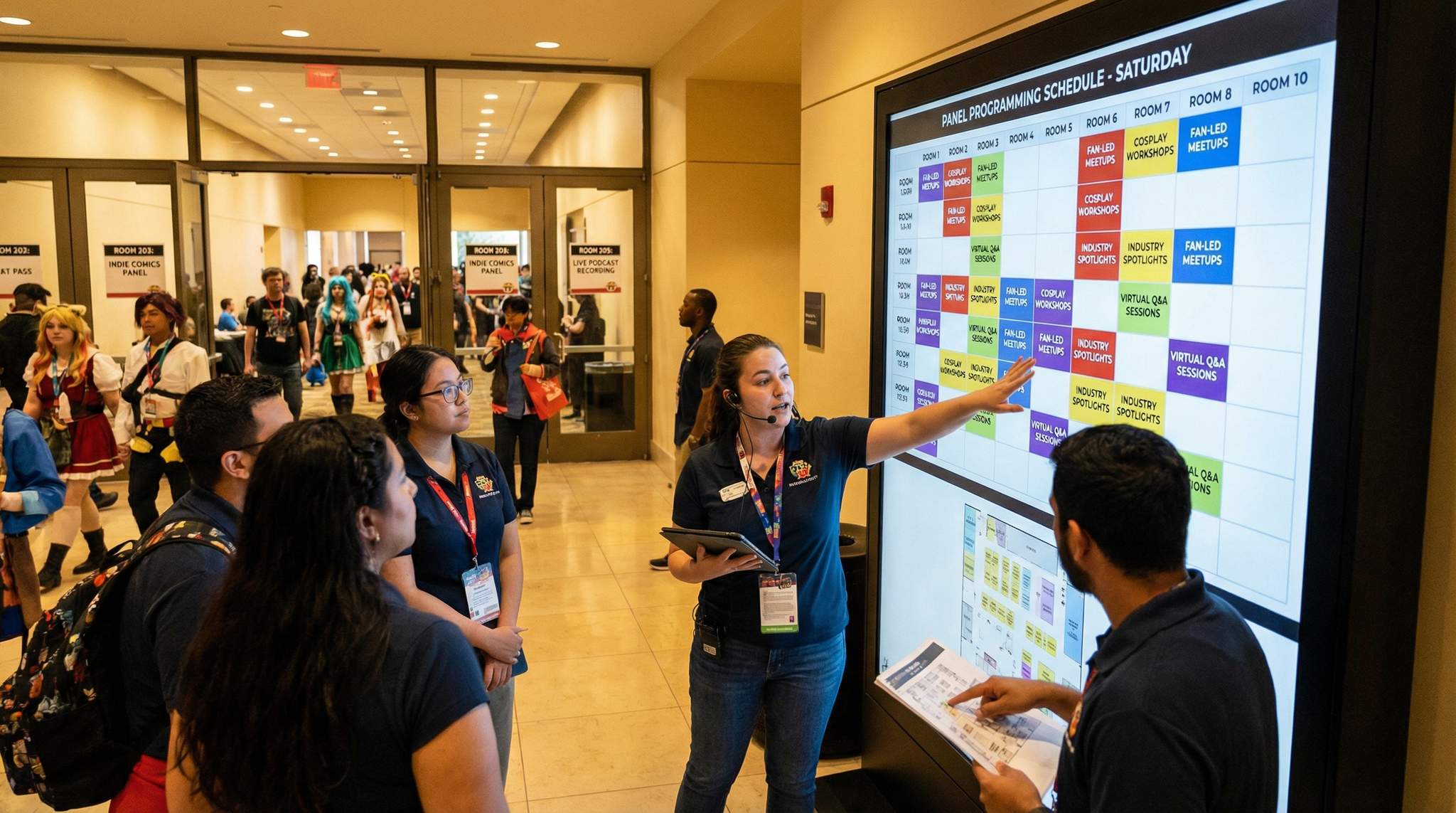
Using schedule visualization tools can help spot bad overlaps. Many organizers use spreadsheets or specialised scheduling software to map out tracks in a grid. By colour-coding tracks or audience types, you might notice “Oops, we put three video game panels all on Saturday morning” and adjust. Experienced planners also consider external timing factors: for instance, don’t program an intense academic panel at 9am Sunday when everyone is exhausted, or a loud interactive game show during a time many will be at lunch. A well-timed schedule has an ebb and flow – mix high-energy big productions with quieter, intimate talks in any given hour to give attendees options if they need a break from crowds.
Don’t forget to plan around the broader event timeline. Large expos often have main hall events (like a keynote or cosplay contest) that you should avoid scheduling major competing panels against. In fact, many cons go semi-dark during the absolute biggest events (e.g., nothing else significant against the Masquerade contest finals) to let everyone enjoy the shared moment. Another timing tip: align your programming with when attendees arrive and depart. On Day 1 morning, people are tied up getting badges, so avoid putting your most anticipated panel at 10:00 AM sharp – late afternoon might be better once everyone’s settled in. As discussed in our guide on affordable event technology solutions for small events, timing logic is crucial for managing attendee flow. Similarly, the final day’s last timeslot can be lower traffic as folks head home; use it for lighter or niche content, and schedule your must-see panels earlier in the day.
Grow Your Events
Leverage referral marketing, social sharing incentives, and audience insights to sell more tickets.
Capacity Planning and Crowd Management
Even with the best scheduling, some panels will exceed capacity. Having a plan to handle crowds safely and fairly is essential. Start with realistic attendance forecasts during programming: consider room caps and implement line management policies for popular sessions. Many veteran-run conventions now use systems like wristbands or ticketed entry for their most in-demand panels to avoid massive queues. For example, San Diego Comic-Con’s famous Hall H line is managed by distributing next-day entry wristbands, eliminating the need for a multi-day camp-out. Other events use mobile apps to issue “virtual queue” tickets or allow advance seat reservations; as mentioned, MCM Comic Con introduced digital reservations so fans can secure a spot in line via the app, a feature of MCM Comic Con’s reservation system. If your con is smaller, you might simply have staff cap the line when a room is full and offer standby if space frees up.
Make sure to communicate these policies clearly. In your program guide and app, note which panels require a special pass or have limited entry. Train volunteers or security on how to direct overflow crowds. When a panel fills up, have a procedure: perhaps offer the disappointed attendees a chance to attend a later repeat of the panel (if you planned encores for high-demand content), or direct them to an alternate activity so they’re not just left frustrated. Some cons set up overflow viewing areas for mega-popular panels – a separate room live-streaming the panel feed, for instance – which can appease more fans. This requires extra A/V setup but can drastically reduce negative feedback when a room hits capacity.
Lastly, incorporate sensible gaps between panels in each room’s schedule. A common rookie mistake is to schedule back-to-back with no turnover time. Always allow at least 15 minutes (if not 30) between sessions in the same room so one crowd can exit and the next can enter in an orderly way. Use that time for your staff to straighten chairs, check mics, and prepare for the next presenters. In schedules, you might list a panel as 1:00–1:45pm, then mark 1:45–2:00pm as a “break” or transition period (not for attendee use, just internally). Attendees will appreciate that panels start on time and aren’t cut short because the previous ran over. Consistency here builds trust – if fans know your sessions reliably begin as scheduled, they can plan their hopping between rooms with confidence.
Tools for Visualizing and Adjusting Schedules
Handling a dozen or more simultaneous sessions over a multi-day event is a logistical puzzle. Modern convention planners rely on digital scheduling tools to design and adjust the program matrix. Simple solutions like Excel or Google Sheets can work for a small con – listing tracks in columns and time slots in rows to create a grid view of each day. This manual method is flexible but can become unwieldy as you add more rooms and days. That’s where dedicated event scheduling software comes in. Platforms such as Sched, Grenadine, or Eventeny (among others) allow you to input your panel info, tag them by track or type, and produce an interactive schedule for attendees. Many large cons use such software not only internally but also as the public-facing schedule where fans can filter and create personalised agendas. For instance, Comic-Con International’s MySched system lets attendees mark which panels they want to attend and then syncs with the official app, much like Comic-Con International’s MySched system – a lifesaver when there are 20+ options at any given hour.
When using scheduling software, take advantage of features like conflict checking. The system can flag if you accidentally scheduled the same speaker twice, or if a room is double-booked. It also simplifies last-minute adjustments (move a panel with a drag-and-drop and it updates everywhere). Some tools even enable “what-if” scenarios – you can see the impact of shifting a panel’s time on the overall grid before committing. As the event approaches, do multiple reviews of the schedule from an attendee perspective: Are there time slots overstuffed with cool content and others sparse? Does each fandom niche have a fair spread of sessions? Tweak as needed. Once the schedule is live, be prepared to update it on the fly – and push those updates to attendees via your app or website so everyone stays informed. In 2026, fans expect the schedule at their fingertips and up-to-the-minute accuracy.
Coordinating Speakers, Guests, and Schedules
Building the Master Schedule to Prevent Conflicts
Behind every great panel schedule is an even more detailed master grid of speaker availability. Especially when you have many guest speakers (authors, actors, influencers, etc.), it’s critical to map out each person’s commitments to avoid inadvertent conflicts. Create a matrix listing each guest down one side and time slots across the top. Block out not only their panel times but also other duties: autograph sessions, photo ops, press interviews, or personal break times. This bird’s-eye view ensures you don’t, say, schedule a voice actor for a panel at 2 PM when they’re supposed to be in the autograph hall until 2:30. It also helps spot if you’ve over-scheduled someone – for instance, giving a guest back-to-back panels with no breather or two panels on opposite ends of the venue with no travel time (a common oversight). Build in buffers so guests can move between rooms or grab a quick refreshment between appearances.
Many conventions now use speaker management software or integrated scheduling tools that allow guests to input their availability and accept panel invitations digitally. But even a shared Google Sheet among your programming team can do the trick to track who is confirmed for what. Regularly cross-check the public schedule against the internal guest schedule. If you see that two popular voice actors each have panels at the same hour, you might reconsider – fans of one are likely fans of the other. Stagger their sessions so interested attendees (and the press) can catch both. Additionally, avoid scheduling a guest’s spotlight panel against major programming that would pull their potential audience away. A rising anime director’s talk will draw better if it’s not up against the cosplay contest finals, for example.
Syncing Panel Schedules with Signings and Photo Ops
One of the most common scheduling hiccups is timing around autograph and photo op sessions. These activities are often handled by separate teams or vendors (for instance, a photo op company might dictate the photo schedule), but they directly impact panel timing. An attendee who paid for a meet-and-greet will be frustrated to miss the guest’s panel or vice versa because of conflicting times. To avoid this, coordinate closely with the autograph/photo op schedule planners. Whenever possible, don’t schedule a guest’s panel during their own signing block. If a celebrity is signing from 11 AM–1 PM and again 4 PM–6 PM, aim to put their Q&A panel in the 2 PM–3 PM range, giving them time to get to the panel room after signing and letting fans attend both.
For high-demand guests, also consider the flow of crowd between panels and signing areas. If a big movie star does a panel that ends at 1:30 and their autograph line opens at 1:30 on the other end of the venue, you’ve set up a foot-traffic nightmare. Instead, stagger the schedule: perhaps the panel ends at 1:15, then autograph session starts at 1:45, giving everyone time to move in an orderly way. Communicate clearly to attendees: announce during the panel that “
Another tactic is using badges or tickets to manage overlap. Some cons issue numbered vouchers for autograph sessions in advance; you can reassure those folks that they won’t lose their place if they attend the panel (e.g., “Group A for
Clear Communication with Speakers and Moderators
While scheduling is being locked down, maintain open lines of communication with your panelists and moderators. Provide them with tentative schedules early and ask for any red flags. It’s much easier to swap two panels in advance than on the day-of. For example, a guest might let you know they’re arriving late on Friday, so that 11 AM panel you planned for them won’t work – you can move it to later in the day or to Saturday. Or a speaker might mention they’re also appearing at a nearby event that same weekend, meaning they need to leave by Sunday afternoon; knowing this, you wouldn’t schedule them for a Sunday 5 PM panel. By proactively getting their constraints, you avoid last-minute holes in your program.
Also, communicate expectations and panel logistics directly. Send each panel’s participants a brief with the time, location, estimated audience size, format, and any A/V available. Include when and where to meet prior to the panel (e.g., “Please arrive at Panel Room 1 ten minutes early for mic check”). If you assign volunteer room hosts or moderators, introduce them via email so they can coordinate with the speakers on content and questions. This preparation helps panels run smoothly and end on time. Nothing throws off a schedule like a panel starting late because a speaker was misdirected or didn’t know where to go.
For larger events with dozens of guests, consider a dedicated guest liaison team as discussed in our guide on mastering celebrity guest relations and booking talent. These staffers ensure each VIP knows their itinerary down to the minute – including panel call times – and can escort them between commitments. Such coordination not only keeps the schedule on track but also impresses your guests, increasing the chance they’ll return for future events.
Accounting for Time Zones and Virtual Appearances
One new wrinkle in recent years is the prevalence of virtual panel appearances. Even as in-person events have roared back, sometimes a guest can’t be there physically but can join via live video, or you might run a hybrid convention with some sessions fully online. When coordinating these, remember to factor in time zone differences and technical setup. If a game developer in Japan is Zooming into your California convention for a 3 PM panel, that’s 7 AM their time – is that reasonable, or should you adjust the schedule earlier? Discuss and confirm well in advance.
Technology-wise, slot virtual-inclusive panels in rooms equipped for it. Ensure you have a stable internet connection, proper audio/visual support to project the remote speaker on screen, and perhaps a dedicated tech operator on hand. Schedule a brief buffer before that panel for setup and testing – the last thing you want is to delay everything because a laptop won’t connect to the projector. It can be wise to have a pre-recorded backup of the speaker’s talk if possible, in case the live link fails (for example, ask the speaker to provide a video of their presentation as a contingency). Attendees will be more forgiving of watching a prerecorded interview than of a cancelled session.
Finally, mark clearly in the program which sessions are virtual or hybrid. Some fans might skip a panel if the guest isn’t physically there, while others won’t mind. Being transparent maintains trust. And if you record panels or stream them, let people know when/where they can catch the content later. Coordinating these modern twists alongside traditional programming is now part of the scheduler’s skill set – and done right, it allows you to involve guests and audience members from around the world seamlessly.
Leveraging Technology for Scheduling and Streaming
Scheduling Software and Attendee Apps in 2026
Gone are the days of paper grids and static websites – in 2026, most conventions deploy dedicated scheduling software and mobile apps to manage their panel lineups. This technology not only aids organizers (as mentioned, to visualize and adjust the schedule) but dramatically improves the attendee experience. A convention app or online schedule lets fans filter events by interest, receive real-time updates, and even reserve seats or RSVP to popular sessions. If you haven’t already, consider integrating a platform like Sched or Grenadine that can publish an interactive schedule to your website and app. Many tools allow attendees to build a personal agenda by bookmarking panels, which can give you helpful analytics (e.g., you might see 500 people added Panel X to their schedule – a hint that you need a bigger room or a repeat session!). Providing these digital conveniences boosts attendee satisfaction and decreases redundant questions, since everyone can see “what’s happening now” at a glance.
A great app can also host push notifications – invaluable for communicating schedule changes or reminders (“Panel starting in 10 minutes in Room B!”). Make sure to promote your schedule app heavily: include download links or QR codes in pre-event emails, put signage at the venue (“Download our app for the latest schedule!”), and maybe even offer on-site help for less tech-savvy guests to install it. Adoption is key; an app doesn’t help if only 5% of attendees use it. In our experience, multi-faceted marketing (social media posts, on-site announcements, incentives like a digital scavenger hunt) can drive strong uptake of event tech tools, as noted in our article on affordable technology solutions for small events. Once fans see how easy finding panels becomes, they’ll gladly leave the chunky program guide behind.
For smaller cons on tight budgets, if a custom app is out of reach, leverage free or low-cost solutions. Many free scheduling platforms can embed in your website and are mobile-friendly. Even a Google Calendar or shared PDF updated in real time is better than nothing. The key is to have a single source of truth for your schedule online, which you can update as things change. And don’t discount social media as a tech tool: posting daily panel highlights or last-minute changes on Twitter, Discord, or Facebook reaches attendees where they already are. The bottom line – meet fans on the platforms they use, and keep your schedule info synced across all of them.
Live Streaming and Virtual Panel Access
One of the biggest shifts in convention programming post-2020 is the normalization of live-streamed panels and hybrid events. Even as physical conventions returned, many organizers realized that streaming some content can exponentially expand their audience and brand reach. If a panel has broad appeal (a celebrity reunion, a major trailer reveal) and you have the resources, consider streaming it on platforms like YouTube, Twitch, or a custom portal. New York Comic Con and other top cons have built a following by offering select panel streams to fans worldwide, as seen in The Popverse’s coverage of NYCC livestreams. This not only generates goodwill but can serve as a marketing funnel – viewers at home might be persuaded to attend in person next year.
When planning streaming, start with the technical plan. Work with your A/V team to set up cameras, a sound feed from the panel room’s audio, and a stable internet upload. Do a test run in advance. If streaming publicly, moderate the chat and have a branded graphics package (logos, lower-thirds with speaker names, etc.) to give it a professional touch. Some cons put streams behind a registration or paywall for remote attendees – if you go that route, ensure the user experience is smooth. Even if you don’t stream live, recording panels for later on-demand viewing is a nice value-add. Just get any necessary permissions from panelists in advance (especially for anything with sensitive content or exclusive previews).
Hybrid engagement can also enhance the on-site experience. For example, you might project live tweets or chat questions from virtual viewers onto a screen in the room during Q&A, making remote fans part of the conversation. However, be cautious: managing both live and virtual audiences is an extra layer of complexity for moderators and crew. It’s wise to have a dedicated producer for the online component if possible. Start with just one or two streamed panels if you’re new to it, and evaluate the response. In 2026, an integrated approach – physical con first, with a digital extension – is becoming the norm, especially for flagship events that want to maintain global influence.
Real-Time Updates and Digital Signage
No matter how perfect your advance scheduling, conventions are dynamic. A guest might miss a flight, a panel may swap rooms due to A/V needs, or you realize you need to add an encore session of a hit panel. Embrace technology for real-time schedule updates to keep attendees informed. As mentioned, push notifications via an app or text alert system can instantly broadcast changes: “Schedule Change: Panel X moved to Room C at 4 PM.” Also utilize digital signage around the venue. Many modern convention centres and hotels have digital info boards or screens outside meeting rooms – tie these into your scheduling system if possible so they automatically reflect current and upcoming sessions in that room. Even if not high-tech, a simple monitor displaying the day’s schedule that you update via a computer can be invaluable when printed signs would be out of date.
Some events set up info kiosks or help desks with live schedule data. Staff those areas with volunteers who have tablets or laptops connected to the master schedule, so they can answer questions like “Has the
Digital signage isn’t only for changes; it also helps with wayfinding and crowd flow. For example, interactive maps or screens showing “Panel starting now” can guide people to content they might enjoy. According to experts, implementing smart wayfinding technology and digital signage can greatly reduce attendee confusion and the load on your staff answering repetitive questions. Consider a screen near the entrance that cycles through highlights of the hour (“In Hall 1: Marvel Universe Panel; In Room 101: DIY Cosplay Armor Workshop; …”) – it can inspire attendees to check out something they didn’t know about. In 2026, fans are used to real-time info at their fingertips, so the more you can deliver that – via apps, screens, or other tech – the more empowered and happy your attendees will be.
Harnessing Data and Feedback for Continuous Improvement
One advantage of digital scheduling tools is the wealth of data they collect. Post-convention, analyze the stats: Which panels had the most pre-event bookmarks or reservations? Which had the highest check-in rate (if your app tracks attendance)? Did certain tracks consistently outperform others? This information is gold for refining next year’s programming. For instance, if your app reveals that “Intro to Digital Art” had three times more interest than expected, you might expand your art programming track. Or if an entire track saw low engagement, perhaps that content needs rethinking or better placement on the schedule.
Also gather qualitative feedback. Send attendees a survey focusing on programming: Ask what their favorite panel was, and why, and if there were any topics they wanted that were missing. Solicit feedback from your panelists and moderators too – they often have insight on what could be improved (like maybe the panels needed more time for questions, or the room’s audio was an issue). Track operational metrics as well: Did panels generally start/end on time? How were the line lengths? Any incidents of note? All these learnings feed into a smarter plan for the next event.
Some conventions hold a “post-mortem” meeting with the programming team and key volunteers right after the event while memories are fresh. This is a good time to review what tech worked or failed, whether scheduling tools were used to their fullest, and which processes need adjusting. If your schedule had hiccups, don’t just move on – address them. For example, if a certain room was always running late, maybe you scheduled too tightly there or the volunteer needed more training. Every con has unforeseen challenges, but the best organizers turn those into lessons (we’ll touch more on troubleshooting in a later section). By combining hard data with honest debriefs, you’ll continuously elevate the quality of your panel programming.
Designing Panel Formats that Captivate Attendees
Beyond the Traditional Speaker Panel Format
When planning content, remember that how a panel is run can be as important as what it’s about. The classic format of “several speakers behind a table talking with a moderator then doing audience Q&A” is a staple for a reason – it works for many discussions. But to truly engage attendees, consider mixing up formats to add variety and excitement. Could that academic-sounding panel work better as a game show or trivia contest with the audience? Perhaps the cosplay panel could include a live demonstration on stage rather than just talking. For example, at some comic cons, art-focused panels become live drawing sessions with cameras on the artists’ sketch pads, so the crowd watches creativity in action. Similarly, a voice actor panel might incorporate a script reading in funny character voices, delighting the audience more than a simple Q&A.
Workshops and interactive sessions are another great format, especially for skill-building topics. Instead of a lecture on writing manga, have a mini hands-on workshop where attendees try drawing or storyboarding with guidance. It’s important to set expectations (if space or materials are limited, note that in the description), but fans love opportunities to actively participate. Roundtables or “unconference” style discussions can work for smaller groups: the panel leader facilitates, but the attendees form part of the content by sharing their experiences. These are great for community-building, though they usually need a cap on attendance to remain effective.
When curating your schedule, slot in a few unconventional formats to keep things fresh. Perhaps a late-night comedy roast of a beloved franchise, or a “Fan Debate” where panelists argue fun hypotheticals (“Who would win in a fight?” style debates are always crowd-pleasers). These creative sessions often become the surprise hits people talk about afterwards. They also provide a break from the heavier info-dense panels. In essence, think of your programming as a well-balanced meal – mix the meat-and-potatoes core panels with some spicy or sweet courses that wake everyone up.
Encouraging Audience Participation and Interaction
Fan conventions thrive on interaction, so design panels that aren’t just one-way lectures. Even in a traditional panel, build in time for Q&A or incorporate audience polling to keep people involved. A few techniques used by veteran moderators: start with an icebreaker question to the audience (“How many of you have been to this con before?” with a show of hands), or sprinkle in trivia questions for the crowd during the session. Some events use live polling apps where attendees can submit questions or vote on topics in real-time – if you have the tech, this can be a fun way to guide the panel toward what the audience most wants to hear (just ensure you have a moderator or team member curating the incoming questions for quality).
For more interactive formats, ensure you have the right setup. A workshop might need tables and materials instead of theatre-style seating. A panel that invites audience members on stage (like a cosplay improv contest) needs space and perhaps an extra mic. Communicate with your facilities and A/V team in advance whenever a panel deviate from the norm, so the room is configured correctly. And of course, brief your panelists – if they know the goal is a highly interactive session, they can plan accordingly (a good panelist might prepare a quick activity or break the fourth wall to engage people). In descriptions, explicitly mention the level of interaction (“Join this hands-on workshop” or “Audience participation encouraged”) so attendees interested in a more passive experience can choose differently.
One caution: keep an eye on time even in fun interactive panels. It’s easy for a lively discussion to run over with everyone so involved. Train moderators to gently cut off questions or end activities so the panel finishes on schedule. You might designate a room volunteer to signal when 5 minutes remain. Attendees generally appreciate a well-paced session – they get the full experience without feeling it dragged or caused them to be late for the next thing. When fans leave a panel feeling they were part of it, not just observing, you’ve likely created a highlight of their convention.
The Role of Skilled Moderators and Hosts
A panel lives or dies by its moderator. Even star guests can falter if the moderator isn’t guiding the conversation effectively. As an organizer, put effort into selecting and training moderators for your panels. For celebrity and industry panels, you may hire a professional moderator or use an experienced staff member who can do the research and keep the discussion flowing. For fan panels, often the panel submitter themselves moderates; consider offering a brief training or at least a tip sheet for them. Emphasize best practices like repeating audience questions for the room to hear, balancing speaking time among panelists, and having some prepared questions or prompts in case the audience is shy.
If you have a volunteer host in each panel room (sometimes called an MC or room facilitator), they can assist the moderator by handling housekeeping announcements (house rules, emergency exits, etc.) and time management. According to veteran convention operations leads, a dedicated room host can dramatically improve panel execution – they ensure panelists have water, signal when time’s almost up, and coordinate any needs like dimming lights for a slideshow. This might be a role for some of your most responsible volunteers. In our guide on building a dedicated volunteer team for your convention, we discuss identifying volunteers with the right mix of passion and professionalism; panel moderation/hosting is a perfect task for those who excel at public speaking and calm improvisation.
Encourage moderators to connect with their panelists ahead of time (even if just a quick chat 15 minutes before the panel starts) to outline how things will run. A little rapport goes a long way on stage. And always have a contingency: if a moderator gets sick or can’t make it, have a backup plan. This could be a floating staff member ready to jump in, or a note to empower one of the panelists to take the lead if needed. With the right guidance and support, moderators will steer panels to be enlightening, entertaining, and on-message timewise.
Accessibility and Comfort in Panel Presentations
Making panels accessible isn’t just the right thing to do – it also widens your audience and enhances everyone’s experience. In 2026, many events have implemented features like live captioning displays and apps for major panels. These services ensure Deaf or hard-of-hearing attendees can fully enjoy the programming. If your budget allows, prioritize captioning for large rooms or high-profile sessions. Some conventions partner with tech providers for AI-driven captioning displayed on screens, which, while not perfect, can be surprisingly effective and also help attendees for whom English isn’t a first language. Likewise, if you know a panel will have significant interest from Deaf fans (say, a panel with a Deaf comic creator or about accessibility in gaming), arrange an interpreter and advertise its availability.
Beyond communication accessibility, consider physical and sensory accommodations. Are your panel rooms wheelchair accessible with spaces in the seating? Reserve some spots at the front for those with mobility devices or who lip-read. Keep a few chairs open near exits for attendees who may need to step out easily (someone with anxiety or other condition might prefer an easy-out seat). If you have panels with bright flashing visuals, give a heads-up for those with light sensitivity or epilepsy. Some conventions now denote certain sessions as “sensory-friendly” with moderated lighting and sound levels. These details make a big difference to attendees who often feel sidelined by traditional setups.
Lastly, comfort is key to engagement. Ensure panel rooms are not overpacked beyond capacity – not only is that a fire hazard, it’s uncomfortable and makes people less likely to stay and participate. Monitor temperature and ventilation; a stuffy room will empty out faster. Provide water for panelists (speaking under stage lights is thirsty work!) and have tech staff on standby in case a microphone fails or slides won’t advance. Your audience will never notice when things go right, but they’ll definitely notice if a mic squeals for 10 minutes. Being proactive about these “little” factors creates a smoother presentation for everyone.
We can summarize some best practices in panel format and engagement design in a quick reference table:
| Panel Format/Feature | Description & Benefits | Example Usage |
|---|---|---|
| Traditional Q&A Panel | Moderator-led discussion with panelists, then audience Q&A. Keeps focus on speakers’ expertise. | Celebrity interviews, expert discussions. |
| Workshop/Hands-On Session | Interactive format where attendees practice a skill or activity. High engagement and take-home value. | Cosplay crafting workshop with materials provided. |
| Live Demonstration | Panelists perform or create something in real-time. Makes content visual and dynamic. | Live art draw, makeup demo, coding live on screen. |
| Game Show/Trivia | Competitive or fun quiz involving audience or panelists. Energizes crowd and encourages participation. | “Anime Trivia Challenge” with prizes for attendees. |
| Roundtable Discussion | Informal circle talk, often with audience as participants. Creates community feel and in-depth sharing. | Fan community discussions, support group style sessions. |
| Hybrid/Virtual Panel | Remote speakers or audience join via streaming platform. Expands reach beyond physical venue. | Developer Q&A streamed from Japan into a US convention panel. |
As you can see, mixing formats can address different learning styles and entertainment preferences. By planning a variety of panel types and equipping your team to execute them well, you’ll keep your programming fresh and your attendees eager to see what’s next.
On-Site Panel Operations and Staffing
Panel Room Setup and Audio-Visual Coordination
Long before any panel can start, your operations team needs to ensure each room is properly equipped and configured. Begin by aligning with the panel’s needs: Does it require a projector and screen for a slideshow? Extra microphones for multiple panelists or audience questions? A stage or podium? Compile these requirements during your programming planning (often via a form filled by panelists in advance) and work with your venue’s A/V provider or your own tech crew to meet them. Create a room A/V checklist for each session. For example:
– Room 101, 10 AM: Projector + HDMI hookup for speaker’s laptop, 3 table mics, 2 wireless mics for audience Q&A, lights dimmed at start.
– Room 102, 10 AM: No A/V needed (panel is purely discussion), arrange chairs in circle.
– Main Hall, 11 AM: Full tech – sound board for 6 mics, large screens for video playback, spotlight lighting, etc.
Standardize where you can. It’s wise to have a default setup in each room and only tweak when needed. Perhaps every panel room gets at least two microphones and a small speaker system, regardless of panel type – because even a simple Q&A can benefit from amplification, and you never know when 20 people will show up versus 200. Ensure extra batteries, connectors, and adapters are on hand. By 2026, many events use digital mixers and networked A/V (AV-over-IP) systems that make it easier to monitor multiple rooms from a central station, a capability of Sched’s convention schedule app, but even with advanced tech, you should station a human A/V tech or knowledgeable volunteer near each active room to handle issues quickly.
Train your tech crew on the schedule: they should know which panels have special tech needs well in advance. A quick production meeting each morning of the con can review anything unusual (“Remember, the 3 PM panel in Room B needs the Skype call set up by 2:50”). Also, consider recording or streaming needs as part of setup. If you plan to record audio or video of panels, set up discreetly and make sure it doesn’t interfere (e.g., cameras not blocking audience sight lines, microphones capturing clean audio). Starting each panel with good technical execution sets the stage for success – attendees focus on content, not crackling mics or fumbling with laptops.
Managing Lines and Crowds for Popular Panels
As attendees flow through your programming, crowd control becomes a front-line concern. Assign specific staff or volunteer teams to manage panel room lines, especially for the big sessions. A common approach is to form lines outside the rooms and only allow entry once the previous panel’s attendees have cleared out and the room is ready. Use stanchions or line tape if possible to keep queues orderly. Volunteers should hold signs for the panel line (“Line starts here for Marvel Panel 2:00 PM”) to avoid confusion. Communication is key: have them periodically announce the current status (“Folks, this panel is now full” or “We expect to start seating in 5 minutes”). This courtesy keeps people from anxiously guessing if they’ll get in.
For extremely popular panels, implement the crowd management strategies we touched on earlier: wristbands, tickets, or room entry passes. If you’re using a reservation system via the app, have a separate queue for those with confirmed reservations versus stand-by attendees. At San Diego Comic-Con, the use of a wristband system for Hall H not only streamlined entry but significantly cut down line-related complaints, similar to the efficiency of MCM Comic Con’s reservation information. You might adapt a simpler version – e.g., hand out tickets to the first 100 people in line so they can take a break and come back at panel time without losing their spot.
Another tip: entertain your lines. Waiting can be tedious, so some conventions deploy “line entertainment” volunteers or content – perhaps trivia questions over a loudspeaker, roving cosplayers taking photos, or a screen with highlight reels. This doesn’t directly affect scheduling, but it improves the experience, which in turn keeps attendees positive even if they’re stuck waiting. Disney parks famously mastered this by turning queues into part of the attraction; at conventions, even small efforts (like volunteers chatting and joking with the line) help.
Once it’s time to seat, have a clear procedure: count off people as they enter to not exceed capacity. If you have VIP tiers or accessible seating, let those badge-holders and individuals in first (per whatever policy you advertised – many cons allow VIPs early access by a few minutes to prime events, as part of their perks, ensuring your festival delivers value despite rising costs). Ensure those needing ADA seating can get to the front. Then fill the rest. Closing the doors on a full panel is always hard – empower your door volunteers to do so firmly but politely (“Sorry folks, we’re at capacity per fire code”). Ideally, have a nearby staffer ready to redirect latecomers elsewhere or encourage them to catch the panel online later if available.
Volunteer Staffing for Panel Rooms
Well-trained volunteers are the backbone of smooth panel operations. Each programming room should have a small team assigned, typically including: a room manager or host (as discussed, often the moderator or dedicated MC), a door attendant, and optionally a line manager outside. For large halls, you’ll have more – perhaps multiple ushers directing seating and roaming mic handlers for audience questions. Make sure volunteers know their specific roles and chain of command. For example, the room manager might be a senior volunteer who liaises with A/V staff and can make on-the-spot decisions, whereas the door attendant simply follows directions to let people in or keep the door shut when instructed.
Provide a quick cheat sheet or training before the con. Cover basics like: ensuring panelists have water and the right name placards, how to dim lights or who to call if A/V malfunctions (radios or phone numbers), emergency procedures (e.g., what to do if someone has a medical issue during a panel), and dispute resolution (e.g., handling an attendee who won’t leave a full room or is being disruptive). Emphasize professionalism – volunteers should be friendly but firm when enforcing rules (no recording if not allowed, clearing the room after each panel if you don’t allow staying between sessions, etc.). In our volunteer management guide, ‘Beyond Free Badges’—and when considering affordable solutions for small events—we note that empowering volunteers with knowledge and authority, while also holding them accountable, leads to a more confident team that can tackle issues proactively.
One often overlooked aspect is volunteer rotation and breaks. Working panel rooms can be tiring (lots of standing, crowd control, missed meals). Schedule shifts so no one is stuck at a door for 6 hours straight. Have floaters who can give a room volunteer a bathroom break. Happy, rested volunteers will interact better with attendees and remain sharp to catch schedule changes or cues. Lastly, recognize them – a simple thank-you announcement at the end of a panel (“Let’s thank our volunteers!”) or small perks (like a lounge with snacks, or being able to watch panels when off-duty) keeps morale up. The smoother they run things, the more invisible operations become to attendees (and that’s a good thing!).
To organise your approach, here’s a quick reference table of typical panel room staffing roles and duties:
| Volunteer Role | Key Responsibilities | Notes |
|---|---|---|
| Room Manager/Host | Acts as lead in the room: coordinates with panelists on setup, keeps time, communicates with A/V. May introduce panelists and enforce schedule. | Should be experienced; often the moderator or a senior staffer. |
| Door Attendant | Manages entry/exit: checks badges if needed, counts attendees, closes doors when full or when panel starts to minimise noise. | Stays at door during session; also assists with crowd control at end. |
| Line Manager | Organizes the queue outside: holds line sign, answers “what is this line for?”, admits people when given all-clear from inside. | Crucial for popular panels; may coordinate with security on overflow. |
| Microphone Runner | (In larger rooms) Brings wireless mic to audience members during Q&A, or stands at aisle mics. Enables more people to participate in questions. | Needs to be attentive and mobile. Ensure multiple runners for big halls. |
| A/V Liaison | (If no dedicated tech staff) Helps panelists connect laptops, adjust mics, and contacts tech support if issues arise. | Some cons assign a tech-savvy volunteer in each room for this purpose. |
| VIP/ADA Seating Usher | Reserves and manages special seating areas (for VIP badge holders, attendees with disabilities, etc.) Ensures these sections are not overrun. | Only needed if your event has tiered seating policies or accommodations. |
Depending on your event’s size, one person may wear multiple hats (e.g., the room manager might also handle the door if it’s a small panel). The key is that all duties are covered by someone. When every volunteer knows their role, panels start on time, issues are handled quietly, and the audience just enjoys the content.
Keeping Panels on Schedule
Time management on-site is where even veteran planners can be tested. One panel running overtime can cascade into a day’s schedule getting skewed – frustrating attendees and panelists alike. To keep panels on schedule, implement a few tactics:
- Visible Timing Aids: Provide moderators with a countdown timer or cue cards (e.g., “10 minutes left”, “5 minutes”, “End”) held up by a room volunteer. There are smartphone apps that display large countdown clocks, or you can go old-school with colored cards. Train moderators to acknowledge and follow these cues.
- MC Announcements: In big rooms, have the room host politely end the session (“Thank you to our panelists! Folks, our next panel starts in 15 minutes…”) if the speakers don’t wrap up on time. It gives a firm endpoint and makes it easier for panelists to stop when they hear the closing thank you and applause.
- Buffer Programming: If you have the luxury, schedule short breaks or “filler” elements between major sessions. Some cons play a 5-minute humorous video or have a quick trivia quiz with the audience as one panel clears out – this buffers any slight delay and entertains those waiting for the next panel. It’s similar to a warm-up act in theater.
- Con Ops Intervention: Empower your operations staff to step in if a panel is egregiously running over. This is sensitive – you don’t want to rudely yank someone off stage – but a staff member can approach and signal the moderator or quietly say, “We need to end now, sorry,” if things are clearly off track. It’s better to be the bad guy internally than have an entire room of next-panel attendees angry because they started 20 minutes late.
Additionally, set expectations early with panelists that starting and ending on time is part of the deal. Mention it in your confirmation emails or orientation materials: “Each session is 45 minutes, with 15 minutes changeover. Please be in your room 5 minutes before start, and conclude your panel by the end time so we can remain on schedule.” Often panelists (especially pros) will self-regulate if they know the importance. Relate it to their experience too – if they have another panel later, they wouldn’t want that one delayed by someone else running long.
Finally, use your app and signage to your advantage. If something does run late or you decide on the fly to shift a subsequent panel’s start by 5 minutes to compensate, push an update so attendees know. Most will be forgiving if kept informed. The worst case is confusion or rooms full of people waiting without explanation. As always, communication and planning go hand in hand. A smoothly run schedule reflects countless behind-the-scenes efforts that attendees never see – but they will definitely feel the benefits in being able to enjoy more content without chaos.
Handling Last-Minute Changes Gracefully
Preparing Backup Plans for Cancellations
No matter how meticulously you plan, last-minute changes are inevitable. A guest speaker might cancel due to illness or travel issues the night before their panel. A panelist could be a no-show. Or perhaps an expected shipment of equipment (for that VR demo panel) doesn’t arrive. The key is to anticipate these possibilities and have backup plans ready. Identify which panels or guests are your highest risk – international travelers, panels dependent on tech, etc. – and brainstorm alternatives in advance. For instance, if your big celebrity Q&A cancels, could you quickly assemble a fan panel about their franchise to fill that spot? Or play an exclusive pre-recorded interview or episode screening to at least give fans something in that time?
Maintain a list of “standby” content or participants. Some cons keep a couple of programming items in their pocket that can flex into empty slots if needed, such as a popular anime screening that can play any time, or a local cosplay group who can host a game on short notice. It won’t replace the lost panel, but it ensures you’re not left with a dead hour in a major room. Make sure your MCs and app team can swiftly change listings – nothing worse than attendees showing up for a cancelled panel because the schedule wasn’t updated in time. If you cancel outright, post signs on the door and have a volunteer there to explain and direct people elsewhere.
Communication with attendees is crucial: use all channels to announce changes (push notification, Twitter, signage) and apologize for the inconvenience. People understand that stuff happens, especially if you’re transparent and maybe a bit humble about it. Offer alternatives: “We’re sorry Guest X couldn’t join – but head over to the Main Stage at 2 PM for a cool surprise panel we’ve lined up in their place!” This turns disappointment into discovery and shows you’re on top of the situation.
Building Flexibility into the Schedule
One way to mitigate schedule chaos is to build in some flexibility from the start. For multi-day cons, consider leaving one or two “open” programming slots towards the end of the event. These can be labeled generically (“To Be Announced Panel”) or something like “Fan Choice Panel”. As the event unfolds, you can use these for popular panel encores, newly available guests, or to make up for earlier cancellations. Attendees often get excited by mysterious TBA slots, and you can gather suggestions on what to fill them with as the con goes on.
Another approach is have shorter filler content ready if earlier panels end earlier or something is missing. For example, if a panel wraps up 20 minutes sooner than expected (maybe the speakers flew through their presentation), instead of idle time, have a volunteer prepared with some trivia questions or a short fan-made film to show. It keeps energy up and prevents people from wandering off (and possibly not coming back for the next item).
A technique used by some large expos is buffer scheduling for key people. If a guest has two panels, schedule one on the first day and one on the last day – so if their flight is delayed and they miss Day 1, at least you still have them for Day 3’s panel. Or schedule a big panel early in the weekend and a repeat on the final day as insurance that one of them will go as planned. This might not always be feasible, but the underlying concept is don’t put all your eggs in one time-slot basket when it comes to marquee content.
Rapid Response: Communicating Changes to Attendees
We’ve touched on communication in previous sections because it really is the make-or-break factor when responding to last-minute changes. Successful conventions establish a clear protocol for who on the team will draft and push out public messages when something changes. Typically, your programming director (or a designated “info desk” person) will coordinate with the social media/app team and the venue announcement system. Within minutes of a change, you want attendees seeing a notification like: “Update:
Train all staff and volunteers to assist in spreading the word. If a panel in their room is affected, volunteers should tell people in line or as they enter. Your info booths should have the latest updates to answer questions. Even consider printing a daily “errata sheet” or whiteboard at the entrance with known schedule changes and cancellations, updated each morning. Attendees often scan those out of habit at cons. The more channels you announce on, the better – you never know which method each person is paying attention to.
Also, be sure to update all instances of the schedule – the mobile app, website, printed signage – to avoid conflicting information. This is where digital tools shine, since updating in one backend can propagate everywhere. But physical printouts or PDF guides can’t be helped if already distributed; hence the need for conspicuous corrections via other means. One pro tip: in your app or online schedule, mark cancelled sessions clearly rather than deleting them, so people see it’s intentional (for example, change the title to “[CANCELLED] Panel Name” or add a note in the description). This prevents confusion like attendees thinking “Did I misread the schedule? I swear there was a panel here.”
Crucially, maintain a positive tone. It’s easy for a flurry of changes to cause negativity or rumors. Your messaging should be factual, brief, and reassuring that the team has it under control. Thank attendees for understanding. If appropriate, explain one sentence of why (“Due to travel delays…”), but don’t overdo justifications – focus on what’s next. People appreciate honesty and prompt info; silence or ambiguity is what breeds frustration. By developing a responsive communications plan, you turn potential crises into merely minor blips in an otherwise great event.
Learning from On-Site Challenges
Every convention – even the most smoothly run – encounters some on-site challenges. The difference for veteran organizers is they treat each challenge as a learning opportunity. After dealing with a major schedule upset or operational snafu, take notes (literally). In the heat of the moment, you solve the issue; later, ask why it happened and how to avoid it or handle it better in future. Maybe a certain guest was very late to their panel because nobody was assigned to fetch them – note to assign a handler next time. Or the tech failed in Room 3 because no one tested the projector that morning – implement a morning A/V check routine moving forward.
Some cons produce an internal “post-con report” where each department (programming, ops, guest relations, etc.) writes up what went right and wrong. Include sections on schedule management: Did any track have consistent delays? Were line problems frequent for certain panels? Document the root causes: e.g., “Panel Room B consistently started late due to crowd bottleneck in hallway” or “The autograph area running behind caused ripple effects on guest panel times.” These insights are fresh immediately after the event, so gather them then. When planning the next year’s programming, revisit the report. It can be humbling to face past mistakes, but it’s one of the best ways to improve.
Also, listen to attendee feedback about on-site issues. Social media and forums will likely discuss any big problems (and successes!). Perhaps many people comment that a particular panel was hard to hear from the back – next time, you might arrange speakers differently or cap that room’s attendance lower. Or you’ll find praise for how a last-minute guest cancellation was handled transparently, reinforcing that your communications strategy works. Celebrate the wins, too – share stories with your team about problems averted (“We managed to rearrange three panels on the fly and most folks still got to see something they loved.”). Convention organizing is high-pressure, so acknowledging the team’s adaptability boosts morale.
By creating a culture that doesn’t fear problems but rather addresses and archives them as lessons, you build resilience. Veterans often have “war stories” from past cons – each of those is a lesson in what to do or not do. Over years, this accumulated wisdom is what makes running even a massive 150,000-person event feel like second nature (most of the time!).
Case Studies: Small Cons vs. Mega Expos
Every convention is unique, but scale and scope dramatically influence panel programming strategies. Let’s look at a few comparative scenarios to draw out lessons for different sizes of events.
Small Fan Convention (2,000 Attendees Example)
Imagine a local anime convention with 2,000 attendees, run by a volunteer fan club. The programming here might consist of 2 or 3 panel rooms in a single hotel, plus maybe a video room for screenings. With a tighter scope, the focus is on high-impact fan experiences with limited resources. This con might rely on enthusiastic fans to run panels – e.g., a group of cosplayers hosts a cosplay makeup tutorial, a local university’s anime club leads an “Anime 101” discussion. Budget is modest, so there are likely few if any paid guests; perhaps one voice actor from the region is the main draw, alongside local artists.
The schedule at a small con can afford to be less dense. Instead of 15 parallel events, you may only have 2 at any time, which means less conflict for attendees – a bonus. However, it also means if a panel is a dud, there aren’t many alternatives. So the organizers must curate carefully to ensure every session has merit. They might schedule big group activities (like a cosplay masquerade or a trivia contest) to bring everyone together, rather than constantly splitting the crowd. One challenge for small cons is lack of fancy technology: they might not have a slick app, instead opting for a printed schedule or simple website update. Yet, being small also means it’s easier to spread news by word of mouth or a single loudspeaker announcement in the lobby.
A real-world example: consider a convention like Animazement (North Carolina) in its early years, or local Comic-Cons that started with a few thousand fans. Their panel offerings were intimate and often scheduled with extra buffer time because volunteer-run panels could unpredictably run short or encounter setup glitches. They leaned on low-cost engagement like fan meetups and discussion circles. If a panelist cancelled last-minute, oftentimes the room would spontaneously turn into a fan hangout on that topic – small communities can pivot like that. The takeaway for small cons is to leverage your close-knit community: involve them in suggesting and even hosting content (they’ll take pride in it), use simple tech effectively (a Facebook group update can inform a high percentage of local attendees), and don’t over-program – quality over quantity of panels will serve you best.
Mega Convention (100,000+ Attendees Example)
Now consider a mega-convention like San Diego Comic-Con (SDCC) or Japan’s Comiket, each easily exceeding 100,000 attendees. These behemoths schedule hundreds of panels and presentations across dozens of locations. For instance, Dragon Con (slightly smaller, ~70k attendees) ran over 3,500 hours of programming across five hotels, according to GeekDad’s analysis of fandom tracks – a scale only possible by decentralizing: they have volunteer track directors, each managing a specific programming stream. A mega-con’s panel schedule reads like a small library of content, from morning till late night. The complexity requires advanced tools, professional staff, and often year-round planning. SDCC, for example, uses a combination of in-house software and the MySched system for attendees, and they start slotting their major studio panels and Hall H programs months in advance as Hollywood’s schedules firm up.
One distinctive strategy at this scale is tiering content by venue size and importance. The “Main Stage” (Hall H at Comic-Con or the Excel Main Stage at MCM London) gets the headline events with exclusive reveals – and often these are few per day, to maximize hype and logistics (Hall H at SDCC famously runs essentially one track all day: a sequence of huge panels where people often camp out all day to see them). Meanwhile, dozens of smaller rooms host everything from academic talks to fan discussions concurrently. The organizers have to trust track managers or content partners to run those smoothly, as central control over each panel is impractical. Clear guidelines, extensive volunteer training, and a robust communication network (security radios, programming HQ, etc.) keep the machine running.
At mega-cons, technology is heavily utilized: custom mobile apps, electronic badge scanning at panel doors, live streaming overflow rooms, and sometimes even RFID wristbands for line management (SDCC’s wristbands for Hall H or virtual queue systems at New York Comic Con). Some big expos also implement reservation lotteries for high-demand panels – AnimeJapan in Tokyo, for instance, has so many attendees that certain stage events are lottery entry only. This adds admin overhead but is seen as the fairest way when demand far exceeds supply of seats.
A case study: Gamescom in Germany (over 300k attendees in some years) features multiple stages including public panels and industry talks. They schedule strictly and advertise internationally, meaning a missed timing can ripple to live broadcast partners. They pad schedules with extra time for interpretation (if bilingual) and use professional MCs to keep energy up as crowds swap in and out. The lessons from mega-cons boil down to: invest in the right tools and people, delegate effectively, and communicate like your life depends on it. Attendees at huge cons often plan their days with precision (some will even create spreadsheets of their personal must-see panels!). Reward that dedication by keeping your programming promises – start on time, end on time, and clearly announce changes. Also, embrace the spectacle: big panels at big cons are often productions with special footage, surprise guests, and audience giveaways. Those touches make the logistical headaches worthwhile, because they create the unforgettable moments that justify a massive event’s existence.
Mid-Sized Regional Con (20,000–50,000 Attendees)
Between the extremes, there are many mid-sized conventions (say 20k–50k attendees) — think Denver Pop Culture Con or Anime Expo Australia — which have elements of both approaches. They have enough attendees to warrant multi-track programming and some professional infrastructure, but they may still rely on a volunteer spirit and have tighter budgets than the mega-cons. Scheduling here is about scalability and growth: how do you add more content without letting quality slip?
Often these cons start resembling the big ones in structure (distinct tracks, a green room for guests, a dedicated programming team that isn’t all volunteers). However, they might still personally vet each fan panel submission or manually schedule things rather than handing it entirely off to track leads. There’s usually a mix of guest stars and fan contributors. The challenge is managing those guests with limited staff – a common solution is to assign each guest a volunteer liaison (like big cons do) to keep them on schedule. For fan panels, mid-sized cons might implement a more formal submission and review process to maintain standards now that demand to present is higher.
One example: Phoenix Fan Fusion (around 25k–30k attendees). They program multiple tracks in the convention center and adjacent hotels, use a digital schedule app, and have guests from niche authors to A-list actors. A few years back they faced a hiccup when a big celebrity cancelled last-minute; being a mid-sized con, they didn’t have dozens of other Hollywood names to fill the void like SDCC might. But they nimbly promoted some other panels into that ballroom slot (including a fan-favorite NASA scientists panel which ended up drawing a huge crowd given the upgrade in prominence). The community responded positively because the organizers were transparent and the alternate content was genuinely interesting. Mid-sized events learn to have faith in their unique content – sometimes a local expert panel can hold its own in a big room if given the chance.
Thus for these events, adaptability is key. They often experiment with new ideas more freely than giant cons can. You might see a mid-tier con pilot a new panel format or a novel audience engagement tech (like an AR app for scavenger hunts) because they can still implement show-wide changes without enormous risk. They can also directly engage with attendee feedback year to year to refine the mix of panels. If something isn’t working (e.g., a board game design track that’s sparsely attended), they can pivot next year to a different focus. In summary, mid-sized cons must be strategic – big enough to have variety, small enough to know their audience intimately – and aim for steady improvement as they grow.
Global and Cultural Considerations
We’d be remiss not to mention how conventions in different countries and cultures handle panel programming. Cultural context can affect things like scheduling styles and content preferences. For example, in Japan, events like Comiket or Wonder Festival are more focused on marketplace and exhibits, with fewer panels – those that occur are tightly scheduled, often industry-run, and usually end by early evening (late-night programming is rare). In contrast, U.S. fan cons or European ones often run programming into the night (midnight movie screenings, etc.) as part of the social experience. If you’re organizing in a new region or a multicultural audience, research local norms: in some places, fans expect formal translations for guest talks (e.g., Tokyo Comic Con provides interpreters on stage for English-speaking guests, which affects panel pacing). Language tracks might also be needed – at large European cons, you might have some panels in the local language and others in English. Scheduling should account for that to avoid, say, all English panels clumped together while non-English speakers have gaps with nothing for them.
Also consider holidays, meal times, and prayer times if relevant. A convention in the Middle East might work around sundown during Ramadan or include prayer breaks in the schedule. An event in India could expect attendees to take lunch later than an American event might. These factors influence how you slot content (maybe a bigger break midday, or lighter content during expected absences). Know your audience demographics; designing an inclusive schedule goes beyond panels themselves to when and how they’re delivered, utilizing technology solutions for inclusive attendee experiences.
Finally, share knowledge across borders. A lot of convention innovation comes from seeing how others do it. The wristband system for lines at U.S. cons has inspired crowd control at events in Europe. Similarly, the fan-club-led track model from Dragon Con has parallels in some Asian cons where communities host their own mini-events. As an organizer, keep an eye on global trends – attend others’ shows if you can, network with fellow planners internationally (there are even conferences for convention organizers). The more you exchange, the more you’ll find solutions and ideas to bring home.
Each scale and setting has its unique hurdles, but the core principle remains: know your attendees and adapt your panel programming to serve them best. Whether 500 or 500,000 people, a convention succeeds when its programming feels both exciting and well-organized. Now, let’s wrap up with key lessons that apply universally.