Hybrid Conference Planning in 2026: A New Norm with Big Opportunities
Professional conferences have evolved dramatically, and hybrid conference planning is now a core skill for organizers. In 2026, hosting a hybrid conference – an event with both in-person and virtual components – has shifted from a novelty to the industry standard, supported by seamless hybrid event tech strategies that unite audiences. This format offers exciting opportunities to broaden reach and inclusivity. For example, by 2025 over 70% of events included a virtual attendance option, according to recent hybrid event statistics from Skift Meetings, a massive jump from under 20% pre-2020. Planners report surging demand: 76% of organizers have seen growing interest in hybrid conferences over 2024–2025, as highlighted in LiveGroup’s corporate events research. The appeal is clear – a well-executed hybrid event can engage far more people than a traditional conference, often with higher total attendance (83% of organizers say hybrid formats boost overall audience size), supported by AM World Group’s virtual event statistics.
At the same time, running a seamless virtual and in-person experience comes with unique challenges. Organizers must master new technology, coordinate complex AV setups, and design agendas that work for both a ballroom of on-site delegates and hundreds or thousands of remote viewers. This playbook will guide you through every step of planning a successful hybrid conference – from choosing the right platform and equipment to keeping virtual conference attendees just as involved as those in the room. Real-world lessons from recent events highlight what works (and what to avoid), so you can anticipate hurdles like time-zone differences, engagement gaps, and technical glitches. By treating hybrid conferences as a unified experience rather than two separate events, meeting professionals can dramatically expand their event’s impact while delivering value to a dual audience.
Key benefits of hybrid conferences: The hybrid model allows anyone, anywhere to participate, which opens your event to new demographics. Notably, about 50% of virtual attendees have never gone to the in-person version of a conference, based on ZegoCloud’s hybrid event attendance data – meaning hybrid events attract new people who wouldn’t have attended otherwise. This expanded reach can also elevate your event’s profile globally and provide additional revenue streams (e.g. selling virtual-access tickets or sponsorships). Moreover, hybrid conferences promote inclusivity and even sustainability: fewer people flying to a venue means lower carbon emissions, aligning with sustainable conference initiatives and green venue strategies to reduce environmental impact. All these advantages explain why hybrid events are here to stay as a pillar of conference strategy in 2026.
Of course, pulling off a great hybrid conference requires careful planning and investment. Seasoned organizers warn that it’s essentially like running two events in one – you need to deliver quality on-site production and a compelling virtual show. In the sections below, we break down how to do exactly that. You’ll learn how to select platforms and tools, set up audiovisual infrastructure, craft an agenda for dual audiences, and actively engage both in-person and online participants. We’ll also cover logistical considerations (like scheduling across time zones) and backup plans to handle the inevitable surprises. With the right preparations, your conference can seamlessly unite on-site and online audiences for a truly successful hybrid experience.
Data-Driven Event Marketing
Track ticket sales, demographics, marketing ROI, and social reach in real time. Exportable reports give you the insights to make smarter decisions.
Choosing the Right Platform and Technology Stack
One of the first big decisions in hybrid conference planning is selecting the virtual event platform and related tech tools. The platform is the digital venue for your online attendees – it’s where they’ll watch live streams, network, ask questions, and access resources. Choosing the right one is crucial to your event’s success, as noted in Fliplet’s guide to boosting hybrid events. You’ll want to evaluate platforms on several key factors:
- Features for engagement: Look for interactive capabilities like live Q&A, audience polls, chat forums, virtual breakout rooms, and networking lounges. These tools help remote attendees actively participate rather than passively watch. For example, the ability to run real-time polls during a session (and show results to everyone) gives virtual attendees a voice alongside the in-person crowd.
- Streaming quality and capacity: Ensure the platform can deliver high-quality video with minimal latency to potentially thousands of viewers. Remote participants expect a broadcast-level live stream now, requiring seamless tech strategies to unite virtual audiences – meaning multiple camera angles, clear slides, and good audio. Platforms should support HD video and have servers or CDN support to handle your peak audience without buffering.
- Scalability and stability: Hybrid conferences can have unpredictable online attendance, so choose a solution proven to handle large concurrent user counts. Read case studies or reviews to see if a platform has performed well for events of your size. Also, inquire about uptime guarantees and tech support – you need reliable service during those critical live hours.
- Integration with registration and onsite systems: Ideally, your virtual platform should connect with your ticketing/registration database so that attendee information is unified. Many organizers use conference ticketing software that syncs online and on-site attendance to keep things seamless – for instance, when someone registers, they get either an e-ticket for badge pickup or virtual login credentials from one system. Integration avoids maintaining separate attendee lists and simplifies communication. If your platform doesn’t have built-in registration, ensure you can import attendee lists easily or use an API to connect systems.
- Analytics and data: Data is power in hybrid events. Make sure the platform provides analytics on viewer counts, watch duration, engagement (e.g. number of questions asked, poll responses), and other metrics. This will help you measure success and provide valuable reports to sponsors. Robust data also lets you prove ROI and refine content for next time.
- User experience: Finally, consider the attendee’s ease of use. The virtual venue should be intuitive to navigate (especially for less tech-savvy guests) and mobile-friendly if attendees might tune in via phones or tablets. Complicated logins or software downloads will deter participation. It’s wise to do a trial run of the platform’s interface from an attendee perspective before committing.
Popular platform options: In 2026 the market offers everything from all-in-one hybrid event platforms to simpler streaming tools. Leading full-featured platforms (like Hopin, Bizzabo, vFairs and others) bundle streaming, networking, expo halls, and more. They’re great for larger conferences that need a “virtual convention center” experience. For smaller events or tighter budgets, organizers might pair a webinar service (Zoom, Microsoft Teams, or YouTube Live) with separate engagement tools (e.g. Slido for Q&A/polls) and a private event app or website. There’s no one-size-fits-all – pick the tech stack that fits your event’s scale and goals. About 85% of event planners now use specialized virtual event platforms for hybrid events, according to Zipdo’s remote event industry statistics, but it’s also common to integrate multiple tools (indeed, nearly half use more than one platform to cover all needs). The key is ensuring those tools work together seamlessly.
Don’t forget the event app: Many hybrid conference planners also deploy a mobile event app for both on-site and remote attendees. An app serves as a unified digital hub – it can host the agenda, speaker bios, venue maps, and also facilitate networking through attendee profiles and messaging. Crucially, an app can bring in-person and virtual participants onto one platform for interactions. For example, an attendee in the conference hall can use the app to post questions that a remote viewer can upvote, or send a direct message to a virtual attendee to set up a meeting. This helps bridge the social gap between audiences. If your main virtual platform doesn’t include a good app, consider using a dedicated event registration platform with a companion app feature or a third-party event app that integrates via API. Just be sure to promote the app to all attendees beforehand so everyone is onboarded and ready to use it from day one.
Budget realistically for tech: Hybrid events do require an investment in technology. Planners report spending around 30% of their event budget on hybrid tech (streaming infrastructure, platforms, etc.) in 2023, up from just 12% in 2019, per Zipdo’s analysis of hybrid event budgets. Overall, hosting a hybrid conference can cost about 15% more than a purely in-person event due to the added technology and logistics, as reported in recent event industry data. Be prepared to allocate funds for a quality platform license, professional AV services, and possibly technical support staff. Cutting corners on tech can seriously hurt the virtual attendee experience – if the stream fails or the platform is confusing, remote participants will drop out quickly. Consider this spending an investment in reaching a larger audience. If cash flow is an issue upfront, some organizers secure financing (for example, via an event cash advance program) to cover production costs before ticket sales come in. Ticket Fairy’s event cash advance Capital program, for instance, provides funding against projected ticket sales – a helpful option to ensure you can pay for that extra bandwidth or streaming crew needed to do hybrid right.
AV and Venue Setup for Hybrid Streaming
Choosing the tech platform is only half the equation – you also need to get the on-site audio/visual (AV) setup right to broadcast a high-quality show. A hybrid conference essentially turns you into a live producer for a TV-style event. It’s critical to work closely with your venue and AV team on a plan that covers cameras, sound, lighting, and internet connectivity.
1. Venue internet and bandwidth: First, confirm that your venue’s internet can handle live streaming. This is non-negotiable – a flimsy connection will doom your virtual conference. Work with the venue’s IT team or bring in your own network vendor to set up a dedicated high-bandwidth internet line for the event to ensure seamless hybrid event tech connectivity. Ideally use a hardwired Ethernet connection for streaming (Wi-Fi is too unstable for the main broadcast). Many large venues offer dedicated bandwidth packages for events; opt for the highest tier you can reasonably afford. Also arrange for a backup internet solution. For example, have a secondary line from a different provider, or an arrangement to tether to 5G wireless if the primary fails. It’s worth testing failover – literally unplug the primary line during a rehearsal to ensure the stream can switch to backup without dropping. This kind of redundancy is an extra cost but can save your event if something goes wrong (and given Murphy’s Law, it often does at the worst time!).
Grow Your Social Following With Every Sale
Require social media follows, shares, or playlist adds to unlock presale access or special pricing. Turn every ticket purchase into audience growth.
2. Camera setup: Plan for at least two camera feeds, even for a mid-size conference. A single static camera in the back of the room makes remote viewers feel disconnected. Instead, use a multi-camera setup to mimic a professional broadcast. Common configurations include: a wide-angle camera covering the stage and audience, a second camera focused on the presenter for close-ups, and perhaps a roving camera or a dedicated feed for panel discussions. Large conferences might have even more (e.g., a camera on the audience for reaction shots, or on the moderator). During sessions, a skilled switcher can cut between angles – wide shot during introductions or Q&A, zoom-in when a speaker is at the podium, slides full-screen when needed, etc. The goal is to keep the virtual audience visually engaged as if they were watching a TV production. If you don’t have an in-house crew for this, hire a production company with hybrid event experience. Many AV vendors now market themselves as hybrid event specialists who know how to do multi-camera streaming.
3. Sound and lighting: Connect the audio feed from the venue soundboard directly into your streaming setup so virtual attendees get clear sound. Relying on camera mics will result in echoey, distant audio. Every speaker should use a microphone (ideally lavalier or headset mics for freedom of movement). Also ensure audience questions in the room are audible to the stream – this might mean passing portable mics to audience members or having moderators repeat in-room questions into a mic. For lighting, you may need to adjust or add stage lights with broadcasting in mind: the stage should be bright enough and evenly lit so cameras produce a clear picture. If you have remote presenters appearing on a screen, avoid washing out that screen with lights or glare. A technical director in your team should check how everything looks and sounds on the broadcast feed, not just in the room.
Ready to Sell Tickets?
Create professional event pages with built-in payment processing, marketing tools, and real-time analytics.
4. Mixing and streaming equipment: Your cameras and audio will feed into a video mixer or software encoder that produces the live stream. There are hardware solutions (like video switcher boards) and software like OBS or vMix that can handle switching and graphics. Make sure to incorporate any presentation slides or video clips into the broadcast feed directly for clarity. Also consider on-screen graphics for the stream – e.g., show the speaker’s name/title, or a ticker with event hashtags. Assign a dedicated producer to manage the live stream output, separate from the person running slides in the room. If your platform allows, you might integrate live captioning for the stream (to improve accessibility for virtual viewers and meet accessibility standards). Technical staff should also monitor the stream on a separate device as a viewer would, to catch any issues in real time (like audio levels, lag, etc.).
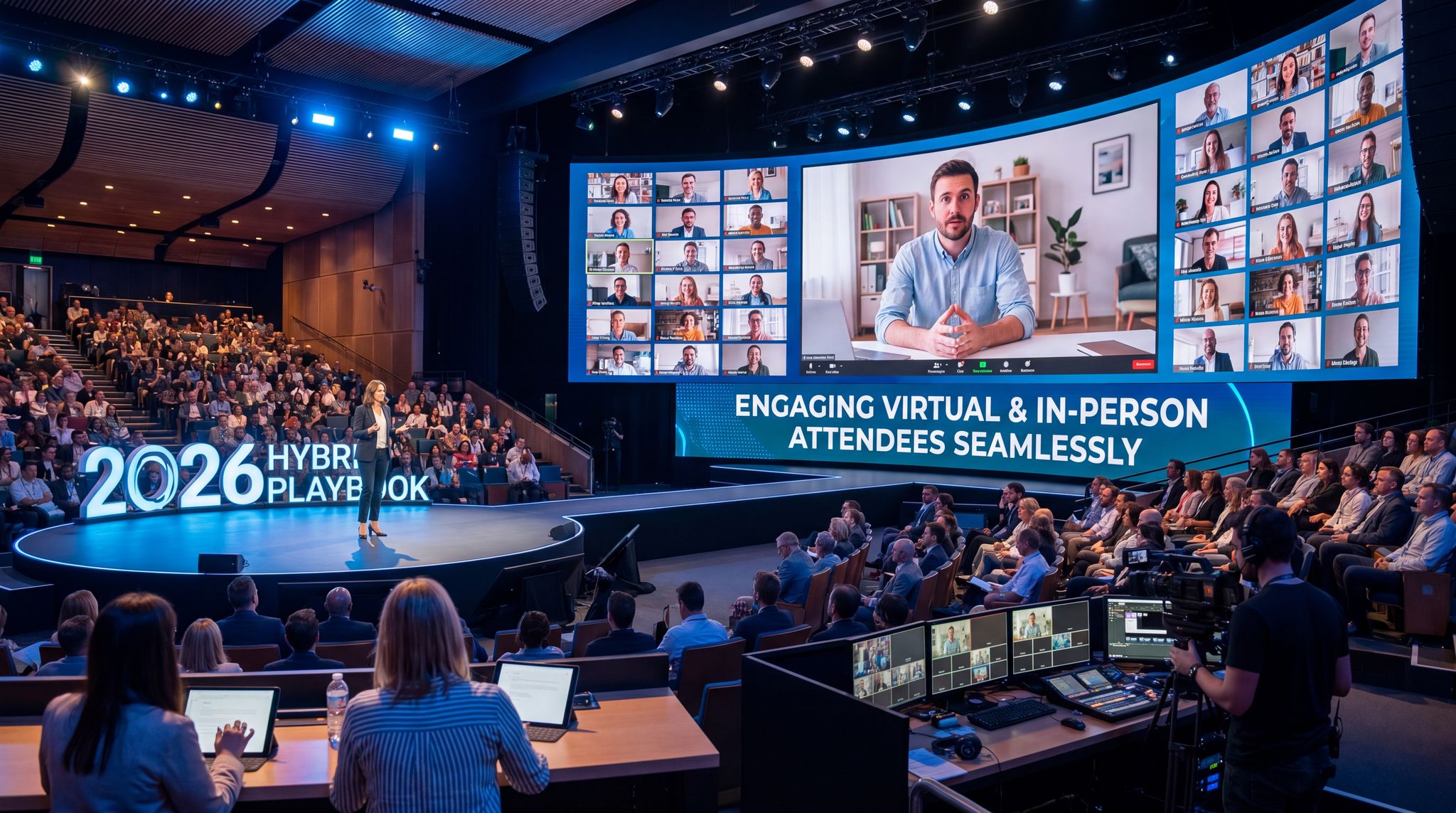
5. On-site stage considerations: Design your stage and rooms with the virtual audience in mind. For instance, place a confidence monitor or small screen facing the speaker that shows the live chat or remote attendees’ video feed – this reminds presenters to greet and acknowledge the online audience. Some events even put a large LED screen on stage that can gallery-display remote participants (for example, during a town-hall Q&A you might beam in a few virtual attendees “live” on screen to ask questions). Ensure your stage backdrop and branding look good on camera, not just in person. Also, brief your on-site crew to be mindful of camera sightlines – e.g., avoid staff walking in front of cameras or blocking the view.
Pro tip: Always schedule a full technical rehearsal before the conference. This means doing a run-through with all cameras, mics, lighting, and streaming gear as if it were showtime. Invite a few team members to act as virtual attendees during the test, so they can verify everything is working from the remote side (audio clarity, slide visibility, chat functions, etc.). Rehearse speaker transitions and any hybrid elements like switching to a remote presenter live. A thorough rehearsal will surface issues while there’s still time to fix them. As one veteran producer quipped, “for a hybrid event, rehearse as if you’re broadcasting the Oscars.” It’s that important.
Designing an Agenda for Both In-Person and Online Audiences
Planning the conference programme for a hybrid event requires a strategic approach. You’re essentially crafting two parallel attendee journeys that need to align. The in-person attendees have the advantage of physical networking and being immersed on-site, while virtual attendees can easily tune out if the content doesn’t keep their attention. Here’s how to design an agenda that captivates both groups:
Collect Any Attendee Data at Checkout
Add custom registration fields to your checkout — dietary needs, t-shirt sizes, company names, and more. Conditional logic and per-ticket-type fields.
Scheduling and Time Zone Management
First, take a global view when mapping out your schedule. If you expect a significant portion of virtual attendees from different regions, be mindful of time zones. One approach is to rotate session times across days – for example, start Day 1 at 9:00 AM US Eastern time (which is afternoon in Europe) and on Day 2, start a bit later to be friendly to West Coast U.S. and Asia-Pacific viewers. You might also record key sessions and replay them at a set time for another region, with a live moderator to field questions from that time zone. Some major tech conferences have even taken this to the extreme: Salesforce’s Dreamforce 2021 event ran a 24-hour virtual broadcast, handing off production from the U.S. team to Australia and Europe in shifts so that online content was live around the clock, as detailed in BizBash’s coverage of Dreamforce 2021. That’s an ambitious model, but it kept global attendees engaged in real time. If a 24/7 schedule isn’t feasible, at least plan to provide on-demand recordings of all sessions that attendees can watch at their convenience. In 2026, conference audiences expect the flexibility to catch up on content later if a time zone or work schedule prevented them from joining live.
When sending out agendas and communications, always list session times in multiple time zones (e.g. “10:00 AM PST / 1:00 PM EST / 6:00 PM GMT”) to avoid confusion. There are online tools and calendar plugins that help with this. Also consider having a “world clock” widget on your virtual platform or website, showing the current time in key cities for reference. Global scheduling is one of the trickiest parts of hybrid conference planning, but doing it well significantly improves the experience for remote participants.
Grow Your Events
Leverage referral marketing, social sharing incentives, and audience insights to sell more tickets.
Content Format and Session Design
Hybrid conferences benefit from mixing up session formats to keep everyone interested. Alternate between keynote presentations, panels, workshops, and interactive sessions. Long gone are the days of 90-minute lectures with no audience interaction – virtual attendees would tune out and even those on-site might get restless. A good rule of thumb is to break content into digestible segments (e.g. a 20-minute TED-style talk, followed by a 15-minute Q&A, then a short break or interactive poll before the next segment). Include interactive elements in every session if possible. For example, after a keynote, do a live Q&A taking questions from both the room and the virtual chat. Using a unified Q&A tool (like Slido or similar) makes this easier – everyone submits questions to one platform so the moderator can select a mix. Just be sure to have a plan for moderation so that neither audience feels ignored.
It’s wise to design some sessions specifically for strong remote engagement. Many hybrid conferences now feature “virtual-first” content like a live behind-the-scenes tour, expert interviews, or bonus digital-only workshops during breaks. For instance, while in-person delegates break for coffee, you could run a short behind-the-scenes interview with the keynote speaker exclusively for the online audience, perhaps hosted by a virtual emcee. This gives remote attendees added value instead of just a “please wait” screen during intermissions. Likewise, you could have a small studio corner at your venue where speakers come after their session to answer a few additional questions from the online audience on camera. These tactics make remote participants feel they get their own special content and access.
Also consider parallel streams and content choices. Just as an in-person conference might have simultaneous breakout tracks, you can offer virtual attendees different channels or content tracks too. They might join the main stage stream in one moment, then choose an online-only breakout on another track next. If you use a robust hybrid platform, it can handle multiple concurrent streams and allow attendees to select sessions. When planning the agenda, clearly indicate which sessions are available to virtual participants and which are in-person only. Ideally, try to minimize “in-room only” content or find ways to include the virtual audience (even if just as viewers) so they don’t feel second-class. If some activities don’t translate well (e.g. a physical site tour or closed-door in-person meeting), provide an alternative for remote folks – for example, a virtual networking meetup at the same time.
Don’t forget to incorporate breaks and buffer times. Staring at a screen non-stop is exhausting, so schedule short breaks for virtual attendees just as you do for those in person. A common practice is to slightly stagger breaks – e.g. the on-site audience has a 30-minute coffee break, but the virtual schedule gives them 20 minutes break plus a 10-minute bonus content piece. That bonus content could be a fun quiz, a wellness stretch session, or sponsor messages – something optional to watch during the break. Staggering ensures the live broadcast isn’t idle for too long and keeps remote folks near the screen, but also lets them step away briefly. Meanwhile on-site attendees get their full break to network or visit exhibits without missing new content.
Free Tool: Will the Room Actually Be Full?
Forecasts expected attendance from ticket type, event type and day of week. Calculates safe over-book count for free-RSVP events. Free estimator.
Aligning On-Site and Online Experiences
To truly make your hybrid conference feel like one event, think about moments where the two audiences can directly interact or share an experience. One powerful technique is running synchronized activities. For example, you can kick off the conference by having everyone – in the venue and online – participate in a live poll or word cloud that’s displayed on the main stage screen. It could ask, “Where are you joining from?” or an industry question to gauge the audience. Then display the results to show the blend of perspectives. This creates a sense of unity right from the start. According to industry surveys, experience equity is vital; 39% of virtual attendees have felt excluded during hybrid events, highlighting the need for mastering hybrid event marketing and engagement, and planners cite engaging both groups at once as a top challenge to maximize ticket sales and audience satisfaction. To combat this, build in shared moments where everyone’s input counts. Announce that “10,000 people are attending online alongside the 5,000 of you in this hall” to acknowledge both groups. During a panel or after a keynote, you might say “We’ll take one question from the room, then one from our virtual audience” and alternate – this sets an expectation of equal participation. Little gestures like a shout-out by the host to “our attendees tuning in from 42 countries today” goes a long way to making remote participants feel seen.
Consider intermixing the audiences in networking elements too. If you have a conference platform or app with user profiles and chat, encourage cross-audience networking by allowing virtual attendees to request meetings or send messages to those on-site (and vice versa). Some events set up specific discussion boards or topic-based chat channels that both groups can join. For instance, after a keynote about cybersecurity, you might direct everyone to a chat channel to discuss key takeaways – an on-site attendee might whip out their phone to post a comment, while virtual attendees do the same from their computers. Suddenly they’re in the same conversation. Another idea is organizing virtual roundtables or “birds of a feather” sessions that in-person folks can opt into via the app if they want to join a discussion from a quiet corner of the venue. The technology to blend these interactions exists; it just takes planning to incorporate it smoothly.
From a programming standpoint, it can be helpful to appoint a “virtual MC” or host who is specifically facing the online audience. This person can appear on the stream during transitions, providing commentary, reading questions from the chat, and generally keeping remote viewers engaged. For example, while people on-site are finding their seats before the next session, the virtual host could be on-camera interviewing an upcoming speaker or doing a recap of the last session for those tuning in late. This ensures the online attendees aren’t left with dead air and feel like the event is catering to them too. The virtual host should frequently remind the remote audience of how they can participate (“Don’t forget you can submit questions at any time” etc.) and echo key information (schedule changes, instructions) that on-site folks might get from signage or staff.
Last but not least, train your speakers and moderators on hybrid best practices. They should understand the importance of engaging both audiences – for example, a presenter should occasionally look into the camera to “make eye contact” with virtual viewers, not only address the people in front of them. In Q&A, moderators must repeat or summarize in-person questions into the microphone so that virtual attendees know what was asked (nothing is worse for remote folks than hearing an answer to a question they didn’t catch). If a speaker plans an interactive exercise with the crowd, they should include a way for online people to take part (maybe via the app or a shared Google Doc, etc.). These might seem like small details, but they strongly influence whether your remote attendees feel involved or sidelined. As one events director put it, design every aspect “with two audiences in mind” from the start, rather than tacking on the virtual audience as an afterthought.
Engaging Attendees and Creating Interaction
Simply streaming content isn’t enough – the success of a hybrid conference hinges on audience engagement. You want both in-person and virtual participants to be actively involved, emotionally invested, and networking throughout the event. Here are practical strategies and tools to boost engagement across the board:
Live Interaction Tools (Q&A, Polls, Chat)
Adopting the right interactive tools can turn a one-sided broadcast into a two-way conversation. Live Q&A platforms are a must – use them to allow questions from anyone, and display questions on a screen so the speaker can address them. Many events embed a Q&A widget in their virtual platform and also project it in the physical session room. This way, a question typed by a remote attendee could be upvoted by people in the room and answered on stage, making it a shared interaction. Similarly, run live polls or surveys during sessions to gather feedback or quiz the audience. Polls can be both fun icebreakers (“What’s your favorite tech gadget?”) and substantive (“Do you agree with the panelist’s point – yes/no?”). By revealing poll results live, you create a moment where everyone sees input from all attendees combined. According to one hybrid event case study, using live polls increased online audience participation by 30% because it gave them an immediate voice in the conversation. It’s an easy win for engagement.
Turn Fans Into Your Marketing Team
Ticket Fairy's built-in referral rewards system incentivizes attendees to share your event, delivering 15-25% sales boosts and 30x ROI vs paid ads.
Chat rooms or discussion feeds are another valuable outlet. Encourage virtual attendees to chat during sessions – many will naturally comment or debate points in real time. You can have staff or volunteer moderators in the chat to seed questions and keep discussions on track. For the in-person side, you might not want them all on devices chatting (you want them paying attention and not disturbing others), but you can still integrate chat by having session-specific discussion boards in the event app or a Slack/Discord channel for the conference. Then schedule designated times (like a post-session breakout) for on-site attendees to join those discussions. If managed well, a chat can create a sense of community and allow peer-to-peer learning, with people sharing insights or resources related to the talks.
Gamification and Contests
Adding game elements can spur attendees to participate more enthusiastically. Many conferences introduce a points system or challenges that reward engagement. For example, attendees might earn points for each question they ask, each poll they answer, visiting virtual exhibitor booths, or posting on the event’s social feed. These points can feed into a leaderboard (visible to all) and ultimately translate to small prizes – maybe exclusive swag, free access to session recordings, or even a free ticket to next year’s event for the top contributor. Gamification motivates friendly competition and prompts quieter attendees to get involved. It’s important to design challenges that include both audiences: e.g., “take a selfie at the venue or a screenshot of you tuning in remotely and post it with our hashtag” could be one challenge that works for everyone. Or a scavenger hunt where in-person attendees have to find codes around the venue while virtual attendees find clues hidden in the virtual platform. One creative idea is a trivia quiz about session content: at the end of each day, run a quick quiz (using a tool like Kahoot) that everyone can play on their phones, with questions drawn from key points made by speakers. It’s fun, reinforces learning, and encourages people to pay attention throughout the day.
Hybrid social media wall: Leverage social media to amplify engagement beyond the platform. Create an event hashtag and encourage attendees to share thoughts, photos, and screenshots on Twitter, LinkedIn, Instagram, etc. Then display a live social media wall at the venue and within the virtual event interface. Seeing their posts pop up on the big screen is exciting for attendees and showcases the global activity. It also encourages cross-interaction – an on-site attendee might see a tweet from a virtual participant and realize “hey, that’s a great point, I should reach out to them.” Just be sure to moderate the social wall feed for any off-topic or inappropriate content.
Networking and Community Building
One common concern about hybrid events is that remote participants miss out on the organic networking – those hallway chats, business card exchanges, or happy hour meetups that happen naturally in person. While you can’t fully replicate serendipitous handshakes through a screen, you can create structured networking opportunities that bridge the gap. Consider hosting virtual networking sessions: for instance, a “speed networking” block where the platform randomly pairs attendees (in-person with virtual or virtual-virtual) for 3-minute video chats before rotating. Clearly communicate to on-site attendees that they can participate from a quiet area with their laptop or a provided kiosk. Another approach is topical roundtables: offer video breakout rooms on specific topics (AI in marketing, women in tech, etc.) at certain times, and encourage anyone interested – whether sitting at home or at the conference center – to join the discussion virtually. These give remote folks a chance to meet people and ensures on-site folks aren’t only talking among themselves. Some events also set up a “networking cafe” video room that stays open throughout the conference for casual drop-ins, mimicking a lounge.
To facilitate person-to-person connection, utilize the attendee profiles collected during registration. Many planners focus on choosing a conference registration platform that allows attendees to opt into networking features: they can list their interests, the kind of contacts they want to meet, and then get suggestions or match-ups. Implement these features and actively prompt attendees to use them (“Visit the Networking tab to find people you have interests in common with and schedule a meeting.”). If you have the resources, assign a couple of staff or volunteers as “community managers” for the event – their job is to introduce people (e.g., in the chat: “@Maria, I see you asked about XYZ, you should connect with @Lee, who is working on something similar”), encourage conversations, and be a friendly presence especially for the virtual crowd. This human touch goes a long way to making remote attendees feel part of a community rather than lone viewers.
Sponsor and Exhibitor Engagement
From an engagement perspective, we can’t forget the experience of sponsors, exhibitors, and their interactions with attendees. In a hybrid conference, you need to deliver ROI for sponsors both on-site (classic branding and booth traffic) and online (leads and exposure in the virtual space). Plan features that let virtual attendees engage with exhibitors: for instance, virtual expo booths where attendees can watch product videos, download PDFs, and chat live with booth staff. You could offer scheduled demos or webinars by sponsors that are accessible to all attendees. Encourage sponsors to host a giveaway or contest that includes remote participants (e.g., a virtual raffle drawing people can enter by visiting a sponsor’s online booth). During the conference, use your platform to drive traffic: shout-out sponsor offerings (“Visit Sponsor X’s booth online to get a discount code”) or integrate sponsor content cleverly (like a sponsored poll question or a short video played during breaks). Also, consider sponsor representation in the stream – maybe the MC does a quick interview with a sponsor representative on the live feed, or you display sponsor logos on the background of speaker shots. By weaving sponsors into both audiences’ experiences, you make them feel the hybrid model is a win, not a drawback.
Smart Promo Codes & Presale Access
Create percentage or flat-rate discount codes with usage limits, date ranges, and ticket type restrictions. Plus unlock codes for private presales.
One innovative idea some events use is setting up one-on-one meeting matchmaking that includes sponsors. An AI-driven meeting scheduler can allow attendees (again, in-person or remote) to request 10-minute meetings with sponsor reps if they’re interested in their product. Those meetings might happen at the physical booth or via video chat. It’s another way to ensure your exhibitors still get valuable interactions and leads from the virtual crowd in addition to foot traffic. As a bonus, the data from these interactions (who met with whom) can be great analytics to show sponsor ROI.
Logistics, Support, and Backup Plans
A dual-format conference has more moving parts, which means more can go wrong. Proactive logistics planning and contingency plans are essential. Here are key considerations to keep things running smoothly:
- Staffing and roles: Treat the virtual component as its own venue and staff it accordingly. This means having a dedicated technical team monitoring the stream and platform, as well as moderators or MCs focusing on online attendees (as discussed). It’s wise to designate a “Virtual Attendee Help Desk” team – people available via chat, email, or a support line solely to assist remote attendees with any issues (login problems, audio not working, etc.). On-site, you’ll still have your usual crew for registration, room managers, and tech support. Make sure both teams are in constant communication (perhaps via radio or a Slack channel) to coordinate timing and handle any cross-over issues. For example, if an on-site session is starting late, the virtual team needs to know immediately to adjust the broadcast schedule and maybe run some filler content.
- Communication is key: Develop a clear run-of-show document that includes what happens for both audiences at each moment. This should detail who is responsible for each element. For instance, “10:00–10:05 AM: Opening video plays (Virtual audience sees intro video; On-site sees same on big screen). 10:05–10:10 AM: CEO welcomes on-site attendees (Virtual host welcomes online viewers in picture-in-picture). 10:10 AM: Emcee on stage addresses both audiences, introduces keynote.” A synchronized show flow ensures nothing and no one is forgotten. It also highlights where you may need extra content for one audience (like those virtual-exclusive segments during a physical break).
- Expect technology hiccups: No matter how much you rehearse, live tech can misbehave. Prepare backup measures for the most critical failure points. If your main streaming platform crashes mid-event, do you have a quick “plan B” like switching to a YouTube or Zoom link emailed to attendees? Even if not as feature-rich, having something is better than a blackout. If a remote presenter’s connection drops, have a phone line ready so they can dial in audio, or have them pre-send a recorded version of their talk as a fallback. If a camera fails on-site, can you do with one less or have a spare handy? Also consider backup power – using UPS battery backups on essential gear like the internet router and encoder can protect against a brief power glitch. For any pre-recorded videos you intend to play (intro videos, etc.), locally store them on the presentation laptop as well as in the cloud, in case one source lags.
- Audience contingency: Plan for what you’ll do if on-site attendance is lower or higher than expected, and similarly if virtual numbers spike unexpectedly. With hybrid, sometimes local turnout is lighter because people opt to stay home and watch – if that happens, you might want to compress the room space or encourage remaining in-person folks to move to front rows so it doesn’t look empty on camera. If instead a lot more show up in person last-minute, ensure your registration system can handle on-site signups and print badges quickly (our 2026 conference registration playbook offers tips on efficient check-ins). For the virtual side, if you suddenly have double the expected online attendees, be ready to open extra streaming capacity (some platforms allow you to upgrade bandwidth on the fly) and have more moderators available in chat to manage the crowd. It’s also wise to adjust your engagement approach dynamically – a very large chat might need slow-mode or stricter moderation, for example.
- Handling attendee issues: Have clear protocols for both audiences in case of issues. If on-site attendees run into problems (like can’t find a session room, or a technical issue with a demo), you have info desks and staff to help – likewise, virtual attendees need easily accessible support. Provide a prominent Help tab on the platform with FAQs and a way to contact support (live chat support during event hours is ideal). In communications before the event, send a “How to participate online” guide with instructions for system requirements (browser type, whether they need to download an app, etc.), time zone of the schedule, and who to reach out to if they need help. Setting expectations and providing orientation to remote attendees will reduce confusion on the day of.
- Crisis management: Identify in advance what constitutes an event “crisis” for hybrid and how you’ll respond. For instance, if the live stream goes down for more than a few minutes, have someone draft a quick announcement to email or text all virtual attendees acknowledging the issue and that you’re fixing it. Transparency is key – don’t leave people in the dark wondering if the problem is on their end. If a major session can’t be streamed due to a technical failure, consider rescheduling it or offering a special make-up session later and communicate that promptly. Meanwhile, continue the on-site event as best you can (those attendees shouldn’t be affected by a virtual issue, and vice versa). In worst-case scenarios (like an entire day gets disrupted), be ready to potentially refund virtual tickets or offer partial credit, and apologize sincerely. Having a PR or communications person on the team is valuable to manage any messaging if things go wrong. The good news is that careful preparation significantly lowers the chance of a true crisis – most hiccups will be minor if you’ve put robust systems and backups in place.
Learning and improving: After your hybrid conference concludes, gather feedback and metrics from both audiences. Send out separate post-event surveys for in-person and virtual attendees, since their experiences will differ. Ask virtual participants about the platform ease of use, stream quality, and whether they felt included; ask on-site folks if the technology elements (like event app or Q&A) added to their experience. Also debrief with your team and vendors: what went well, what didn’t, where did engagement drop off, etc. Analyzing the data will help pinpoint improvements. For example, you might find remote viewers had lower attention during afternoon sessions – maybe due to time zones or Zoom fatigue – suggesting shorter or more interactive sessions could help. You might discover that a significant percentage of online attendees were from a region you didn’t expect, which could inform scheduling or marketing next time, which is essential for mastering hybrid event marketing strategies. Use these insights to refine your hybrid event strategy going forward. Hybrid conferences are still a learning journey for our industry, and each iteration will get better if you consciously apply the lessons learned.
Frequently Asked Questions
What is a hybrid conference?
A hybrid conference is an event that combines both in-person and virtual components, allowing attendees to participate on-site or remotely. This format unites dual audiences through seamless live streaming and interactive technology, significantly expanding overall reach and accessibility for global participants.
What are the main benefits of hosting a hybrid event?
Hosting a hybrid event dramatically increases total attendance, with 83% of organizers reporting larger audience sizes. The format attracts new demographics, as roughly 50% of virtual participants have never attended the physical version. It also creates additional revenue streams and promotes environmental sustainability by reducing travel emissions.
How much more does a hybrid conference cost compared to an in-person event?
A hybrid conference typically costs about 15% more than a purely in-person event due to added technology and logistical requirements. Event planners allocate approximately 30% of their total budget toward hybrid tech, which includes professional audiovisual services, dedicated streaming infrastructure, and specialized virtual platform licenses.
How do you manage different time zones for a virtual conference?
Manage global time zones by rotating session start times across different days to accommodate various regions. Always provide on-demand recordings so attendees can watch content at their convenience. Additionally, clearly list all schedule times in multiple time zones across your communications and virtual event platform.
What internet setup is required for live streaming a hybrid event?
Live streaming a hybrid event requires a dedicated, high-bandwidth hardwired Ethernet connection to ensure broadcast stability. Wi-Fi is too unreliable for main broadcasts. Organizers must also secure a secondary backup internet line or a 5G wireless tethering arrangement to prevent stream drops if the primary network fails.
How can you keep virtual attendees engaged during a hybrid conference?
Keep virtual attendees engaged by integrating live interactive tools like unified Q&A platforms, real-time polls, and chat rooms. Incorporating gamification, such as point-based leaderboards and trivia quizzes, also boosts participation. Providing virtual-exclusive content during physical breaks ensures remote viewers remain actively involved throughout the event.
What features should you look for in a virtual event platform?
A virtual event platform should offer broadcast-level streaming capacity, robust engagement tools like live polls and virtual breakout rooms, and seamless registration integration. Essential features also include detailed analytics for measuring viewer watch duration and an intuitive, mobile-friendly user interface to ensure easy navigation for all attendees.
How do you prepare for technical failures at a hybrid event?
Prepare for technical failures by establishing strict contingency plans, such as having backup streaming links, spare cameras, and pre-recorded speaker presentations ready. Utilizing UPS battery backups protects essential gear from power glitches. Designating a dedicated virtual help desk ensures remote attendees receive immediate support during any disruptions.