
Tapahtuman määrittäminen
Schedule when your event goes live
Pick the date and time your event page goes public, and Ticket Fairy publishes it for you at that moment, in your event's own timezone.
- Kenelle
- Anyone running an on-sale to a set time
- Kestää
- 4 minuuttia
Mitä tarvitset ennen aloitusta
- You're an owner or an admin on this event. If you can't find Publish, ask an owner or an admin to do this part. Ticket Fairy support can publish for you as well.
- Your event is saved. Save any changes you have open before you start.
-
Open your event and select Publish
Open the event you want to put on sale, then select Publish. The dialog opens on Event Details.
-
Work through to Payment/Support
Select Next through Tickets/Add-ons to Payment/Support. Each screen is what buyers will see, so read them on the way past.
The scheduling button is on the last screen, beside Publish Now.
-
Select Schedule Publish
On Payment/Support, select Schedule Publish rather than Publish Now.
-
Choose the date and time, and confirm
Under When do you want to publish this event?, enter the moment your event page should go public. Select Schedule Publish.
The clock is your event's own timezone, not yours, and the earliest you can pick is fifteen minutes from now.
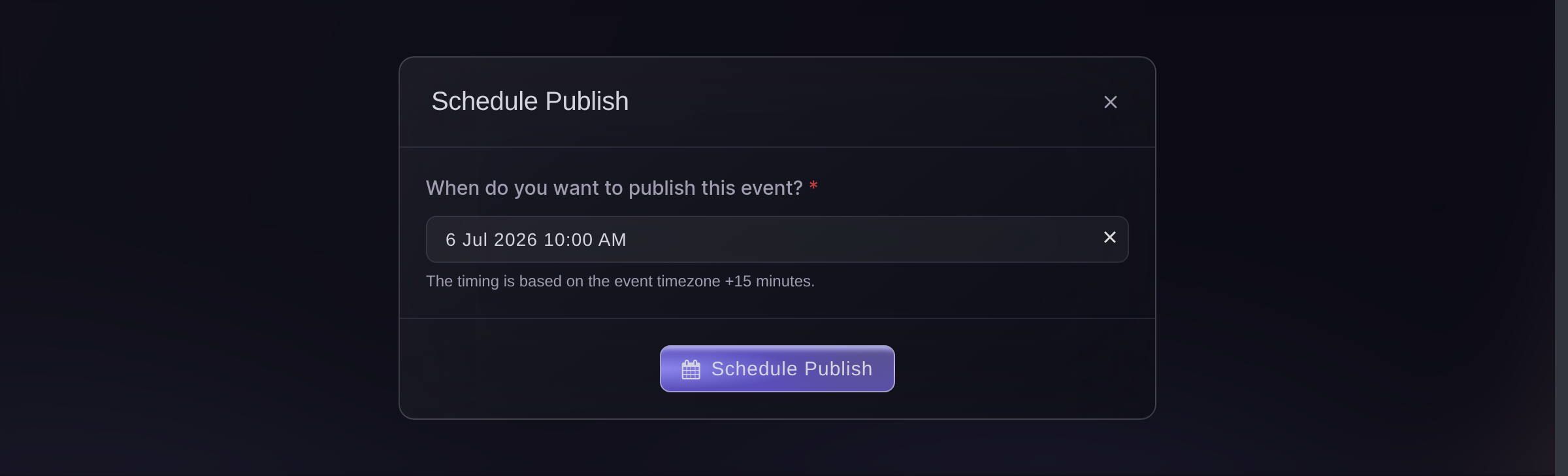
Publish, Payment/Support, Schedule Publish. -
Check the button says Scheduled
Close the dialog and look at the event. The Publish button now reads Scheduled, and resting on it names the date and time in your event's timezone.
Nothing else changes until then: the event page stays hidden and no ticket sells. Publishing makes the page public, which is not the same as opening the sale, so check the sale windows on your ticket types before you advertise a time.

Tai anna sen hoitua puolestasi
Fai, the assistant inside your dashboard, can set the schedule for you, and stops to ask you to approve it before it books anything. Your own AI assistant over our MCP server cannot schedule a publish: it can put an event live now, or tell you where one has got to, so use Fai or the dashboard for the date itself.
Hallintapaneelissasi, Fain kanssa
Schedule my event to go live at 10am on 12 September, and tell me which timezone you are using for that.
Omasta avustajastasi, MCP:n kautta
Yhdistä avustajasi MCP-palvelimeemme ja pyydä sitä:
Sivun vain luku -asetus riittää tähän. Täällä ei muuteta mitään, joten jätä --read-only paikallaan.
Find my event by name and tell me whether it is live yet, and if it is not, what is holding it up.
Päätteeltä
Asenna CLI osoitteesta CLI-sivultamme, kirjaudu komennolla ticketfairy auth login ja valitse brändi, jonka parissa työskentelet, komennolla ticketfairy brand use <BRAND_ID>. ticketfairy brand list ja ticketfairy event list tulostavat tunnisteet, joita alla olevat komennot tarvitsevat.
You need to be an owner or an admin on the event to run these, the same as for the Publish button. The CLI publishes the moment you run it, and takes one back down the same way. It cannot book a time, so set the schedule in your dashboard or ask Fai.
Your event page, live now
ticketfairy event publish <EVENT_ID>
Live now, with promoter links emailed
ticketfairy event publish <EVENT_ID> --send-promoter-links
Kysymyksiä joita sinulla voi olla
- How do I move or cancel a scheduled publish?
- Select Scheduled on the event to reopen the dialog. Pick a new time and select Save Schedule, or select Cancel Schedule, which leaves the event unpublished for you to publish whenever you want.
- Will tickets be on sale the moment it publishes?
- Only if nothing holds them back. Publishing makes the page public; a ticket type with its own sale window still waits for that window, and so does the event if you set a sales start on it. Set those to the same moment when you want the page and the sale to open together.
- What time zone is the publish time in?
- Your event's, not the one you are sitting in. An event in Los Angeles set for 10am opens at 10am in Los Angeles, whatever the clock says where you are.
- How exact is the publish time?
- Close to the minute. Ticket Fairy looks for due events once a minute, so an event set for 10:00 normally opens between 10:00 and 10:01. Read it as a minute either way rather than to the second, and do not build a countdown on the exact instant.
- Do my promoters get their links when a scheduled event goes live?
- No. Send Promoter Links is on the publish dialog and applies to publishing now, so a scheduled publish sends nothing. If your promoters need their links at the on-sale, publish at the moment yourself with that box ticked.
- Why won't it publish at all?
This is a draft event. Please save it first before publishing.
means save the event and come back.The location of your venue was not found
means the address you typed did not land on the map, so open the event details and pick your venue from the suggestions as you type.- Why won't it take the time I picked?
- Two refusals say so.
The publish time you chose has already passed
means the moment went by while you were setting it;Setting the venue moved this event to a different time zone
means your address resolved somewhere else and took the clock with it. Pick a new time in both cases. - Can I schedule an event that is already live?
- Not in one move: a live event's button unpublishes it instead. Take it down first, then schedule it, and it stays off sale until the time you set.
Mihin seuraavaksi
Tee tämä omassa tapahtumassasi
Luo tili, rakenna tapahtumasi ja seuraa näitä vaiheita omassa hallintapaneelissasi. Ilman myyntipuhelua.