
Membaca laporan acara Anda
See which fans sell the most tickets for your event
Every section of your event's Influencers screen, what it counts, and what it tells you about the people selling tickets for you.
- Untuk
- Anyone running a referral push for an event
- Perlu waktu
- 6 menit
Layar Influencers Anda
Yang Anda perlukan sebelum mulai
- You're an owner or an admin on this event, or you have a Stats or Limited Stats login for it. All four see the same sections. On a Limited Stats login the money columns are hidden.
- At least one buyer has shared your event. A buyer gets a referral link of their own in a referral email after they buy, unless you have turned referrals off for the event or that ticket type, and the money sections stay at zero until a sale comes back through one.
-
Referral Network Analysis
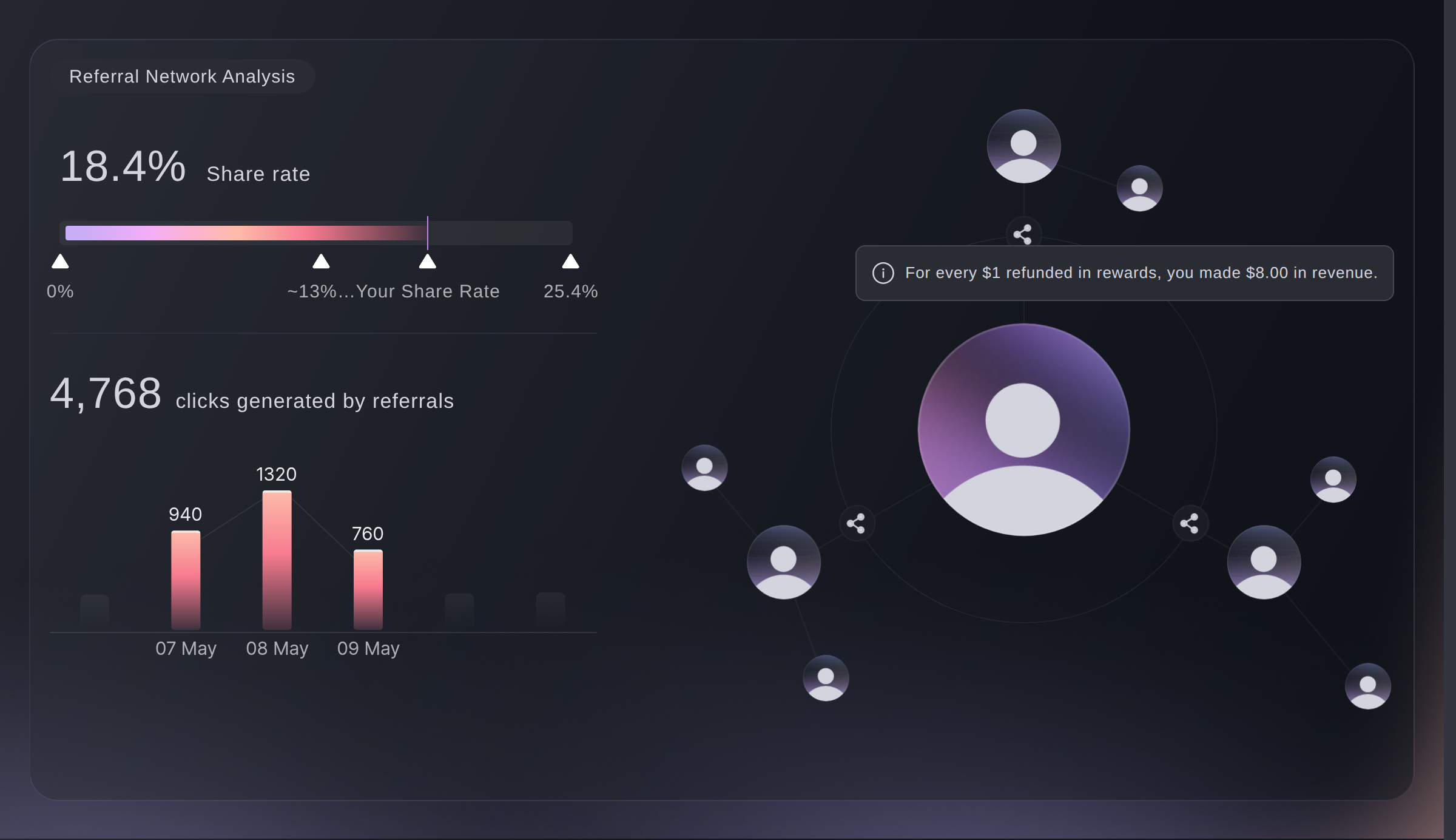
Open your event and go to Influencers. Your share rate sits at the top, as the percentage of buyers who shared your event, then the total clicks those shares brought, then the same clicks by day.
Read the shape rather than the total. Clicks bunched around your on-sale and nothing after it means people shared once and stopped, which is the moment a reminder earns its keep. This total and this chart leave out your own team's clicks, though they still count in the table lower down.
Influencers, Referral Network Analysis. -
Share of Total Revenue
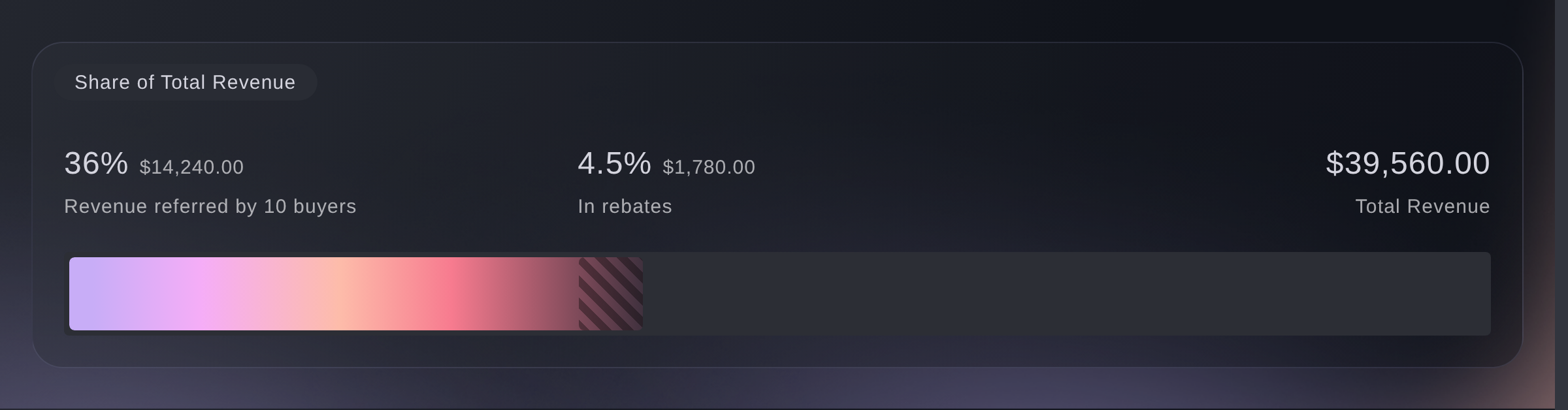
Your total ticket revenue is the full bar. Against it sit two shares: the revenue your referrers brought in, and what you owe them in rebates.
Read this one before you widen a reward, because it puts the rebate next to the money it produced rather than on its own.
Influencers, Share of Total Revenue. -
Revenue referred by buyers
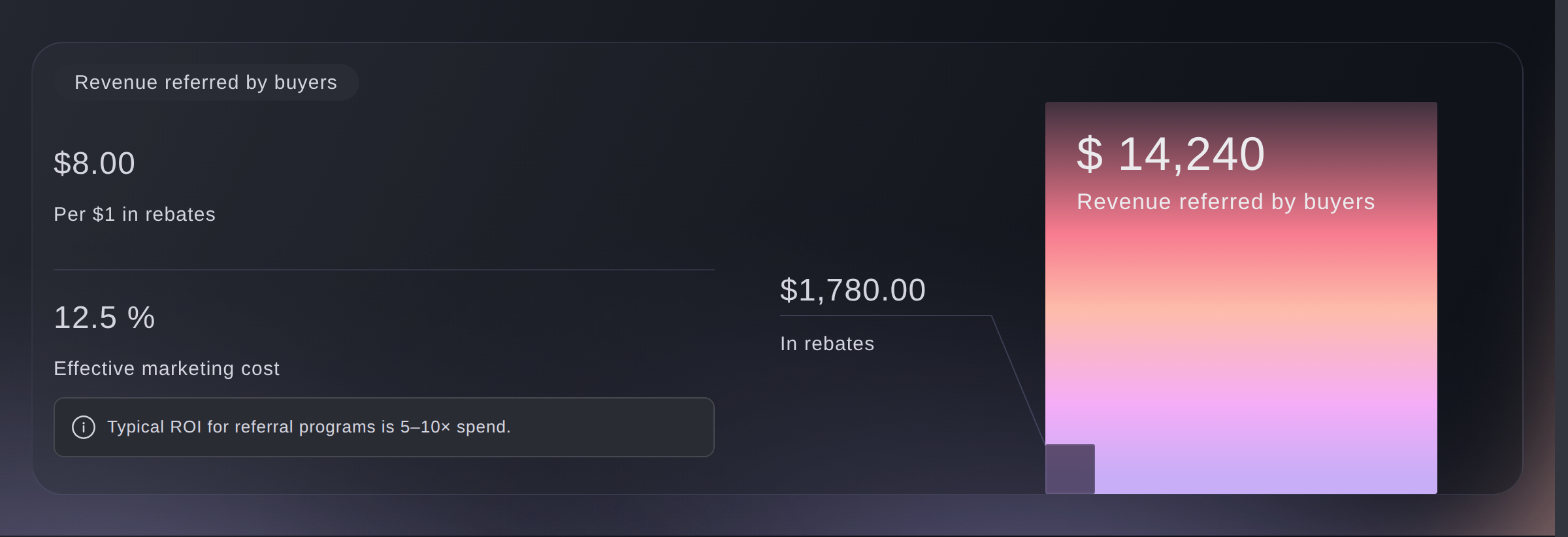
Per $1 in rebates is your return: the referred revenue divided by the rebates owed on it. Effective marketing cost is the same relationship the other way up, as a percentage.
Typical referral programmes return five to ten times what they cost, and the screen marks that band beside your figure. Below it the reward is generous for what it brings in; well above it, you can afford more.
Influencers, Revenue referred by buyers. -
Reward Targets
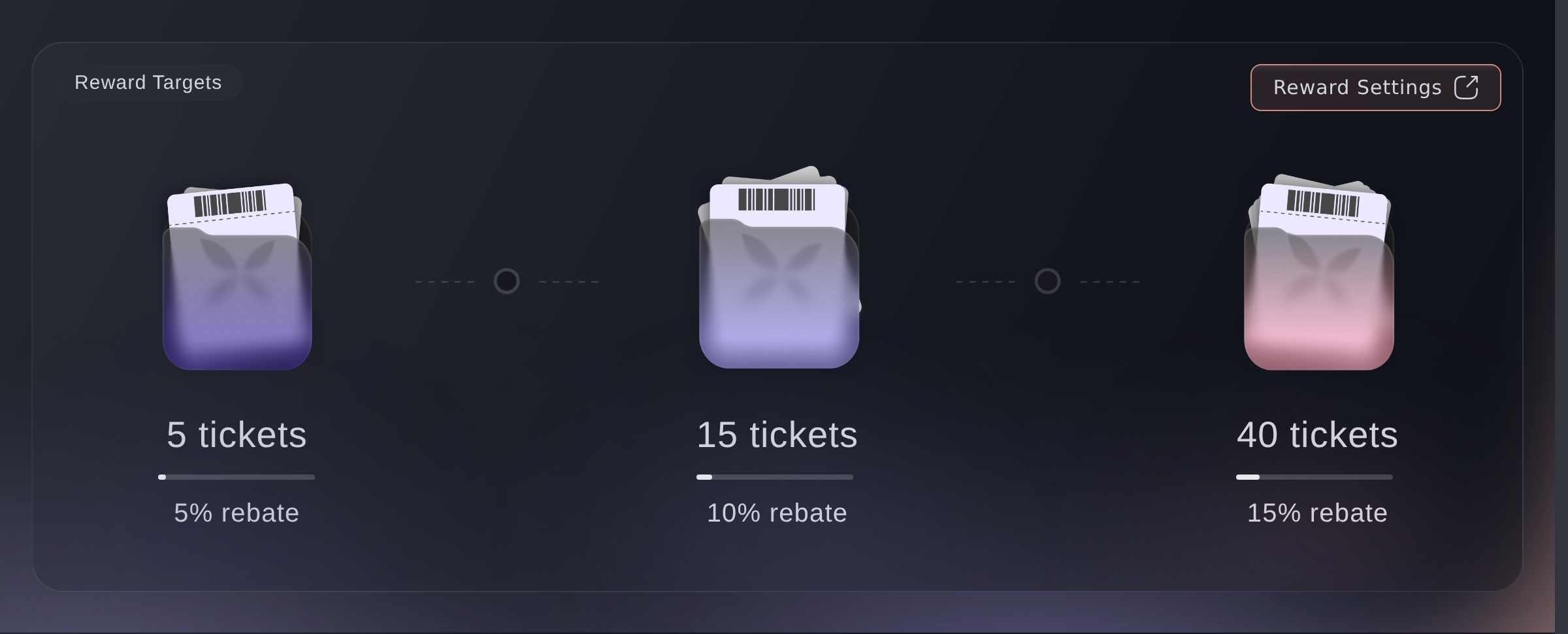
The tiers you set: how many sales a referrer makes to move up a step, and what percentage they earn once they are on it. Left alone, an event runs on three sales for 10%, five for 30% and ten for 100%.
Compare the steps against the table at the foot of the screen. If nobody has reached a tier, either the sale is still young or the step sits further out than this event can carry, so judge it late in an on-sale rather than on the first day.
Influencers, Reward Targets. -
Sales referred by buyers
Not one bar per person. Along the bottom is how many tickets somebody referred, and the height is how many of your referrers did that much.
A tall bar at the left is the healthy shape: lots of people bringing a friend or two. A lone bar far out on the right is one person referring far more than anybody else. Check that count against your total sales before you call them the reason the event sold, and know who they are before your next on-sale either way.
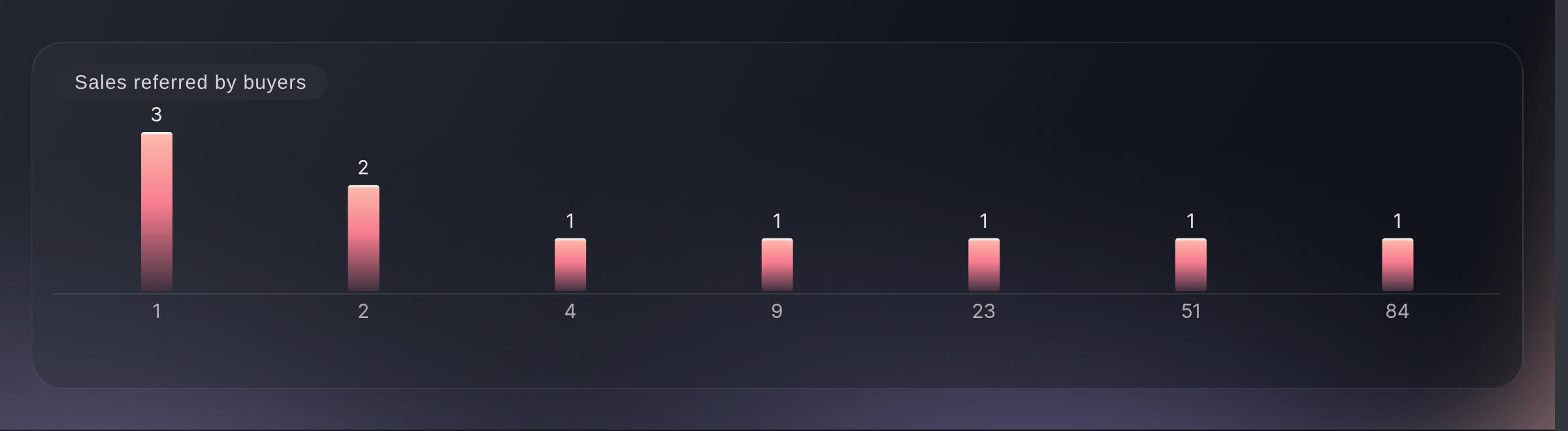
Influencers, Sales referred by buyers. -
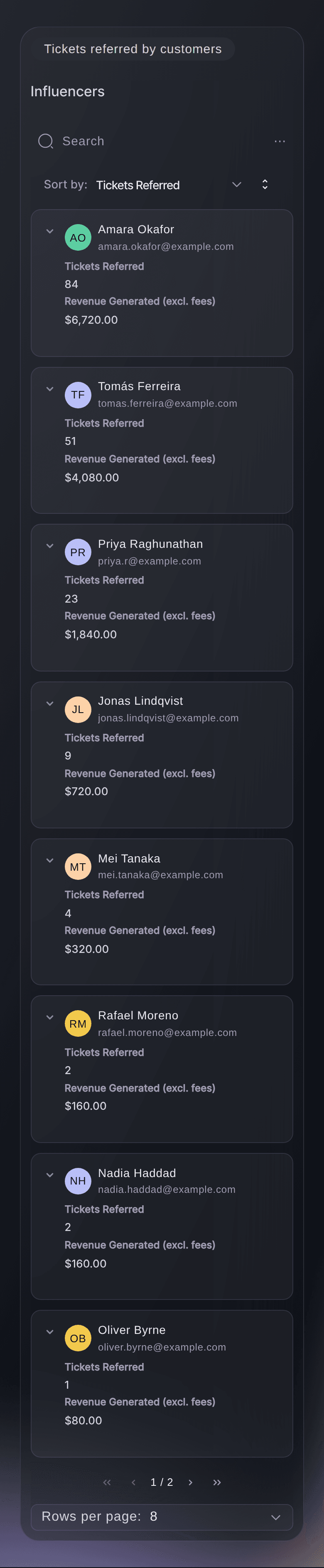
Tickets referred by customers
The referrers themselves, one per row: tickets referred, clicks generated, revenue generated excluding fees, the original purchase price, and the refund due to them.
Refund due is what that person has earned at the tier they reached, worked out from the price of their own ticket. It is what the event owes them for the whole run, and it does not fall once you have paid, so read it against your payout records rather than as a running balance. Sort clicks generated against tickets referred to find someone whose audience is looking but not buying.
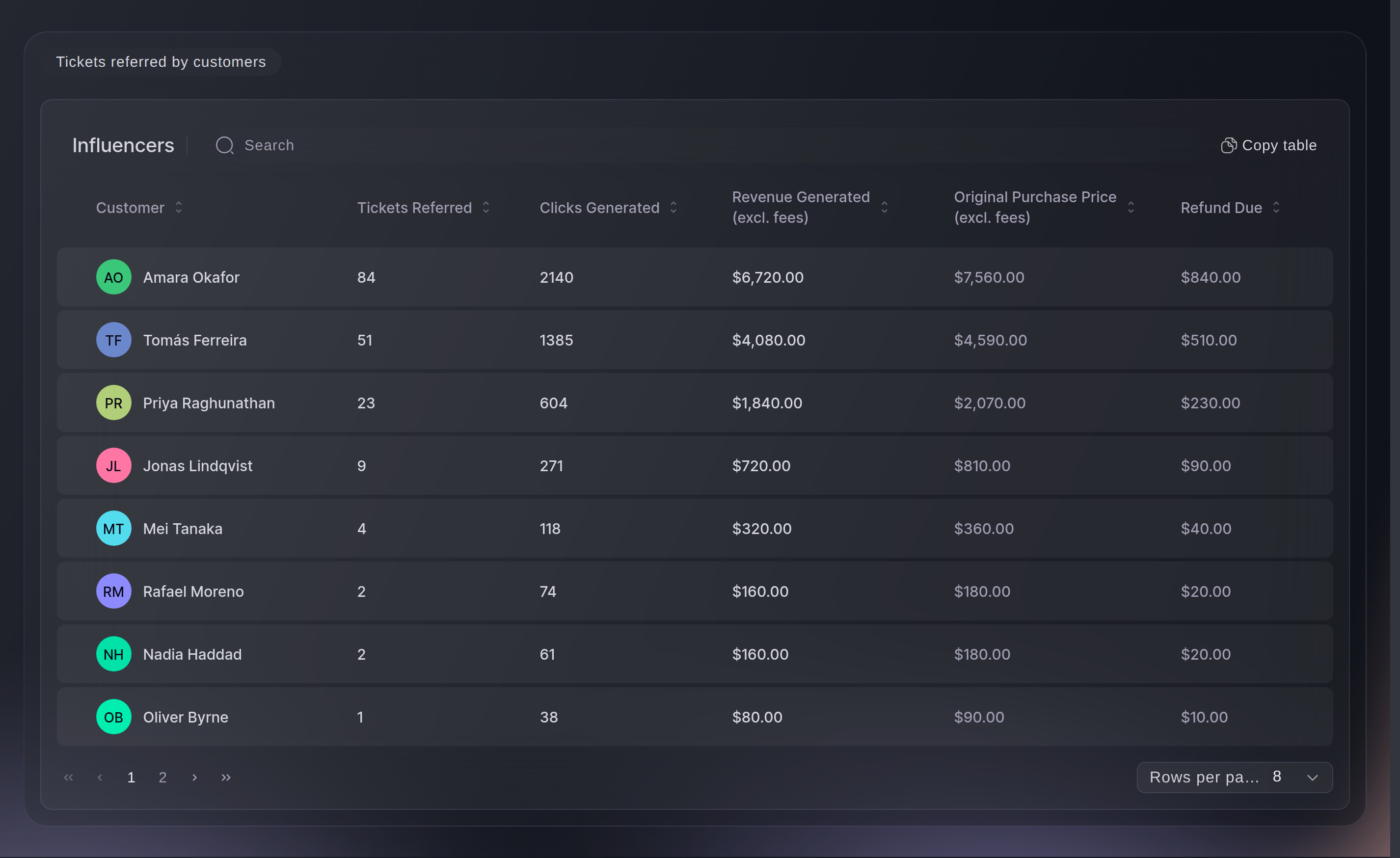
Influencers, Tickets referred by customers.


Atau minta dikerjakan untuk Anda
Fai, the assistant inside your dashboard, reads this screen too, and so does your own AI assistant through our MCP server. Ask either one what your referral figures are saying.
Di dasbor Anda, dengan Fai
Look at the referral results for this event. Who brought in the most sales, and is the reward paying for itself?
Dari asisten Anda sendiri, lewat MCP
Hubungkan asisten Anda ke server MCP kami lalu minta:
Pengaturan hanya-baca di halaman itu sudah cukup. Tidak ada yang diubah di sini, jadi biarkan --read-only apa adanya.
Find my event by name, then pull its referral figures and tell me the return per unit of rebate, and which of the referrers who did sell have the worst clicks-to-sales ratio.
Dari terminal Anda
Pasang CLI dari halaman CLI kami, masuk dengan ticketfairy auth login, lalu pilih brand yang Anda kerjakan dengan ticketfairy brand use <BRAND_ID>. ticketfairy brand list dan ticketfairy event list menampilkan id yang dibutuhkan perintah di bawah.
You need an owner, admin or Stats login to see the money. A Limited Stats login gets the same rows with it hidden. Set your rewards in your dashboard.
Your referrers and what each of them brought in
ticketfairy event stats <EVENT_ID> --metric referrals
The same figures, ready for a spreadsheet
ticketfairy event stats <EVENT_ID> --metric referrals --output csv
Pertanyaan yang mungkin Anda punya
- Which currency are these figures in?
- Your event's own, unless it sells in more than one. Then a currency selector appears and the sections above the table follow what you pick, while the table itself grows a revenue column per currency instead.
- Why is every number on this screen zero?
- Nothing has come back through a referral link yet. This screen counts shares, clicks and sales that carried a referral code, so an event nobody has shared reads zero rather than empty.
- Are my promoters on this screen?
- No. This screen counts buyers who shared their referral link, and your team's sales are read on Sales by Promoter instead. Anybody on your team is counted there rather than here, whatever their role and even when they bought a ticket themselves.
- Do these figures cover only this event?
- Mostly. If you have linked this event to others for referrals, the revenue, sales, referrer rows and clicks count the linked events with it. Your share rate is the exception and stays on this event alone, so do not read the two against each other.
- Why can't I see the revenue columns?
- A Limited Stats login hides revenue generated and the original purchase price; a plain Stats login keeps them. Ask an owner or an admin on the event to change your role if you need the money figures.
- What is the difference between revenue generated and original purchase price?
- Revenue generated is what that person's referred sales brought in, excluding fees. The original purchase price is what they paid for their own ticket, and their rebate is a percentage of that rather than of what they sold.
- Does refund due mean I have already paid them?
- No. It is what that referrer has earned on the sales they brought in, and it stays there after you pay it, so it is a bill rather than a receipt.
- What is a good return per $1 in rebates?
- Five to ten times, which is the band the screen itself quotes for referral programmes. Under five, the reward costs more than the sales justify.
- My event has no Influencers screen. Where is it?
- You can switch referrals off for one event, and the screen then dims with a way to turn them back on. Check that event's own settings rather than your brand's.
Langkah berikutnya
Lakukan ini di acara Anda sendiri
Buat akun Anda, susun acara Anda, dan ikuti langkah-langkah ini di dasbor Anda sendiri. Tanpa panggilan penjualan lebih dulu.