
Spørsmål fra arrangører
How do you build custom reports on ticket sales and buyer behaviour?
The reports that answer the usual questions, the orders table for the ones they do not, and the export that gets your event's numbers into anything else.
- For
- Anyone facing a question the standard reports do not answer
- Tar
- 6 minutter
Many "custom report" questions already have a screen. Your event's statistics cover what sold and when, where the buyers came from, who they are, which fans sold to their friends, and who has arrived. Start there, and build something by hand for what they do not cover.
For the questions that are genuinely yours, work from the orders table: filter it to the slice you mean and export that slice to CSV, or export every ticket rather than every order when the question is about attendees. That file is what goes into a spreadsheet, a BI tool or a finance system.
And you can ask in words. Fai in the dashboard, your own assistant over MCP and the command line all read the same numbers the screens draw, so "which age band bought the most, and how does that compare with last time" is a question rather than a spreadsheet.
Slik håndterer Ticket Fairy det
-
The statistics your event already has
You get Performance, Orders, Traffic, Demographics, Psychographics, Geographics, Influencers, Check-In and Devices. Each answers one question about your event, and you build none of them.
-
The orders table, filtered
Filter it to a ticket type, a date, a status or an add-on, and you are looking at the answer. Export what you filtered to and the file holds the same rows.
-
Export to CSV, orders or tickets
Export to CSV takes the rows as you have filtered them. Export all Tickets and Export Filtered Tickets give you one row per ticket instead, which is the shape most questions about attendees need.
-
The same numbers, asked in words
Fai reads these screens inside the dashboard, your own AI assistant reads them over our MCP server, and the command line prints them as JSON for a script that runs every morning.
Slik setter du det opp
Dette trenger du før du starter
- You're an owner or an admin on the event. A Stats login opens the report screens but not the orders table, and you need the orders table to export.
- Your event has sold something. Every report below reads your real orders.
-
Check whether a screen already answers it
Open Statistics on your event and start with Analytics, which is what sold and when. Traffic sources, ages and locations, referrals and check-ins each have a screen of their own beside it.
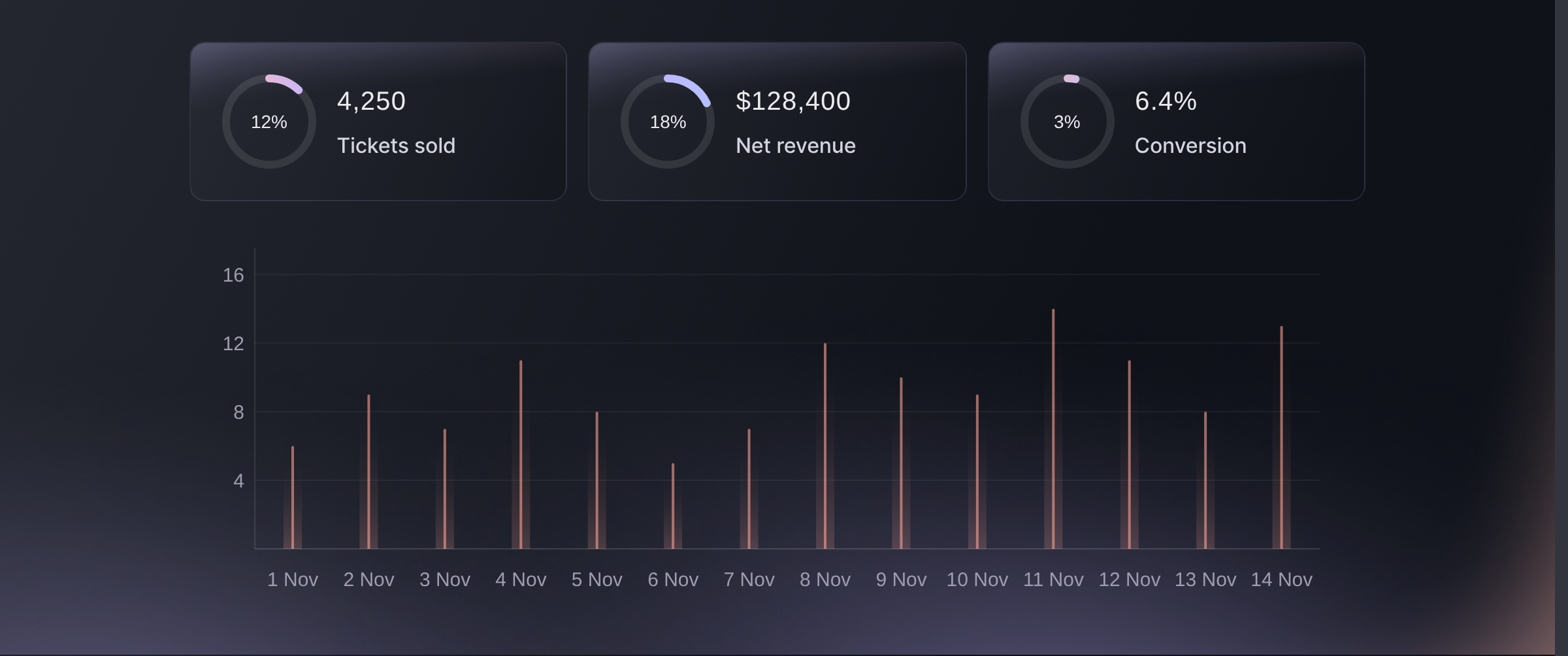
Statistics, Analytics. -
Filter the orders table to the slice you mean
Open Orders and narrow it to one ticket type, one add-on, one order status, one discount code, or a search. The rows left on screen are the orders your question is about, one row per order rather than one per person.
There is no date filter on this table. Where the question is about a window of time, sort by order date and take the rows you need, or read the sales-over-time screen, which does exactly that.
-
Export the slice, not the database
Use Export to CSV for the orders as filtered, or Export Filtered Tickets where the question is about attendees rather than transactions.
One order can hold several tickets, so an orders export and a tickets export answer different questions. Pick the one whose rows are the thing you are counting.
-
Put the recurring ones on a schedule
Where the same question comes back every week, ask it from the command line with JSON output and let a script run it. You get the numbers the screens show, so you never have to reconcile two answers.
Eller få det gjort for deg
Fai and your own AI assistant over our MCP server both read the statistics screens. The command line reads them too, and writes the orders export straight to a file a script can pick up.
I dashbordet ditt, med Fai
Compare this event with the last one I ran: what sold, where the buyers came from, and which age band bought the most.
Fra din egen assistent, via MCP
Koble assistenten til MCP-serveren vår, og be den om:
Det skrivebeskyttede oppsettet på den siden er alt som trengs. Ingenting endres her, så la --read-only stå.
Find my event by name. Pull its sales summary, its traffic and its age demographics, then tell me which referrers sent the most visitors and how sales moved over the same days.
Fra terminalen din
Installer CLI-en fra CLI-siden vår, logg inn med ticketfairy auth login, og velg merkevaren du jobber med ved hjelp av ticketfairy brand use <BRAND_ID>. ticketfairy brand list og ticketfairy event list skriver ut id-ene kommandoene under trenger.
Sign in with the same login you use for the screens. To export the orders you need an owner or admin login, the same as in the dashboard.
What has sold, as the summary at the top of the screen
ticketfairy event stats <EVENT_ID> --metric sales
The same numbers per ticket type
ticketfairy event stats <EVENT_ID> --metric performance --output json
Every order for the event, written to a file for a spreadsheet
ticketfairy order export <EVENT_ID> --output csv --file orders.csv
Spørsmål du kanskje har
- Is there a report builder?
- Not a drag-and-drop one. The report screens cover the questions that come up most. Past those, filter the orders table and export it, or ask Fai, your own assistant over MCP, or the command line, which all read the same numbers.
- What is the difference between an orders export and a tickets export?
- One row per transaction against one row per ticket. A single order can carry four tickets in three names, so counting attendees from an orders export undercounts them.
- Can I get ticket sales into our BI tool?
- Yes. Export the slice as CSV for a one-off, and for something that runs on a schedule use the command line with JSON output, which returns the same figures the screens draw.
- Who can see these reports?
- You can open the report screens on an owner, admin, Stats or Limited Stats login, so you can let somebody read the numbers without letting them change the event. You need an owner or admin login to open the orders table, so that is what the filtered export asks of you.
- Do the reports include refunded orders?
- You choose. Filter the orders table to include or exclude refunded and cancelled orders, and decide which of the two your question means before you export.
Veien videre
Gjør dette på ditt eget arrangement
Opprett kontoen din, bygg arrangementet ditt, og følg disse trinnene i ditt eget dashbord. Uten salgssamtale først.