
Вопросы организаторов
How do you manage tickets for a multi-day event?
Sell the full run and each single day from one event page, with camping and parking in the same order, and releases that hand over on their own.
- Для кого
- Anyone running a festival, conference or tour date over more than one day
- Займёт
- 5 минут
Most multi-day events work best as one event with a category per day, which is what this covers. Everything a buyer can choose sits on a single page: the full run, each day on its own, and the upgrades above them, so somebody deciding between Saturday and the whole weekend compares them side by side and pays once. Separate events per day suit days with their own venue, line-up and reporting.
Four parts carry it. Ticket Categories group what a buyer gets, so day tickets and weekend tickets read as sections rather than a list of thirty ticket types. Release tiers inside each category set what that thing costs as the event gets closer. Add-ons carry everything that is not admission -- camping, parking, meals -- into the same checkout. And a name on every ticket is what lets the door check who is holding it on day three.
Как это решает Ticket Fairy
-
Ticket Categories
A category is what the buyer gets: general admission, VIP, Saturday, the full weekend. The ticket types inside it are what they pay. Your event page shows the categories as sections, so a reader picks the day first and the price second. To hold a day ticket to its day, set the door times on the ticket itself.
-
Release tiers that hand over on their own
Early bird, first release, final release -- each its own ticket type inside a category, with its own allocation, price and sale window. A hidden release can appear either when the one before it sells out or at a set time, whichever comes first, so a weekend that sells fast never leaves an empty page.
-
Add-ons for everything that is not admission
Camping pitches, campervan permits, parking, meal packages and VIP upgrades are add-ons rather than ticket types, so a weekend with a tent and a car park space is one order and one confirmation email. Where an add-on comes in sizes, its variants keep it to one row.
-
Names on tickets, and resale at face value
Multi-day events are the ones touts work hardest, because there is a week of demand behind them. Requiring an attendee name puts each ticket in somebody's name, and turning resale on lets a buyer who cannot come pass it on through your own event page rather than through a tout, at a price you control rather than one they set.
Как это настроить
- Write down what a buyer gets on each day
- Create a category for each of them
- Add your releases inside each category
- Set the door times on each day's tickets
- Leave your full-run tickets on the event's own times
- Put camping, parking and travel in add-ons
- Require a name on every ticket
- Look at your event page as a buyer
Что нужно перед началом
- You're an owner or an admin on this event. If you cannot open the ticket screens, ask an owner or an admin to do this part.
- You know which days you are selling separately, and what a full-run ticket includes.
-
Write down what a buyer gets on each day
One line each: the full run, any single days you are selling, and any upgrade above them. This list becomes your categories, so keep it to what a buyer would recognise on your poster.
Every extra choice is one more decision before somebody can pay. A day ticket you add later is easy; one you take away after it has sold is not.
-
Create a category for each of them
Open Ticket Categories on your Tickets screen and click Create, once per line on your list. Put the name a buyer would recognise in Category Name.
A category has to exist before a release can join it. This is what turns a long list of ticket types into the sections your buyers see.
-
Add your releases inside each category
Create early bird, first release and final release as separate ticket types, and set the Ticket Category on each one to the day or run it belongs to.
A release left on No category still sells, but it sits outside the section, so the grouping a buyer sees has a hole in it.
-
Set the door times on each day's tickets
Open each day ticket, scroll to Options, and turn on This ticket has different door times. Set Door opens and Last entry to that day.
Without these, a ticket works for the whole run, so a Saturday ticket scans in on Sunday. A category groups what a buyer sees. The door reads these two.
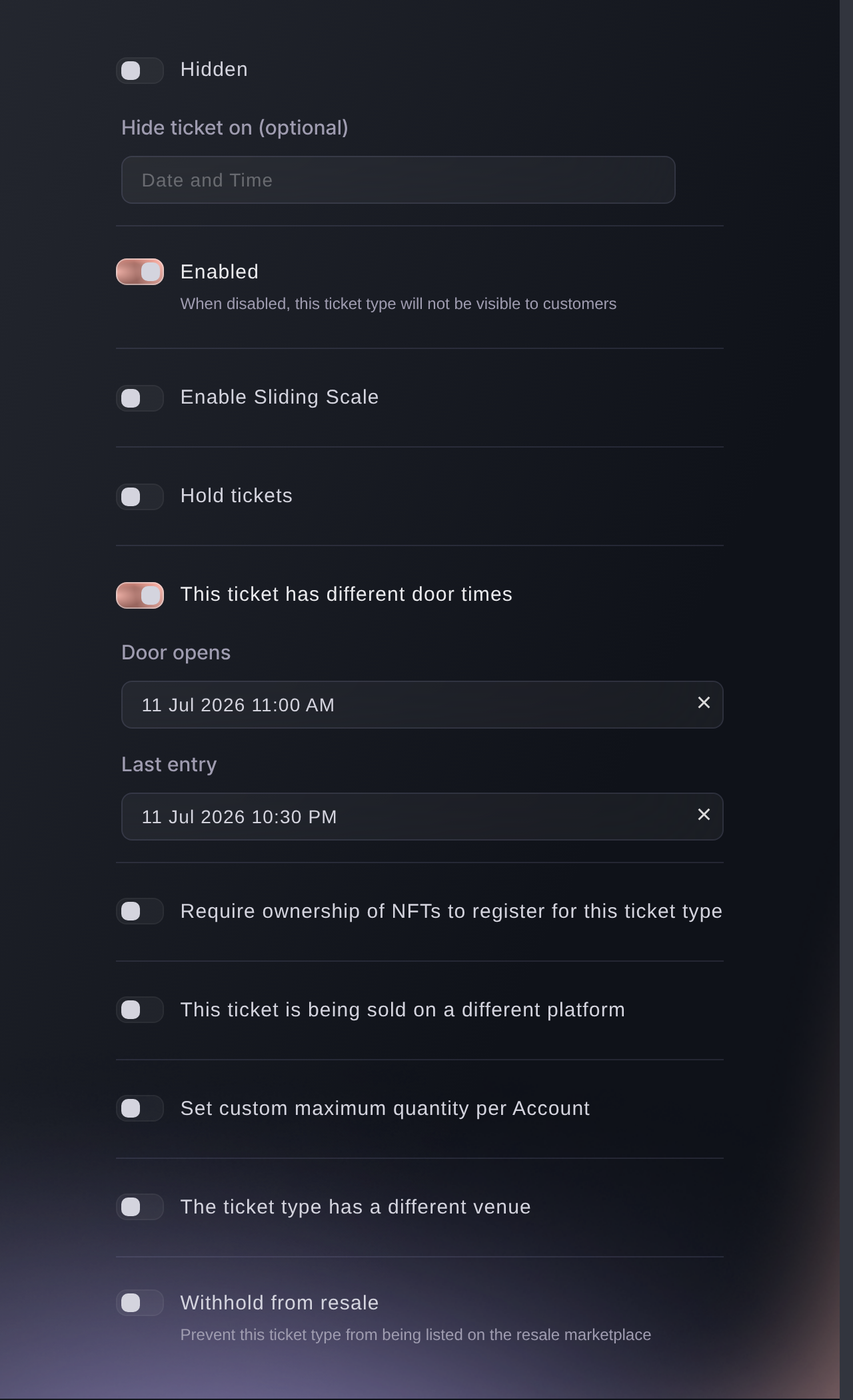
Tickets, a ticket type, Options. -
Leave your full-run tickets on the event's own times
Open each full-run ticket and check This ticket has different door times is off. The ticket then opens and closes with the event rather than with one day of it.
With the toggle off there are no dates to fill in, so the two fields are not on the screen at all. Letting the same ticket back in on the second day is a separate setting and it is not on this form: a ticket reads as checked in after its first scan, so ask us to allow repeat entry on your full-run types before the run starts.
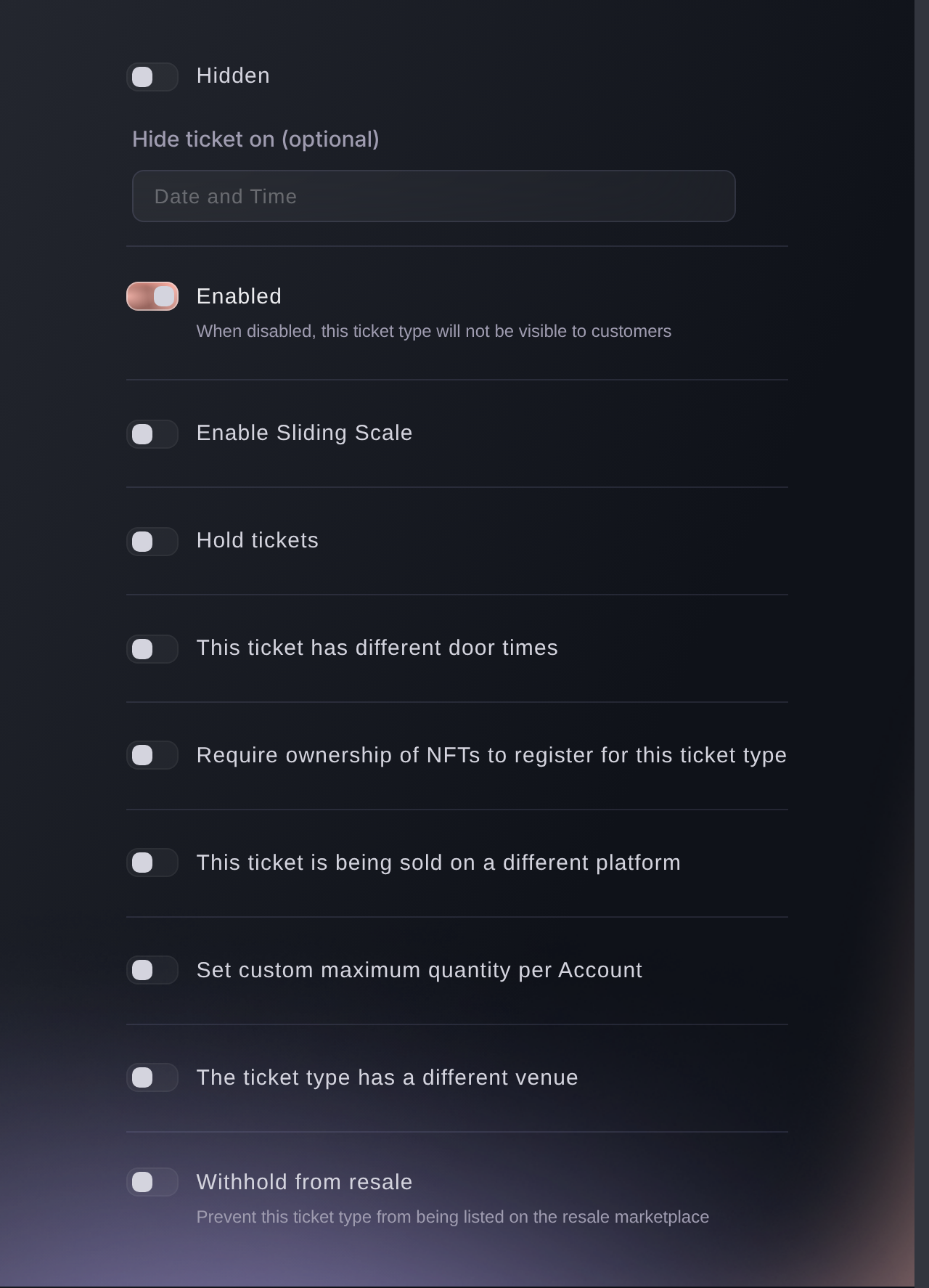
Tickets, a full-run ticket type, Options. -
Put camping, parking and travel in add-ons
Add each of them once, for the whole event rather than per day, so a buyer picks a pitch and a car park space in the same checkout as their ticket.
-
Require a name on every ticket
Open your anti-scalping and fraud settings and turn on names required, so each ticket carries the attendee's name rather than only the buyer's. Turn on name checks with it and the door checks those names on entry.
-
Look at your event page as a buyer
Open it in a private browser window. Each day should read as its own section, only the release that is open now should carry a price, and your add-ons should sit under the tickets.
A later release stays off the page until its turn, so an empty space where you expect the next tier is the correct result.


Вопросы, которые могут возникнуть
- Should a multi-day event be one event or one event per day?
- One event with a category per day suits most runs: one page holds all the demand, and a buyer choosing between a day and the full run compares them without opening two pages. Separate events split your reporting and your marketing with them. Split them anyway when the days have their own venue, line-up and accounts.
- How do I sell single-day tickets alongside a weekend ticket?
- Give each day its own ticket category and the full run its own, then put the releases for each inside the matching category. A buyer sees Saturday, Sunday and the full weekend as separate sections with their own prices. Set Door opens and Last entry on each day's tickets too, or a Saturday ticket will scan in on Sunday.
- How do I sell camping with a multi-day ticket?
- As an add-on, not as a ticket type. Camping, campervan permits, parking and meal packages all sell alongside the ticket, so the buyer picks a pitch in the same checkout rather than coming back for a second order.
- What happens if an early release sells out before its end date?
- You can set the next release to appear when the previous ticket type sells out or at a specific time, whichever comes first. Choose that and a tier that goes early hands over the same day instead of leaving nothing on sale.
- Can somebody who can only come for one day pass on a weekend ticket?
- Yes, while resale is on and the ticket is still unused. Scanning it in stops the listing, so somebody who came on Friday cannot pass the weekend ticket on for Saturday unless you reverse that check-in on the ticket first. An unused ticket sells through your own event page rather than a tout, the original code stops working, the new holder gets a ticket in their own name, and what they pay comes from the Resale Type on the ticket category.
Что дальше
Сделайте это на своём мероприятии
Создайте аккаунт, соберите мероприятие и повторите эти шаги в своей панели. Без предварительного звонка отдела продаж.