
Чтение отчётов мероприятия
See which promotion sold your tickets
Give every place you promote your event its own link, then read the clicks, the orders and the ticket money each one brought in, side by side on one table.
- Для кого
- Anyone promoting an event in more than one place at once
- Займёт
- 6 минут
Что нужно перед началом
- You are an owner or an admin on this event. If Tracking Links is missing from your event menu, ask an owner or an admin to change your role.
- Ticket Fairy has verified your brand. Until it has, the entry sits in the menu greyed out, beside the other selling tools.
-
Make a link for each place you promote
Open your event, go to Tracking Links under Marketing, and select Create Tracking Link. Put the channel and the date in the Name, so the table still reads clearly in a month, and select Create. The new link arrives at the top of the table with a short address of its own.
A Promoter (optional) field appears when somebody on this event holds the promoter role. Picking one makes this a promoter link: the sales through it are counted as that person's and reach Sales by Promoter rather than your referrals, so leave it empty for a post of your own.
-
Put each link where its audience will find it
The address sits under the name, with a copy button beside it. Download QR saves the same link as a QR code, ready for a poster or a flyer. Use one link per channel and keep using it: a link goes on counting for as long as you leave it in place.
-
Read what each link brought in
The table opens with the busiest link first. Number of Clicks is the visitors that link sent you, Orders is the orders that followed, and Revenue is what those orders are worth to you. Select a column heading to sort by it, and Copy table puts the whole thing on your clipboard.
Revenue is your share, after our fees come out, not what the buyer paid. Orders counts an order from the moment it is placed, so one still waiting on a bank transfer is in there beside a paid one, and a refunded order stays in the count while its money drops out of Revenue.
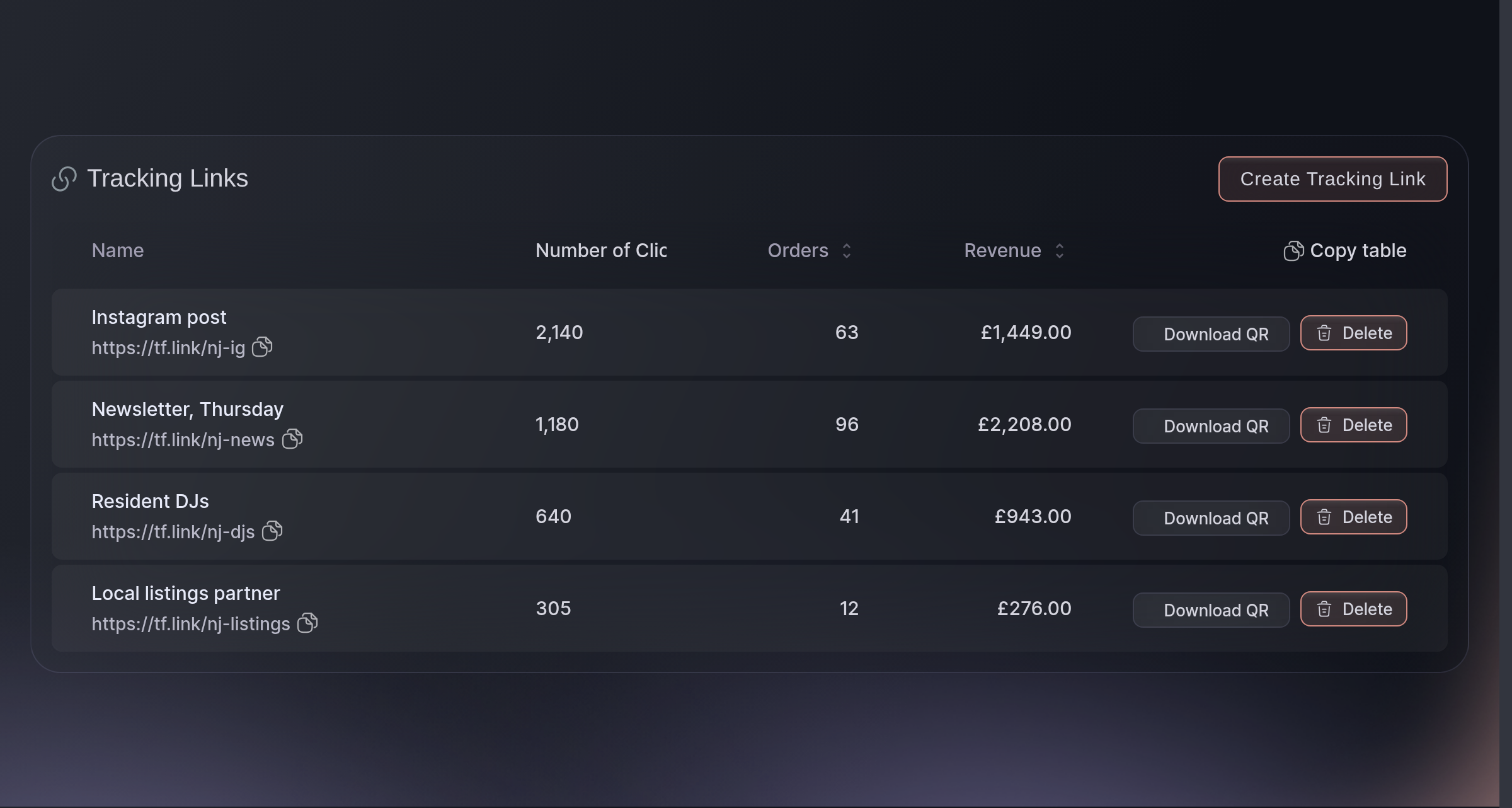
Tracking Links. -
Take a spent link off the table
Select Delete on the row, and the dashboard asks
Are you sure you want to delete this tracking link?
before it goes. The row leaves the table with its clicks and its orders, and the orders themselves are untouched.Anybody who already has that address stops reaching your event by it, and lands on a general events page instead. Leave a link you have printed on a poster or handed to a partner where it is.

Вопросы, которые могут возникнуть
- How is a tracking link different from a referral link or a promoter link?
- By who it belongs to. A referral link belongs to a buyer, who gets it after they buy and earns a reward on sales through it; a promoter link belongs to a team member and counts as their sales; a tracking link belongs to nobody and measures a place you promoted.
- Why is a link's click count higher than the people I know clicked it?
- One visitor counts once per link, and the count resets when they open a different link for the same event. Somebody who opens your Instagram link, then your newsletter link, then the Instagram one again adds two clicks to Instagram. The reset lasts 30 days, or until they clear their browser.
- Why do the orders on a link not add up to the sales on my event?
- A link is credited with an order only when the buyer arrived through it and bought in the same browser. Somebody who opens your link on a phone and buys on a laptop is a sale to your event with no link against it, and every sale that came in without a tracking link is in the same position.
- Do these links show up as referrals on my Traffic tab?
- No. A tracking link with no promoter on it arrives as a Direct Visit, because nobody is being credited. Referral Visits counts arrivals on a buyer's referral link or a promoter's link.
- Can I rename a link after I have shared it?
- Not on this screen. Make a second link with the name you want and put that one out next, and leave the first where it is so what it has already earned stays on the table.
- Why does a link I made somewhere else not show here?
- This table holds the links made on this screen and no others. A buyer's referral link is read on Influencers and a team member's link on Sales by Promoter, and a short link or a collective link is read where you made it.
- What do the Linked Promoter and Redirect URL columns mean?
- Each appears only when a link on your event carries one. Linked Promoter is the team member the sales through that link are counted as, and Redirect URL is a destination other than your event page, which a link made outside this screen can carry.
Что дальше
Сделайте это на своём мероприятии
Создайте аккаунт, соберите мероприятие и повторите эти шаги в своей панели. Без предварительного звонка отдела продаж.