
Создание мероприятия
Create a reusable event template
Share your ticket tiers and allocations as a template without publishing your prices. Your brand name appears on every template you publish.
- Для кого
- Sharing an event setup as a reusable template
- Займёт
- 8 минут
Что нужно перед началом
- You're an owner or an admin on this brand. Sharing puts your brand's name on a public page, so if you can't find Share an event, ask an owner or an admin to do this part.
- Check that the ticket names, prices and allocations reflect what you want to share.
-
Pick the event to share
Open Event templates on your brand and choose Share an event. Pick the event whose ticketing you would recommend to another organiser running a similar event.
A successful event gives another organiser a proven starting point for prices, allocations and release timings.
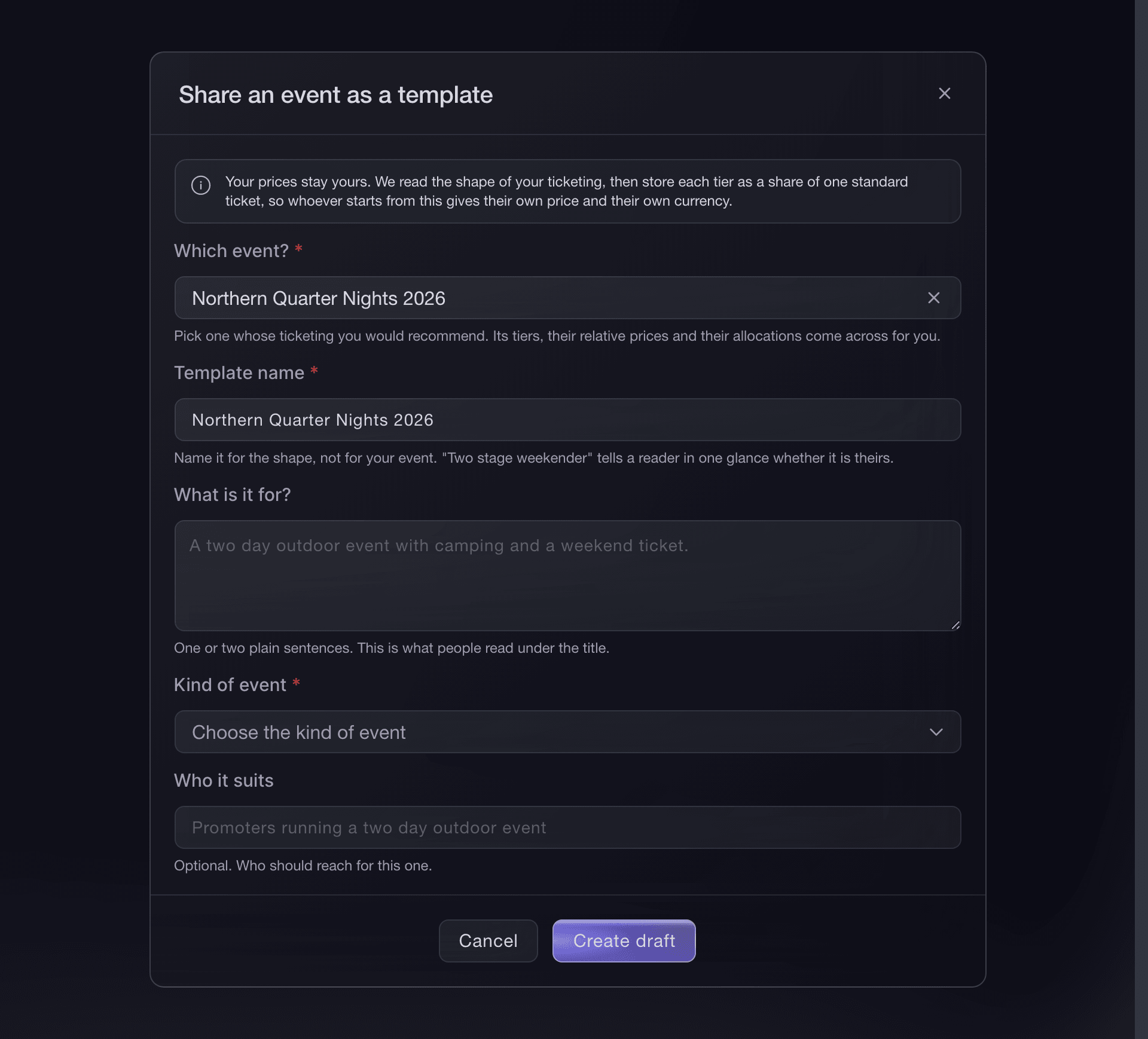
Brand settings, Event templates, Share an event. -
Review the copied ticket tiers
The template copies the ticket tiers, their relative prices and allocations from the event. Each tier then shows as a share of the anchor rather than as an amount.
The template copies these details from the event. If a tier is wrong, correct it on the event and create the template again.
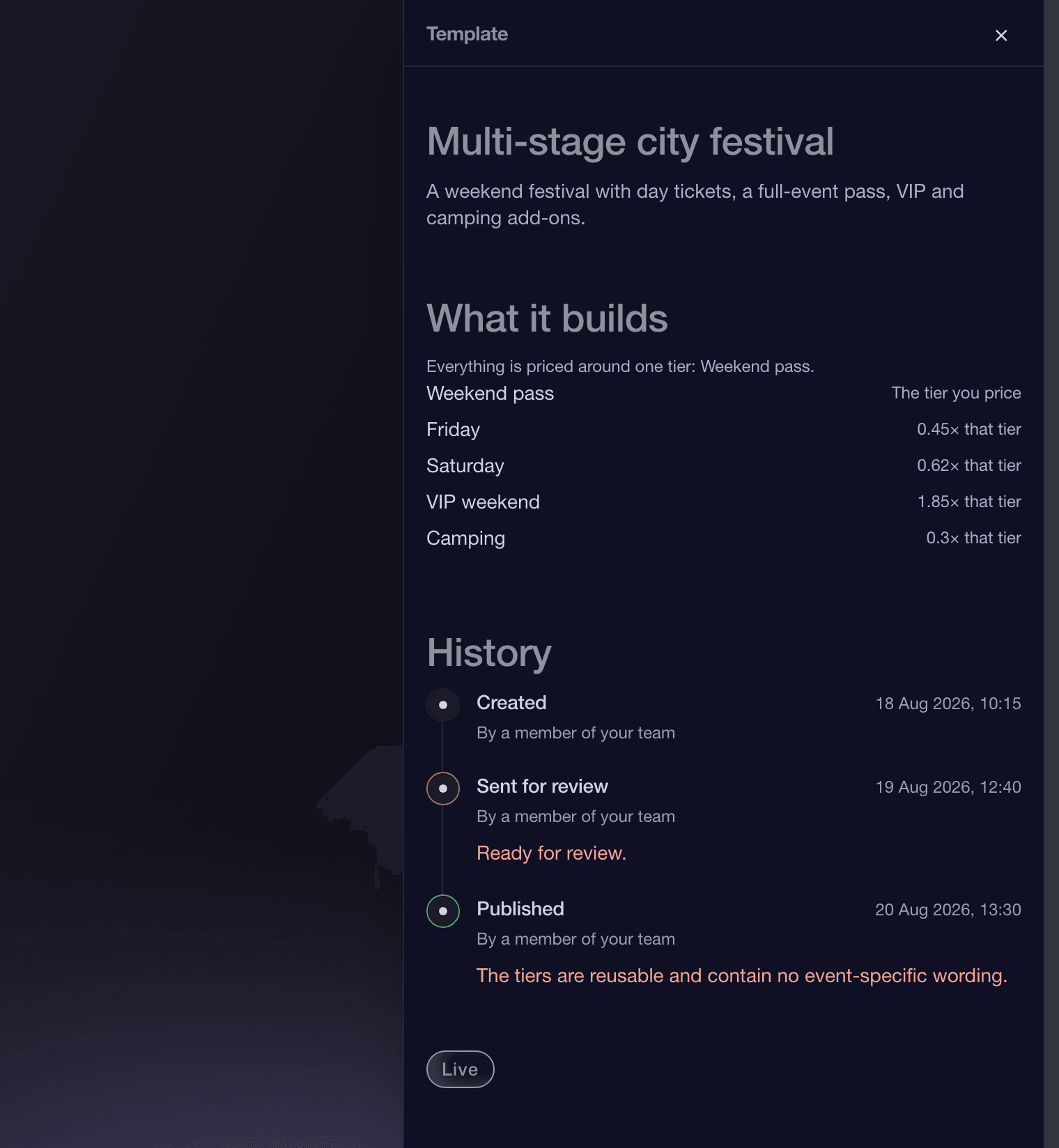
Brand settings, Event templates, Template details. -
Set the anchor tier
The anchor is the one ticket tier your template asks about. The template initially uses the paid tier with the largest allocation. Change it if a different tier is what you would call a standard ticket.
Changing the anchor recalculates every tier's relative price without changing the relationship between them. Only the price the next organiser enters changes. Pick a paid ticket type that buyers would recognise as the standard option.
-
Enter the template details
Enter a name that describes the kind of event in Template name, such as Two stage weekender. Explain the setup in one or two plain sentences in What is it for?, and choose the closest Kind of event. You must complete the name and kind before you can create the draft. If it helps another organiser decide, enter who should use it in Who it suits. Use your own language if that is not English.
Name it for the kind of event rather than for yours. A name like Summer Weekender 2026 belongs to one date, so an organiser browsing the gallery cannot see what it sets up; Two stage weekender with camping tells them in one glance whether it is theirs.
-
Submit it and wait for the review
Submit the draft for review. The Event templates page shows its current status, the brand name that will appear with it and every review decision.
A turned-down template returns to draft so you can change it and submit it again.
Или поручите это помощнику
Fai can copy the ticket tiers and allocations from your event, choose an anchor tier and draft the template details. She shows you the wording and asks before submitting it. You can also create the template from your event in the dashboard.
В вашей панели, с Fai
Share my Summer Weekender as a template called "Two stage weekender", use the weekend ticket as the anchor, draft a one-line summary for a two-day outdoor event with camping, and show me the draft before submitting
Withdraw a template
Open the template and choose Withdraw. You can withdraw it while it is under review or after it has been published.
The template returns to draft and disappears from the public gallery. Your team can still open and edit it.
Fai can find the template and withdraw it after showing you its current status. MCP and the CLI do not manage organiser-shared event templates.
В вашей панели, с Fai
Find my event template called <TEMPLATE NAME>, show me its current status and public details, then ask before withdrawing it to draft
Вопросы, которые могут возникнуть
- Does sharing a template give away my prices?
- No. A template saves how your tickets are set up, not your prices: one tier is the anchor, and it stores every other tier as a share of that one. Your template asks for the anchor ticket price, then prices every other tier from that amount in the chosen currency, so your published template does not show your prices.
- What is the anchor tier?
- The one tier your template asks about, so pick the tier you would call a standard ticket. The template initially uses the paid tier with the largest allocation, which is usually right, and you can change it before you submit. Use a paid ticket type so the template has one clear starting amount for working out every other tier.
- When does my template appear on the gallery?
- After it passes review. Submit your draft and our team will review it before publishing it under your brand. Until then, only your team can see it.
- Mine was turned down. Why?
- Open the template and read its history. Every state it has been in is there with who changed its status and why. Take it back to draft so you can edit it, fix what the reason names, then submit it.
- Can I take a published template down?
- Yes. Withdraw it and it goes back to draft, so the gallery stops offering it while you work on it. Events already created from it remain unchanged: a template is a starting point, not a live link.
- What does the review look for?
- The review checks that another organiser can use the template: tier names explain what buyers receive, the summary says which events it suits, and the template contains no prices.
Что дальше
Сделайте это на своём мероприятии
Создайте аккаунт, соберите мероприятие и выполните шаги в своей панели управления. Звонок в отдел продаж не нужен.