
Suosittelumarkkinointi
Reward buyers who bring friends to your event
Give each eligible paid ticket buyer a personal referral link and return part of their own ticket price when their friends buy through it.
- Kenelle
- Turning word of mouth into ticket sales
- Kestää
- 7 minuuttia
Ennen aloitusta
- You have an owner or admin login for the event.
- Your event has at least one paid ticket type. Free tickets can still be shared, but they do not give the buyer a ticket price to earn back.
- Referrals are enabled for the event. Only eligible ticket types take part. A buyer does not receive a personal referral link for an excluded ticket.
- If referral rewards are already enabled, set your targets before the first ticket sale. The terms buyers saw when they bought then stay fixed.
-
Open the Rewards System settings
Open your event, select Tickets, then Settings, and keep Disable Rewards System turned off under Rewards System. Eligible paid buyers then receive their personal referral links.
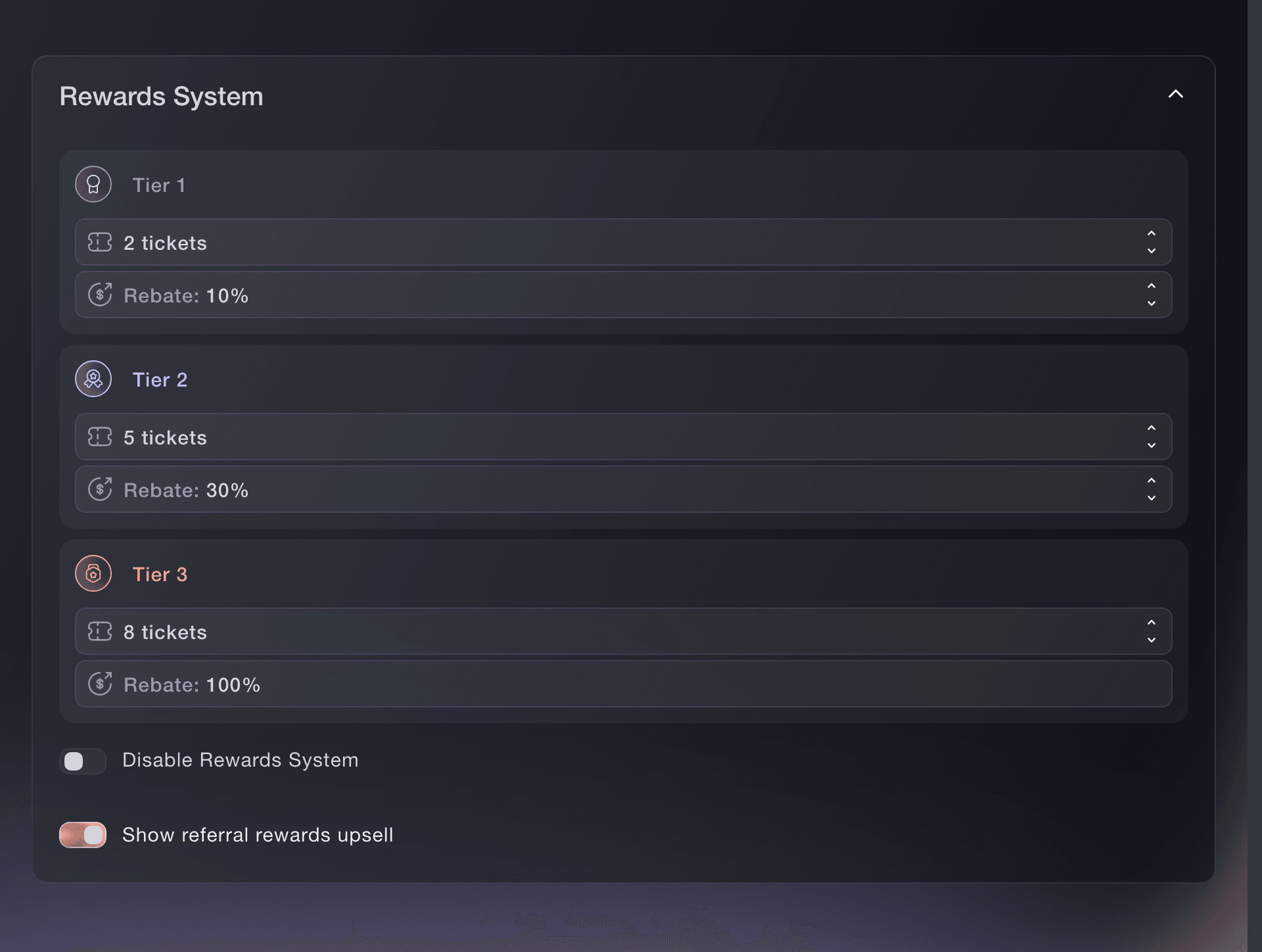
Tickets, Settings, Rewards System. -
Choose the sales target and reward for each tier
Set each tier's target from 1 to 10 referred sales, and its Rebate, the share of the buyer's own ticket price they earn back: Tier 1 can be 5% to 95%, tier 2 can be 5% to 100%, and both move in steps of 5%. Tier 3 always returns 100% of the eligible ticket price.
Huomautus: The sales target must increase from tier 1 to tier 2 and again from tier 2 to tier 3. Tier 1's rebate must stay below tier 2's, and a buyer receives the highest tier they reach, not all three rewards added together.
Default tiers on a new event
A newly created event starts at 10% after 2 referred sales, 30% after 5 and 100% after 8. Choose targets your buyers can reach and a cost your ticket margin can support.
-
Show buyers what they can earn
Turn on Show referral rewards upsell. Your event ticket page then explains the reward tiers before the buyer checks out, and each eligible paid buyer receives their personal referral link by email and on their order page.
Huomautus: The reward belongs to the ticket buyer. A promoter link belongs to a team member and a tracking link measures one placement; neither earns this buyer reward.
-
Save the reward terms
Select Save Ticket Settings. Rewards System then shows the three targets, both editable rebate percentages and the upsell control as you set them.
Huomautus: If rewards are enabled when the first ticket sells, an owner or admin can still see the tiers but cannot change or disable them. If rewards are disabled when sales begin, you can enable them and set the terms in the dashboard, and once enabled those terms stay fixed for the buyers who see them.
-
Follow the sales your buyers bring in
Open Influencers after buyers start sharing. Tickets referred by customers lists each buyer beside their clicks, referred ticket sales, revenue and earned reward, and Understand your event's referral results explains each section.
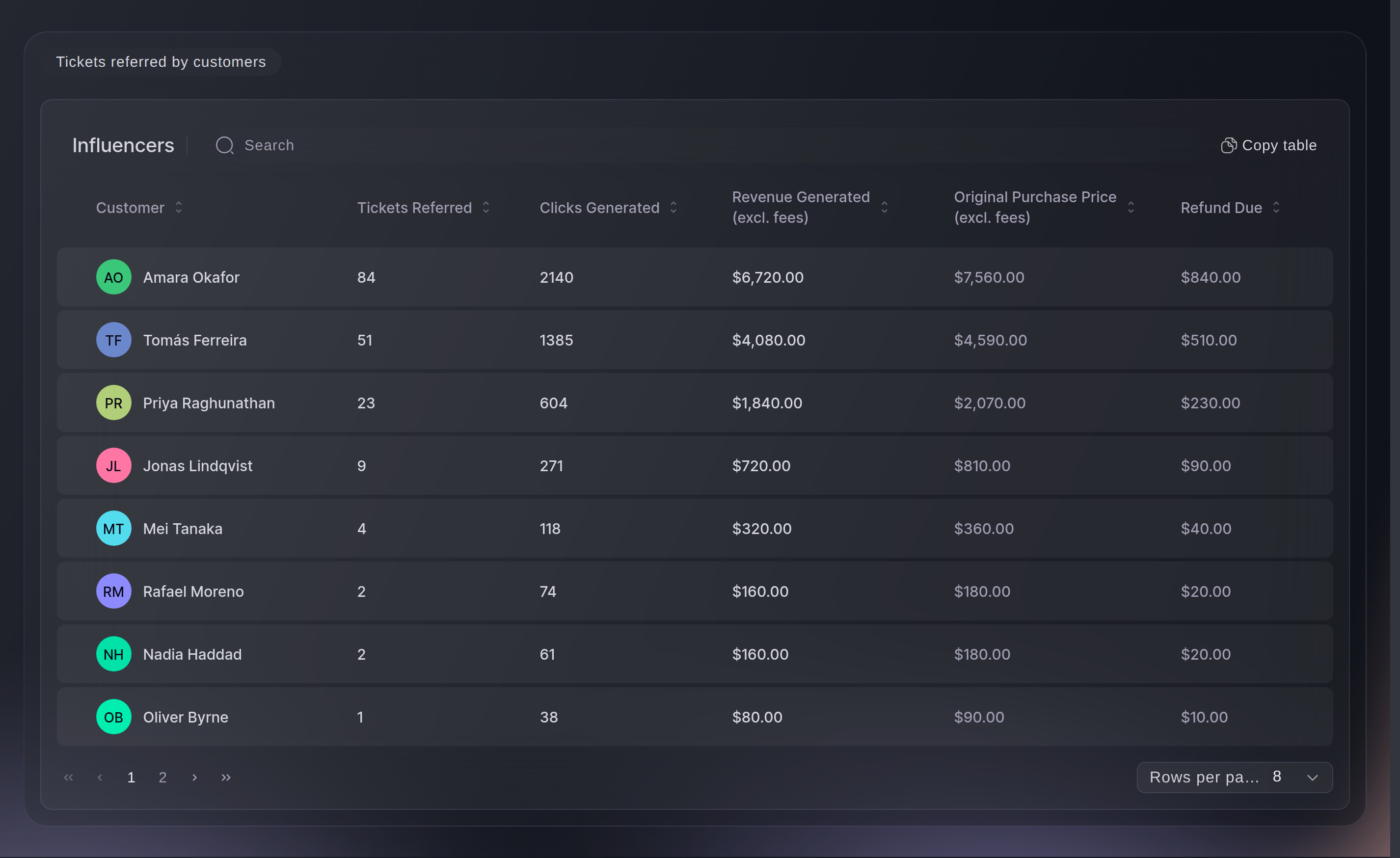
Influencers, Tickets referred by customers.
Tai anna sen hoitua puolestasi
Before ticket sales start, Fai can turn referral rewards on, set all three tiers and show the reward offer on your event ticket page. You review the complete change before it is applied.
Hallintapaneelissasi, Fain kanssa
For this event, enable referral rewards at 10% after 2 referred sales, 30% after 5 and 100% after 8, and show the referral reward offer on the ticket page
Kysymyksiä joita sinulla voi olla
- What does a buyer have to do to earn a referral reward?
- They buy an eligible paid ticket, share their personal referral link and bring in enough completed ticket sales to reach one of your tiers. Opening the link or starting checkout does not count as a sale.
- Is the reward based on what the buyer sold or what they paid?
- What they paid for their own eligible ticket. Referred revenue tells you what their friends bought, while the rebate percentage applies to the buyer's ticket price. If they have more than one eligible ticket, the highest-priced one is used.
- Do the referral tiers add together?
- No. A buyer earns the percentage for the highest tier they have reached. Reaching tier 2 replaces the tier 1 amount, and tier 3 returns 100% of the eligible ticket price.
- Can a buyer earn more than their ticket price?
- No. Tier 3 is fixed at 100% of the eligible ticket price, and the refund cannot exceed the amount still available on that ticket.
- Why can I see the tiers but not change them?
- Referral rewards were enabled after the first ticket was sold. Ticket Fairy keeps those targets and percentages fixed so every buyer keeps the offer they saw at purchase.
- Are promoter sales included in these referral rewards?
- No. Sales through a promoter link owned by a member of your event team appear under Sales by Promoter, even when that team member has also bought a ticket. A buyer earns a referral reward only for sales made through their personal link, and only when they are not on your event team.
Aiheeseen liittyvät oppaat
Tee tämä omassa tapahtumassasi
Luo tili, rakenna tapahtumasi ja seuraa vaiheita omassa hallintapaneelissasi. Sinun ei tarvitse varata myyntipuhelua.