
Halaman venue Anda
Ask the venue to help with their page
The people who work in a room know it better than you do: which door to use, what the load-in is like, what the bar stops serving at. You can ask them to say it themselves. The seat you hand out reaches the venue and nothing of your brand, so a booker can help with the page without seeing your events, your orders or your money.
Invite the venue's booker or marketing manager by email so they can manage the content on the venue page with you, and send the invitation again or call it off if it does not land.
- Untuk
- Getting the venue's own people to fill in the parts of the page only they know
- Perlu waktu
- 5 menit
Sebelum mulai
- You need to be an owner or an admin, either of the brand that looks after the venue or of the venue itself. Your brand's other team members see the venue in the list and open its page; only owners and admins can change who looks after it.
- You reach the venue under Venues, which we switch on for your brand. If you cannot find that entry, contact us and we will turn it on for you.
- Have the address you want to invite. One invitation goes to one address.
-
Open the venue you look after
In your brand's menu, choose Venues, then select Open beside the venue.

Brand, Venues. -
Find who looks after the page
Who looks after this page sits under the questions list. It names everybody who holds a seat that reaches the page, and each person carries what they do here: Runs the venue or On the venue team.
Catatan: A venue with more people on it than the list shows says so, and the rest are in the venue's own permissions.
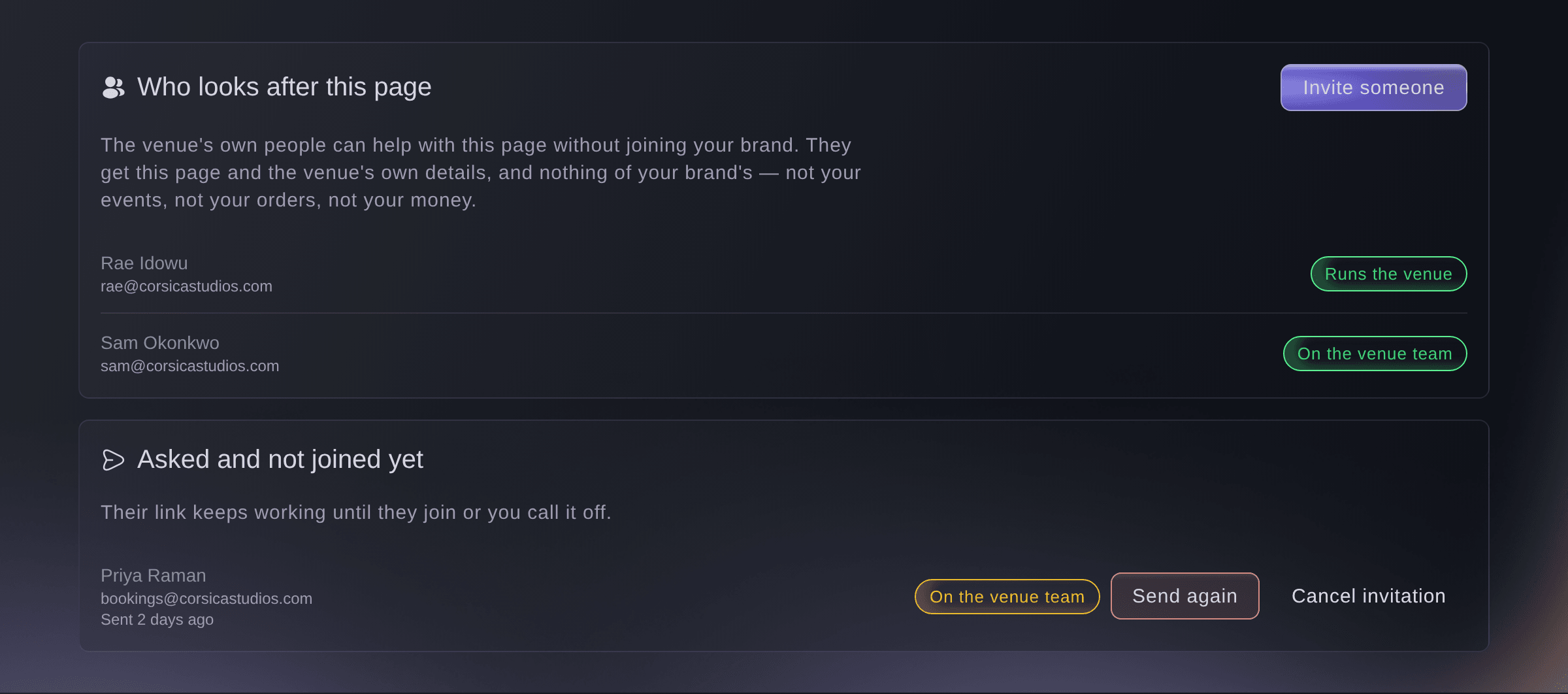
Venues, Who looks after this page. -
Start the invitation
Select Invite someone beside the heading, and a form opens at the side of the page.
Catatan: A page with nobody on it yet offers Invite someone from the venue under Nobody else yet.
-
Enter the address to invite
Enter it in Email address. This is where the invitation is sent, so it has to be an address that person reads.
Kiat: The venue's booker, or whoever answers questions about the place, is usually the one you want.
-
Choose what they do here
Choose it in What they do here. The sentence under the choice says what the one you picked can do.
Catatan: On the venue team is the usual answer. Runs the venue can do everything on the page.
-
Add their name, if you have it
Enter it in First name (optional) and Last name (optional). This is the name of the person you are inviting: it addresses their email and shows beside their address while they have not joined.
Catatan: The invitation sends without a name. It reads less personally, and nothing else changes.
-
Send it
Select Send invitation. The message that follows names the address it went to, and that person appears under Asked and not joined yet.
Catatan: Their link keeps working until they join or you call it off. It does not expire.


The two seats
Both seats manage the content on the page and answer questions on it, and both can invite other people to it. Runs the venue is the wider of the two and can do everything on the page. Neither reaches anything of your brand's: not your events, not your orders, not your money. What they do reach beyond the page is the venue's own details and the venue's entry passes.
Catatan: Pick On the venue team unless the person you are inviting runs the place.
The email and the join page
They get an email naming the venue and what they have been asked to do there. The link in it opens a page that names the venue, and asks them to join. A booker who already has a Ticket Fairy account signs in and joins as themselves. One who does not makes an account there, bound to the address you sent the invitation to. Either way they land on the venue page they were invited to.
Catatan: They never see your brand, your events or your orders. The venue page and the venue's own details are what the seat reaches.
An address that is already waiting
Enter an address that already has an invitation out and the form tells you so before you send. Offering the same job again keeps the link already in their inbox working, so sending it a second time is safe. Offering a different job replaces that link: the first one stops working and a new one goes out. The form says which of the two it is about to do.
Catatan: Either way you get one invitation for that address rather than two.
-
Check they are on the page
A person who has joined moves out of Asked and not joined yet and into Who looks after this page, with what they do here beside their name.
Coba langkah-langkah ini di acara Anda sendiri
Buat akun gratis, susun acara Anda dan ikuti langkah-langkah di atas di dasbor Anda sendiri. Hanya perlu beberapa menit dan Anda tidak perlu menjadwalkan panggilan penjualan.
Tanpa biaya pemasangan. Tanpa biaya bulanan wajib. Tanpa kartu kredit.
Atau minta dikerjakan untuk Anda
Fai, the assistant inside your dashboard, can read who looks after a venue page and who has been asked and not joined, invite a person by email, send an invitation again and call one off. She asks you to confirm before she invites, resends or cancels, and reading either list asks you nothing. She cannot take a seat back from a person who has already joined. MCP and the CLI do not reach a venue page.
Di dasbor Anda, dengan Fai
For the venue page for <VENUE NAME>, show me who looks after it and who has been asked and not joined. Then invite <EMAIL ADDRESS> onto the venue team, and tell me what they will and will not be able to see
Biarkan Fai mengerjakannya untuk Anda
Fai bekerja di dalam dasbor Ticket Fairy Anda. Buat akun Anda, buka Fai dan tempel perintah di atas.
Tanpa biaya pemasangan. Tanpa biaya bulanan wajib. Tanpa kartu kredit.
Send the invitation again
The person you invited says nothing arrived. Read Asked and not joined yet first: each row says when their email last went out, and a row that reads Sending has not been sent yet rather than never will be.
-
Find them in the list
Each row carries the address the invitation went to, what they were asked to do, and when it was last sent.
-
Send it again
Select Send again on their row. The message that follows names the address it went to.
Kiat: Ask them to look in their spam folder before you send a third time.
Catatan: Sending again does not break the link already in their inbox. Both links are the same one.
Fai can read who is waiting and when each invitation last went out, and send one again. She asks you to confirm before she sends. MCP and the CLI do not reach a venue page.
Di dasbor Anda, dengan Fai
On the venue page for <VENUE NAME>, show me who has been asked and not joined, with when each invitation last went out. Then send <EMAIL ADDRESS> theirs again
Call an invitation off
You invited the wrong address, or the booker has left the venue. Cancelling stops their link working, and a person who opens it afterwards is told it was cancelled.
-
Cancel it
Select Cancel invitation on their row, then confirm with Cancel invitation again. Keep it backs out and changes nothing.
Catatan: You can invite the same address again at any time.
Fai can call an invitation off, and she asks you to confirm first. She cannot take a seat back from a person who has already joined. MCP and the CLI do not reach a venue page.
Di dasbor Anda, dengan Fai
On the venue page for <VENUE NAME>, call off the invitation to <EMAIL ADDRESS>. Tell me what it does to the link they already have
Pertanyaan yang mungkin Anda punya
- Does the person I invite see my events or my money?
- No. The seat reaches the venue page, the venue's own details and the venue's entry passes. It reaches nothing of your brand's: not your events, not your orders, not your payouts. That is what lets you ask the venue's own people in without giving them a seat on your business.
- Does the invitation expire?
- No. It works until that person joins or you call it off. If they say nothing arrived, send it again rather than waiting for it to time out, because it will not.
- I invited the same address twice. Are there two invitations?
- No. The second one updates the first. Offering the same job again keeps the link already in their inbox working; offering a different job replaces it, so the first link stops working and a new one goes out. The form tells you which before you send.
- How do I take a person off the page once they have joined?
- Through the venue's own permissions, not this section. Cancelling an invitation stops a link working and does nothing to a person who has already used one. Contact us if you need a seat taken back and cannot find where.
- Can the person I invite invite other people?
- Yes, on both seats. On the venue team and Runs the venue can both invite other people to the page, so the venue can bring in the person who answers a question you did not think to ask.
- It says I have sent as many invitations as an hour allows. What now?
- Wait, then send the rest. One person can make one venue send 20 emails an hour, counting invitations and repeat sends together. A venue team is a handful of people, so you meet this only when something has gone wrong or you are adding a large group in one sitting. You can send more an hour after the first one you sent, and nothing you already sent is affected.
- Why can I not change who looks after this page?
- Changing who looks after a page is for owners and admins, of the brand that looks after the venue or of the venue itself. Your brand's other team members open the page and see what it says, and the section tells them the change is not theirs to make.
Masih ada pertanyaan?
Jadwalkan demo dan kami akan menjawabnya lewat panggilan, sesuai jenis acara Anda. Atau buat akun Anda dan lihat sendiri.
Tanpa biaya pemasangan. Tanpa biaya bulanan wajib. Tanpa kartu kredit.
Panduan terkait
Lakukan ini di acara Anda sendiri
Buat akun, susun acara, dan ikuti langkah-langkahnya di dasbor Anda. Anda tidak perlu memesan panggilan penjualan.