
Probleme beim Ticketverkauf für Veranstaltungen lösen
How do you answer a custom ticket sales question?
Start with the event report that matches your question, filter the Orders table when you need a narrower view, then export those rows for further analysis.
- Für
- Answering a question your standard reports do not cover
- Dauer
- 6 Minuten
Start with the dashboard report closest to your question. Event statistics cover sales over time, traffic, buyer demographics, referrals and check-ins. If you need the transactions behind a total, filter Orders and export those rows.
For questions that need a different view, work from the orders table: filter it to the orders you need and export those rows to CSV, or export every ticket rather than every order when the question is about attendees. That file is what goes into a spreadsheet, a BI tool or a finance system.
You can also ask in words. Fai in the dashboard, your own assistant over MCP and the command line can all get your dashboard figures. Ask "which age band bought the most, and how does that compare with last time" instead of building a spreadsheet.
Wie Ticket Fairy das löst
-
The statistics your event already has
You get Performance, Orders, Traffic, Demographics, Psychographics, Geographics, Influencers, Check-In and Devices. Each answers a different question about your event.
-
The orders table, filtered
Filter Orders by ticket type, status, add-on, discount code or search. The table and export then contain the matching orders.
-
Export to CSV, orders or tickets
Export to CSV takes the rows as you have filtered them. Export all Tickets and Export Filtered Tickets give you one row per ticket instead, which is usually the right level for questions about attendees.
-
The same numbers, asked in words
Fai gets these figures inside the dashboard, your own AI assistant gets the same figures over our MCP server, and the command line prints them as JSON for a script that runs every morning.
So richten Sie es ein
Was Sie brauchen, bevor Sie anfangen
- You need an owner or admin login to open Orders and export its rows. Stats and Limited Stats logins can use the event reports but cannot open the orders table.
- Your event has at least one completed ticket sale that has not been cancelled or refunded. Unpaid and abandoned checkouts do not fill the sales or buyer reports.
-
Check whether a report already answers it
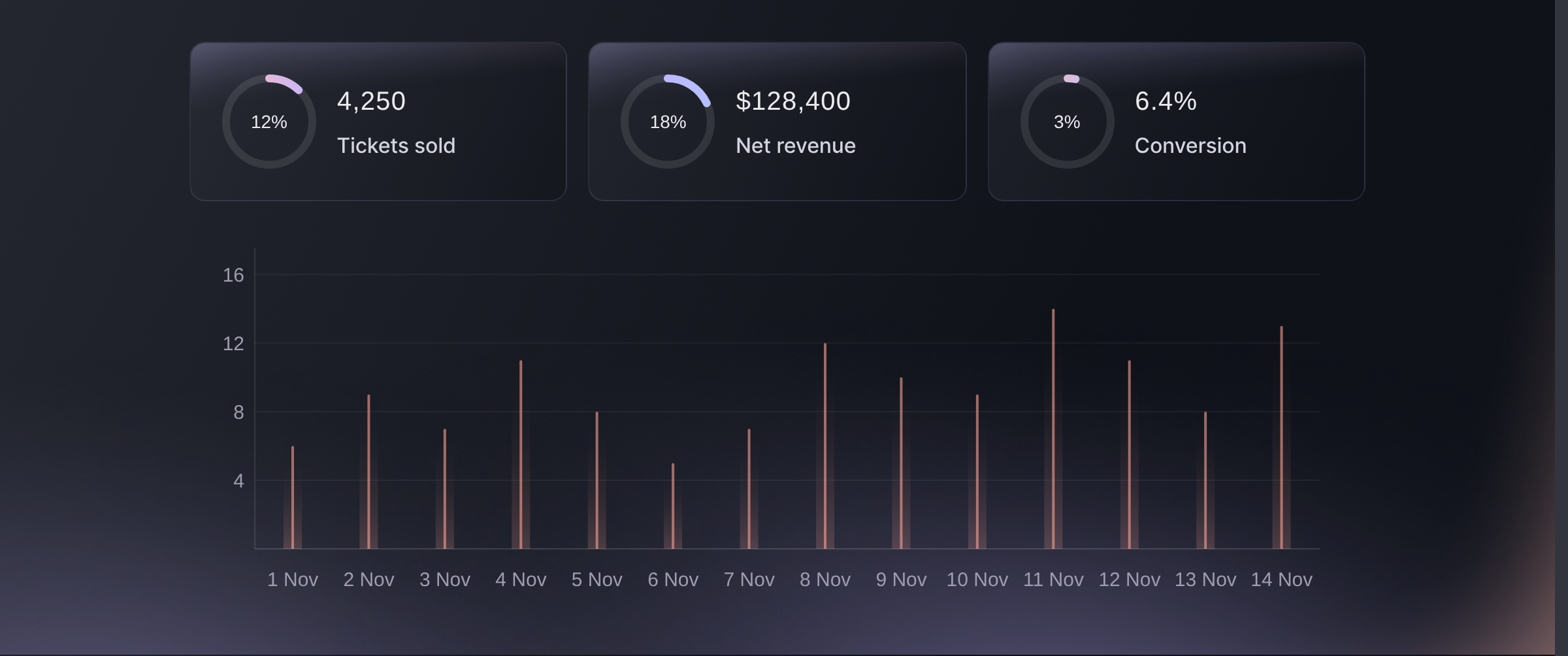
Open Statistics on your event and start with Analytics for ticket sales and sales over time. Traffic sources, ages and locations, referrals and check-ins each have their own report beside it.
Statistics, Analytics. -
Filter the orders table to the orders you need
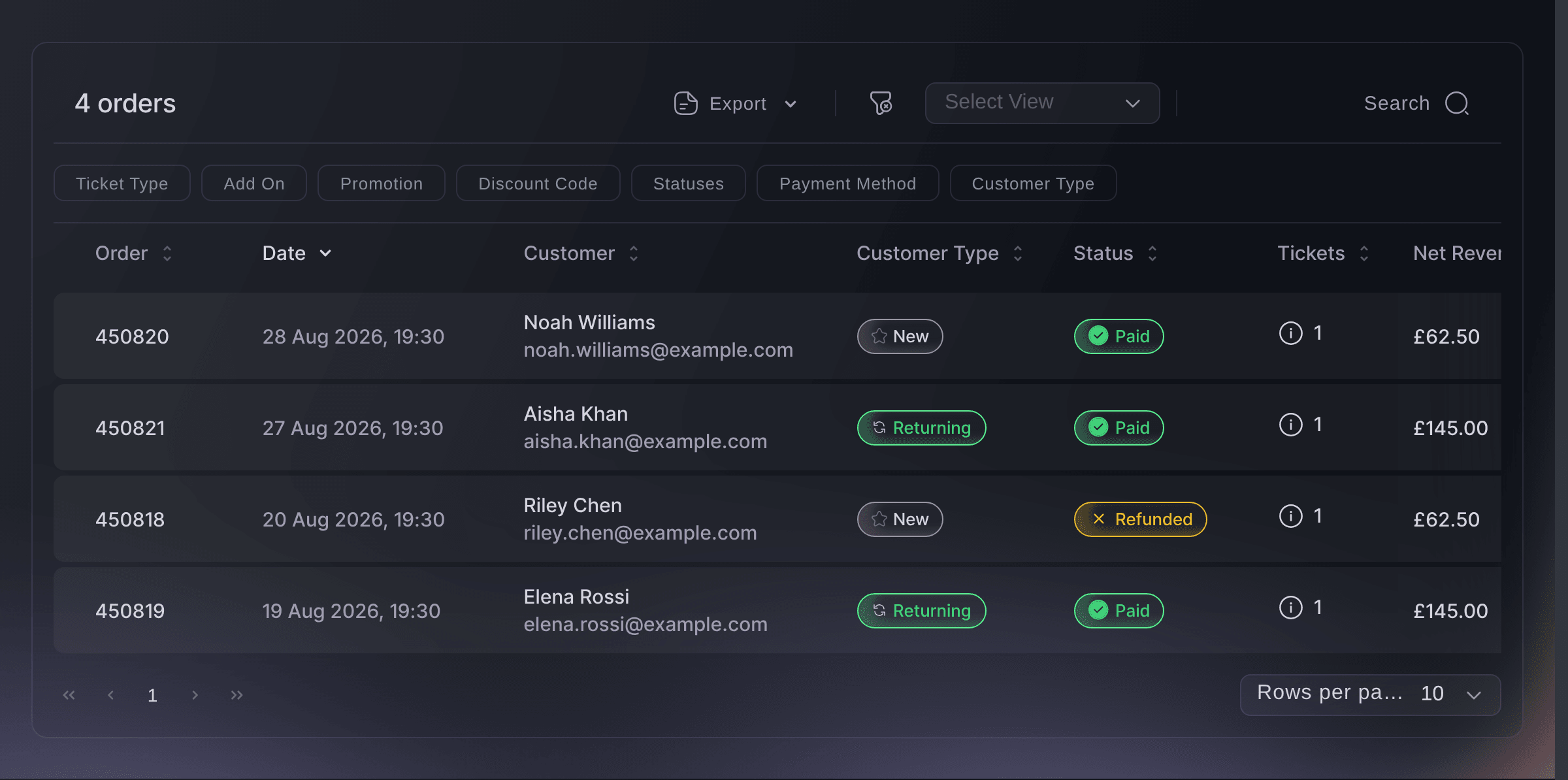
Open Orders and narrow it to one ticket type, one add-on, one order status, one discount code, or a search. The rows left in the table are the orders your question is about, one row per order rather than one per person.
Use the event's sales-over-time report when the question is about a particular date range, and use Orders when you need the transactions behind the total.
Event, Orders. -
Export the rows you need
Choose Export to CSV for the filtered orders, or Export Filtered Tickets when you need one row per attendee ticket.
One order can hold several tickets, so an orders export and a tickets export answer different questions. Pick the one whose rows are the thing you are counting.
-
Schedule a recurring report
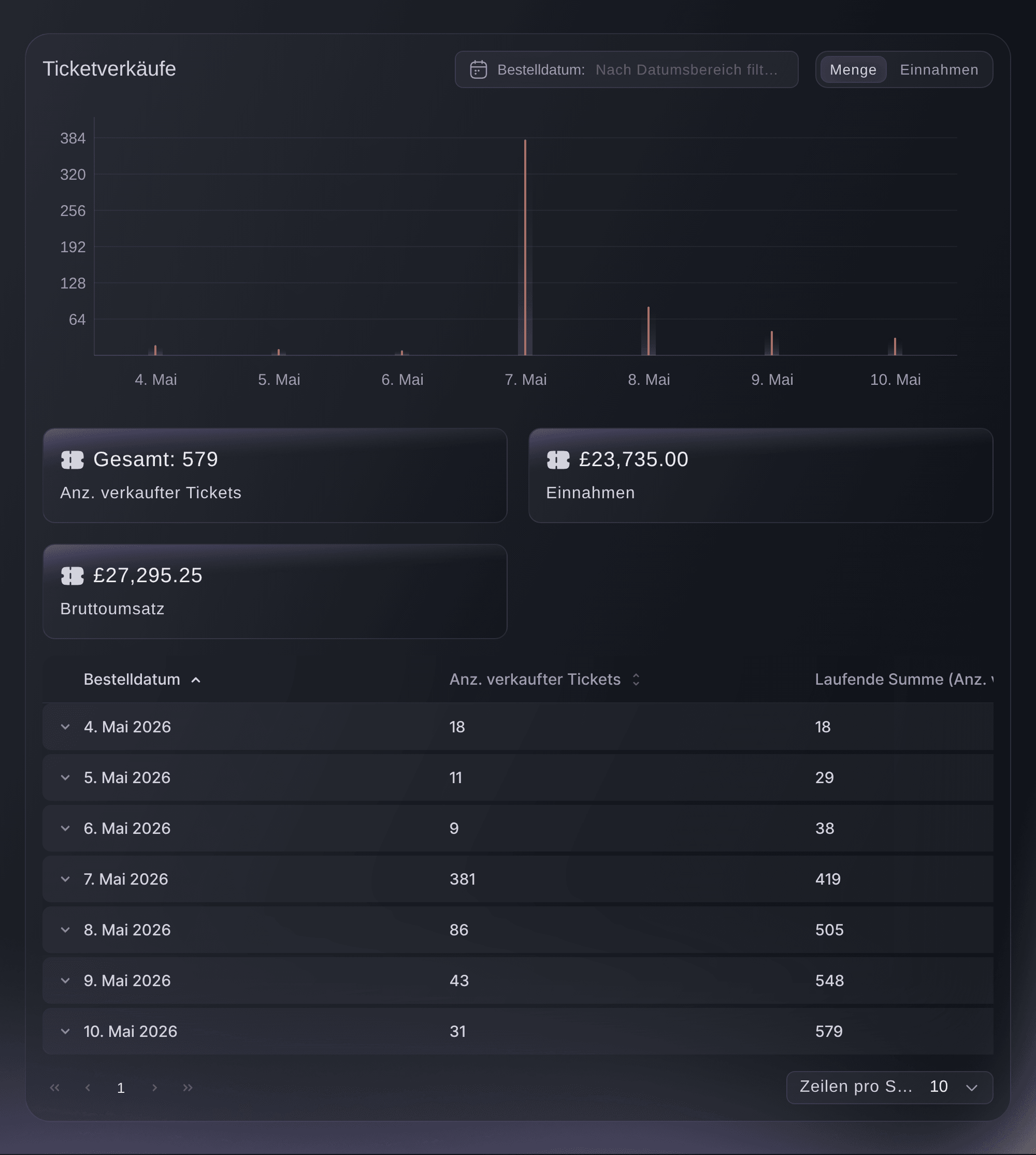
Where the same question comes back every week, ask it from the command line with JSON output and let a script run it. You get the same figures the dashboard shows, so you never have to reconcile two answers.
Oder lassen Sie es erledigen
Ask Fai or your own assistant for event statistics, or use the command line to return them as JSON for a scheduled report.
In Ihrem Dashboard, mit Fai
Compare this event with the last one I ran and tell me what sold, where the buyers came from, and which age band bought the most
Über MCP, mit Ihrem eigenen Assistenten
Verbinden Sie Ihren Assistenten mit unserem MCP-Server und bitten Sie ihn:
Lassen Sie --read-only in Ihrer MCP-Konfiguration. Diese Aufgabe liest nur Daten, deshalb braucht Ihr Assistent keine Werkzeuge für Änderungen.
Find my event and compare its sales, traffic, age groups and top referring sites over the same dates
Über das Terminal
Installieren Sie die CLI über unserer CLI-Seite, melden Sie sich mit ticketfairy auth login an und wählen Sie mit ticketfairy brand use <BRAND_ID> die Marke, an der Sie arbeiten. ticketfairy brand list und ticketfairy event list zeigen die IDs, die die anderen Befehle verwenden.
Sign in with the same account you use in the dashboard. The commands below return a sales summary without downloading individual orders, so they work well in scheduled reports.
What has sold, as the summary at the top of Analytics
ticketfairy event stats <EVENT_ID> --metric sales
The same numbers per ticket type
ticketfairy event stats <EVENT_ID> --metric performance --output json
Fragen, die Sie haben könnten
- How do I answer a question that spans several reports?
- Start with the relevant report, filter Orders to inspect the transactions behind it, and export the result when you want to combine it with other data. You can also ask Fai, your own assistant over MCP, or the command line to get the same figures.
- What is the difference between an orders export and a tickets export?
- One row per transaction against one row per ticket. A single order can carry four tickets in three names, so counting attendees from an orders export undercounts them.
- Can I get ticket sales into our BI tool?
- Yes. Export the matching rows as CSV for a one-off, and for something that runs on a schedule use the command line with JSON output, which returns the same figures shown in the dashboard.
- Who can see these reports?
- You can open the reports on an owner, admin, Stats or Limited Stats login, so you can let somebody view the reports without letting them change the event. You need an owner or admin login to open the orders table, so that is what the filtered export asks of you.
- Do the reports include refunded orders?
- You choose. Filter the orders table to include or exclude refunded and cancelled orders, and decide which of the two your question means before you export.
Wie es weitergeht
Machen Sie das bei Ihrer eigenen Veranstaltung
Erstellen Sie Ihr Konto, legen Sie Ihr Event an und folgen Sie den Schritten in Ihrem eigenen Dashboard. Sie müssen kein Verkaufsgespräch buchen.