
Probleme beim Ticketverkauf für Veranstaltungen lösen
Can you sell tickets directly from your own website?
Yes. Add checkout to your event page so buyers can choose tickets, pay by card and receive confirmation without leaving your website.
- Für
- Selling tickets from your own website
- Dauer
- 6 Minuten
Yes. Add an embedded checkout to your event page and buyers can choose tickets, pay by card and receive their confirmation without leaving your website.
New buyers can check out without creating an account. Returning buyers sign in with a code sent to their email. The checkout also works in browsers opened from social apps that block third-party cookies.
Some payment methods open their own payment page and return the buyer to your website afterwards. Events with purchase options that the embedded checkout does not show open the full event page instead, so buyers still get every option you offer.
Wie Ticket Fairy das löst
-
Keep card buyers on your website
Buyers choose tickets, pay by card and receive confirmation on your event page. Your own website analytics can measure the complete visit.
-
Let new buyers check out as guests
New buyers do not need an account. Returning buyers sign in with a code sent to their email without leaving the checkout.
-
Sell through browsers opened from social apps
The checkout keeps working when an in-app browser blocks third-party cookies.
-
Match the checkout to your website
Create an Event Embed when you want your own colours, approved website addresses, a chosen page after checkout and separate sales reporting for each embed.
So richten Sie es ein
Was Sie brauchen, bevor Sie anfangen
- You have an owner or admin role for the brand.
- You or your web developer can add a code snippet to your website.
-
Copy the checkout snippet
Open your event and choose Embed. Copy the snippet for the event page where you want to sell tickets.
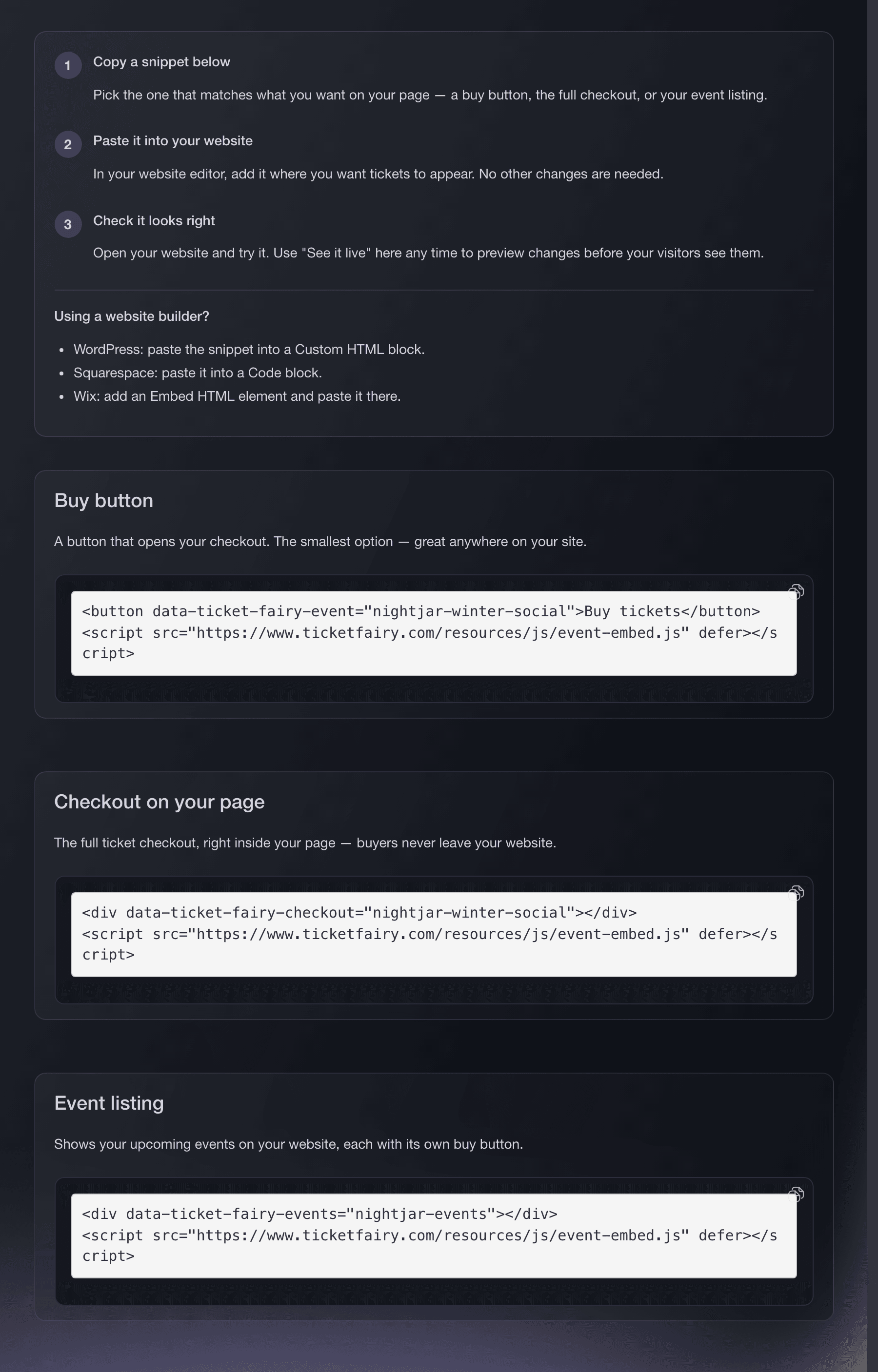
Website Embeds, Install, with the dashboard-generated snippets ready to copy. -
Add the checkout to your event page
Paste the snippet where the checkout should appear. Use the full content width on phones so buyers do not have to scroll inside the checkout.
-
Open the checkout on your website
Load your event page and open the checkout. Ticket Fairy opens the full event page when the purchase needs pay-what-you-want pricing, bespoke terms, a custom capture form, a custom page, tailored add-on choices, a social or wallet check, or a ticketing partner. This preserves the complete purchase instead of showing a reduced checkout.
-
Test the complete checkout
Place an order from your live page on a phone and a desktop computer. Check that payment completes, the confirmation arrives and the ticket contains the right details.
-
Set up wallet payments if you offer them
Wallet payments appear only on websites listed for the Event Embed. Add your exact website address and ask your web developer to serve the verification file. An embed with no site listed sells by card and hides the wallet button.
The verification file still belongs on your own web server; the image shows the dashboard setting.
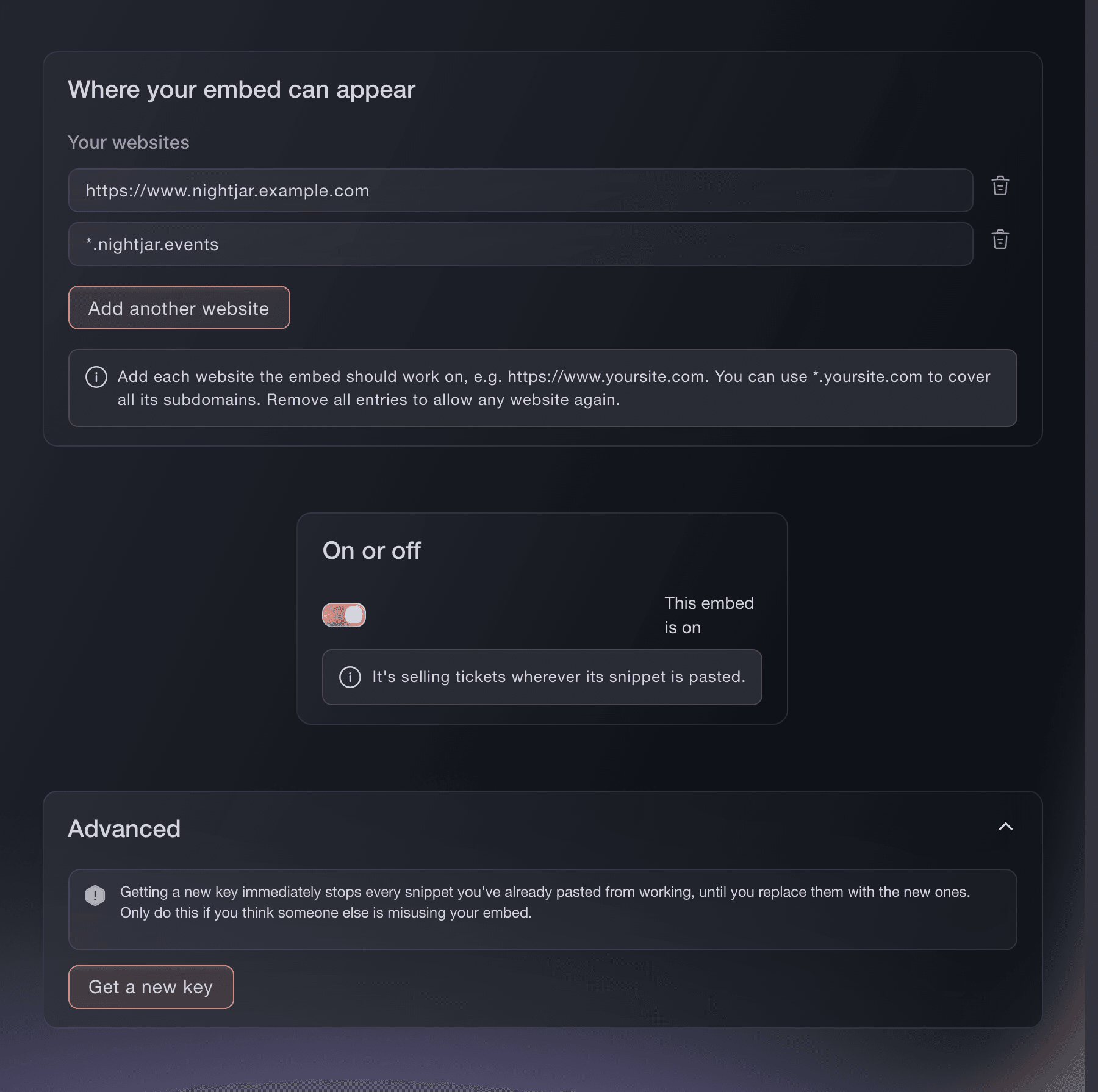
Website Embeds, Security, where you list the sites that may host the checkout. -
Test again after changing your website
Repeat the phone and desktop checkout tests after a redesign or theme change. Check that the checkout still uses the available width and appears where buyers expect it.
Oder lassen Sie es erledigen
Fai, the assistant inside your dashboard, can create, view, edit and turn off Event Embeds for a brand, then give you the ready-to-copy snippet. She asks before she creates or changes a widget.
In Ihrem Dashboard, mit Fai
Create an Event Embed for my Main website, bind it to this event, allow my own website to run it, asking me for the address first, and give me the inline checkout snippet before you make any later changes.
Fragen, die Sie haben könnten
- What is the best embedded ticket checkout?
- Choose one that keeps card buyers on your website, lets new buyers check out without an account, works in browsers opened from social apps and preserves every purchase option when the full event page is needed.
- Does a buyer have to create an account?
- No. New buyers check out without an account. Returning buyers sign in with a code sent to their email without leaving the checkout.
- Do buyers ever leave my page?
- Card and wallet payments stay on your website. Some pay-later and bank-transfer methods open their own payment page and return the buyer to your website afterwards.
- Will it work if the browser blocks cookies?
- Yes. The checkout works in browsers opened from social apps even when they block third-party cookies.
- Can every event be embedded?
- Most can. Ticket Fairy opens the full event page for pay-what-you-want pricing, bespoke terms, custom capture forms or pages, tailored add-ons, social or wallet checks, and events with another ticketing partner. Buyers can then use every purchase option available for that event.
- Why is the wallet button missing?
- Wallet payments need a widget that lists which sites may run it, and a verification file served from your domain. Until both are in place the embed sells by card and hides the button.
- Do I still get an event page?
- Yes. The embed is in addition to it, so you can sell from both and send links to either.
Wie es weitergeht
Machen Sie das bei Ihrer eigenen Veranstaltung
Erstellen Sie Ihr Konto, legen Sie Ihr Event an und folgen Sie den Schritten in Ihrem eigenen Dashboard. Sie müssen kein Verkaufsgespräch buchen.