
Ihre Veranstaltung bewerben
Track ticket sales with your LinkedIn pixel
Add your LinkedIn pixel once at brand level to see which campaigns led to ticket sales.
- Für
- Running LinkedIn ads for an event
- Dauer
- 5 Minuten
Was Sie brauchen, bevor Sie anfangen
- You're an owner, an admin or on the marketing team for this brand. If you can't open Integrations, ask an owner or an admin to do this part or to give you access.
- You have the complete LinkedIn tracking snippet.
-
Copy your LinkedIn pixel code
In LinkedIn Campaign Manager, copy your account's complete Insight Tag. Then open the event-specific conversion for completed ticket sales and copy its conversion code. Paste the Insight Tag and conversion code together so both the partner ID and conversion ID are kept.
The partner ID loads your Insight Tag. The conversion ID assigns a completed ticket sale to the right LinkedIn conversion action, and Ticket Fairy adds a stable order event ID.
-
Import it in your brand settings
Open Network Conversion Tracking Pixels and select Import Tracking Pixel. Under Paste complete pixel code, paste the full LinkedIn snippet, check that the dialog detects LinkedIn and the right ID, then select Import Pixel.
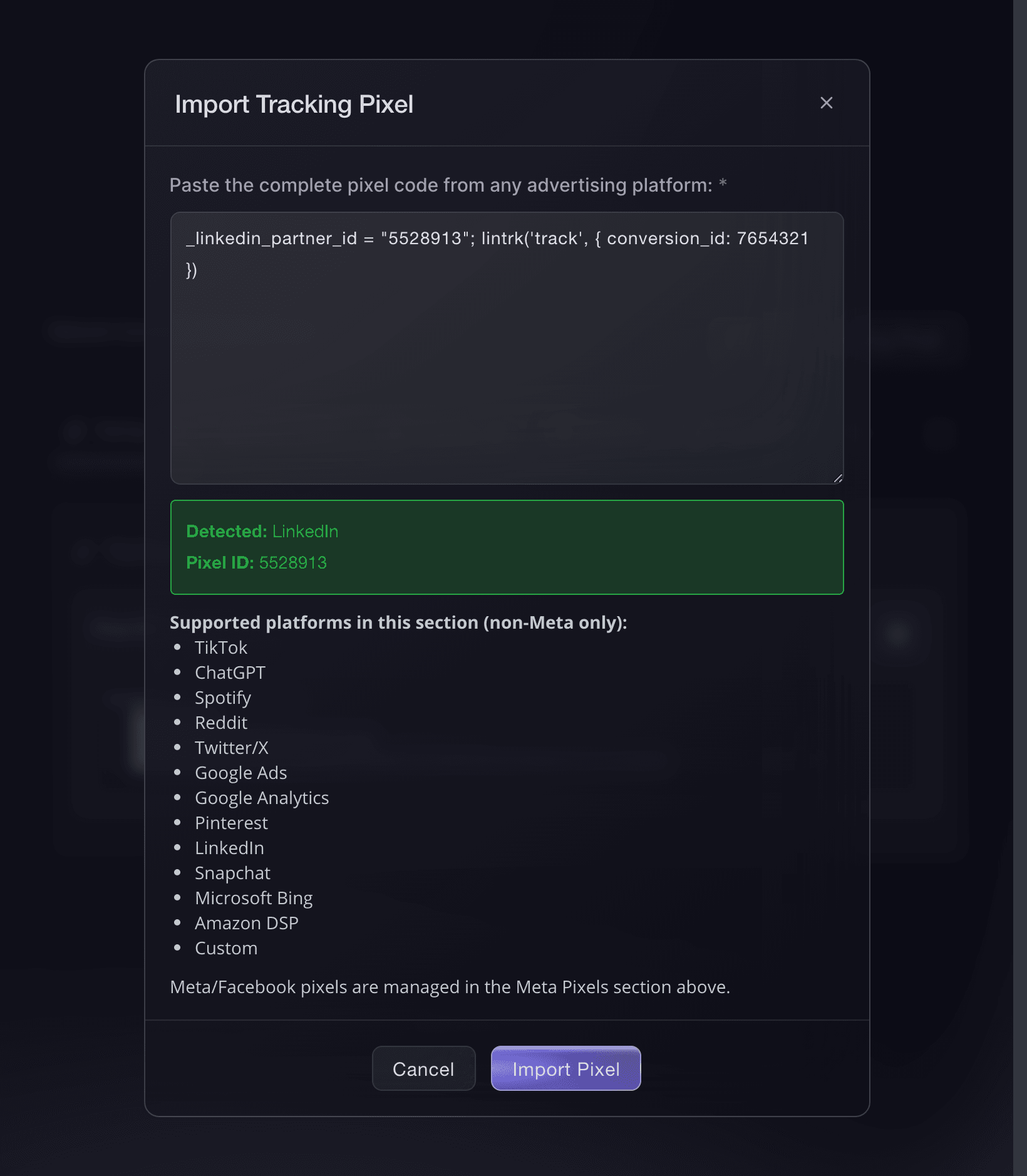
Brand settings, Integrations, Import Tracking Pixel. -
Check it appears under LinkedIn
Open the LinkedIn tab. It shows the imported ID and the tracking calls Ticket Fairy sends.
You can import more than one, so an agency running two LinkedIn accounts against the same event can add both.
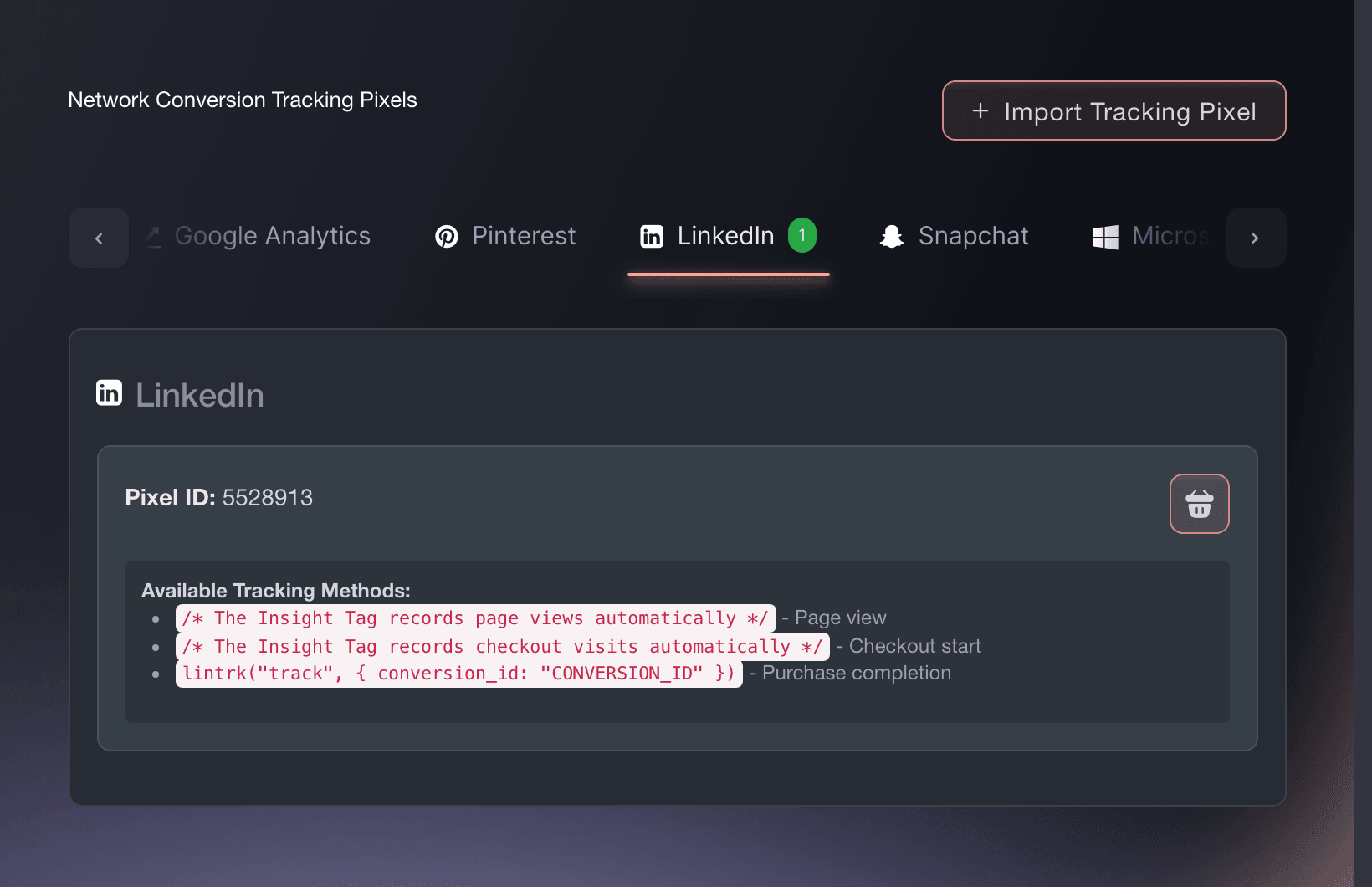
Brand settings, Integrations, Tracking pixels. -
Confirm LinkedIn receives a sale
Buy a ticket on your own event, or use a test order. Look for the purchase event in LinkedIn.
Tracking is working when LinkedIn shows the purchase with the completed order value.
Oder lassen Sie es erledigen
Fai can add this pixel after asking you to approve the change when you give it the complete snippet from LinkedIn. You can also add it in the dashboard.
In Ihrem Dashboard, mit Fai
Add a LinkedIn tracking pixel to this brand using this complete snippet: <paste the snippet>
Fragen, die Sie haben könnten
- How do I add a LinkedIn pixel to my event page?
- Open Network Conversion Tracking Pixels and select Import Tracking Pixel. Under Paste complete pixel code, paste the full LinkedIn snippet, check that the dialog detects LinkedIn and the right ID, then select Import Pixel. The LinkedIn pixel then measures every event page and checkout under that brand, so you add it only once.
- Which LinkedIn events does Ticket Fairy fire?
- The Insight Tag records page activity while someone views your event and moves through checkout. When the sale completes, Ticket Fairy sends lintrk('track', { conversion_id: 'YOUR-ID' }) for the purchase conversion action saved with the tag, with the order value and currency. You can see the value of each reported ticket sale in LinkedIn. Each completed order also has its own event ID, ready for LinkedIn to match browser and server copies if you use both.
- Can I enter only the pixel ID?
- Use the complete snippet. It keeps the provider settings the ID alone does not carry, such as the conversion action or region, so Ticket Fairy can send each sale to the right destination.
- Will my LinkedIn pixel fire if buyers check out on my own website?
- Yes. The embedded checkout sends the same events at the same points as the hosted checkout, so LinkedIn records a sale on your own site the same way.
Wie es weitergeht
Machen Sie das bei Ihrer eigenen Veranstaltung
Erstellen Sie Ihr Konto, legen Sie Ihr Event an und folgen Sie den Schritten in Ihrem eigenen Dashboard. Sie müssen kein Verkaufsgespräch buchen.