
Ihre Veranstaltungsberichte verstehen
See how visitors find your event page
See how many visits your event page receives, where they came from and how many reached order confirmation.
- Für
- Choosing where to promote your event next
- Dauer
- 7 Minuten
Ihre Traffic-Seite
Was Sie brauchen, bevor Sie anfangen
- You're an owner or an admin on this event, or you have a Stats or Limited Stats login for it. All four see every figure here. If Traffic isn't in your event menu, ask an owner or an admin to change your role.
- Your event page has had at least one visit. Everything here counts visits to this event's own page, never to another event you linked to it.
-
Views
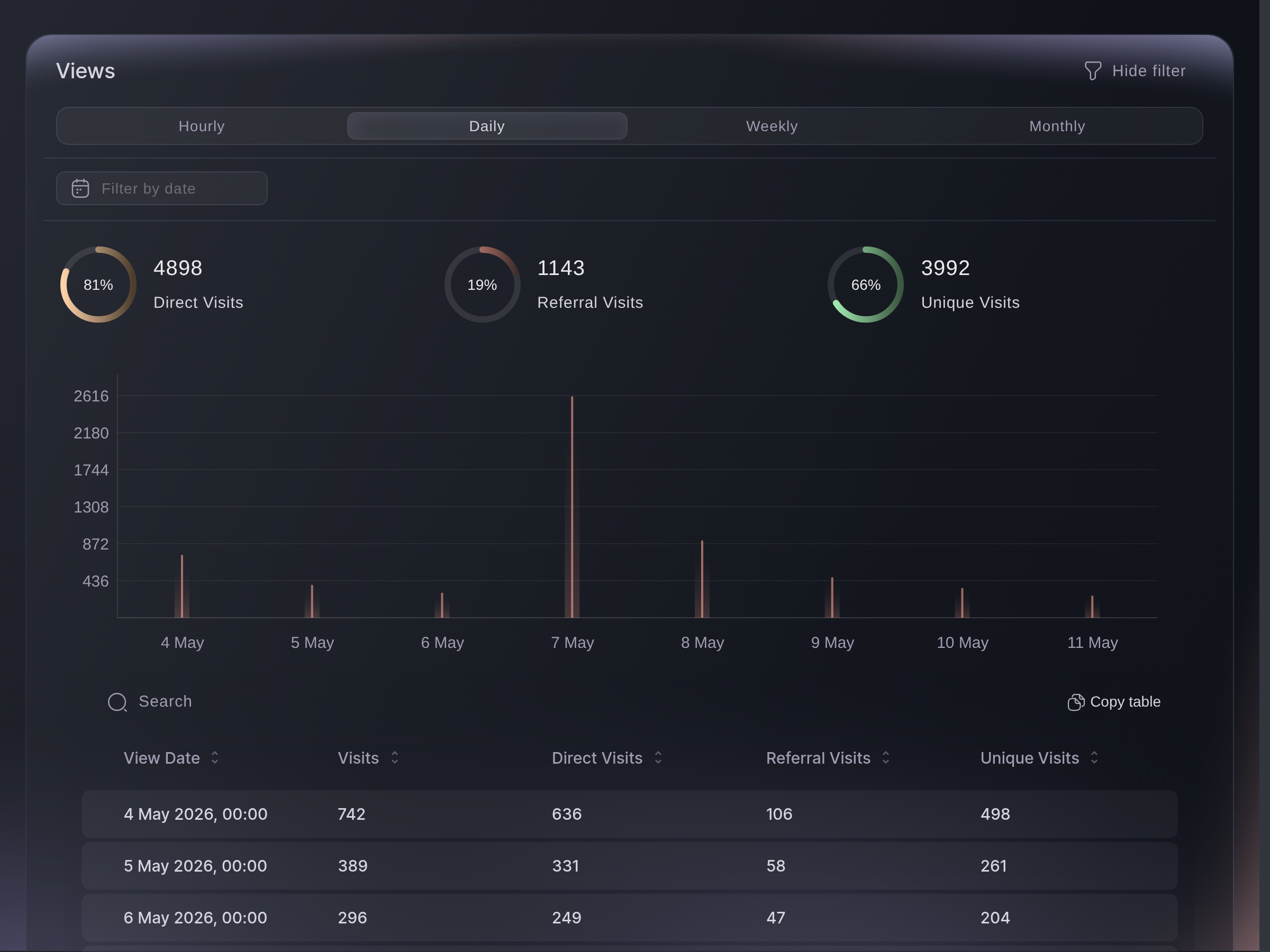
Open your event and go to Traffic. The chart counts every opening of your event page, one bar a day. The table below splits the same days into Visits, Direct Visits, Referral Visits and Unique Visits.
Referral Visits is arrivals on a buyer's referral link or a promoter's link, and Direct Visits is everything else, a tracking link included, because that one credits nobody. Unique Visits counts a visitor once in each hour they were on the page, so browsing across two hours counts twice. Hourly, Daily, Weekly and Monthly reshape the chart, and the date box narrows every figure on the tab.
Traffic, Views. -
Conversions
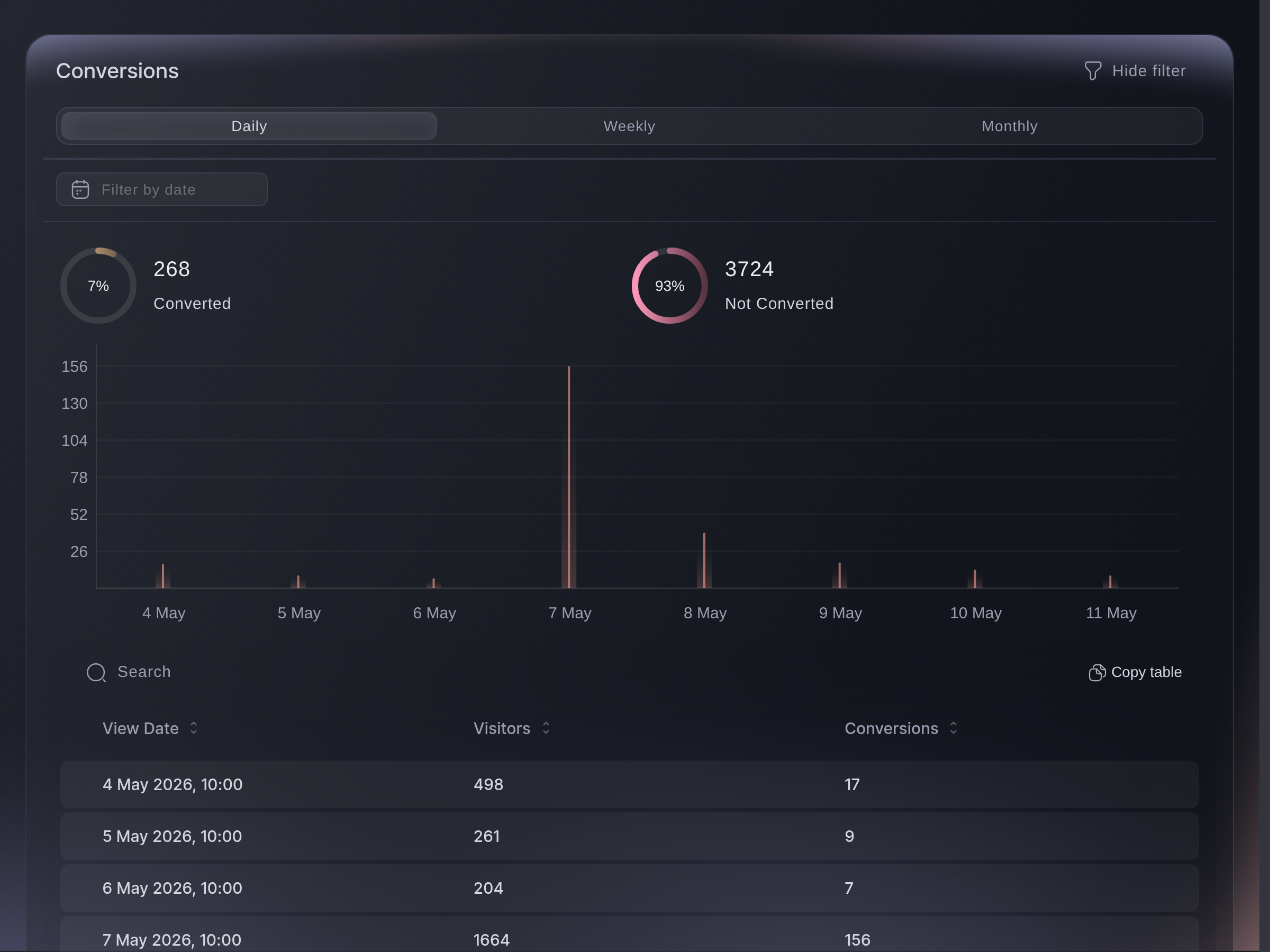
Converted counts visits that reached your order confirmation page, and Not Converted counts the remaining visits. The table gives the same two a day at a time, under Visitors and Conversions. Daily, Weekly and Monthly are the only widths offered here.
This section counts visits to the order confirmation page, free registrations included, rather than orders. It groups each hour by browser session and sign-in identity, so a reload straight away stays one, while a later hour, another browser, a second device or signing in mid-visit each add one. Compare the two as your event page's hit rate rather than as an exact order count.
Traffic, Conversions. -
Languages
The ring and table group visitors by the language set in their browser or phone. Other covers visits where the device did not provide a language. The filter above the ring narrows the ring to the languages you pick, and leaves the table whole.
This is the language somebody uses, not the country they are in. A Spanish-language visit on a local show is worth a Spanish advert rather than a Spanish tour date. The ring counts a visitor once per browsing session, so somebody who comes back next week counts twice.

Traffic, Languages. -
Devices
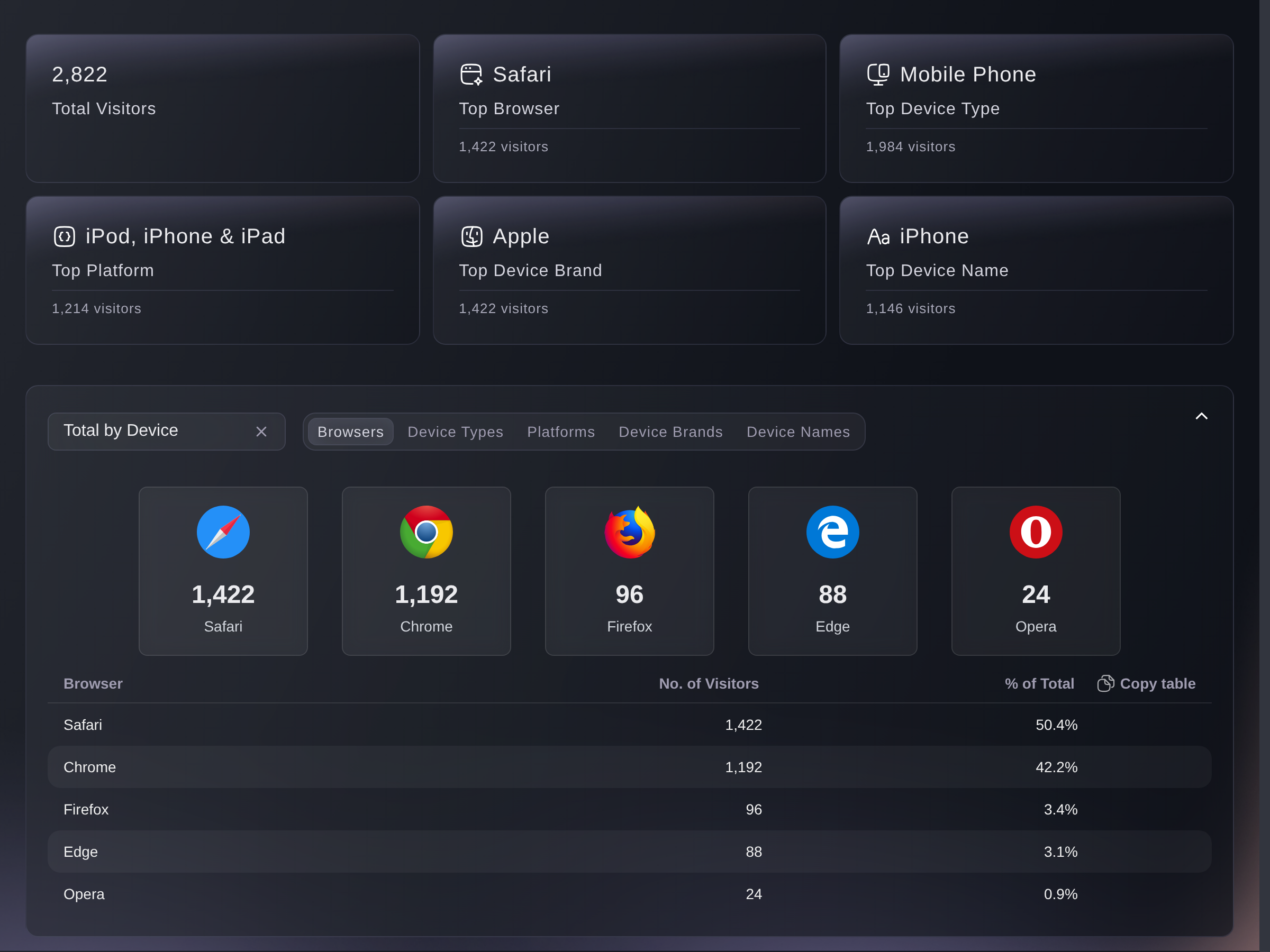
Total Visitors and the five cards beside it name the most common browser, device type, platform, brand and model. Below the cards, Browsers, Device Types, Platforms, Device Brands and Device Names.
All five lists are the same visitors counted five ways, so each one adds up to Total Visitors. They leave out the visits where we could not identify a device from. If most of your visitors are on a phone, open your own event page on one before you buy more advertising.
Traffic, Devices. -
Referrer URL
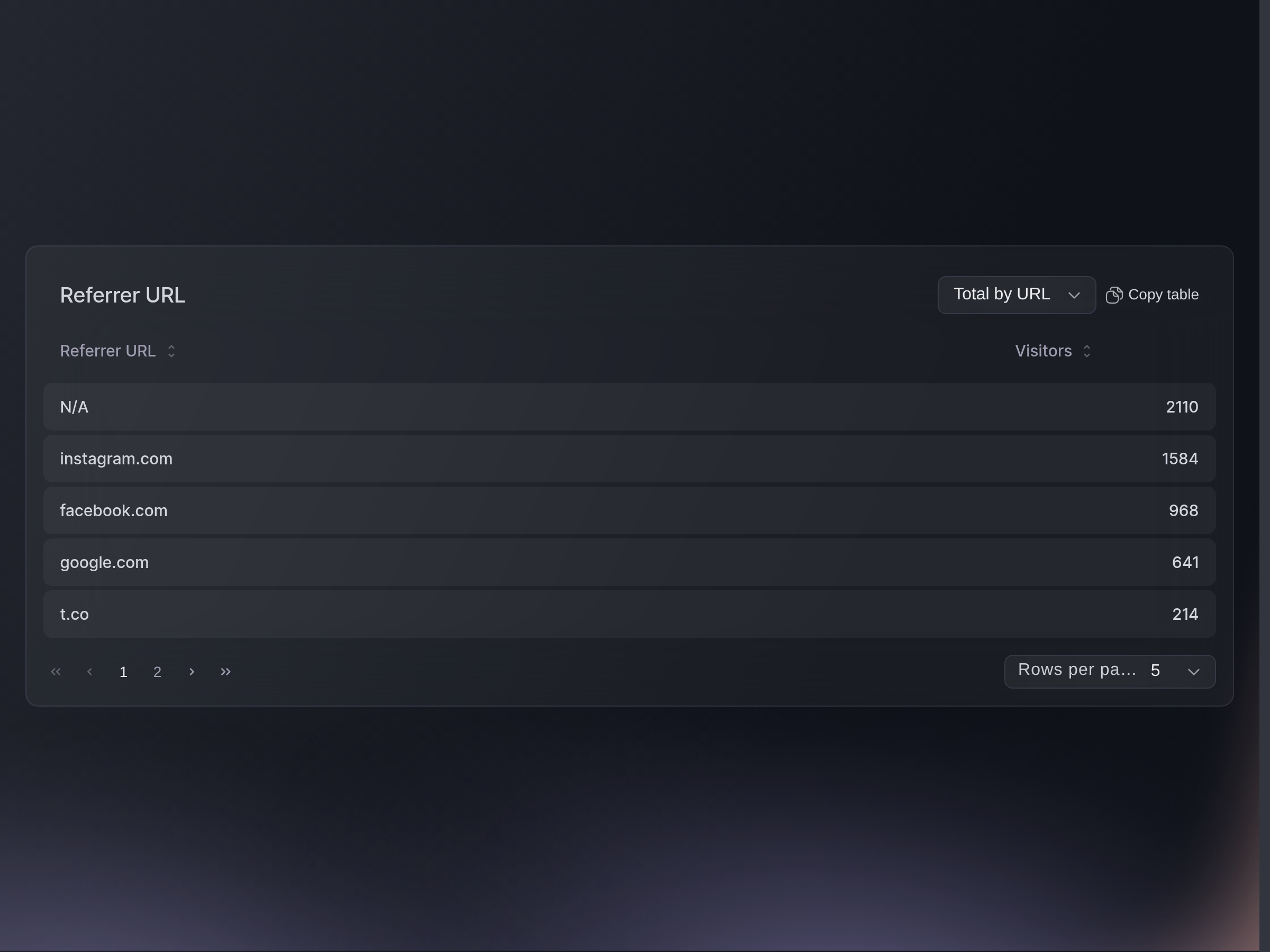
One row per site that sent you visits, with how many each sent. N/A covers visits with no referring site, such as a typed address, an app, or a link inside a message.
The list folds Facebook, Instagram, Google and Yahoo into one name each, and gives every other site a row of its own address. Referrer URL covers the event's whole run, while Total by Day shows the same sites a day at a time.
Traffic, Referrer URL.


Oder lassen Sie es erledigen
Ask Fai for a date range. She applies it to every traffic result except the referrer list, which always covers the event's full run.
In Ihrem Dashboard, mit Fai
Where did the traffic for this event come from, and how many times was the order confirmation page reached
Über MCP, mit Ihrem eigenen Assistenten
Verbinden Sie Ihren Assistenten mit unserem MCP-Server und bitten Sie ihn:
Lassen Sie --read-only in Ihrer MCP-Konfiguration. Diese Aufgabe liest nur Daten, deshalb braucht Ihr Assistent keine Werkzeuge für Änderungen.
Find my event by name, then show its visits by day and the referring sites that sent the most visits
Über das Terminal
Installieren Sie die CLI über unserer CLI-Seite, melden Sie sich mit ticketfairy auth login an und wählen Sie mit ticketfairy brand use <BRAND_ID> die Marke, an der Sie arbeiten. ticketfairy brand list und ticketfairy event list zeigen die IDs, die die anderen Befehle verwenden.
You need an owner, admin, Stats or Limited Stats login. Use the commands below for visits and referrers. Review Devices and Visitor Locations in the dashboard, where those tabs count page visitors.
Visits, unique visits and conversions
ticketfairy event stats <EVENT_ID> --metric traffic
The sites that sent you visits, a day at a time
ticketfairy event stats <EVENT_ID> --metric referrer-by-day
Fragen, die Sie haben könnten
- What does the Visitor Locations tab show?
- A map of the towns your visitors opened the page from, with the top cities, regions and countries beside it. The place comes from the visitor's internet connection, so it is where they were rather than where they live, and the map drops the visits we cannot place.
- Why are all my traffic figures zero?
- Your event page has not had a visit yet, or you are viewing Pre-Registration Traffic for an event with no pre-registrations. Choose Overall Traffic to return to the public event page.
- What is the difference between visits and unique visits?
- Visits counts every opening of your event page, including the same person coming back. Unique Visits counts each visitor once in each hour they were on the page, so browsing across two hours counts twice.
- Do these figures cover the other events I linked to this one?
- No. Everything here counts visits to this event's own page and nothing else, which is why it can differ from your Influencers figures, where the report counts linked events together.
- Do my own team's visits count?
- Yes. Visits counts every opening of your public event page, your own team's included, so a week of checking your page lifts the figure on a quiet event. This report does not remove those visits.
- Which times are these figures in?
- The chart groups and labels the days in your event's own timezone, so a bar uses the event's timezone rather than yours. Choose the date range you want to compare and the charts update to that period.
- Why don't the tabs add up to the same total?
- They count different things on purpose. Views counts every opening of the page, while Locations and Devices count only the visits we could place or identify a device for. Languages and Conversions count each visitor once a session or once an hour.
- What does the Pre-Registration Traffic switch do?
- It swaps every figure in the report to your event's pre-registration page instead of the event page. Choose Overall Traffic to switch back to the public event page.
- Can I get this out into a spreadsheet?
- Copy table above each table puts it on your clipboard, ready to paste. Ask Fai for the figures behind the charts and device tiles.
- Why does it say "We don't have enough data for your event"?
- For events with traffic before 22 April 2022, conversion totals for those early dates are incomplete. The other figures still load.
- Why doesn't a day in Visitor Locations match the cities under it?
- The day row and the lists beneath it count different things, so they do not add up to each other. Take your city, region and country figures from Total by Location, which counts each visitor once.
- Why is a site I know sent people missing from Referrer URL?
- Some apps and messaging clients pass visitors on with no site attached, so those land in N/A rather than under a name. Only a buyer's referral link or a promoter's link counts as a Referral Visit on Views; everything else, your own tracking links included, counts as a direct visit.
Wie es weitergeht
Machen Sie das bei Ihrer eigenen Veranstaltung
Erstellen Sie Ihr Konto, legen Sie Ihr Event an und folgen Sie den Schritten in Ihrem eigenen Dashboard. Sie müssen kein Verkaufsgespräch buchen.