
Reading your event reports
See where your event page visitors came from
Every section of your event's Traffic screen: how many people opened your event page, where they arrived from, and how many reached the confirmation page at the end of checkout.
- For
- Anyone deciding where to spend the next round of promotion
- Takes
- 7 minutes
Your Traffic screen
Before you start
- You can open this screen as an owner, an admin, a Stats login or a Limited Stats login, and all four see every figure on it. If Traffic is not in your event menu, ask an owner or an admin to change your role.
- Somebody has opened your event page. Every figure here counts visits to that page.
-
Views
Open your event and go to Traffic. The chart counts every opening of your event page, one bar a day. The table below splits the same days into Visits, Direct Visits, Referral Visits and Unique Visits.
Referral Visits is arrivals carrying somebody's referral or promoter link, and Direct Visits is everything else, search and social included. Unique Visits counts a visitor once in each hour they were on the page, so browsing across two hours counts twice. Hourly, Daily, Weekly and Monthly reshape the chart, and the date box narrows every figure on the tab.
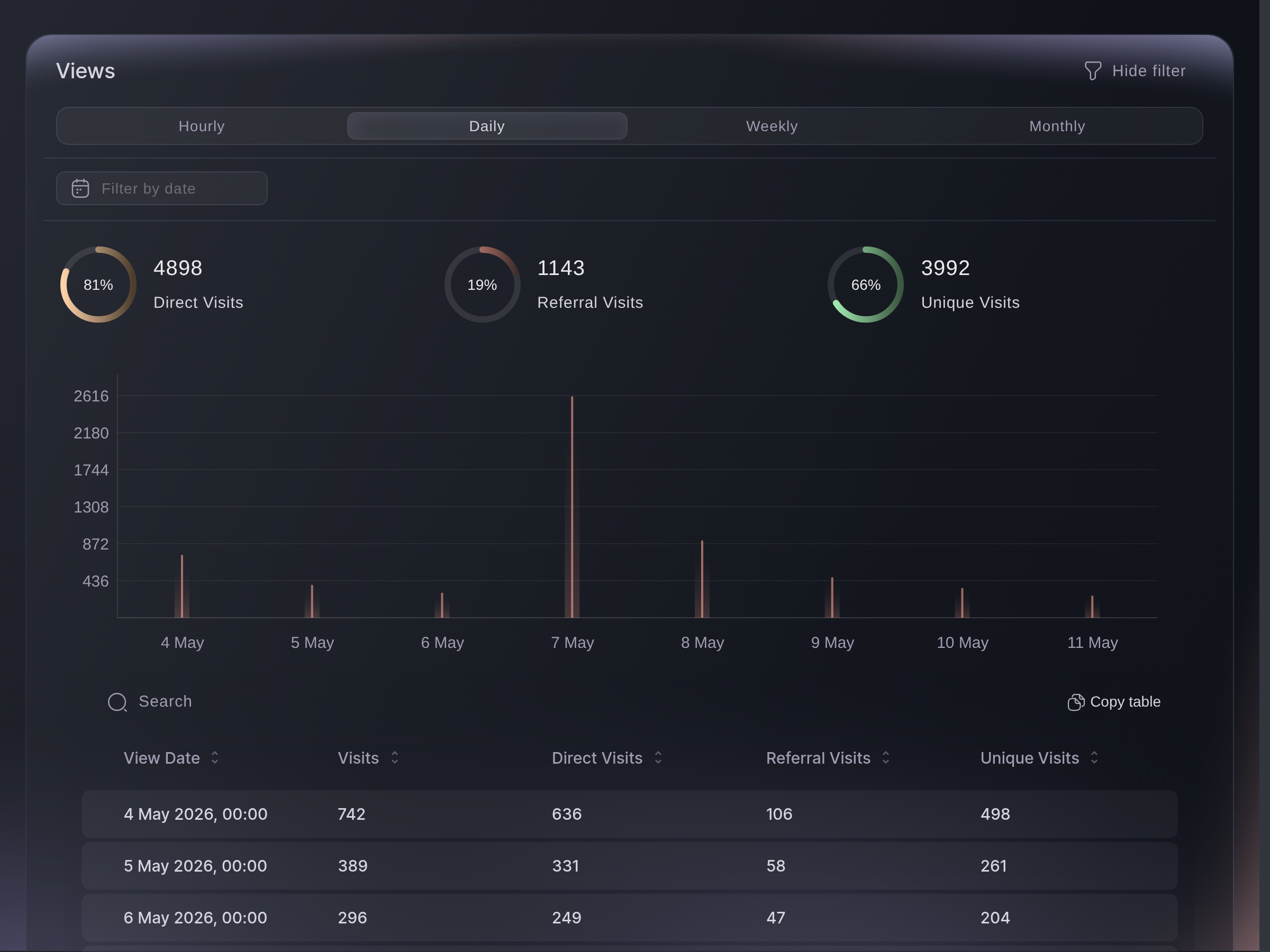
Traffic, Views. -
Conversions
Converted is the visitors who reached your order confirmation page, and Not Converted is the rest. The table gives the same two a day at a time, as Visitors and Conversions. Daily, Weekly and Monthly are the only widths offered here.
A conversion is counted when somebody reaches your order confirmation page, free registrations included, so a buyer who reloads that page counts twice. Read the two together as your event page's hit rate rather than as an exact order count.
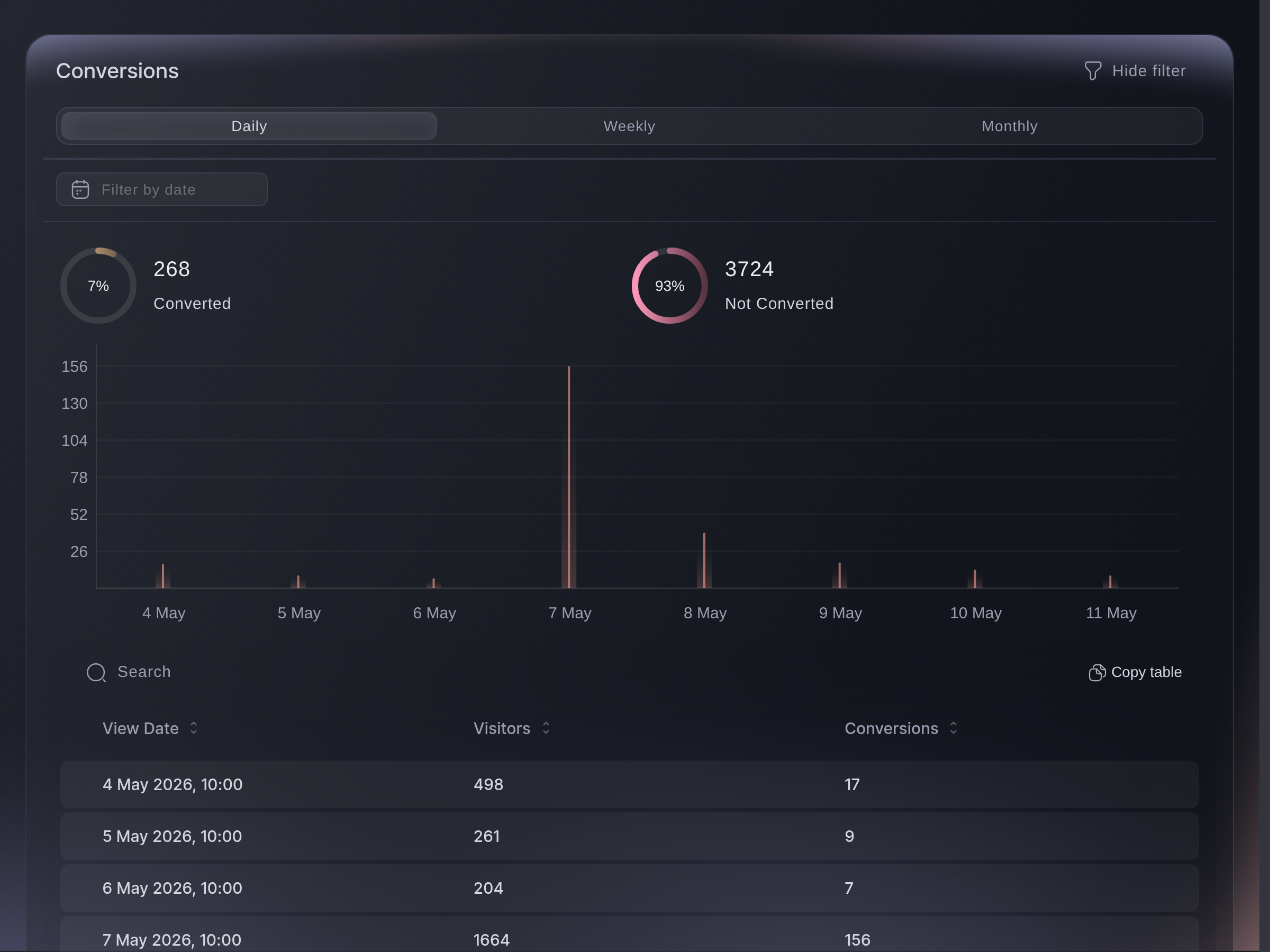
Traffic, Conversions. -
Languages
The ring and the table under it count visitors by the language their phone or browser asked your event page for. Other is the visitors whose device did not say. The filter above the ring narrows the ring to the languages you pick, and leaves the table whole.
This is the language somebody reads in, not the country they are in. A Spanish reading on a local show is worth a Spanish advert rather than a Spanish tour date. A visitor is counted once per browsing session, so somebody who comes back next week counts twice.

Traffic, Languages. -
Devices
Total Visitors and the five cards beside it name the most common browser, device type, platform, brand and model. Under them, five lists draw the full breakdown as tiles and a table: Browsers, Device Types, Platforms, Device Brands and Device Names.
All five lists are the same visitors counted five ways, so each one adds up to Total Visitors. Visits we could not read a device from are left out. If most of your visitors are on a phone, open your own event page on one before you buy more advertising.
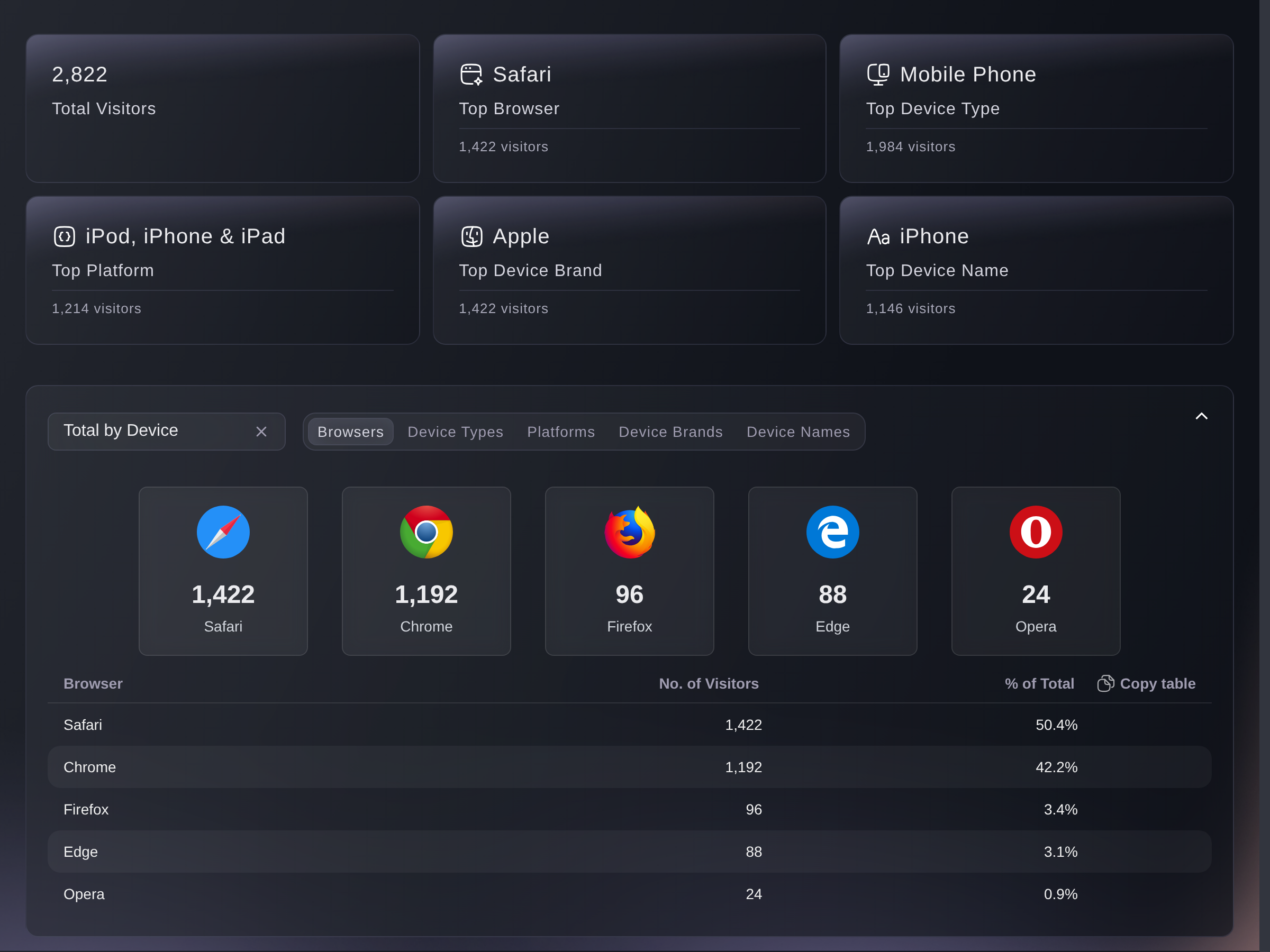
Traffic, Devices. -
Referrer URL
One row per site that sent you visits, with how many each sent. N/A is visits that arrived with no site behind them, which is a typed address, an app, or a link inside a message.
Facebook, Instagram, Google and Yahoo are folded into one name each, and every other site is listed by its address. The date box on the other tabs does not reach this list, which always covers the whole run. Total by Day shows the same sites a day at a time.
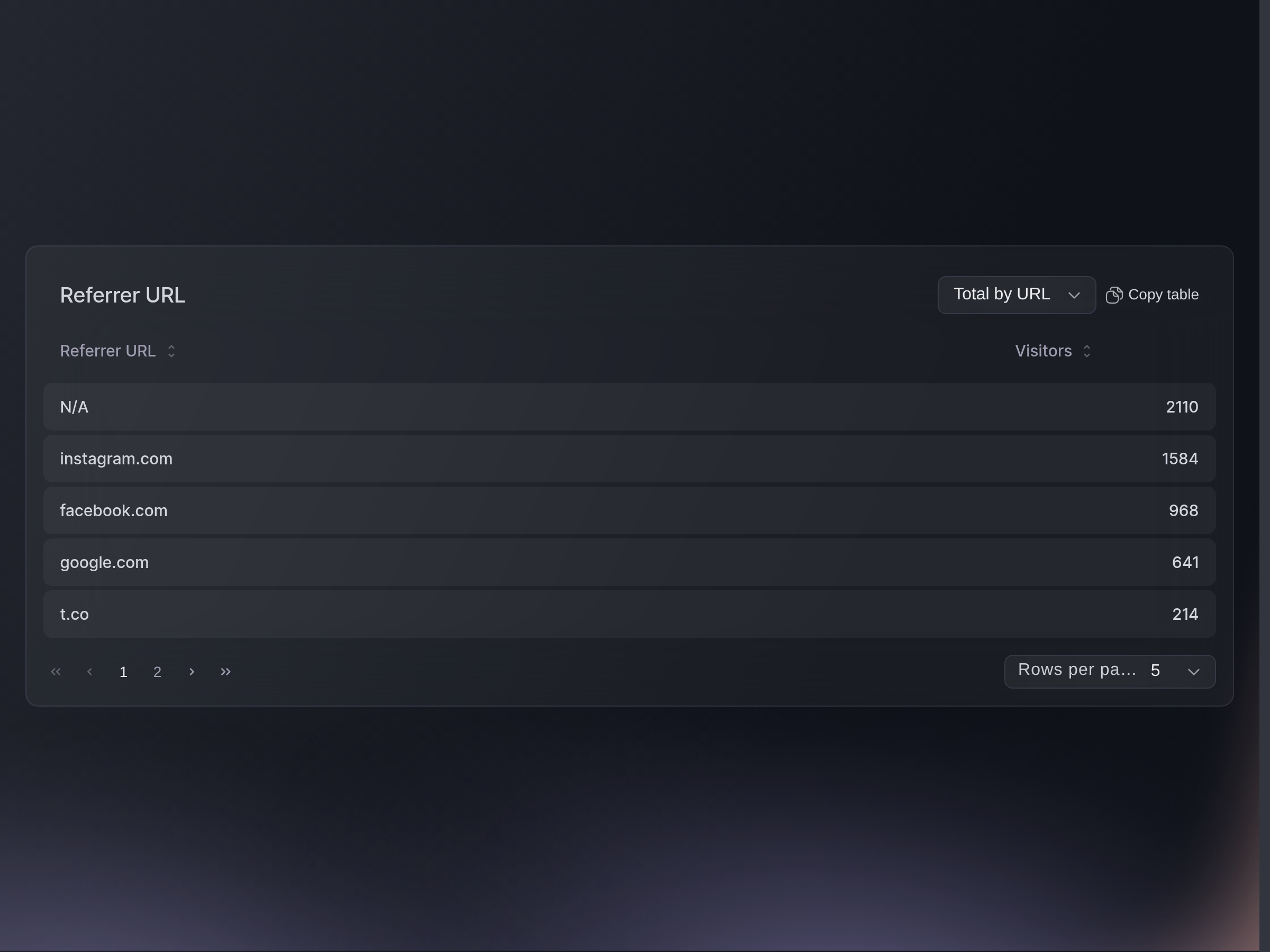
Traffic, Referrer URL.


Or have it done for you
Fai, the assistant inside your dashboard, reads this screen too, and so does your own AI assistant through our MCP server. Ask for a date range and they apply it everywhere except the referrer list, which always covers the whole run.
In your dashboard, with Fai
where did the traffic for this event come from, and how many of those visitors actually bought a ticket?
From your own assistant, over MCP
Connect your assistant to our MCP server and ask it:
The read-only setup on that page is all this needs. Nothing here changes anything,
so leave --read-only where it is.
Find my event by name, then pull its traffic and tell me which referring sites sent the most visits, and how many of the people who opened the event page went on to buy.
From your terminal
Install the CLI from our CLI page, sign in
with ticketfairy auth login, and choose the brand you are working on with
ticketfairy brand use <BRAND_ID>. ticketfairy brand list
and ticketfairy event list print the ids the commands below take.
Owners, admins, Stats and Limited Stats logins can all run these. Two tabs have no command: Devices and Visitor Locations here count page visitors, and the CLI metrics with those names count buyers instead, so read those two on the screen.
Visits, unique visits and conversions
ticketfairy event stats <EVENT_ID> --metric traffic
The sites that sent you visits, a day at a time
ticketfairy event stats <EVENT_ID> --metric referrer-by-day
Questions you might have
- What does the Visitor Locations tab show?
- A map of the towns your visitors opened the page from, with the top cities, regions and countries beside it. The place comes from the visitor's internet connection, so it is where they were rather than where they live, and visits we cannot place are left out.
- Why is every number on this screen zero?
- Nothing has opened your event page yet, or the switch at the top right is set to Pre-Registration Traffic on an event that never had a pre-registration. That switch is remembered across every event you open next, so check it before anything else.
- What is the difference between visits and unique visits?
- Visits counts every opening of your event page, including the same person coming back. Unique Visits counts each visitor once in each hour they were on the page, so browsing across two hours counts twice.
- Do these figures cover the other events I linked to this one?
- No. Everything here counts visits to this event's own page and nothing else, which is why it can differ from your Influencers figures, where linked events are counted together.
- Do my own team's visits count?
- Yes. Every opening of your public event page is counted, your own team's included, so a week of checking your page lifts Visits on a quiet event. Nothing on this screen takes them back out.
- Which times are these figures in?
- The days are grouped and labelled in your event's own timezone, so a bar reads where the event is rather than where you are. The date box is not converted the same way, so a range you pick can take in an hour or two either side of those days.
- Why don't the tabs add up to the same total?
- They count different things on purpose. Views counts every opening of the page, while Locations and Devices count only the visits we could place or read a device from. Languages and Conversions count each visitor once a session or once an hour.
- What does the Pre-Registration Traffic switch do?
- It swaps every figure on the screen to your event's pre-registration page instead of the event page. It stays where you leave it for every event you open next, so put it back to Overall Traffic when you are finished.
- Can I get this out into a spreadsheet?
- Copy table above each table puts it on your clipboard, ready to paste. The charts and the device tiles have no export of their own, so ask Fai for those figures.
- Why does it say "We don't have enough data for your event"?
- That message appears when this event has visits from before 22 April 2022, which is earlier than the point our traffic recording changed. The figures still load; read the conversion split on those early days as a guide rather than a count.
- Why doesn't a day in Visitor Locations match the cities under it?
- The day row and the lists beneath it are counted differently, so they do not add up to each other. Take your city, region and country figures from Total by Location, which counts each visitor once.
- Why is a site I know sent people missing from Referrer URL?
- Some apps and messaging clients pass visitors on with no site attached, so those land in N/A rather than under a name. Only a referral or promoter link counts as a Referral Visit on Views; a link tagged any other way arrives as a direct visit.
Where to go from here
Do this on your own event
Create your account, build your event, and follow these steps in your own dashboard. No sales call first.