
Anunciar tu evento
Track ticket sales with your Spotify pixel
Add your Spotify pixel once at brand level to see which campaigns led to ticket sales.
- Para
- Running Spotify ads for an event
- Dura
- 5 minutos
Lo que necesitas antes de empezar
- You're an owner, an admin or on the marketing team for this brand. If you can't open Integrations, ask an owner or an admin to do this part or to give you access.
- You have the complete Spotify tracking snippet.
-
Copy your Spotify pixel code
In Spotify Ad Analytics, open the pixel you use for this website and copy its complete base code. Keep the spdt configuration and its key in the snippet.
The complete snippet lets Ticket Fairy identify Spotify and import the correct pixel ID.
-
Import it in your brand settings
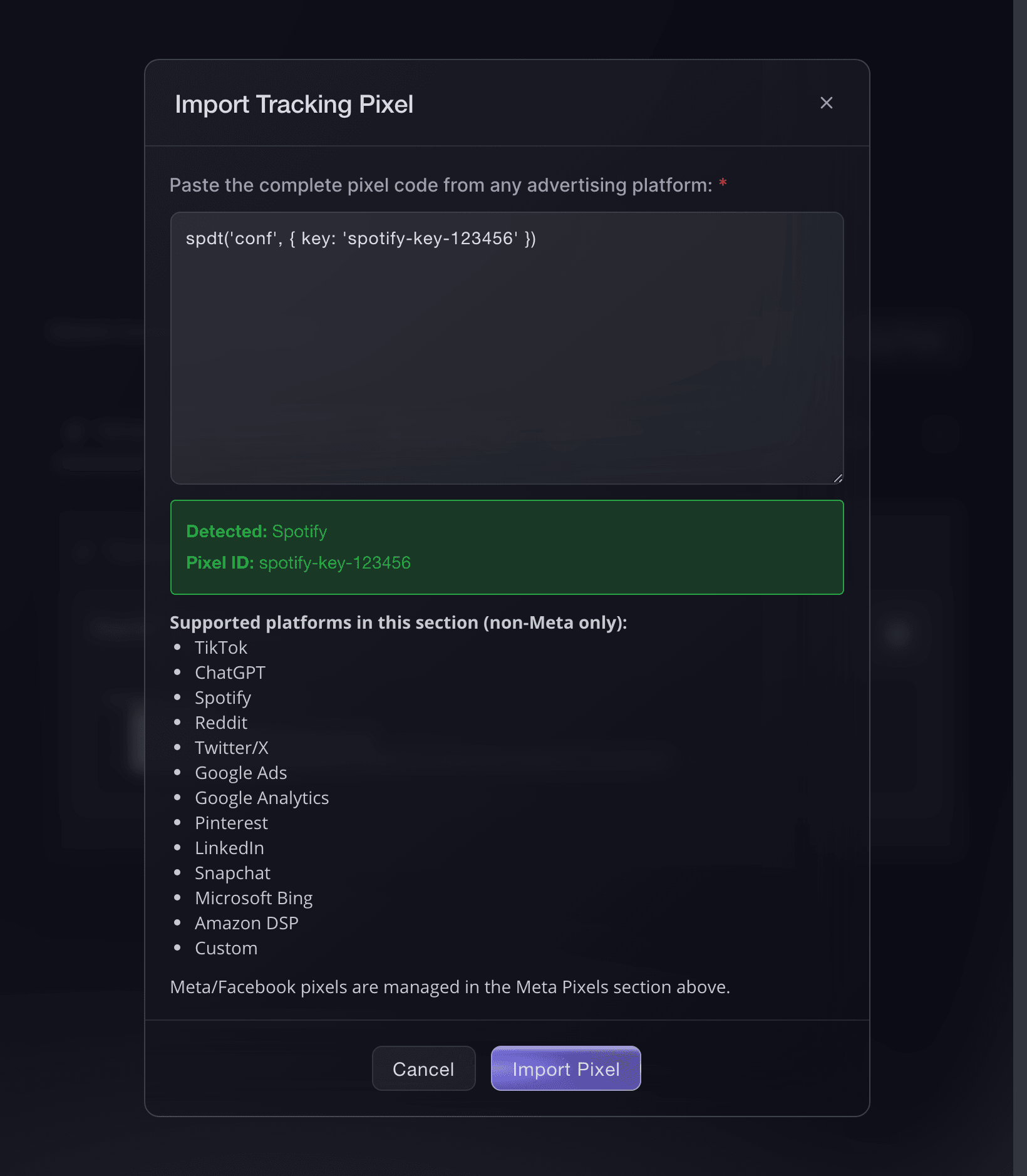
Open Network Conversion Tracking Pixels and select Import Tracking Pixel. Under Paste complete pixel code, paste the full Spotify snippet, check that the dialog detects Spotify and the right ID, then select Import Pixel.
Brand settings, Integrations, Import Tracking Pixel. -
Check it appears under Spotify
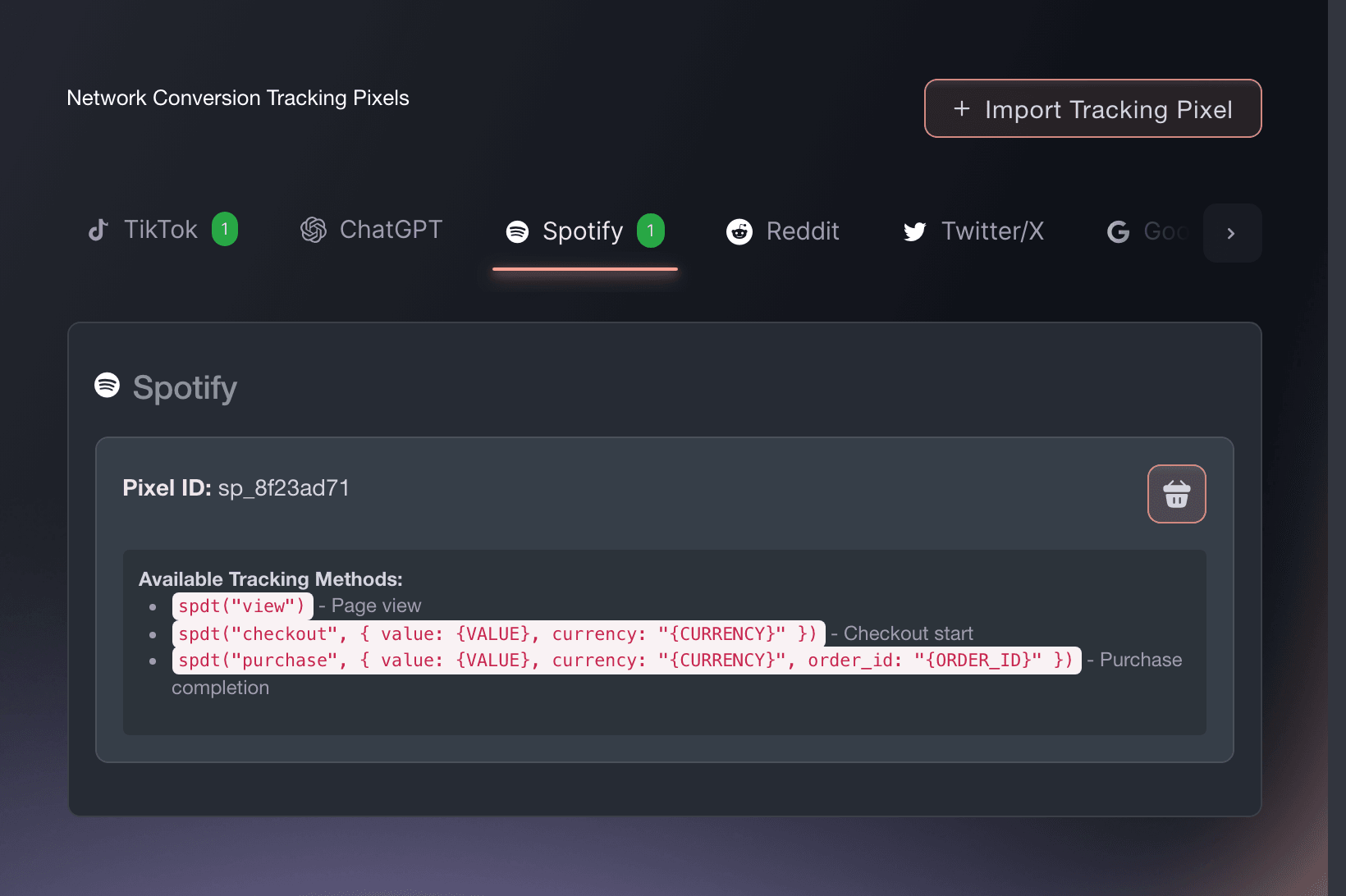
Open the Spotify tab. It shows the imported ID and the events Ticket Fairy reports to Spotify.
Use one Spotify pixel for this brand. Choose the pixel from the ads account you use for this brand's campaigns.
Brand settings, Integrations, Tracking pixels. -
Confirm Spotify receives a sale
Buy a ticket on your own event, or use a test order. Look for the purchase event in Spotify.
Tracking is working when Spotify shows the purchase with the completed order value.
O deja que lo hagan por ti
Give Fai the complete snippet from Spotify, and she can add the pixel after asking you to approve the change. You can also add it in the dashboard.
En tu panel, con Fai
Add a Spotify tracking pixel to this brand using this complete snippet: <paste the snippet>
Preguntas que puedes tener
- How do I add a Spotify pixel to my event page?
- Open Network Conversion Tracking Pixels and select Import Tracking Pixel. Under Paste complete pixel code, paste the full Spotify snippet, check that the dialog detects Spotify and the right ID, then select Import Pixel. The Spotify pixel then measures every event page for your brand and throughout checkout. You only need to set it up once for the brand.
- Which Spotify events does Ticket Fairy fire?
- Your Spotify tag runs spdt('view') when it loads. Ticket Fairy sends product when a visitor opens your event page, checkout when they start checkout, and purchase when the sale completes. The purchase event includes the order value and currency, so Spotify can report the value of each ticket sale.
- Can I enter only the pixel ID?
- Use the complete snippet. It includes settings that are missing from the ID alone, such as the conversion action or region. Ticket Fairy uses those settings to report each sale correctly.
- Will my Spotify pixel fire if buyers check out on my own website?
- Yes. The embedded checkout sends the same events at the same points as the hosted checkout, so Spotify records a sale on your own site the same way.
Adónde ir después
Hazlo en tu propio evento
Crea tu cuenta, monta tu evento y sigue los pasos en tu propio panel. No necesitas reservar una llamada comercial.