
Menjalankan produksi
Advance your performers before the show
Promoters, bookers and production managers advance every act on the line-up, chasing agents and tour managers for flights, input lists and riders across weeks of email. Advancing keeps each performer's details in one sheet that Fai starts for you and their team fills in, so you can see at a glance who is ready for show day.
Collect each performer's travel, hotel, schedule, technical and hospitality needs for your event, let their agent or tour manager fill in their part from a link with no sign-in, and sign each advance off when everything is confirmed.
- Untuk
- Getting every performer's details agreed before show day
- Perlu waktu
- 10 menit
Sebelum mulai
- You are an owner, admin or producer on the event. The event's Management page opens for those roles only.
- Your performers are on the event's line-up. Each one gets an advance when you open Advancing.
-
Open Advancing
Open the event, select Management, then select Advancing in the list of sections.
Catatan: Each row shows how many sections are confirmed, what is still needed and how many days are left before the show. If Advancing is not in the list, select More sections and open it there.
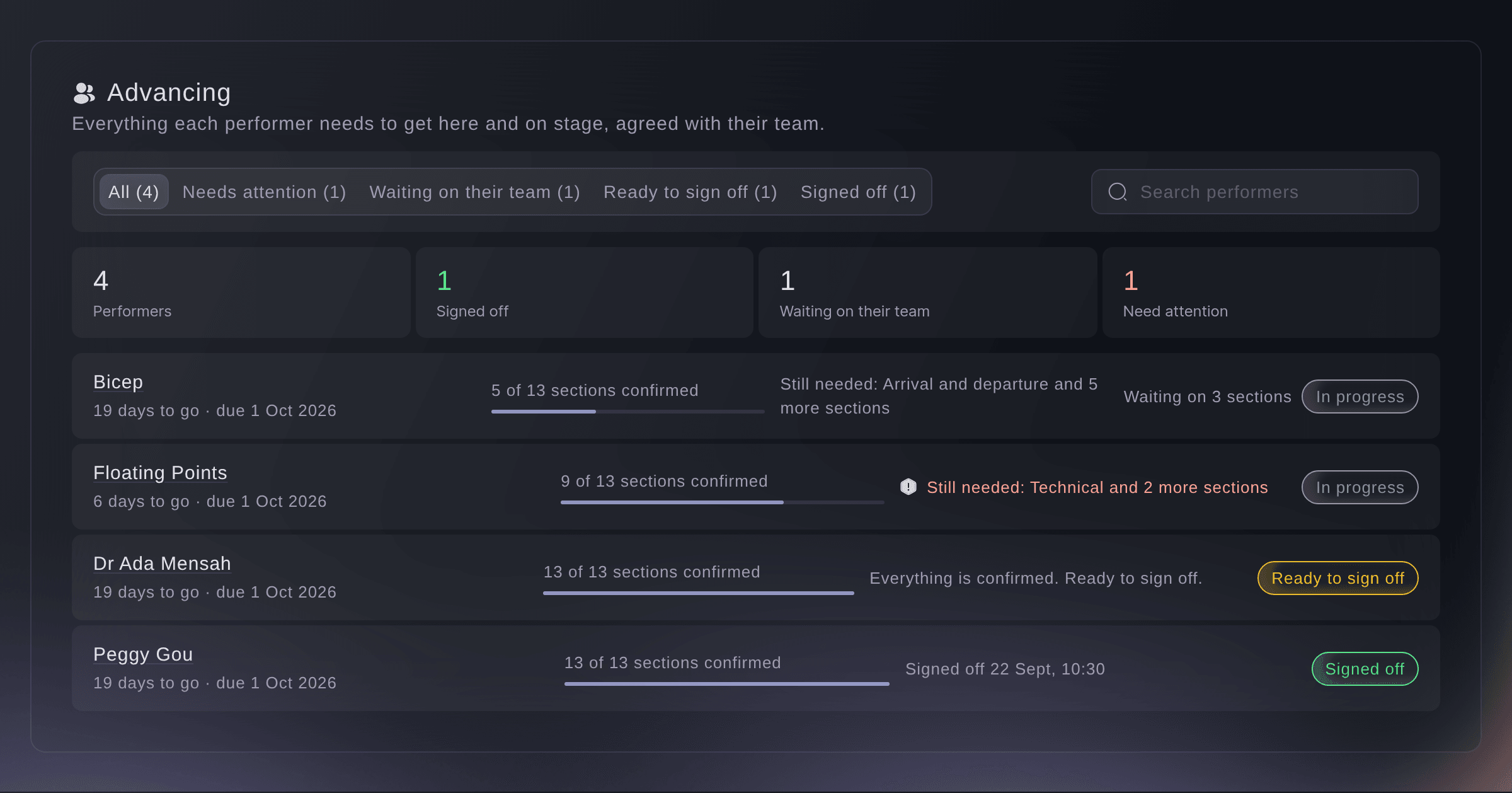
Every performer's advance. -
Filter to the performers who need you
Choose a filter above the list.
-
Open a performer's advance
Select a performer's row to open their advance.
Catatan: The first time anyone opens it, Fai fills in the empty answers she finds in the booking, travel, hotel, schedule and documents, and marks each one Filled by Fai with where it came from. She never replaces an answer a person gave.
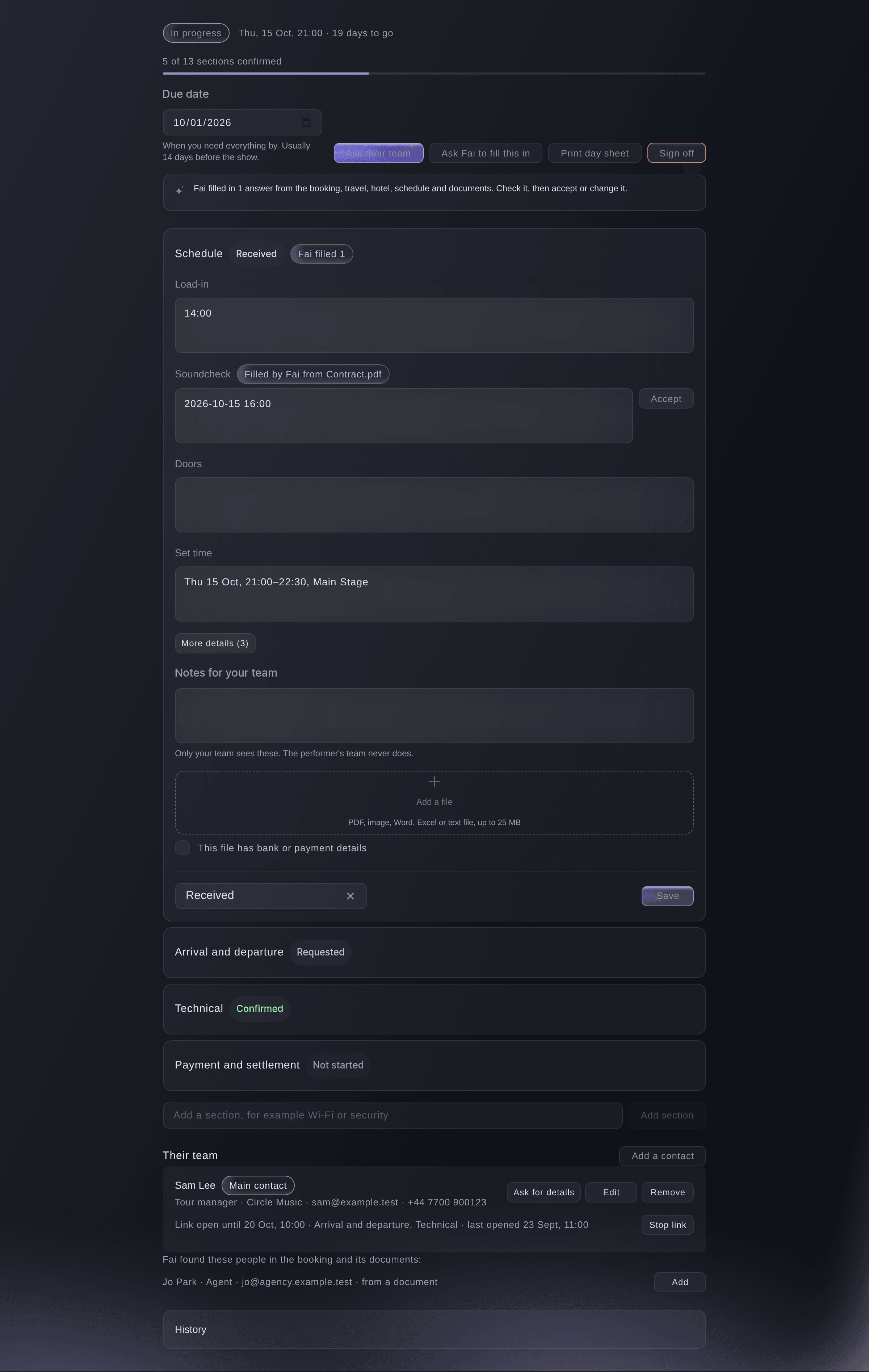
One performer's advance. -
Set the due date
Optional: change Due date to when you need everything by.
Catatan: It starts at 14 days before the performance. Once it passes, the performer shows under Needs attention.
-
Check Fai's answers
In each section Fai filled, select Accept beside an answer that is right, or change it and select Save.
Catatan: Select Accept all of Fai's answers to accept a whole section at once. A section opens by itself when it needs you: sent back for changes, answered by their team, or filled by Fai.
-
Add a contact from their team
Under Their team, select Add a contact, enter their Name, Role and Email, then select Add a contact.
Catatan: Enter the role in your own words or choose one such as Tour manager. When Fai found people in the booking or its documents, select Add beside one to start from their details.
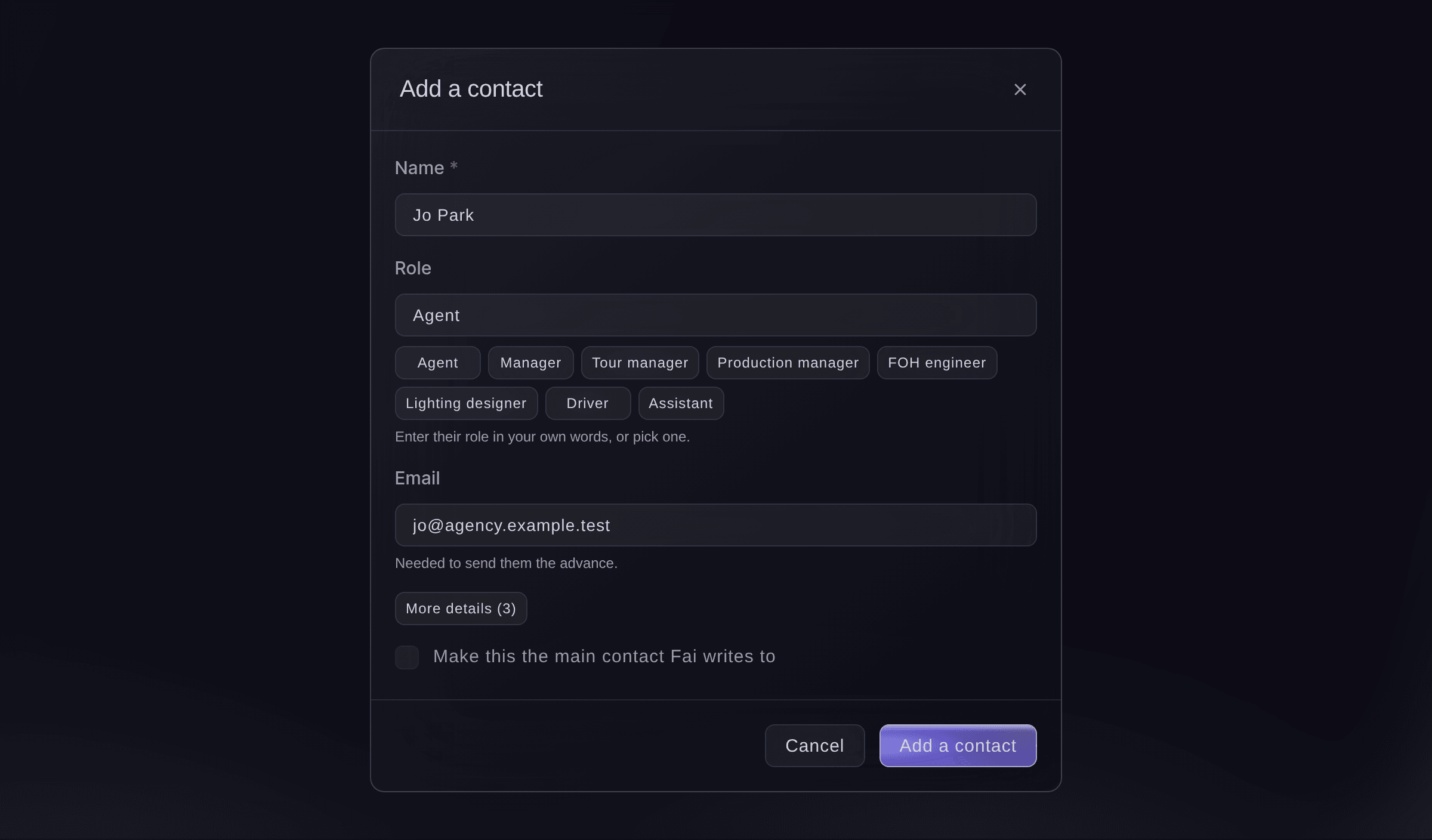
Add a contact, started from one Fai found. -
Ask their team to fill in their part
Select Ask their team, choose who it goes to in Send to and the sections under What they can see and fill in, then select Send.
Catatan: Payment and settlement is left out unless you add it. Under More details you can change the subject and how long the link works, from 7 to 90 days, 30 by default.
Peringatan: The email goes as soon as you select Send. Select Copy a link instead to send the link yourself.
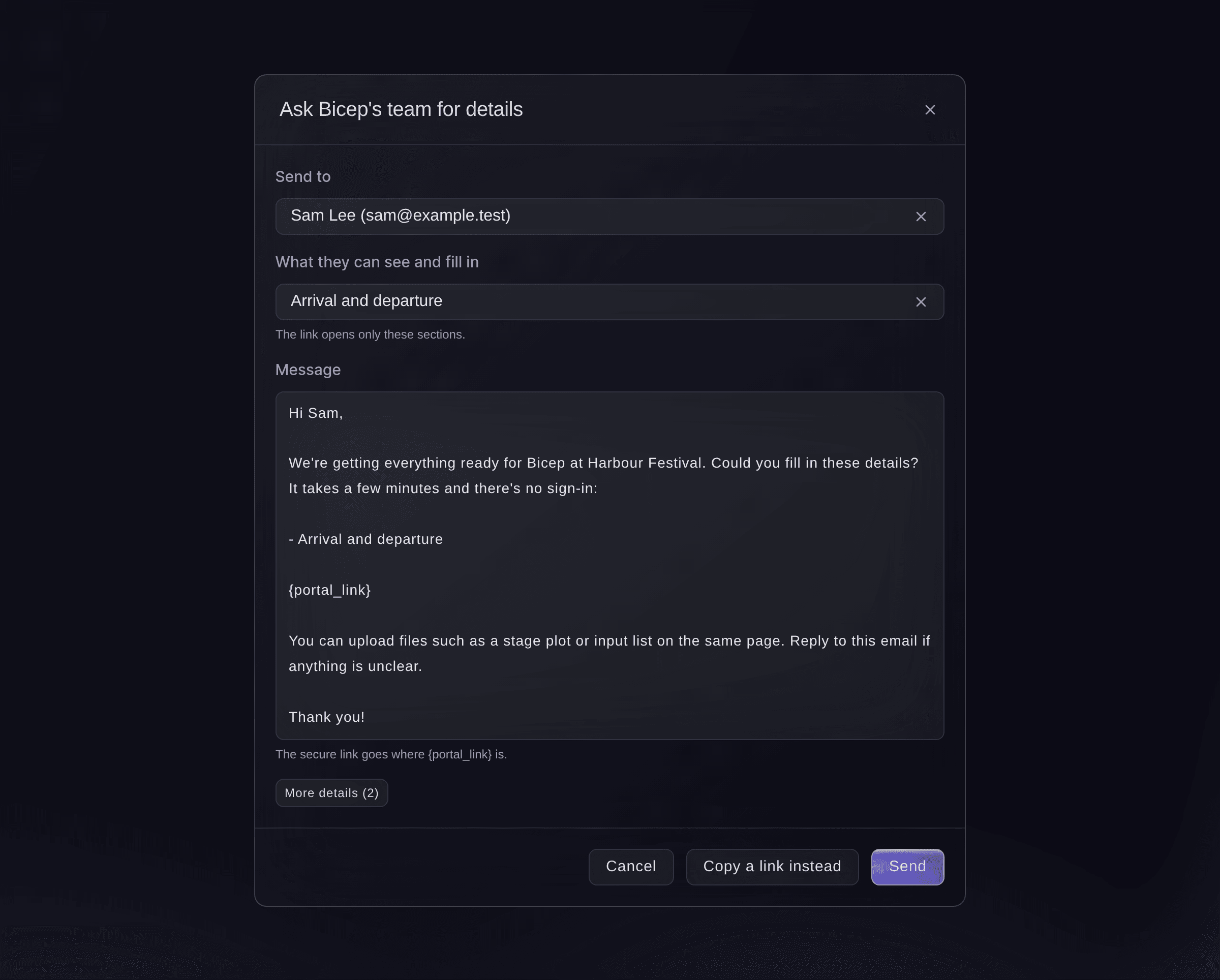
Ask their team for details.




What their team sees
The contact opens the link on any phone or computer with no sign-in, and sees only the sections you chose, with what is still needed at the top. When they save an answer, that section shows as Received on your advance; when they select Mark this section complete, it shows that their team says it is complete, and it stays yours to confirm. Once you sign the advance off, their page shows it read only.

-
Confirm each section
Check their answers and files, then choose Confirmed in the section's status.
Catatan: Choose Needs changes to send it back, then ask their team again. Use Notes for your team for anything the performer's team must not see.
-
Sign off the advance
Select Sign off, then confirm.
Catatan: When every section is confirmed the performer shows as Ready to sign off. If some are not, the dialog says how many and you can sign off anyway.
Coba langkah-langkah ini di acara Anda sendiri
Buat akun gratis, susun acara Anda dan ikuti langkah-langkah di atas di dasbor Anda sendiri. Hanya perlu beberapa menit dan Anda tidak perlu menjadwalkan panggilan penjualan.
Tanpa biaya pemasangan. Tanpa biaya bulanan wajib. Tanpa kartu kredit.
Atau minta dikerjakan untuk Anda
Fai reads every advance, fills in empty answers from the booking and documents, changes a section's answers or status, adds contacts, emails a contact the link to their part and signs an advance off or reopens it. She shows you each change or email and waits for your yes first, and she never shows the link itself in the conversation.
Di dasbor Anda, dengan Fai
Which performers at <EVENT NAME> still have their advance open, and send Bicep's tour manager a link to fill in their travel and technical sections
Biarkan Fai mengerjakannya untuk Anda
Fai bekerja di dalam dasbor Ticket Fairy Anda. Buat akun Anda, buka Fai dan tempel perintah di atas.
Tanpa biaya pemasangan. Tanpa biaya bulanan wajib. Tanpa kartu kredit.
Reopen a signed-off advance
-
Reopen it
Open the performer's advance, select Reopen, then confirm.
Catatan: Your team and the performer's team can change it again until you sign it off. You cannot ask their team for more while it is signed off.
Fai reopens a signed-off advance when you ask, after you confirm.
Di dasbor Anda, dengan Fai
Reopen Bicep's advance for <EVENT NAME>, their flights have changed
Stop a link
-
Stop the link
Under Their team, select Stop link beside the link, then confirm.
Catatan: It stops working straight away and what they already filled in stays. Removing a contact, or changing their email address, stops their links too.
Fai stops a contact's link when you ask, after you confirm.
Di dasbor Anda, dengan Fai
Stop the advancing link we sent Bicep's agent for <EVENT NAME>
Pertanyaan yang mungkin Anda punya
- Does the performer's team need a Ticket Fairy account?
- No. They open the link from the email on any phone or computer, with no sign-in, and see only the sections you shared.
- What happens when the link expires?
- Their page says the link has expired and asks them to contact you. Select Ask their team again to send a new link.
- Does Fai read the files their team uploads?
- Yes, to fill in answers, unless the person uploading ticks "This file has bank or payment details". Fai never reads a file ticked that way, and a file in Payment and settlement is always treated as one.
- What if a teammate changes the same section at the same time?
- The second save does not overwrite the first. The advance reloads with your teammate's version, and you make your change again on it.
- Can I add a section the advance does not have?
- Yes. At the foot of the sections, enter a name such as Wi-Fi or security, then select Add section.
Masih ada pertanyaan?
Jadwalkan demo dan kami akan menjawabnya lewat panggilan, sesuai jenis acara Anda. Atau buat akun Anda dan lihat sendiri.
Tanpa biaya pemasangan. Tanpa biaya bulanan wajib. Tanpa kartu kredit.
Panduan terkait
Lakukan ini di acara Anda sendiri
Buat akun, susun acara, dan ikuti langkah-langkahnya di dasbor Anda. Anda tidak perlu memesan panggilan penjualan.