
Menjalankan produksi
Share day sheets with your event's on-site teams
Production managers used to build a call sheet for every team by hand the night before each show day. Day sheets give security, sound, hospitality and every other team their own page from the run of show, and a link each lead can open on their phone at the gate.
Set up the departments working your event and who leads each one, then print or share a day sheet for each team, performer or stage with only their part of the show day, on any phone and without a sign-in.
- Untuk
- Giving each on-site team its own plan for the day
- Perlu waktu
- 8 menit
Sebelum mulai
- You are an owner, admin or producer on the event. The event's Management page opens for those roles only.
- Your run of show has cues for the day. A day sheet shows each team the cues their department owns.
-
Open your departments
Open the event, select Management, select Run of show in the list of sections, then scroll to Departments.
Catatan: Your event starts with the teams an event of its type usually has, such as Stage management, Sound and Security and safety. Rename, remove or add to them to match your crew.
-
Open a department
Select the pencil beside a department to open it.
Catatan: You can change its Name, Colour and What this department looks after, and see its people under People.
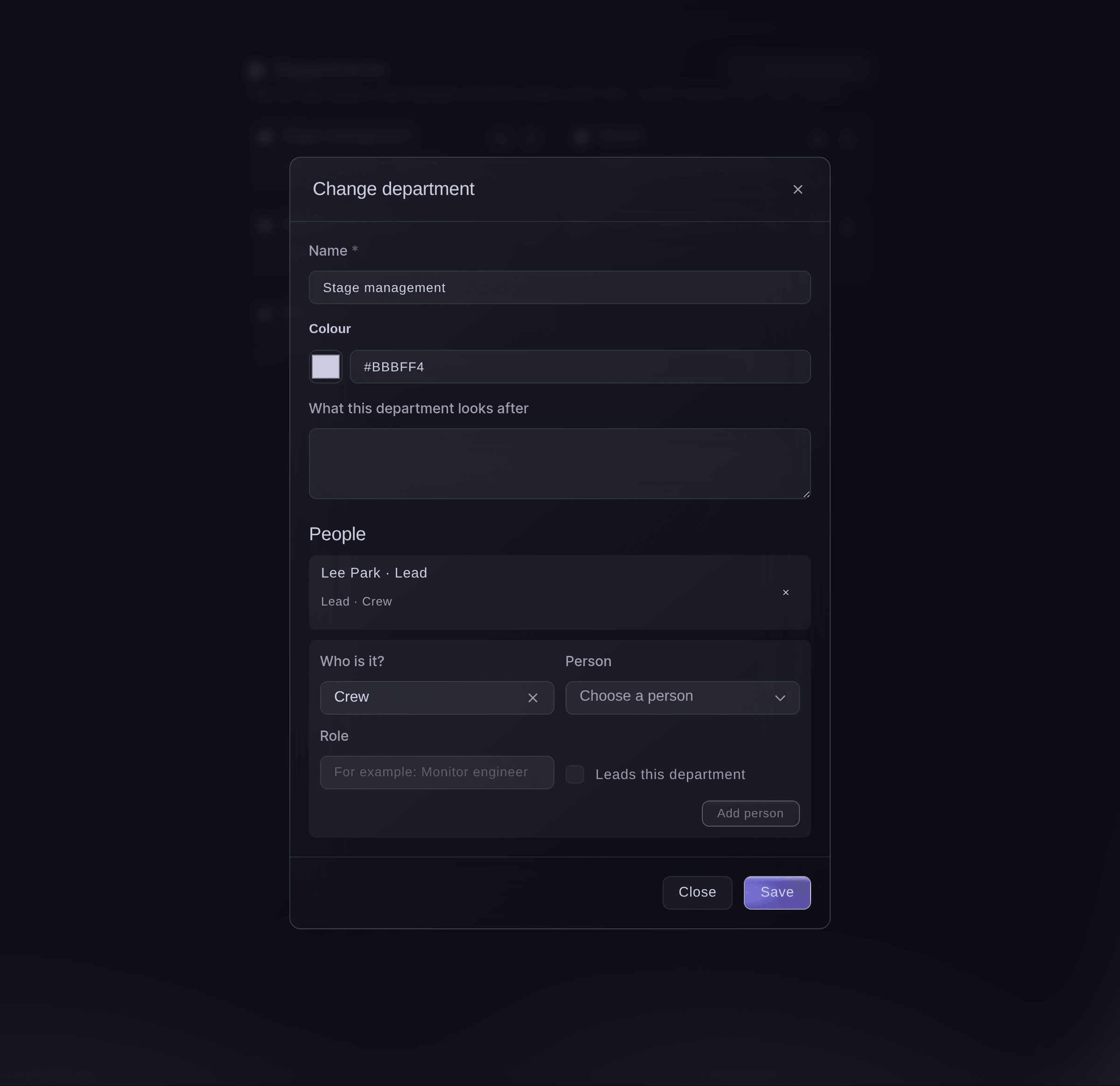
A department and its people. -
Add the people in the department
Under Who is it?, choose Crew, Volunteer, Collaborator or Someone else, choose or enter the person, then select Add person.
Catatan: Crew and volunteers come from those sections of the event. For someone else, enter their Name and Email so they can be sent the day sheet.
-
Choose who leads the department
Tick Leads this department as you add them, or select Make lead beside someone already in it.
Catatan: The lead is the person emailed their department's day sheet, and their phone number shows on it. A department with no lead email is left out when you send day sheets.
-
Open the day sheets
Select Day sheets in the list of sections, choose Department, Performer or Stage, then choose whose sheet and the Day.
Catatan: A department's sheet lists its cues from the run of show, its people, pickups and arrivals, key contacts and its rota shifts. A performer's adds their set, hotel and advancing, and a stage's lists its performers and tech contacts.
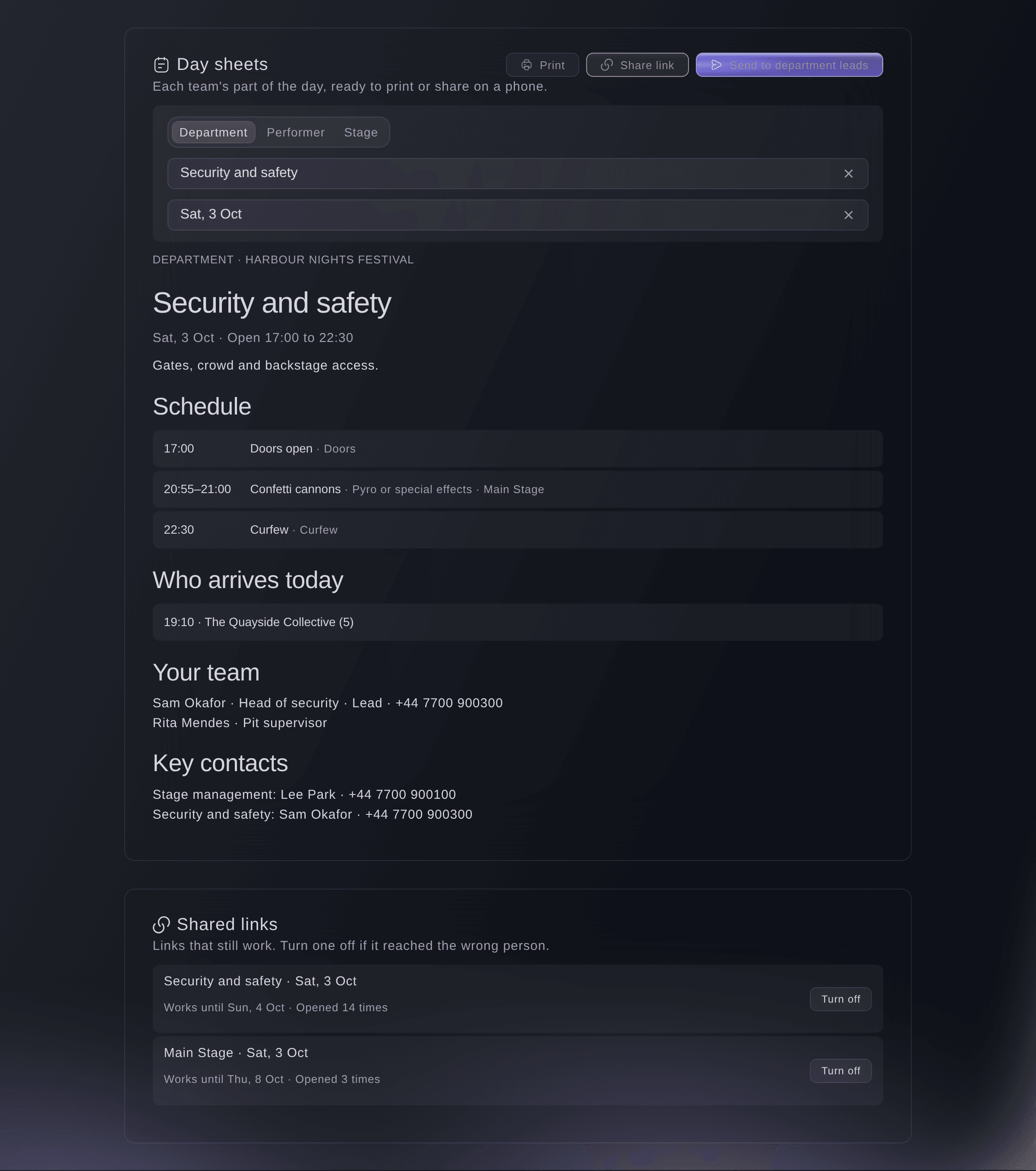
The security team's day sheet. -
Share a link to the day sheet
Select Share link, choose how long Link works for, then select Make link and copy the link.
Catatan: Anyone with the link can read the sheet on their phone without signing in, and it always shows the latest run of show. The link is shown only once, so make a new one if it gets lost.
Peringatan: Tick Include phone numbers and hotel addresses only when everyone you share the link with needs them; a department's sheet always shows its own lead's number.
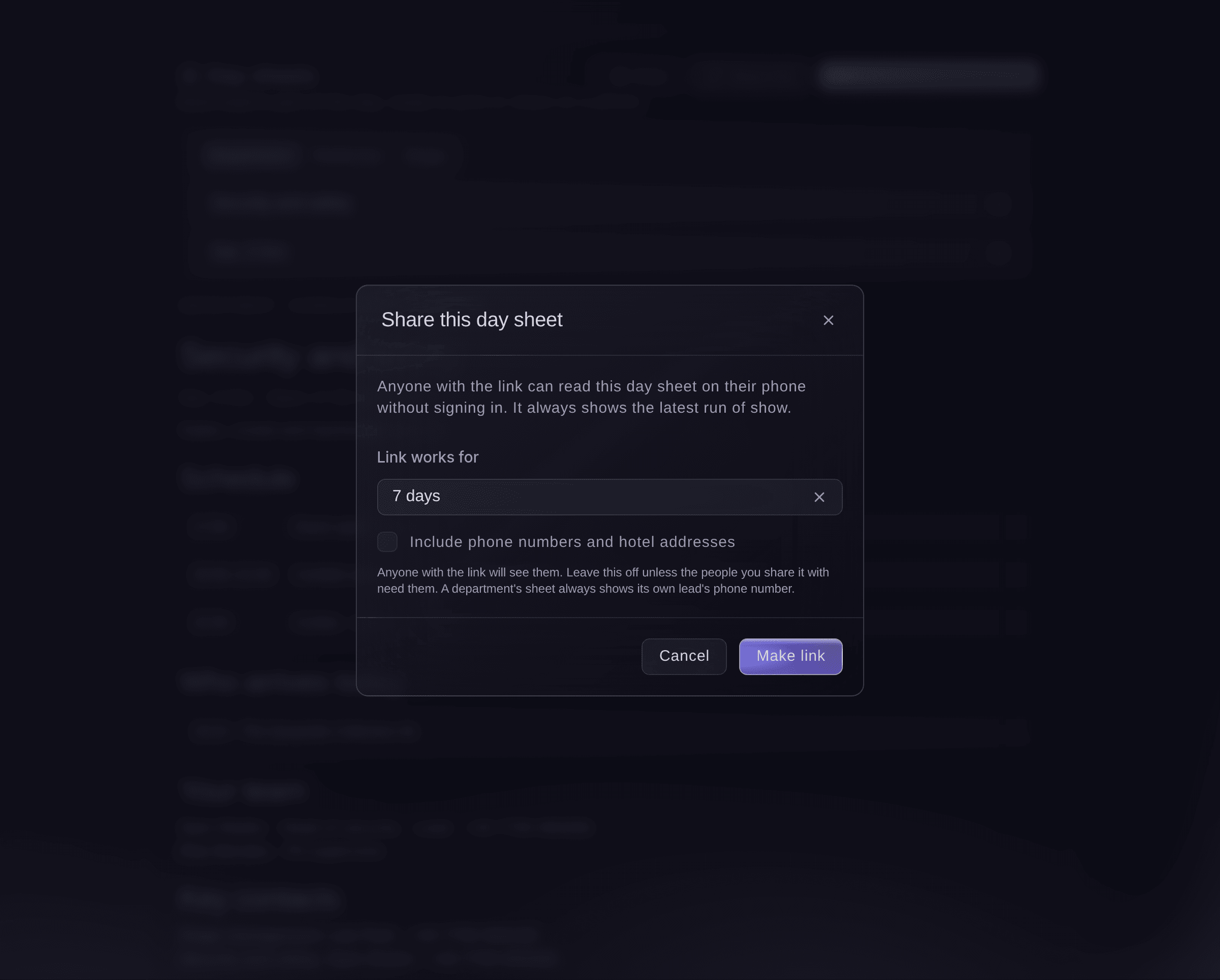
Share a day sheet without a sign-in. -
Send every lead their day sheet
Select Send to department leads, check who will get one, then select Send.
Catatan: Each lead gets an email with a link to their own department's sheet for the day, which works until the end of the day after the show. The dialog names any departments left out because their lead has no email address.
-
Print a day sheet
Optional: select Print for a paper copy of the sheet you are looking at.


Coba langkah-langkah ini di acara Anda sendiri
Buat akun gratis, susun acara Anda dan ikuti langkah-langkah di atas di dasbor Anda sendiri. Hanya perlu beberapa menit dan Anda tidak perlu menjadwalkan panggilan penjualan.
Tanpa biaya pemasangan. Tanpa biaya bulanan wajib. Tanpa kartu kredit.
Atau minta dikerjakan untuk Anda
Fai reads any team's, performer's or stage's day sheet, adds or changes departments and the people in them, makes or turns off a share link, and emails every department lead the link to their own day sheet. She shows you each change or email and waits for your yes first.
Di dasbor Anda, dengan Fai
Email every department lead at <EVENT NAME> their day sheet for Saturday
Biarkan Fai mengerjakannya untuk Anda
Fai bekerja di dalam dasbor Ticket Fairy Anda. Buat akun Anda, buka Fai dan tempel perintah di atas.
Tanpa biaya pemasangan. Tanpa biaya bulanan wajib. Tanpa kartu kredit.
Turn off a shared link
-
Turn it off
Under Shared links, select Turn off beside the link, then confirm.
Catatan: Anyone using it sees that the link no longer works. Each link shows how many times it was opened, and you can make a new one at any time.
Fai turns off a day sheet link when you ask, after you confirm.
Di dasbor Anda, dengan Fai
Turn off the security day sheet link for Saturday at <EVENT NAME>
Pertanyaan yang mungkin Anda punya
- Does the day sheet change when the run of show changes?
- Yes. A shared link always shows the latest run of show, so a moved cue reaches every team that opens it. If their phone loses signal, it keeps the last version it loaded.
- What does someone see when a link has expired?
- A page saying the link no longer works and to ask the event team for a new one. Make a new link, or send the day sheets to the leads again.
- Can I see who opened a shared link?
- You see how many times each link was opened, under Shared links. The names of the people who opened it are not recorded.
- What happens when I remove a department?
- Its people come off the list and it no longer gets a day sheet. Cues it owned keep their other departments.
Masih ada pertanyaan?
Jadwalkan demo dan kami akan menjawabnya lewat panggilan, sesuai jenis acara Anda. Atau buat akun Anda dan lihat sendiri.
Tanpa biaya pemasangan. Tanpa biaya bulanan wajib. Tanpa kartu kredit.
Panduan terkait
Lakukan ini di acara Anda sendiri
Buat akun, susun acara, dan ikuti langkah-langkahnya di dasbor Anda. Anda tidak perlu memesan panggilan penjualan.