
Kasse und Bestellungen
Let buyers resell their tickets at face value
Festival, club and concert promoters turn on resale so a fan who can no longer come passes their ticket on through Ticket Fairy instead of through a tout. The next person in line pays the ticket's own price, the seller gets their money back, and the old ticket stops working at the door.
Turn on ticket resale so a buyer who can't come to your event passes their ticket to the next fan on your waiting list, or to someone they name, at the ticket's own price, and follow every resale ticket on the Ticket Resale report.
- Für
- Letting ticket buyers pass their tickets to fans who want them
- Dauer
- 6 Minuten
Bevor Sie anfangen
- You're the owner or an admin of the event. Ask one of them to do this if you can't open Tickets.
-
Open the anti-scalping settings
Open your event, select Tickets, then Settings, and find the Anti-Scalping/Fraud Settings card. A tick beside Ticket Resale means your buyers can already resell their tickets.
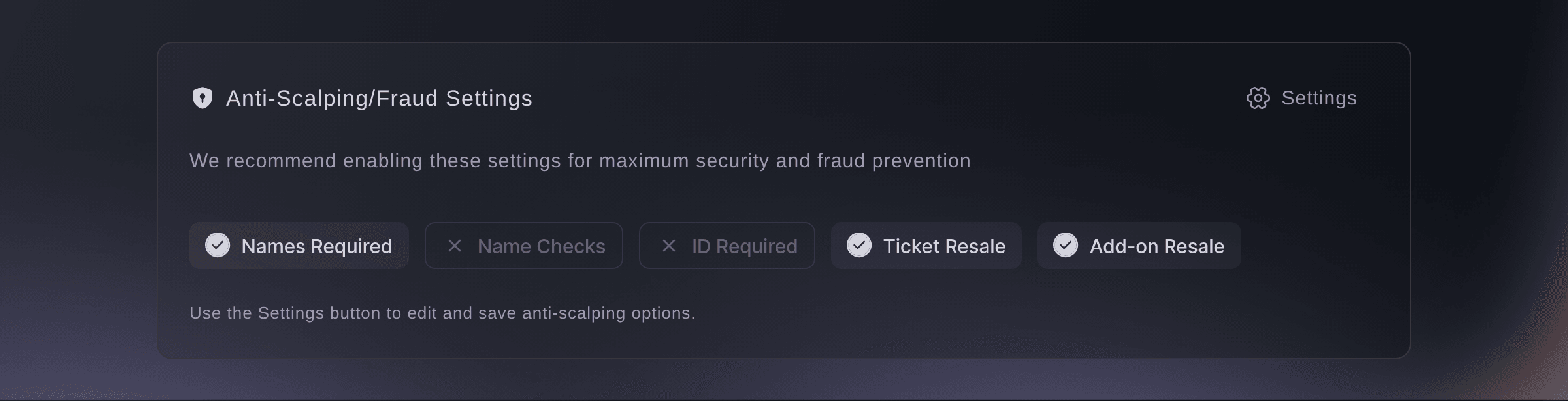
Tickets, Settings, Anti-Scalping/Fraud Settings. -
Open the settings dialog
Select Settings on the card. The dialog lists Ticket resale and Add-on resale below the name and ID checks.
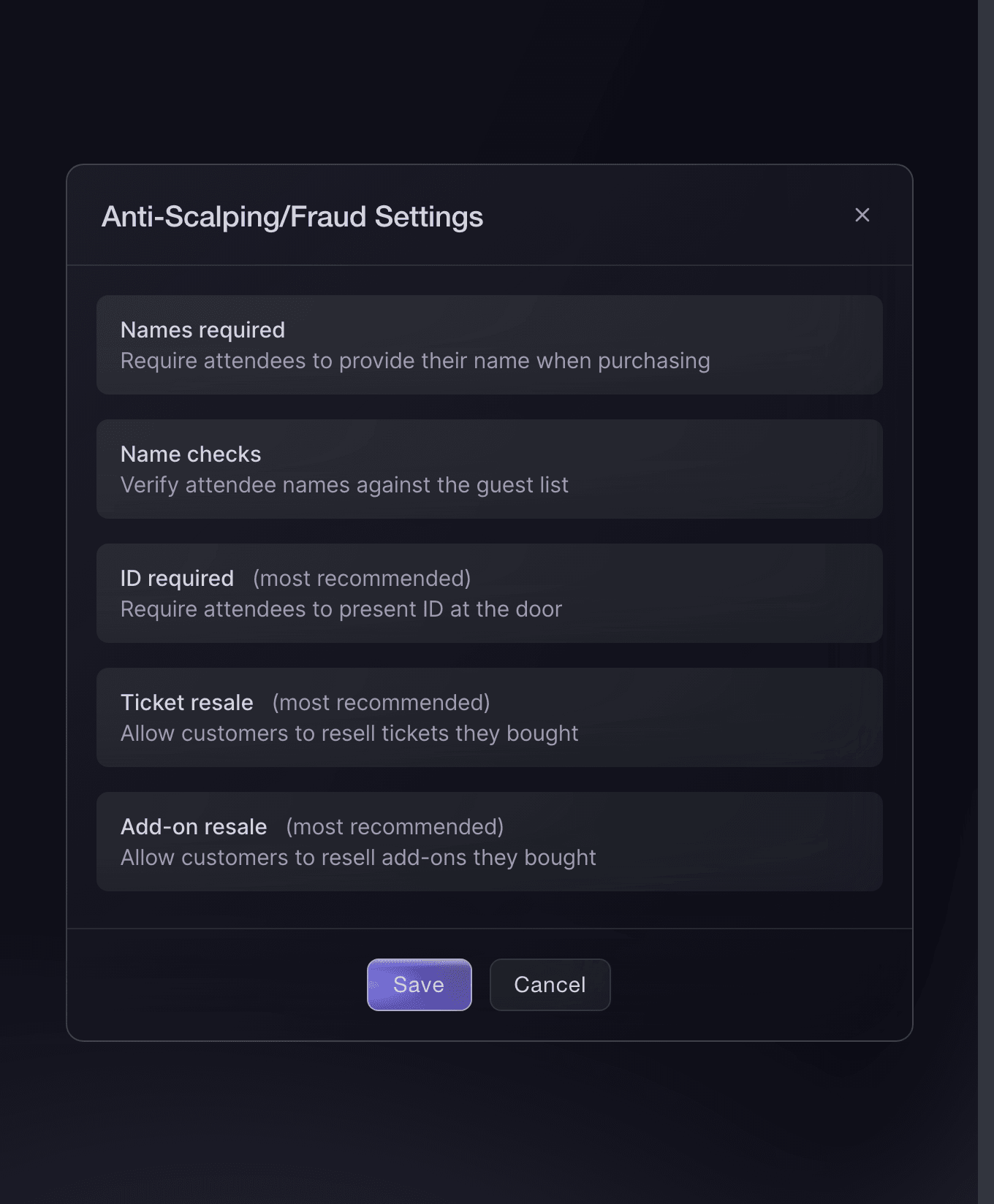
Tickets, Settings, Anti-Scalping/Fraud Settings. -
Turn on the resale you want to offer
Turn on each kind of resale your buyers can use.
-
Save the settings
Select Save. The dashboard shows
Successfully updated ticket settings
, and Ticket Resale on the card carries a tick.Hinweis: The change applies to every ticket on the event, so buyers who already hold tickets can resell them too.
The resale fee
When a ticket sells through resale, we charge the seller a resale fee of 10% of the price they paid for the ticket, not counting the booking fee. The fee applies to every resale on your event from the moment Ticket resale is on, whether you switch it on when you create the event or on this page later, unless your event is in India, where resale carries no fee, or we've set a different fee for it. For a ticket bought in a currency other than US, Australian or New Zealand dollars, pounds sterling or euros, the fee is capped at the equivalent of US$20.
Hinweis: We take the fee from the seller's card once their ticket sells, then refund their ticket. If the card is declined, we email them a link to pay the fee, and their refund goes out once they pay.
A buyer's resale
A buyer who can't come opens their order in their Ticket Fairy account and chooses Sell Ticket beside the ticket. They can sell it to anyone who wants it, which offers it to the next person on your waiting list for that ticket type, or to someone they know, whom we email a link to buy it. Their ticket keeps working at the door until the new buyer pays.
Hinweis: When a resale fee applies, the Sell ticket page shows the amount before the buyer lists the ticket. A buyer can take the ticket off resale from the same order until a new buyer pays for it.
-
Turn on the waiting list
On the same Settings tab, turn on Enable waiting list after ticket sell-out if it's off, then select Save Ticket Settings.
Hinweis: A ticket sold to anyone is offered to the person who joined the waiting list for that ticket type earliest. When the list is empty, the ticket stays up for resale until a fan joins it.
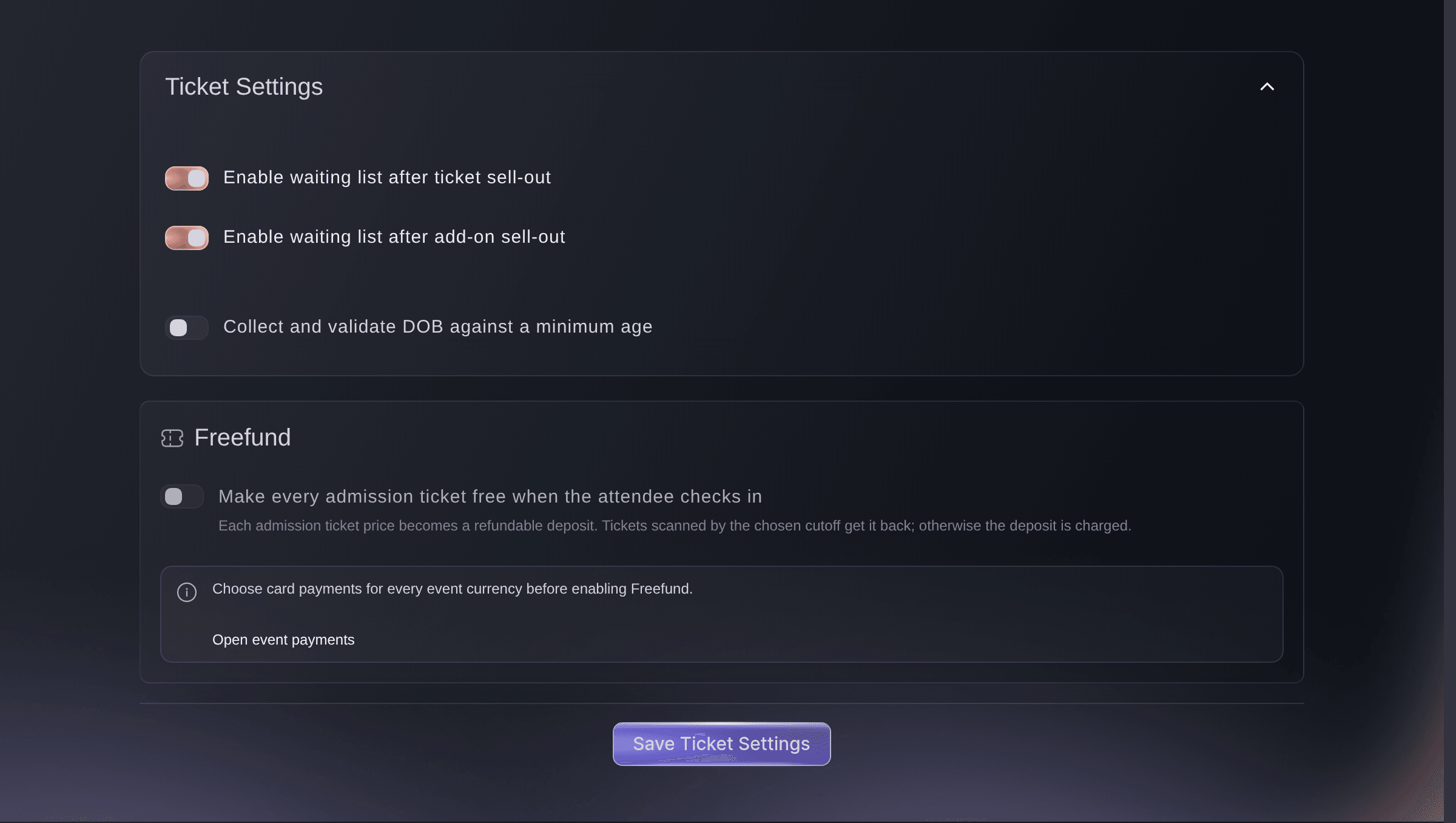
Tickets, Settings.
A completed resale
The new buyer pays the ticket type's current price at an ordinary checkout, with the booking fee as for any other ticket, and receives a ticket of their own. The seller's ticket stops working, and we refund the seller what they paid for the ticket and any add-ons that went with it, less anything already refunded on it and, unless we've set your event up to return it, the booking fee.
-
Watch your resale tickets
Open Performance and select Ticket Resale. Each ticket type shows how many of its tickets buyers have put up for resale, and selecting one lists each ticket with its Status, Sold Via and Sold To.
Hinweis: A ticket reads for sale until a new buyer pays for it, sale in progress while the seller's resale fee is unpaid, and sold once the sale completes.
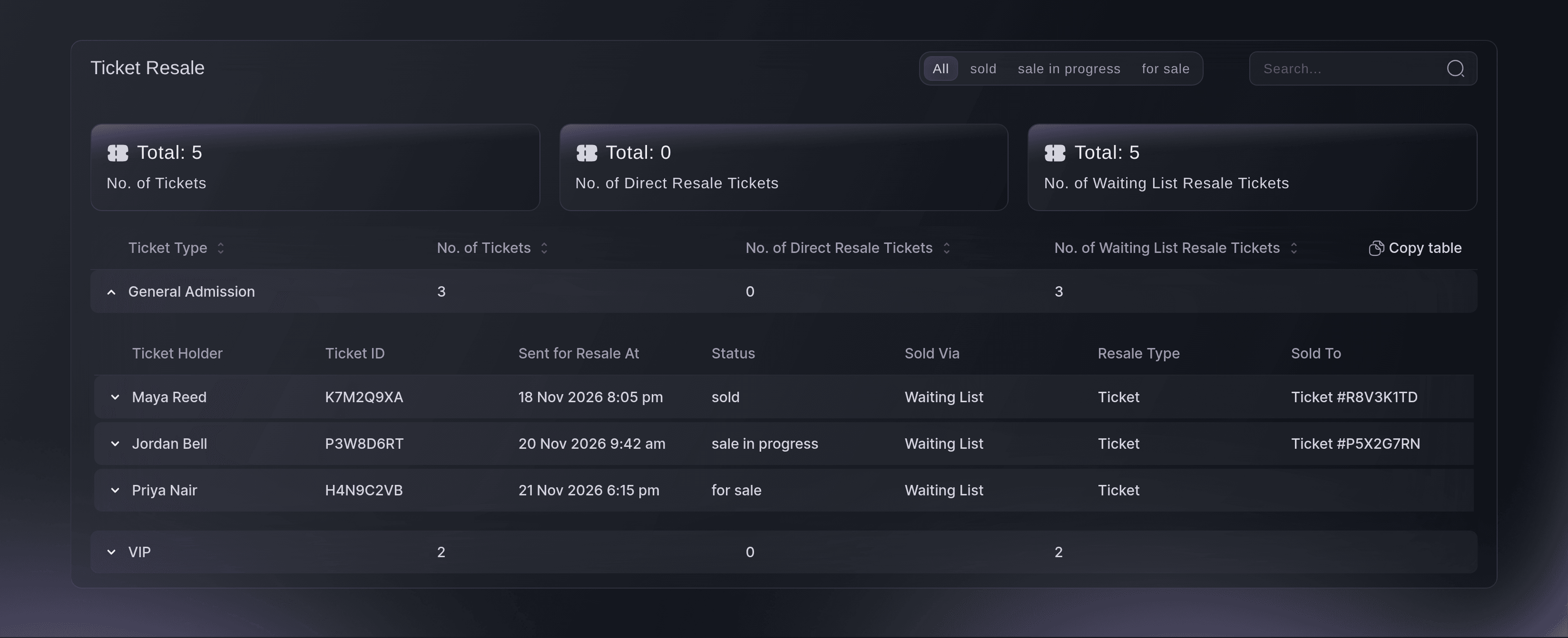
Performance, Ticket Resale. -
Check a resale went through
Select a ticket type's row and look for a ticket marked sold. The ticket number under Sold To is the new buyer's ticket.
Probiere diese Schritte bei deinem eigenen Event aus
Erstelle ein kostenloses Konto, lege dein Event an und folge den Schritten oben in deinem eigenen Dashboard. Das dauert ein paar Minuten, und du musst kein Verkaufsgespräch buchen.
Keine Einrichtungsgebühren. Keine verpflichtende monatliche Ticketing-Gebühr. Keine Kreditkarte nötig.
Oder lassen Sie es erledigen
Fai, the assistant inside your dashboard, can turn ticket resale, add-on resale and the waiting list on for you, tell you the resale fee on your event and list the tickets buyers have put up for resale. She shows you each change and asks you to approve it before she saves. Over MCP your own assistant can switch resale on and read the setting back.
In Ihrem Dashboard, mit Fai
Turn on ticket resale, add-on resale and the waiting list for <EVENT NAME>, then tell me the resale fee on the event and list the tickets buyers have put up for resale
Über MCP, mit Ihrem eigenen Assistenten
Verbinden Sie Ihren Assistenten mit unserem MCP-Server und bitten Sie ihn:
Die kopierte MCP-Konfiguration enthält --read-only. Entfernen Sie --read-only nur, wenn Ihr Assistent Änderungen vornehmen soll. Routinemäßige Änderungen laufen auf Anfrage; vor destruktiven Aktionen fragt Sie ein kompatibler Client. Wenn Ihr Client nicht fragen kann, nehmen Sie die Änderung im Dashboard vor.
Pick the brand, find the event <EVENT NAME>, turn on ticket resale and add-on resale, then show me the event's resale settings
Über das Terminal
Installieren Sie die CLI über unserer CLI-Seite, melden Sie sich mit ticketfairy auth login an und wählen Sie mit ticketfairy brand use <BRAND_ID> die Marke, an der Sie arbeiten. ticketfairy brand list und ticketfairy event list zeigen die IDs, die die anderen Befehle verwenden.
Use the same owner or admin login with the command line that you use in the dashboard. It turns resale on through the event's settings, reads back whether resale is on with the resale fee percentage, and lists every ticket on resale with its status. The waiting list switch and the report's grouping by ticket type are in the dashboard.
Turn on ticket resale and add-on resale for an event.
ticketfairy event update <EVENT_ID> --body '{"flagResaleEnabled": true, "flagEnableAddOnResale": true}'
Check whether ticket and add-on resale are on, and the resale fee percentage the event carries.
ticketfairy event get <EVENT_ID> --fields flagResaleEnabled,flagEnableAddOnResale,resaleFeePercentage
List every ticket buyers have put up for resale, with its status, how it sold and the ticket it went to.
ticketfairy api /api/events/<EVENT_ID>/relationships/performance --query section=resale --output json
Lass Fai das für dich erledigen
Fai arbeitet in deinem Ticket Fairy Dashboard. Erstelle dein Konto, öffne Fai und füge die Anweisung von oben ein.
Keine Einrichtungsgebühren. Keine verpflichtende monatliche Ticketing-Gebühr. Keine Kreditkarte nötig.
Keep one ticket type out of resale
-
Open the ticket type
Open your event, select Tickets, then select Edit on the ticket type.
-
Withhold it from resale
Turn on Withhold this ticket type from resale, then select Save.
Hinweis: Buyers holding that ticket type no longer see Sell Ticket on it. A ticket already up for resale stays up until it sells or its buyer takes it down.
Fai can withhold a ticket type from resale after showing you which one she will change, and asks you to approve it. Over MCP your own assistant can do the same, and the command line sets it with the ticket type's ID from the ticket list.
In Ihrem Dashboard, mit Fai
Stop buyers reselling the <TICKET TYPE NAME> tickets on <EVENT NAME>, and show me the ticket type before you change it
Über MCP, mit Ihrem eigenen Assistenten
Die kopierte MCP-Konfiguration enthält --read-only. Entfernen Sie --read-only nur, wenn Ihr Assistent Änderungen vornehmen soll. Routinemäßige Änderungen laufen auf Anfrage; vor destruktiven Aktionen fragt Sie ein kompatibler Client. Wenn Ihr Client nicht fragen kann, nehmen Sie die Änderung im Dashboard vor.
Find the event <EVENT NAME>, list its ticket types, then withhold <TICKET TYPE NAME> from resale
Über das Terminal
Use an owner or admin login. Take the ticket type's ID from the ticket list, then withhold it from resale.
List the event's ticket types with their IDs.
ticketfairy ticket list <EVENT_ID>
Withhold one ticket type from resale.
ticketfairy ticket update <EVENT_ID> <TICKET_TYPE_ID> --body '{"disableResale": true}'
Stop one buyer reselling their order
Open Orders, open the order, then select Block Resale.
Hinweis: The button then reads Unblock Resale, which lets the buyer resell again. You need to be the owner, an admin, a Stats login or a Customer Support login on the event.
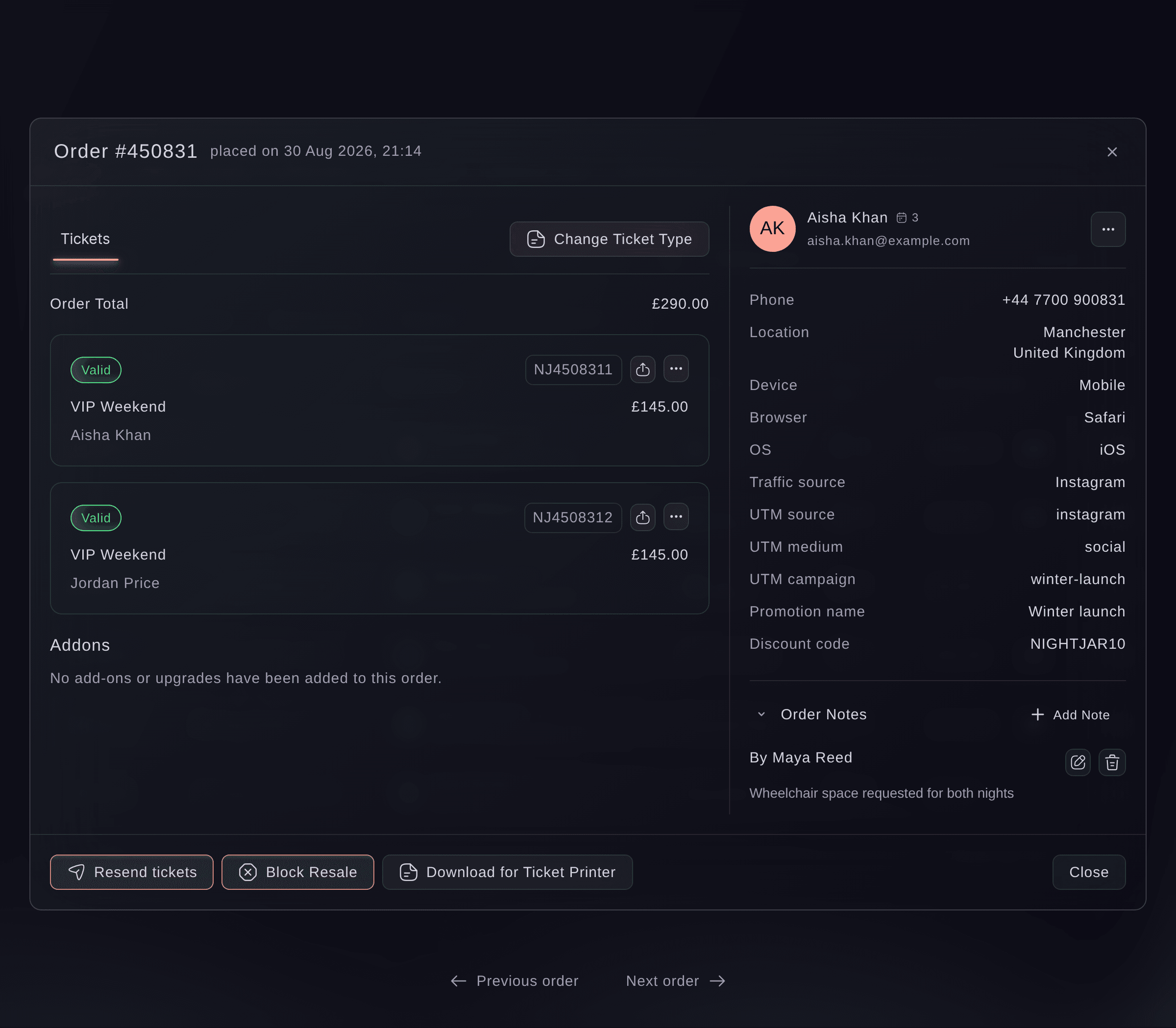
Fai can find the order and block or unblock resale on it, and asks you to approve the change first. MCP and the command line do not block resale on an order.
In Ihrem Dashboard, mit Fai
Find order <ORDER NUMBER> on <EVENT NAME> and block resale on it once I approve
Turn resale off
In the Anti-Scalping/Fraud Settings dialog, turn off Ticket resale, then select Save.
Hinweis: Buyers can no longer put tickets up for resale, and the Ticket Resale tab leaves Performance. A ticket already up for resale stays up until it sells or its buyer takes it down.
Fai can turn ticket resale off after showing you the change, and asks you to approve it. Over MCP your own assistant can switch it off too, and so can the command line.
In Ihrem Dashboard, mit Fai
Turn off ticket resale for <EVENT NAME>
Über MCP, mit Ihrem eigenen Assistenten
Die kopierte MCP-Konfiguration enthält --read-only. Entfernen Sie --read-only nur, wenn Ihr Assistent Änderungen vornehmen soll. Routinemäßige Änderungen laufen auf Anfrage; vor destruktiven Aktionen fragt Sie ein kompatibler Client. Wenn Ihr Client nicht fragen kann, nehmen Sie die Änderung im Dashboard vor.
Find the event <EVENT NAME> and turn off ticket resale
Über das Terminal
Use an owner or admin login.
Turn off ticket resale for an event.
ticketfairy event update <EVENT_ID> --body '{"flagResaleEnabled": false}'
Fragen, die Sie haben könnten
- What does the person reselling a ticket get back?
- What they paid for the ticket and any add-ons that went with it, less anything already refunded on it. The booking fee isn't returned unless we've set your event up to return it. We refund them the way they paid once the ticket sells and any resale fee is paid.
- What does the new buyer pay?
- The ticket type's current price at an ordinary checkout, with the booking fee as for any other ticket. On an event Ticket Fairy has set up to offer returned tickets by category, it is the price of the category's resale ticket type. Nobody sets their own price on a resale, so a ticket can't be marked up.
- Can I change the resale fee?
- We set the resale fee on your event. Ask us if your event needs a different one.
- Why can't a buyer resell their ticket?
- Sell Ticket appears only while ticket resale is on, on a ticket the buyer paid for that hasn't been scanned in. It doesn't appear on free and guest tickets, gifts, tickets from a pass or a membership, tickets still being paid off in instalments, a ticket type you've withheld from resale, or an order you've blocked.
- Can a buyer choose who gets their ticket?
- Yes. They choose to sell it to someone they know and enter that person's name and email address, and we email them a link to buy it. On an event with time slots, selling to someone they know is the only choice.
- Can a buyer take a ticket off resale?
- Yes, from their order in their Ticket Fairy account, until a new buyer pays for it. Once the new buyer has paid, the resale can't be called off.
- Is there a resale fee on an add-on sold on its own?
- No, unless we've set one for your event.
- Why does my event with resale on charge no resale fee?
- The fee follows the country of your venue, so an event you saved before it had a venue gets the fee once you save it with its venue. Some older events have Ticket resale on without the fee, and saving other changes to the event does not add it. To add it, open the Anti-Scalping/Fraud Settings dialog, leave Ticket resale on and select Save. The fee applies to resales from then on.
- Does an event created through the API charge the resale fee?
- Not at first. An event created through the Ticket Fairy API charges the resale fee after you save the Anti-Scalping/Fraud Settings dialog with Ticket resale on, or after we set a fee for it. An event with no venue yet gets the fee once you add its venue on the Event Details page, or make it an online event there.
Hast du noch eine Frage?
Buche eine Demo, und wir beantworten sie in einem Gespräch, passend zu deiner Art von Event. Oder erstelle dein Konto und sieh es dir selbst an.
Keine Einrichtungsgebühren. Keine verpflichtende monatliche Ticketing-Gebühr. Keine Kreditkarte nötig.
Verwandte Anleitungen
Machen Sie das bei Ihrer eigenen Veranstaltung
Erstellen Sie Ihr Konto, legen Sie Ihr Event an und folgen Sie den Schritten in Ihrem eigenen Dashboard. Sie müssen kein Verkaufsgespräch buchen.