
Vault dan Capital
Freeze, cancel or change the limits on an event team's Vault card
Production and tour managers need to stop a lost card in seconds and raise a limit before a big supplier order. Each Vault card can be frozen, changed or linked to an event from the card itself, so you keep control of event spending without issuing new cards.
Freeze a Vault card your event team spends with, unfreeze it, cancel it for good, change its spending limits or where and when it works, rename it or link it to the event it pays for, all from the card in Vault.
- Untuk
- Keeping control of the cards your event team spends with
- Perlu waktu
- 5 menit
Sebelum mulai
- You're an owner or an admin on the brand. Ticket Fairy support can see a card's controls but can't change them.
- The card was issued from your brand's Vault, as Let your event team spend with Vault cards shows.
-
Open the card
Open Vault, select Cards, then select View on the card's row. Card information opens with Manage this card under the card.
Catatan: The card's status says what it can do now, such as Active with
The card can be used.
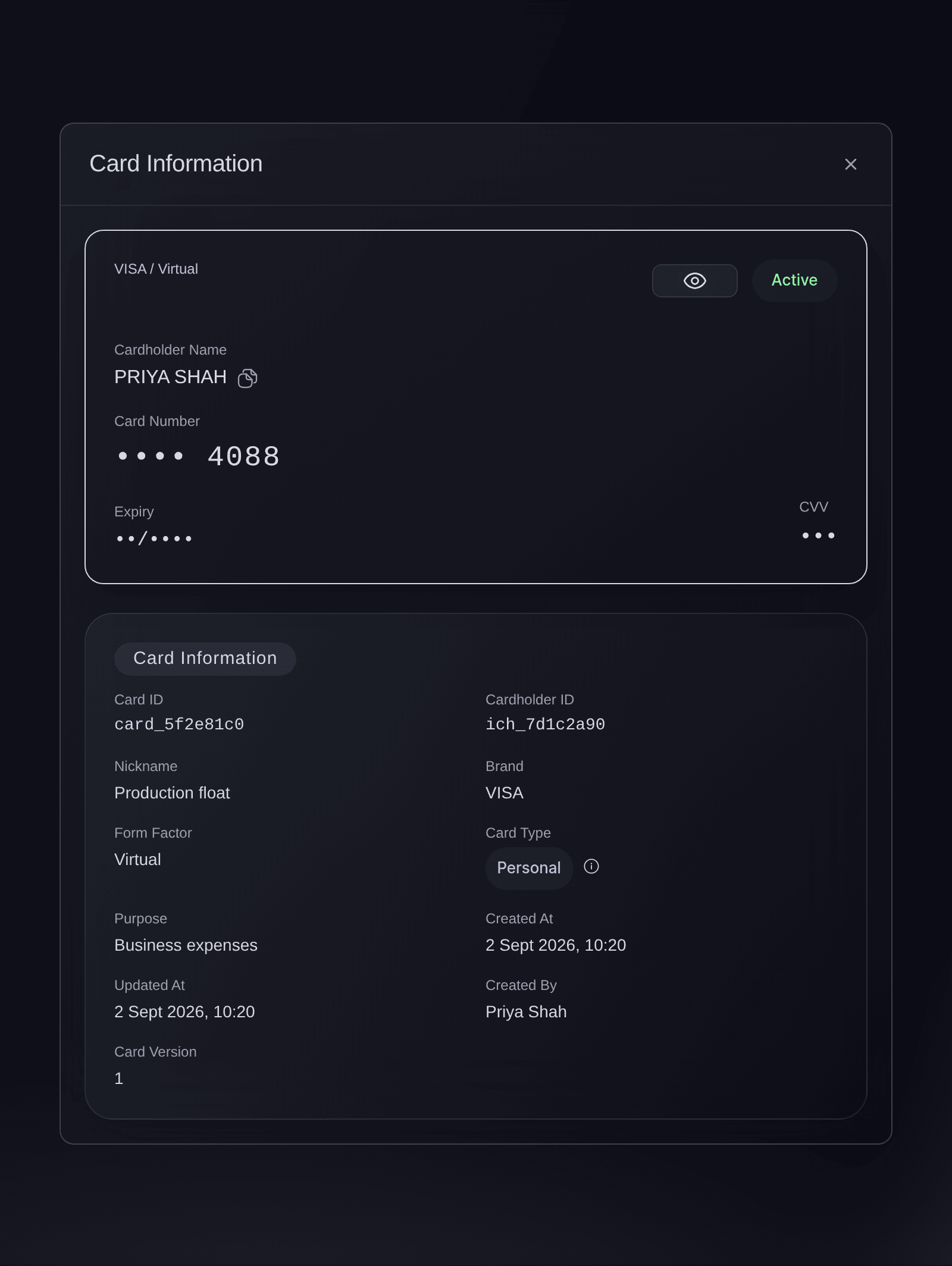
Vault, Cards, a card opened from the list. -
Freeze the card
Select Freeze card, then Freeze card in
Freeze this card?
. Payments with the card are declined until you unfreeze it. -
Check the card is frozen
Read the status: it says Frozen with
Payments are declined until you unfreeze it.
, and Unfreeze card takes the place of the freeze button.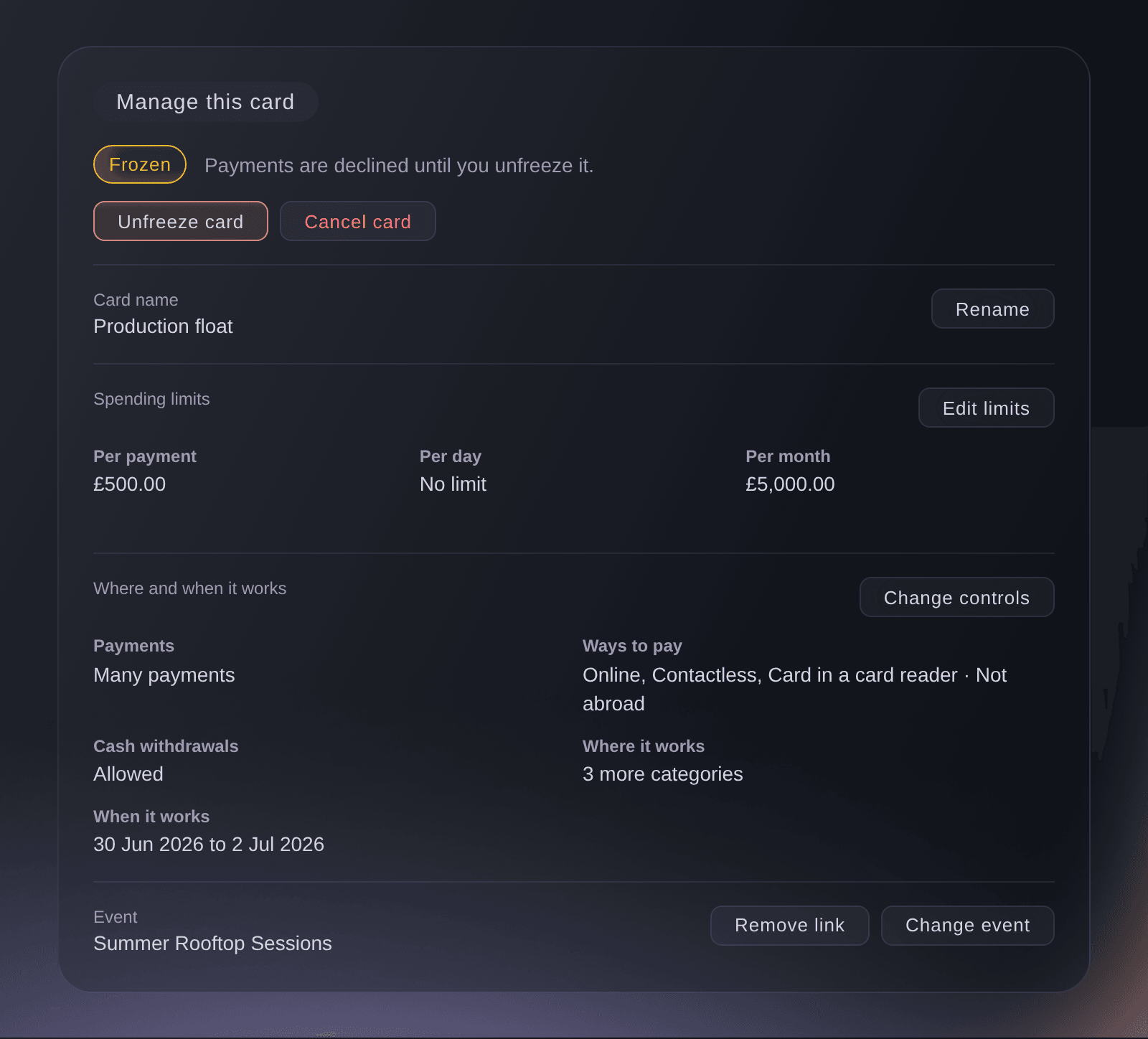
Manage this card, after the card was frozen.
Coba langkah-langkah ini di acara Anda sendiri
Buat akun gratis, susun acara Anda dan ikuti langkah-langkah di atas di dasbor Anda sendiri. Hanya perlu beberapa menit dan Anda tidak perlu menjadwalkan panggilan penjualan.
Tanpa biaya pemasangan. Tanpa biaya bulanan wajib. Tanpa kartu kredit.
Atau minta dikerjakan untuk Anda
Fai, the assistant inside your dashboard, can freeze, unfreeze or cancel a card, change its limits and controls, rename it and link it to an event. She names the card and the change and asks before each one, and you may still need to confirm it's you in Vault. MCP and the command line read cards but change nothing.
Di dasbor Anda, dengan Fai
Freeze the Vault card <CARD NAME> for <BRAND NAME>, it has been lost
Biarkan Fai mengerjakannya untuk Anda
Fai bekerja di dalam dasbor Ticket Fairy Anda. Buat akun Anda, buka Fai dan tempel perintah di atas.
Tanpa biaya pemasangan. Tanpa biaya bulanan wajib. Tanpa kartu kredit.
Unfreeze a card
-
Select Unfreeze card
Open the card, select Unfreeze card, then Unfreeze card in
Unfreeze this card?
. The card can be used straight away.
Fai can unfreeze a frozen card after she names it and you agree.
Di dasbor Anda, dengan Fai
Unfreeze the Vault card <CARD NAME>, we found it
Cancel a card for good
-
Select Cancel card
Open the card, select Cancel card, then Cancel card in
Cancel this card?
.Peringatan: Cancelling can't be undone: the card stops working at once and can never be used again. Freeze it instead if you only need to pause it.
Fai can cancel a card after she names it, says it can't be undone and you agree.
Di dasbor Anda, dengan Fai
Cancel the Vault card <CARD NAME> for good, the person has left
Change a card's spending limits
-
Select Edit limits
Open the card and select Edit limits under Spending limits. The fields open with the card's current limits.

Manage this card, Edit limits. -
Enter the new limits
Choose the Currency, then enter amounts in Per payment, Per day and Per month.
Catatan: An empty field means no limit of that kind, and a card needs at least one limit.
-
Select Save limits
Select Save limits.
Spending limits saved.
confirms it, and the new limits apply to the next payment.
Fai can set a card's per-payment, daily and monthly limits after she shows you the new limits and you agree.
Di dasbor Anda, dengan Fai
Raise the monthly limit on the Vault card <CARD NAME> to <AMOUNT>
Change where and when a card works
-
Select Change controls
Open the card and select Change controls beside Where and when it works. The card's current controls open for you to change.
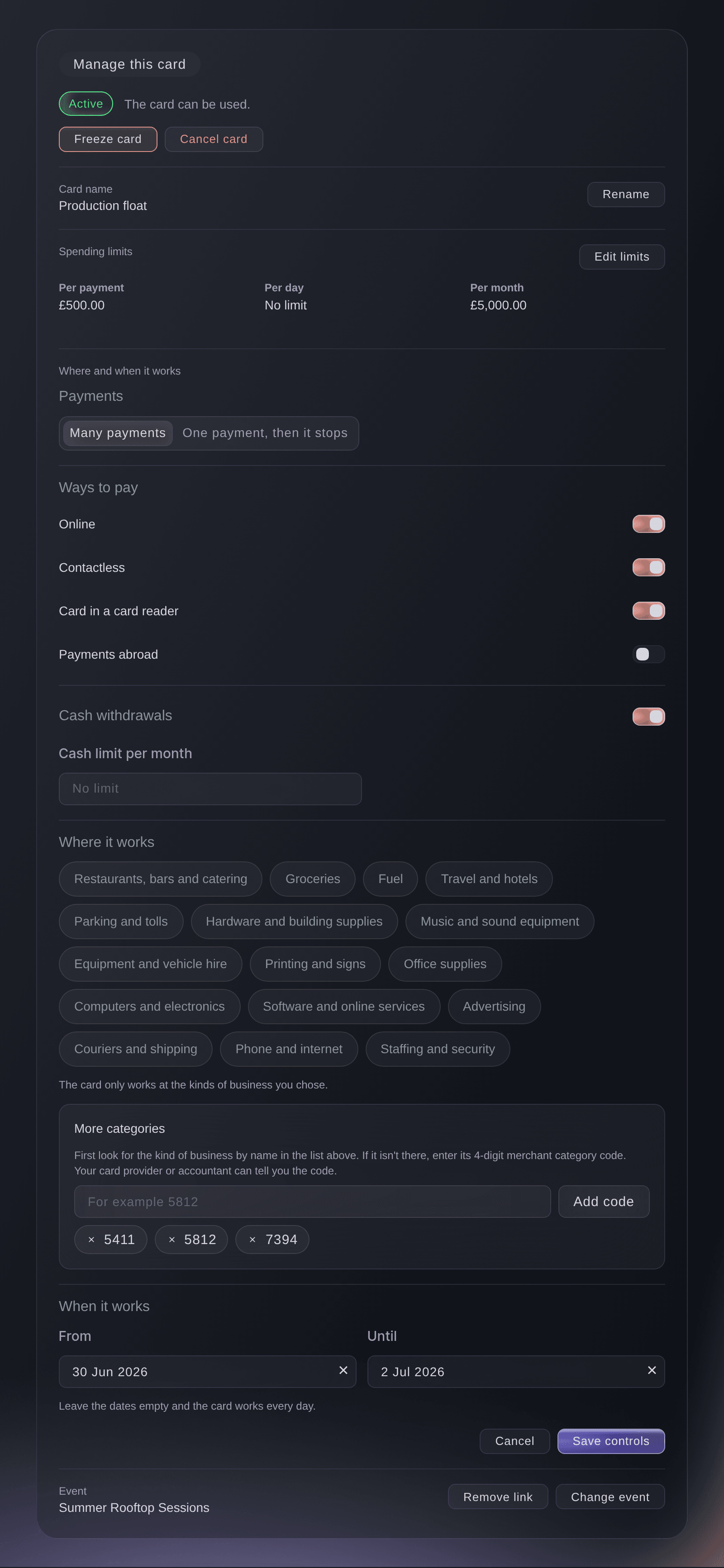
Manage this card, Change controls. -
Change the controls
Change the Ways to pay, Cash withdrawals, Where it works and When it works you need.
Catatan: With no kinds of business chosen, the card works at any business. With no dates, it works every day.
-
Select Save controls
Select Save controls.
Card controls saved.
confirms it, and the new controls apply to the next payment.
Fai can change the ways to pay, cash withdrawals, kinds of business and dates on a card after she shows you the new controls and you agree.
Di dasbor Anda, dengan Fai
Make the Vault card <CARD NAME> work only from <START DATE> to <END DATE>
Link a card to an event
-
Select Link to an event
Open the card and select Link to an event, or Change event if it is linked already.
-
Choose the event and save
Search for the event, choose it, then select Link event.
Event link saved.
confirms it, and the event shows on the card and in the Event column on Cards.Kiat: Fai uses the link to add the card's spending to that event's budget, as Let Fai prepare your finance work shows. Select Remove link to take it off.
Fai can link a card to one of your events, or remove the link, after you agree.
Di dasbor Anda, dengan Fai
Link the Vault card <CARD NAME> to <EVENT NAME>
Rename a card
-
Select Rename and save
Open the card, select Rename, enter the new name in Card name, then select Save.
Fai can rename a card after you agree.
Di dasbor Anda, dengan Fai
Rename the Vault card <CARD NAME> to <NEW NAME>
Pertanyaan yang mungkin Anda punya
- Should I freeze or cancel a lost card?
- Freeze it first: payments stop at once and you can unfreeze it if it turns up. Cancel it once you know it is gone for good, because a cancelled card can never be used again.
- Why don't I see Freeze card or Edit limits?
Only owners and admins can freeze, cancel or change a card.
appears at the top of the section for everyone else. Ask an owner or admin of the brand.- Can I unfreeze a cancelled card?
- No. Cancelled is final, so issue a new card from Cards if the person needs one.
- Does freezing a card stop payments already made?
- No. Freezing declines new payments. A purchase already authorised settles as normal, and Card activity lists it.
- Why does Vault ask me to confirm it's me?
- Changing a card is a sensitive action, so Vault may ask for your second factor in Authenticate to continue before the change goes through. You are approving at the top of the check says Change a card and names the card. Continue only if they match what you want to do.
- What does Someone else changed this card's controls mean?
- Another person on your team changed the card while you were changing it. Nothing you changed was saved, and the section shows the card's controls now. Check your changes, then select Save controls again.
- Can I see only the frozen cards?
- Yes. On Cards, choose Frozen in Show cards.
Masih ada pertanyaan?
Jadwalkan demo dan kami akan menjawabnya lewat panggilan, sesuai jenis acara Anda. Atau buat akun Anda dan lihat sendiri.
Tanpa biaya pemasangan. Tanpa biaya bulanan wajib. Tanpa kartu kredit.
Panduan terkait
Lakukan ini di acara Anda sendiri
Buat akun, susun acara, dan ikuti langkah-langkahnya di dasbor Anda. Anda tidak perlu memesan panggilan penjualan.