
Управление продакшеном
Track every artist booking for your event in one place
The gap between booking an artist and having them play is a stack of paperwork that usually lives in one person's inbox, while the tickets are already on sale. Keeping each artist's contract, fee, rider and travel on their own record lets anyone on the team answer a question on event day without waiting for that person to wake up.
Keep the contract, the fee, the rider, the hospitality and the travel for every artist on your event together, and see which parts are still missing.
- Для кого
- Booking artists and getting them to your event ready to play
- Займёт
- 8 минут
Перед началом
- Event management is switched on for your account.
- You have the paperwork for at least one booking: a contract, an invoice or an offer. The record is more useful with the documents on it than without them.
- You know who on your team owns hospitality and who owns travel, because those parts of a booking are usually not the person who did the deal.
-
Open the artists on the bill
Open the event and select Artists.
Примечание: Each artist is a card, and the badges on it say which parts of the booking are finished. A conference calls this tab Speakers and a film festival calls it Filmmakers, but it works the same way.
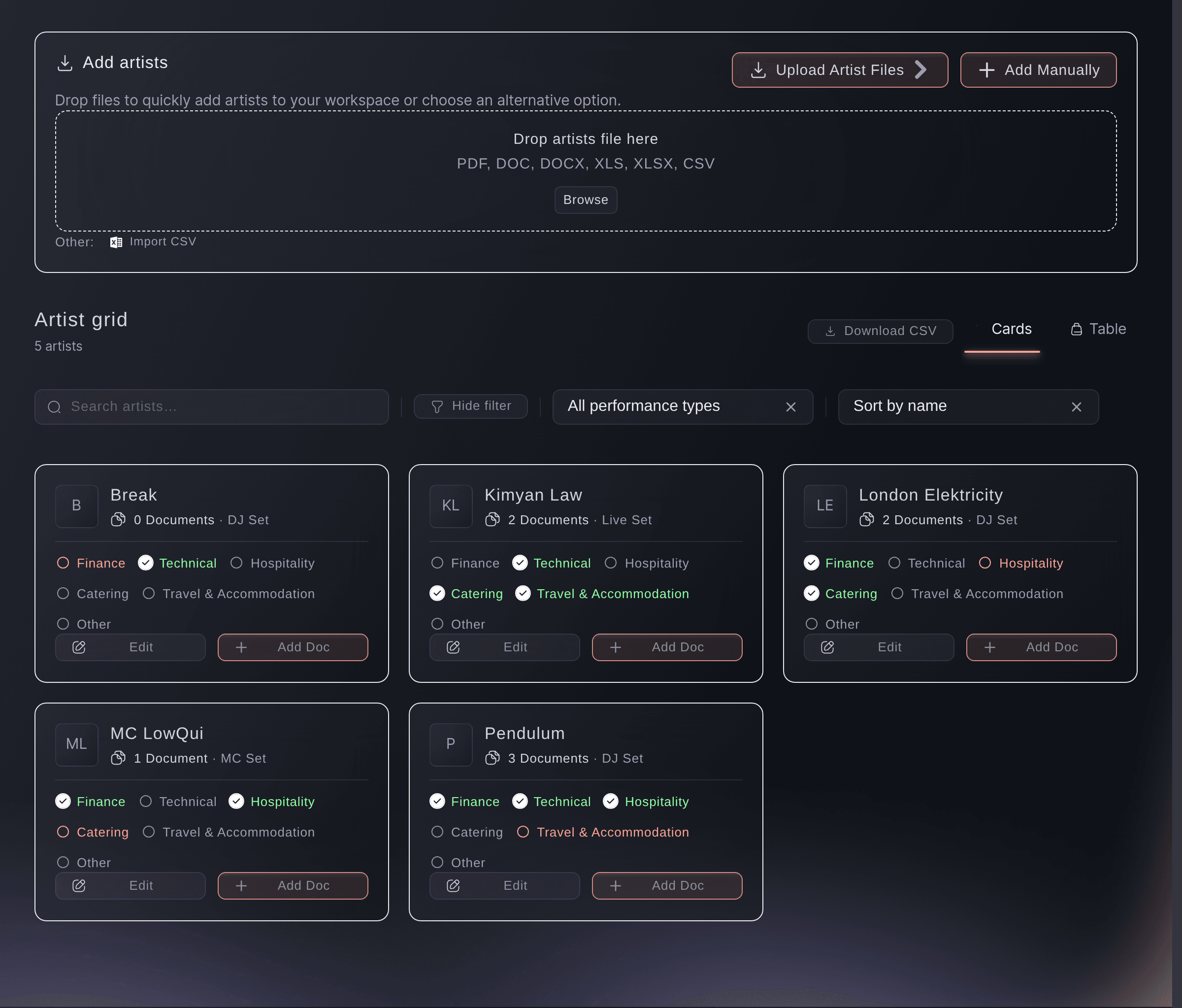
The artists on a bill, with the state of each booking on the card. -
Add the artists you have booked
Add each artist by name, or import a list where you have one.
Примечание: Add them as the deals close rather than in one go at the end. An artist on the list with nothing filled in is still more useful than an artist nobody recorded.
-
Put the paperwork on the artist
Open an artist and attach the contract, the invoice and the rider to their record.
Примечание: This is what makes the record answer questions on the day. A rider in an inbox helps nobody at four in the afternoon.
-
Work through the parts of the booking
Fill in the finance, technical, hospitality, catering and travel parts, and set each one complete on the card as it is agreed.
Примечание: A part stays open until you mark it, whatever you have filled in, so the badges say what you have signed off rather than what you have typed.
-
Find the artists nobody has finished
Read down the cards for the badges that are still open.
Примечание: Two weeks out, the artists with an open travel or hospitality badge are the ones that will cost you a phone call at midnight.

Или поручите это помощнику
Fai can read a booking contract or invoice and pull the fee, the deposit, the payment schedule and the flight details out of it. She can also read what an artist draws on the streaming platforms.
В вашей панели, с Fai
Read the contract I uploaded for <ARTIST NAME> and tell me the fee, the deposit and when the balance is due
Из вашего собственного ассистента, через MCP
Подключите ассистента к нашему серверу MCP и попросите его:
Оставьте --read-only в конфигурации MCP. Для этой задачи нужно только читать данные, поэтому ассистенту не нужны инструменты, которые вносят изменения.
Pick the brand, find the event <EVENT NAME> and show it
Из терминала
Установите CLI по ссылке нашей страницы CLI, войдите командой ticketfairy auth login и выберите бренд, с которым работаете, командой ticketfairy brand use <BRAND_ID>. ticketfairy brand list и ticketfairy event list выводят идентификаторы, которые используют другие команды.
Read the event the bookings belong to.
Show the event and its dates
ticketfairy event get <EVENT_ID>
Let Fai read the contract for you
-
Ask her for the terms rather than reading twelve pages
Attach the contract, then ask Fai for the fee, the deposit and the payment schedule.
Примечание: She reads the parties, the money, the payment dates and the flight details where the contract carries them. Check her figures against the document before you pay anything.
Fai reads a booking contract or invoice and pulls out the terms. What she finds is a reading of the document, so check it before you pay.
В вашей панели, с Fai
Read the invoice for <ARTIST NAME> and tell me what is due, to whom and by when
Из вашего собственного ассистента, через MCP
Оставьте --read-only в конфигурации MCP. Для этой задачи нужно только читать данные, поэтому ассистенту не нужны инструменты, которые вносят изменения.
Pick the brand, find the event <EVENT NAME> and show it
Из терминала
Read the event the bookings belong to.
Show the event and its dates
ticketfairy event get <EVENT_ID>
Вопросы, которые могут возникнуть
- Does adding an artist here put them on my event page?
- No. This is your production record. The lineup buyers see is part of your event page and is set up separately.
- What do the badges on a card mean?
- One for each part of the booking: finance, technical, hospitality, catering, travel and accommodation, and anything else you track. A complete badge means a team member finished that part.
- Can I see the artists as a table instead?
- Yes. The cards and the table hold the same bookings, and the table suits a long bill you are working down.
Похожие руководства
Сделайте это на своём мероприятии
Создайте аккаунт, соберите мероприятие и выполните шаги в своей панели управления. Звонок в отдел продаж не нужен.