
Оформление и заказы
Sell a block of tickets to a company and invoice them
A company buying forty tickets does not want a card form, it wants a quote, a purchase order number and thirty days to pay. Conference and awards organisers who can take that order the way finance departments work close it in one call instead of losing it to a procurement process.
Take an order for twenty or two hundred tickets on a purchase order, get it signed off, and raise the invoice with the terms the company needs.
- Для кого
- Selling blocks of tickets to companies and teams
- Займёт
- 8 минут
Перед началом
- Group bookings is switched on for your event. The page says so plainly where it is not, and offers to put you in touch.
- Your event has the ticket types the block will draw from, priced in the event's currency. A booking is built from your real tickets rather than from a free-text amount.
- You have what the company gave you: how many people, the purchase order number if they issued one, and how long they take to pay.
-
Open the group bookings on the event
Open the event and select Group Bookings.
Примечание: Each row is one company, with its purchase order, the number of passes, the total, the terms and where the booking has got to. The status filter above the table narrows it to the ones waiting on you.
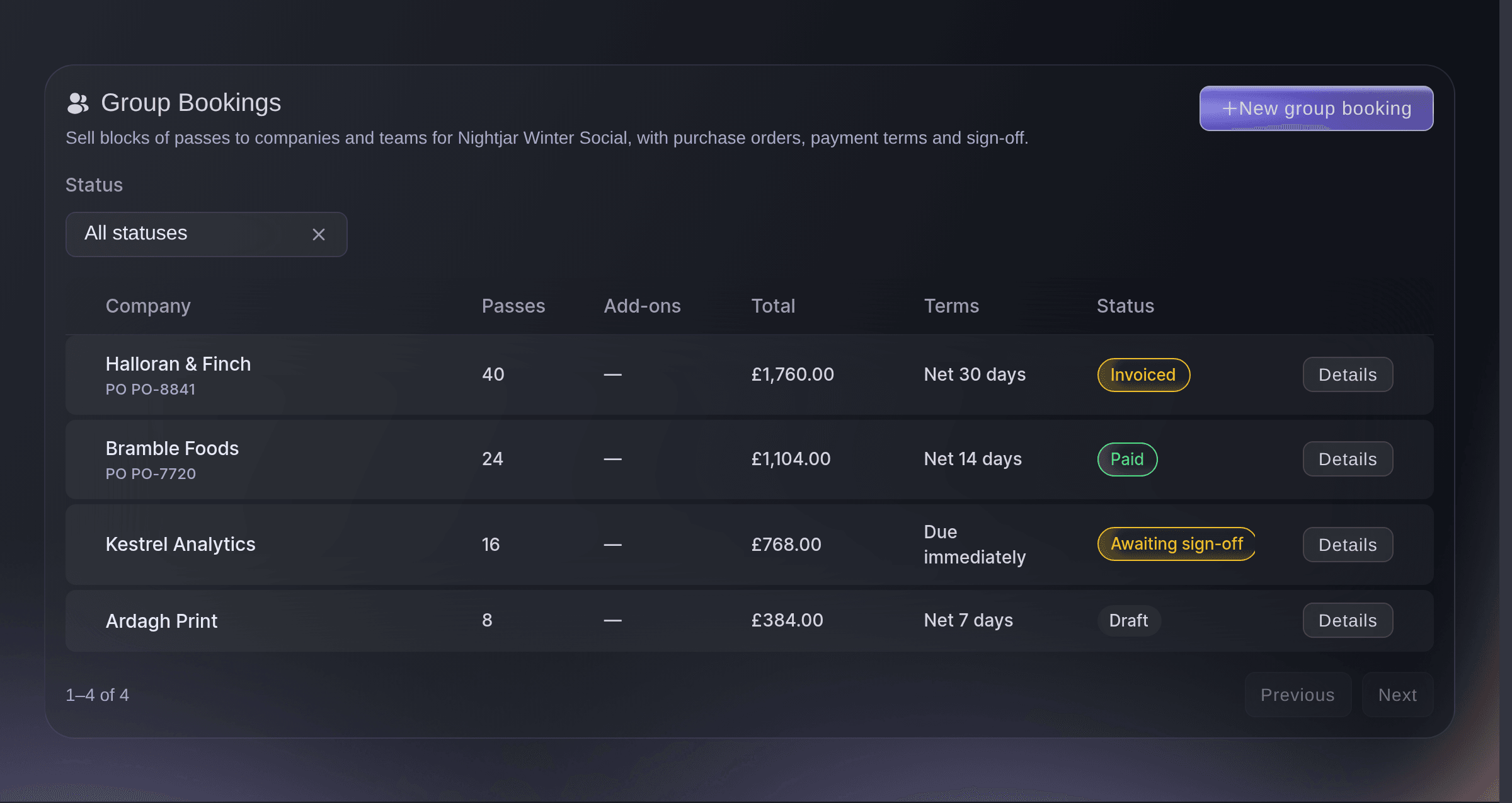
The blocks sold to companies, at each stage of getting paid. -
Start the booking with the company on it
Select New group booking and enter the company name.
Примечание: The company name is what appears on the invoice and what your team searches for later, so use the legal name rather than the name of the person who rang.
-
Build what they are buying
Add each ticket type and quantity to the booking, and any add-ons that go with them.
Примечание: Add-ons attach to tickets, so a booking needs at least one ticket line before they can go on it. The running total updates as you build it.

When to charge one agreed total
Most blocks are priced per pass, which keeps the maths visible to both sides and matches what the company approved. Charge one agreed total instead when the deal was struck as a lump sum: a sponsor package, a negotiated table price, or a block where the per-pass number would only invite a haggle. The invoice then carries the single figure with no per-item breakdown, so use it when that is what the company expects to see.
-
Set the billing terms
Enter the purchase order number and choose how long they have to pay.
Примечание: Terms run from due immediately to sixty days. A budget code and a cost centre are there for companies whose finance team asks for them.
-
Ask for sign-off where you need it
Turn on Require sign-off before invoicing and name the approvers.
Примечание: The booking cannot be invoiced until everyone named has approved it. Use it where a discount or a large block needs a second pair of eyes.
-
Send the booking for sign-off
Select Send for sign-off and name the people who have to approve it.
Примечание: Leave the approver list empty and the booking is approved as you send it, which is the path for a block nobody else needs to see. Until you send it the booking is a draft, and a draft cannot be invoiced.
-
Raise the invoice
Select Raise invoice once the booking is approved.
Примечание: An invoice number is generated where you left the field blank. The booking moves to invoiced, and to paid when the money arrives.
Или поручите это помощнику
Fai can draft the booking, send it for sign-off and raise the invoice. She asks before each of those, because each one commits money or reaches a company.
В вашей панели, с Fai
Create a group booking for <EVENT NAME>: forty passes for <COMPANY NAME> against <PURCHASER NAME OR EMAIL>, on the general admission ticket at its current price, purchase order 8841, thirty day terms, and show it to me before saving
Из вашего собственного ассистента, через MCP
Подключите ассистента к нашему серверу MCP и попросите его:
Оставьте --read-only в конфигурации MCP. Для этой задачи нужно только читать данные, поэтому ассистенту не нужны инструменты, которые вносят изменения.
Pick the brand, find the event <EVENT NAME> and show its ticket types
Из терминала
Установите CLI по ссылке нашей страницы CLI, войдите командой ticketfairy auth login и выберите бренд, с которым работаете, командой ticketfairy brand use <BRAND_ID>. ticketfairy brand list и ticketfairy event list выводят идентификаторы, которые используют другие команды.
Read the event the bookings belong to.
Show the event and its dates
ticketfairy event get <EVENT_ID>
Handle a booking that changes
-
Change a draft the company has revised
Select Edit and change the numbers the company has revised.
Примечание: Only a draft can be edited. Once a booking has gone for sign-off, cancel it and take the revised block as a new booking.
-
Cancel one that fell through
Select Cancel booking where the company has pulled out.
Примечание: Cancelling leaves the record in place, so the block that was held and the reason it went are both still answerable later. An invoice you already sent can still be paid, so ask us to withdraw it as well.
Fai can change a draft or cancel a booking once you approve it, and read back the ones waiting on sign-off or payment.
В вашей панели, с Fai
For <EVENT NAME>, which group bookings are still waiting to be paid
Из вашего собственного ассистента, через MCP
Оставьте --read-only в конфигурации MCP. Для этой задачи нужно только читать данные, поэтому ассистенту не нужны инструменты, которые вносят изменения.
Pick the brand, find the event <EVENT NAME> and show it
Из терминала
Read the event the bookings belong to.
Show the event and its dates
ticketfairy event get <EVENT_ID>
Вопросы, которые могут возникнуть
- Does the company pay by card?
- Not usually, and that is the point. The invoice carries your terms, and the booking moves to paid when the payment lands.
- Who gets the tickets?
- The purchaser holds the block and gives the passes out. That is what the company wants: one order, one invoice, and their own list of who is coming.
- Does a draft booking hold the seats?
- No. A draft records the block and its terms, and the passes are set aside when the invoice is paid. Where the night is close to selling out, hold those tickets back separately while the purchase order goes through their finance team.
- What if the company wants one figure with no breakdown?
- Charge one agreed total on the booking. The invoice then shows the single amount you agreed rather than a line for each pass.
Похожие руководства
Сделайте это на своём мероприятии
Создайте аккаунт, соберите мероприятие и выполните шаги в своей панели управления. Звонок в отдел продаж не нужен.