
Дополнения, столики и прочее
Sell one pass that covers several of your events
Venues and promoters with a regular programme know the same people come back four or five times a year, and asking them to buy each ticket separately loses some of them every time. One pass takes the money up front and lets the buyer choose their nights later, including nights you have not announced yet.
Sell a season pass or a multi-night bundle once, then let the buyer book the nights they want as your programme fills in.
- Для кого
- Selling a season ticket or a multi-night bundle across your programme
- Займёт
- 9 минут
- Open the passes you already sell
- Create the pass
- Say how many events one pass covers
- When to use each kind of expiry
- Choose when it expires
- When to pick the ticket yourself
- Set which ticket a pass books
- Set the price and how many you will sell
- Choose the events it covers
- Let future events join by themselves
Перед началом
- You are an owner or admin of the brand, and Event Passes is switched on for it. The page says so plainly where it is not, and offers to put you in touch.
- You know how many events one pass should cover and what it should cost. A pass that covers four nights at the price of three is the version buyers understand without asking.
- You have at least one event a pass holder could book. A pass with no events behind it can be created, but nobody can use it.
-
Open the passes you already sell
Open Event Passes for the brand.
Примечание: Each row shows how many events one pass covers, when it expires, its price and whether it is still on sale. An archived pass stays in the list because the passes already bought under it are still usable.
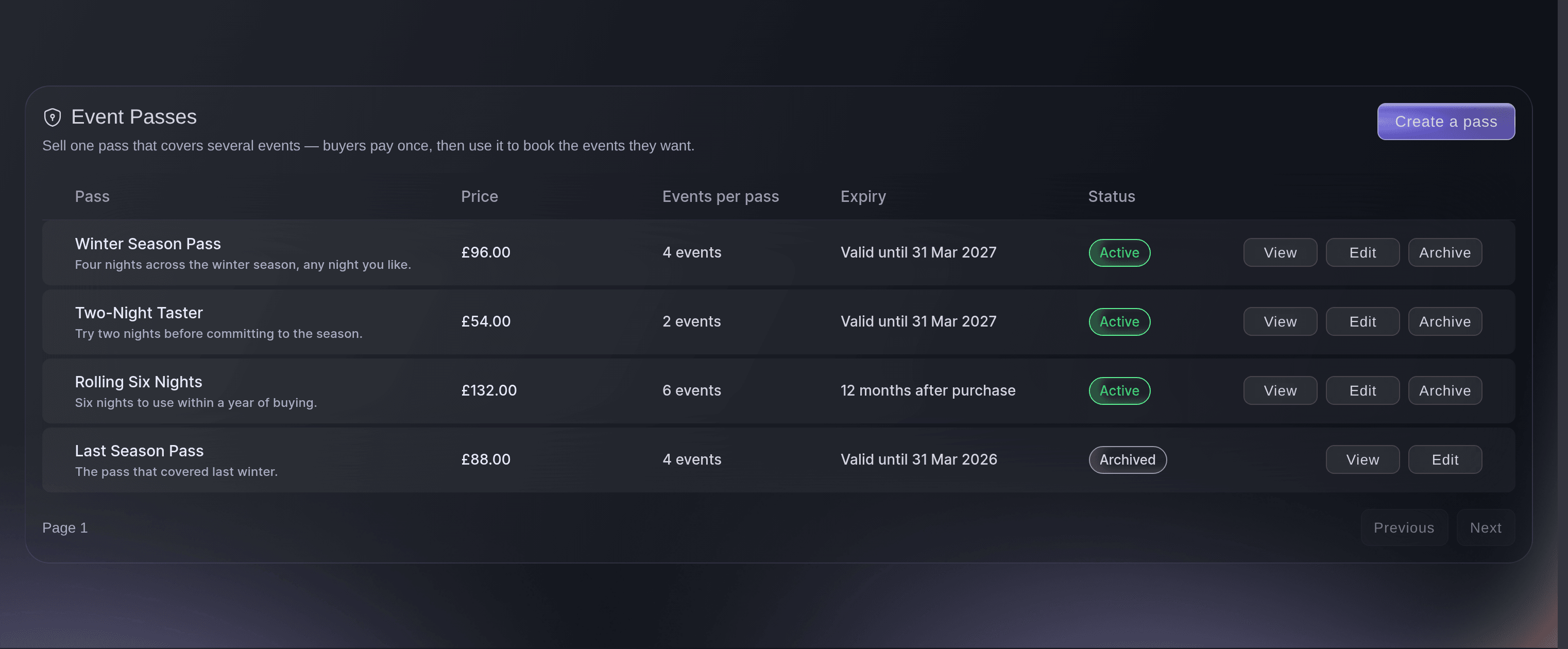
The passes a brand sells, including a rolling one and an archived one. -
Create the pass
Select Create a pass and name it for what the buyer gets.
Примечание: "Winter Season Pass" tells a buyer more than "Bundle A". The name is what the buyer sees on the buy page and on their account.
-
Say how many events one pass covers
Enter the number in Events per pass.
Примечание: Anything from one to a hundred. Each event a holder books uses one, and the pass stops working when they run out.

When to use each kind of expiry
A pass that never expires suits a venue with a continuous programme, because a holder can take their time and you keep the money either way. A set date suits a season or a festival year, so the pass and the programme end together. A rolling number of months suits a pass you sell all year round, because every buyer gets the same length of use whenever they buy. The choice changes what buyers expect of you, so make it before you set the price.
-
Choose when it expires
Pick one of the three answers under When does it expire?.
Примечание: A set date asks for the last usable day. A rolling pass asks for a number of months, counted from the day each buyer pays rather than from today.
When to pick the ticket yourself
Left automatic, a pass books the lowest priced ticket type on the night that is neither hidden nor switched off, which is what an evenly priced programme wants. Pick the ticket yourself where the programme is mixed: a season with two premium nights in it would otherwise hand those nights away at the price of a normal one. The second choice also limits holders to events you have set a ticket for, so a night you have not got to yet stays out of reach until you do.
-
Set which ticket a pass books
Choose under Which ticket does a pass book?.
Примечание: The automatic answer needs nothing else from you. The other one asks you to name a ticket for each event the pass covers.
-
Set the price and how many you will sell
Enter the price and, where you want a limit, the number in Total for sale.
Примечание: A pass with no price saves as a draft and gets no buy page, which is the way to build one before you are ready to sell it. A blank total means unlimited.
-
Choose the events it covers
Open Included events on the pass and add each event a holder may book.
Примечание: The list says which events are bookable and which are not, so a night with no suitable ticket shows up here rather than at the moment a buyer tries to use their pass.
-
Let future events join by themselves
Attach a series under Event series (optional) where your programme runs as one.
Примечание: Every event in that series counts, including the ones you have not created yet. That is what lets a season pass go on sale before the season is announced.
Или поручите это помощнику
Fai can build the pass, choose the events it covers and read what it has sold. She asks before each change, because a pass is something buyers pay for.
В вашей панели, с Fai
Create a season pass for <BRAND NAME> covering four events, priced at 96, usable until the end of March, and show me the events it would cover before saving
Из вашего собственного ассистента, через MCP
Подключите ассистента к нашему серверу MCP и попросите его:
Оставьте --read-only в конфигурации MCP. Для этой задачи нужно только читать данные, поэтому ассистенту не нужны инструменты, которые вносят изменения.
Pick the brand <BRAND NAME> and show its events
Из терминала
Установите CLI по ссылке нашей страницы CLI, войдите командой ticketfairy auth login и выберите бренд, с которым работаете, командой ticketfairy brand use <BRAND_ID>. ticketfairy brand list и ticketfairy event list выводят идентификаторы, которые используют другие команды.
Read the events a pass could cover.
Show the brand's events
ticketfairy event list
Read what the pass is doing
-
Check what has sold and what has been booked
Open the pass and check the totals across the top of it.
Примечание: Passes sold and events booked are different numbers, and the gap between them is the bookings still to come. Revenue moves to an event as each booking is made, so the waiting figure is money you hold but have not yet earned against a night.
Fai can read the roll-up for a pass: how many sold, how many events were booked and how much revenue is still waiting.
В вашей панели, с Fai
For <BRAND NAME>, how many season passes have sold and how many events have been booked with them
Из вашего собственного ассистента, через MCP
Оставьте --read-only в конфигурации MCP. Для этой задачи нужно только читать данные, поэтому ассистенту не нужны инструменты, которые вносят изменения.
Pick the brand <BRAND NAME> and show its events
Из терминала
Pass figures are read in the dashboard.
Show the brands you can act for
ticketfairy brand list
Stop selling a pass without breaking it
-
Archive it rather than deleting it
Archive the pass once the season it covers is closed.
Примечание: An archived pass leaves the sale but keeps working for everyone who already holds one, so nobody loses the nights they paid for.
Fai can archive a pass once you confirm it. She asks first, because it takes a product off sale.
В вашей панели, с Fai
Take the last season pass for <BRAND NAME> off sale
Из вашего собственного ассистента, через MCP
Оставьте --read-only в конфигурации MCP. Для этой задачи нужно только читать данные, поэтому ассистенту не нужны инструменты, которые вносят изменения.
Pick the brand <BRAND NAME> and show its events
Из терминала
Passes are archived in the dashboard.
Show the brands you can act for
ticketfairy brand list
Вопросы, которые могут возникнуть
- Which ticket does the automatic choice pick?
- The lowest priced ticket type on that night that is neither hidden nor switched off. Its own sale dates are not part of the choice, so hide a cheap tier that has not opened yet to keep a pass from booking it.
- Can a buyer use two events of a pass on the same night?
- Each booking uses one event of the pass, so two bookings on one night use two. That is how a pass holder brings a guest with them.
- What happens when the price is left blank?
- The pass saves as a draft with no buy page of its own. Set a price whenever you are ready, and the buy page appears.
- Does a pass holder pick their own seat or ticket?
- They book the event, and the ticket they get is the one your setting decides: either the lowest priced one that is neither hidden nor switched off, or the one you chose for that event.
- Why is one of my nights showing as not bookable?
- That event has no ticket a pass can book. Give it a ticket that is neither hidden nor switched off, or pick one for that event yourself, and it becomes bookable.
Похожие руководства
Сделайте это на своём мероприятии
Создайте аккаунт, соберите мероприятие и выполните шаги в своей панели управления. Звонок в отдел продаж не нужен.