
Социальные сети
Answer what ticket buyers ask you on social
The question that stops a sale is usually asked under a post rather than in your inbox, and the buyer asking it already has their card out. Reading those comments in one place, with the people who have bought from you already marked, turns the busiest part of an on-sale into ten minutes of work.
Read every comment on your ticket posts in one table, tell a buyer from a passer-by, and reply in public or in private without leaving the dashboard.
- Для кого
- Answering the buyers who comment on your event posts
- Займёт
- 7 минут
Перед началом
- Your Instagram or Facebook account is connected to the brand, and has been long enough to have collected comments.
- You know which questions you answer yourself and which go to your team, so a support case under a post reaches the person who can settle it.
-
Open the comments on your posts
Open Comments for the brand.
Примечание: Every comment on every connected account arrives in one table, newest first, rather than one post at a time.
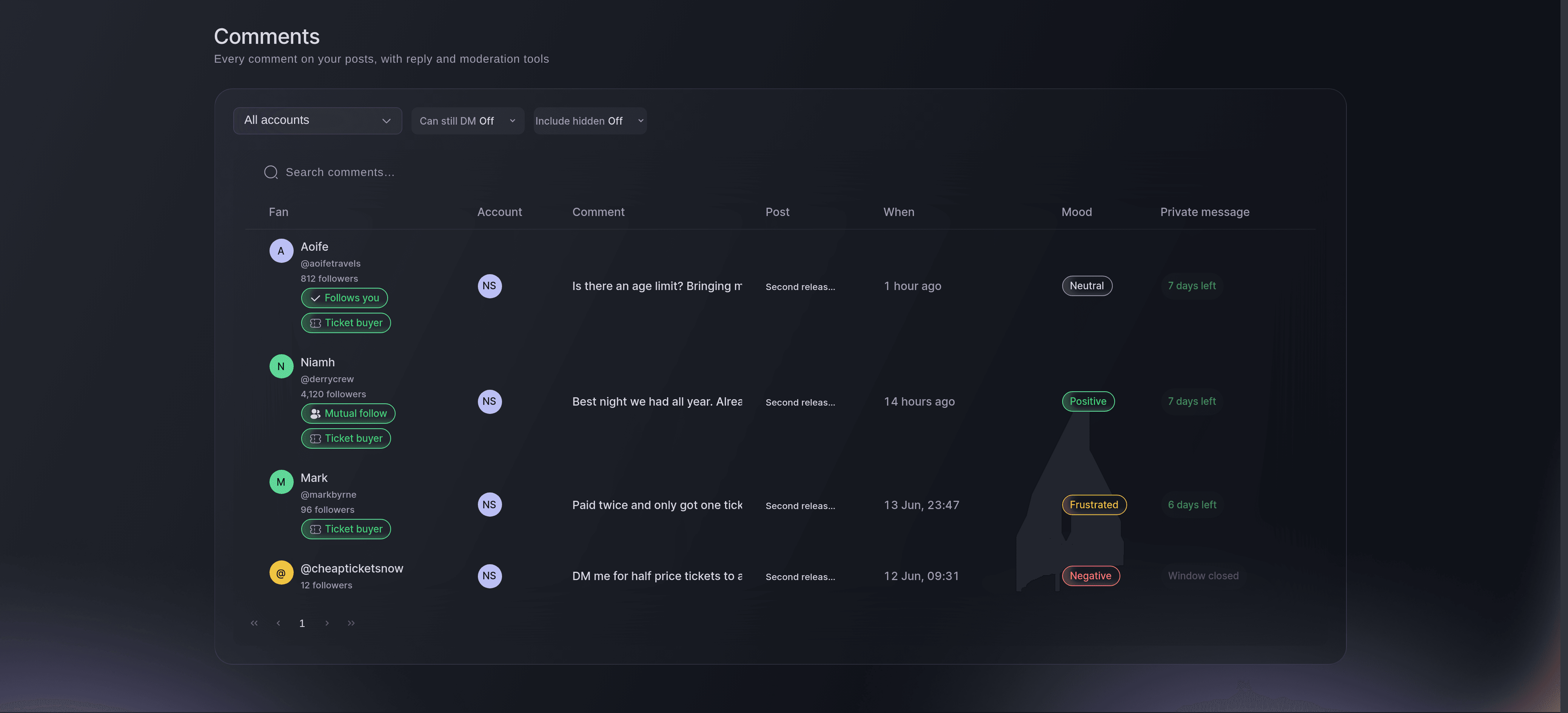
The comment feed, with a question, praise and a support case in it. -
See which commenter already bought a ticket
Read the Fan column, which carries what is known about the person.
Примечание: A commenter matched to one of your buyers is badged, with how many orders they have placed with your brand. It counts every event of yours, so it tells you they buy from you rather than that they hold a ticket to this one.
-
Find the ones that need you first
Read the Mood column to see which comments read as unhappy.
Примечание: The mood is a reading rather than a verdict, so use it to sort the queue and the words themselves to decide.
-
Answer in public
Select Reply on the row and enter your answer.
Примечание: A public answer to a common question saves you the next twenty. Your reply appears under the post as the account, not as you.
-
Take a personal matter out of public
Select Send private message when the answer involves an order.
Примечание: The Private message column says whether the network still allows one and how long is left. Once that window closes, the reply has to be public or by email.
-
Deal with the touts
Select Hide on a comment selling tickets that are not yours.
Примечание: Hiding leaves the comment visible to its author and to nobody else, which draws less attention than deleting. Unhide puts it back.
Или поручите это помощнику
Fai can read the comments back to you and draft a reply. She asks before a reply is posted, because it appears under your post in public.
В вашей панели, с Fai
What are buyers asking under our posts for <BRAND NAME>, and which ones need an answer today
Из вашего собственного ассистента, через MCP
Подключите ассистента к нашему серверу MCP и попросите его:
Оставьте --read-only в конфигурации MCP. Для этой задачи нужно только читать данные, поэтому ассистенту не нужны инструменты, которые вносят изменения.
Pick the brand <BRAND NAME> and show its events
Из терминала
Установите CLI по ссылке нашей страницы CLI, войдите командой ticketfairy auth login и выберите бренд, с которым работаете, командой ticketfairy brand use <BRAND_ID>. ticketfairy brand list и ticketfairy event list выводят идентификаторы, которые используют другие команды.
Comments are read in the dashboard.
Show the brands you can act for
ticketfairy brand list
Find a comment again later
-
Search the words you remember
Enter part of the comment in the search field above the table.
Примечание: Search covers the comment text rather than the person, so a phrase from the comment finds it faster than a name.
-
Bring the hidden ones back into view
Turn on Include hidden to see what has been taken down.
Примечание: Hidden comments are left out of the table by default, so this is how you check a decision or undo one.
Fai can search the comments and read the matches back to you. Hiding and unhiding are done in the dashboard.
В вашей панели, с Fai
Find the comments for <BRAND NAME> that mention refunds
Из вашего собственного ассистента, через MCP
Оставьте --read-only в конфигурации MCP. Для этой задачи нужно только читать данные, поэтому ассистенту не нужны инструменты, которые вносят изменения.
Pick the brand <BRAND NAME> and show its events
Из терминала
Comments are read in the dashboard.
Show the brands you can act for
ticketfairy brand list
Вопросы, которые могут возникнуть
- Does a reply go out as me or as the account?
- As the account. The buyer sees your brand answering, and your teammates see in the dashboard which of you sent it.
- Why can I not send a private message on some comments?
- Two reasons. The networks allow one only for a period after the comment is left, and the Private message column shows how long is left; and each comment takes one private reply, so a comment you have already answered that way offers a public reply instead.
- Should I hide a comment or delete it?
- Hide it. Its author still sees it, which rarely starts an argument, and you can put it back. Deleting removes it from the post and cannot be undone.
- What does the mood column actually measure?
- A reading of the words, done for you so a long thread can be sorted quickly. Treat it as a way to find the comments worth reading first, not as the answer.
Похожие руководства
Сделайте это на своём мероприятии
Создайте аккаунт, соберите мероприятие и выполните шаги в своей панели управления. Звонок в отдел продаж не нужен.