
От начала до конца
Open your ticket on-sale
The morning tickets go on sale is the one hour of an event's life that cannot be repeated, and most of what decides how it goes was set days earlier. Promoters who run a calm on-sale check the same handful of things first, announce once, then watch the opening minutes with the reports that show a problem while there is still time to fix it.
Run the checks that matter on the morning of an on-sale, put the event live at the time you announced, and watch the first hour closely enough to act on it.
- Для кого
- Putting an announced event on sale at a set time
- Займёт
- 10 минут
Перед началом
- The event is finished and in draft, with every ticket type, price, allocation and sale window set. This is the run-through, not the build.
- Your payment account is connected and taking money, because an on-sale that cannot charge sells nothing.
- You know the exact minute you told people tickets open, and who is watching the first hour with you.
-
Check the ticket types one last time
Open the event and read every ticket type: price, how many, when it opens and when it closes.
Примечание: A ticket type with no allocation sells until you stop it, and one whose sale window opens tomorrow will not appear today. These two mistakes cost the most and take a minute to rule out.
-
Add a hidden ticket to test with
Add one cheap ticket type that is on sale now and hidden behind an access code.
Примечание: Your real ticket types cannot be bought before their window opens, and putting one on sale early would sell to whoever finds the page. A hidden ticket is only reachable by a buyer holding the code, so the test stays yours.
-
Buy the hidden ticket on the live event page
Publish the event, enter your access code and buy that ticket yourself, end to end, on a phone.
Примечание: This is the only check that covers the whole path: the page, the checkout, the card charge and the confirmation email. Refund your own order afterwards.
-
Close the test ticket type
Set the hidden ticket type to nothing on sale once your own order is refunded.
Примечание: A ticket type that has taken an order cannot be deleted, and your test order counts. Closed and hidden, it sells nothing and stays out of the way.
-
Take the event back down
Unpublish the event.
Примечание: A live event cannot be scheduled: its publish button takes it down instead, and the scheduled on-sale only picks up events that are already down.
-
Set the on-sale time
Open the publish dialog and select Schedule Publish to open the event at the minute you announced.
Примечание: A scheduled publish opens the event whether or not your team is at a keyboard. Choose the timezone you announced in, not the one you are sitting in.
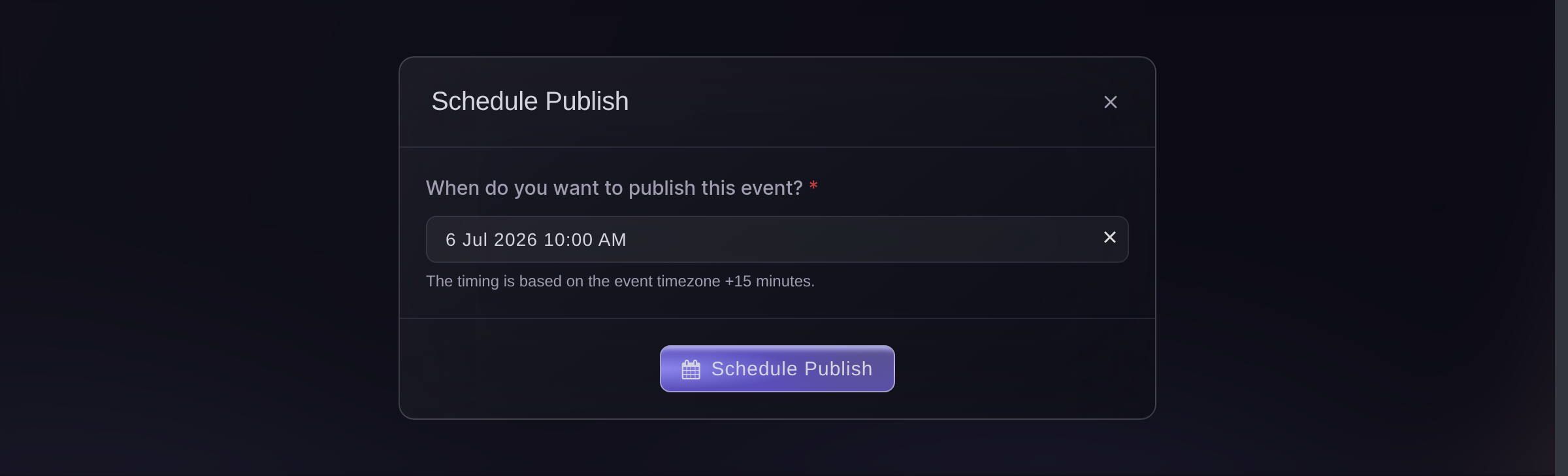
The publish dialog, set to a scheduled on-sale. -
Tell your audience it is open
Send the announcement to your buyer list at the moment the event goes live, not before it.
Примечание: An email that lands before the page can sell sends people to a closed door, and they rarely come back the same day.
-
Watch the first hour
Keep Performance open and check it every few minutes for the first hour.
Примечание: You are looking for two things: a ticket type selling far faster than the rest, and no sales at all. The first tells you what to release next, the second means something is broken.

The sales summary, during an on-sale.

Или поручите это помощнику
Fai can read the event back to you before you open it, publish it once you approve, and report the sales as they come in. The CLI publishes and reads the same event without opening the dashboard.
В вашей панели, с Fai
Before I open <EVENT NAME> for sale, list its ticket types with prices, allocations and sale windows, and tell me anything that looks wrong
Из вашего собственного ассистента, через MCP
Подключите ассистента к нашему серверу MCP и попросите его:
Оставьте --read-only в конфигурации MCP. Для этой задачи нужно только читать данные, поэтому ассистенту не нужны инструменты, которые вносят изменения.
Pick the brand, find the event <EVENT NAME> and show its ticket types and sale dates
Из терминала
Установите CLI по ссылке нашей страницы CLI, войдите командой ticketfairy auth login и выберите бренд, с которым работаете, командой ticketfairy brand use <BRAND_ID>. ticketfairy brand list и ticketfairy event list выводят идентификаторы, которые используют другие команды.
Check the event, publish it at the announced time, then watch what it sells.
Show the event and its ticket types before you open it
ticketfairy event get <EVENT_ID>
Put the event on sale
ticketfairy event publish <EVENT_ID>
Release more tickets when a tier sells out
-
Open the next release
Open the ticket type you held back and set its sale window to start now.
Примечание: Holding stock back is what gives you something to release. Decide the price of the next tier before the on-sale, not during it.
Fai can open the next release once you approve the price and the number.
В вашей панели, с Fai
For <EVENT NAME>, open the next ticket release now and tell me the price and allocation before you change anything
Из вашего собственного ассистента, через MCP
Оставьте --read-only в конфигурации MCP. Для этой задачи нужно только читать данные, поэтому ассистенту не нужны инструменты, которые вносят изменения.
Pick the brand, find the event <EVENT NAME> and show its ticket types
Из терминала
Open the held release from the command line.
Show the ticket types so you can pick the one to open
ticketfairy ticket list <EVENT_ID>
Collect the people who missed out
-
Turn on the waiting list
Turn the waiting list on as soon as the last ticket goes, so the demand after a sell-out is captured rather than lost.
Примечание: A waiting list collected in the first hour is the audience for your next release, and for your next event.
Fai can open the event so you can turn the waiting list on. Switching it on and reading its members are dashboard jobs today.
В вашей панели, с Fai
Open <EVENT NAME> so I can turn on its waiting list
Из вашего собственного ассистента, через MCP
Оставьте --read-only в конфигурации MCP. Для этой задачи нужно только читать данные, поэтому ассистенту не нужны инструменты, которые вносят изменения.
Pick the brand, find the event <EVENT NAME> and show its waiting list
Из терминала
Read the event to confirm the waiting list is collecting.
Show the event and its current settings
ticketfairy event get <EVENT_ID>
Вопросы, которые могут возникнуть
- Should I publish by hand or schedule it?
- Schedule it. The event opens at the minute you announced without anyone having to be at a keyboard, and you spend that minute watching the sales instead.
- What if no tickets sell in the first ten minutes?
- Open the event page yourself as a buyer would. A ticket type whose sale window has not opened, an unconnected payment account and an unpublished event all look the same from the report.
- Is it worth expecting a rush?
- If you expect more demand than tickets, read the guide on keeping a high-demand on-sale running smoothly before the day. Its choices have to be made in advance.
Похожие руководства
Сделайте это на своём мероприятии
Создайте аккаунт, соберите мероприятие и выполните шаги в своей панели управления. Звонок в отдел продаж не нужен.