
От начала до конца
Run last year's event again
An event that worked once is the best starting point for the next one, and rebuilding it from an empty form throws away everything you learned. Promoters running an annual festival, a returning club night or a second city on a tour copy the setup, change what moved, and sell the first tickets to last year's buyers.
Copy the event that worked, change the dates and prices, and open it to the people who came last time before you announce it to anyone else.
- Для кого
- Running an event you have run before
- Займёт
- 12 минут
Перед началом
- Last year's event is still on your account. A copy takes its setup, so an event you deleted cannot be the starting point.
- You have read what last year actually sold: which tiers went first, which never moved, and what people bought as add-ons.
- You know the new dates, and whether the venue, capacity or prices have changed.
-
Read what last year sold before you copy it
Open last year's event and check Sales by Type for what each tier actually sold.
Примечание: A tier that sold out in an hour was priced too low, and one that never sold is worth cutting rather than copying. This is the only step that improves the event rather than repeating it.
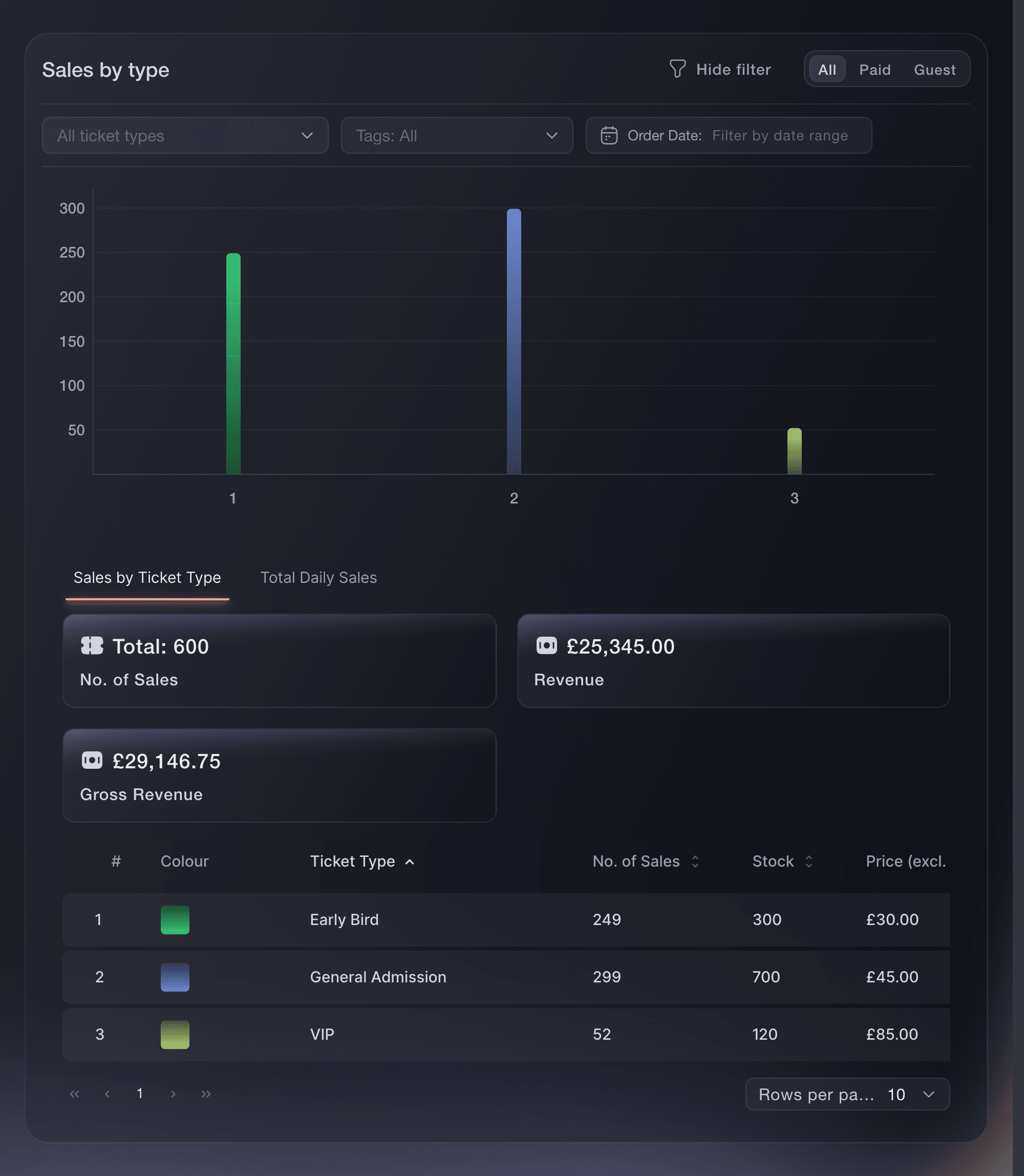
The sales breakdown for a finished event. -
Copy the event
Select Duplicate Event and choose what the copy takes with it.
Примечание: The copy is a draft. Nothing about it is public, and last year's event is left exactly as it was.
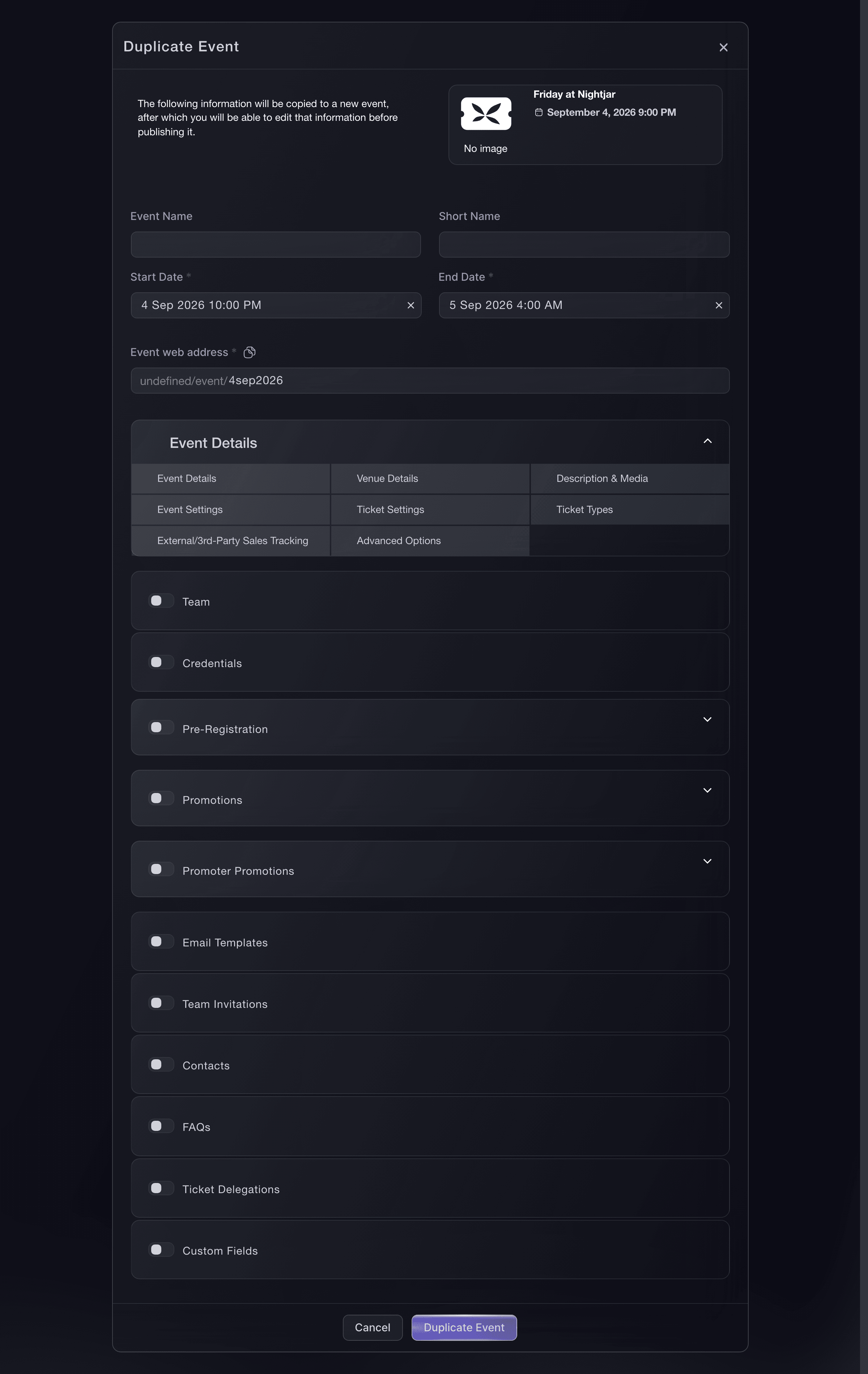
The duplicate dialog, copying a night that worked. -
Check the dates and change the prices
Open the copy, check every sale window against the new date, and change any price that has moved.
Примечание: Give the new dates in the duplicate dialog and the copy moves the sale windows, door times and validity by the same number of whole days. Check the weekday, which a whole-day move can change.
-
Sell to last year's buyers first
Email the people who came last year before the public on-sale, with an access code or an invitation.
Примечание: They are the audience most likely to buy and the cheapest to reach. A presale to them also tells you what demand looks like before you commit to the public price.
-
Open the public on-sale
Put the copy on sale once the presale has run and the ticket types are right.
Примечание: Treat the copy as a new event on its opening morning: the run-through in the on-sale guide applies to it in full.


Или поручите это помощнику
Fai can read what last year's event sold back to you, tier by tier, and copy it once you approve. The CLI copies the event in one command.
В вашей панели, с Fai
Copy <EVENT NAME> for next year, keep the ticket types and add-ons, and show me the new event in draft with the dates I give you before anything is published
Из вашего собственного ассистента, через MCP
Подключите ассистента к нашему серверу MCP и попросите его:
Оставьте --read-only в конфигурации MCP. Для этой задачи нужно только читать данные, поэтому ассистенту не нужны инструменты, которые вносят изменения.
Pick the brand, find the event <EVENT NAME> and show its ticket types, add-ons and final sales
Из терминала
Установите CLI по ссылке нашей страницы CLI, войдите командой ticketfairy auth login и выберите бренд, с которым работаете, командой ticketfairy brand use <BRAND_ID>. ticketfairy brand list и ticketfairy event list выводят идентификаторы, которые используют другие команды.
Copy the event, then edit the copy.
Copy an event into a new draft
ticketfairy event clone <EVENT_ID>
Repeat an event every week or month
-
Make it a series instead of a copy
Set up a recurring series when the event repeats on a schedule rather than once a year.
Примечание: A series carries the setup forward for you and keeps the dates together, which a copy does not.
Fai can open the recurring-event setup for you. Building the series is a dashboard job; she creates one event at a time.
В вашей панели, с Fai
Open the recurring-event setup for <EVENT NAME> so I can make it a weekly series
Из вашего собственного ассистента, через MCP
Оставьте --read-only в конфигурации MCP. Для этой задачи нужно только читать данные, поэтому ассистенту не нужны инструменты, которые вносят изменения.
Pick the brand, find the event <EVENT NAME> and show its dates
Из терминала
Copy the event once per date when a series does not fit.
Copy an event into a new draft
ticketfairy event clone <EVENT_ID>
Save the setup as a template for another promoter
-
Share the event as a template
Share the setup as a template when you want another promoter to start from it without seeing your event.
Примечание: A template carries the tiers and allocations, not your prices or sales.
Fai can open the sharing page for the event.
В вашей панели, с Fai
Open the template sharing page for <EVENT NAME>
Из вашего собственного ассистента, через MCP
Оставьте --read-only в конфигурации MCP. Для этой задачи нужно только читать данные, поэтому ассистенту не нужны инструменты, которые вносят изменения.
Pick the brand, find the event <EVENT NAME> and show its ticket types
Из терминала
Sharing a template is done in the dashboard.
Show the event you are about to share
ticketfairy event get <EVENT_ID>
Вопросы, которые могут возникнуть
- Does a copy carry last year's orders?
- No. A copy takes the setup, not the sales. Last year's orders, tickets and buyers stay on last year's event, which is where you look them up.
- Does copying change the event I copied?
- No. The original is untouched and stays exactly as it was, including its reports.
- What happens to the sale windows in a copy?
- They move with the event when you give the duplicate dialog new dates, by the same number of whole days. Copy without new dates and they keep last year's, which have usually closed.
Похожие руководства
Сделайте это на своём мероприятии
Создайте аккаунт, соберите мероприятие и выполните шаги в своей панели управления. Звонок в отдел продаж не нужен.