
Vault и Capital
See what your events have earned in Vault
Promoters holding takings from several events in several currencies need one answer before they commit to a supplier: how much can I actually spend today. Vault answers it per currency, and separates the money you can move now from the money that is still settling or being held against something.
See what your event money is doing: what you can spend today, what is still settling, and what is held back against something else.
- Для кого
- Checking what money your brand holds in Vault
- Займёт
- 6 минут
Перед началом
- You are an owner or admin of the brand, and Vault is switched on for it. Ask Ticket Fairy support to switch it on where the page tells you it is not enabled.
- Your Vault account is through onboarding. An account still in onboarding can hold no money and shows you the step it is waiting on instead of balances.
- You have your second factor to hand. Refreshing the balances asks you to confirm it is you.
-
Open Vault for the brand
Pick the brand, then open Vault.
Примечание: Vault belongs to the brand, not to an event. Money from every event that brand runs arrives in the same balances.
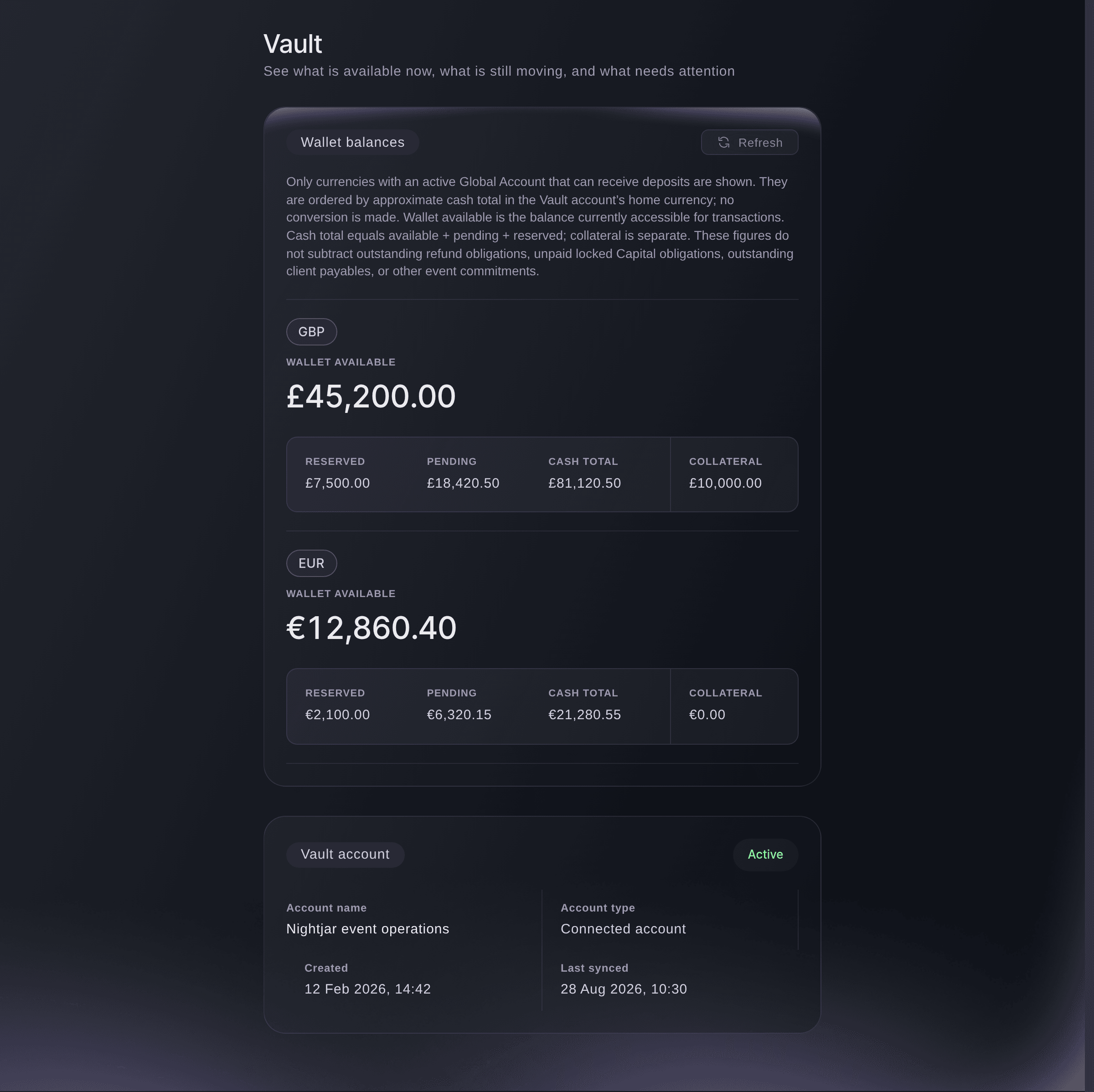
Vault, for a brand with money in two currencies. -
Read the currency you are spending in
Find the row for the currency you want to spend and read across it.
Примечание: One row per currency, biggest first. Only currencies with an account that can take deposits appear, so a currency you have never been paid in is absent rather than zero.
-
Work out what is free to spend
Start from the available column rather than the cash total, then take off the refunds you still owe, any Capital you have not repaid and money due to clients.
Примечание: Available is what Vault can move today, which is not the same as what is yours to keep. The cash total adds available, pending and reserved, and collateral sits beside them outside it.
-
Refresh before you commit to a payment
Select Refresh and confirm the sign-in prompt before you rely on a figure.
Примечание: The page shows the last balances it saved. Where a refresh fails it says so and keeps the saved figures rather than showing you nothing.
Или поручите это помощнику
Fai can open Vault for you. The balances themselves are read in the dashboard, behind the extra sign-in that moving money needs.
В вашей панели, с Fai
Open Vault for <BRAND NAME>
Из вашего собственного ассистента, через MCP
Подключите ассистента к нашему серверу MCP и попросите его:
Оставьте --read-only в конфигурации MCP. Для этой задачи нужно только читать данные, поэтому ассистенту не нужны инструменты, которые вносят изменения.
Pick the brand <BRAND NAME> and show what it has on the platform
Из терминала
Установите CLI по ссылке нашей страницы CLI, войдите командой ticketfairy auth login и выберите бренд, с которым работаете, командой ticketfairy brand use <BRAND_ID>. ticketfairy brand list и ticketfairy event list выводят идентификаторы, которые используют другие команды.
Vault balances are read in the dashboard rather than from the command line.
Show the brands you can act for
ticketfairy brand list
Check the account itself is healthy
-
Read the Vault account card
Read Vault account below the balances for the status and when it last synced.
Примечание: A suspended account can neither receive nor move money, and says why. A sync from days ago means the figures above are older than they look.
Fai can open Vault so you can read the account status.
В вашей панели, с Fai
Open Vault for <BRAND NAME> so I can check the account status
Из вашего собственного ассистента, через MCP
Оставьте --read-only в конфигурации MCP. Для этой задачи нужно только читать данные, поэтому ассистенту не нужны инструменты, которые вносят изменения.
Pick the brand <BRAND NAME> and show its details
Из терминала
Account status is read in the dashboard.
Show the brands you can act for
ticketfairy brand list
Вопросы, которые могут возникнуть
- Why do the columns not add up to the total?
- The cash total is available plus pending plus reserved. Collateral is shown beside them because it is security rather than spendable cash, so it is left out.
- Why is a currency I have been paid in missing?
- Only currencies with an active account that can take deposits are listed. Activate one for that currency and the row appears.
- Why does one currency show without a position in the order?
- The rows are ordered by value in one currency, and Vault could not convert that one this time. Its figures are correct; only its place in the order is unknown.
- Is the available figure mine to spend?
- It is what Vault can move today. It does not take off refunds you still owe, Capital you have not repaid or money due to clients, so subtract those yourself before you commit to a supplier.
- Is this the same as my event payouts?
- No. Payouts are money sent out to a card account. Vault is an account of your own that holds money, so the two answer different questions.
Похожие руководства
Сделайте это на своём мероприятии
Создайте аккаунт, соберите мероприятие и выполните шаги в своей панели управления. Звонок в отдел продаж не нужен.