
От начала до конца
Change the date or call off an event
A headliner pulls out, a venue loses its licence or the sales never came, and an organiser has hours rather than days to decide. Getting the choice right first is what saves the money and the audience: postponing, cancelling and refunding lead to very different places, and only one of them can be undone.
Work out whether to postpone, cancel or refund, tell ticket holders before they hear it anywhere else, and finish the clean-up the change leaves behind.
- Для кого
- Choosing between a new date, calling an event off and refunding buyers
- Займёт
- 9 минут
Перед началом
- You are an owner or admin for the event. Both changes are unavailable after the event has ended and after its funds have been paid out.
- You know what the event has sold and what refunding all of it would cost you, because that figure decides as much as the artist does.
- You have checked what your terms, artist agreement and venue contract commit you to. The dashboard offers the choices; your contracts narrow them.
-
Choose the change that fits
Choose between a new date, calling the event off and refunding some of the orders.
Примечание: Choose postponement whenever a later date is plausible. A postponed event can still be cancelled later, and a cancelled one is hard to bring back.
-
Make the change where it lives
Open Event Details to postpone or cancel, and Orders to refund one order at a time.
Примечание: Postponing and cancelling are whole-event actions with their own dialogs. There is no partial-refund dialog: you refund each order from the Orders page.
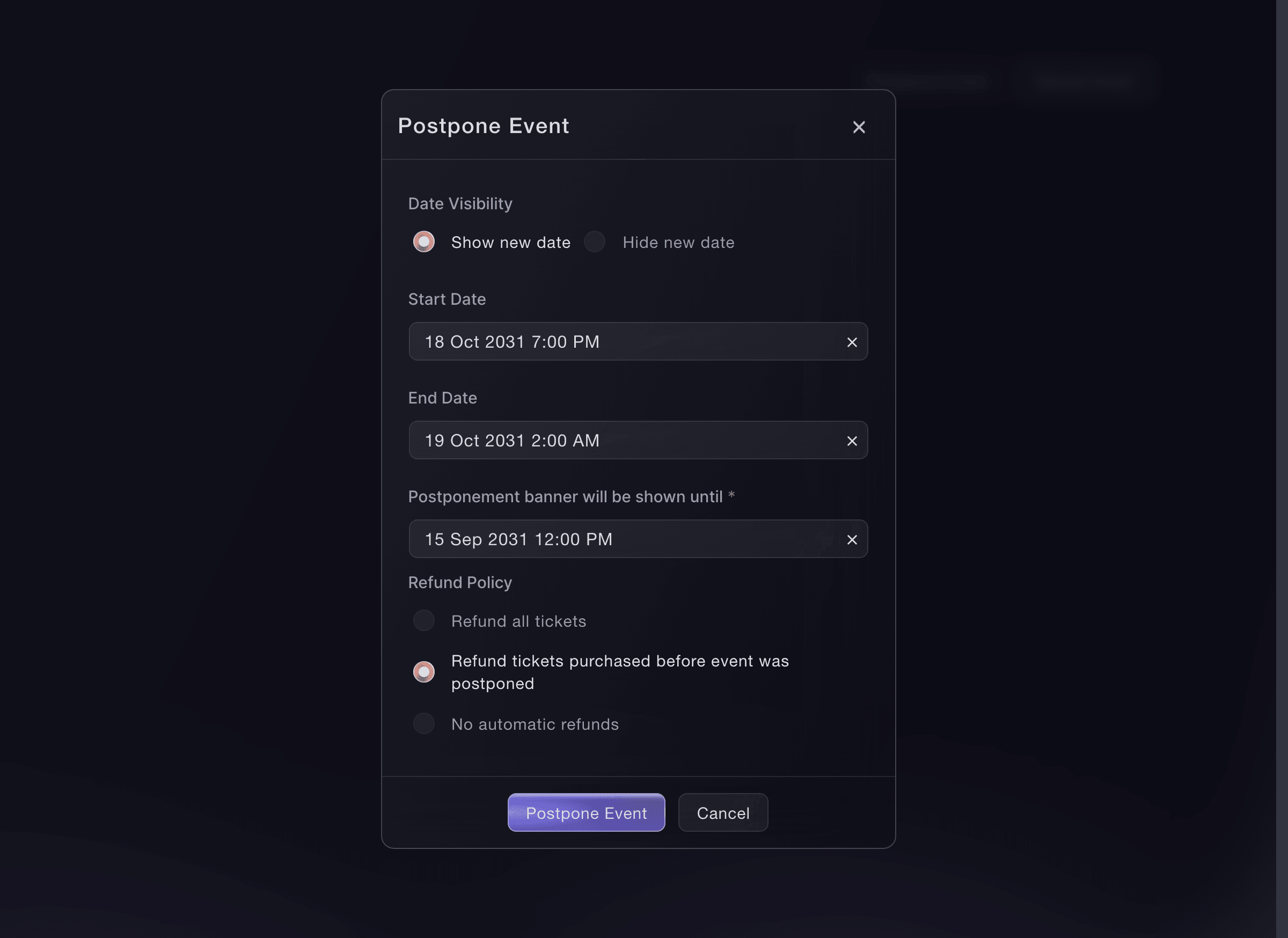
The postponement dialog, one of the three status actions. -
Tell ticket holders in your own words
Email every ticket holder the same day, saying what changed, what it means for their ticket and what you are doing next.
Примечание: Postponement sends its own email when you confirm it, while cancellation lets buyers hear from the refund instead. Your message is the one that explains it.
-
Update the event page to match
Change the event description so anyone who reaches the page reads the same thing your email said.
Примечание: The page keeps selling to people who never got the email until it says otherwise. A cancelled event still saves its description and artwork.
-
Finish the clean-up the change left
Check the sale windows, the door times, the scheduled messages and any advertising that still points at the old plan.
Примечание: A postponed event keeps every time you set separately: last entry, doors, ticket-level entry and scheduled emails all still hold the old date until you move them.

Или поручите это помощнику
Fai can read the ticket sales back to you, open the page where you make the change, and draft the message to ticket holders. Take her figure as ticket sales rather than the whole bill: add-ons and instalment plans sit outside it.
В вашей панели, с Fai
For <EVENT NAME>, tell me what its tickets have sold and whether its funds have been paid out yet. Say what your figure leaves out
Из вашего собственного ассистента, через MCP
Подключите ассистента к нашему серверу MCP и попросите его:
Оставьте --read-only в конфигурации MCP. Для этой задачи нужно только читать данные, поэтому ассистенту не нужны инструменты, которые вносят изменения.
Pick the brand, find the event <EVENT NAME> and show its status, dates and sales
Из терминала
Установите CLI по ссылке нашей страницы CLI, войдите командой ticketfairy auth login и выберите бренд, с которым работаете, командой ticketfairy brand use <BRAND_ID>. ticketfairy brand list и ticketfairy event list выводят идентификаторы, которые используют другие команды.
Read the event before you decide, then run the change you chose.
Show the event, its dates and its status
ticketfairy event get <EVENT_ID>
Let buyers refund themselves instead
-
Turn on self-service refunds
Let ticket holders refund their own orders when you expect many requests and want your team out of the middle.
Примечание: This suits a postponement more than a cancellation, because a cancellation refunds everybody anyway.
Fai can open the event so you can switch self-service refunds on. How many buyers used them is read on the Orders page today.
В вашей панели, с Fai
Open <EVENT NAME> so I can let buyers refund themselves
Из вашего собственного ассистента, через MCP
Оставьте --read-only в конфигурации MCP. Для этой задачи нужно только читать данные, поэтому ассистенту не нужны инструменты, которые вносят изменения.
Pick the brand, find the event <EVENT NAME> and show its settings
Из терминала
Read the event to see the current refund setting.
Show the event and its settings
ticketfairy event get <EVENT_ID>
Offer the ticket to another buyer
-
Open resale for the people who cannot come
Let buyers who cannot make the new date pass their ticket on at face value instead of refunding it.
Примечание: This keeps the money on the event and fills the room, which a refund does neither of. It suits a postponement to a date some buyers cannot make.
Fai can open the event so you can turn resale on. The resale figures are read in the dashboard today.
В вашей панели, с Fai
Open <EVENT NAME> so I can let buyers pass their tickets on
Из вашего собственного ассистента, через MCP
Оставьте --read-only в конфигурации MCP. Для этой задачи нужно только читать данные, поэтому ассистенту не нужны инструменты, которые вносят изменения.
Pick the brand, find the event <EVENT NAME> and show its settings
Из терминала
Read the event to check resale is open.
Show the event and its settings
ticketfairy event get <EVENT_ID>
Вопросы, которые могут возникнуть
- Which choice can I undo?
- Postponement. You can change the date, change who may refund, or remove the postponed status yourself. Only Ticket Fairy support can reverse a cancellation.
- Can I decide later, once I have a new date?
- Yes. Postpone without publishing a date, then reveal it when the venue and the artists are confirmed. Ticket holders hear that plans changed without waiting.
- What if the money has already been paid out?
- Neither change is available once the funds have left. Contact Ticket Fairy support with the event ID and what you need to do.
- Do I have to refund everybody when I postpone?
- No. You choose whether every ticket holder, only those who bought before the postponement, or nobody can ask for a refund.
Похожие руководства
Сделайте это на своём мероприятии
Создайте аккаунт, соберите мероприятие и выполните шаги в своей панели управления. Звонок в отдел продаж не нужен.