
Создание мероприятия
Take pre-registrations before your ticket on-sale
The gap between announcing an event and selling it is the cheapest audience you will ever build, and most promoters waste it. Pre-registration turns that gap into a list: people register interest, earn points for sharing your event, and get first access when the tickets appear.
Collect the people who want tickets before you have any to sell, reward them for bringing friends, and open a pre-sale to them ahead of everyone else.
- Для кого
- Building demand before tickets go on sale
- Займёт
- 10 минут
Перед началом
- The event is published, even with no ticket types on sale yet. Buyers reach the pre-registration page through your event page, and a draft event shows them nothing.
- You know when tickets will actually go on sale. The pre-sale has to start after pre-registration ends, so those two dates decide each other.
- You have decided what a registrant gets for sharing, if anything. Points and prizes are optional and can be added after the window opens.
-
Turn pre-registration on
Open the event and select Enable Pre-Registration.
Примечание: You cannot switch it off again while rewards are running, so set the rewards after the dates rather than before them.
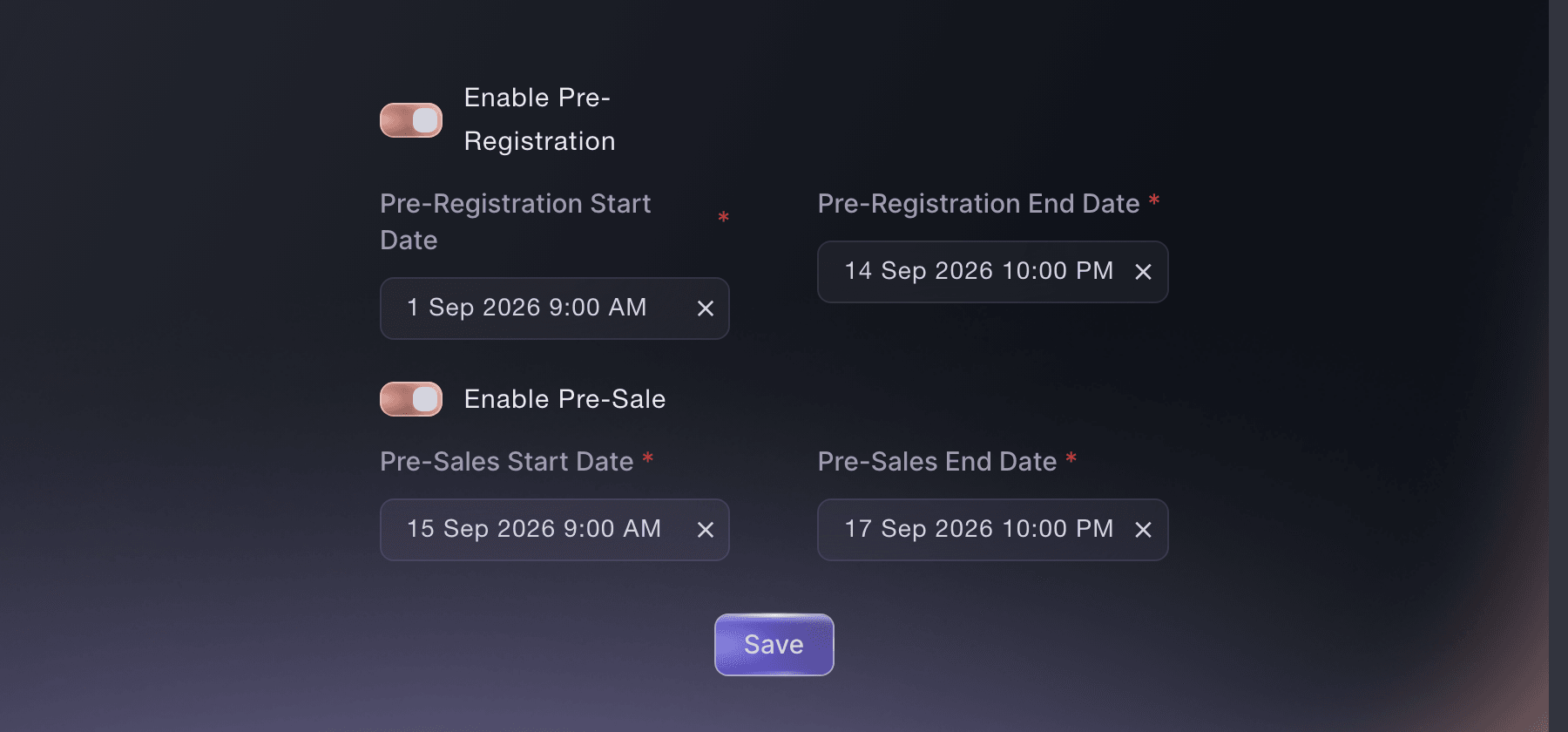
Pre-Registration Dates, with both windows set. -
Set the registration window
Enter the Pre-Registration Start Date and the end date beside it.
Примечание: Open registration the day you announce. A window that opens later loses the attention the announcement bought you.
-
Open a pre-sale for the people who registered
Select Enable Pre-Sale and set its window after registration closes.
Примечание: The pre-sale is the reward. It has to start after pre-registration ends, and the dashboard refuses a window that starts earlier.
-
Choose what earns points
Open Pre-Registration Actions and give each sharing action a point value.
Примечание: Sharing a personal link is worth more than a follow, because it brings people rather than attention. Price the actions accordingly.
-
Add a prize worth competing for
Open Pre-Registration Prizes and select Add New Prize.
Примечание: A prize only your event can give away beats a cash-equivalent one. Guest list, a soundcheck, a bar tab: things a competitor cannot copy.
Или поручите это помощнику
Fai can open the pre-registration settings and report how many people have registered and how many tickets they asked for.
В вашей панели, с Fai
For <EVENT NAME>, how many people have pre-registered and how many tickets have they asked for between them
Из вашего собственного ассистента, через MCP
Подключите ассистента к нашему серверу MCP и попросите его:
Оставьте --read-only в конфигурации MCP. Для этой задачи нужно только читать данные, поэтому ассистенту не нужны инструменты, которые вносят изменения.
Pick the brand, find the event <EVENT NAME> and show its pre-registration dates
Из терминала
Установите CLI по ссылке нашей страницы CLI, войдите командой ticketfairy auth login и выберите бренд, с которым работаете, командой ticketfairy brand use <BRAND_ID>. ticketfairy brand list и ticketfairy event list выводят идентификаторы, которые используют другие команды.
Read the event to check the pre-registration window.
Show the event and its dates
ticketfairy event get <EVENT_ID>
Email the people who registered
-
Send to the pre-registered audience
Choose Pre-registered customers as the audience when the pre-sale opens.
Примечание: There is a second audience for those who registered and never bought. That one is the reminder before the public on-sale.
Fai can draft the message and send it to the pre-registered audience after you approve it.
В вашей панели, с Fai
Draft an email to everyone pre-registered for <EVENT NAME> telling them the pre-sale is open, and show it to me before sending
Из вашего собственного ассистента, через MCP
Оставьте --read-only в конфигурации MCP. Для этой задачи нужно только читать данные, поэтому ассистенту не нужны инструменты, которые вносят изменения.
Pick the brand, find the event <EVENT NAME> and show its pre-registration figures
Из терминала
Messages are reviewed and sent in the dashboard.
Show the event before you write to its audience
ticketfairy event get <EVENT_ID>
Read how the registration went
-
Open the pre-registration report
Open Pre-Registration in the event reports for the totals.
Примечание: Total tickets requested is the number to plan against. It is usually larger than the number of people, and smaller than what they buy.
Fai can read the pre-registration totals back to you.
В вашей панели, с Fai
For <EVENT NAME>, how many people pre-registered and how many tickets did they ask for
Из вашего собственного ассистента, через MCP
Оставьте --read-only в конфигурации MCP. Для этой задачи нужно только читать данные, поэтому ассистенту не нужны инструменты, которые вносят изменения.
Pick the brand, find the event <EVENT NAME> and show its pre-registration report
Из терминала
Read the event statistics.
Show the event statistics
ticketfairy event stats <EVENT_ID>
Вопросы, которые могут возникнуть
- Do I need ticket types before I open pre-registration?
- No. Registration collects interest rather than orders, so it runs on a published event with no tickets set up yet. Have the tickets ready before the pre-sale opens.
- Why can I not switch pre-registration off?
- Rewards are running on it. Finish or remove the rewards and the switch is available again.
- Does a pre-registration guarantee a buyer a ticket?
- No. It gives them access to the pre-sale ahead of the public. Hold back enough stock for that window or the reward is one in name only.
Похожие руководства
Сделайте это на своём мероприятии
Создайте аккаунт, соберите мероприятие и выполните шаги в своей панели управления. Звонок в отдел продаж не нужен.