
Разработчикам и API
Create an API key so your own tools can read your ticket sales
Promoters who run more than a handful of events end up wanting their sales in their own spreadsheet, their own dashboard or their own agent. A token is what lets those tools read what you can read, without anyone sharing a dashboard password.
Give the command line, a script or an agent its own key to your ticket sales, choose how long it lasts, and take it back the moment you need to.
- Для кого
- Connecting your own tools, scripts or agents to your ticket sales
- Займёт
- 7 минут
Перед началом
- You know which tool needs the access: a laptop, a server, a scheduled script or an agent. One token per tool is what makes taking access back painless later.
- You have somewhere safe to keep the token, such as your password manager or your build system's secret store. The token is shown once and never again.
-
Open your account settings
Open your account settings and find Personal Access Tokens.
Примечание: These sit on your own account rather than on a brand, because a token carries your permissions. A teammate who needs their own access creates their own.
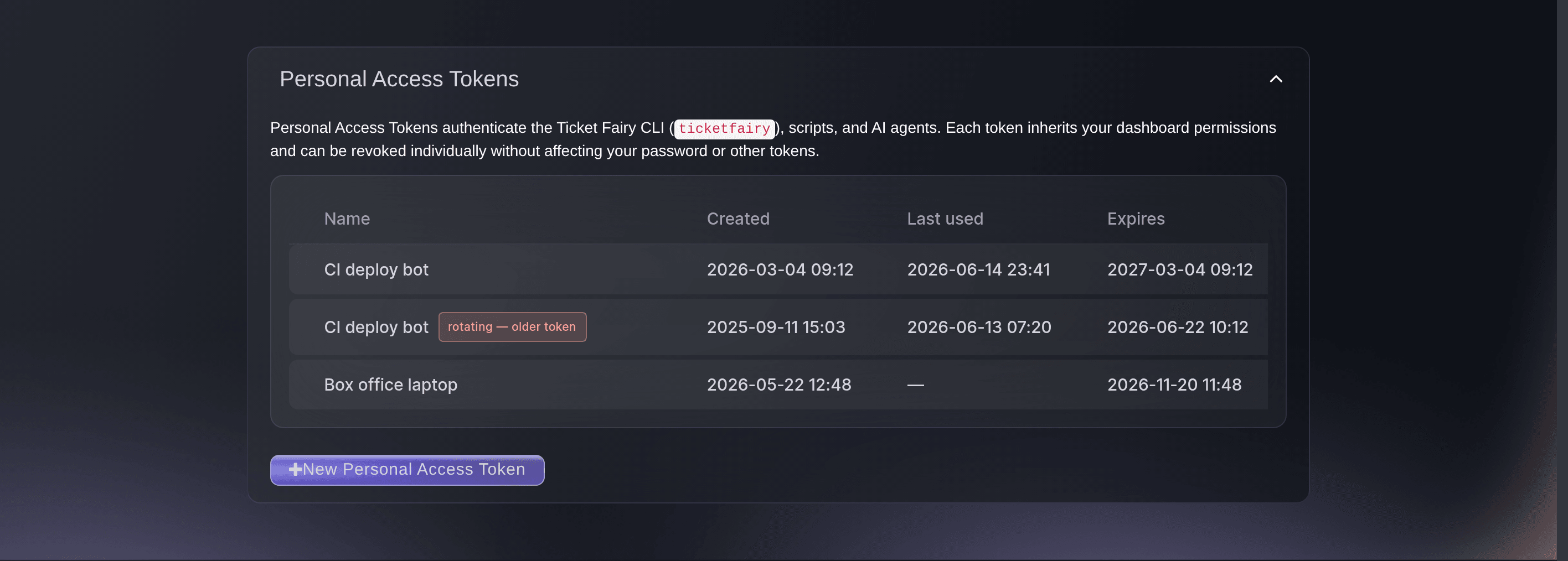
The tokens on an account, with one part-way through a rotation. -
Name the token after the tool that will hold it
Select New Personal Access Token and enter the tool's name in Token name.
Примечание: Name it for the laptop, service or script rather than for the job, because the name is how you find the right row when you take access back.
-
Choose how long it should last
Open Set custom expiry and pick a length that suits the tool.
Примечание: A year is the default and the longest available. Pick an hour or seven days for a one-off script, because a short life limits what a leak costs you.
-
Copy the token before you close the window
Select Create token and copy the value it shows you into your password manager.
Примечание: The token is shown once. Close the window without copying it and the only way forward is to revoke that token and create another.
-
Generate the brand key for the event APIs
Find API Key on the same page and select Generate API Key.
Примечание: This is the key the event APIs ask for, the referral leaderboard among them. Regenerating it stops every application using the old key until you update them.
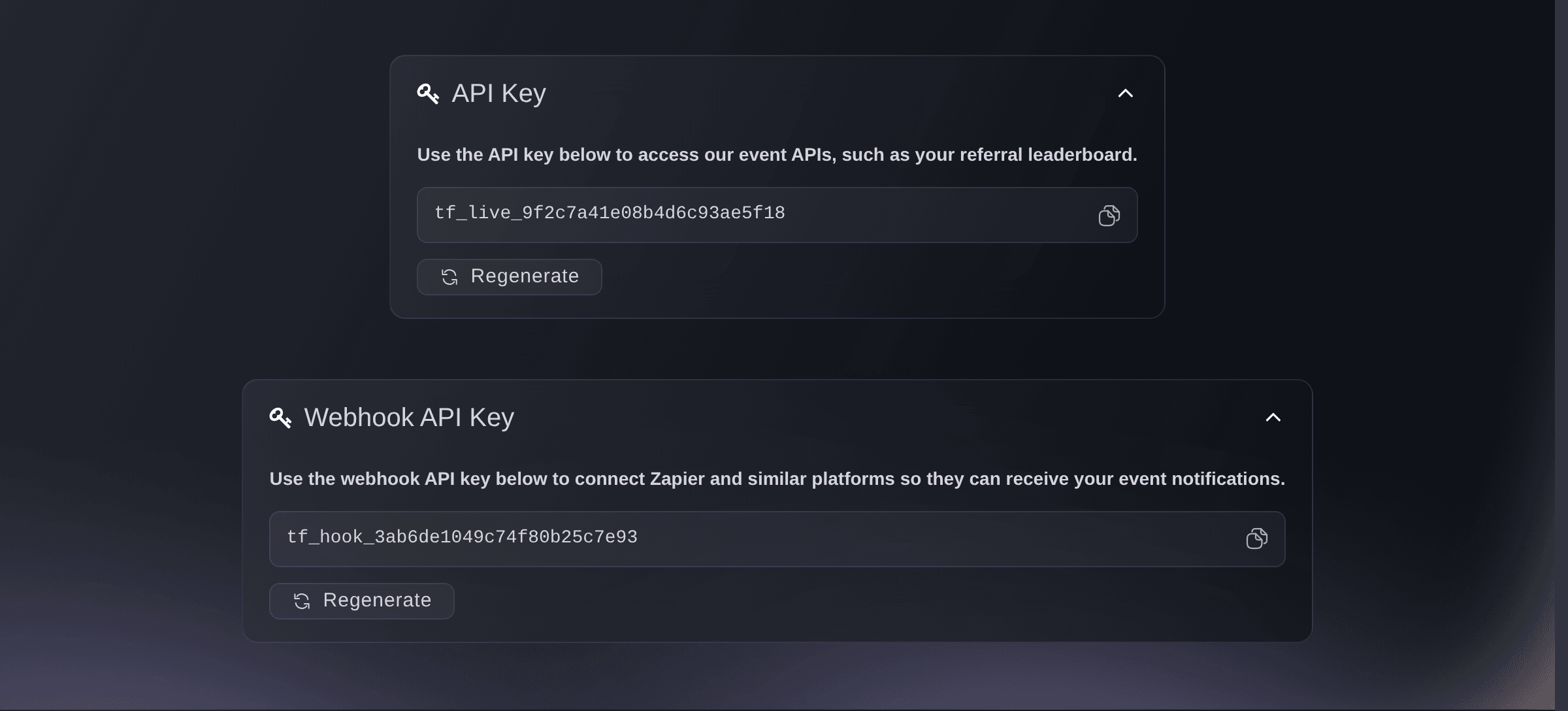
The two keys, once each has been generated.

Или поручите это помощнику
Fai can open the page where the tokens live. Minting one is yours to do, because the token is shown once and only to you.
В вашей панели, с Fai
Open my account settings so I can create an access token
Из вашего собственного ассистента, через MCP
Подключите ассистента к нашему серверу MCP и попросите его:
Оставьте --read-only в конфигурации MCP. Для этой задачи нужно только читать данные, поэтому ассистенту не нужны инструменты, которые вносят изменения.
Pick the brand <BRAND NAME> and show its events
Из терминала
Установите CLI по ссылке нашей страницы CLI, войдите командой ticketfairy auth login и выберите бренд, с которым работаете, командой ticketfairy brand use <BRAND_ID>. ticketfairy brand list и ticketfairy event list выводят идентификаторы, которые используют другие команды.
Sign the command line in with the token, then check which brands it reaches.
Sign in with a token you have created
ticketfairy auth login
Show the brands the token can act for
ticketfairy brand list
Swap a token without any downtime
-
Rotate it instead of replacing it
Select Rotate on the row and copy the new token.
Примечание: Rotating mints a fresh token under the same name and leaves the old one working for a grace period. Update every script and service before that window ends.
-
Tell the two rows apart afterwards
Look for the badge marking the older half of the rotation before you remove anything.
Примечание: Both rows carry the same name, so the badge is what stops you taking the fresh token out of service by mistake.
Fai can open the page. Rotating and copying the new token stay with you, because the value is shown once and only to you.
В вашей панели, с Fai
Open my account settings so I can rotate an access token
Из вашего собственного ассистента, через MCP
Оставьте --read-only в конфигурации MCP. Для этой задачи нужно только читать данные, поэтому ассистенту не нужны инструменты, которые вносят изменения.
Pick the brand <BRAND NAME> and show its events
Из терминала
Sign in again with the new token.
Sign in with the token you copied
ticketfairy auth login
Take access back
-
Revoke the token the moment it leaks
Select Revoke on the row for the tool that is affected.
Примечание: Revoking stops that token immediately and cannot be undone. The tool needs a new token before it works again.
Fai can open the page. Revoking is yours to confirm, because it stops a live integration the moment it happens.
В вашей панели, с Fai
Open my account settings so I can revoke an access token
Из вашего собственного ассистента, через MCP
Оставьте --read-only в конфигурации MCP. Для этой задачи нужно только читать данные, поэтому ассистенту не нужны инструменты, которые вносят изменения.
Pick the brand <BRAND NAME> and show its events
Из терминала
Check what the remaining tokens still reach.
Show the brands the current token can act for
ticketfairy brand list
Вопросы, которые могут возникнуть
- Which one does the command line want?
- A personal access token. The command line, your own scripts and your agents all sign in with one, and each inherits the permissions your dashboard account has.
- What is the API key for, then?
- The event APIs, such as your referral leaderboard. It is issued against the account that asks for it, so a tool meant to outlive one person needs a key from an account that stays on the team.
- Can a token do everything I can?
- Within your permissions, yes. That is why one token per tool and a short expiry are worth the extra minute, and why revoking is instant and never rate limited.
- How many tokens can I create?
- Ten an hour, counting rotations, and you cannot create a new one while fifty are already live. Waiting clears the hourly count; the fifty needs you to revoke one you have finished with. A rotation is exempt from the fifty, so it can hold fifty-one until the old token runs out its grace period.
- What if I close the window without copying the token?
- Revoke that token and create another. The value is never shown again, so there is nothing to recover and nothing lost by starting over.
Похожие руководства
Сделайте это на своём мероприятии
Создайте аккаунт, соберите мероприятие и выполните шаги в своей панели управления. Звонок в отдел продаж не нужен.