
Социальные сети
Schedule the social posts that sell your tickets
The posts that sell tickets go out at the hours nobody wants to be at a keyboard: the on-sale minute, the Friday teaser, the last-chance post the night before. Planning them in one sitting is what lets a small team keep a full calendar without living on their phones.
Plan the posts that sell a run of tickets in one sitting, send them for approval where your team needs it, and let them go out on time while you do something else.
- Для кого
- Running the social accounts that sell your tickets
- Займёт
- 8 минут
Перед началом
- Your Instagram or Facebook account is connected to the brand. Connecting one is its own job, done once.
- You know the two or three moments worth a post: the announcement, the release, the last chance. A calendar with three good posts beats one with ten weak ones.
- You have the artwork or video ready. Instagram takes photos, videos, carousels, reels and stories, and a Facebook page also takes a post with no picture at all.
-
Open the queue and see what is already planned
Open Publish for the brand and read the queue.
Примечание: Each row shows the account, when it goes out and where it has got to. The chips above the table narrow it to drafts, posts waiting for approval or the ones that did not go.
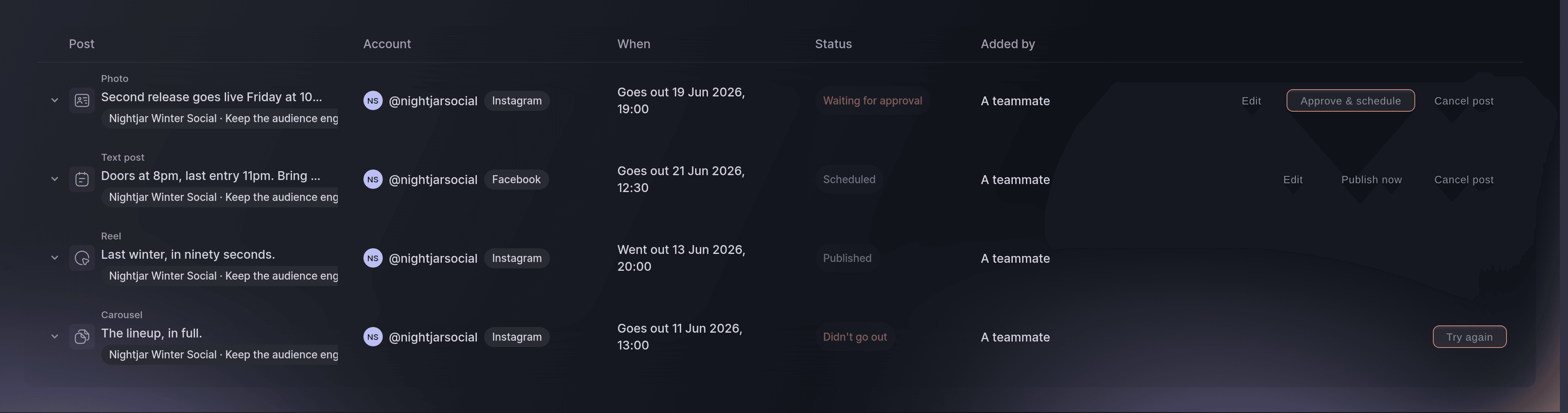
The queue, with a post in each state that needs a decision. -
Start a post
Select New post and choose the accounts it should go to.
Примечание: One post can go to several accounts at once, and the same words go out to each. An account that cannot take the kind of post you picked says so as you pick.
-
Say what kind of post it is
Choose the kind under What kind of post? and add the photo or video.
Примечание: A carousel takes two to ten items and the order you set is the order people swipe. A story carries no caption on Instagram.
-
Enter the caption
Enter the caption in Caption, with the one thing you want people to do in the first line.
Примечание: Captions run to 2,200 characters and the composer counts them for you. The first line is the part most people read.
-
Tie the post to the event it sells
Choose the event under What is this post for?.
Примечание: This is what lets the timing suggestions use your event dates, and what puts the event name on the row in the queue.
-
Set when it goes out
Choose Schedule and set the date and time.
Примечание: A time in the past is refused. An account that has hit the day's posting limit says so, and the fix is a time tomorrow.
-
Send it on its way
Select Schedule post, or Send for approval where the account asks for it.
Примечание: An owner or admin approves posts on an account set up that way, and the composer says so before you finish. A draft still needs the post itself to be complete, so add the picture or the words first and leave the timing for later.
Или поручите это помощнику
Fai can draft a post and put it in the queue for you to approve. Nothing reaches an audience until a person says so.
В вашей панели, с Fai
Draft a post for <EVENT NAME> announcing that the second release opens on Friday, and schedule it for Thursday evening
Из вашего собственного ассистента, через MCP
Подключите ассистента к нашему серверу MCP и попросите его:
Оставьте --read-only в конфигурации MCP. Для этой задачи нужно только читать данные, поэтому ассистенту не нужны инструменты, которые вносят изменения.
Pick the brand, find the event <EVENT NAME> and show it
Из терминала
Установите CLI по ссылке нашей страницы CLI, войдите командой ticketfairy auth login и выберите бренд, с которым работаете, командой ticketfairy brand use <BRAND_ID>. ticketfairy brand list и ticketfairy event list выводят идентификаторы, которые используют другие команды.
Read the event the posts are about.
Show the event and its dates
ticketfairy event get <EVENT_ID>
Clear the posts waiting on you
-
Approve what your team drafted
Select Approve & schedule on a row that is waiting.
Примечание: Approving both accepts the post and books it in for the time it already carries. Use Edit first when the words need changing.
Fai can approve a post you have read and agreed to. She asks first, because approving sends it to a public audience.
В вашей панели, с Fai
Show me the posts waiting for approval for <BRAND NAME>
Из вашего собственного ассистента, через MCP
Оставьте --read-only в конфигурации MCP. Для этой задачи нужно только читать данные, поэтому ассистенту не нужны инструменты, которые вносят изменения.
Pick the brand <BRAND NAME> and show its events
Из терминала
Approving is done in the dashboard.
Show the brands you can act for
ticketfairy brand list
Deal with a post that did not go out
-
Read what went wrong, then try again
Open the row marked as not sent and read the reason beside it.
Примечание: A photo the network could not fetch and an account that lost its connection need different fixes, and the row says which one it is.
-
Send it again once the cause is fixed
Select Try again on the row.
Примечание: A post whose moment has passed is worth cancelling rather than sending late, and Cancel post does that.
Fai can list the posts that did not go out and tell you what each one said. Sending again is done from the queue.
В вашей панели, с Fai
Which posts for <BRAND NAME> did not go out, and why
Из вашего собственного ассистента, через MCP
Оставьте --read-only в конфигурации MCP. Для этой задачи нужно только читать данные, поэтому ассистенту не нужны инструменты, которые вносят изменения.
Pick the brand <BRAND NAME> and show its events
Из терминала
The queue is read in the dashboard.
Show the brands you can act for
ticketfairy brand list
Вопросы, которые могут возникнуть
- Can one post go to Instagram and Facebook together?
- Yes, and the same words go to each. Pick both accounts in the composer, and mind that a kind one of them cannot take is refused as you pick it.
- Who has to approve a post?
- An owner or admin, and only on an account set up to ask for it. The composer tells you before you finish, so a post never waits without you knowing.
- What happens if a post fails at the moment it should go out?
- A network that was briefly unavailable is tried again a few times, and the row turns to failed with the reason once those tries run out. Anything else, such as a connection that has expired, fails at once and waits for you.
- Can I save something without sending it?
- Yes. Save it as a draft and it waits in the queue with no time on it until you give it one.
Похожие руководства
Сделайте это на своём мероприятии
Создайте аккаунт, соберите мероприятие и выполните шаги в своей панели управления. Звонок в отдел продаж не нужен.