
Управление продакшеном
Keep the jobs behind your event moving
Most of the work behind an event is invisible until it is late: the licence nobody applied for, the barrier nobody hired, the poster nobody printed. A board the whole team shares turns that list from something one person carries into something any team member can pick up.
Put every job your event needs on one board, give each one an owner and a date, and see what is blocked before it becomes a problem.
- Для кого
- Running the jobs your team has to finish before the doors open
- Займёт
- 7 минут
Перед началом
- Event management is switched on for your account.
- Your team members are on the event, so a task can have an owner who is a person rather than a note in a description.
- You have the list you already keep somewhere else. Moving an existing list onto the board beats inventing a new one.
-
Open the board
Open the event and select Tasks.
Примечание: One column per state, and each task sits in the column it has reached. A task in the blocked column is waiting on something rather than on a team member.
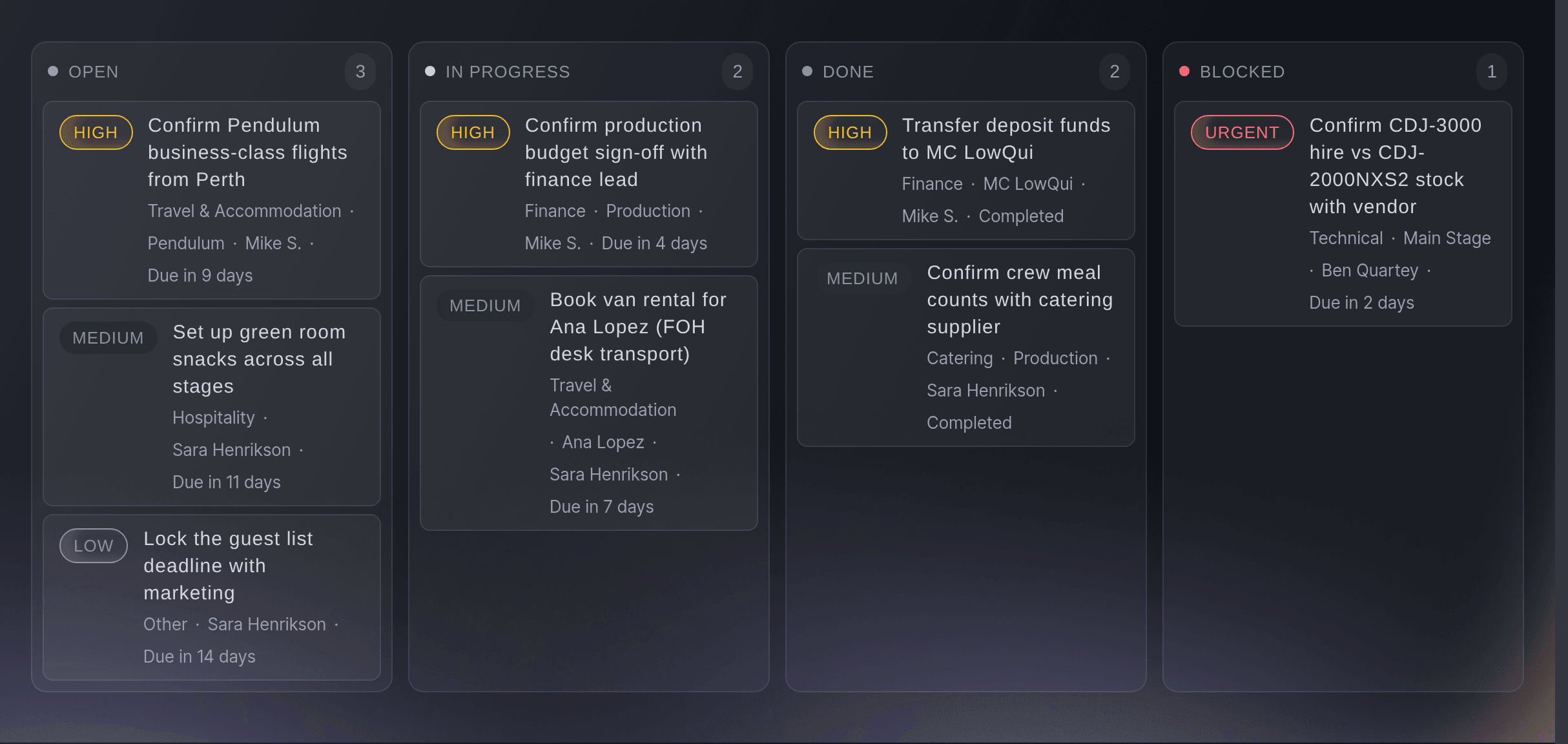
The board, with the work spread across its columns. -
Add the jobs that have to happen
Add a task for each job, named so that a team member reading it knows what finished looks like.
Примечание: "Apply for the late licence" is a task. "Licence" is a topic a team member will have to ask about.
-
Give every task an owner and a date
Assign each task to a person and set the day it has to be done by.
Примечание: A task with no owner belongs to whoever feels worst about it, which is rarely the person who can finish it.
-
Move a task as it moves
Drag a card into the column that matches where the job has got to.
Примечание: The board is only worth reading if it is current, and moving a card takes a second. The blocked column is the one to look at first each morning.
Или поручите это помощнику
Fai can open the event so you can work the board. The tasks themselves are read and moved in the dashboard today.
В вашей панели, с Fai
Open <EVENT NAME> so I can go through its tasks
Из вашего собственного ассистента, через MCP
Подключите ассистента к нашему серверу MCP и попросите его:
Оставьте --read-only в конфигурации MCP. Для этой задачи нужно только читать данные, поэтому ассистенту не нужны инструменты, которые вносят изменения.
Pick the brand, find the event <EVENT NAME> and show it
Из терминала
Установите CLI по ссылке нашей страницы CLI, войдите командой ticketfairy auth login и выберите бренд, с которым работаете, командой ticketfairy brand use <BRAND_ID>. ticketfairy brand list и ticketfairy event list выводят идентификаторы, которые используют другие команды.
Read the event the tasks belong to.
Show the event and its dates
ticketfairy event get <EVENT_ID>
See the same work as a list, a calendar or a timeline
-
Switch the view to suit the question
Change the view when you want the work by date rather than by state.
Примечание: The board answers "what is stuck" and a list answers "everything at once". A calendar answers "what is due this week", and a timeline lays the dated work out in order so you can see what has to finish before the next thing starts.
Fai can open the event. The task views are read in the dashboard today.
В вашей панели, с Fai
Open <EVENT NAME> so I can see what is due this week
Из вашего собственного ассистента, через MCP
Оставьте --read-only в конфигурации MCP. Для этой задачи нужно только читать данные, поэтому ассистенту не нужны инструменты, которые вносят изменения.
Pick the brand, find the event <EVENT NAME> and show it
Из терминала
Read the event the tasks belong to.
Show the event and its dates
ticketfairy event get <EVENT_ID>
Вопросы, которые могут возникнуть
- Who can see the board?
- The team on the event, within what their role allows. It is a working record for your team and buyers never see it.
- What belongs in the blocked column?
- A task that cannot move until something outside it happens: a permit, a supplier, a decision. A task waiting on a person is still in progress.
- Can two people own one task?
- Yes. Add as many assignees as the job needs, and each of them gets it in their own list. Naming one of them as the person accountable for it finishing still helps, and anyone who only wants to keep an eye on it can follow it instead.
Похожие руководства
Сделайте это на своём мероприятии
Создайте аккаунт, соберите мероприятие и выполните шаги в своей панели управления. Звонок в отдел продаж не нужен.