
Integraciones
Send your ticket buyers to Laylo
Artists and promoters who message their fans through Laylo connect it to a brand once. Every paid ticket order across that brand's events then reaches your Laylo account, so the fans who bought are in the audience for your next drop.
Connect Laylo to a brand with the webhook link from your Laylo account, and each paid ticket order on that brand's events sends the buyer, their order and their marketing choice to Laylo.
- Para
- Adding the fans who buy your tickets to your Laylo audience
- Dura
- 4 minutos
Antes de empezar
- You're an owner or admin of the brand. If the Laylo card is missing from Integrations, ask an owner or an admin.
- You have a Laylo account and can copy its webhook link.
-
Open the Laylo card
Open your brand, select Integrations and scroll to Purchase & sign-up capture.
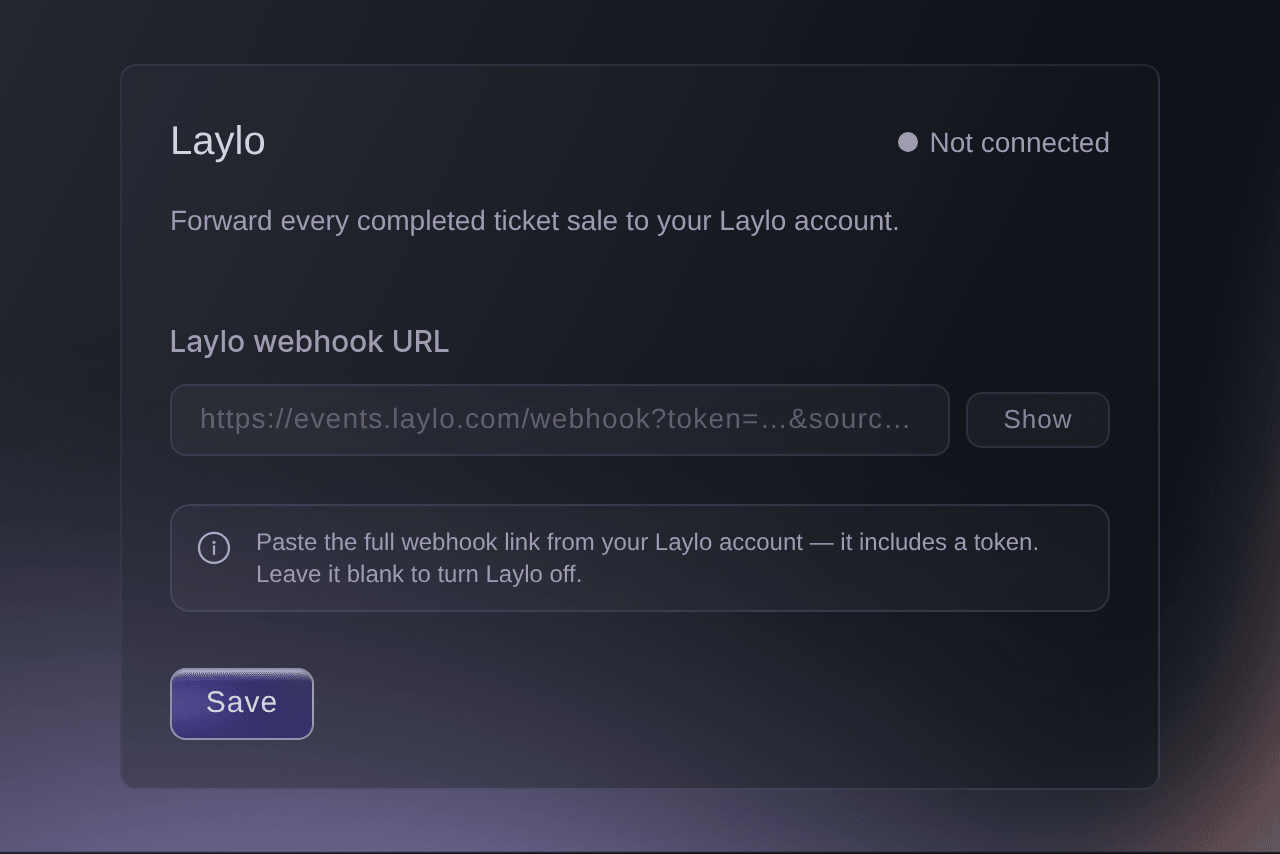
Brand, Integrations, Purchase & sign-up capture. -
Copy your Laylo webhook link
In your Laylo account, copy the full webhook link Laylo gives you.
Nota: The link starts with https and carries your Laylo token, which is why the card hides it as you paste.
-
Paste the link into the Laylo card
Paste the link into Laylo webhook URL.
Consejo: Select Show to check the whole link went in.
-
Save the link
Select Save. The card changes to Connected and
Laylo saved.
appears.
The order details Laylo receives
Each ticket order on the brand's events goes to Laylo once, after it is paid. Laylo receives the buyer's name, email, phone number and billing address, the order number, currency and total, and the event's name and date.
Nota: Ticket Fairy sends the order after the payment is taken, so Laylo never slows a buyer's checkout.
-
Check the first buyer arrived
Buy a test ticket with an email address you control, then look for that buyer in your Laylo account.
Nota: Laylo receives the orders paid after you save the link. Buyers who paid before then aren't sent.
Prueba estos pasos en tu propio evento
Crea una cuenta gratis, monta tu evento y sigue los pasos de arriba en tu propio panel. Tarda unos minutos y no necesitas reservar una llamada comercial.
Sin cuotas de alta. Sin cuota mensual obligatoria. Sin tarjeta de crédito.
O deja que lo hagan por ti
Fai can save or remove the Laylo link on a brand, and she asks for your approval before each change. The link carries your Laylo token, so paste it into the Laylo card yourself and ask Fai to open the page.
En tu panel, con Fai
Open Integrations for <BRAND NAME> so I can connect Laylo
Deja que Fai lo haga por ti
Fai trabaja dentro de tu panel de Ticket Fairy. Crea tu cuenta, abre Fai y pega la instrucción de arriba.
Sin cuotas de alta. Sin cuota mensual obligatoria. Sin tarjeta de crédito.
Turn Laylo off
-
Clear the Laylo link
On the Laylo card, delete the link in Laylo webhook URL, then select Turn off.
-
Confirm turning Laylo off
Select Turn off in the confirmation. The card changes to Not connected.
Nota: Ticket Fairy stops sending new orders, and the fans already in Laylo stay there. Paste the link again to turn it back on.
Fai can turn Laylo off for a brand after you approve the change.
En tu panel, con Fai
Turn off Laylo on <BRAND NAME>, and ask me before you save it
Preguntas que puedes tener
- Why won't the Laylo card save my link?
That doesn't look like a valid Laylo webhook URL. Paste the full https://…laylo.com/…?token=… link from your Laylo account, or leave it blank to turn the sync off.
means the pasted text is not a complete Laylo link. Copy the whole link from your Laylo account again, starting with https, and paste it over what is in the field.- Does Laylo get buyers who didn't agree to hear from me?
- Yes. Every paid order goes to Laylo with the buyer's checkout answer about hearing from your brand. Laylo receives that same answer for text messages, even when the buyer answered the separate text-message question differently.
- Does a refund reach Laylo?
- No. Laylo receives each order once, when it is paid, and a later refund or cancellation is not sent.
- Can I send one event's buyers to Laylo and not the others?
- No. Laylo is set for the whole brand, so every event on that brand sends its paid orders to the same Laylo account.
- Why can't I see the Laylo card?
- The Laylo card shows for brand owners and admins. A marketing team member sees Integrations without it, so ask an owner or an admin to paste the link.
- Why does the Laylo card say someone else changed it?
Someone else changed this while you were editing.
means a teammate saved the Laylo card while you had it open. Select Load latest to see what they saved before you save yours.
¿Todavía tienes una pregunta?
Reserva una demo y te la respondemos en una llamada, sobre tu tipo de evento. O crea tu cuenta y compruébalo por ti mismo.
Sin cuotas de alta. Sin cuota mensual obligatoria. Sin tarjeta de crédito.
Guías relacionadas
Hazlo en tu propio evento
Crea tu cuenta, monta tu evento y sigue los pasos en tu propio panel. No necesitas reservar una llamada comercial.