
Guías por tipo de evento
Run ticketing as an agency or promoter group
Agencies, promoter groups and collectives sell tickets for several brands at once, with a core team behind them and a roster of promoters who work across every show. Each brand keeps its own events, team and payouts, and your promoters join once and sell wherever you deploy them. You set the commission they earn on each event or brand they work on.
Run each of your brands with its own team and payouts from one login, build one promoter roster that sells tickets for all of them, give partners their own ticket allocations, and set the commission each promoter earns.
- Para
- Agencies, promoter groups and collectives selling tickets for several brands with one core team and one promoter roster
- Dura
- 16 minutos
- Create a brand for each name you sell under
- Invite each brand's permanent team
- Create a collective for your promoters
- Invite your promoters to the collective
- Deploy the collective to an event or brand
- Choose which promoters work it
- Set the commission and deploy
- Share your invite code with a venue that hires you
- Accept a venue's invitation
- Give partners their own ticket allocation
- Check each promoter's sales and commission
- Compare the sales of each brand's own team
Antes de empezar
- You can create brands with the Ticket Fairy login you already use, and you become the owner of each brand you create.
- You have the email address each promoter uses for Ticket Fairy, or will use when they join.
- You know the commission you pay your promoters, if you pay one: a percentage of sales, a flat amount per ticket or a flat amount per order.
-
Create a brand for each name you sell under
Open Brands, select Create Brand and enter the name buyers know those events by in Brand Name. The same pages then ask for the business address and how that brand is paid.
Nota: Each brand keeps its own events, team and payout details.
Create your Ticket Fairy account and brand to start selling tickets
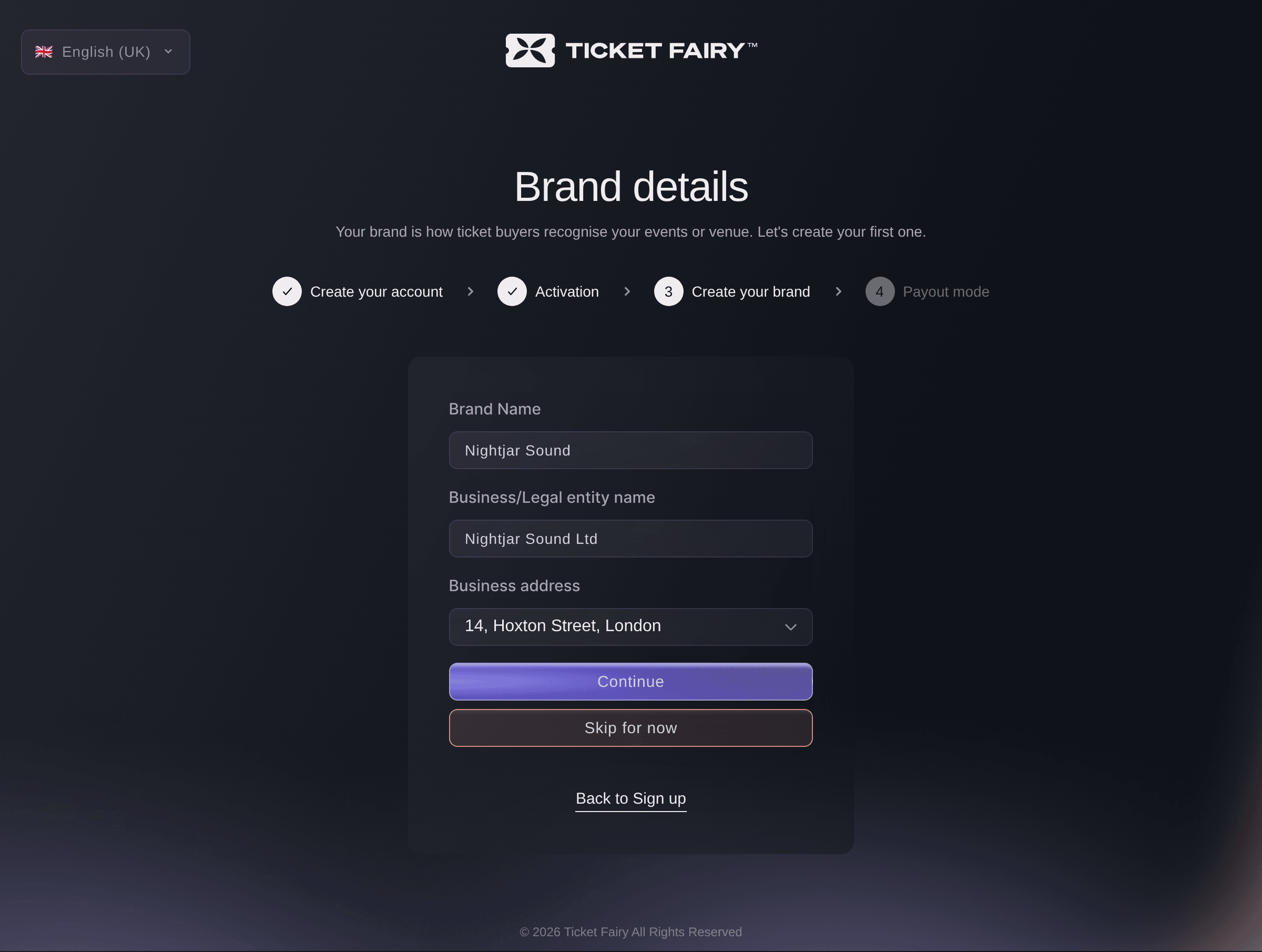
Brands, Create Brand, Brand details. -
Invite each brand's permanent team
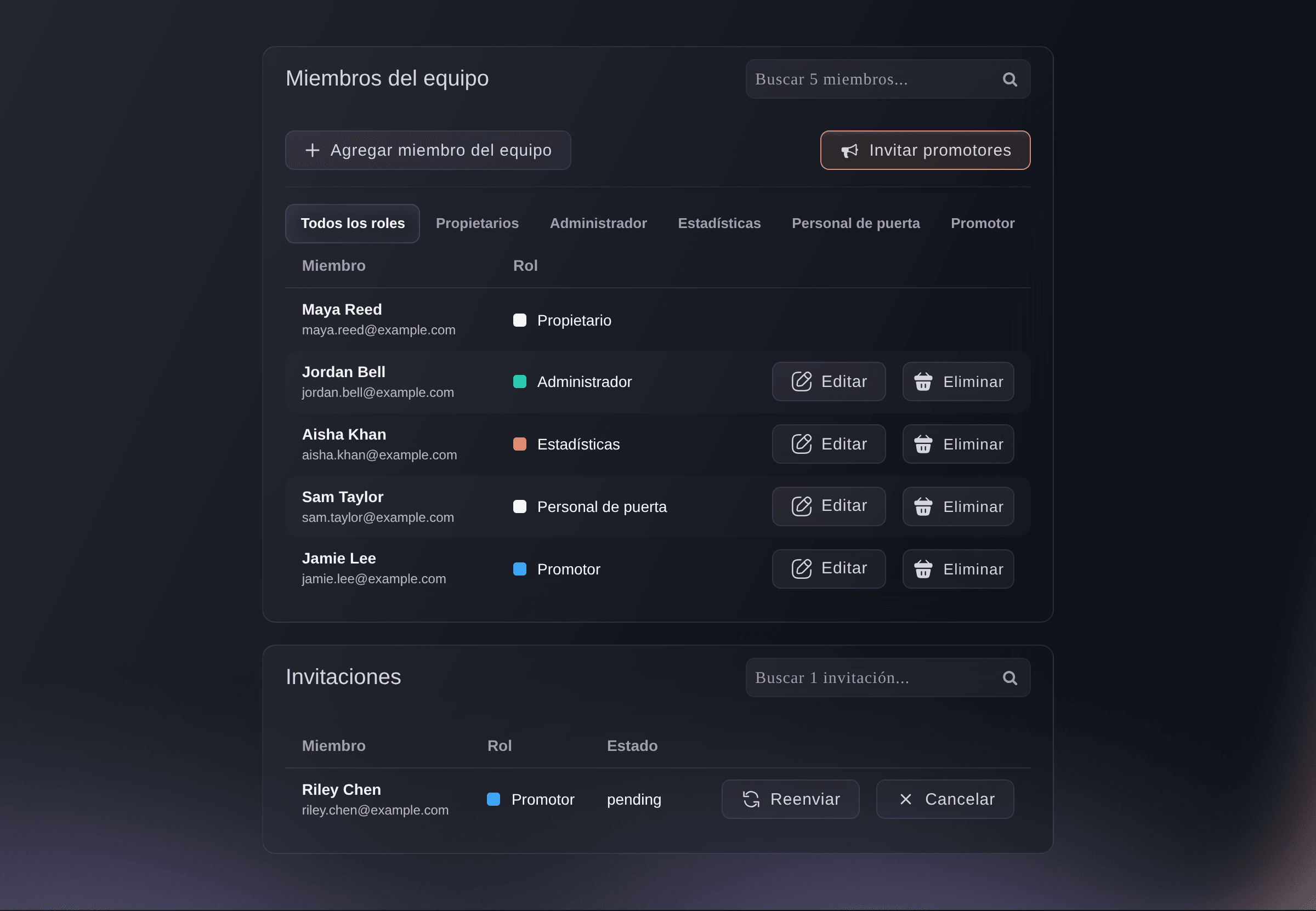
On each brand, open Team and select Add Team Member for the people who run that brand's events. They get that role on every event under that brand.
Nota: A core team member who works on every brand gets an invitation from each brand.
Invite your team to your events and choose what each person can do
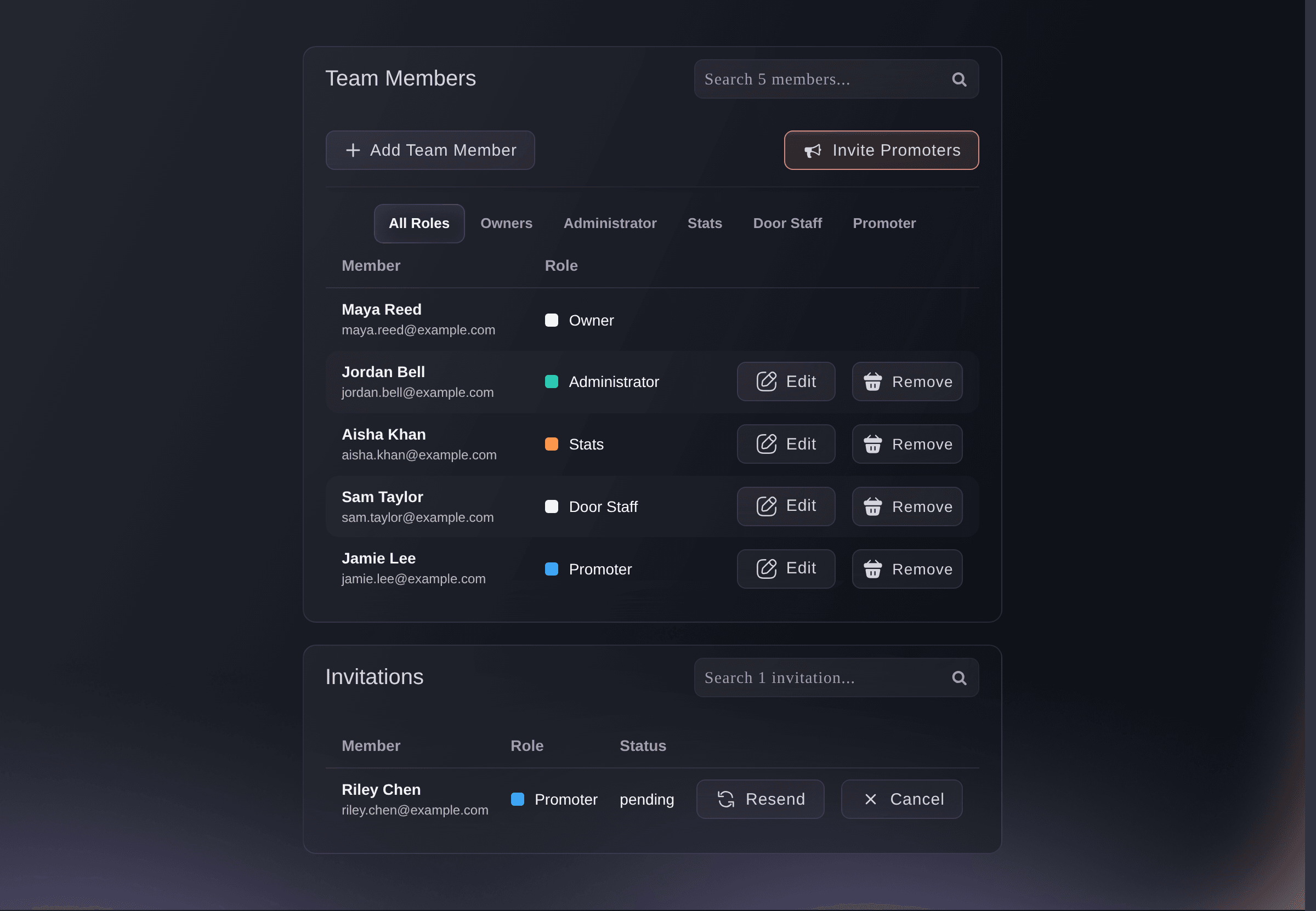
Brand, Team. -
Create a collective for your promoters
Open Collectives, select New collective, enter the Collective name and select Create collective. The collective's page opens, with you as its owner.
Nota: A collective belongs to you rather than to one brand, so the same promoters can sell for every brand you run. Your brand teams stay as they are.
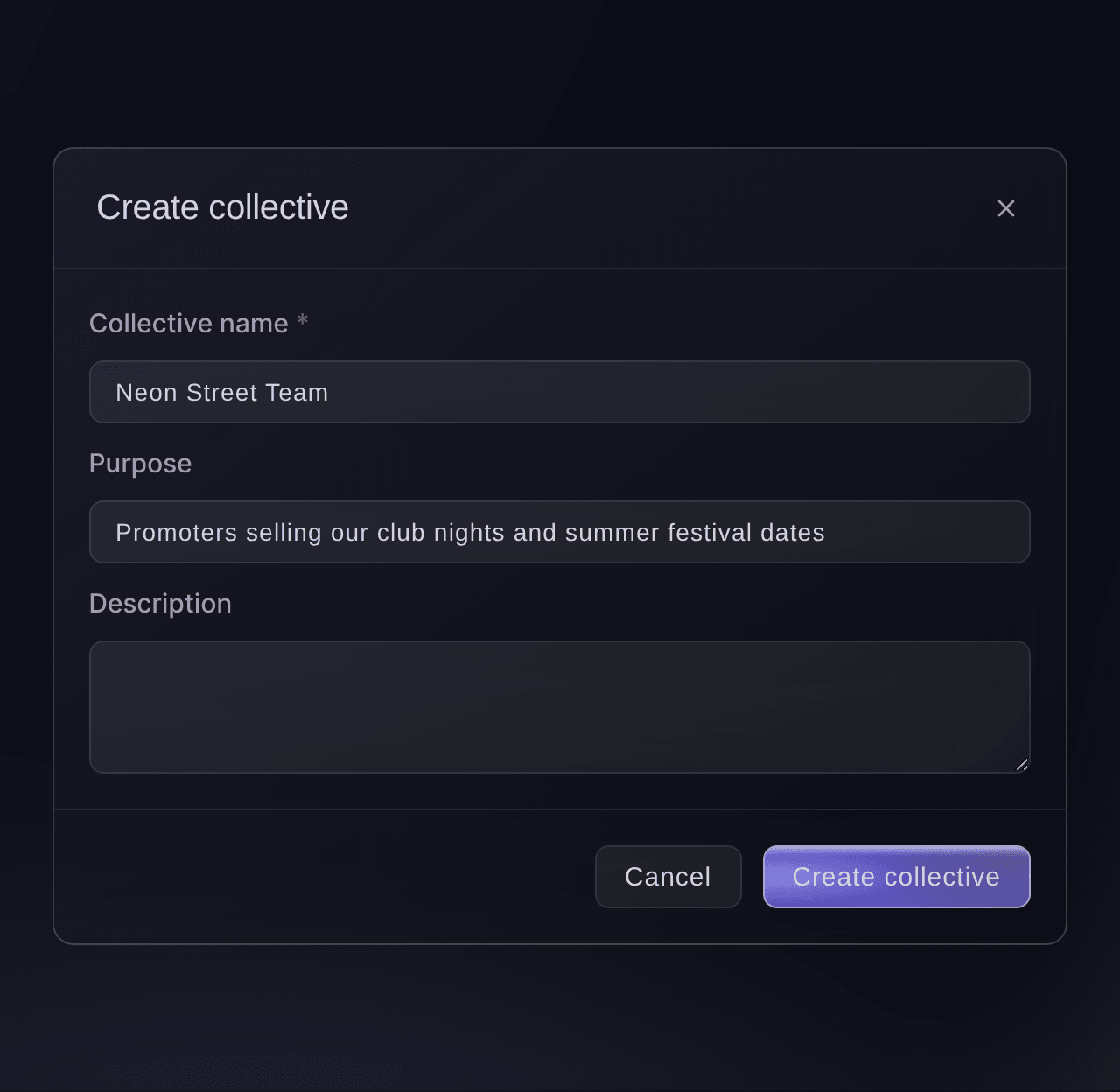
Collectives, New collective. -
Invite your promoters to the collective
On the collective, select Invite member, enter the promoter's Email address and choose their Collective role. Everyone who has not joined yet is listed under Waiting to join.
Consejo: Give a colleague who runs the roster with you the Admin role.
Invita a promotores a tu colectivo para que puedan vender entradas para tus eventos
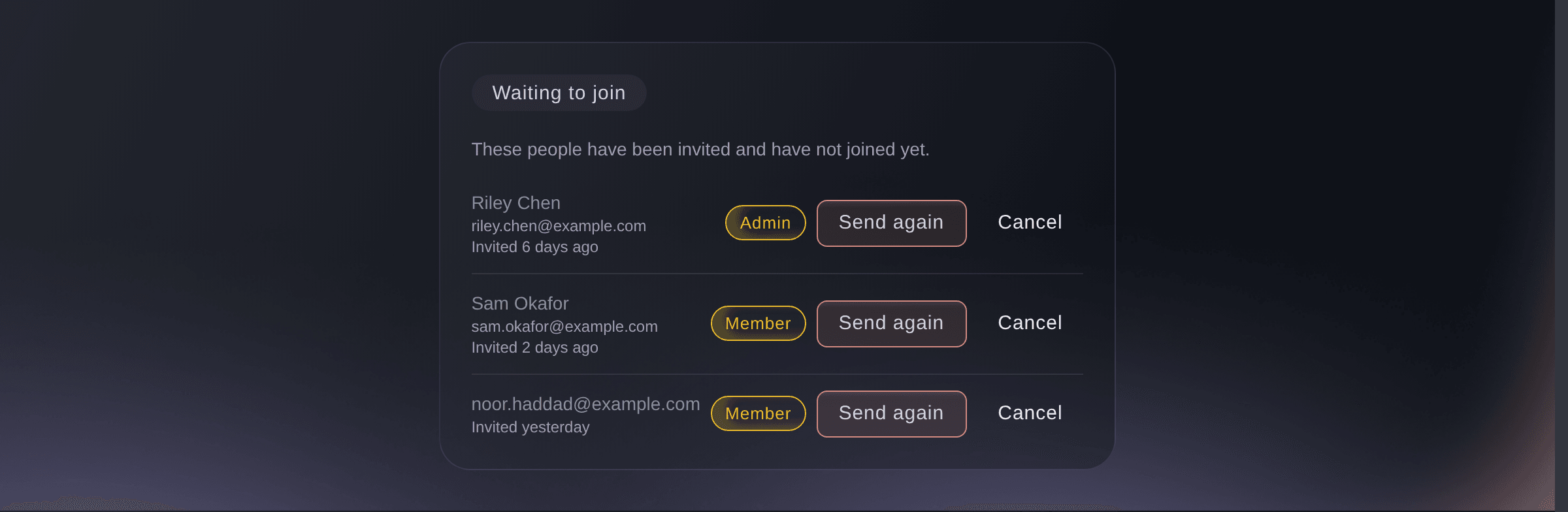
Collective, Waiting to join. -
Deploy the collective to an event or brand
On the collective, select Deploy collective, choose where your promoters work under Deploy into, then pick it under Where to deploy.
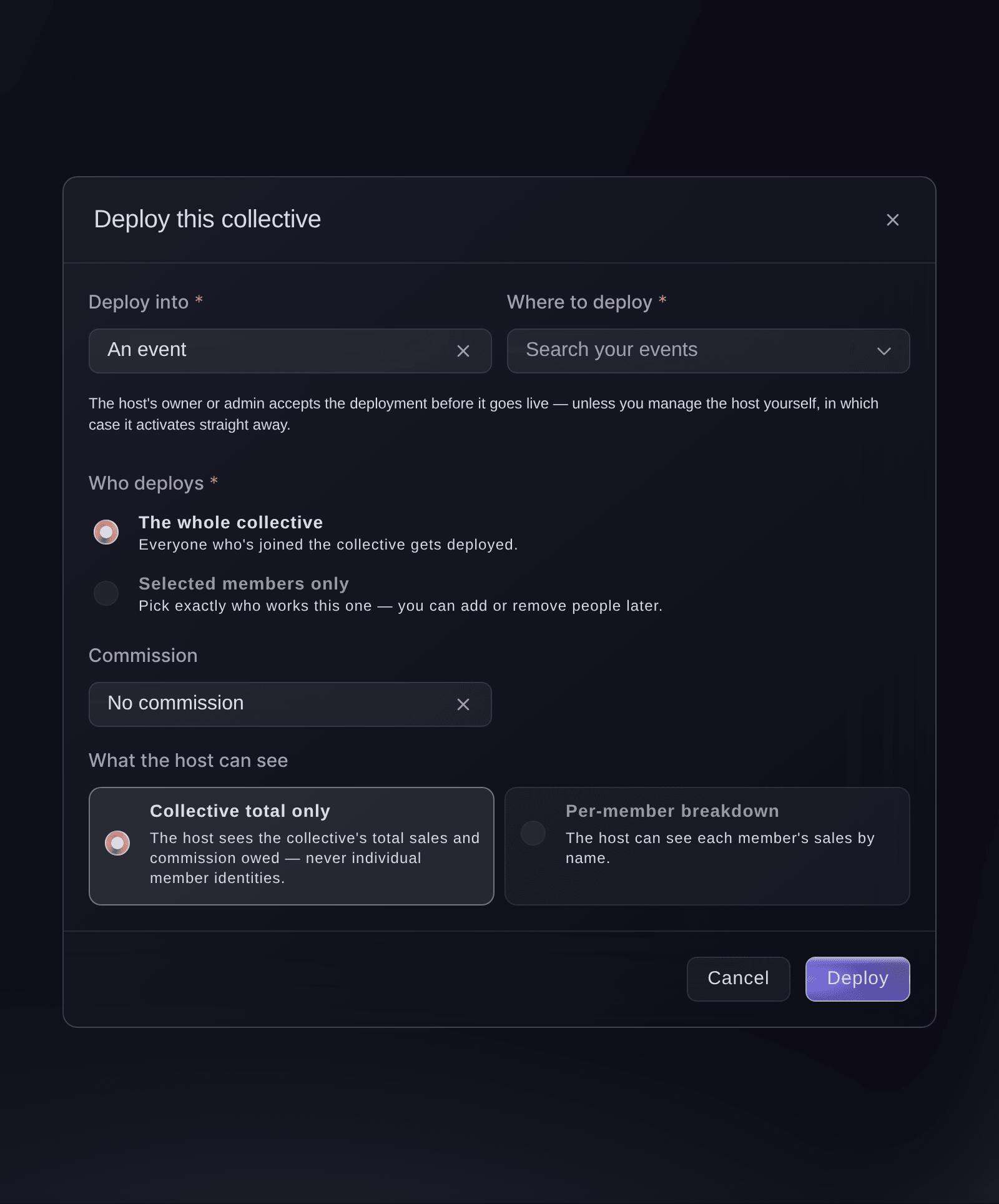
Collective, Deploy collective. -
Choose which promoters work it
Under Who deploys, choose which promoters work the event or brand.
-
Set the commission and deploy
Choose what each promoter earns under Commission, then select Deploy.
Nota: On an event, brand or tour you own or run as an admin, the deployment goes live straight away. On any other, it goes live once its owner or admin accepts it.
-
Share your invite code with a venue that hires you
Optional: Under Deployments, select Share invite code and send the code to the venue or promoter who hires your collective. They use it to invite your collective to their own brand or event, with the commission they pay.
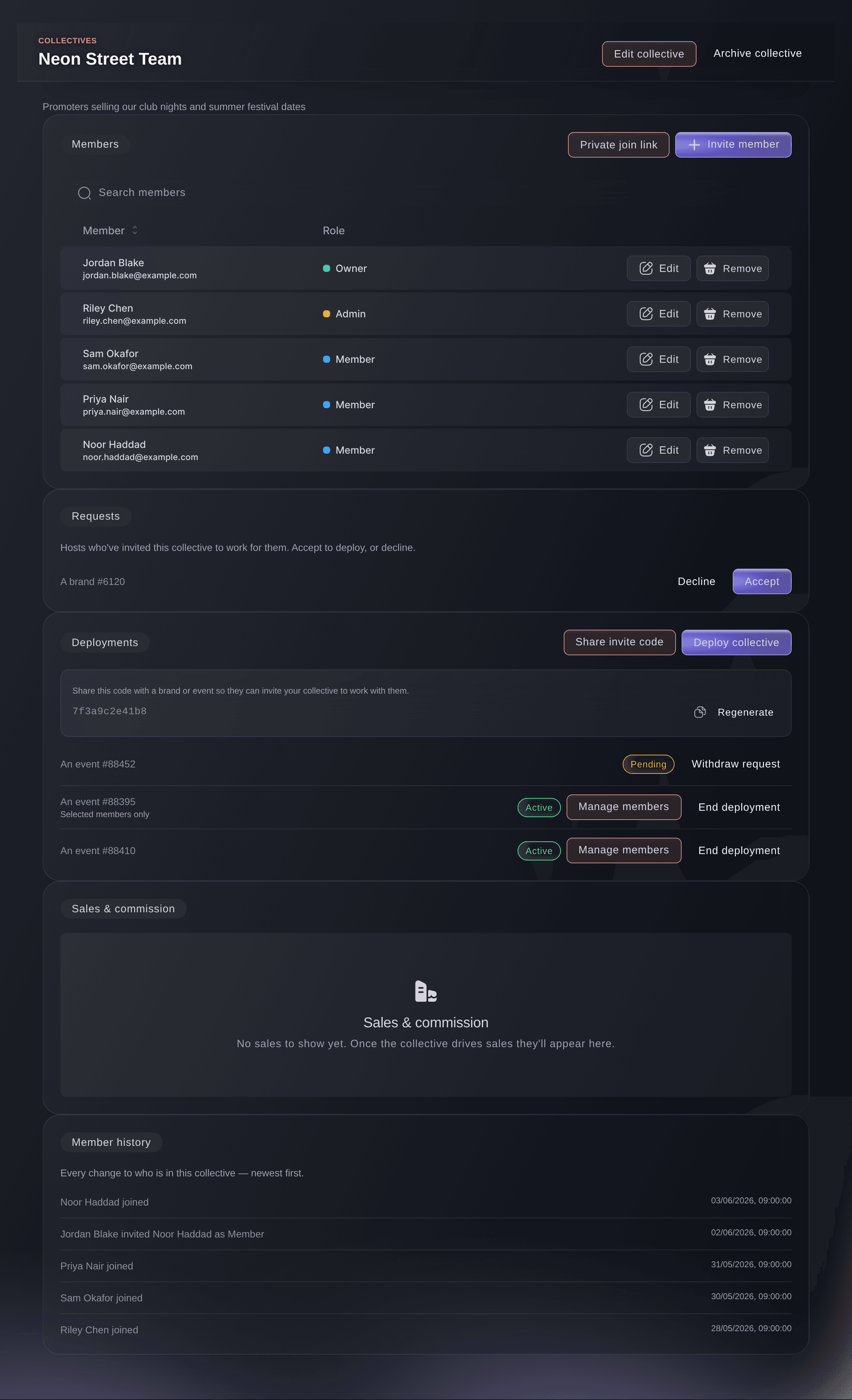
Collective, Deployments. -
Accept a venue's invitation
If a venue invites your collective, select Accept beside their invitation under Requests. Your promoters get access to their event or brand, and the deployment appears under Deployments.
-
Give partners their own ticket allocation
Optional: On an event, open Delegations and select Create Delegation for each artist's management, sponsor or partner who hands out tickets themselves.
Nota: A delegation gives the partner a counted allocation and a sign-in link of their own, without a seat on your team.
Let a partner hand out their own tickets for your event

Event, Delegations. -
Check each promoter's sales and commission
Scroll to Sales & commission on the collective. Each event deployment shows Tickets sold, Revenue and Commission owed, with each promoter's own figures listed underneath.
Nota: Only event deployments count sales here, and a brand deployment shows none.
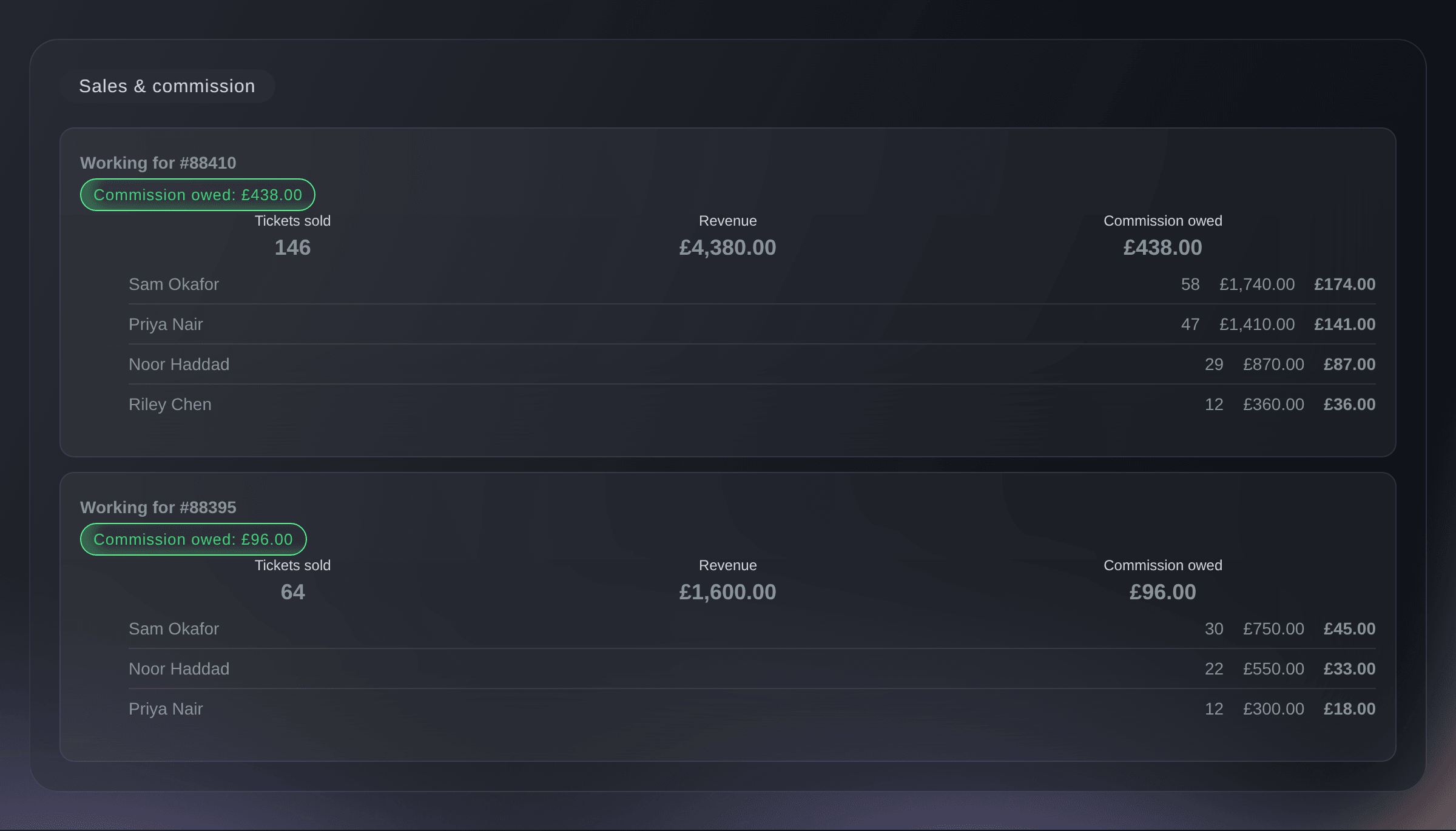
Collective, Sales & commission. -
Compare the sales of each brand's own team
Open Promoters on each brand to rank its team members by the tickets and revenue their promoter links brought in across its events.
Nota: Promoters who work only through your collective stay out of this ranking. A promoter who is also on the brand's team is listed here with all their sales, including those through the collective.
Consulta qué miembros del equipo venden tus entradas
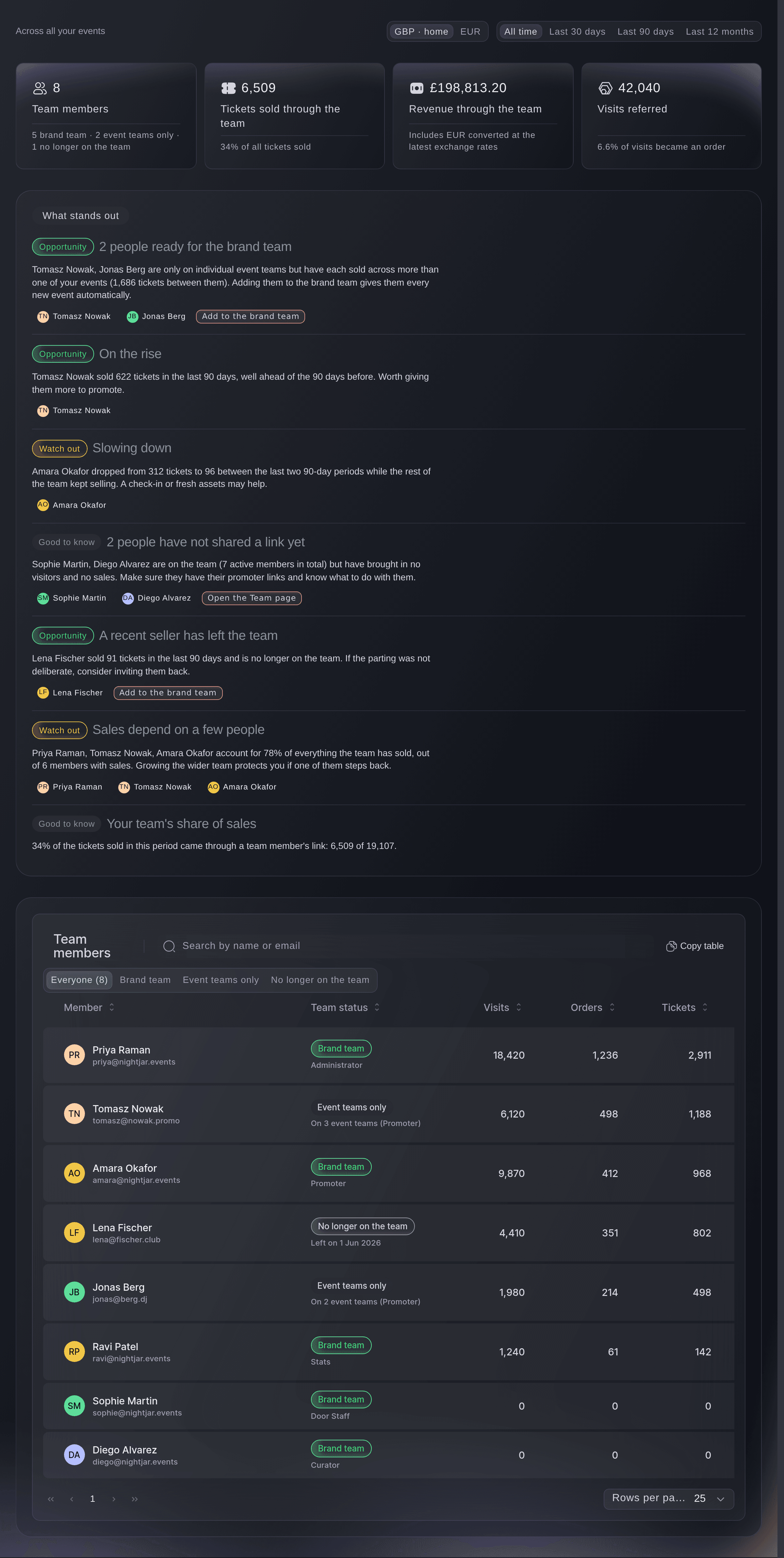
Brand, Promoters.



Prueba estos pasos en tu propio evento
Crea una cuenta gratis, monta tu evento y sigue los pasos de arriba en tu propio panel. Tarda unos minutos y no necesitas reservar una llamada comercial.
Sin cuotas de alta. Sin cuota mensual obligatoria. Sin tarjeta de crédito.
O deja que lo hagan por ti
Fai, the assistant inside your dashboard, can list your brands, invite each brand's team, create your collective, invite your promoters, deploy the collective to an event or brand with its commission, give you your invite code, accept a venue's invitation, change what a host can see of your promoters' sales, create a partner's delegation and report each promoter's sales and commission. She shows you each change and asks you to approve it before she makes it. Create each brand in the dashboard, from Brands.
En tu panel, con Fai
Set up my promoter collective <COLLECTIVE NAME>, invite <EMAIL ADDRESSES> as members and deploy it to <EVENT NAME> with <COMMISSION> commission; show me each change before you make it
Deja que Fai lo haga por ti
Fai trabaja dentro de tu panel de Ticket Fairy. Crea tu cuenta, abre Fai y pega la instrucción de arriba.
Sin cuotas de alta. Sin cuota mensual obligatoria. Sin tarjeta de crédito.
End a deployment
Under Deployments, select End deployment and confirm. Your promoters lose their access to that event or brand, and their past sales stay on record.
Fai can end a deployment after showing you which one it is and asking you to confirm.
En tu panel, con Fai
End my collective <COLLECTIVE NAME>'s deployment on <EVENT OR BRAND NAME> and ask me to confirm first
Preguntas que puedes tener
- Can I run all my brands from one login?
- Yes. You create every brand with the login you already have, and a team member you invite to several brands also signs in once. Brands lists every brand you work on.
- What is the difference between a brand team and a collective?
- A brand team belongs to one brand and reaches that brand's events, which suits your permanent staff. A collective belongs to you, and you deploy its promoters to any of your events and brands, and to venues that invite you.
- Why does Sales & commission show no sales for a brand deployment?
- Sales & commission counts the tickets each promoter sells through the promoter link the collective gives them on an event. A brand or tour deployment gives your promoters access to its events without those links, so it shows no sales there. Deploy the collective to each event whose sales and commission you want to follow.
- How many deployments does Sales & commission show?
- It lists your 50 most recent deployments, whatever their status, newest first. An older deployment drops off the list, and its sales stay on record.
- Does Net revenue give a different commission from Gross revenue?
- No. Under Calculated on, Net revenue counts the same sales as Gross revenue and takes nothing off them, so both give each promoter the same commission.
- Does Ticket Fairy pay my promoters their commission?
- No. You pay your promoters yourself, under the commission set for each deployment: yours on your own events and brands, and the venue's when a venue invites you.
- Can a venue see which of my promoters sold their tickets?
- Only if your collective lets it. When a venue invites your collective, the venue starts with your total sales and the commission it owes, not each promoter's figures. When you deploy to an event or brand yourself, choose Per-member breakdown under What the host can see to show each promoter's sales by name. If you are an owner or admin of your collective, you can ask Fai to change what the host sees on any deployment later.
- What happens to a promoter's access when they leave the collective?
- Removing a promoter from the collective ends their access to every event and brand the collective works on. Their past sales stay on the collective's record.
- Can the same promoters sell for several of my brands at once?
- Yes. Deploy the collective to each event or brand, and the same promoters work all of them. Sales & commission lists each event deployment separately.
¿Todavía tienes una pregunta?
Reserva una demo y te la respondemos en una llamada, sobre tu tipo de evento. O crea tu cuenta y compruébalo por ti mismo.
Sin cuotas de alta. Sin cuota mensual obligatoria. Sin tarjeta de crédito.
Guías relacionadas
Hazlo en tu propio evento
Crea tu cuenta, monta tu evento y sigue los pasos en tu propio panel. No necesitas reservar una llamada comercial.