
Tuotannon hallinta
Track every artist booking for your event
Promoters and festival bookers hold a contract, a fee, a rider and travel for every artist they book. Keeping each artist's own record up to date lets any member of your team answer a question on event day without calling the person who made the booking.
Keep the contract, the fee, the rider, the hospitality and the travel for every artist on your event together, and see which parts are still missing.
- Kenelle
- Booking artists and getting them to your event ready to play
- Kestää
- 8 minuuttia
Ennen aloitusta
- Event management is switched on for your account.
- You have the paperwork for at least one booking: a contract, an invoice or an offer.
- You know who on your team owns hospitality and who owns travel, because the person who did the deal usually does not handle those parts.
-
Open the artists on the bill
Open the event and select Artists.
Huomautus: Each artist is a card, and the badges on it say which parts of the booking are finished. A conference calls this tab Speakers and a film festival calls it Filmmakers, but it works the same way.
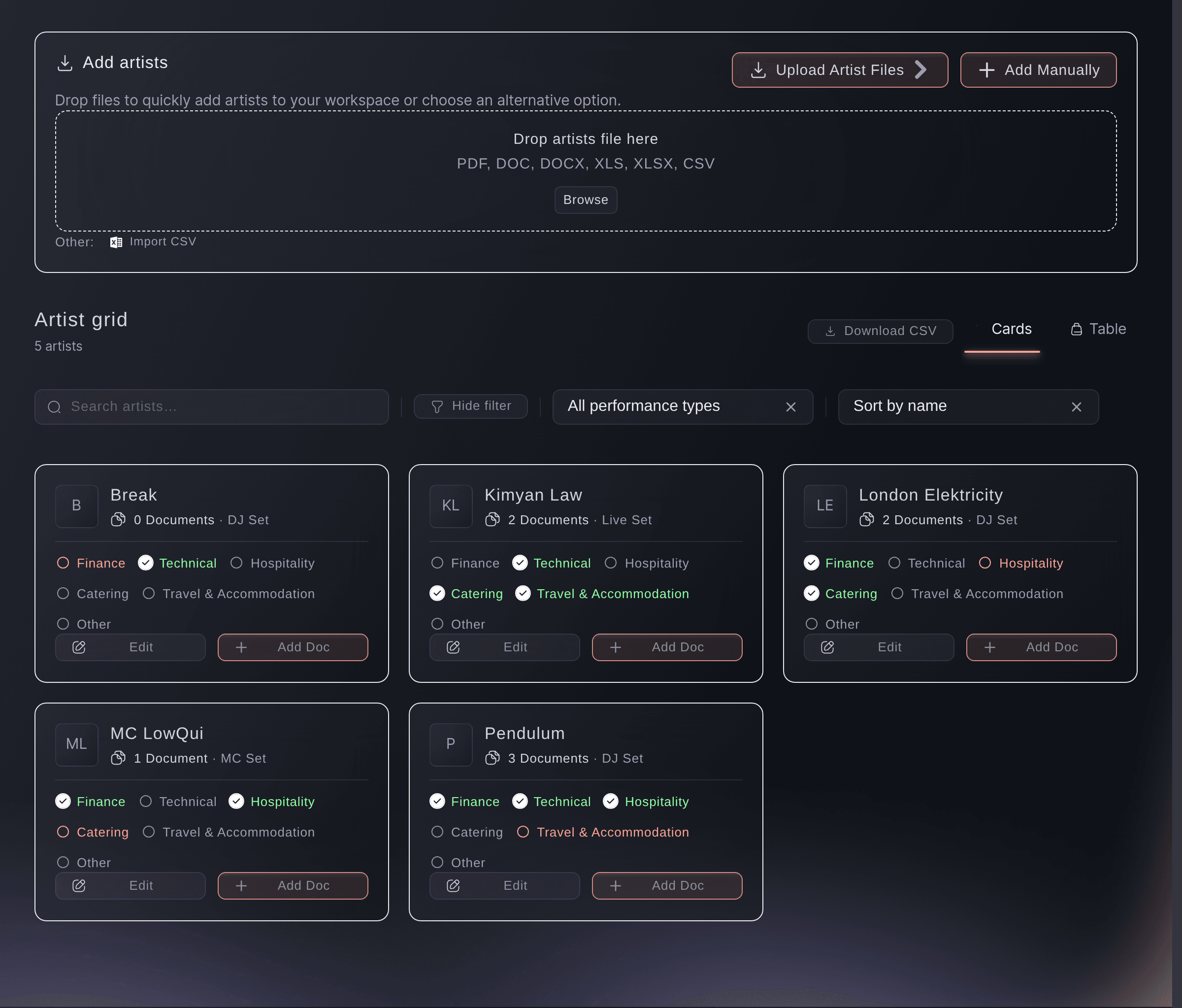
The artists on a bill, with the state of each booking on the card. -
Add the artists you have booked
Add each artist by name, or import a list where you have one.
Huomautus: Add them as the deals close rather than in one go at the end. An artist on the list with nothing filled in is still more useful than an artist nobody recorded.
-
Put the paperwork on the artist
Open an artist and attach the contract, the invoice and the rider to their record.
Huomautus: Your crew can open the rider from the artist record on the day, which they cannot do while it sits in your inbox.
-
Work through the parts of the booking
Fill in the finance, technical, hospitality, catering and travel parts, and set each one complete on the card as it is agreed.
Huomautus: A part stays open until you mark it, whatever you have filled in, so the badges say what you have signed off rather than what you have typed.
-
Find the artists with parts still open
Read down the cards for the badges that are still open.
Huomautus: Two weeks out, the artists with an open travel or hospitality badge are the ones to chase first.

Kokeile näitä vaiheita omassa tapahtumassasi
Luo ilmainen tili, rakenna tapahtumasi ja seuraa yllä olevia vaiheita omassa hallintapaneelissasi. Se vie muutaman minuutin, eikä sinun tarvitse varata myyntipuhelua.
Ei käyttöönottomaksuja. Ei pakollista kuukausimaksua. Luottokorttia ei tarvita.
Tai anna sen hoitua puolestasi
Fai can read a booking contract or invoice and pull the fee, the deposit, the payment schedule and the flight details out of it. She can also read what an artist draws on the streaming platforms.
Hallintapaneelissasi, Fain kanssa
Read the contract I uploaded for <ARTIST NAME> and tell me the fee, the deposit and when the balance is due
Omasta avustajastasi, MCP:n kautta
Yhdistä avustajasi MCP-palvelimeemme ja pyydä sitä:
Pidä --read-only MCP-määrityksessäsi. Tämä tehtävä vain lukee tietoja, joten avustajasi ei tarvitse muutoksia tekeviä työkaluja.
Pick the brand, find the event <EVENT NAME> and show it
Päätteeltä
Asenna CLI osoitteesta CLI-sivultamme, kirjaudu komennolla ticketfairy auth login ja valitse brändi, jonka parissa työskentelet, komennolla ticketfairy brand use <BRAND_ID>. ticketfairy brand list ja ticketfairy event list näyttävät muiden komentojen käyttämät tunnisteet.
Read the event the bookings belong to.
Show the event and its dates
ticketfairy event get <EVENT_ID>
Anna Fain hoitaa se puolestasi
Fai toimii Ticket Fairy -hallintapaneelissasi. Luo tili, avaa Fai ja liitä yllä oleva kehote.
Ei käyttöönottomaksuja. Ei pakollista kuukausimaksua. Luottokorttia ei tarvita.
Let Fai read the contract for you
-
Ask her for the terms rather than reading twelve pages
Attach the contract, then ask Fai for the fee, the deposit and the payment schedule.
Huomautus: She reads the parties, the money, the payment dates and the flight details where the contract carries them. Check her figures against the document before you pay anything.
Fai reads a booking contract or invoice and pulls out the terms. What she finds is a reading of the document, so check it before you pay.
Hallintapaneelissasi, Fain kanssa
Read the invoice for <ARTIST NAME> and tell me what is due, to whom and by when
Omasta avustajastasi, MCP:n kautta
Pidä --read-only MCP-määrityksessäsi. Tämä tehtävä vain lukee tietoja, joten avustajasi ei tarvitse muutoksia tekeviä työkaluja.
Pick the brand, find the event <EVENT NAME> and show it
Päätteeltä
Read the event the bookings belong to.
Show the event and its dates
ticketfairy event get <EVENT_ID>
Kysymyksiä joita sinulla voi olla
- Does adding an artist here put them on my event page?
- No. This is your production record. The lineup buyers see is part of your event page and is set up separately.
- What do the badges on a card mean?
- One for each part of the booking: finance, technical, hospitality, catering, travel and accommodation, and anything else you track. A complete badge means a team member finished that part.
- Can I see the artists as a table instead?
- Yes. The cards and the table hold the same bookings, and the table suits a long bill you are working down.
Jäikö vielä kysyttävää?
Varaa esittely, niin vastaamme siihen puhelussa sinun tapahtumatyyppisi mukaan. Tai luo tili ja katso itse.
Ei käyttöönottomaksuja. Ei pakollista kuukausimaksua. Luottokorttia ei tarvita.
Aiheeseen liittyvät oppaat
Tee tämä omassa tapahtumassasi
Luo tili, rakenna tapahtumasi ja seuraa vaiheita omassa hallintapaneelissasi. Sinun ei tarvitse varata myyntipuhelua.