
Tuotannon hallinta
Keep the jobs behind your event moving
Promoters and event teams have a long list of jobs to finish before the doors open, from the licence to the barrier hire to the posters. A board the whole team shares gives each job an owner and a date, so any team member can pick one up.
Put every job your team has to finish before the event on one board, give each one an owner and a date, and see what is blocked before it becomes a problem.
- Kenelle
- Running the jobs your team has to finish before the doors open
- Kestää
- 7 minuuttia
Ennen aloitusta
- Event management is switched on for your account.
- Your team members are on the event, so a task can have an owner who is a person rather than a note in a description.
- You have the list you already keep somewhere else. Move that list onto the board rather than starting a new one.
-
Open the board
Open the event and select Tasks.
Huomautus: One column per state, and each task sits in the column it has reached. A task in the blocked column is waiting on something rather than on a team member.
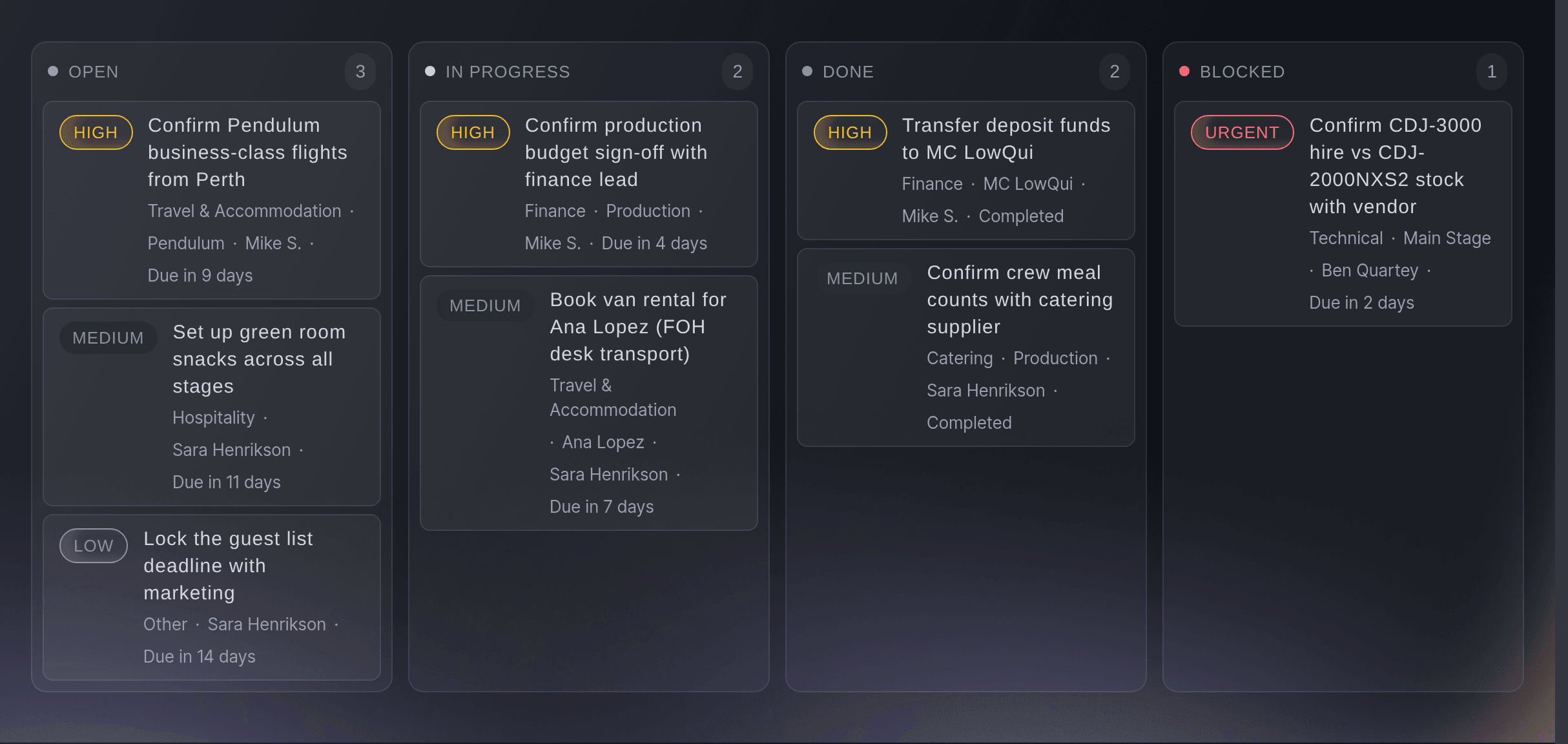
The board, with the work spread across its columns. -
Add the jobs that have to happen
Add a task for each job, named so that a team member reading it knows what finished looks like.
Huomautus: "Apply for the late licence" is a task. "Licence" is a topic a team member will have to ask about.
-
Give every task an owner and a date
Assign each task to a person and set the day it has to be done by.
Huomautus: A task with no owner has nobody to chase, so give it to the team member who can finish it.
-
Move each card as the job moves on
Drag a card into the column that matches where the job has got to.
Huomautus: Move a card as soon as the work moves, so the board matches where the job has got to. The blocked column is the one to read first each morning.
Kokeile näitä vaiheita omassa tapahtumassasi
Luo ilmainen tili, rakenna tapahtumasi ja seuraa yllä olevia vaiheita omassa hallintapaneelissasi. Se vie muutaman minuutin, eikä sinun tarvitse varata myyntipuhelua.
Ei käyttöönottomaksuja. Ei pakollista kuukausimaksua. Luottokorttia ei tarvita.
Tai anna sen hoitua puolestasi
Fai can open the event so you can read the board. The tasks themselves are read and moved in the dashboard today.
Hallintapaneelissasi, Fain kanssa
Open <EVENT NAME> so I can go through its tasks
Omasta avustajastasi, MCP:n kautta
Yhdistä avustajasi MCP-palvelimeemme ja pyydä sitä:
Pidä --read-only MCP-määrityksessäsi. Tämä tehtävä vain lukee tietoja, joten avustajasi ei tarvitse muutoksia tekeviä työkaluja.
Pick the brand, find the event <EVENT NAME> and show it
Päätteeltä
Asenna CLI osoitteesta CLI-sivultamme, kirjaudu komennolla ticketfairy auth login ja valitse brändi, jonka parissa työskentelet, komennolla ticketfairy brand use <BRAND_ID>. ticketfairy brand list ja ticketfairy event list näyttävät muiden komentojen käyttämät tunnisteet.
Read the event the tasks belong to.
Show the event and its dates
ticketfairy event get <EVENT_ID>
Anna Fain hoitaa se puolestasi
Fai toimii Ticket Fairy -hallintapaneelissasi. Luo tili, avaa Fai ja liitä yllä oleva kehote.
Ei käyttöönottomaksuja. Ei pakollista kuukausimaksua. Luottokorttia ei tarvita.
See the same work as a list, a calendar or a timeline
-
Switch the view to suit the question
Change the view when you want the work by date rather than by state.
Huomautus: The board shows what is stuck, a list everything at once and a calendar what is due this week, while a timeline lays the dated work out in order so you can see what has to finish before the next thing starts.
Fai can open the event. The task views are read in the dashboard today.
Hallintapaneelissasi, Fain kanssa
Open <EVENT NAME> so I can see what is due this week
Omasta avustajastasi, MCP:n kautta
Pidä --read-only MCP-määrityksessäsi. Tämä tehtävä vain lukee tietoja, joten avustajasi ei tarvitse muutoksia tekeviä työkaluja.
Pick the brand, find the event <EVENT NAME> and show it
Päätteeltä
Read the event the tasks belong to.
Show the event and its dates
ticketfairy event get <EVENT_ID>
Kysymyksiä joita sinulla voi olla
- Who can see the board?
- The team on the event, within what their role allows. It is a working record for your team and buyers never see it.
- What belongs in the blocked column?
- A task that cannot move until something outside it happens: a permit, a supplier, a decision. A task waiting on a person is still in progress.
- Can two people own one task?
- Yes. Add as many assignees as the job needs, and each of them gets it in their own list. Naming one of them as the person accountable for it finishing still helps, and a team member who only wants to keep an eye on it can follow it instead.
Jäikö vielä kysyttävää?
Varaa esittely, niin vastaamme siihen puhelussa sinun tapahtumatyyppisi mukaan. Tai luo tili ja katso itse.
Ei käyttöönottomaksuja. Ei pakollista kuukausimaksua. Luottokorttia ei tarvita.
Aiheeseen liittyvät oppaat
Tee tämä omassa tapahtumassasi
Luo tili, rakenna tapahtumasi ja seuraa vaiheita omassa hallintapaneelissasi. Sinun ei tarvitse varata myyntipuhelua.