
Sähköposti, tekstiviestit ja markkinointi
Tell ticket holders where your event is
A late venue reveal or a change of entrance can turn a good event day into a stressful one. Ticket Fairy keeps the location information with the event and emails a clear update to the people attending once you approve it.
Save the location details, choose when future buyers can see the venue, and email a confirmed venue update to ticket holders and RSVPs.
- Kenelle
- Announcing an event location or venue change to the people attending
- Kestää
- 4 minuuttia
Ennen aloitusta
- You're an owner or admin of the event.
- Your event has a saved venue.
-
Open Venue Details
Open your event, select Details, then scroll to Venue Details.
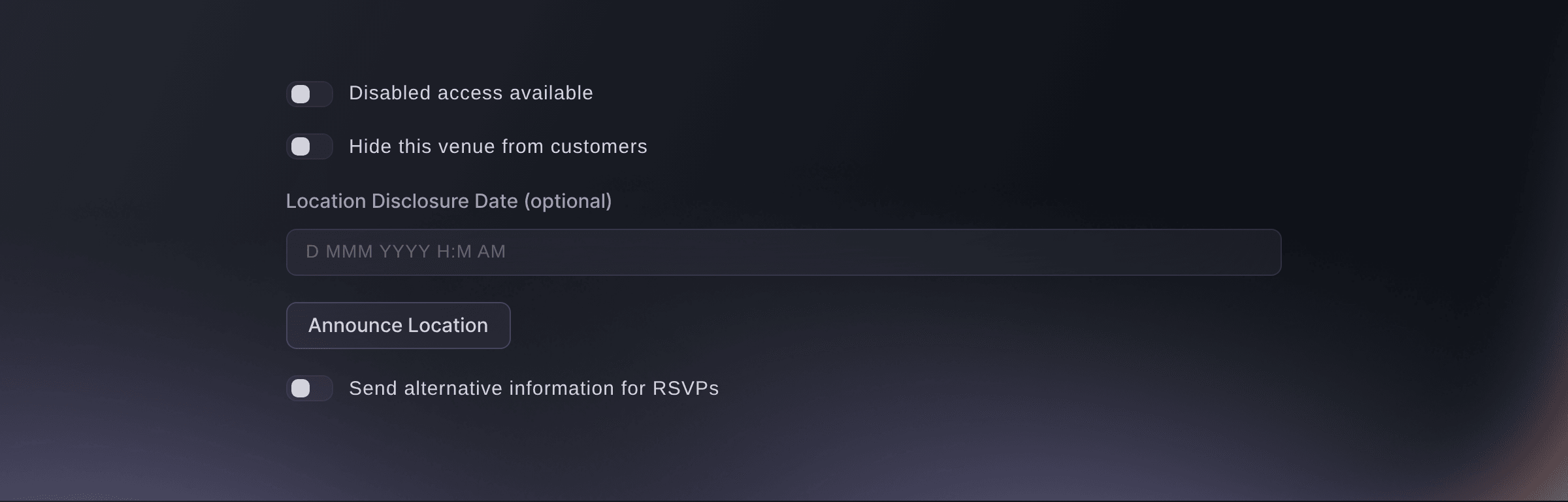
Event, Details, Venue Details. -
Choose whether future buyers see the venue
Turn Hide this venue from customers off when future buyers should see the venue on the event page.
Huomautus: To keep the venue secret until a set time, leave it on and enter Location Disclosure Date (optional). At that time the venue appears on the event page and Ticket Fairy emails the location to ticket holders, so you do not need to announce it yourself.
-
Enter the location information
Enter the directions or entrance details ticket holders need under Additional Location Information.
Huomautus: The location email carries this text with the venue name and address.
-
Save the venue changes
Select Save at the foot of the page.
Huomautus: Announce Location stays unavailable until you save. If the page asks
Do you want to send venue update information to all ticket holders and RSVPs?
, select No when you will announce the location in the next steps, because Yes sends the same update now. -
Open the announcement
Select Announce Location, then check the text under Location Information.
Huomautus: The text you saved appears here, and a change here replaces the saved location information. Ticket holders receive the email with the subject Location Updated: and your event name, or Location Disclosed: while the venue is still hidden.
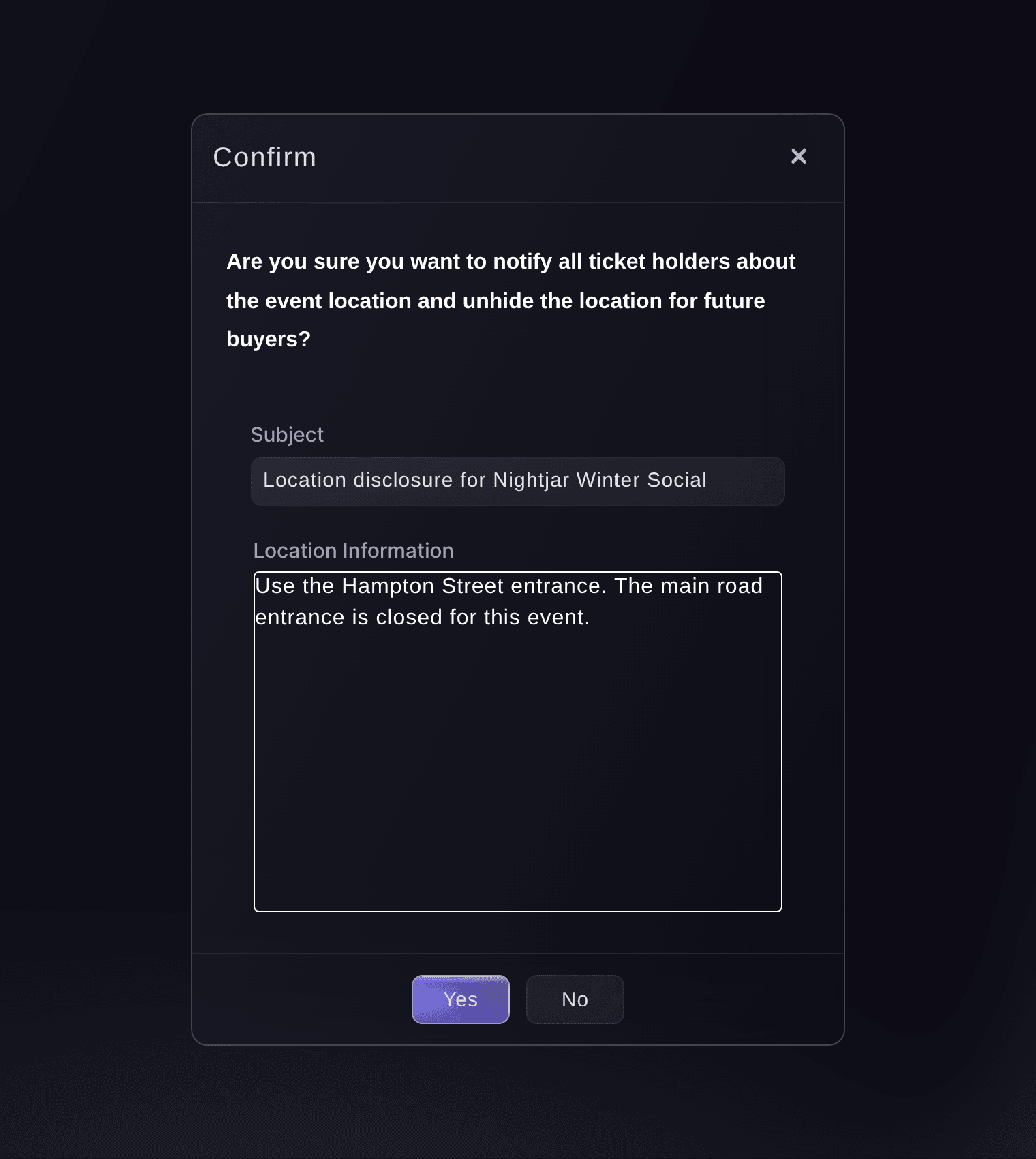
Event, Details, Venue Details, Announce Location. -
Approve the announcement
Select Yes to send the email.
Huomautus: The confirmation mentions unhiding the location for future buyers. Hide this venue from customers and the disclosure date decide that, so set them before you approve.
Varoitus: The email cannot be recalled once you select Yes.
-
Check that the email went out
Look for
Successfully sent!
after the confirmation closes.Huomautus: Ticket Fairy emails each ticket-holder address once, then each RSVP address that is not already on that list. If you see
We couldn't send the emails. Please try again.
, select Announce Location again.
Kokeile näitä vaiheita omassa tapahtumassasi
Luo ilmainen tili, rakenna tapahtumasi ja seuraa yllä olevia vaiheita omassa hallintapaneelissasi. Se vie muutaman minuutin, eikä sinun tarvitse varata myyntipuhelua.
Ei käyttöönottomaksuja. Ei pakollista kuukausimaksua. Luottokorttia ei tarvita.
Tai anna sen hoitua puolestasi
Fai can save the location information and email it to your ticket holders and RSVPs. She shows you the event and the location text and asks for your approval before sending, and the email cannot be recalled after you approve it. Set whether the venue is hidden on the Details page first, because the announcement leaves that setting as it is.
Hallintapaneelissasi, Fain kanssa
Announce the venue location for <EVENT NAME> with this location information: <LOCATION INFORMATION>. Show me the event and the text, and ask for my approval before sending
Anna Fain hoitaa se puolestasi
Fai toimii Ticket Fairy -hallintapaneelissasi. Luo tili, avaa Fai ja liitä yllä oleva kehote.
Ei käyttöönottomaksuja. Ei pakollista kuukausimaksua. Luottokorttia ei tarvita.
Kysymyksiä joita sinulla voi olla
- Can I change the subject of the location email?
- The email's subject is Location Updated: and your event name, or Location Disclosed: while the venue is still hidden. Leave the Subject field in the dialog as it is filled in, because the dialog does not send while it is empty.
- Will announcing the location make it visible to future buyers?
- No. The event page shows the venue when Hide this venue from customers is off, or once the Location Disclosure Date (optional) has passed. Announcing sends the email and saves the location information, and leaves both settings as they are.
- Do I need to announce the location if I set a disclosure date?
- No. When the disclosure date passes, Ticket Fairy shows the venue on the event page and emails the location to ticket holders within about five minutes. Use Announce Location for an update you want to send straight away.
- Why can't I select Announce Location?
- It stays unavailable while Venue Details has unsaved changes, and hovering over the button shows
Save changes to announce new location
. Select Save, then select Announce Location again. - Who receives the venue update?
- Ticket Fairy sends it to each unique ticket-holder email address for the event, then to RSVP addresses that are not already in that list.
- Can I stop the email after I select Yes?
- No. The email cannot be recalled. Check the location text, the venue visibility and the recipients before you approve it.
Jäikö vielä kysyttävää?
Varaa esittely, niin vastaamme siihen puhelussa sinun tapahtumatyyppisi mukaan. Tai luo tili ja katso itse.
Ei käyttöönottomaksuja. Ei pakollista kuukausimaksua. Luottokorttia ei tarvita.
Aiheeseen liittyvät oppaat
Tee tämä omassa tapahtumassasi
Luo tili, rakenna tapahtumasi ja seuraa vaiheita omassa hallintapaneelissasi. Sinun ei tarvitse varata myyntipuhelua.