
Toimintaohjeet tapahtumatyypeittäin
Sell exhibitor stands for a trade show or exhibition
Trade show and exhibition teams sell stands to exhibitors, then have to get every exhibitor's stand staff in on the morning without a spreadsheet of names. You can sell each stand package with a deposit, and let each exhibitor name their own staff up to the number their stand includes.
Sell each stand package at your trade show, expo or consumer exhibition as its own booking with a deposit, take exhibitor applications, and let every exhibitor name their own stand staff up to the number their package includes.
- Kenelle
- Selling stands and exhibitor passes for a trade show, expo or consumer exhibition
- Kestää
- 20 minuuttia
Ennen aloitusta
- You're a brand owner or admin. You can create events, change tickets and table types, and set up delegations.
- You know your stand packages, what each costs, how much you take as a deposit and how many staff each package includes.
- You have a contact name and email address for each exhibitor.
-
Build the show from the Convention template
Select Create Event, choose Convention and turn on Add an exhibitor booth. The template adds an Exhibitor booth table type beside the weekend, day and VIP passes your visitors buy.
Huomautus: Run a conference on Ticket Fairy walks the visitor side of the show: registration, workshops and speakers. The Exhibition template suits a gallery or museum show with adult and concession entry.
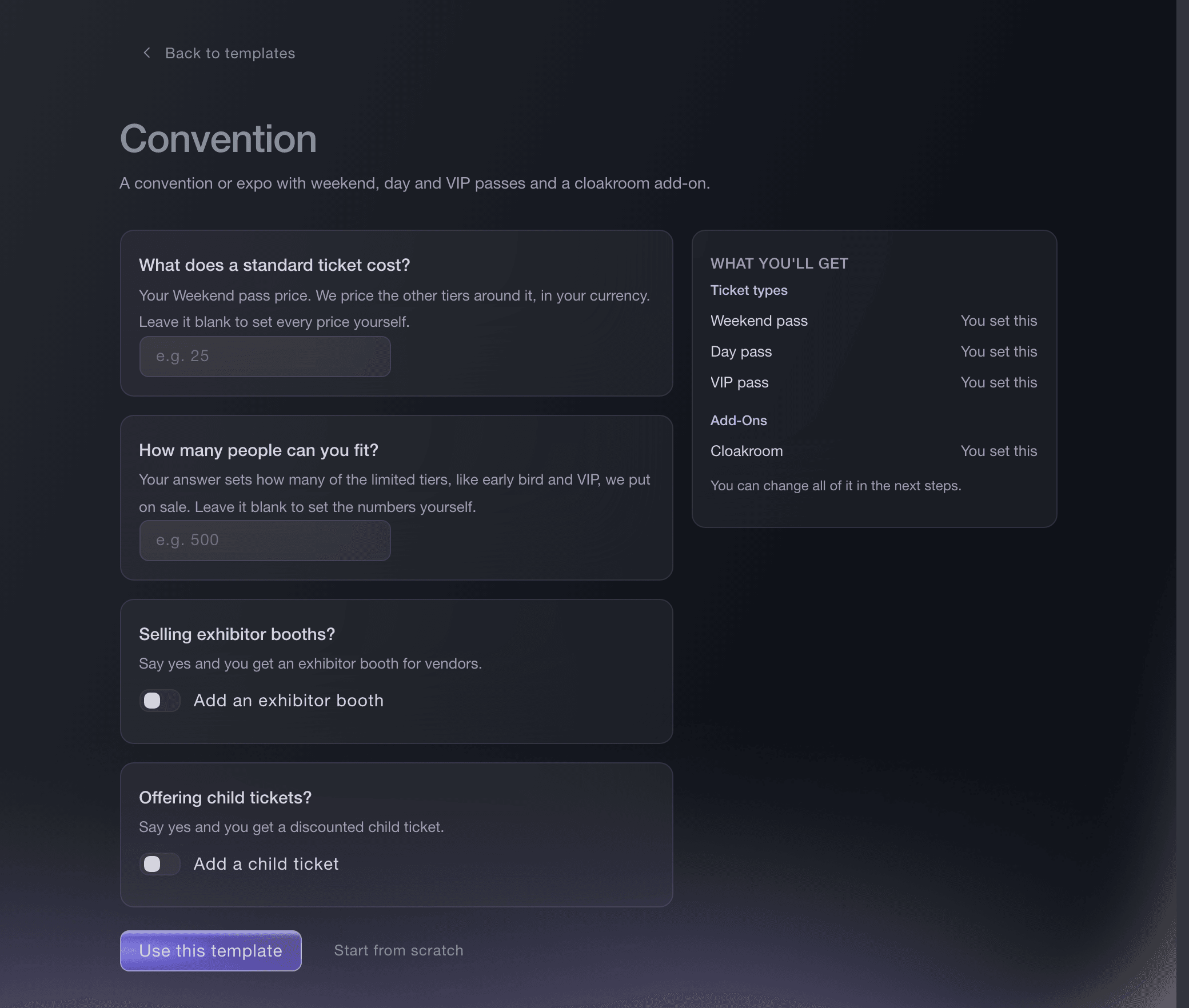
Create Event, Convention template. -
Price each stand package as a table type
Open the Exhibitor booth under Table Types and enter the stand price, how many stands you have, the smallest and largest team one booking admits, and your deposit in Online Deposit Percentage. We hold that share on the exhibitor's card and charge it once they pass the identity check, and you collect the rest directly.
Huomautus: After paying, each exhibitor photographs an ID document and takes a selfie before their booking is confirmed. An exhibitor who has passed the check before skips it.
Vinkki: Create a separate table type for each package, such as Shell scheme, Space only and Corner stand, each with its own price. Enter 100 as the deposit to take the whole stand price online.
Sell VIP tables and bottle service through your promoters
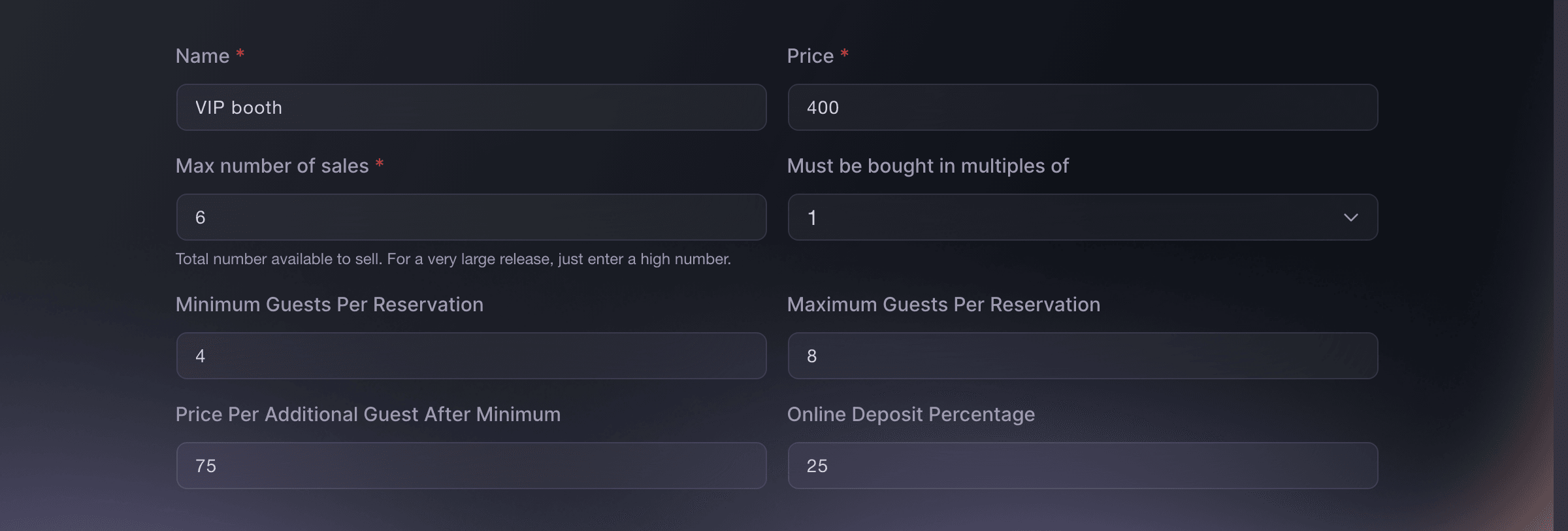
Tickets, Table Types. -
Take exhibitor applications
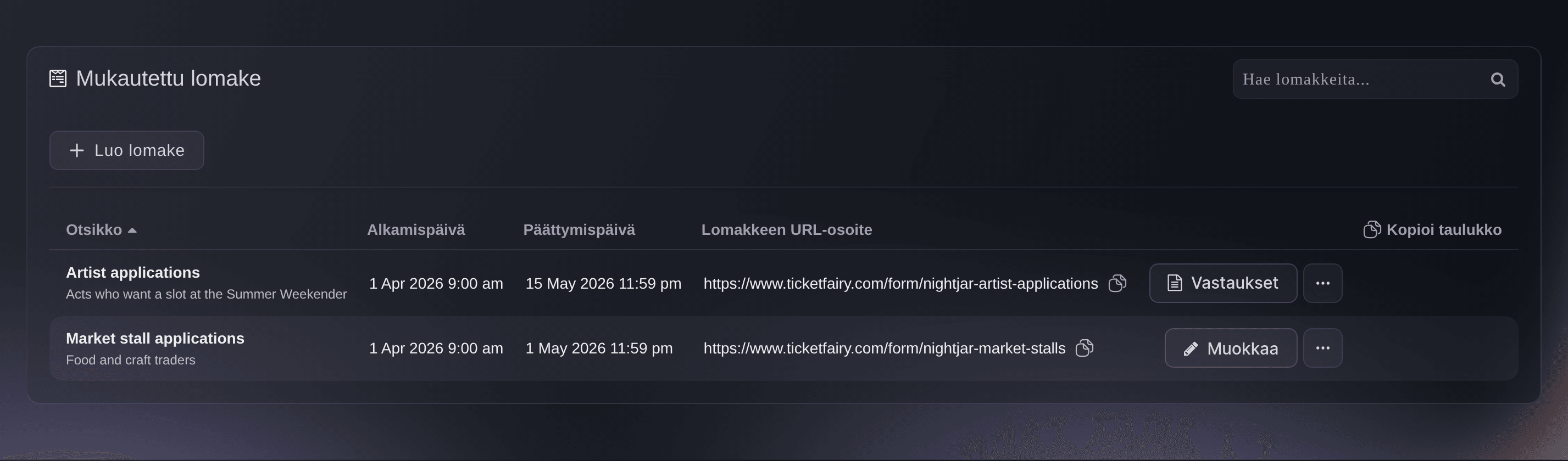
Optional: If you choose your exhibitors, open Forms on the event and select Create Form with the questions you need, such as company, product category and stand size. Every application arrives in one list with a column for each answer, ready for you to accept or decline.
Huomautus: Once you accept an applicant, their row offers you a guest ticket or an invitation to buy for them.
Take act and trader applications for your event
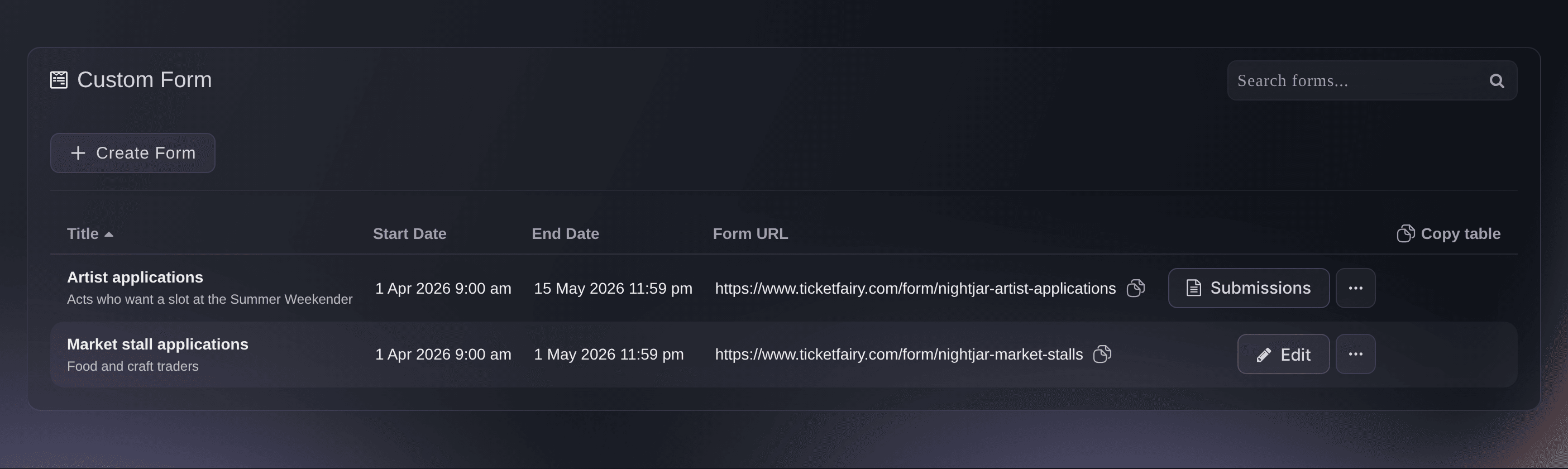
Event, Forms. -
Create a hidden Stand staff ticket type
On the event's Tickets page, create a free ticket type named Stand staff, then turn on Hidden and choose Always hidden. Stand staff tickets then never appear on your public event page, so visitors cannot take one.
Huomautus: Give it a daily scan rule, one entry per day, so one ticket works on every day of the show.
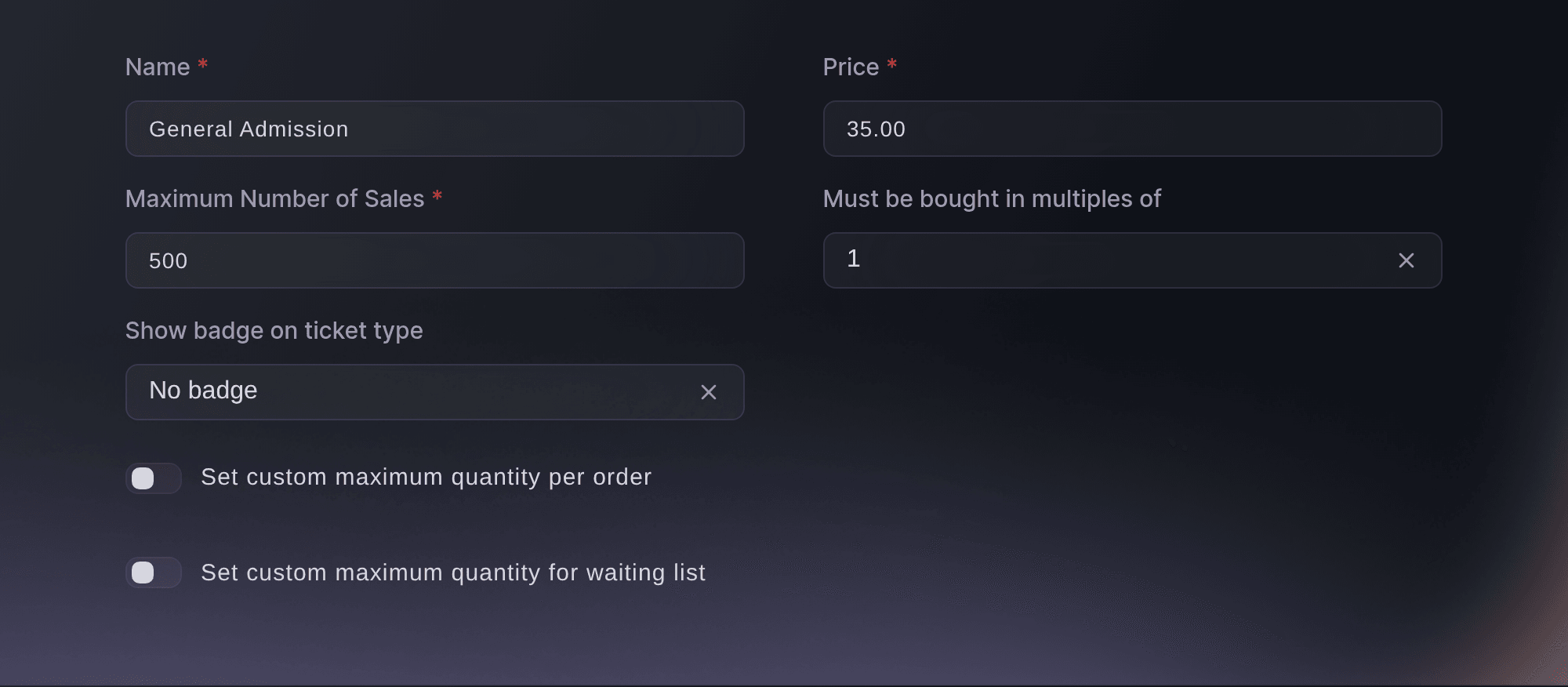
Tickets, Create Ticket Type. -
Give each exhibitor their stand staff allocation
Open Delegations and select Create Delegation for each exhibitor, adding the Stand staff ticket type as a Guest Ticket with the number of staff their stand package includes. The exhibitor names their own staff through one link, without a login to your event, and cannot go past the number you set.
Huomautus: Name the delegation after the exhibitor, and add both of their bookers to it when two people share the allocation.
Let a partner hand out their own tickets for your event

Event, Delegations. -
Put the scanning app on the door team's phones
Open Check-In and select Download App for the Entry Fairy links on both app stores. Each person scanning signs in with their own Door Staff login, so every admission carries a name.

Event, Check-In, Download App. -
Watch visitors and stand staff arrive
Open Check-In on each day of the show to see arrivals by hour against tickets sold. Stand staff scan in the same app as visitors, and the Ticket Type tab counts them apart from visitors.
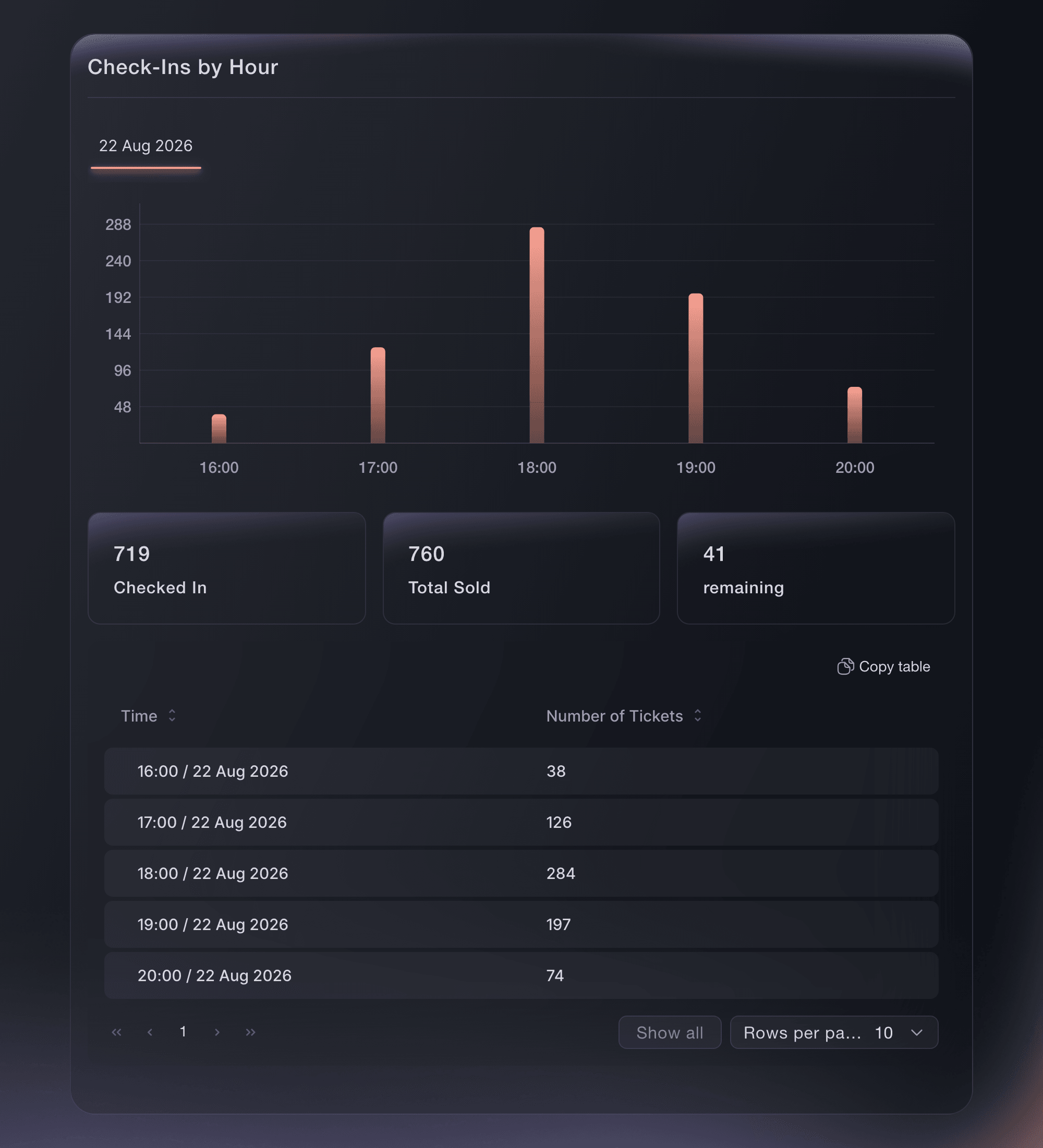
Event, Check-In.
Kokeile näitä vaiheita omassa tapahtumassasi
Luo ilmainen tili, rakenna tapahtumasi ja seuraa yllä olevia vaiheita omassa hallintapaneelissasi. Se vie muutaman minuutin, eikä sinun tarvitse varata myyntipuhelua.
Ei käyttöönottomaksuja. Ei pakollista kuukausimaksua. Luottokorttia ei tarvita.
Tai anna sen hoitua puolestasi
Fai can build the show from the Convention template with an exhibitor booth, create each stand package, create the hidden stand staff ticket type, set up a delegation for each exhibitor and report arrivals. She shows you each change and asks you to approve it before she makes it. Exhibitor applications are set up and read on the Forms page in the dashboard.
Hallintapaneelissasi, Fain kanssa
Help me set up exhibitor stands for our trade show <EVENT NAME>; ask about our stand packages, prices, deposits and how many staff each includes, then show me the stand packages and the exhibitor allocations before changing anything
Päätteeltä
Asenna CLI osoitteesta CLI-sivultamme, kirjaudu komennolla ticketfairy auth login ja valitse brändi, jonka parissa työskentelet, komennolla ticketfairy brand use <BRAND_ID>. ticketfairy brand list ja ticketfairy event list näyttävät muiden komentojen käyttämät tunnisteet.
Use the CLI to create each stand package and the hidden stand staff ticket type, and to read arrivals by ticket type. Applications and delegations are set up in the dashboard.
Create a stand package for a team of up to 4 with a 50% deposit online. Prices are in the smallest unit of your event currency, so 120000 is 1,200.00.
ticketfairy table create <EVENT_ID> --body '{"displayName": "Shell scheme stand", "price": 120000, "maxInventory": 40, "minGuests": 1, "maxGuests": 4, "guestPrice": 0, "depositPercent": 50}'
Create a free stand staff ticket type that never shows on your public event page and admits its holder once in each 24 hours.
ticketfairy ticket create <EVENT_ID> --name "Stand staff" --price 0 --max-inventory 400 --hidden --hiding-option always_hidden --scan-rule "day:1"
Read arrivals for visitors and stand staff separately.
ticketfairy checkin status <EVENT_ID> --breakdown ticket-types --output json
Anna Fain hoitaa se puolestasi
Fai toimii Ticket Fairy -hallintapaneelissasi. Luo tili, avaa Fai ja liitä yllä oleva kehote.
Ei käyttöönottomaksuja. Ei pakollista kuukausimaksua. Luottokorttia ei tarvita.
Kysymyksiä joita sinulla voi olla
- Does a stand booking let the exhibitor's team in?
- The stand booking is one booking for the stand. Give each exhibitor a delegation of Stand staff tickets, so every member of their team has a ticket in their own name for the door.
- How do I collect the rest of the stand price?
- A deposit below 100 charges that share online once the exhibitor passes the identity check, and the confirmation you see when you save says how much you collect directly. Enter 100 to take the whole stand price online instead.
- Can an exhibitor add more staff than their package includes?
- Not through their link: it refuses a ticket past the number you set. Raise the number on their delegation when you agree to more staff.
- Can visitors book a time to arrive?
- Yes, once Ticket Fairy has turned on time slots for your show. The visitor ticket type then offers a calendar of dates and arrival times, each with its own capacity.
- Where do I set up visitor registration, workshops and job titles?
- On the same event: the visitor passes from the template, workshops as add-ons, a name on every ticket and checkout questions for each visitor's company and job title. The conference playbook walks that side of the show step by step.
Jäikö vielä kysyttävää?
Varaa esittely, niin vastaamme siihen puhelussa sinun tapahtumatyyppisi mukaan. Tai luo tili ja katso itse.
Ei käyttöönottomaksuja. Ei pakollista kuukausimaksua. Luottokorttia ei tarvita.
Aiheeseen liittyvät oppaat
Tee tämä omassa tapahtumassasi
Luo tili, rakenna tapahtumasi ja seuraa vaiheita omassa hallintapaneelissasi. Sinun ei tarvitse varata myyntipuhelua.