
Suosittelumarkkinointi
Choose who wins a prize at your event
Some prizes cannot be worked out from your ticket sales. Best costume, the answer to a question you asked on stage, a name out of a hat: you decide who won, so Ticket Fairy waits for you. There are two ways to say it, and both end with the same win on your winners list.
Give out a prize with no target on it: name the buyer you already know won, or draw winners at random from every buyer who has paid, then confirm what the draw came up with.
This is deciding who won a prize with no target on it, within offering prizes at your event. You can return to the complete prizes guide once the winners are on your list. Offer prizes your fans can win at your event
- Kenelle
- Giving out a prize you decide the winner of
- Kestää
- 7 minuuttia
Ennen aloitusta
- You have an owner or admin login for the event. For a prize that runs across a brand's events you need an owner or admin login for the brand instead.
- The prize is one you judge yourself. On Add a prize that is the You pick the winner yourself answer to who earns it, and its card reads "Whoever you choose".
- You still have one of the prize left to give. The card says how many are left where you set a limit.
-
Open the Prizes tab
Open your event, select Rewards and open the Prizes tab.
Huomautus: The cash back your buyers earn for selling tickets sits at the top, and the prizes you offer sit under it.

Rewards, Prizes. The menu on each card carries what you can do with that prize. -
Find the prize you judge yourself
Find the card that reads "Whoever you choose" and open the menu on it.
Huomautus: A prize with a target on it is awarded for you the moment a buyer reaches it, and a prize a pack of friends wins is decided a different way. Neither carries the two entries below.
-
Choose how the winner is decided
Select either Pick the winner or Draw a winner from that menu.
Huomautus: Both ways end with the same win on your winners list, and both email the winner. They differ only in who decides.
-
Name the winner you already know
Select Pick the winner, enter part of the person's name or email address in Who won it?, choose them from the list, then select Give them the prize.
Huomautus: Only buyers who have bought from you are offered, and a buyer who already holds this prize stays on the list marked Already picked. Why they won (optional) is kept with the win for your team to read.
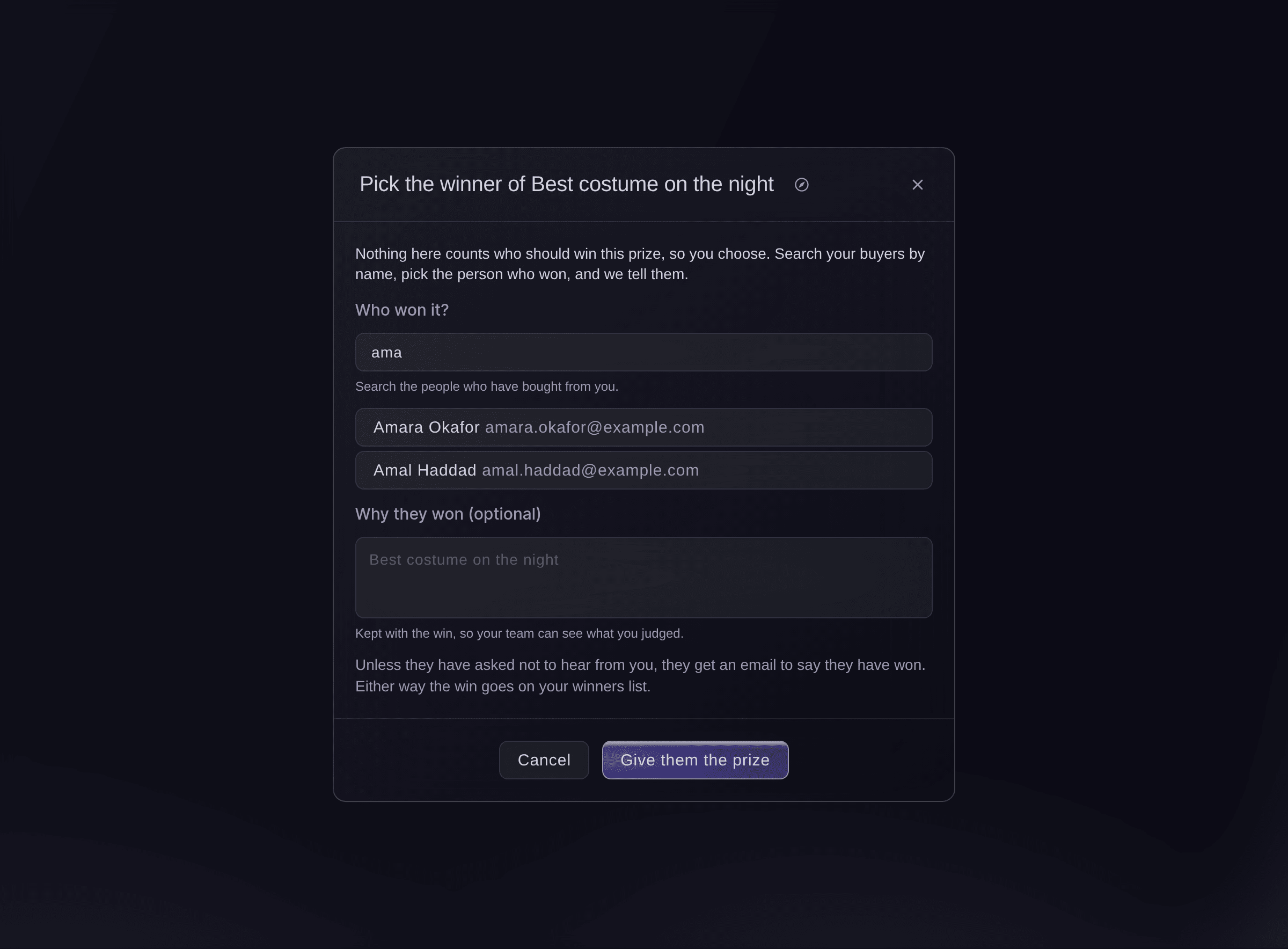
Pick the winner, with two buyers matching what was entered. -
Draw the winner instead
Select Draw a winner, enter How many winners do you want?, then select Draw.
Huomautus: Every buyer who has paid for a ticket on this event goes in once, apart from those who already hold this prize. The draw takes longer on a larger event, and you can leave the dialog open while it runs.
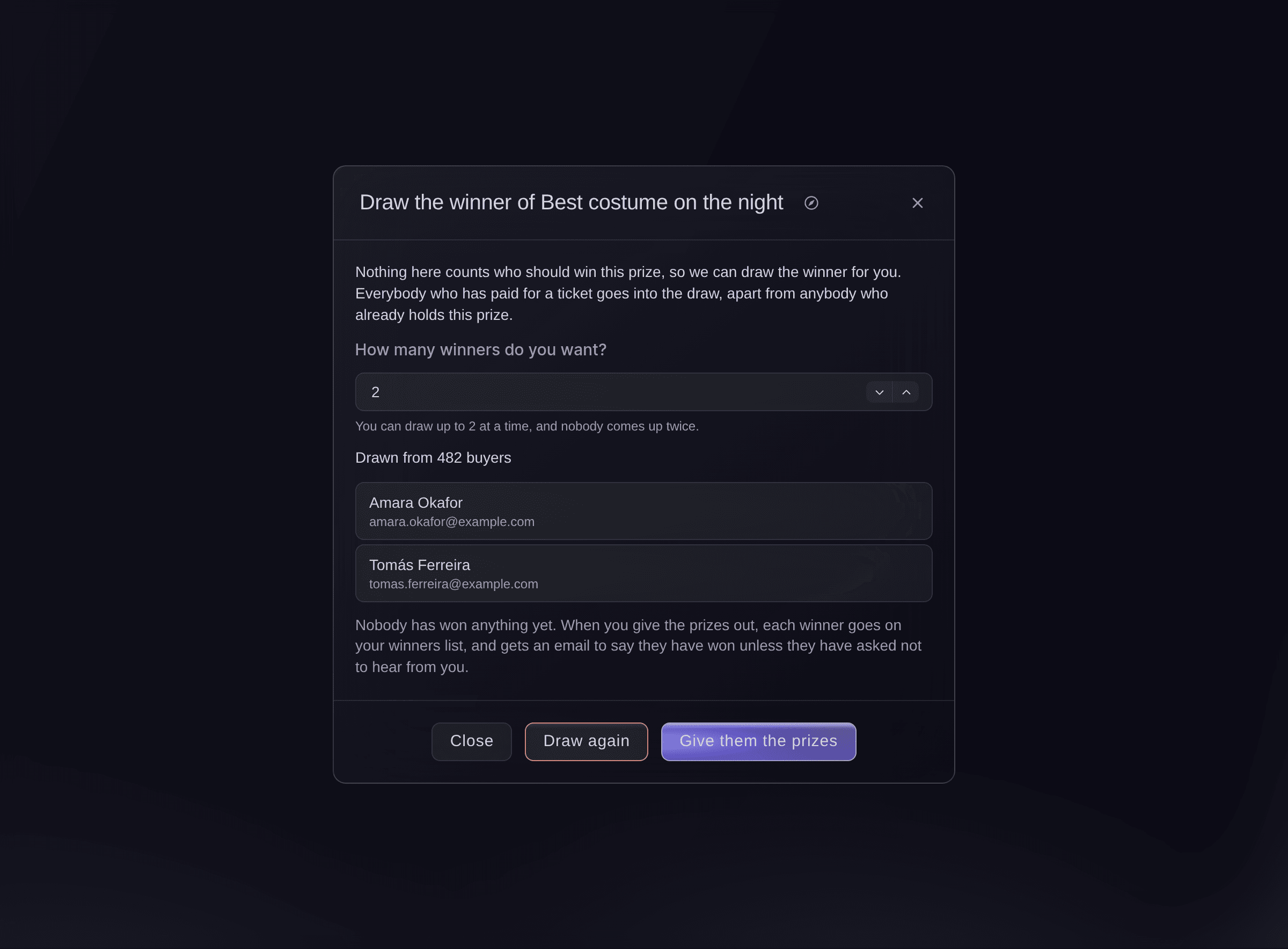
Draw a winner, with the two names the draw came up with and nothing given out yet. -
Give the prizes to the buyers who came up
Read the names and how many buyers were in the draw, then select Give them the prizes. Nobody has won anything until you do.
Huomautus: Draw again takes a different set of names, and every draw is kept, including the ones you drew again over. Closing the dialog gives nobody anything.
-
Find the win on your winners list
Open Influencers and open the Winners tab. A new win is ready for you there, or sits as Waiting on the winner where the prize asks the winner a question first.
Huomautus: Select Mark as delivered once the prize is with them. Cancel takes back a win that should not stand and asks you why.

Influencers, Winners. A win you named and a win you drew sit beside every other win.


Kokeile näitä vaiheita omassa tapahtumassasi
Luo ilmainen tili, rakenna tapahtumasi ja seuraa yllä olevia vaiheita omassa hallintapaneelissasi. Se vie muutaman minuutin, eikä sinun tarvitse varata myyntipuhelua.
Ei käyttöönottomaksuja. Ei pakollista kuukausimaksua. Luottokorttia ei tarvita.
Tai anna sen hoitua puolestasi
Fai can name the winner you tell her to, or draw winners for you. A draw gives nobody anything on its own: she reads out who came up and how many buyers were in the draw, then waits for you to say whether to give the prizes out.
Hallintapaneelissasi, Fain kanssa
For this event, draw 2 winners for the prize Best costume on the night, tell me who came up and how many buyers were in the draw, then ask me before you give the prizes out
Anna Fain hoitaa se puolestasi
Fai toimii Ticket Fairy -hallintapaneelissasi. Luo tili, avaa Fai ja liitä yllä oleva kehote.
Ei käyttöönottomaksuja. Ei pakollista kuukausimaksua. Luottokorttia ei tarvita.
Give out a prize that runs across a brand's events
A prize you set up on a brand is judged on the brand, so both ways live there rather than on any one event.
-
Open the brand's Prizes tab
Open your brand, select Rewards, open the Prizes tab and use the same two menu entries on the prize's card.
Huomautus: The brand's Winners page is where those wins land. A draw for a brand prize takes in every buyer who has paid on any of that brand's events, so it runs for longer.
Fai can draw for a brand prize and give the prizes out, the same as on an event. She reads out who came up and asks you to approve the moment they win.
Hallintapaneelissasi, Fain kanssa
For the brand <BRAND NAME>, draw 1 winner for the prize <PRIZE NAME>, tell me who came up, then ask me before you give the prize out
Ask each winner for what you need to send the prize
A prize you post needs an address, and a prize in a buyer's name needs the spelling they want. Ask on the prize itself and every winner answers the same questions, however you chose them.
-
Add the questions to the prize
Open the prize from Prizes, select Edit, then add each question under Ask winners for.
Huomautus: A win on a prize that asks questions sits as Waiting on the winner until the winner answers, and is ready for you once they have.
Fai can add or change the questions a prize asks its winners. You see the questions before they are saved.
Hallintapaneelissasi, Fain kanssa
On the prize <PRIZE NAME> for this event, ask each winner for their postal address and their t-shirt size
Kysymyksiä joita sinulla voi olla
- Who goes into the draw?
- Every buyer who has paid for a ticket on the event, or on any of the brand's events for a brand prize. Each buyer is in it once however many tickets they bought, and a buyer who already holds this prize is left out, including one whose win was called off.
- Can I draw again if I do not like the result?
- Yes, as often as you want, and nobody has won anything until you give the prizes out. Every draw is kept, so your team can see how many times a prize was drawn, and the winners you settled on are on the winners list.
- How many winners can one draw take?
- Up to 25, and never more than you have left of the prize. Where you limited the prize to three and have given one away, a draw takes up to two.
- The draw came up with fewer names than I asked for. Why?
- There were fewer buyers in the draw than that. The dialog says how many it drew from, so you can give those winners their prizes, or wait until more buyers have paid and draw again.
- Why does it say nobody can win this prize yet?
- Either no buyer has paid for a ticket yet, or every buyer who has already holds this prize. Both are answers about your buyers rather than about the prize, so the draw waits until that changes.
- Does the winner know how they were chosen?
- The email says they have won and what they won. It does not say whether you named them or drew them, so tell your buyers yourself where a draw is part of what you promised.
- Can I take a win back?
- Select Cancel on the row in Winners and say why. The winner was emailed when they won, so tell them too; the cancelled win and your reason stay in their history, and they cannot be picked or drawn for the same prize again.
- A team member took the last prize while I was reading my draw. What happens?
- Giving the prizes out is refused and says so, and nothing is half given: either every winner in the draw gets one or none of them does. Raise the limit on the prize, or draw again for what is left.
- Can a pack of friends be drawn?
- No. A draw picks one buyer at a time, so a prize a pack wins carries neither of the two entries. Give a pack prize a target it can reach instead.
- Who can see the names in a draw?
- Owners and admins on the event, or on the brand for a brand prize. A Stats or Limited Stats login opens neither entry and reads no buyer's email address, and Ticket Fairy records each time a draw is read.
Jäikö vielä kysyttävää?
Varaa esittely, niin vastaamme siihen puhelussa sinun tapahtumatyyppisi mukaan. Tai luo tili ja katso itse.
Ei käyttöönottomaksuja. Ei pakollista kuukausimaksua. Luottokorttia ei tarvita.
Aiheeseen liittyvät oppaat
Tee tämä omassa tapahtumassasi
Luo tili, rakenna tapahtumasi ja seuraa vaiheita omassa hallintapaneelissasi. Sinun ei tarvitse varata myyntipuhelua.