
Vault og Capital
Get paid for your events in local currencies with Vault
Touring promoters and festival teams are paid by sponsors, venues and partners in more than one country. A Vault receiving account gives your brand local bank details in each currency, so a payment arrives in the currency it was sent in and waits in Vault until you spend it.
Open a Vault receiving account for a currency, such as pounds, euros or dollars, and give its bank details to sponsors, partners and anyone else who pays your events by bank transfer. Each payment arrives in Vault in that currency.
- Til
- Taking bank transfers for your events in the currencies you are paid in
- Tager
- 6 minutter
Før du går i gang
- You're an owner or an admin on the brand. Those are the two roles that reach Vault.
- Your brand has an active Vault account. Ask Ticket Fairy support to switch Vault on for your brand if it isn't, then open the account.
-
Open Accounts
Pick the brand, open Vault, then select Accounts. Each row is one receiving account, with its bank details, the currencies it takes and its status.
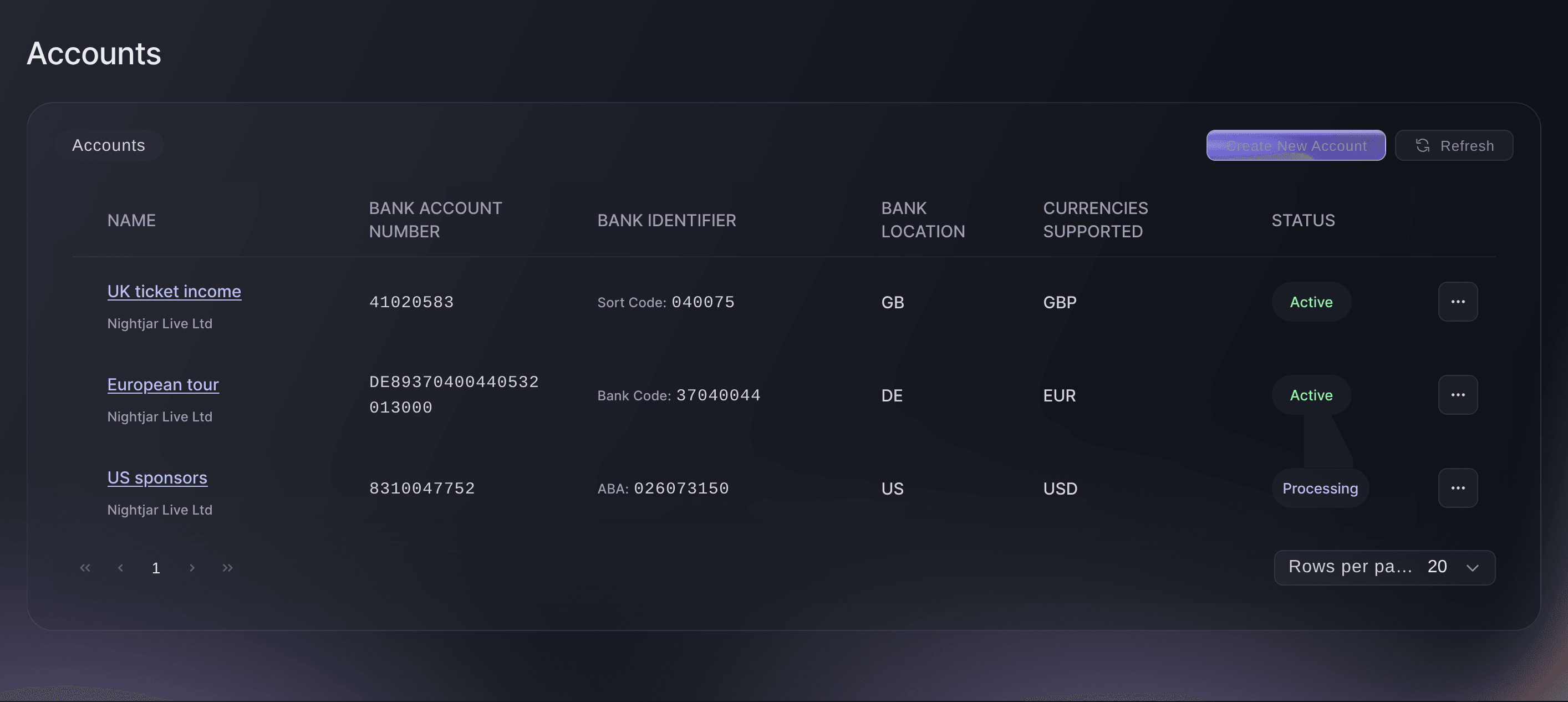
Brand, Vault, Accounts. -
Select Create new account
Select Create new account. The Create new account window opens.
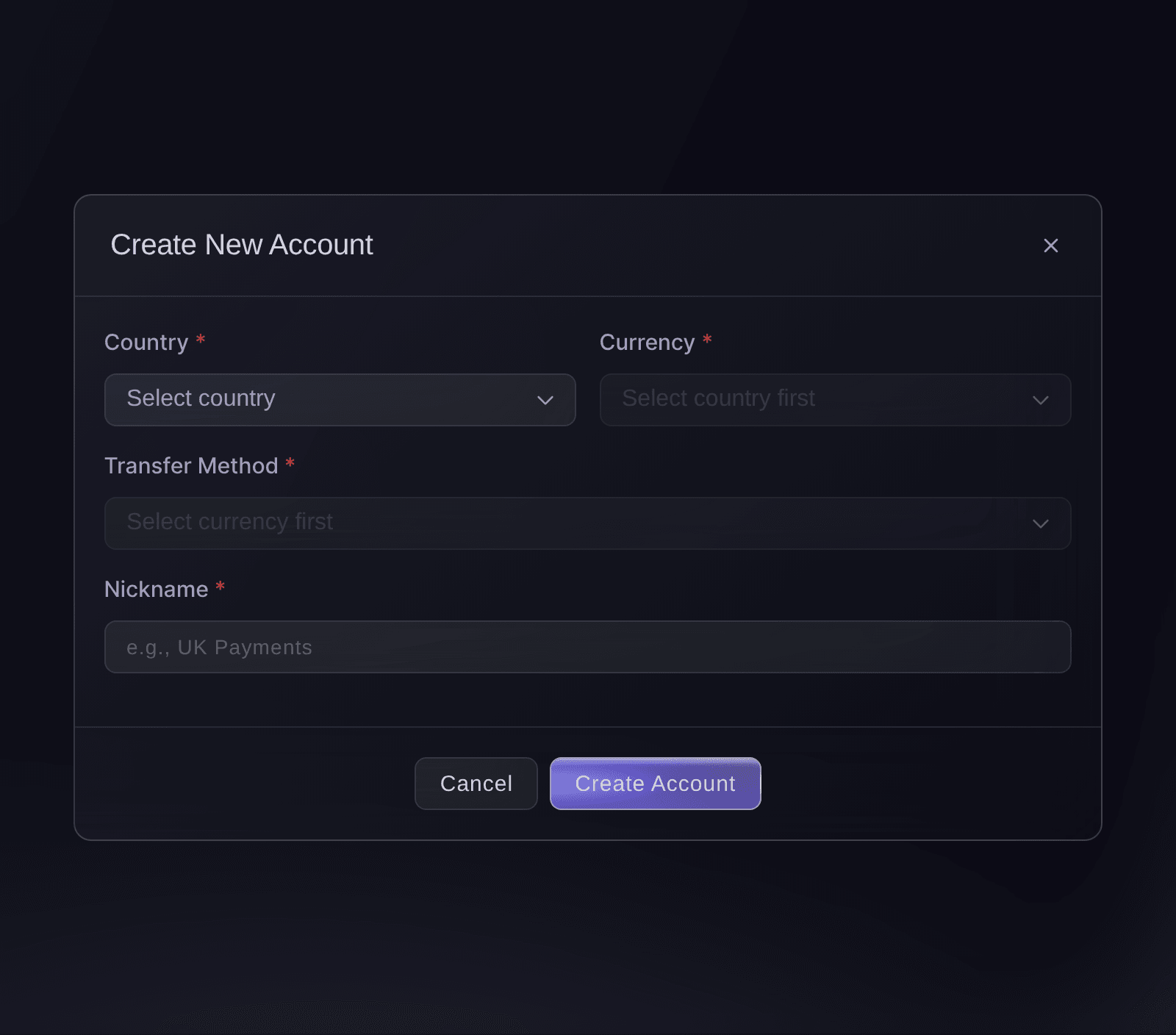
Brand, Vault, Accounts, Create new account. -
Choose the country
Choose the country your payers bank in from Country. The account gets bank details in that country.
Bemærk: The list holds the 17 countries Vault opens receiving accounts in, including the United Kingdom, the United States, Germany, the Netherlands, Australia, Canada and Singapore.
-
Choose the currency
Choose the currency you want to be paid in from Currency. The list shows only the currencies an account in that country can take.
When to choose SWIFT
A local transfer is the ordinary bank transfer people make inside that country. SWIFT is the international wire a bank abroad sends. Choose Local when your payers bank in the account's country, and SWIFT when they send from another country.
-
Choose the transfer method
Choose Local or SWIFT from Transfer method. Where the currency takes only one method, the form picks it for you.
-
Name the account
Enter a name you will recognise in Nickname, such as UK ticket income or European tour.
Bemærk: Every account needs a nickname, of up to 110 characters.
-
Select Create account
Select Create account.
Account created successfully!
confirms it, and the account joins the list with its status.Bemærk: Share the details once the status says Active. Processing means Vault is still setting the account up.
-
Open the account's bank details
Select the account's name. Account details shows the Bank account number, the bank code, such as a sort code, and the bank's name and address, with a copy button beside most of them.
Bemærk: Account name is the name the account is held in, so give payers that name. Nickname is the label only your team sees.
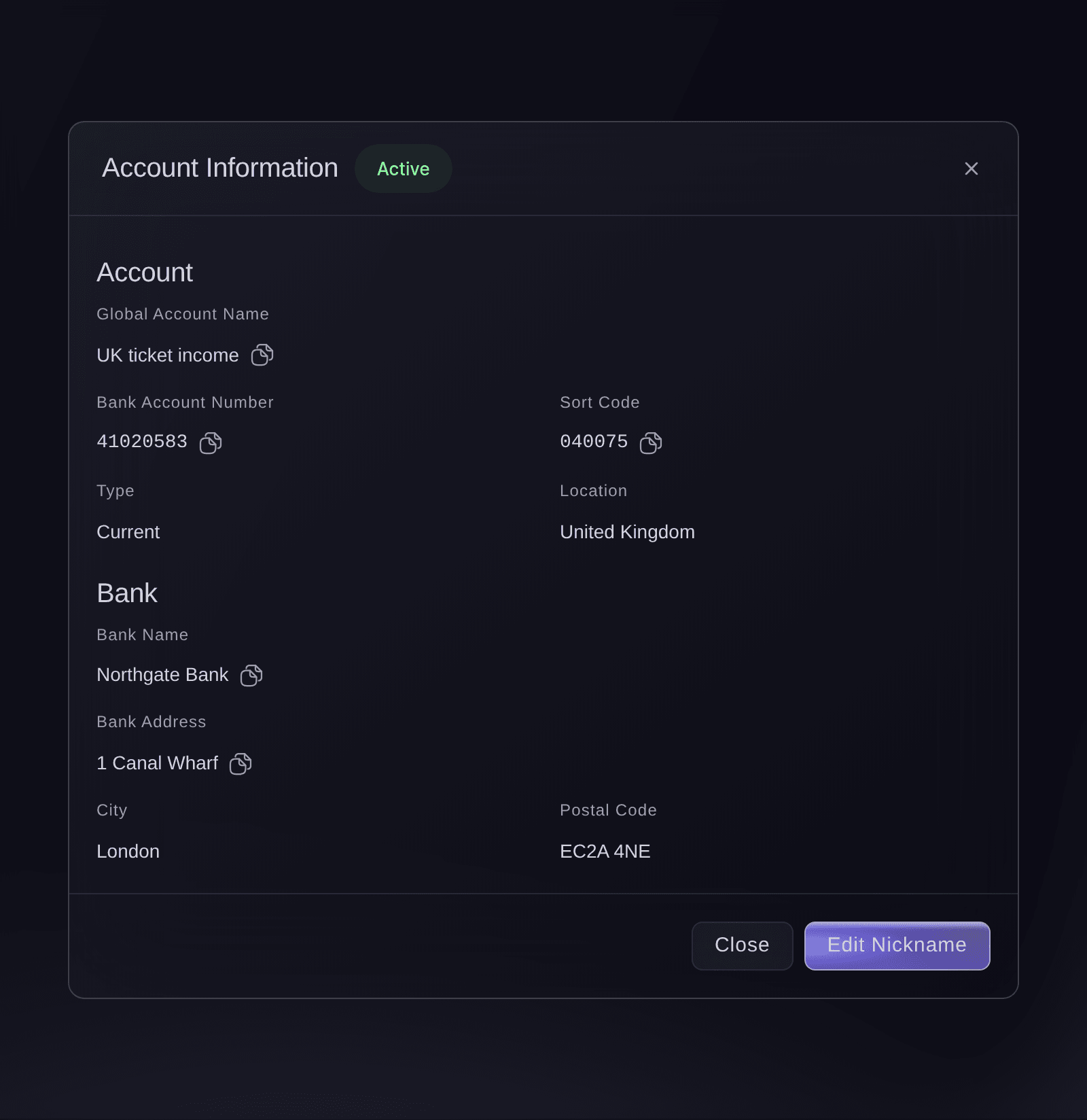
Brand, Vault, Accounts, an account opened from the list. -
Send the details to whoever pays you
Copy the details into your invoice or email to the sponsor, venue or partner paying you. They pay the account the way they pay any bank account in that country.
-
Check a payment has arrived
Open the menu on the account's row and select View transactions. Each payment shows who sent it, the amount, any fee and its status.
Bemærk: A payment into the account also counts in that currency's row of your Vault balances, as pending until it settles.
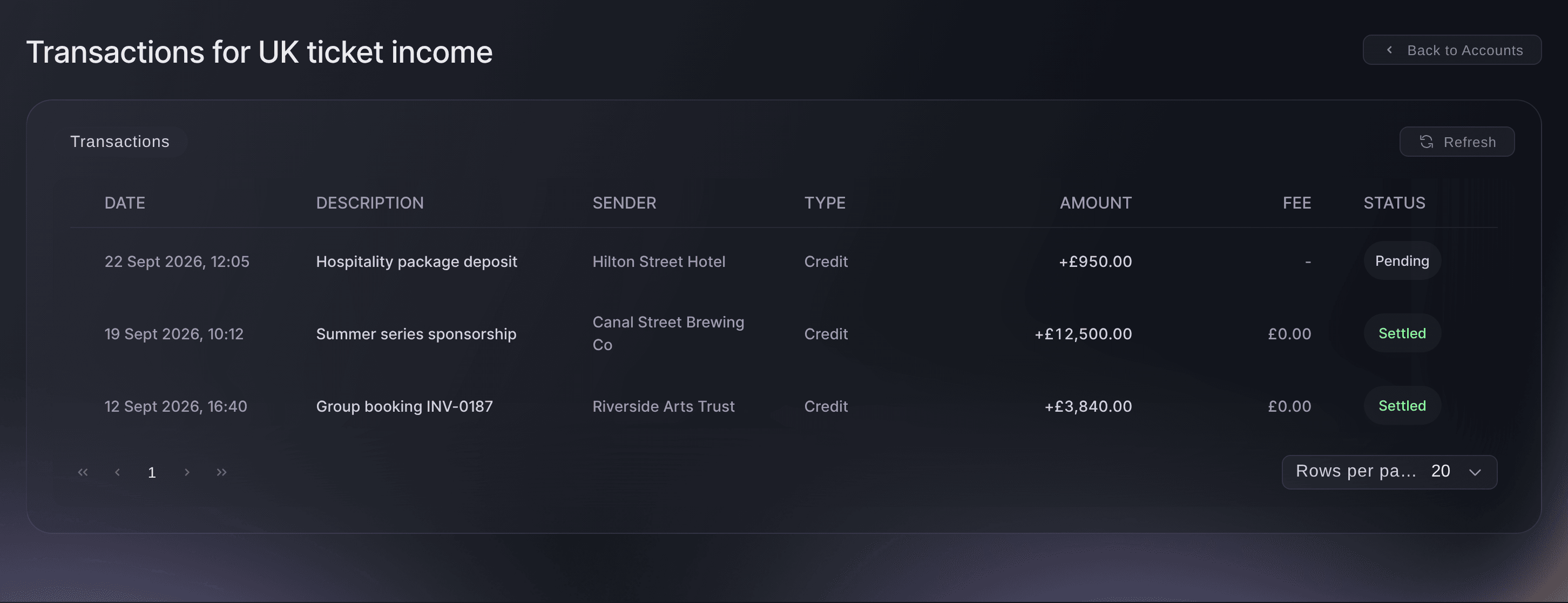
Brand, Vault, Accounts, View transactions.
Prøv disse trin på dit eget event
Opret en gratis konto, byg dit event og følg trinnene ovenfor i dit eget dashboard. Det tager få minutter, og du behøver ikke at booke et salgsopkald.
Ingen oprettelsesgebyrer. Intet obligatorisk månedligt gebyr. Intet kreditkort påkrævet.
Eller få det gjort for dig
Fai, the assistant inside your dashboard, can list your receiving accounts, read the bank details a payer needs and show the money each account has received. She can also open a new receiving account for you. She shows you the country, currency, transfer method and name, and asks before she opens it. MCP and the command line have no commands for receiving accounts.
I dit dashboard, med Fai
Open a <CURRENCY> receiving account in Vault for <BRAND NAME> and give me the bank details to send to <PAYER NAME>
Lad Fai gøre det for dig
Fai arbejder inde i dit Ticket Fairy-dashboard. Opret din konto, åbn Fai og indsæt instruktionen ovenfor.
Ingen oprettelsesgebyrer. Intet obligatorisk månedligt gebyr. Intet kreditkort påkrævet.
Rename a receiving account
-
Edit the nickname and save
Open the menu on the account's row, select Edit nickname, enter the new name, then select Save.
Nickname updated successfully
confirms it.Bemærk: Only the name you see changes. The bank details you have shared stay the same.
Fai can rename a receiving account for you. She shows you the account and the new name, and asks before she saves it. The bank details stay the same.
I dit dashboard, med Fai
Rename the <CURRENCY> Vault receiving account for <BRAND NAME> to <NEW NAME>
Close a receiving account
-
Close the account and confirm
Open the menu on the account's row, select Close account, then Close account again in
Close account?
.Advarsel: A closed account can't be opened again, so tell anyone who pays into it first. Open a new account if you need that currency again later.
Fai can close a receiving account for you. She shows you the account, tells you that closing it can't be undone, and asks before she closes it.
I dit dashboard, med Fai
Close the <CURRENCY> Vault receiving account for <BRAND NAME>
Spørgsmål du måske har
- Is this how buyers pay for tickets in another currency?
- No. Buyers pay at checkout through the payment account your events use. A receiving account takes bank transfers, such as a sponsor paying an invoice or a partner settling a share.
- Why isn't Close account in the menu?
- An account can be closed only while it is Active. One still Processing has no close option yet.
- Which countries can I open a receiving account in?
- Australia, Canada, Denmark, Estonia, Germany, Hong Kong, Indonesia, Israel, Mexico, the Netherlands, New Zealand, the Philippines, Poland, Singapore, the United Arab Emirates, the United Kingdom and the United States. Some of them take several currencies, which the Currency list shows once you pick the country.
- Why does a currency I was paid in not show in my balances?
- The Vault balances list one row for each currency with an active receiving account. Open an account in that currency and its row appears.
Har du stadig et spørgsmål?
Book en demo, så besvarer vi det i en samtale ud fra din type event. Eller opret din konto og se det selv.
Ingen oprettelsesgebyrer. Intet obligatorisk månedligt gebyr. Intet kreditkort påkrævet.
Relaterede guides
Gør det på dit eget arrangement
Opret din konto, byg dit arrangement, og følg trinnene i dit eget dashboard. Du behøver ikke booke et salgsmøde.