
Vault og Capital
Track what your event team spends on Vault cards
Finance leads and production managers check card spend against the event budget and want to catch a problem before a supplier is left unpaid. Card activity lists what each Vault card did, and the Action centre lists the Vault work that needs a person, such as a card payment held for a fraud review.
See every payment your event team's Vault cards make, with holds, refunds and declined payments and the reason each was declined, and the Vault work in the Action centre that needs someone to act, with its priority and deadline.
- Til
- Keeping track of card spend and Vault reviews for your events
- Tager
- 6 minutter
Din Vault-side
Før du går i gang
- You're an owner or an admin on the brand. Those are the two roles that reach Vault.
- Your brand has an active Vault account. Ask Ticket Fairy support to switch Vault on for your brand if it isn't, then open the account.
- You have your second factor to hand. Card activity may ask you to confirm it's you before it loads.
-
Activity ledger
Pick the brand, open Vault, then select Card activity. Activity ledger lists what your Vault cards did in the latest 30 days, newest first: each row gives the merchant and where it is, the card by its nickname and last four digits, the type of event, the amount and its status. Authorisation hold with Authorised is money held on the card for a payment that has not settled; Purchase with Settled is money spent; Refund with Credited is money back on the card; and Authorisation release with Released is a hold let go, once the purchase settles or when the payment is reversed. The amount is in the card's own currency, with the merchant's amount beneath it when they charged in another currency.
Bemærk: One payment usually shows as more than one row: the hold, then the settled purchase and the hold's release. So never add up the Amount column; count the purchases and the credits, which are the rows that moved money.
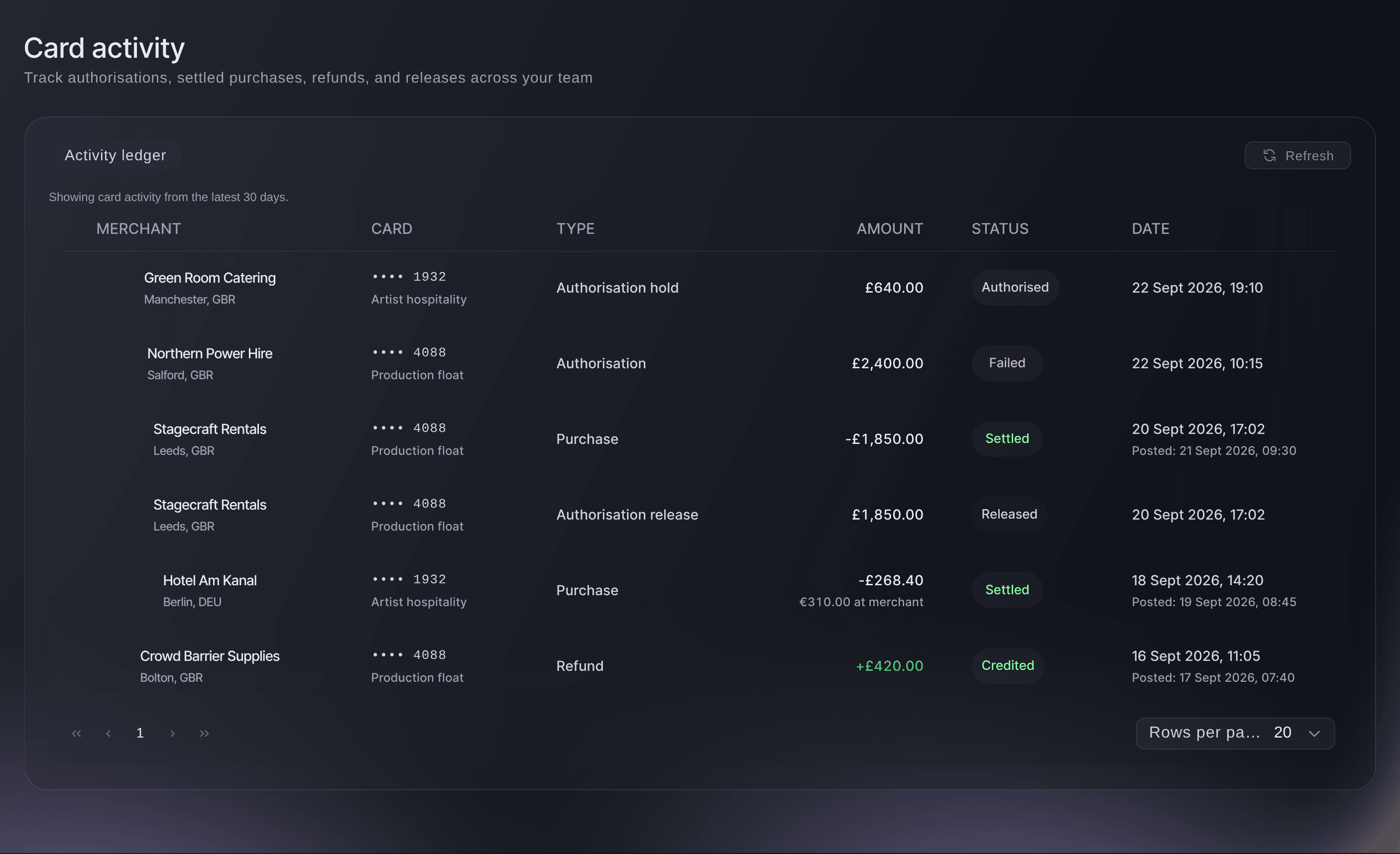
Brand, Vault, Card activity. -
Card activity details
Select a row's merchant to open Card activity details. It holds the type and status, the dates the payment was made and posted, the merchant's name, place and category, the card, any security check on the payment, the references your bank or the merchant may ask for, and any fee. A payment that did not go through, shown as Declined or Failed, says why at the top in a sentence, such as a card limit being reached, with what to do next.
Bemærk: A decline on a card limit means the card needs different limits, which you change on the card, as Freeze, cancel or change the limits on an event team's Vault card shows. When a decline says to contact support, quote the Activity ID under References.
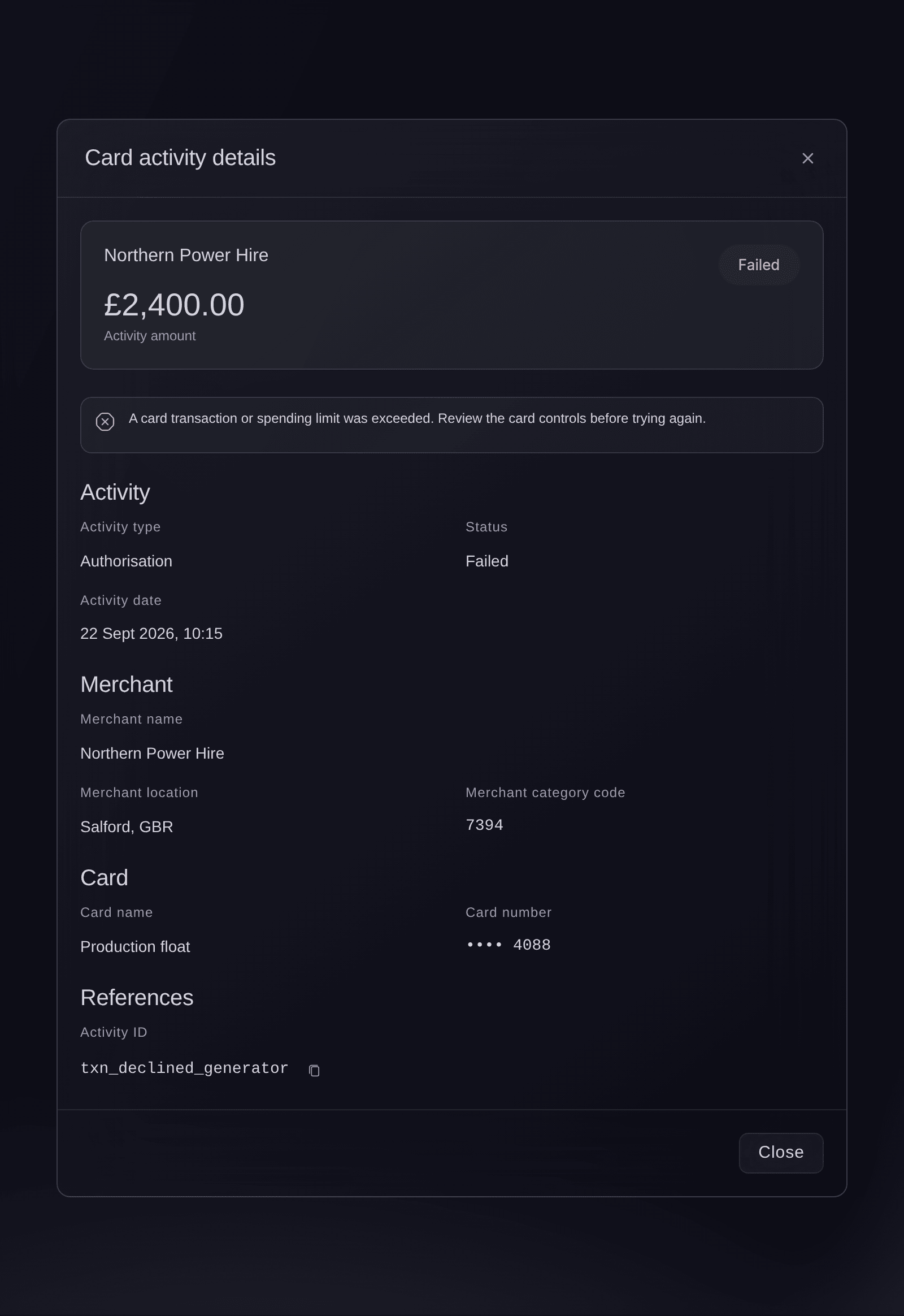
Card activity, a declined payment opened from the list. -
Action centre
Select Action Centre under Vault. Work to review lists the open Vault tasks for the brand, nearest deadline first, each with its priority, whether it is on time, the area of work it belongs to, when it is due and when it last changed. A task opens when Vault reports something that needs a person: an information request, an account or cardholder review, a card payment held for a fraud review, a card close to its limit or a delivery problem, a transfer or deposit that failed or needs approval. The filters above narrow the list by status, priority, responsible team, task type and deadline, and Refresh queue fetches the latest.
Bemærk: Ordinary card payments and declines never open a task; they are in Card activity. A task closes by itself when Vault reports the matter sorted, so choose Resolved under Status to see what has been dealt with.
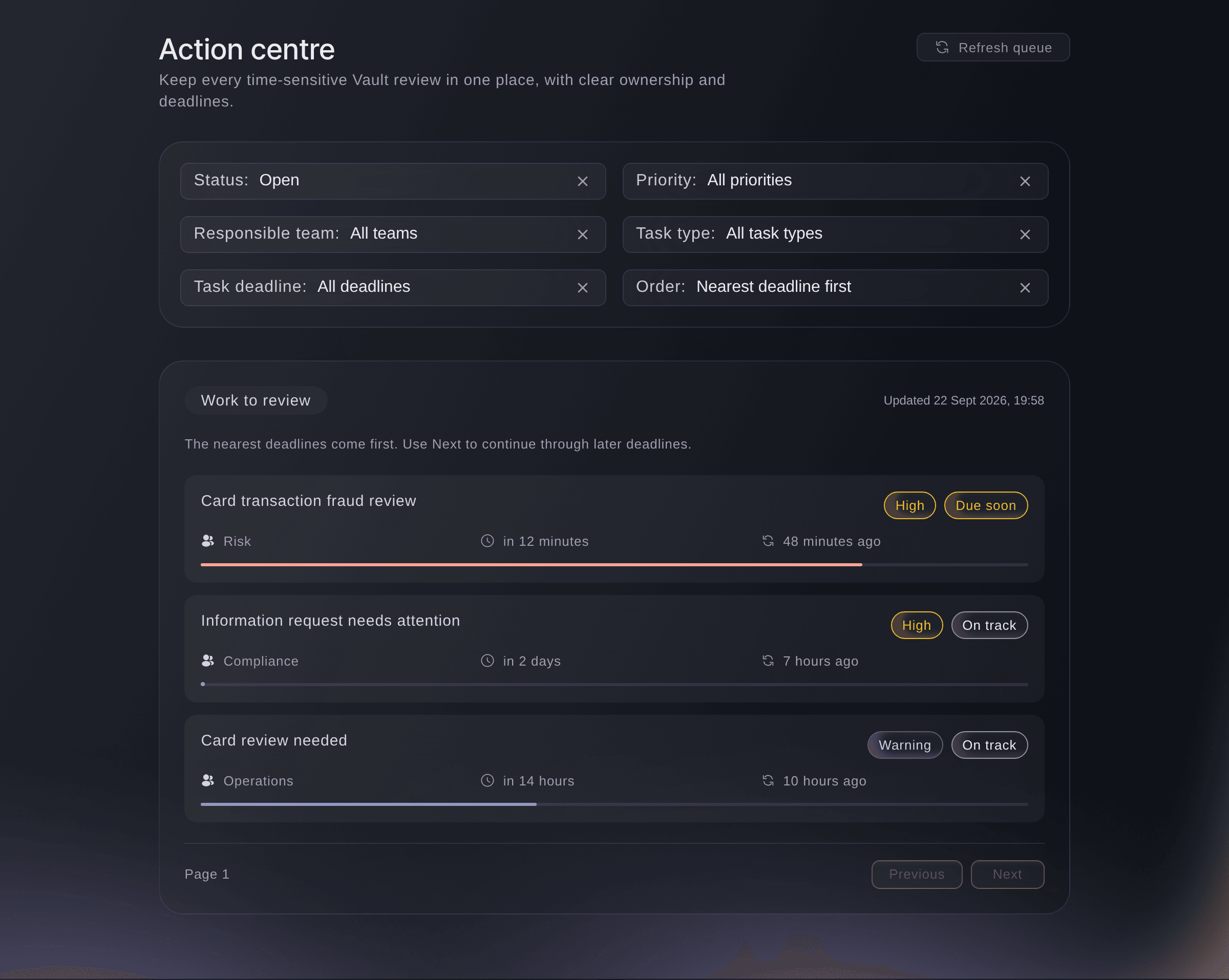
Brand, Vault, Action centre. -
Review details
Select a task to open its details. Time remaining shows how much of the response window has gone, with Due and Responsible team beneath it, and Review details gives the facts Vault reported, such as why it needs review, the deadline, the merchant, the card's last four digits, the amount and when the payment was made. The deadline is the one Vault gave, or else the task's response window counted from the moment the event happened, so a fraud review can be due within the hour.
Bemærk: The bar under each task fills as its response window runs out, and turns peach once a quarter or less is left or the deadline has passed.
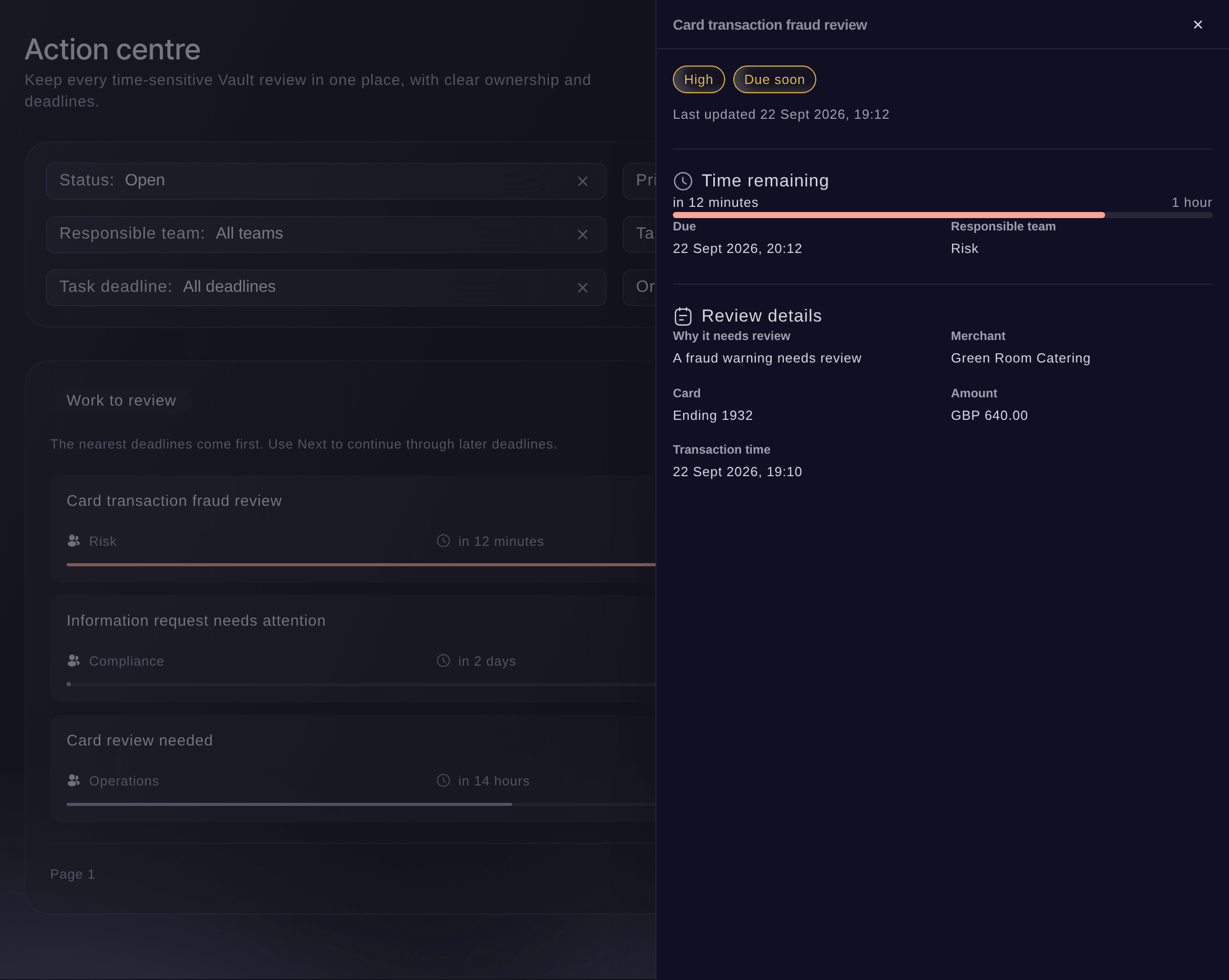
Action centre, a task opened from the queue.
Se disse tal for dit eget event
Opret en gratis konto, så udfyldes denne rapport, efterhånden som dine billetter sælges. Du ser de samme tal for dit eget event fra det første salg.
Ingen oprettelsesgebyrer. Intet obligatorisk månedligt gebyr. Intet kreditkort påkrævet.
Eller få det gjort for dig
Fai, the assistant inside your dashboard, reads the Action centre back to you, with each task's priority, team and deadline, and opens a task for its details. She also lists your card activity with the merchant, amount, status and any reason a payment was declined. From MCP or the command line you can list the card activity, and neither reads the Action centre.
I dit dashboard, med Fai
What is waiting for us in the Vault action centre for <BRAND NAME>, and what is due first?
Fra din egen assistent, via MCP
Forbind din assistent til vores MCP-server, og bed den om:
Behold --read-only i din MCP-konfiguration. Denne opgave læser kun data, så din assistent behøver ikke værktøjer, der foretager ændringer.
Pick the brand <BRAND NAME> and list the latest Vault card transactions
Fra din terminal
Installér CLI fra vores CLI-side, log ind med ticketfairy auth login, og vælg det brand, du arbejder på, med ticketfairy brand use <BRAND_ID>. ticketfairy brand list og ticketfairy event list viser de ID'er, som de andre kommandoer bruger.
The command line lists the card events on the brand's Vault cards and opens one of them. You need an owner or admin login for the brand. It has no command for the Action centre. If it says Vault needs you to confirm it is you, the command stops. Open the card activity in Vault in the dashboard, confirm it is you there, and read it there.
List the card events on the brand's Vault cards, newest first, with the id of each
ticketfairy vault transactions list --brand <BRAND_ID>
Open one card event with its merchant, amount and status, using an id from the list
ticketfairy vault transactions get <TRANSACTION_ID> --brand <BRAND_ID>
Lad Fai gøre det for dig
Fai arbejder inde i dit Ticket Fairy-dashboard. Opret din konto, åbn Fai og indsæt instruktionen ovenfor.
Ingen oprettelsesgebyrer. Intet obligatorisk månedligt gebyr. Intet kreditkort påkrævet.
Spørgsmål du måske har
- Why does one payment appear twice in Card activity?
- The card holds the money first, as an authorisation hold, then the purchase settles and the hold is released. Each of those is its own row, and only the settled purchase is money spent.
- How far back does Card activity go?
- The latest 30 days, newest first. The page says so above the list.
- Why is Card activity empty?
No card activity in the latest 30 days
means none of the brand's Vault cards has been used in that time. New holds, purchases, refunds and releases appear as the cards are used.- Can I clear a task in the Action centre myself?
- No. A task closes when Vault reports that the matter is sorted, for example when a transfer is funded or a cardholder is ready, and it then moves from Open to Resolved.
- What do I do about a task?
- The Action centre has no button to act on a task. Deal with a card or cardholder task on Cards and a transfer task on Transfers, and for an account review check the Vault account card on Overview, which offers Continue setup when Vault needs more from you. Contact Ticket Fairy support about an information request or anything else the dashboard doesn't let you settle.
- Where do I add a receipt or a note to a card payment?
- Select the merchant on the payment's row and use Receipt, note and event in its details, as Add receipts, notes and events to your team's Vault card payments shows. The RECEIPT and EVENT columns show which payments still need one.
- Where are my Vault balances?
- On the Vault Overview, which shows what you can spend in each currency. Card activity lists what the cards did, not what is left.
- Why does Vault say Vault is locked?
- Vault locks when nobody has used it for 5 minutes, and hides your card activity. Select Unlock Vault and confirm it's you to see it again.
Har du stadig et spørgsmål?
Book en demo, så besvarer vi det i en samtale ud fra din type event. Eller opret din konto og se det selv.
Ingen oprettelsesgebyrer. Intet obligatorisk månedligt gebyr. Intet kreditkort påkrævet.
Relaterede guides
Gør det på dit eget arrangement
Opret din konto, byg dit arrangement, og følg trinnene i dit eget dashboard. Du behøver ikke booke et salgsmøde.