
Vault et Capital
Open a Vault account to hold your ticket money
Promoters and venue teams open a Vault account to give their brand an account of its own for event money, with cards, transfers and currency accounts attached. You enter the business and the people who run it, then finish a verification check, and the account opens once the check passes.
Open a Vault account for your brand so the money your events take has an account of its own. Enter the business and the people behind it, then finish onboarding so Vault can verify them and switch the account on.
- Pour
- Opening the account your brand holds its event money in
- Durée
- 10 minutes
- Open Vault for the brand
- Select Create New Account
- Check the business details
- Choose the business structure
- Choose the country
- Enter the authorised person
- Enter the legal representative
- Enter the controlling person
- Enter the beneficial owner
- Select Create Account
- Select Start Onboarding
- Answer the verification questions
- While Vault checks your account
- Check the account is active
Avant de commencer
- You're an owner or an admin on the brand. Those are the two roles that reach Vault.
- Vault is switched on for your brand. Ask Ticket Fairy support to switch Vault on for your brand if it isn't.
- You know how your business is registered, and the names of the people who act for it, represent it, control it and own it.
-
Open Vault for the brand
Pick the brand, then open Vault. A brand with no account yet shows Open a Vault account.
Remarque: If the page says
Vault is not enabled for this brand
, ask Ticket Fairy support to switch Vault on for your brand.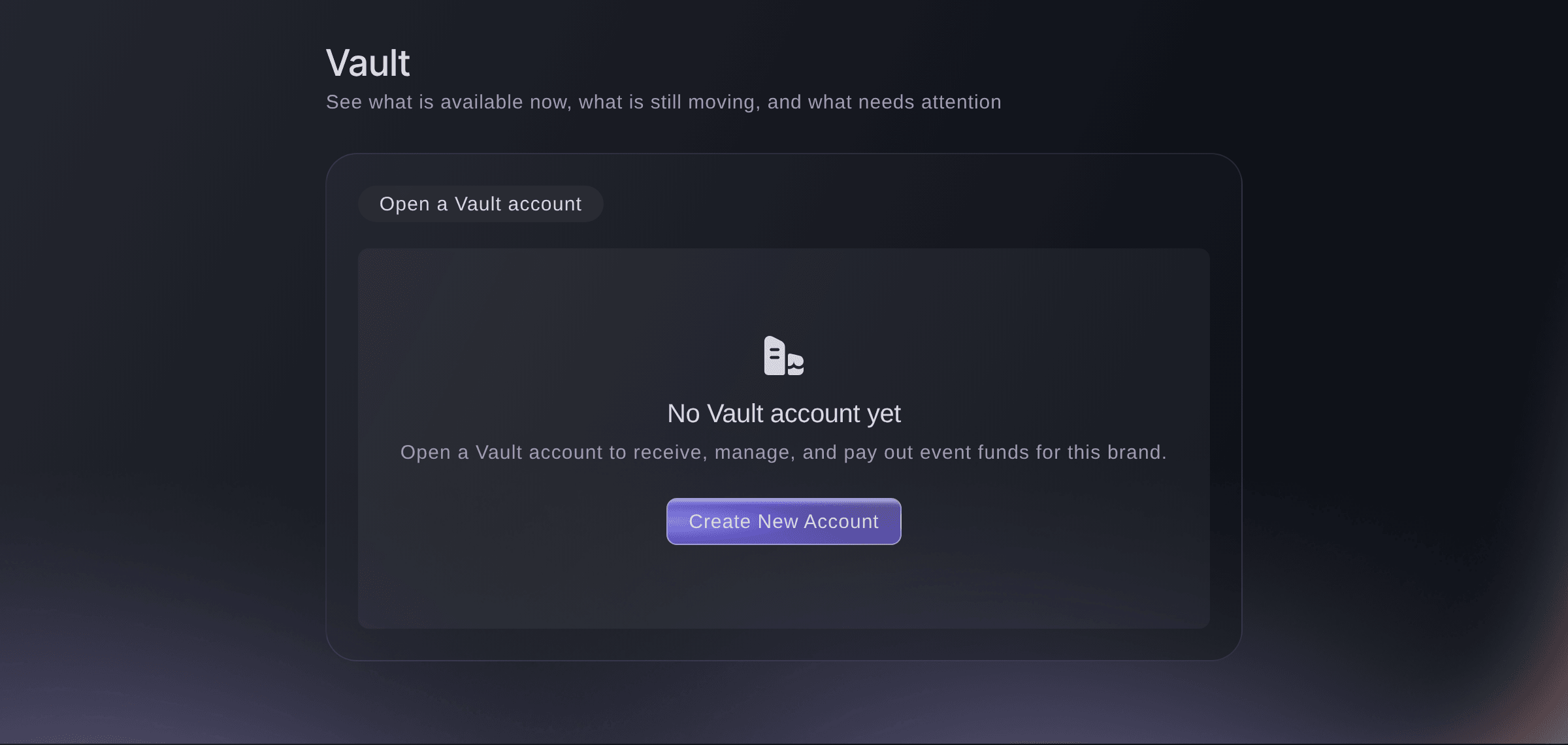
Brand, Vault, before the account exists. -
Select Create New Account
Select Create New Account. The form opens with your brand's email, name, city and country already filled in.
Conseil: Cancel closes the form without keeping what you entered, so finish it once you start.
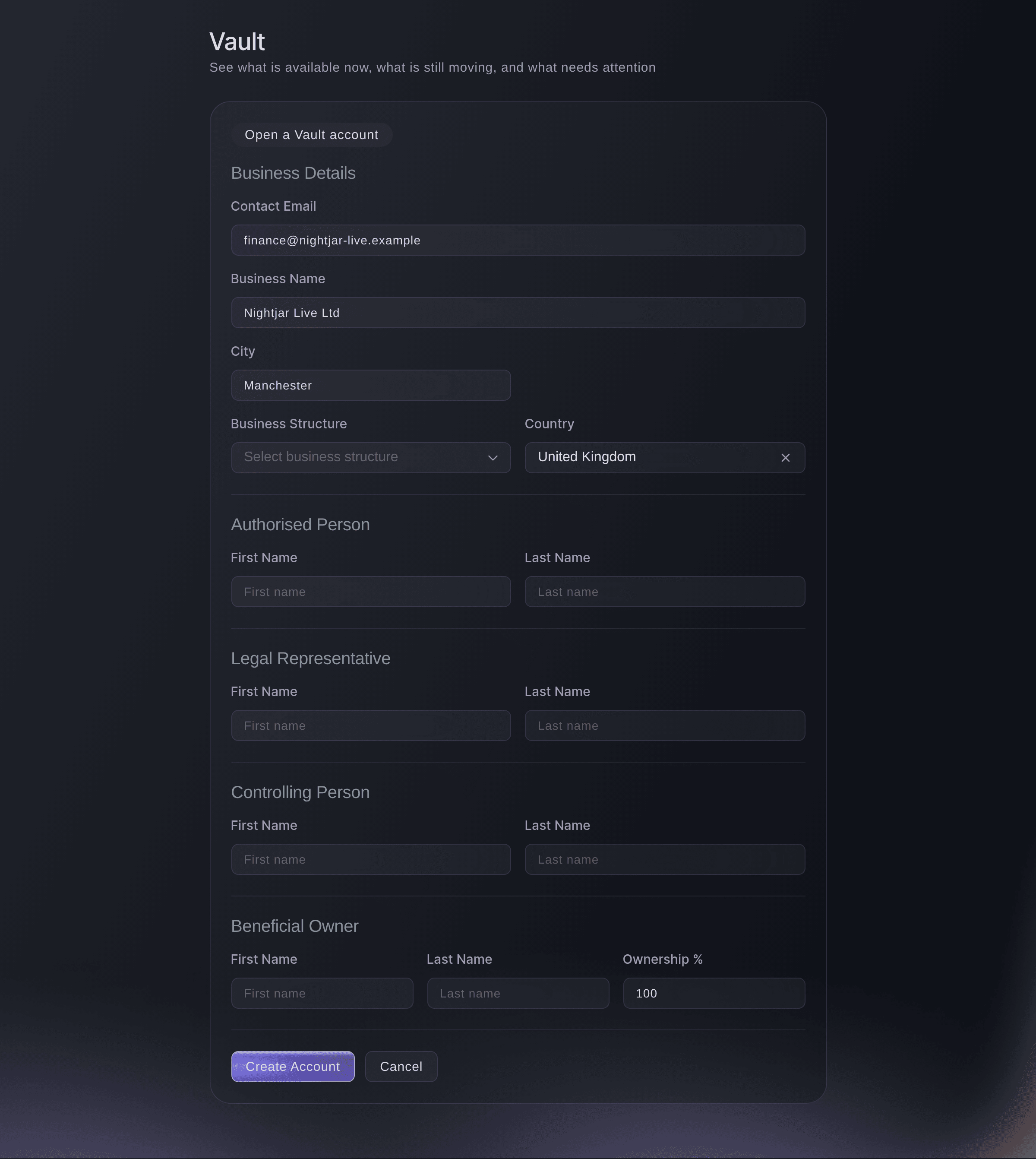
Brand, Vault, Create New Account. -
Check the business details
Under Business Details, check Contact Email, Business Name and City against your business's own records, and correct any that differ.
-
Choose the business structure
Choose how the business is set up from Business Structure.
-
Choose the country
Choose the country the business is based in from Country. The list starts on your brand's country and offers every other country too.
-
Enter the authorised person
Under Authorised Person, enter the first and last name of the person who acts for the business on this account.
-
Enter the legal representative
Under Legal Representative, enter the name of the person who represents the business legally, such as a director.
-
Enter the controlling person
Under Controlling Person, enter the name of the person who has control of the business, such as its managing director.
-
Enter the beneficial owner
Under Beneficial Owner, enter the name of the person who owns the business, then their share in Ownership %.
Remarque: Ownership % starts at 100 and takes a whole number from 1 to 100. One person can appear in every section when they run and own the business.
-
Select Create Account
Select Create Account.
Account created successfully!
confirms it, and the Vault account card takes the form's place with the status Created.Remarque: If you see
Failed to create account
, the form keeps what you entered. Check each section, then select Create Account again.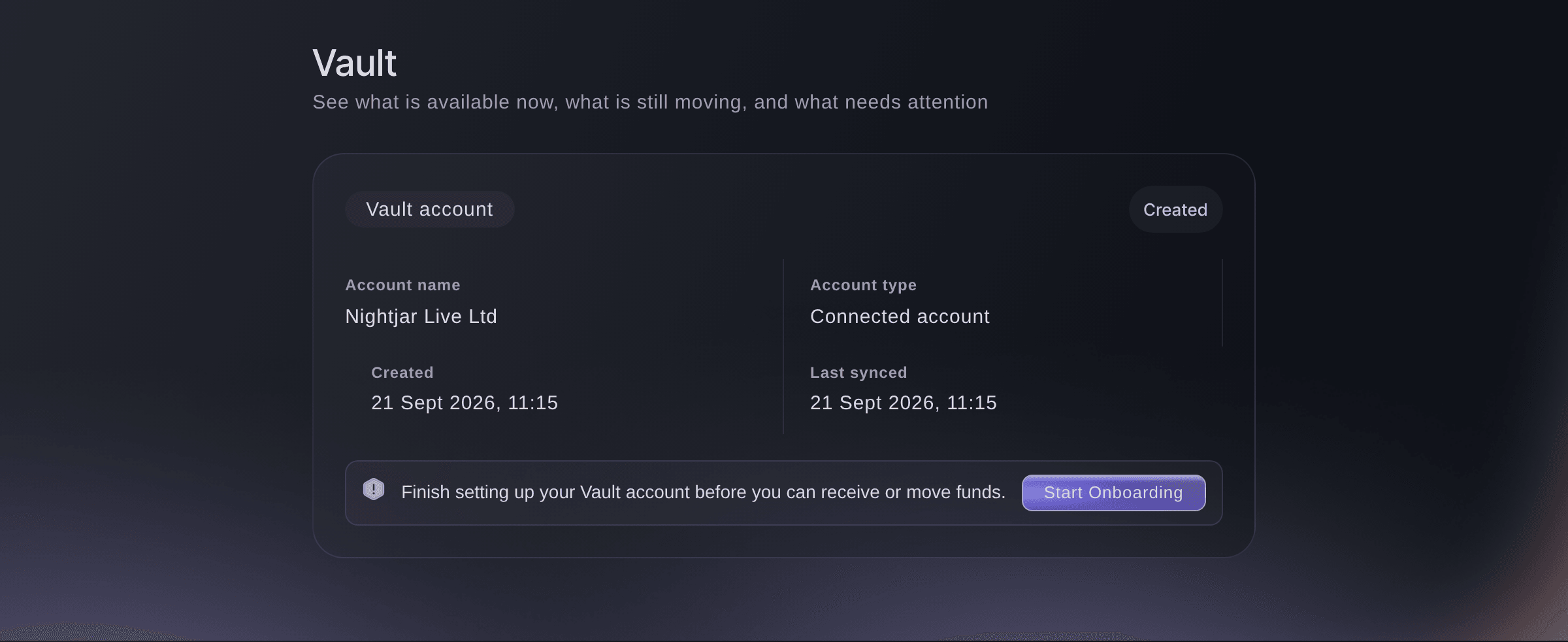
Brand, Vault, straight after the account is created. -
Select Start Onboarding
On the Vault account card, select Start Onboarding. The Complete Account Onboarding window opens Vault's secure verification.
Remarque: If the window asks you to continue securely instead, select Continue account setup and finish in the tab it opens.
-
Answer the verification questions
Answer each question about the business and the people behind it, then submit the last page.
Onboarding submitted successfully!
confirms it and the window closes.
While Vault checks your account
The Vault account card says Submitted while the check runs, and Vault shows only Overview and Action Centre. If the card changes to Action required, Vault needs more from you: select Continue Onboarding and answer what it asks.
-
Check the account is active
Open Vault again. The Vault account card says Active, your balances show above it, and Cards, Transfers and Accounts appear under Vault.
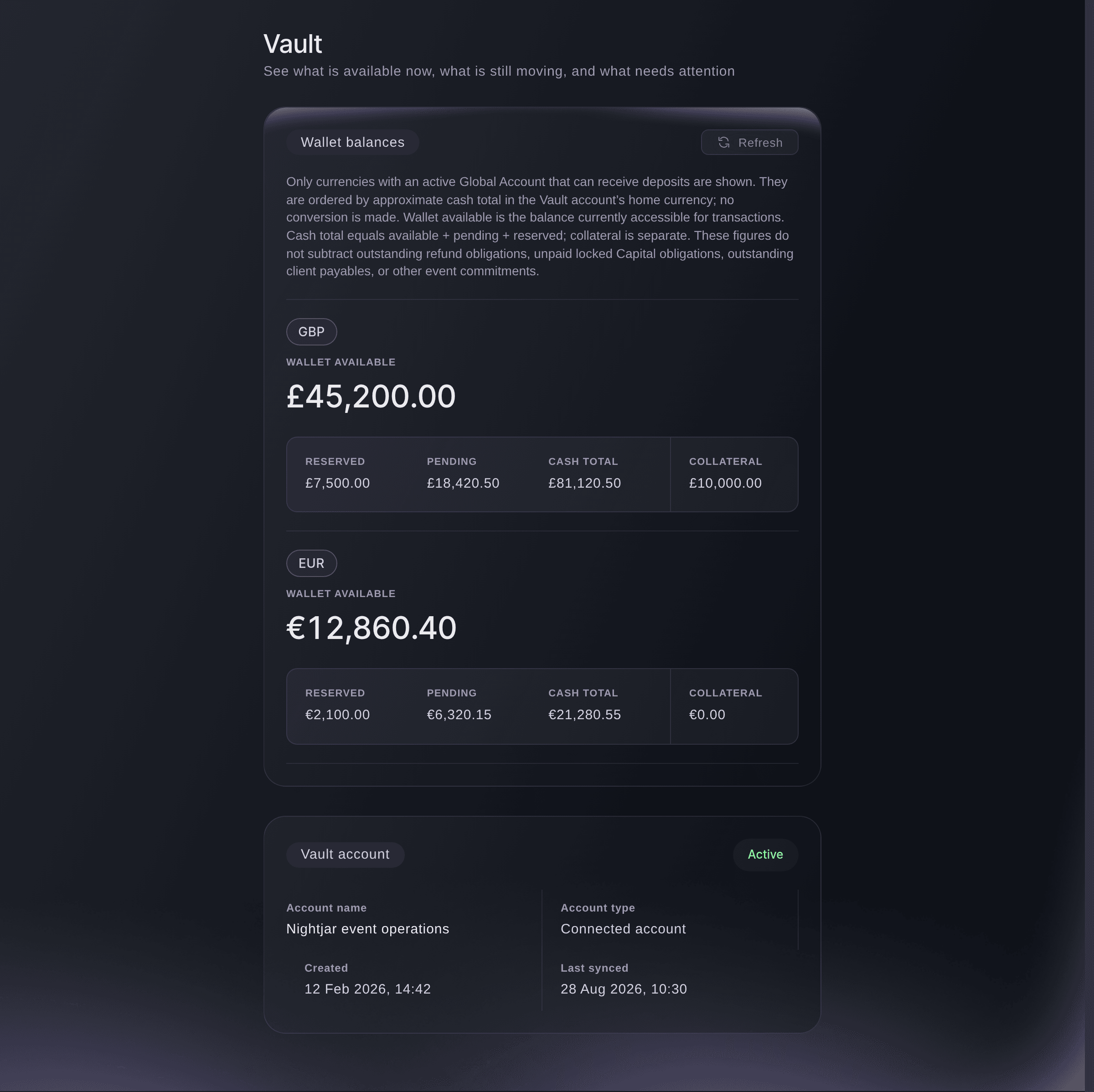
Brand, Vault, once the account is active.
Essayez ces étapes sur votre propre événement
Créez un compte gratuit, montez votre événement et suivez les étapes ci-dessus dans votre propre tableau de bord. Cela prend quelques minutes et vous n'avez pas besoin de réserver un appel commercial.
Pas de frais d'installation. Pas d'abonnement mensuel obligatoire. Pas de carte bancaire requise.
Ou faites-le faire pour vous
Fai, the assistant inside your dashboard, opens Vault for you. Creating the account and answering the verification questions are yours to do on the page, because they are about you and your business. MCP and the command line read the account and its status while you wait for the check, and create nothing.
Dans votre tableau de bord, avec Fai
Open Vault for <BRAND NAME> so I can open an account
Depuis votre propre assistant, via MCP
Connectez votre assistant à notre serveur MCP et demandez-lui :
Conservez --read-only dans votre configuration MCP. Cette tâche ne fait que lire des données, votre assistant n’a donc pas besoin d’outils qui effectuent des changements.
Pick the brand <BRAND NAME> and tell me the status of its Vault account
Depuis votre terminal
Installez la CLI depuis notre page CLI, connectez-vous avec ticketfairy auth login, puis choisissez la marque sur laquelle vous travaillez avec ticketfairy brand use <BRAND_ID>. ticketfairy brand list et ticketfairy event list affichent les identifiants utilisés par les autres commandes.
The command line reads the brand's Vault account and its status. You need an owner or admin login for the brand. It cannot create the account or run onboarding, which happen in the dashboard.
List the brands you can act for, with the id each one uses
ticketfairy brand list
Print the brand's Vault account as JSON. Its metadata.status reads ACTIVE once the check has passed
ticketfairy vault account --brand <BRAND_ID> --output json
Laissez Fai le faire pour vous
Fai travaille dans votre tableau de bord Ticket Fairy. Créez votre compte, ouvrez Fai et collez la consigne ci-dessus.
Pas de frais d'installation. Pas d'abonnement mensuel obligatoire. Pas de carte bancaire requise.
Questions que vous pourriez avoir
- Can I open a Vault account for one event?
- No. Vault belongs to the brand, and a brand has one Vault account, so money from every event the brand runs arrives in the same place.
- Why can't I see Vault in my brand menu?
- Vault shows to owners and admins of a brand that has it switched on. If you're an owner or admin and it isn't there, ask Ticket Fairy support to switch Vault on for your brand.
- What does Action required mean on my account?
- Vault needs more information before it can activate the account. Select Continue Onboarding on the Vault account card and answer what the window asks.
- Can a colleague finish onboarding for me?
- Yes, if they're an owner or admin on the brand: the Start Onboarding button is on the same card for them. The questions are about the business and its people, so whoever answers needs those details to hand.
- Can I change the details after I create the account?
- The dashboard has no form to change them once the account exists. Contact Ticket Fairy support if a detail you entered is wrong.
- My account says Suspended. What now?
- A suspended account can neither receive nor move money. Contact Ticket Fairy support, who can review the restriction and tell you what is needed to restore it.
Vous avez encore une question ?
Réservez une démo et nous y répondrons lors d'un appel, pour votre type d'événement. Ou créez votre compte et voyez par vous-même.
Pas de frais d'installation. Pas d'abonnement mensuel obligatoire. Pas de carte bancaire requise.
Guides associés
Faites-le sur votre propre événement
Créez votre compte, montez votre événement et suivez les étapes dans votre propre tableau de bord. Vous n’avez pas besoin de réserver un appel commercial.