
Tuotannon hallinta
Add everyone who sends your event form to your volunteers, traders or crew
Festival teams collect volunteers, traders and crew through their own forms, then retype every answer into the list they work from. Connecting the form to that list adds each person as they apply, so nobody copies a name twice.
Connect a form on your event to your volunteers, traders, press, crew or an act's contacts, match each detail to a question, and every person who sends the form is added to that list in Event OS, with their answers kept on the form.
You are connecting a form you have already built on your event to one of its Event OS lists. Take act and trader applications for your event
- Kenelle
- Getting form applicants into the lists your event team works from
- Kestää
- 6 minuuttia
Ennen aloitusta
- You need an owner or admin login for the event.
- Event OS is turned on for the event, and the form exists on the event's Forms page.
-
Open the form's questions
On Forms, select Edit Form in the form's row menu, then go to the Fields step.
-
Choose the list to add people to
Under When someone sends this form, choose the list in Also add each person to.
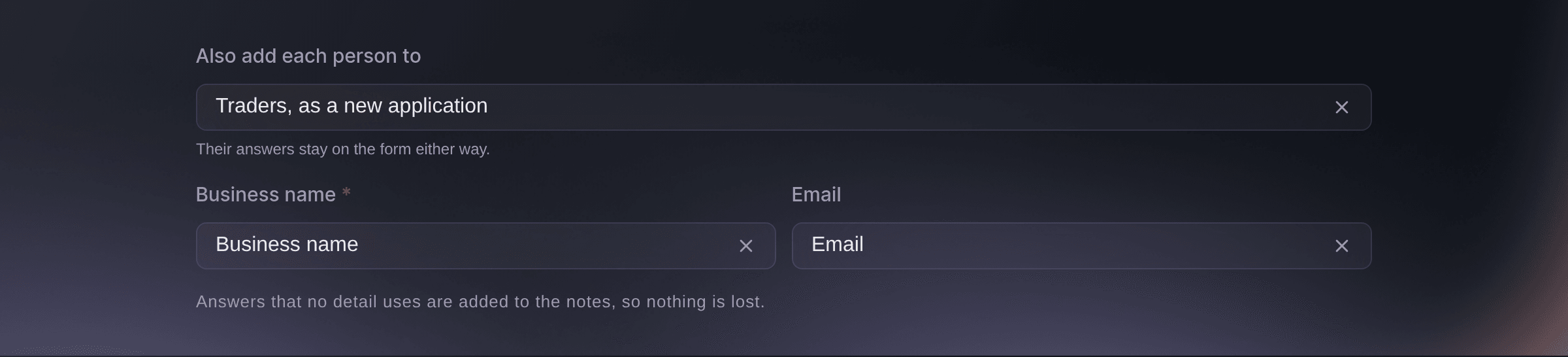
When someone sends this form. -
Match each detail to a question
For each detail the list takes, such as Business name or Email, choose the question on your form that gives it.
Huomautus: A detail the list needs says Choose the question that gives this. until you choose one. Answers that no detail uses are added to the notes, so nothing is lost.
-
Save the form
Select Update Form. From now on, each person who sends the form is added to the list a moment after they send it.
-
Check who was added
On the form's row, select Submissions. Each application shows Added to Event OS, Adding or Not added.
Huomautus: Filter by Added to Event OS to see only the people who were not added.
-
Add someone who was not added
Open the application, read the reason beside Not added to Event OS, fix it, then select Try adding again.
Huomautus: The application is added once, however many times you try.

Kokeile näitä vaiheita omassa tapahtumassasi
Luo ilmainen tili, rakenna tapahtumasi ja seuraa yllä olevia vaiheita omassa hallintapaneelissasi. Se vie muutaman minuutin, eikä sinun tarvitse varata myyntipuhelua.
Ei käyttöönottomaksuja. Ei pakollista kuukausimaksua. Luottokorttia ei tarvita.
Tai anna sen hoitua puolestasi
Fai sets where a form's answers go when she creates or updates the form, and adds one applicant to your Event OS list when you ask. She shows you the change and waits for your yes.
Hallintapaneelissasi, Fain kanssa
Make the trader form on <EVENT NAME> add every applicant to our traders, and add the applicants who already sent it
Anna Fain hoitaa se puolestasi
Fai toimii Ticket Fairy -hallintapaneelissasi. Luo tili, avaa Fai ja liitä yllä oleva kehote.
Ei käyttöönottomaksuja. Ei pakollista kuukausimaksua. Luottokorttia ei tarvita.
Add people who applied before you connected the form
-
Add each earlier application
Open an application that shows Not added yet and select Add to Event OS.
Fai adds the applicants who sent the form before it was connected, after you confirm.
Hallintapaneelissasi, Fain kanssa
Add everyone who already sent the trader form on <EVENT NAME> to our traders
Kysymyksiä joita sinulla voi olla
- Why can I not choose a list?
- The section says
Turn on Event OS for this event to add people to its lists.
when the event does not use Event OS yet. Ask your Ticket Fairy contact to switch it on. - Are the answers still on the form?
- Yes. The answers stay on the form either way, and the export includes them.
- What kind of trader does a food or drinks answer become?
- A food answer becomes street food, drinks becomes a bar and crafts becomes craft, so the trader lands in the right kind in your Vendors section. Anything else becomes other.
Jäikö vielä kysyttävää?
Varaa esittely, niin vastaamme siihen puhelussa sinun tapahtumatyyppisi mukaan. Tai luo tili ja katso itse.
Ei käyttöönottomaksuja. Ei pakollista kuukausimaksua. Luottokorttia ei tarvita.
Aiheeseen liittyvät oppaat
Tee tämä omassa tapahtumassasi
Luo tili, rakenna tapahtumasi ja seuraa vaiheita omassa hallintapaneelissasi. Sinun ei tarvitse varata myyntipuhelua.