
Tuotannon hallinta
Keep a risk register for your event
Event managers and safety officers keep a risk register for licensing, insurers and their own peace of mind, usually as a spreadsheet nobody updates after the safety advisory group meeting. The register keeps each risk scored, owned and dated beside the incidents your team logs, with nothing ever deleted.
List what could go wrong at your event, how likely and how bad each risk is and what you are doing about it, start from a draft Fai builds from your event and past incidents, and keep every risk's owner, review date and status current.
- Kenelle
- Keeping your event's risk assessment current
- Kestää
- 6 minuuttia
Ennen aloitusta
- You are an owner, admin or producer on the event. The event's Management page opens for those roles only.
-
Open the risk register
Open the event, select Management, then select Risks in the list of sections.
Huomautus: Each risk shows its score, owner, review date and status, highest score first; Still open leaves out closed risks. If Risks is not in the list, select More sections and open it there.
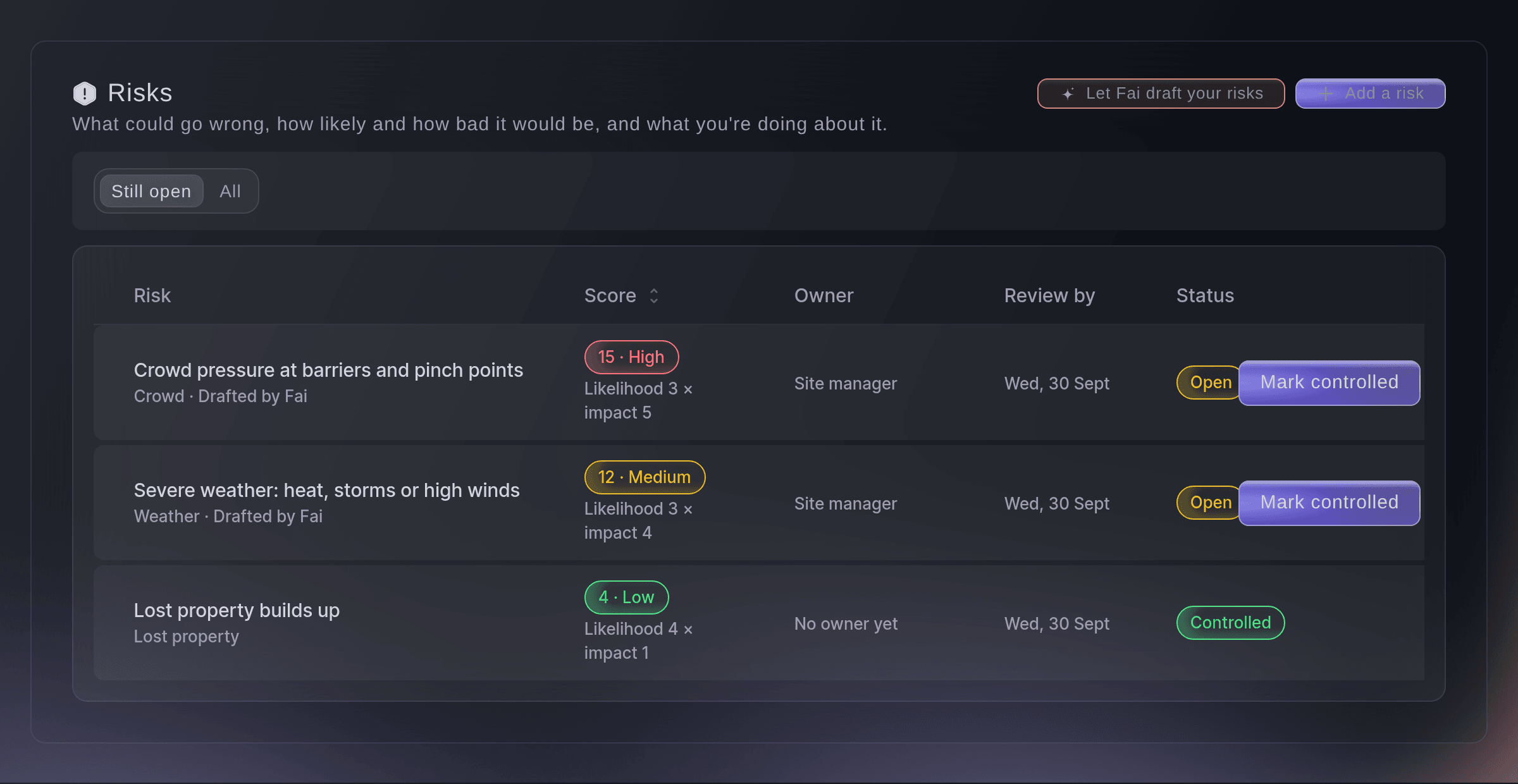
The risk register. -
Let Fai draft your risks
Select Let Fai draft your risks, check People at the busiest time and Indoors or outdoors?, then select Draft again if you changed them.
Huomautus: Fai drafts from your event type, size, dates and finish time, and from incidents at your earlier events, and says why each risk is on the list. Risks your register already covers are left out.
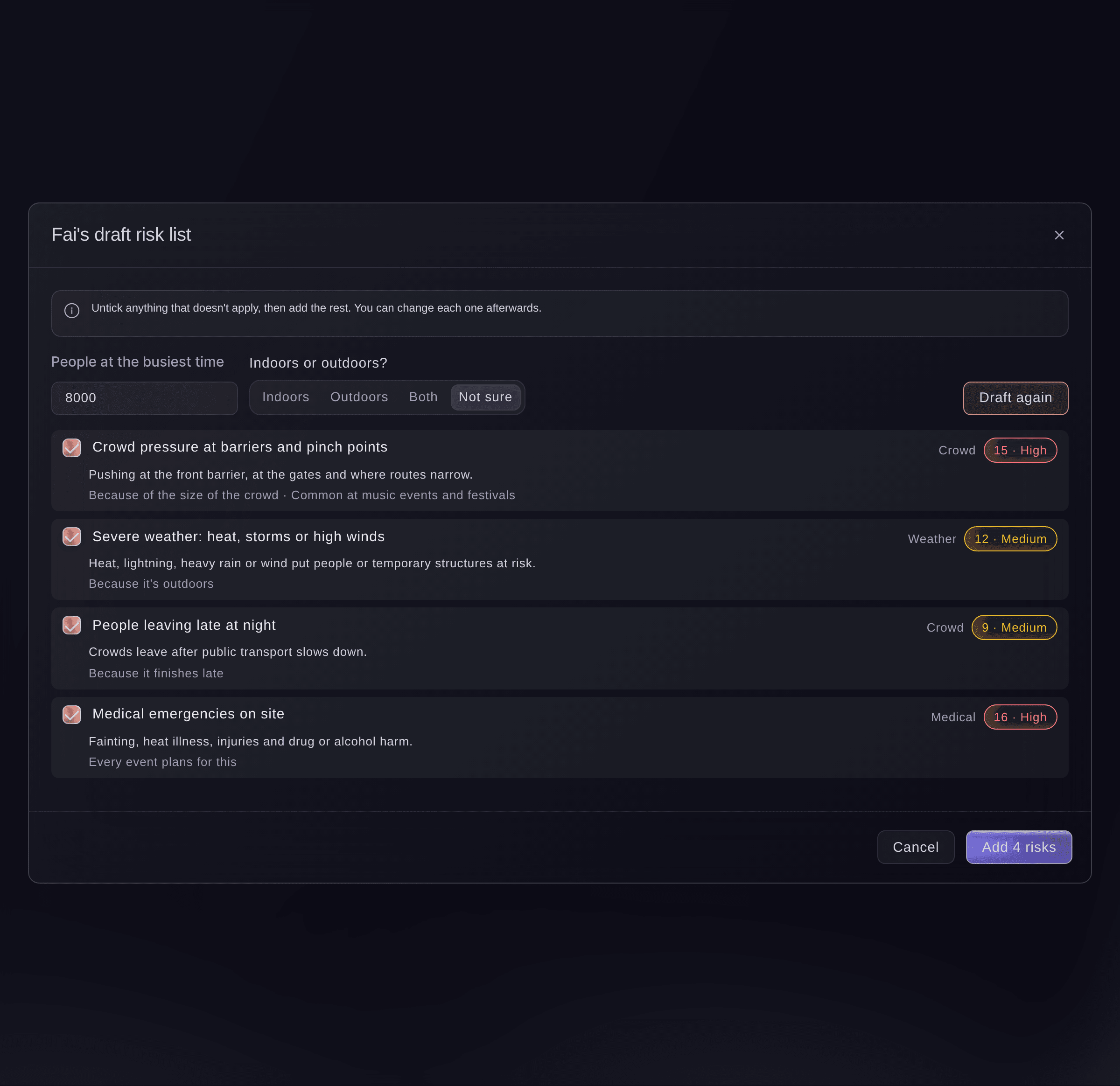
Fai's draft risk list. -
Add the risks you keep
Untick anything that does not apply, then select the add button, for example "Add 4 risks".
Huomautus: Nothing is saved until you add them, and each one shows Drafted by Fai on the register. You can change each one afterwards.
-
Add a risk of your own
Select Add a risk, enter What could go wrong?, choose How likely? and How bad would it be?, then select Add risk.
Huomautus: The score is how likely times how bad, from 1 to 25: 15 or more is High, 8 to 14 Medium and 7 or less Low. It is worked out for you and never entered.
-
Record what you are doing and who owns it
Select a risk, enter What you're doing about it one action per line, then set Who owns it and Review by and select Save.
Huomautus: Change how likely or how bad as your plans take effect, and the score follows. A teammate's save in the meantime is never overwritten; the form reloads their version for you to check.
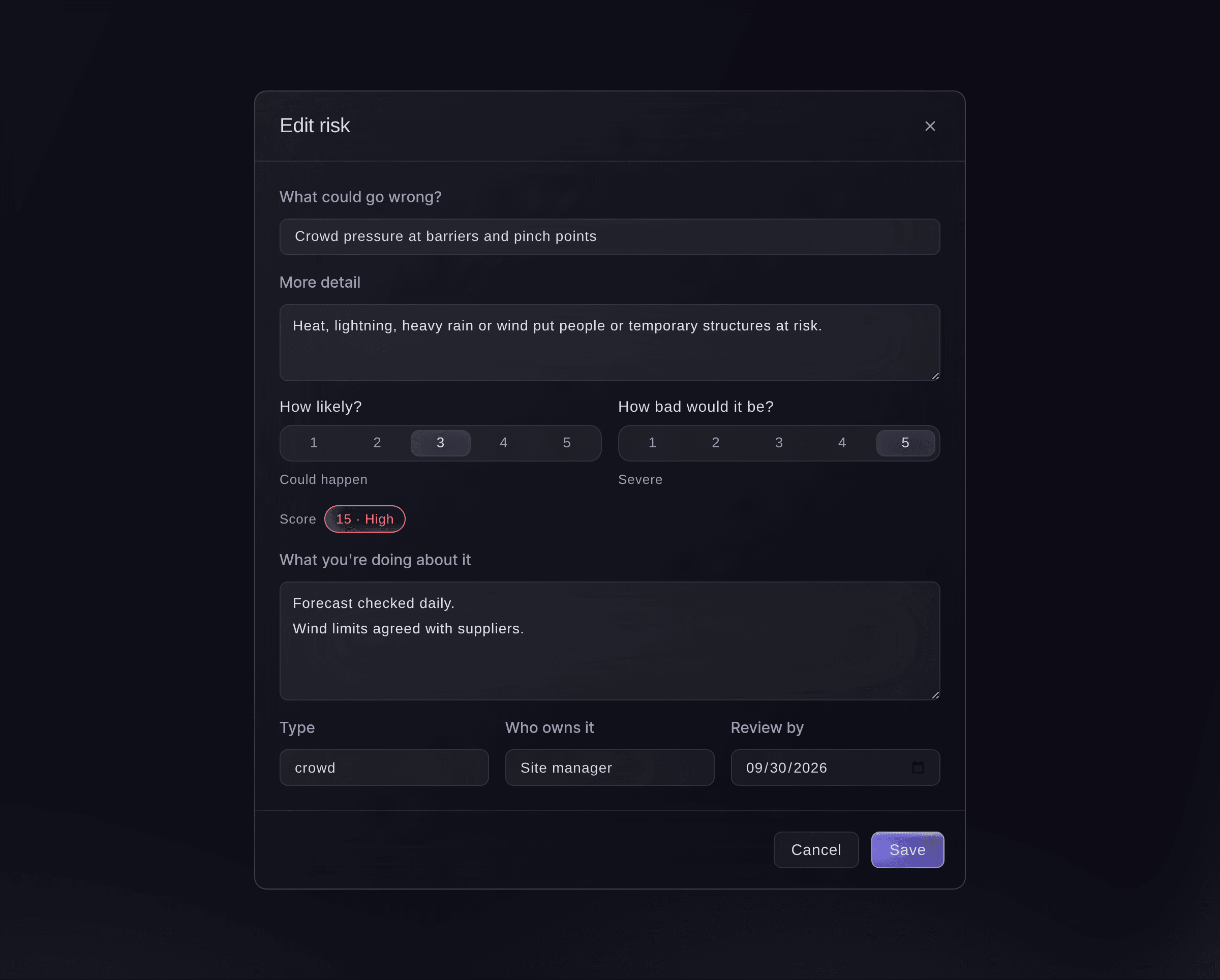
Edit a risk. -
Mark a risk controlled, accepted or closed
Select Mark controlled, Accept or Close on the risk's row.
Huomautus: Controlled means your actions are in place, and Accepted means you have decided to live with it. A closed risk can be brought back with Reopen, and every change is kept in its history.


Kokeile näitä vaiheita omassa tapahtumassasi
Luo ilmainen tili, rakenna tapahtumasi ja seuraa yllä olevia vaiheita omassa hallintapaneelissasi. Se vie muutaman minuutin, eikä sinun tarvitse varata myyntipuhelua.
Ei käyttöönottomaksuja. Ei pakollista kuukausimaksua. Luottokorttia ei tarvita.
Tai anna sen hoitua puolestasi
Fai reads the register, builds a draft from your event without saving it, adds risks one at a time or many at once, edits them and marks them controlled, accepted, closed or open again. She shows you each change and waits for your yes first; risks are never deleted.
Hallintapaneelissasi, Fain kanssa
Draft a risk register for <EVENT NAME>, an outdoor festival for 8,000 people, and show me before you add anything
Anna Fain hoitaa se puolestasi
Fai toimii Ticket Fairy -hallintapaneelissasi. Luo tili, avaa Fai ja liitä yllä oleva kehote.
Ei käyttöönottomaksuja. Ei pakollista kuukausimaksua. Luottokorttia ei tarvita.
Kysymyksiä joita sinulla voi olla
- Can I delete a risk?
- No. Risks are never deleted, so your register keeps its history for licensing and insurers. Close a risk that no longer applies.
- Is Fai's draft a risk assessment?
- It is a starting list for you to check. Follow your own risk assessment and the advice of your security and medical providers.
- Why did Fai add a risk about a past incident?
- Incidents like it were logged at your earlier events, and the draft says how many beside the risk.
Jäikö vielä kysyttävää?
Varaa esittely, niin vastaamme siihen puhelussa sinun tapahtumatyyppisi mukaan. Tai luo tili ja katso itse.
Ei käyttöönottomaksuja. Ei pakollista kuukausimaksua. Luottokorttia ei tarvita.
Aiheeseen liittyvät oppaat
Tee tämä omassa tapahtumassasi
Luo tili, rakenna tapahtumasi ja seuraa vaiheita omassa hallintapaneelissasi. Sinun ei tarvitse varata myyntipuhelua.